2024 MAZDA CX90 tires
[x] Cancel search: tiresPage 282 of 687

Radar Sensors*
The radar sensor detects objects by
sending radio waves in a specific
direction and receiving the reflected
waves back.
Ve h i c l e f ro n t
1. Front radar sensor*
2. Front side radar sensors*
Ve h i c l e rea r
1. Rear side radar sensors*
CAUTION
Heed the following cautions so that
the radar sensors can function
normally.
Do not modify the suspensions.
Always use tires of the specified
size and the same manufacturer,
brand, and tread pattern on all 4
wheels. In addition, do not use
tires with significantly different
wear patterns or tire pressures on
the same vehicle (including
temporary spare tire).
Do not spray highly pressurized
water against the radar sensors or
rub them strongly.
Do not apply stickers on parts near
the radar sensors.
If foreign matter adheres to parts
near the radar sensors, remove it
and switch the vehicle power OFF.
The foreign matter detection status
is reset by switching the vehicle
power OFF.
Consult an Authorized Mazda
Dealer if you need to repair,
replace, or paint parts near the
radar sensors.
Do not install any parts that cover
the front of the radar sensors.
Do not replace the radiator grille
and emblem with anything other
than genuine products.
If strong force is applied to parts near
the radar sensors, the direction of
the radar sensor may become
deviated and each system may not
operate normally. Stop each system
immediately and have the vehicle
inspected by an Authorized Mazda
Dealer.
NOTE
The radar sensors include a function
for detecting abnormalities in the
sensor, soiling of the sensor’s front
surface, and informing the driver. If a
message appears on the screen that
can be addressed, follow the
directions of the message.
Front radar sensor
The following systems utilize the front
radar sensor.
Distance & Speed Alert (DSA)Mazda Radar Cruise Control
(MRCC)
Cruising & Traffic Support (CTS)
Driving
Radar Sensors
*Some models.5-131
CX-90_8KG7-EA-22L_Edition1_new 2022-11-17 16:05:04
Page 327 of 687

The vehicle is driven on slippery
roads such as icy roads,
snow-covered roads, and unpaved
roads.
The vehicle is driven on a long
downslope.
The vehicle is driven on a steep
slope.
A two-wheeled vehicle such as a
motorcycle or bicycle is traveling
ahead.
The vehicle is being towed or towing
another vehicle.
Proximity warnings activate
frequently.
Under bad weather conditions (rain,
fog , and snow).
Tires other than the
specified size are
used, such as when tire chains or
temporary spare tires are used.
The tire pressures are not adjusted to
the appropriate pressure.
Tires with insufficient tread are used.
Switch the CTS off when it is not
being used.
Leaving the CTS on when it is not in
use is dangerous as it could operate
unexpectedly, resulting in an accident.
Do not leave the vehicle while the
vehicle is stopped by the CTS control.
Getting out of the vehicle while the
stop hold control is operating is
dangerous as the vehicle may move
unexpectedly and result in an accident.
Before leaving the vehicle, switch the
CTS off, shift the selector lever to the P
position, and apply the parking brake.CAUTION
Heed the following cautions so that
the CTS can operate normally.
Do not modify the suspensions.
Always use wheels of the
specified
size for the front and rear wheels.
Consult an Authorized Mazda
Dealer for tire replacement.
Turn off the CTS when the vehicle is
running on a chassis roller.
Driving
Cruising &
Tra ffi c Support (CTS)
5-176
CX-90_8KG7-EA-22L_Edition1_new
2022-11-17 16:05:04
Page 339 of 687

Lane-keep Assist System(LAS)
*
The LAS is a system to help the driver
stay within the vehicle lane if the
vehicle might be deviating.
If your vehicle may be deviating from
the vehicle lane, the LAS provides
steering assistance to avoid departure
from the lane.
Warnings and Cautions
for Using the Lane-keep Assist System (LAS)
WARNING
Do not rely completely on the LAS.
The LAS is not an automated driving
system. Over reliance on the system
could lead to an accident.
The functions of the LAS have
limitations. Do not rely completely
on the system and always stay on
course using the steering wheel.
Do not use the LAS under the
following conditions. Otherwise, it
may result in an accident.
The vehicle is driven on slippery
roads such as icy roads,
snow-covered roads, and unpaved
roads.
Tires other than the specified size are
used, such as when tire chains or
temporary spare tires are used.
Tires with insufficient tread are used.
The tire pressures are not adjusted to
the specified pressure.
The vehicle is towing a camping
trailer or boat trailer.
The vehicle is driven on roads other
than expressways or highways with
white (yellow) lines.
CAUTION
Heed the following cautions so that
the LAS can operate normally.
Do not modify the vehicle's
suspensions.
Driving
Lane-keep Assist System (LAS)
5-188*Some models.
CX-90_8KG7-EA-22L_Edition1_new 2022-11-17 16:05:04
Page 343 of 687

Warnings and Cautions
for Using the Emergency Lane Keeping (ELK)
WARNING
Do not rely completely on the ELK.
The ELK has limitations. Do not rely
completely on the system and always
stay on course using the steering
wheel.
The ELK is not an automated driving
system. Over reliance on the system
could lead to an accident.
The detection range of the camera
and sensors is limited. If the steering
wheel operation assist is operated
without detecting a two-wheeled
vehicle near the detecting vehicle, it
could result in an accident.
Do not use the ELK under the
following conditions. Otherwise, it
may result in an accident.
The vehicle is driven on slippery
roads such as icy roads,
snow-covered roads, and unpaved
roads.
Tires other than the specified size are
used, such as when tire chains or
temporary spare tires are used.
(Blind Spot Assist)
The vehicle is driven on roads other
than expressways and highways.
(Blind Spot Assist and Head-on
traffic avoidance assist)
The rear bumper around a rear side
radar sensor is deformed.
Driving
Emergency Lane Keeping (ELK)
5-192
CX-90_8KG7-EA-22L_Edition1_new 2022-11-17 16:05:04
Page 351 of 687

Refer to Cameras on page 5-137.
Always check the surrounding area
visually.
The operation of the SBS has certain
limitations. Always confirm the safety
around the vehicle visually when
driving.
CAUTION
If any of the following conditions is
met, turn the SBS
off to prevent a
mis-operation.
A trailer is pulled or an accessory
such as a bicycle carrier is installed
to the rear of the vehicle.
The vehicle is driven on rough
roads such as in areas where there
is grass and foliage or off-road.
Always use tires of the specified size
and the same manufacturer, brand,
and tread pattern on all 4 wheels. In
addition, do not use tires with
significantly different wear patterns
on the same vehicle. If such
improper tires are used, the SBS may
not operate normally.
How to Use the Smart
Brake Support (SBS)
NOTE
During the SBS brake control, the
brake pedal may move rearward or
become stiff. The brakes are operating,
but continue to depress the brake
pedal.
When the forward detection function
operates*
The forward detection function
operates when all of the following
conditions are met.
(If an object is a vehicle ahead)
The vehicle speed is about 4 km/h
(3 mph) or faster.
(If an object is a bicycle/pedestrian)
The vehicle speed is about 10
km/h to 80 km/h (6.3 mph to 49
mph).
The DSC does not operate.The system determines that there is a
possibility of a collision with an
object ahead.
When the forward detection function
operates, the driver is notified of the
danger by the screen display and
warning sound. Furthermore, if the
possibility of a collision increases,
brake control is performed.
Instrument cluster
Driving
Smart Brake Support (SBS)
5-200*Some models.
CX-90_8KG7-EA-22L_Edition1_new 2022-11-17 16:05:04
Page 364 of 687
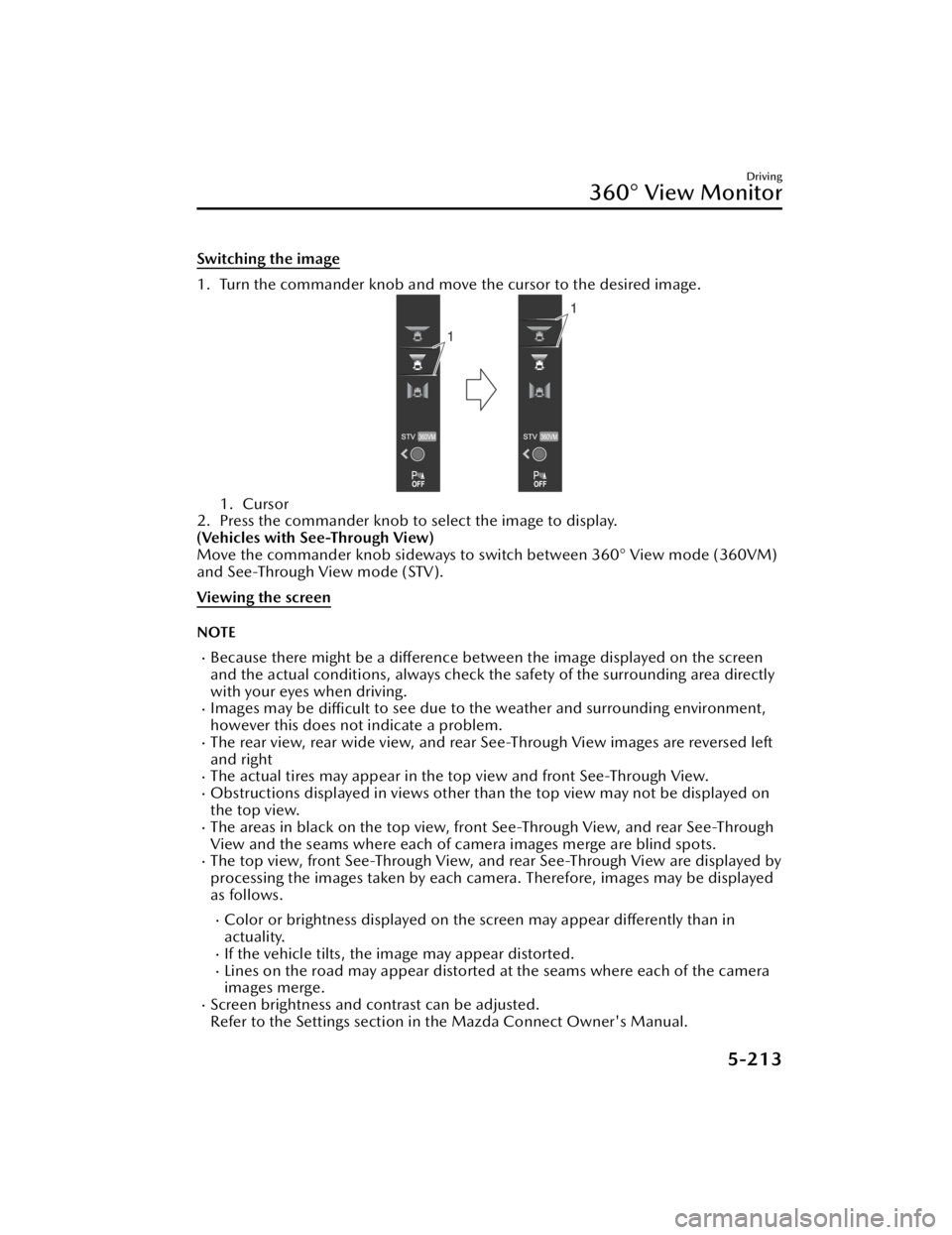
Switching the image
1. Turn the commander knob and move the cursor to the desired image.
1. Cursor
2. Press the commander knob to select the image to display.
(Vehicles with See-Through View)
Move the commander knob sideways to switch between 360° View mode (360VM)
and See-Through View mode (STV).
Viewing the screen
NOTE
Because there might be a difference between the image displayed on the screen
and the actual conditions, always check th e safety of the surrounding area directly
with your eyes when driving.
Images may be difficult to see due to the weather and surrounding environment,
however this does not indicate a problem.
The rear view, rear wide view, and rear See-Through View images are reversed left
and right
The actual tires may appear in the top view and front See-Through View.Obstructions displayed in views other than the top view may not be displayed on
the top view.
The areas in black on the top view, front See-Through View, and rear See-Through
View and the seams where each of camera images merge are blind spots.
The top view, front See-Through View, and rear See-Through View are displayed by
processing the images taken by each camera. Therefore, images may be displayed
as follows.
Color or brightness displayed on the screen may appear differently than in
actuality.
If the vehicle tilts, the image may appear distorted.Lines on the road may appear distorted at the seams where each of the camera
images merge.
Screen brightness and contrast can be adjusted.
Refer to the Settings section in the Mazda Connect Owner's Manual.
Driving
360° View Monitor
5-213
CX-90_8KG7-EA-22L_Edition1_new 2022-11-17 16:05:04
Page 370 of 687

IndicationContent
7 Parking sensor status icon Indicates that the parking sensor has a problem or it is
switched off.
NOTE
The rear wide view displays the image at the rear of the vehicle at a wide angle and
corrects the image to help detect approaching obstructions from the side. Therefore,
it differs from the actual view.
Top view, front See-Through View
Indication
Content
1 Tire icon Indicates the tire direction. Moves in conjunction with
the steering wheel operation.
2 Projected vehicle path lines (red/
yellow) Indicates the approximate projected path of the vehicle.
Moves in conjunction with the steering wheel operation.
a) Indicates the path where the edge of the front bumper
is expected to travel.
b) Indicates the path where the inner side of the vehicle
is expected to travel.
3 Parking sensor detection indication Indicates the obstruction detection status.
4 Tire graphic Indicates the approximate position of the tires.
5 Vehicle bottom graphic Indicates the estimated bottom of the vehicle.
6 Projected vehicle path distance
guide lines (red/yellow) Indicates the distance (from front end of bumper) in
front of the vehicle.
The red line indicates the point about 50 cm (19 in)
from the front end of the bumper.
The yellow lines indicate the points about 1 m (39 in)
and 2 m (78 in) from the front end of the bumper.
7 View status icon Indicates which image is selected.
Driving
360° View Monitor
5-219
CX-90_8KG7-EA-22L_Edition1_new 2022-11-17 16:05:04
Page 371 of 687

IndicationContent
8 Mode switching icon Indicates which mode is selected.
9 Parking sensor status icon Indicates that the parking sensor has a problem or it is
switched
off.
NOTE
The front See-Through View may be displayed as follows.
The ground and three-dimensional objects may appear curved.The representation of three-dimensional objects changes at the joints of images
and the same object may appear to be duplicated or not connected.
Top view, rear See-Through View
Indication Content
1 Tire icon Indicates the tire direction. Moves in conjunction with
the steering wheel operation.
2 Projected vehicle path lines (red/
yellow) Indicates the approximate projected path of the vehicle.
Moves in conjunction with the steering wheel operation.
a) Indicates the path where the rear end of the rear
bumper passes as a reference.
b) Indicates the path where the outer side of the vehicle
is expected to travel.
3 Parking sensor detection indication Indicates the obstruction detection status.
4 Tire graphic Indicates the approximate position of the tires.
5 Vehicle bottom graphic Indicates the estimated bottom of the vehicle.
Driving
360° View Monitor
5-220
CX-90_8KG7-EA-22L_Edition1_new 2022-11-17 16:05:04