Page 186 of 687

Fuel Gauge
The fuel gauge shows approximately
how much fuel is remaining in the tank
when the vehicle power is switched
ON.
When the fuel tank is full, F (Full) is
indicated, and as the level lowers the
needle approaches E (Empty).
NOTE
After refueling , it may require some
time for the indicator to stabilize. In
addition, the indicator may deviate
while driving on a slope or curve
since the fuel moves in the tank.
The direction of the arrow
indicates that the fuel-filler lid is on
the left side of the vehicle.
Dashboard Illumination
When the lights are turned on with the
vehicle power switched ON, the
brightness of the dashboard
illumination is dimmed. However,
when the light sensor detects that the
surrounding area is bright such as
when the lights are turned on in the
daytime, the dashboard illumination
does not dim.
NOTE
When the vehicle power is switched
ON in the early evening or at dusk, the
dashboard illumination is dimmed for
several seconds until the light sensor
detects the brightness of the
surrounding area, however, the
dimming may cancel after the
brightness is detected.
Driving
Instrument Cluster
5-35
CX-90_8KG7-EA-22L_Edition1_new 2022-11-17 16:05:04
Page 214 of 687

AUTOHOLD
AUTOHOLD is a function to keep the
vehicle stopped by applying the brakes
even if you take your foot off the brake
pedal while the vehicle is stopped. This
function reduces the burden on the
driver while the vehicle is stopped,
such as at traffic lights.
Warning and Cautions for
Using the AUTOHOLD
WARNING
Do not rely completely on the
AUTOHOLD function.
The AUTOHOLD function is only
designed to assist the brake operation
while the vehicle is stopped.
Neglecting to operate the brakes and
relying only on the AUTOHOLD system
is dangerous and could result in an
unexpected accident if the vehicle
were to suddenly move. Operate the
brakes appropriately in accordance
with the road and surrounding
conditions. Note that the vehicle may
move suddenly depending on the
vehicle’s load or if it is towing
something.
Do not release your foot from the
brake pedal while the vehicle is
stopped on a steep grade.
Because there is a possibility of the
vehicle not being held in the stopped
position by the AUTOHOLD function,
the vehicle may move unexpectedly
and result in an accident.
Refrain from using the AUTOHOLD
function on slippery roads such as icy
or snow-covered roads, or unpaved
roads.
Even if the vehicle is held in the
stopped position by the AUTOHOLD
function, the vehicle may move
unexpectedly and result in an accident.
Operate the accelerator pedal, brakes,
or steering wheel appropriately as
necessary.
Driving
AUTOHOLD
5-63
CX-90_8KG7-EA-22L_Edition1_new 2022-11-17 16:05:04
Page 219 of 687
How to Use the LightSwitch
NOTE
Headlights which do not blind drivers
approaching in the opposite direction
have been adopted. Therefore, it is not
necessary to adjust the optical axis of
the headlights even when traveling
temporarily in a country where vehicles
are driven on the right-hand side of the
road.
Using the Lights Automatically
Using the Auto Light*
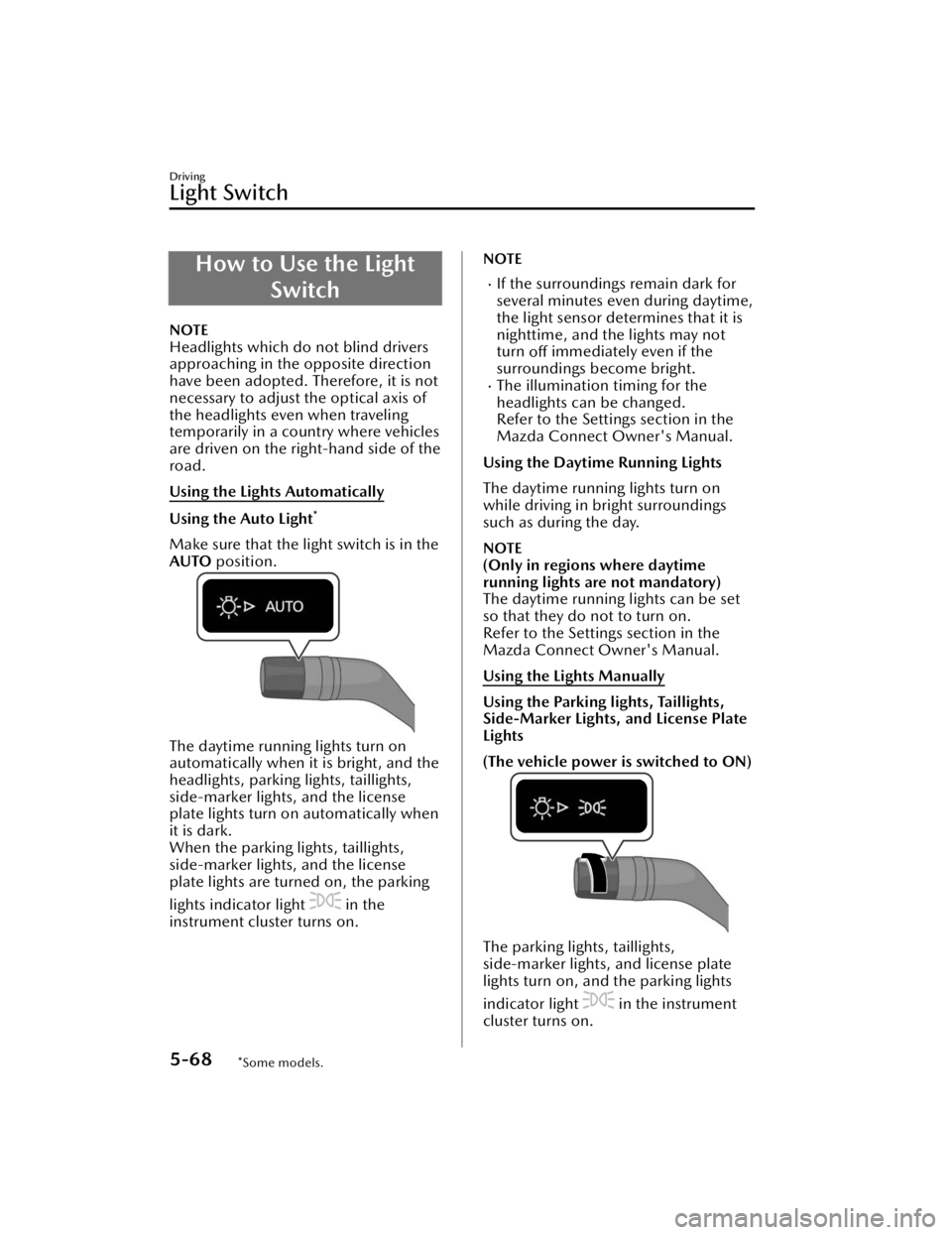
Make sure that the light switch is in the
AUTO position.
The daytime running lights turn on
automatically when it is bright, and the
headlights, parking lights, taillights,
side-marker lights, and the license
plate lights turn on automatically when
it is dark.
When the parking lights, taillights,
side-marker lights, and the license
plate lights are turned on, the parking
lights indicator light
in the
instrument cluster turns on.
NOTE
If the surroundings remain dark for
several minutes even during daytime,
the light sensor determines that it is
nighttime, and the lights may not
turn off immediately even if the
surroundings become bright.
The illumination timing for the
headlights can be changed.
Refer to the Settings section in the
Mazda Connect Owner's Manual.
Using the Daytime Running Lights
The daytime running lights turn on
while driving in bright surroundings
such as during the day.
NOTE
(Only in regions where daytime
running lights are not mandatory)
The daytime running lights can be set
so that they do not to turn on.
Refer to the Settings section in the
Mazda Connect Owner's Manual.
Using the Lights Manually
Using the Parking lights, Taillights,
Side-Marker Lights, and License Plate
Lights
(The vehicle power is switched to ON)
The parking lights, taillights,
side-marker lights, and license plate
lights turn on, and the parking lights
indicator light
in the instrument
cluster turns on.
Driving
Light Switch
5-68*Some models.
CX-90_8KG7-EA-22L_Edition1_new 2022-11-17 16:05:04
Page 220 of 687

When the vehicle power is switched
from ON to OFF, the parking lights,
taillights, side-marker lights, and the
license plate lights are turned on by the
auto headlight off function for a certain
period of time.
(The vehicle power is switched to ACC
or OFF)
The parking lights, taillights,
side-marker lights, and license plate
lights turn on, and the parking lights
indicator light
in the instrument
cluster turns on.
The parking lights, taillights,
side-marker lights, and the license
plate lights are turned on by the auto
headlight off function for a certain
period of time.
NOTE
Do not leave the lights on while the
engine is turned off. Otherwise, the
lead-acid battery power could be
depleted.
Using the Headlights
The headlights, parkin g lights, taillights,
side-marker lights, and the license
plate lights turn on, and the parking
lights indicator light
in the
instrument cluster turns on.
Switching the Headlights to High
Beams
The headlights are switched to high
beams and the headlight high-beam
indicator light
in the instrument
cluster turns on.
When the lever is returned to its
original position, the headlights are
switched to low beams.
Flash-to-pass
While the lever is being operated, the
headlight high beams turn on and the
headlight high-beam indicator light
in the instrument cluster turns on.
Driving
Light Switch
5-69
CX-90_8KG7-EA-22L_Edition1_new 2022-11-17 16:05:04
Page 221 of 687

Turning off the Lights
Turn the light switch to the OFF
position when the vehicle is stopped.
(With Auto Light)
The light switch returns to the AUTO
position automatically.
All the lights that are turned on turn
off, and the parking lights indicator
light
in the instrument cluster
turns off.
Headlight Leveling
The number of passengers and weight
of cargo in the luggage compartment
change the angle of the headlights. The
angle of the headlights will be
automatically adjusted when turning
on the headlights. A system
malfunction or operation conditions
are indicated by a warning.
Refer to Exterior Lights Warning Light
on page 8-50.
Convenient Ways to Use the Light Switch
Coming Home Light
After the vehicle power is switched
OFF, the headlights can be turned on
for a while.
Using the coming home light
1. Switch the vehicle power to ACC orOFF.
2.
The headlights turn on, and then turn
off when any of the following
conditions is met.
A certain amount of time has passed
since occupants got out of the
vehicle and all the doors closed.
Three minutes have passed since the
headlights turned on.
The light switch was operated after
the headlights turned on.
NOTE
The time until the headlights turn off
can be changed.
Refer to the Settings section in the
Mazda Connect Owner's Manual.
Leaving Home Light
The lights of your vehicle parked at a
distance can be turned on by operating
the key.
Driving
Light Switch
5-70
CX-90_8KG7-EA-22L_Edition1_new 2022-11-17 16:05:04
Page 222 of 687
Using the leaving home light
Press the unlock button on the key
while the vehicle power is switched
OFF.
When the vehicle receives a key
operation signal, the headlights,
parking lights, taillights, and the license
plate lights turn on.
The lights turn off when any of the
following conditions is met.
Thirty seconds have passed since the
lights turned on.
The light switch is set to the OFF
position.
The lock button on the key is
pressed.
NOTE
The leaving home light can be set so
that it does not to operate.
Refer to the Settings section in the
Mazda Connect Owner's Manual.
Driving
Light Switch
5-71
CX-90_8KG7-EA-22L_Edition1_new 2022-11-17 16:05:04
Page 223 of 687
How to Use the TurnSignal Lever
When the lever is operated, the turn
signal lights flash/turn
off.
Using the Turn Signal Lever
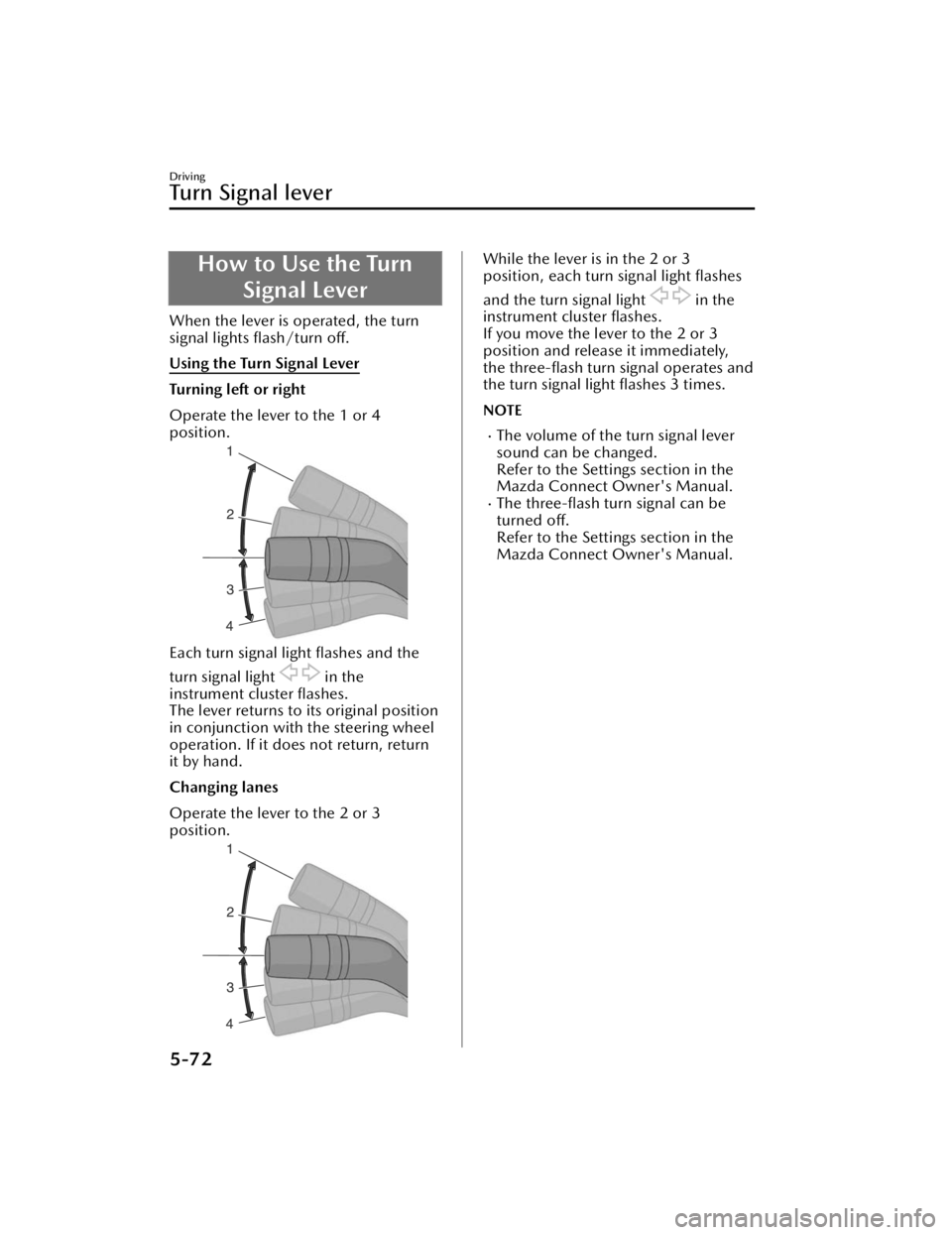
Turning left or right
Operate the lever to the 1 or 4
position.
Each turn signal light flashes and the
turn signal light
in the
instrument cluster flashes.
The lever returns to its original position
in conjunction with the steering wheel
operation. If it does not return, return
it by hand.
Changing lanes
Operate the lever to the 2 or 3
position.
While the lever is in the 2 or 3
position, each turn signal light flashes
and the turn signal light
in the
instrument cluster flashes.
If you move the lever to the 2 or 3
position and release it immediately,
the three-flash turn signal operates and
the turn signal light flashes 3 times.
NOTE
The volume of the turn signal lever
sound can be changed.
Refer to the Settings section in the
Mazda Connect Owner's Manual.
The three-flash turn signal can be
turned off.
Refer to the Settings section in the
Mazda Connect Owner's Manual.
Driving
Tu r n S i g n a l l e v e r
5-72
CX-90_8KG7-EA-22L_Edition1_new 2022-11-17 16:05:04
Page 233 of 687
Hazard Warning Lights
The hazard warning light switch is used
when it is necessary to park the vehicle
on a roadside due to a vehicle
breakdown or other emergency.
How to Use the HazardWarning Lights
The vehicle power is switched ON
All the turn signal lights flash, and the
turn signal light
and the hazard
warning light
in the instrument
cluster flash.
Press the switch again to turn off the
lights.
The vehicle power is switched to ACC
or OFF
All the turn signal lights flash and the
hazard warning light
in the
instrument cluster flashes.
Press the switch again to turn off the
lights.
Driving
Hazard Warning Lights
5-82
CX-90_8KG7-EA-22L_Edition1_new 2022-11-17 16:05:04

