2024 MAZDA CX90 brake light
[x] Cancel search: brake lightPage 237 of 687

How to Use the TractionControl System (TCS)
Switch the vehicle power ON.
The TCS is operable.
When the TCS operates, the TCS/DSC
operation indicator light
flashes.
Stopping the TCS Operation
The TCS operation is canceled and the
TCS OFF indicator light
in the
instrument cluster and the TCS OFF
switch indicator light turn on.
Press the TCS OFF switch again to
enable the TCS operation.
NOTE
If the hybrid system is stopped while
the TCS operation is canceled, the
TCS becomes operational when the
hybrid system is started the next
time.
When the TCS is on and you attempt
to free the vehicle from being stuck,
the TCS will activate. Depressing the
accelerator will not increase engine
power and freeing the vehicle from
being stuck might be difficult. When
this happens, turn off the TCS.
If the TCS is canceled and the
following systems are operated, the
TCS becomes operational.
Smart Brake Support (SBS)
Mazda Radar Cruise Control
(MRCC)
Cruising & Traffic Support (CTS)
Driving
Traction Control System (TCS)
5-86
CX-90_8KG7-EA-22L_Edition1_new 2022-11-17 16:05:04
Page 241 of 687

Trailer Stability Control(TSC)
The TSC is a system that increases the
stability of the vehicle during towing.
When vehicle sway occurs during
towing, the TSC controls the output of
the brakes and the hybrid system to
suppress swaying.
Warning and Cautions forUsing the Trailer Stability Control (TSC)
WARNING
Do not rely solely on the Trailer
Stability Control (TSC).
Vehicle stability can be limited even if
the Trailer Stability Control (TSC) is
operating. Drive carefully to prevent
accidents. In particular, if the
TCS/DSC indicator light is flashing ,
drive the vehicle carefully as it is in a
less stable condition and could sway
more easily. Drive with caution and in
accordance with the road, vehicle and
trailer conditions.
CAUTION
The Trailer Stability Control (TSC)
may not operate correctly unless the
following are observed:
Use tires of the correct size
specified for your Mazda on all
four wheels.
Use tires of the same
manufacturer, brand and tread
pattern on all four wheels.
Do not mix worn tires.
The Trailer Stability Control (TSC)
may not operate correctly when tire
chains are used or a temporary spare
tire is installed because the tire
diameter changes.
Driving
Trailer Stability Control (TSC)
5-90
CX-90_8KG7-EA-22L_Edition1_new 2022-11-17 16:05:04
Page 242 of 687

How to Use the TrailerStability Control (TSC)
Drive the vehicle at a speed of 65
km/h (40 mph) or faster.
The TSC is operable.
When the TSC operates, the TCS/DSC
operation indicator light
flashes.
NOTE
The Trailer Stability Control (TSC)
does not operate if there is a
malfunction in the TCS/DSC (the
TCS/DSC operation indicator light
turns on).When the Trailer Stability Control
(TSC) is operating, the brake lights
may turn on.
For information regarding trailer
towing , refer to Towing on page
7-59.
Driving
Trailer Stability Control (TSC)
5-91
CX-90_8KG7-EA-22L_Edition1_new 2022-11-17 16:05:04
Page 244 of 687

How to Use the HillDescent Control
Using the Hill Descent Control
1. When the vehicle speed is about 25 km/h (15 mph) or slower, press the
hill descent control switch.
The hill descent control is operable,
and the hill descent control
indicator light (white)
turns on.
2. Depress the accelerator pedal or the brake pedal to drive the vehicle
at a speed between about 3 km/h
and 20 km/h (2 and 12 mph).
3. Release the accelerator pedal or the brake pedal when the desired
target speed is reached.
The hill descent control operates,
the hill descent control indicator
light (white)
changes to the hill
descent control indicator light
(green)
, and then the target
speed is displayed.
The brake lights turn on while the
hill descent control is operating.
NOTE
If the braking system is overheated
after using the hill descent control for
a long time, the operation of the hill
descent control may be temporarily
stopped. When the operation of the
hill descent control stops, a warning
sound is activated and the hill
descent control indicator light turns off.
The hill descent control may not be
available due to a system
malfunction in the following cases.
Have your vehicle inspected by an
Authorized Mazda Dealer.
The hill descent control indicator
light does not turn on even if the
hill descent control switch is
pressed.
The TCS/DSC operation indicator
light turns on.
The hill descent control is not
available while Mazda Radar Cruise
Control (MRCC) or Cruising & Traffic
Support (CTS) is operating.
Driving
Hill Descent Control
5-93
CX-90_8KG7-EA-22L_Edition1_new 2022-11-17 16:05:04
Page 248 of 687

(SPORT Mode)
(NORMAL Mode)
(EV Mode)
(OFF-ROAD Mode)
NOTE
TOWING mode can be selected only
when electrically connected to the
trailer using a Mazda genuine trailer
hitch. In addition, it may take some
time until the connection is detected
and TOWING mode is displayed.
Consult an Authorized Mazda Dealer
for details.
Depending on driving conditions
when selecting TOWING mode/
SPORT mode/OFF-ROAD mode, the
vehicle may perform shift-down or
accelerate slightly.
When SPORT mode/OFF-ROAD
mode is selected, driving the vehicle
at higher engine speeds increases
and fuel economy may worsen.
Canceling SPORT mode/OFF-ROAD
mode during normal driving is
recommended.
When setting the Mazda Radar
Cruise Control (MRCC) while driving
in SPORT mode, the mode is
switched to NORMAL mode. In
addition, while the MRCC is being
used, the mode cannot be switched
to SPORT mode.
Switching to EV mode may not be
possible depending on the driving
operations, driving conditions, and
high voltage battery condition.
When the system determines that
the engine needs to be started while
the vehicle is being driven in EV
mode, the mode is switched to
NORMAL mode.
The remaining distance-to-full
discharge for EV mode may
decrease, even when the vehicle is
being driven in a mode other than
EV mode.
The maximum speed in EV mode is
140 km/h (86 mph).
The drive mode cannot be switched
in the following cases.
The Antilock Brake System (ABS) is
operating.
The Traction Control System (TCS)
is operating.
The Dynamic Stability Control
(DSC) is operating.
The steering wheel is being
operated abruptly.
The driving mode in which the
display in the instrument cluster is
grayed out cannot be selected.
When the vehicle power is switched
OFF, the mode returns to NORMAL
mode. However, TOWING mode
before switching the vehicle power
OFF is maintained only when the
trailer is connected in TOWING
mode.
Driving
Mazda intelligent Drive Select (Mi-Drive)
5-97
CX-90_8KG7-EA-22L_Edition1_new2022-11-17 16:05:04
Page 251 of 687

Tire Pressure MonitoringSystem (TPMS)
The TPMS monitors the air pressure of
each tire and informs the driver of a
decrease in the tire air pressure when it
becomes lower than the specified air
pressure.
For the TPMS, the air pressure data
sent from the tire pressure sensors
installed on each wheel via radio signal
is received by the receiver unit in the
vehicle to monitor the tire pressures.
1. Tire pressure sensor
Warning and Cautions forUsing the Tire Pressure Monitoring System
(TPMS)
WARNING
Do not drive the vehicle at high
speeds if the TPMS warning light
is
turned on or flashing.
Driving the vehicle at high speeds
while the TPMS warning light is turned
on or flashing is dangerous because
the brake performance and the
steering wheel operability will be
reduced. If the vehicle is driven at high
speeds or the brakes are suddenly
applied, it could lead to an accident.
Gradually apply the brake and reduce
the vehicle speed.
Do not ignore the TPMS warning light
when it is turned on or flashing.
Continuing to driv e the vehicle while
ignoring the illumi nation/flashing of
the TPMS warning light is dangerous
because a tire may burst which could
lead to an accident. Take appropriate
measures as soon as possible.
Driving
Tire Pressure Monitoring System (TPMS)
5-100
CX-90_8KG7-EA-22L_Edition1_new 2022-11-17 16:05:04
Page 278 of 687
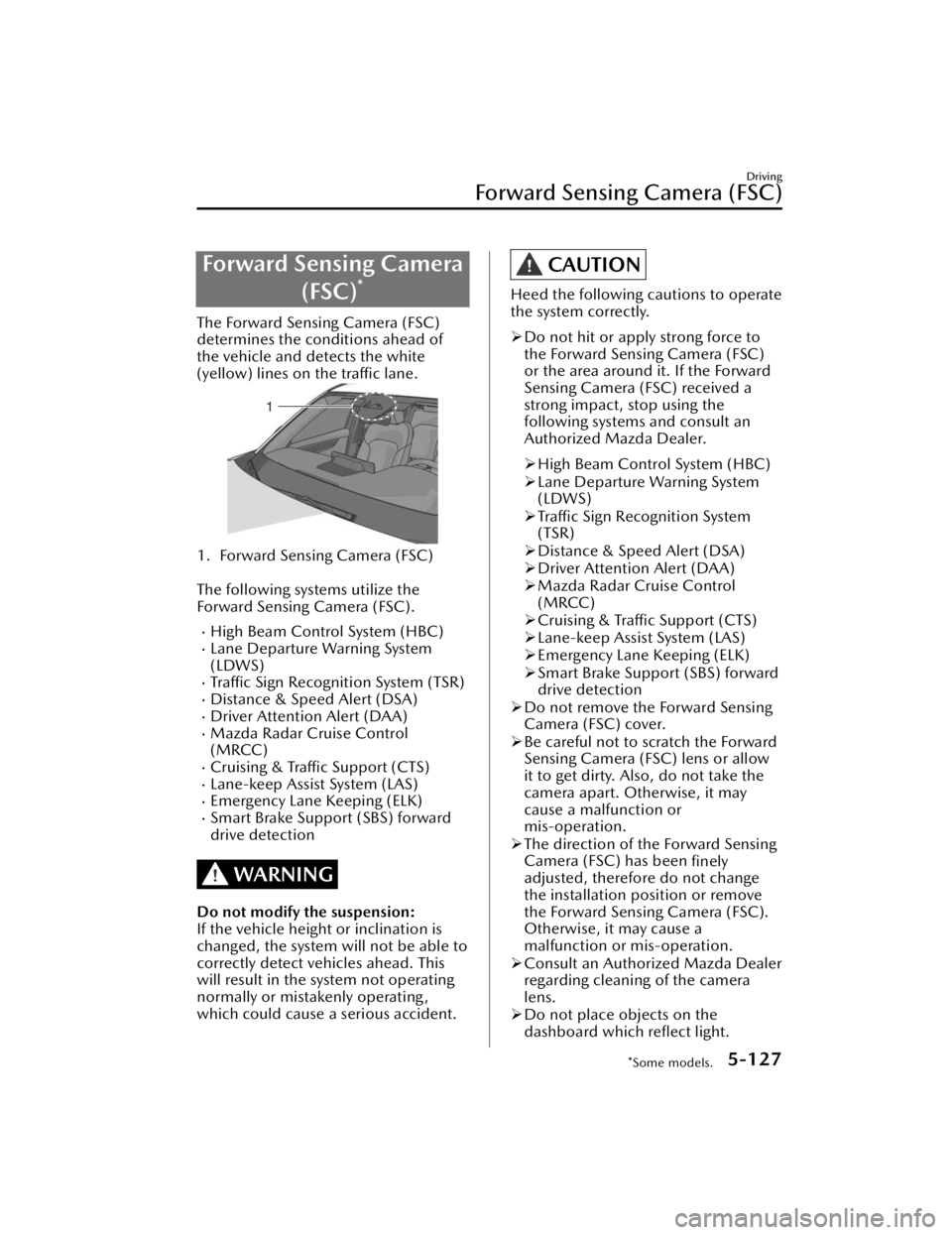
Forward Sensing Camera(FSC)
*
The Forward Sensing Camera (FSC)
determines the conditions ahead of
the vehicle and detects the white
(yellow) lines on the traffic lane.
1. Forward Sensing Camera (FSC)
The following systems utilize the
Forward Sensing Camera (FSC).
High Beam Control System (HBC)Lane Departure Warning System
(LDWS)
Traffic Sign Recognition System (TSR)Distance & Speed Alert (DSA)Driver Attention Alert (DAA)Mazda Radar Cruise Control
(MRCC)
Cruising & Traffic Support (CTS)Lane-keep Assist System (LAS)Emergency Lane Keeping (ELK)Smart Brake Support (SBS) forward
drive detection
WARNING
Do not modify the suspension:
If the vehicle height or inclination is
changed, the system will not be able to
correctly detect vehicles ahead. This
will result in the system not operating
normally or mistakenly operating,
which could cause a serious accident.
CAUTION
Heed the following cautions to operate
the system correctly.
Do not hit or apply strong force to
the Forward Sensing Camera (FSC)
or the area around it. If the Forward
Sensing Camera (FSC) received a
strong impact, stop using the
following systems and consult an
Authorized Mazda Dealer.
High Beam Control System (HBC)
Lane Departure Warning System
(LDWS)
Traffic Sign Recognition System
(TSR)
Distance & Speed Alert (DSA)
Driver Attention Alert (DAA)
Mazda Radar Cruise Control
(MRCC)
Cruising & Traffic Support (CTS)
Lane-keep Assist System (LAS)
Emergency Lane Keeping (ELK)
Smart Brake Support (SBS) forward
drive detection
Do not remove the Forward Sensing
Camera (FSC) cover.
Be careful not to scratch the Forward
Sensing Camera (FSC) lens or allow
it to get dirty. Also, do not take the
camera apart. Otherwise, it may
cause a malfunction or
mis-operation.
The direction of the Forward Sensing
Camera (FSC) has been
finely
adjusted, therefore do not change
the installation position or remove
the Forward Sensing Camera (FSC).
Otherwise, it may cause a
malfunction or mis-operation.
Consult an Authorized Mazda Dealer
regarding cleaning of the camera
lens.
Do not place objects on the
dashboard which
reflect light.
Driving
Forward Sensing Camera (FSC)
*Some models.5-127
CX-90_8KG7-EA-22L_Edition1_new
2022-11-17 16:05:04
Page 289 of 687

The cameras include a function for
detecting abnormalities in the
camera, soiling of the camera’s front
surface, and informing the driver. If a
message appears on the screen that
can be addressed, follow the
directions of the message.
If there are water droplets, snow, or
mud on the camera lens, wipe it off
using a soft cloth. If the camera lens
is especially dirty, wash it off with
mild detergent.
Front camera
The following system use the front
camera.
360° View Monitor
Side cameras
The following system use the side
cameras.
360° View Monitor
Rear camera
The following systems use rear camera.
Smart Brake Support (SBS) reverse
drive detection
360° View MonitorRear View Monitor
Detection of pedestrians
The rear camera detects pedestrians
when all of the following conditions
are met.
The height of a pedestrian is about 1
to 2 meters.
The outline of a pedestrian is
recognized such as the head, both
shoulders, or the feet.
If any of the following conditions is
met, the rear camera may not be able
to accurately detect pedestrians and
the Smart Brake Support (SBS) reverse
drive detection may not operate
correctly.
There are multiple pedestrians.A pedestrian is close to a separate
object.
A pedestrian is crouching , lying, or
slouching.
A pedestrian suddenly jumps into
the road.
A pedestrian is holding something
(such as an open umbrella or large
baggage).
A pedestrian blends into the
background (such as in a dark
location at night or by wearing
clothes matching the background
color).
The surrounding area is dark (such as
during the night, early evening, or
early morning , or in a tunnel or
indoor parking lot).
Foreign matter is adhering to the rear
camera (water droplets, snow, mud).
The rear camera is exposed to strong
light (sunlight, vehicle headlights).
Driving
Cameras
5-138
CX-90_8KG7-EA-22L_Edition1_new 2022-11-17 16:05:04