2024 MAZDA CX90 brake light
[x] Cancel search: brake lightPage 290 of 687

Driver MonitoringCamera
*
The driver monitoring camera detects
changes in the driver’s facial features
and estimates the driver's condition.
1. Driver monitoring camera
The following systems use the driver
monitoring camera.
Driver Monitoring (DM)Smart Brake Support (SBS) forward
detection function
Driver Personalization System
NOTE
Each system may not operate
normally if any of the following
conditions is met.
You are wearing glasses or
sunglasses
A cap or hat you are wearing
partially blocks the driver
monitoring camera's view of your
eyes, you have long bangs partially
covering your eyes, or a part of
your face is invisible due to a scarf,
face mask, beard, or hand.
The lighting conditions change
significantly (such as backlight,
light from the side, direct light
from the setting sun, or the
headlights of on-coming vehicles)
Device that emits near-infrared
light is used in the cabin.
The temperature in the cabin is
high.
The driver monitoring camera is
blocked by hands or arms.
There is more than one face in the
detection range of the driver
monitoring camera, such as when
the front passenger or a rear seat
passenger leans forward.
The driver’s face is far out of the
detection range of the driver
monitoring camera, such as when
the driver’s face is put outside of
the window.
Driving
Driver Monitoring Camera
*Some models.5-139
CX-90_8KG7-EA-22L_Edition1_new 2022-11-17 16:05:04
Page 319 of 687
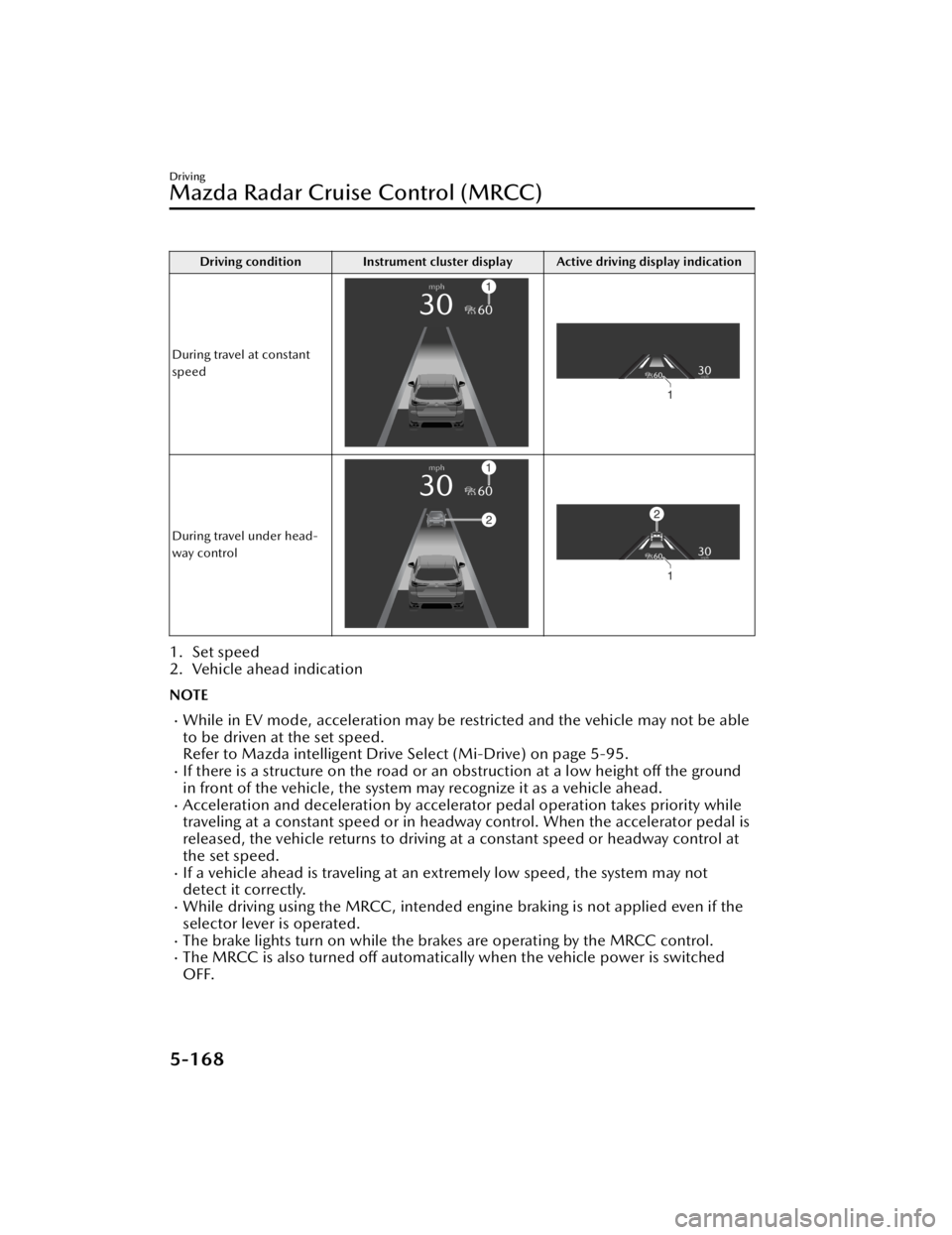
Driving condition Instrument cluster display Active driving display indication
During travel at constant
speed
During travel under head-
way control
1. Set speed
2. Vehicle ahead indication
NOTE
While in EV mode, acceleration may be restricted and the vehicle may not be able
to be driven at the set speed.
Refer to Mazda intelligent Drive Select (Mi-Drive) on page 5-95.
If there is a structure on the road or an obstruction at a low height off the ground
in front of the vehicle, the system may recognize it as a vehicle ahead.
Acceleration and deceleration by accelerator pedal operation takes priority while
traveling at a constant speed or in headway control. When the accelerator pedal is
released, the vehicle returns to driving at a constant speed or headway control at
the set speed.
If a vehicle ahead is traveling at an extremely low speed, the system may not
detect it correctly.
While driving using the MRCC, intended engine braking is not applied even if the
selector lever is operated.
The brake lights turn on while the brakes are operating by the MRCC control.The MRCC is also turned off automatically when the vehicle power is switched
OFF.
Driving
Mazda Radar Cruise Control (MRCC)
5-168
CX-90_8KG7-EA-22L_Edition1_new 2022-11-17 16:05:04
Page 320 of 687

If the distance between vehicles control is disabled using Mazda Connect, the
system switches to the cruise control. At this time, the MRCC switch functions as
the cruise control switch.
Refer to the Settings section in the Mazda Connect Owner's Manual.
If the vehicle power is switched OFF while the distance between vehicles control is
disabled, the distance between vehicles control is enabled automatically the next
time the vehicle power is switched ON.
If the vehicle ahead stops during headway control, your vehicle in headway control
also stops. When the vehicle is stopped, the MRCC indicator light
in the
instrument cluster turns on.
When the vehicle ahead accelerates from a stop and one of the following operations
is performed, your vehicle starts driving.
Press the RES switch.Depress the accelerator pedal.
If you do not start driving the vehicle af ter the vehicle ahead has resumed driving,
the system urges the driver to resume driving.
NOTE
If the vehicle ahead resumes driving within 3 seconds after the vehicle was
stopped by the system, your vehicle also resumes driving automatically.
If the vehicle is stopped by the system continuously for 10 minutes or longer, the
parking brake is applied automatically. At this time, the MRCC is canceled.
Even if the MRCC is canceled while the vehicle is stopped, the vehicle is held in its
stopped position.
Refer to AUTOHOLD on page 5-63.
If the MRCC is canceled while the vehicle is stopped and there is no vehicle
ahead, you cannot resume driving the ve hicle using the RES switch. Depress the
accelerator pedal and start driving the vehicle.
Changing the set vehicle speed
Changing the set vehicle speed using the RES switch
Press the RES switch up (SET+) or down (SET-) to the desired speed.
Press and release immediately: 1 km/h (1 mph)Press and hold: 10 km/h (5 mph)
Changing the set vehicle speed using the accelerator pedal
Depress the accelerator pedal until the vehicle speed reaches the desired speed,
then press the RES switch up (SET+) or down (SET-).
Reading the set vehicle speed from the speed limit sign using the RES switch
Press the RES switch when the speed limit sign set indication
turns on.
Driving
Mazda Radar Cruise Control (MRCC)
5-169
CX-90_8KG7-EA-22L_Edition1_new 2022-11-17 16:05:04
Page 329 of 687

Driving condition Instrument cluster display Active driving display indication
During travel at constant
speed
During travel under head-
way control
1. Set speed
2. Vehicle ahead indication
NOTE
While in EV mode, acceleration may be restricted and the vehicle may not be able
to be driven at the set speed.
Refer to Mazda intelligent Drive Select (Mi-Drive) on page 5-95.
If there is a structure on the road or an obstruction at a low height off the ground
in front of the vehicle, the system may recognize it as a vehicle ahead.
Acceleration and deceleration by accelerator pedal operation takes priority while
traveling at a constant speed or in headway control. When the accelerator pedal is
released, the vehicle returns to driving at a constant speed or headway control at
the set speed.
The Forward Sensing Camera (FSC) may not be able to detect target objects
correctly, and the CTS may not operate normally.
Refer to Forward Sensing Camera (FSC) on page 5-127.
If a vehicle ahead is traveling at an extremely low speed, the system may not
detect it correctly.
While driving using the CTS, intended engine braking is not applied even if the
selector lever is operated.
The brake lights turn on while the brakes are operating by the CTS control.
Driving
Cruising & Tra ffi c Support (CTS)
5-178
CX-90_8KG7-EA-22L_Edition1_new
2022-11-17 16:05:04
Page 332 of 687

If the vehicle ahead stops during headway control, your vehicle in headway control
also stops. While the vehicle is stopped, the CTS indicator light
in the
Instrument cluster turns on.
When the vehicle ahead accelerates from a stop and one of the following operations
is performed, your vehicle starts driving.
Press the RES switch.Depress the accelerator pedal.
If you do not start driving the vehicle af ter the vehicle ahead has resumed driving,
the system urges the driver to resume driving.
NOTE
If the vehicle ahead resumes driving within 3 seconds after the vehicle was
stopped by the system, your vehicle also resumes driving automatically.
If the vehicle is stopped by the system continuously for 10 minutes or longer, the
parking brake is applied automatically. At this time, the CTS is canceled.
Even if the CTS is canceled while the vehicle is stopped, the vehicle is held in its
stopped position.
Refer to AUTOHOLD on page 5-63.
If the CTS is canceled while the vehicle is stopped and there is no vehicle ahead,
you cannot resume driving the vehicl e using the RES switch. Depress the
accelerator pedal and start driving the vehicle.
Changing the set vehicle speed
Changing the set vehicle speed using the RES switch
Press the RES switch up (SET+) or down (SET-) to the desired speed.
Press and release immediately: 1 km/h (1 mph)Press and hold: 10 km/h (5 mph)
Changing the set vehicle speed using the accelerator pedal
Depress the accelerator pedal until the vehicle speed reaches the desired speed,
then press the RES switch up (SET+) or down (SET-).
Reading the set vehicle speed from the speed limit sign using the RES switch
Press the RES switch when the speed limit sign set indication
turns on.
Driving
Cruising & Tra ffi c Support (CTS)
5-181
CX-90_8KG7-EA-22L_Edition1_new
2022-11-17 16:05:04
Page 352 of 687

1. “BRAKE!”
Active driving display
1. “BRAKE!”
NOTE
If any of the following conditions is
met, the forward detection function
may not operate normally.
The Forward Sensing Camera (FSC)
cannot detect target objects.
Refer to Forward Sensing Camera
(FSC) on page 5-127.
The front radar sensor cannot
detect target objects.
Refer to Radar Sensors on page
5-131.
When there is the possibility of a
partial contact with a target object.
The driver deliberately performs
driving operations (accelerator pedal
operation, steering wheel operation,
selector lever operation, and turn
signal lever operation).
If any of the follo wing conditions is
met, the forward detection function
may operate.
An animal or object on the road is
detected.
Passing an approaching vehicle
while rounding a curve.
Vehicle is passing through a narrow
gate or a gate with a low ceiling.
There is a metal object, bump, or a
protruding object on the road.
(Vehicles with Driver Monitoring
(DM))
If the system determines that the
driver is not paying attention to the
road, it activates the collision
warning earlier than normal.
If the forward detection function
performs brake control and the
vehicle is stopped, the system will
continue to hold the brakes for a
brief time unless there is an
operation performed by the driver.
The operation distance and volume
of the collision warning can be
changed.
Refer to the Settings section in the
Mazda Connect Owner's Manual.
The Turn-Across Tra ffi c operation
conditions*
The Turn-Across
Tra ffi c operates when
all of the following conditions are met.
The vehicle speed is about 4 km/h
to 20 km/h (3 mph to 12 mph).
The left turn signal light is turned on
and the vehicle is turning left.
A lane line between your vehicle and
the vehicle approaching in the
opposite direction is detected.
The system determines that there is a
possibility of collision with an object
ahead.
When the Turn-Across Tra ffi c operates,
the driver is notified of the danger by
the screen display and warning sound.
Furthermore, if the possibility of a
collision increases, brake control is
performed.
Instrument cluster
Driving
Smart Brake Support (SBS)
*Some models.5-201
CX-90_8KG7-EA-22L_Edition1_new 2022-11-17 16:05:04
Page 374 of 687

Secondary CollisionReduction
*
The Secondary Collision Reduction
reduces secondary damage by
decelerating the vehicle when it is
damaged in a collision to the extent
that the airbags are deployed while
driving.
If a collision occurs to the extent that
the airbags are deployed while driving,
the hazard warning lights flash to alert
surrounding vehicles and the brakes
are controlled to reduce damage in the
event of a collision with an obstruction
or other object.
Warnings and Cautions
for Using the Secondary Collision Reduction
WARNING
Do not rely completely on the
Secondary Collision Reduction.
The Secondary Collision Reduction
may not operate normally depending
on various conditions such as the
accident condition, component part
damage condition, target object
condition, weather conditions, or
traffic conditions. Do not rely
completely on the system and make
it your responsibility as a driver to
drive the vehicle.
The functions of the Secondary
Collision Reduction have limitations.
If you neglect to operate the brake
and accelerator pedals correctly, it
could result in serious injury.
Driving
Secondary Collision Reduction
*Some models.5-223
CX-90_8KG7-EA-22L_Edition1_new 2022-11-17 16:05:04
Page 375 of 687

How to Use the
Secondary Collision Reduction
When the Secondary Collision
Reduction operates
The Secondary Collision Reduction
operates if the vehicle is damaged in a
collision to the extent that the airbags
are deployed while driving.
When the Secondary Collision
Reduction operates, the system
controls and applies the brakes until
the vehicle stops. In addition, the
hazard warning lights continue to flash.
After the vehicle stops, the parking
brake is applied by the Electric Parking
Brake (EPB).
NOTE
The brake lights turn on while the
brakes are operating by the system
control.
If there is a malfunction with the
electric parking brake (EPB), the
brakes are released by the system
control after the vehicle is stopped.
The settings for the Secondary
Collision Reduction system differ
depending on the grade/specification-separate equipment.
Secondary Collision Reduction is
disabled
If any of the following conditions is
met, the Second ary Collision
Reduction is canceled.
A certain period of time has passed
since the system operated.
After stopping the vehicle, the
accelerator pedal is strongly
depressed 3 times.
The parking brake is released after
the Electric Parking Brake (EPB)
operates.
NOTE
If the driver's brake pedal depression
force is stronger than the system's
brake control, the driver's brake
operation takes priority.
Flashing of the hazard warning lights
by the system control is canceled
when any of the following operations
is performed.
Hazard warning light switch is
pressed.
Vehicle power is switched OFF.
Driving
Secondary Collision Reduction
5-224
CX-90_8KG7-EA-22L_Edition1_new 2022-11-17 16:05:04