Page 71 of 687
Driving Position Memory*
The desired driving position can be
called up after programming the
position.
Driver’s seat position (Seat slide,
height adjustment, front edge of seat
bottom, seat recline)
Active driving display (Display
position, brightness level, display
information)
Outside mirror angleSteering Wheel (Power type) (Up
and down adjustment, forward and
backward adjustment)
Warnings and Cautionsfor Using the Driving Pos i t i on Me m or y
CAUTION
Do not place hand, fingers, or feet
around the bottom of the
seat or around the bottom of the
steering wheel while the seat memory
function is operating. The
seat or steering wheel moves
automatically while the seat memory
function is operating and hand, fingers,
or feet could get pinched and injured.
Equipment to Protect Occupants/Pedestrians
Front Seats
3-32*Some models.
CX-90_8KG7-EA-22L_Edition1_new 2022-11-17 16:05:04
Page 72 of 687

How to Use the DrivingPo s i t i on M e m o r y
A driving position can be programmed
to the position memory switch and the
key.
Programming
1. Switch the vehicle power ON.
2. Adjust the following driving positions to the desired positions.
Driver's seatActive driving displayOutside mirrorsSteering wheel (Power type)
3. Continue pressing the SET switch until a sound is activated.
4. Do the following operation within 5seconds after the sound is activated
to program the driving position.
Programming to a position
memory button
Press the button you want to
program, either 1 or 2 button.
Programming to the transmitter
Press the unlock button on the
transmitter.
A sound is activated when the
operation is completed correctly.
Adjusting to the Programmed Driving
Po s i t io n
Operation Using the Position Memory
Switch
Press either switch 1 or 2 that you
programmed to activate the seat
adjustment to your position.
A sound is activated when the
adjustment to the programmed driving
position is completed.
Operation Using the Key
1. Unlock the driver's door using one of the following methods.
Touch the sensing area of the
door release touch sensor.
Press the key unlock button.
2. If the driver's door is opened within a certain period of time after
unlocking, adjustment of the next
driving position starts.
Driver's seatActive driving displayOutside mirrorsSteering wheel (Power type)
A sound is activated when the
adjustment to the programmed
driving position is completed.
Equipment to Protect Occupants/Pedestrians
Front Seats
3-33
CX-90_8KG7-EA-22L_Edition1_new 2022-11-17 16:05:04
Page 73 of 687

Deleting a Programmed Position
Erasing the Position Stored in the
Position Memory Switch
Program a new driving position.
Deleting a Position Programmed to
the Key
1. Switch the vehicle power OFF.
2. Continue pressing the SET switchuntil a sound is activated.
3. Press the key lock button within 5 seconds after the sound is
activated.
NOTE
If the angle of the outer mirror is
adjusted close to the limits of its
range of motion, the angle of the
outer mirrors may not be
programmed correctly.
When the adjustment to the
programmed driving position has
been completed, a sound is not
activated.
Under the following conditions, the
driving position adjustment is
canceled.
The seat adjustment switch/SET
switch/steering wheel (power
type)/outer mirrors/active driving
display for the driver's seat is
operated to adjust the position.
The key lock button or unlock
button is operated.
The vehicle moves.The selector lever is shifted to a
position other than P.
Equipment to Protect Occupants/Pedestrians
Front Seats
3-34
CX-90_8KG7-EA-22L_Edition1_new 2022-11-17 16:05:04
Page 89 of 687
Warnings and Cautionsfor Using the Steering Wheel
WARNING
Never adjust the steering wheel while
the vehicle is moving.
Adjusting the steering wheel while the
vehicle is moving is dangerous. Moving
it can very easily cause the driver to
abruptly turn to the left or right. This
can lead to loss of control or an
accident.
After adjusting the steering wheel
position, make sure it is securely
locked by trying to move it up and
down.
Driving with the steering wheel not
securely locked in position is
dangerous. If the steering wheel moves
unexpectedly while driving, you could
lose control of the steering resulting in
an accident.
How to Use the Steering
Wheel
Manual Type
1.
2. Adjust the steering wheel to theappropriate position.
3. Pull up the lever to securely lock the
steering wheel.
Powe r Ty p e
1. Up and down adjustment
2. Forward and backward adjustment
Equipment to Protect Occupants/Pedestrians
Steering Wheel
3-50
CX-90_8KG7-EA-22L_Edition1_new 2022-11-17 16:05:04
Page 197 of 687

Warning and Cautions forUsing the Selector Lever
WARNING
Always apply the parking brake when
the selector lever is in the P position.
When parking the vehicle, only shifting
the selector lever to the P position is
dangerous as the vehicle may move
unexpectedly and result in an accident.
Do not move the selector lever from
the N or P position while the engine
speed is high.
Otherwise, the vehicle will move
suddenly which could lead to an
unexpected accident.
When operating the selector lever,
shift the selector lever with the brake
pedal firmly depressed and the
vehicle completely stopped.
Operating the selector lever while the
vehicle is moving could lead to an
unexpected accident.
Do not shift the selector lever with the
accelerator pedal depressed when the
selector lever is in the P or N position.
Always operate the selector lever with
the brake pedal depressed when the
selector lever is in the P or N position.
Otherwise, the vehicle will suddenly
accelerate which could lead to an
accident.
Do not shift the selector lever to the N
position while driving.
Otherwise, it could result in the loss of
the engine braking power and cause
an accident.
Do not depress the accelerator pedal
unnecessarily while the vehicle is
stopped.
If the accelerator pedal is mistakenly
depressed when the se lector lever is in
a position other than the P or N
position, the vehicle could suddenly
accelerate resulting in an accident.
After stopping the vehicle, check the
shift position indication in the
instrument cluster before
re-accelerating.
If the vehicle were to move
unexpectedly, it could lead to an
accident.
Do not allow the vehicle to move in
reverse on an upslope while the
selector lever is in forward drive, or
move forward on a downslope while
the selector lever is in reverse drive.
Otherwise, the engine could stop,
making the steering wheel difficult to
control, which could result in an
accident.
CAUTION
When visually checking at the rear of
the vehicle while reversing the
vehicle, your body twists around to
the rear. Be careful and make sure
that the brake pedal can be firmly
depressed.
Completely stop the vehicle before
shifting the select or lever to the P
position. If the selector lever is
shifted to P position before the
vehicle is completely stopped,
unnecessary force will be applied to
the transmission which could cause
damage.
Driving
Selector Lever
5-46
CX-90_8KG7-EA-22L_Edition1_new 2022-11-17 16:05:04
Page 214 of 687

AUTOHOLD
AUTOHOLD is a function to keep the
vehicle stopped by applying the brakes
even if you take your foot off the brake
pedal while the vehicle is stopped. This
function reduces the burden on the
driver while the vehicle is stopped,
such as at traffic lights.
Warning and Cautions for
Using the AUTOHOLD
WARNING
Do not rely completely on the
AUTOHOLD function.
The AUTOHOLD function is only
designed to assist the brake operation
while the vehicle is stopped.
Neglecting to operate the brakes and
relying only on the AUTOHOLD system
is dangerous and could result in an
unexpected accident if the vehicle
were to suddenly move. Operate the
brakes appropriately in accordance
with the road and surrounding
conditions. Note that the vehicle may
move suddenly depending on the
vehicle’s load or if it is towing
something.
Do not release your foot from the
brake pedal while the vehicle is
stopped on a steep grade.
Because there is a possibility of the
vehicle not being held in the stopped
position by the AUTOHOLD function,
the vehicle may move unexpectedly
and result in an accident.
Refrain from using the AUTOHOLD
function on slippery roads such as icy
or snow-covered roads, or unpaved
roads.
Even if the vehicle is held in the
stopped position by the AUTOHOLD
function, the vehicle may move
unexpectedly and result in an accident.
Operate the accelerator pedal, brakes,
or steering wheel appropriately as
necessary.
Driving
AUTOHOLD
5-63
CX-90_8KG7-EA-22L_Edition1_new 2022-11-17 16:05:04
Page 223 of 687
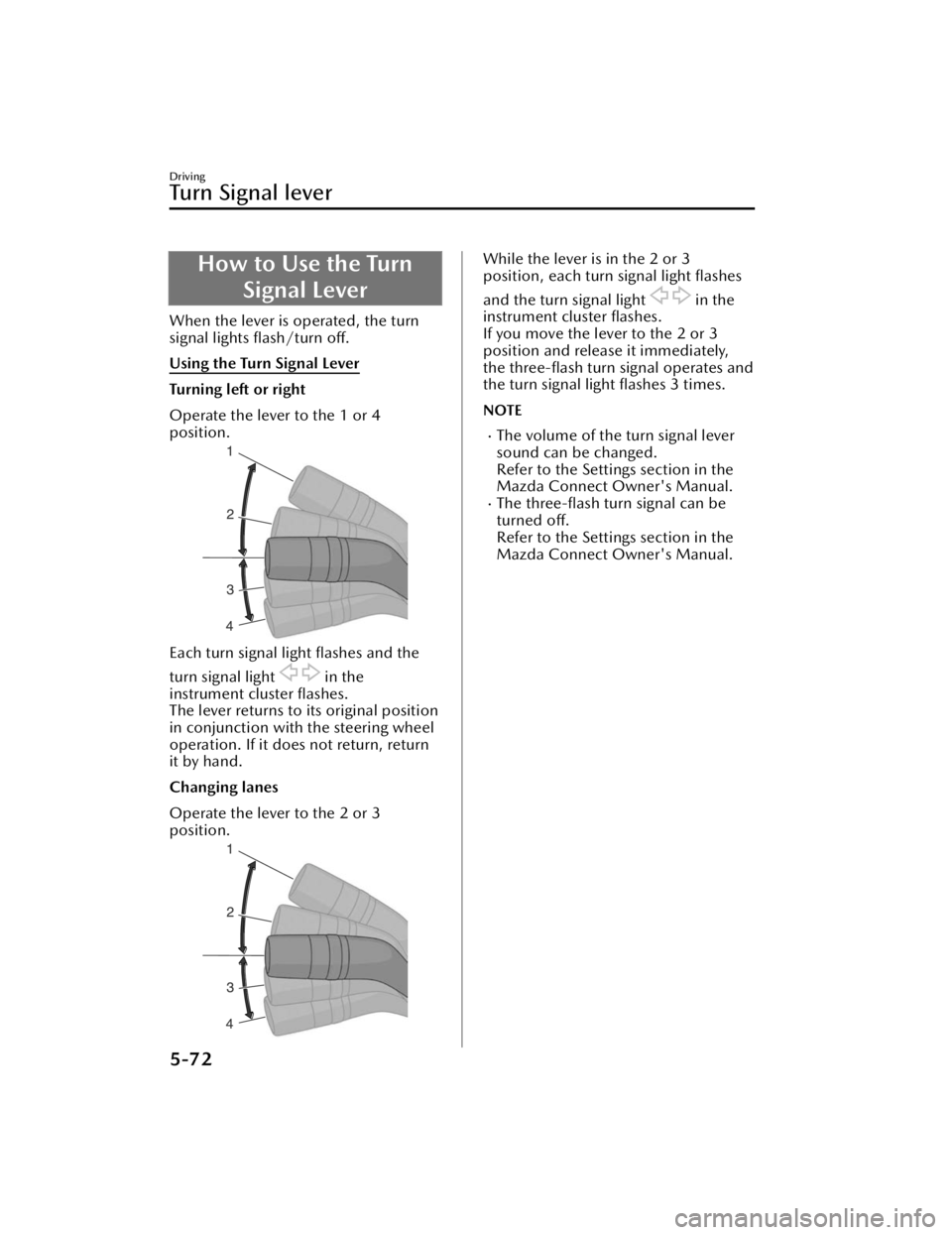
How to Use the TurnSignal Lever
When the lever is operated, the turn
signal lights flash/turn
off.
Using the Turn Signal Lever
Turning left or right
Operate the lever to the 1 or 4
position.
Each turn signal light flashes and the
turn signal light
in the
instrument cluster flashes.
The lever returns to its original position
in conjunction with the steering wheel
operation. If it does not return, return
it by hand.
Changing lanes
Operate the lever to the 2 or 3
position.
While the lever is in the 2 or 3
position, each turn signal light flashes
and the turn signal light
in the
instrument cluster flashes.
If you move the lever to the 2 or 3
position and release it immediately,
the three-flash turn signal operates and
the turn signal light flashes 3 times.
NOTE
The volume of the turn signal lever
sound can be changed.
Refer to the Settings section in the
Mazda Connect Owner's Manual.
The three-flash turn signal can be
turned off.
Refer to the Settings section in the
Mazda Connect Owner's Manual.
Driving
Tu r n S i g n a l l e v e r
5-72
CX-90_8KG7-EA-22L_Edition1_new 2022-11-17 16:05:04
Page 234 of 687
How to Use the Horn
Press the area around the mark
on the steering wheel.
The horn sounds while it is pressed.
Driving
Horn
5-83
CX-90_8KG7-EA-22L_Edition1_new 2022-11-17 16:05:04


