2024 MAZDA CX90 height
[x] Cancel search: heightPage 278 of 687
Forward Sensing Camera(FSC)
*
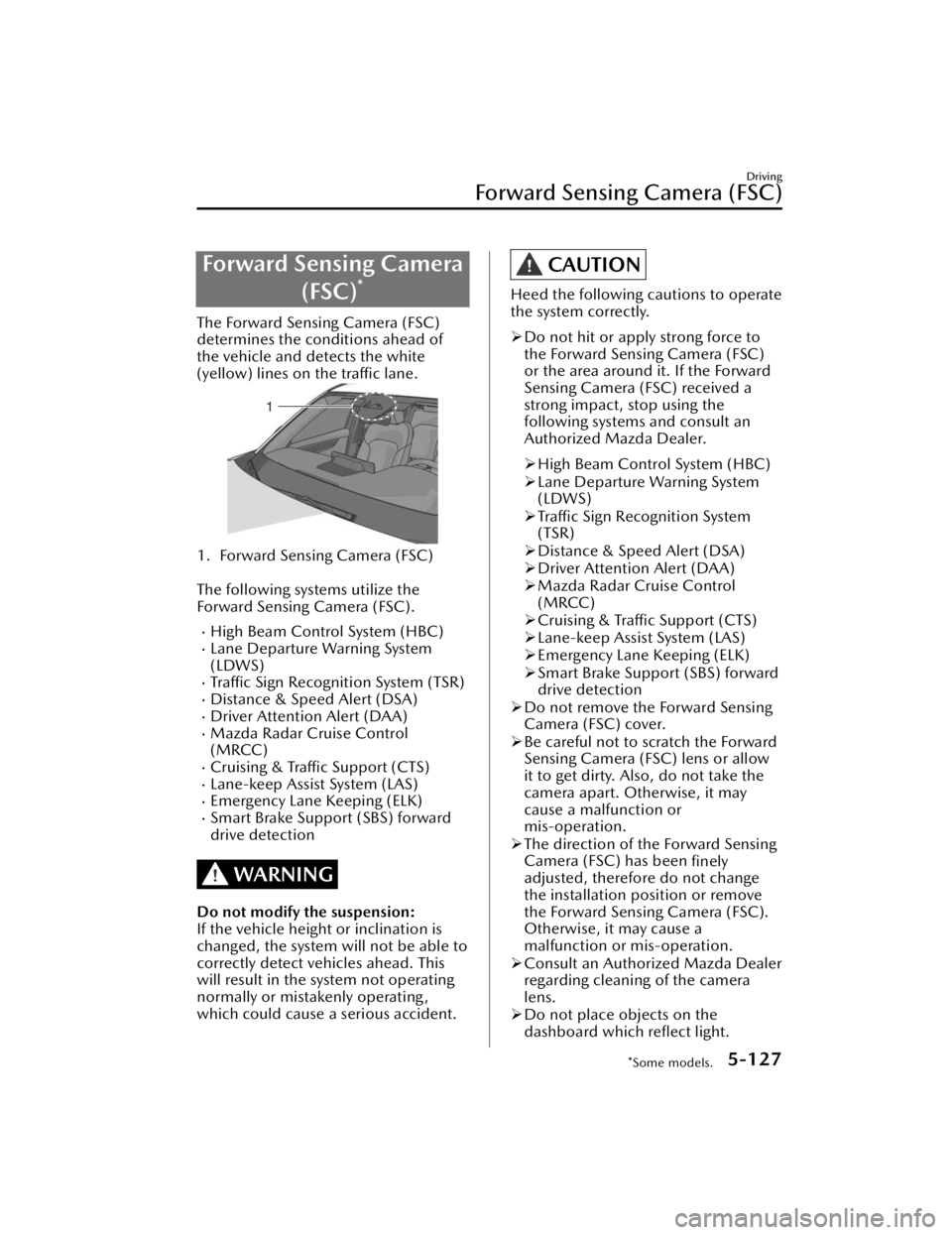
The Forward Sensing Camera (FSC)
determines the conditions ahead of
the vehicle and detects the white
(yellow) lines on the traffic lane.
1. Forward Sensing Camera (FSC)
The following systems utilize the
Forward Sensing Camera (FSC).
High Beam Control System (HBC)Lane Departure Warning System
(LDWS)
Traffic Sign Recognition System (TSR)Distance & Speed Alert (DSA)Driver Attention Alert (DAA)Mazda Radar Cruise Control
(MRCC)
Cruising & Traffic Support (CTS)Lane-keep Assist System (LAS)Emergency Lane Keeping (ELK)Smart Brake Support (SBS) forward
drive detection
WARNING
Do not modify the suspension:
If the vehicle height or inclination is
changed, the system will not be able to
correctly detect vehicles ahead. This
will result in the system not operating
normally or mistakenly operating,
which could cause a serious accident.
CAUTION
Heed the following cautions to operate
the system correctly.
Do not hit or apply strong force to
the Forward Sensing Camera (FSC)
or the area around it. If the Forward
Sensing Camera (FSC) received a
strong impact, stop using the
following systems and consult an
Authorized Mazda Dealer.
High Beam Control System (HBC)
Lane Departure Warning System
(LDWS)
Traffic Sign Recognition System
(TSR)
Distance & Speed Alert (DSA)
Driver Attention Alert (DAA)
Mazda Radar Cruise Control
(MRCC)
Cruising & Traffic Support (CTS)
Lane-keep Assist System (LAS)
Emergency Lane Keeping (ELK)
Smart Brake Support (SBS) forward
drive detection
Do not remove the Forward Sensing
Camera (FSC) cover.
Be careful not to scratch the Forward
Sensing Camera (FSC) lens or allow
it to get dirty. Also, do not take the
camera apart. Otherwise, it may
cause a malfunction or
mis-operation.
The direction of the Forward Sensing
Camera (FSC) has been
finely
adjusted, therefore do not change
the installation position or remove
the Forward Sensing Camera (FSC).
Otherwise, it may cause a
malfunction or mis-operation.
Consult an Authorized Mazda Dealer
regarding cleaning of the camera
lens.
Do not place objects on the
dashboard which
reflect light.
Driving
Forward Sensing Camera (FSC)
*Some models.5-127
CX-90_8KG7-EA-22L_Edition1_new
2022-11-17 16:05:04
Page 280 of 687

When the Forward Sensing Camera
(FSC) detects that the windshield is
dirty or foggy, the functions related
to the Forward Sensing Camera
(FSC) are temporarily stopped. In
this case, the following warning
indications turn on. However, this
does not indicate a problem.
Remove the dirt from the windshield
or press the windshield defroster
switch.
HBC warning indicationi-ACTIVSENSE warning indicationSBS OFF indication
Detection of pedestrians
The Forward Sensing Camera (FSC)
detects pedestrians when all of the
following conditions are met.
The height of a pedestrian is about 1
to 2 meters.
The outline of a pedestrian is
recognized such as the head, both
shoulders, or the feet.
The Forward Sensing Camera (FSC)
may not be able to detect pedestrians
when any of the following conditions is
met.
There are multiple pedestrians.A pedestrian is close to a separate
object.
A pedestrian is crouching , lying, or
slouching.
A pedestrian suddenly jumps into
the road.
A pedestrian is holding something
(such as an open umbrella or large
baggage).
A pedestrian blends into the
background (such as in a dark
location at night or by wearing
clothes matching the background
color).
Detection of objects
When any of the following conditions
is met, the Forward Sensing Camera
(FSC) may not be able to detect target
objects correctly, and each system may
not operate normally.
You are driving your vehicle at the
same speed as the vehicle ahead.
The headlights of your vehicle are not
turned on during the night or in a
tunnel.
The target object is in the blind spot
of the Forward Sensing Camera
(FSC).
A person or object bursts onto the
road from the shoulder or cuts right
in front of you.
The distance between your vehicle
and the target object is extremely
close or extremely far.
You change the course and approach
a target object.
The target object (vehicle ahead,
white line (yellow line), sign) is dirty
or worn.
A vehicle ahead has a special shape
(such as a vehicle carrier).
A vehicle ahead is a truck with a low
loading platform.
A vehicle ahead has an extremely
low or high profile.
A vehicle ahead is outside the
illumination range of the headlights.
The illumination area of the taillights
of the vehicle ahead is small.
The taillights of a vehicle ahead are
dim or turned off.
The headlights of an on-coming
vehicle are dim or turned off.
Under bad weather conditions (rain,
fog , and snow).
Front visibility is reduced (due to a
vehicle ahead casting off water,
snow, or sand).
Driving
Forward Sensing Camera (FSC)
5-129
CX-90_8KG7-EA-22L_Edition1_new 2022-11-17 16:05:04
Page 287 of 687

Target object is thin such as wire,
rope, or poles.
Target object absorbs waves easily
such as cotton or snow.
Target object has an angular shape.Target object is tall and wide at the
upper part.
Target object height is low.There are multiple target objects.Target objects are too close to the
sensors.
Ice, snow, or mud is adhering to
the sensor area.
Heavy rainfall or pressurized water
is applied to the sensor area.
The sensor areas are frozen.You cover the sensor with your
hand.
The area around the sensor has
received a strong impact.
The vehicle is excessively tilted.Under extremely hot or cold
weather.
Approached by an object that
generates ultrasonic waves, such as
the horn of another vehicle, the
engine noise of a motorcycle, the
air brake noise of a large vehicle,
or the sensor of another vehicle.
A commercially-available fender
pole or an antenna for a radio
transmitter is installed to the
vehicle.
The vehicle is moving towards a tall
or square curbstone, or a steep
grade.
The vehicle is moving towards an
uneven wall or stairs.
The vehicle is driven in a place with
low ceilings.
The vehicle is driven on bumpy
roads, inclines, gravel roads, dense
grass, or grating.
The ultrasonic sensor does not detect
target objects directly beneath the
bumper. Even if target objects which
are located at a position lower than
an ultrasonic sensor have been
detected, the ultrasonic sensor may
suddenly stop detecting as the
vehicle approaches the target object.
Front ultrasonic sensors
The following systems utilize front
ultrasonic sensors.
Pa r k i n g S e n s o r
Rear ultrasonic sensors
The following systems utilize rear
ultrasonic sensors.
Smart Brake Support (SBS) reverse
drive detection
Pa r k i n g S e n s o r
Driving
Ultrasonic Sensors
5-136
CX-90_8KG7-EA-22L_Edition1_new 2022-11-17 16:05:04
Page 289 of 687

The cameras include a function for
detecting abnormalities in the
camera, soiling of the camera’s front
surface, and informing the driver. If a
message appears on the screen that
can be addressed, follow the
directions of the message.
If there are water droplets, snow, or
mud on the camera lens, wipe it off
using a soft cloth. If the camera lens
is especially dirty, wash it off with
mild detergent.
Front camera
The following system use the front
camera.
360° View Monitor
Side cameras
The following system use the side
cameras.
360° View Monitor
Rear camera
The following systems use rear camera.
Smart Brake Support (SBS) reverse
drive detection
360° View MonitorRear View Monitor
Detection of pedestrians
The rear camera detects pedestrians
when all of the following conditions
are met.
The height of a pedestrian is about 1
to 2 meters.
The outline of a pedestrian is
recognized such as the head, both
shoulders, or the feet.
If any of the following conditions is
met, the rear camera may not be able
to accurately detect pedestrians and
the Smart Brake Support (SBS) reverse
drive detection may not operate
correctly.
There are multiple pedestrians.A pedestrian is close to a separate
object.
A pedestrian is crouching , lying, or
slouching.
A pedestrian suddenly jumps into
the road.
A pedestrian is holding something
(such as an open umbrella or large
baggage).
A pedestrian blends into the
background (such as in a dark
location at night or by wearing
clothes matching the background
color).
The surrounding area is dark (such as
during the night, early evening, or
early morning , or in a tunnel or
indoor parking lot).
Foreign matter is adhering to the rear
camera (water droplets, snow, mud).
The rear camera is exposed to strong
light (sunlight, vehicle headlights).
Driving
Cameras
5-138
CX-90_8KG7-EA-22L_Edition1_new 2022-11-17 16:05:04
Page 319 of 687
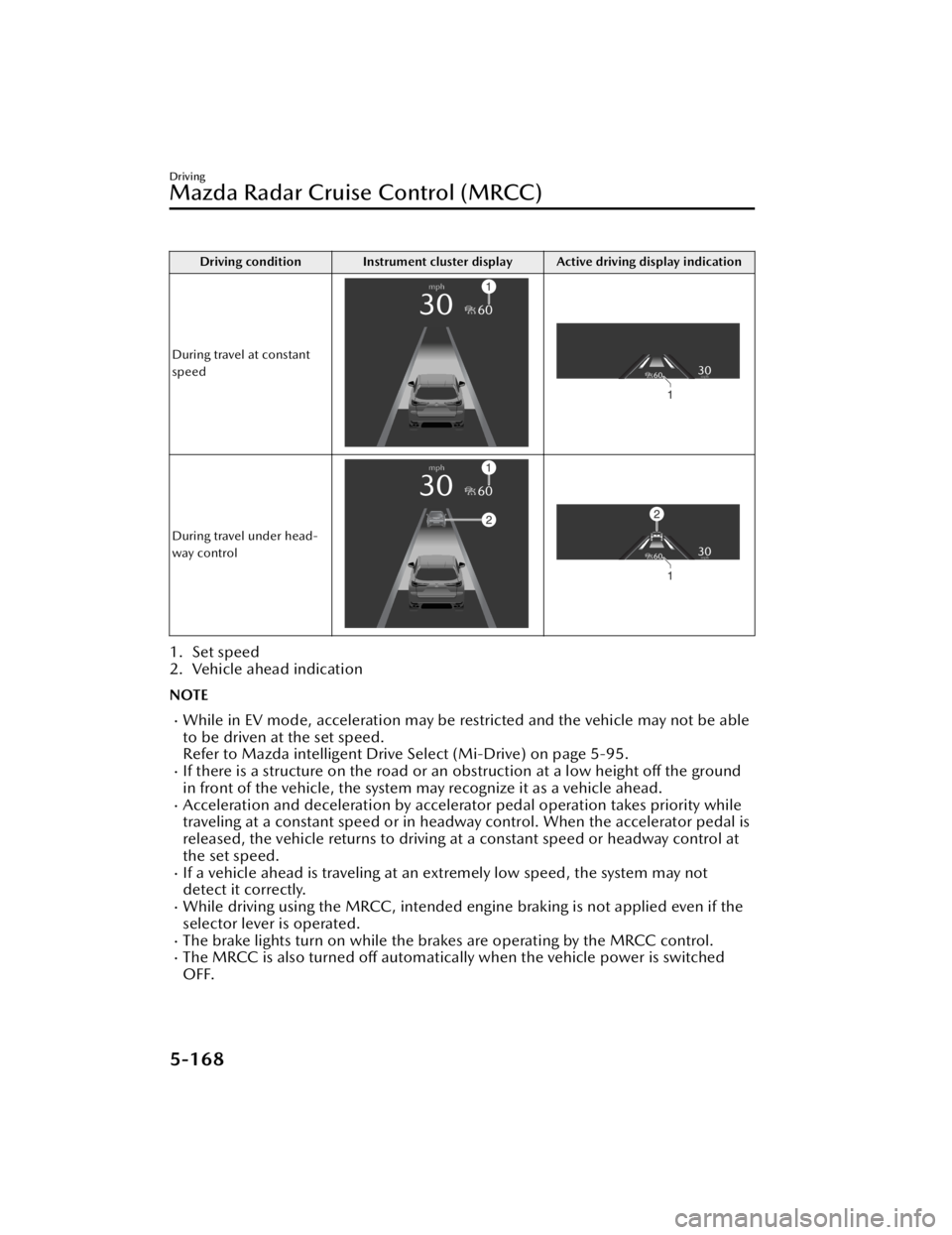
Driving condition Instrument cluster display Active driving display indication
During travel at constant
speed
During travel under head-
way control
1. Set speed
2. Vehicle ahead indication
NOTE
While in EV mode, acceleration may be restricted and the vehicle may not be able
to be driven at the set speed.
Refer to Mazda intelligent Drive Select (Mi-Drive) on page 5-95.
If there is a structure on the road or an obstruction at a low height off the ground
in front of the vehicle, the system may recognize it as a vehicle ahead.
Acceleration and deceleration by accelerator pedal operation takes priority while
traveling at a constant speed or in headway control. When the accelerator pedal is
released, the vehicle returns to driving at a constant speed or headway control at
the set speed.
If a vehicle ahead is traveling at an extremely low speed, the system may not
detect it correctly.
While driving using the MRCC, intended engine braking is not applied even if the
selector lever is operated.
The brake lights turn on while the brakes are operating by the MRCC control.The MRCC is also turned off automatically when the vehicle power is switched
OFF.
Driving
Mazda Radar Cruise Control (MRCC)
5-168
CX-90_8KG7-EA-22L_Edition1_new 2022-11-17 16:05:04
Page 329 of 687

Driving condition Instrument cluster display Active driving display indication
During travel at constant
speed
During travel under head-
way control
1. Set speed
2. Vehicle ahead indication
NOTE
While in EV mode, acceleration may be restricted and the vehicle may not be able
to be driven at the set speed.
Refer to Mazda intelligent Drive Select (Mi-Drive) on page 5-95.
If there is a structure on the road or an obstruction at a low height off the ground
in front of the vehicle, the system may recognize it as a vehicle ahead.
Acceleration and deceleration by accelerator pedal operation takes priority while
traveling at a constant speed or in headway control. When the accelerator pedal is
released, the vehicle returns to driving at a constant speed or headway control at
the set speed.
The Forward Sensing Camera (FSC) may not be able to detect target objects
correctly, and the CTS may not operate normally.
Refer to Forward Sensing Camera (FSC) on page 5-127.
If a vehicle ahead is traveling at an extremely low speed, the system may not
detect it correctly.
While driving using the CTS, intended engine braking is not applied even if the
selector lever is operated.
The brake lights turn on while the brakes are operating by the CTS control.
Driving
Cruising & Tra ffi c Support (CTS)
5-178
CX-90_8KG7-EA-22L_Edition1_new
2022-11-17 16:05:04
Page 423 of 687
Driver PersonalizationSystem
*
The Driver Personalization System
recognizes the driver using the camera
inside the vehicle and automatically
restores the various driver settings that
have been stored.
The following 2 functions have been
added depending on the grade and
specification.
Ideal Driving Position Assist
*
This function makes an overall
determination of the driver's physique
based on the information from the
camera in the vehicle and the input
height, and automatically adjusts to
the recommended driving position.
Entry/Exit Assist
*
This function automatically moves the
seat and the steering wheel so that the
driver can easily enter and exit the
vehicle.
Warnings and CautionsFor Using the Driver
Personalization System
CAUTION
Do not allow a hand, fingers, or feet to
come close the area under or around
the seat or steering wheel when the
seat or steering wheel is automatically
moving by the driver personalization
system. Otherwise, your hand, fingers,
or feet could be injured.
Equipment to Make Cabin More Comfortable
Driver Personalization System
6-30*Some models.
CX-90_8KG7-EA-22L_Edition1_new 2022-11-17 16:05:04
Page 424 of 687

How to Use the Driver
Personalization System
NOTE
In the following cases, the driver may
not be registered or recognized
correctly.
You are wearing sunglasses, a
mask, or other accessories.
There is an obstruction between
your face and the camera.
Looking forward or at the Mazda
Connect screen will facilitate driver
recognition.
If the vehicle power is switched ON
during recognition, the driver will be
recognized as a guest. If the vehicle
power is switched ON without
opening/closing the door even once,
the information of the previously
recognized driver is taken over.
If the recognition is difficult,
reprogram the data. Two types of
faces can be programmed, such as
when wearing glasses or contact
lenses.
If people with similar faces are
programmed, they may be
recognized incorrectly.
Refer to Driver Monitoring Camera
on page 5-139
Programming
1. Switch the vehicle power ON.
2. Select “Settings” from the Mazda Connect home screen.
3. Select “Driver Personalization System”.
4. Select “Add New Driver”. Operate according to the Mazda
Connect screen.
NOTE
When the door is closed and “Add
New Driver” is displayed on the
Mazda Connect home screen,
follow the instructions on the
screen.
5. (Vehicles with Ideal Driving
Position Assist)
Program the driver’s height
according to the Mazda Connect
screen.
The following items are
automatically adjusted.
Driver's seat position (Angle,
forward and back positions,
entire height, front end height)
Active driving display (Display
height)
Outer mirror angleSteering wheel position (forward
and back positions, height)
NOTE
Under the following conditions,
the Ideal Driving Position Assist is
canceled.
The switch is operated due to
the position adjustment of the
driver's seat, the steering
wheel, the outer mirrors, or the
active driving display.
The key lock button or unlock
button is operated.
The vehicle moves.
The selector lever is shifted to a
position other than P.
6. Follow the Mazda Connect screen to complete the programming.
Equipment to Make Cabin More Comfortable
Driver Personalization System
6-31
CX-90_8KG7-EA-22L_Edition1_new 2022-11-17 16:05:04