2024 CHEVROLET SILVERADO stop start
[x] Cancel search: stop startPage 372 of 433
Chevrolet Silverado 2500 HD/3500 HD Owner Manual (GMNA-Localizing-U.
S./Canada/Mexico-16908339) - 2024 - CRC - 12/5/22
370 Vehicle Care
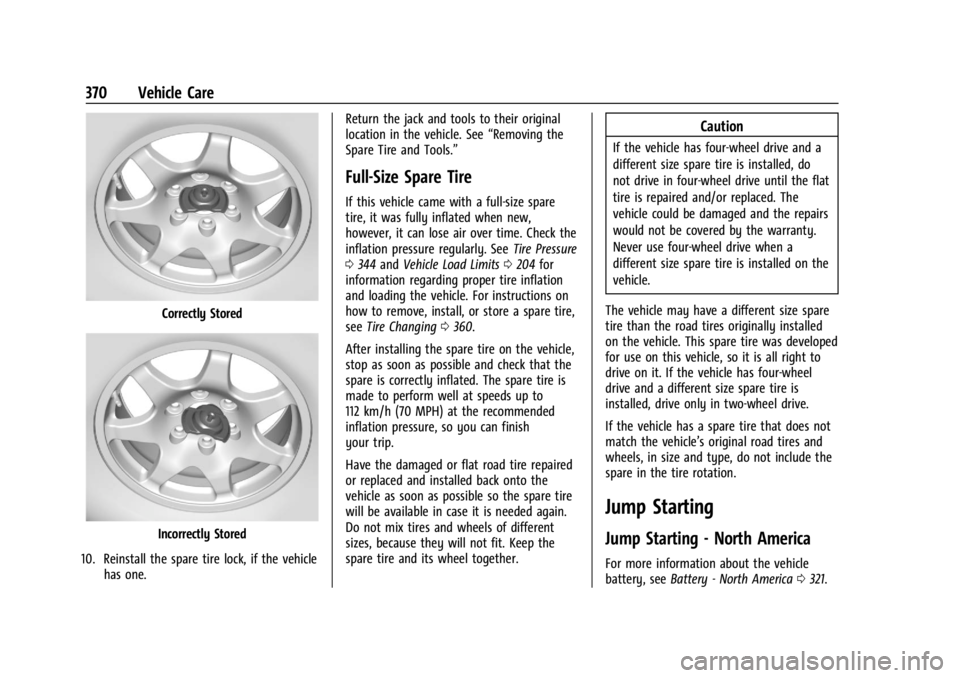
Correctly Stored
Incorrectly Stored
10. Reinstall the spare tire lock, if the vehicle has one. Return the jack and tools to their original
location in the vehicle. See
“Removing the
Spare Tire and Tools.”
Full-Size Spare Tire
If this vehicle came with a full-size spare
tire, it was fully inflated when new,
however, it can lose air over time. Check the
inflation pressure regularly. See Tire Pressure
0 344 and Vehicle Load Limits 0204 for
information regarding proper tire inflation
and loading the vehicle. For instructions on
how to remove, install, or store a spare tire,
see Tire Changing 0360.
After installing the spare tire on the vehicle,
stop as soon as possible and check that the
spare is correctly inflated. The spare tire is
made to perform well at speeds up to
112 km/h (70 MPH) at the recommended
inflation pressure, so you can finish
your trip.
Have the damaged or flat road tire repaired
or replaced and installed back onto the
vehicle as soon as possible so the spare tire
will be available in case it is needed again.
Do not mix tires and wheels of different
sizes, because they will not fit. Keep the
spare tire and its wheel together.
Caution
If the vehicle has four-wheel drive and a
different size spare tire is installed, do
not drive in four-wheel drive until the flat
tire is repaired and/or replaced. The
vehicle could be damaged and the repairs
would not be covered by the warranty.
Never use four-wheel drive when a
different size spare tire is installed on the
vehicle.
The vehicle may have a different size spare
tire than the road tires originally installed
on the vehicle. This spare tire was developed
for use on this vehicle, so it is all right to
drive on it. If the vehicle has four-wheel
drive and a different size spare tire is
installed, drive only in two-wheel drive.
If the vehicle has a spare tire that does not
match the vehicle’s original road tires and
wheels, in size and type, do not include the
spare in the tire rotation.
Jump Starting
Jump Starting - North America
For more information about the vehicle
battery, see Battery - North America 0321.
Page 378 of 433
Chevrolet Silverado 2500 HD/3500 HD Owner Manual (GMNA-Localizing-U.
S./Canada/Mexico-16908339) - 2024 - CRC - 12/5/22
376 Vehicle Care
{Warning
Shifting a four-wheel-drive vehicle's
transfer case into N (Neutral) can allow
the vehicle to move even if the
transmission is in P (Park). You or others
could be injured. Set the parking brake
and use wheel blocks before shifting the
transfer case to N (Neutral).
To dinghy tow: 1. Position the vehicle being towed behind the tow vehicle, facing forward and on a
level surface.
2. Securely attach the vehicle being towed to the tow vehicle.
3. Apply the parking brake and start the engine.
4. Shift the transfer case to N (Neutral). See “Shifting into N (Neutral)” under
Four-Wheel Drive 0221.
5. With the engine running, release the parking brake and verify that the
transfer case is in N (Neutral) by shifting
the transmission to D (Drive) and then to
R (Reverse). There should be no
movement while shifting the
transmission. 6. Shift the transmission to D (Drive).
7. Turn the vehicle off. Disregard the Shift
to P (Park) DIC message. See Ignition
Positions 0211.
{Warning
To avoid death, serious injury,
or property damage, before dinghy
towing the vehicle, always disconnect and
secure the negative battery cable and
cover the negative battery post and cable
with a non-conductive material. If the
battery is left connected or the battery
cable contacts the post, the Electric
Parking Brake may activate during
towing, which could cause a crash.
8. Disconnect the negative (–) battery cable. See “Negative Battery Cable
Disconnection” inBattery - North
America 0321.
9. Shift the transmission to P (Park).
Caution
If the steering column is locked, vehicle
damage may occur. 10. Move the steering wheel to make sure
the steering column is unlocked.
11. Keep the remote key outside of the vehicle and manually lock the doors.
Access the vehicle by using the key in
the door lock. See Door Locks019.
Disconnecting the Towed Vehicle
Before disconnecting from the tow vehicle: 1. Park on a level surface. Secure the vehicle with wheel blocks.
2. Reconnect the negative (–) battery. See Battery - North America 0321.
3. Turn on the vehicle. With your foot off the brake pedal, press and hold ENGINE
START/STOP for five seconds until the
green light comes on in the button. See
Ignition Positions 0211.
4. Set the parking brake. See Electric
Parking Brake 0228.
5. Disconnect from the tow vehicle.
6. Shift the transmission to N (Neutral).
7. Shift the transfer case to 2
m(Two-Wheel
Drive High). When the shift to 2
m
(Two-Wheel Drive High) is complete, the
light in the instrument cluster will stop
flashing and stay lit. See
Four-Wheel-Drive Light 0120.
Page 418 of 433
Chevrolet Silverado 2500 HD/3500 HD Owner Manual (GMNA-Localizing-U.
S./Canada/Mexico-16908339) - 2024 - CRC - 12/5/22
416 Connected Services
Ensuring Security
.Change the default passwords for the
Wi-Fi hotspot and myChevrolet mobile
application. Make these passwords
different from each other and use a
combination of letters and numbers to
increase the security.
.Change the default name of the SSID
(Service Set Identifier). This is your
network’s name that is visible to other
wireless devices. Choose a unique name
and avoid family names or vehicle
descriptions.
Wi-Fi Hotspot (If Equipped)
The vehicle may have a built-in Wi-Fi
hotspot that provides access to the Internet
and web content at 4G LTE speed. Up to
seven mobile devices can be connected.
A data plan is required. Use the in-vehicle
controls only when it is safe to do so. 1. To retrieve Wi-Fi hotspot information, press
=to open the OnStar app on the
infotainment display, then select Wi-Fi
Hotspot. On some vehicles, touch Wi-Fi
or Wi-Fi Settings on the screen. 2. The Wi-Fi settings will display the Wi-Fi
hotspot name (SSID), password, and on
some vehicles, the connection type (no
Internet connection, 3G, 4G, 4G LTE), and
signal quality (poor, good, excellent).
3. To change the SSID or password, press
Qor call 1-888-4ONSTAR to connect
with an Advisor. On some vehicles, the
SSID and password can be changed in
the Wi-Fi Hotspot menu.
After initial set-up, your vehicle’s Wi-Fi
hotspot will connect automatically to your
mobile devices. Manage data usage by
turning Wi-Fi on or off on your mobile
device, using the myChevrolet mobile app,
or by contacting an OnStar Advisor. On
some vehicles, Wi-Fi can also be managed
from the Wi-Fi Hotspot menu.
MyChevrolet Mobile App (If Available)
Download the myChevrolet mobile app to
compatible Apple and Android smartphones.
Chevrolet users can access the following
services from a smartphone:
.Remotely start/stop the vehicle,
if factory-equipped.
.Lock/unlock doors, if equipped with
automatic locks.
.Activate the horn and lamps.
.Check the vehicle’s fuel level, oil life,
or tire pressure, if factory-equipped
with the Tire Pressure Monitor System.
.Send destinations to the vehicle.
.Locate the vehicle on a map (U.S.
market only).
.Turn the vehicle's Wi-Fi hotspot on/off,
manage settings, and monitor data
consumption, if equipped.
.Locate a dealer and schedule service.
.Request roadside assistance.
.Set a parking reminder with pin drop,
take a photo, make a note, and set a
timer.
.Connect with Chevrolet on social media.
Features are subject to change. For
myChevrolet mobile app information and
compatibility, see my.chevrolet.com.
An active OnStar or connected service plan
may be required. A compatible device,
factory-installed remote start, and power
locks are required. Data rates apply. See
www.onstar.com for details and system
limitations.
Page 430 of 433

Chevrolet Silverado 2500 HD/3500 HD Owner Manual (GMNA-Localizing-U.
S./Canada/Mexico-16908339) - 2024 - CRC - 12/5/22
428 Index
Specifications and Capacities . . . . . . . . . . . . . 396
Speedometer . . . . . . . . . . . . . . . . . . . . . . . . . . . . . 111
Start Assist, Hill . . . . . . . . . . . . . . . . . . . . . . . . . . 229
Start Vehicle, Remote . . . . . . . . . . . . . . . . . . . . . .18
Starting the Engine . . . . . . . . . . . . . . . . . . . . . . . 213
Steering . . . . . . . . . . . . . . . . . . . . . . . . . . . . . . . . . 195Column Lock . . . . . . . . . . . . . . . . . . . . . . . . . . . . 30
Fluid, Power . . . . . . . . . . . . . . . . . . . . . . . . . . . . 317
Heated Wheel . . . . . . . . . . . . . . . . . . . . . . . . . 100
Wheel Adjustment . . . . . . . . . . . . . . . . . . . . . 100
Wheel Controls . . . . . . . . . . . . . . . . . . . . . . . . . 151
Steps Power Assist . . . . . . . . . . . . . . . . . . . . . . . . . . . . 28
Stoplamps and Back-up Lamps Bulb Replacement . . . . . . . . . . . . . . . . . . . . . . 328
Storage
Center Console . . . . . . . . . . . . . . . . . . . . . . . . . 96
Compartments . . . . . . . . . . . . . . . . . . . . . . . . . . 94
Cupholders . . . . . . . . . . . . . . . . . . . . . . . . . . . . . 94
Floor Console . . . . . . . . . . . . . . . . . . . . . . . . . . . 96
Glove Box . . . . . . . . . . . . . . . . . . . . . . . . . . . . . . 94
Rear . . . . . . . . . . . . . . . . . . . . . . . . . . . . . . . . . . . . 95
Underseat . . . . . . . . . . . . . . . . . . . . . . . . . . . . . . 95
Struts Gas . . . . . . . . . . . . . . . . . . . . . . . . . . . . . . . . . . . . 326
Stuck Vehicle . . . . . . . . . . . . . . . . . . . . . . . . . . . . 203
Sun Visors . . . . . . . . . . . . . . . . . . . . . . . . . . . . . . . . .41
Sunroof . . . . . . . . . . . . . . . . . . . . . . . . . . . . . . . . . . . .41 Surround
Vision System . . . . . . . . . . . . . . . . . . . . . . . . . 248
Symbols . . . . . . . . . . . . . . . . . . . . . . . . . . . . . . . . . . . .3 Navigation . . . . . . . . . . . . . . . . . . . . . . . . . . . . . . 161
System Airbag . . . . . . . . . . . . . . . . . . . . . . . . . . . . . . . . . . 60
Brake Pad Life . . . . . . . . . . . . . . . . . . . . . . . . . 319
Engine Air Filter Life . . . . . . . . . . . . . . . . . . . . 311
Global Positioning . . . . . . . . . . . . . . . . . . . . . 162
Infotainment . . . . . . . . . . . . . . . . . . . . . . . . . . . 409
Noise Control . . . . . . . . . . . . . . . . . . . . . . . . . . 323
T
Tachometer . . . . . . . . . . . . . . . . . . . . . . . . . . . . . . . 111
Tailgate . . . . . . . . . . . . . . . . . . . . . . . . . . . . . . . . . . . . 21
TaillampsBulb Replacement . . . . . . . . . . . . . . . . . . . . . . 328
Task Lighting . . . . . . . . . . . . . . . . . . . . . . . . . . . . .143
Teen Driver . . . . . . . . . . . . . . . . . . . . . . . . . . . . . . 179
Text Telephone (TTY) Users . . . . . . . . . . . . . . 401
Theft-Deterrent Systems . . . . . . . . . . . . . . . . . . 30 Immobilizer . . . . . . . . . . . . . . . . . . . . . . . . . . . . . 30
Time . . . . . . . . . . . . . . . . . . . . . . . . . . . . . . . . . . . . . 102
Tires . . . . . . . . . . . . . . . . . . . . . . . . . . . . . . . . . . . . . 339 All-Season . . . . . . . . . . . . . . . . . . . . . . . . . . . . . 340
All-Terrain . . . . . . . . . . . . . . . . . . . . . . . . . . . . . 341
Buying New Tires . . . . . . . . . . . . . . . . . . . . . . 354
Chains . . . . . . . . . . . . . . . . . . . . . . . . . . . . . . . . . 358 Tires (cont'd)
Changing . . . . . . . . . . . . . . . . . . . . . . . . . . . . . . 360
Designations . . . . . . . . . . . . . . . . . . . . . . . . . . . 342
Different Size . . . . . . . . . . . . . . . . . . . . . . . . . . 355
Full-Size Spare . . . . . . . . . . . . . . . . . . . . . . . . . 370
If a Tire Goes Flat . . . . . . . . . . . . . . . . . . . . . 358
Inspection . . . . . . . . . . . . . . . . . . . . . . . . . . . . . 351
Pressure . . . . . . . . . . . . . . . . . . . . . . . . . . . . . . . 344
Pressure Light . . . . . . . . . . . . . . . . . . . . . . . . . 123
Pressure Monitor Operation . . . . . . . . . . . 346
Pressure Monitor System . . . . . . . . . . . . . . 345
Rotation . . . . . . . . . . . . . . . . . . . . . . . . . . . . . . . 351
Sidewall Labeling . . . . . . . . . . . . . . . . . . . . . . 341
Terminology and Definitions . . . . . . . . . . . 342
Uniform Tire Quality Grading . . . . . . . . . . 356
Wheel Alignment and Tire Balance . . . . 357
Wheel Replacement . . . . . . . . . . . . . . . . . . . . 357
When It Is Time for New Tires . . . . . . . . . 353
Winter . . . . . . . . . . . . . . . . . . . . . . . . . . . . . . . . . 340
Top Tier Fuel . . . . . . . . . . . . . . . . . . . . . . . . . . . . 265
Tow/Haul Mode . . . . . . . . . . . . . . . . . . . . . . . . . . 221
Tow/Haul Mode Light . . . . . . . . . . . . . . . . . . . 120
Towing App . . . . . . . . . . . . . . . . . . . . . . . . . . . . . . . . . . . . 290
Driving Characteristics . . . . . . . . . . . . . . . . . 270
Equipment . . . . . . . . . . . . . . . . . . . . . . . . . . . . . 278
General Information . . . . . . . . . . . . . . . . . . . 270
Recreational Vehicle . . . . . . . . . . . . . . . . . . . 374