2024 CHEVROLET CORVETTE run
[x] Cancel search: runPage 248 of 362
Chevrolet Corvette Owner Manual (GMNA-Localizing-U.S./Canada/Mexico-
17272984) - 2024 - CRC - 2/20/23
Vehicle Care 247
4. Remove the dipstick again and read thelevel on the cross-hatched area. Re-insert
the dipstick and push it all the way in
until it stops.
5. Turn the engine off.
When to Add Engine Oil
If the oil is below the cross-hatched area at
the tip of the dipstick, add 1 L (1 qt) of the
recommended oil through the oil fill cap
opening in the oil tank fill tube and then
recheck the level. See “Selecting the Right
Engine Oil” later in this section for the type
of oil to use. For engine oil crankcase
capacity, see Capacities and Specifications
0 325.
Caution
Do not add too much oil. Oil levels above
or below the acceptable operating range
shown on the dipstick are harmful to the
engine. If the oil level is above the
operating range (i.e., the engine has so
much oil that the oil level gets above the
cross-hatched area that shows the proper
operating range), the engine could be
damaged. Drain the excess oil or limit
driving of the vehicle, and seek a service
professional to remove the excess oil.
See Engine Compartment Overview 0238 for
the location of the external engine oil tank
dipstick and fill cap.
Add enough oil to put the level somewhere
in the proper operating range. Push the
dipstick all the way back into the oil tank
tube when finished.
Changing the Engine Oil and Filter
The vehicle requires a special procedure
when changing the engine oil and filter.
Follow this procedure closely.
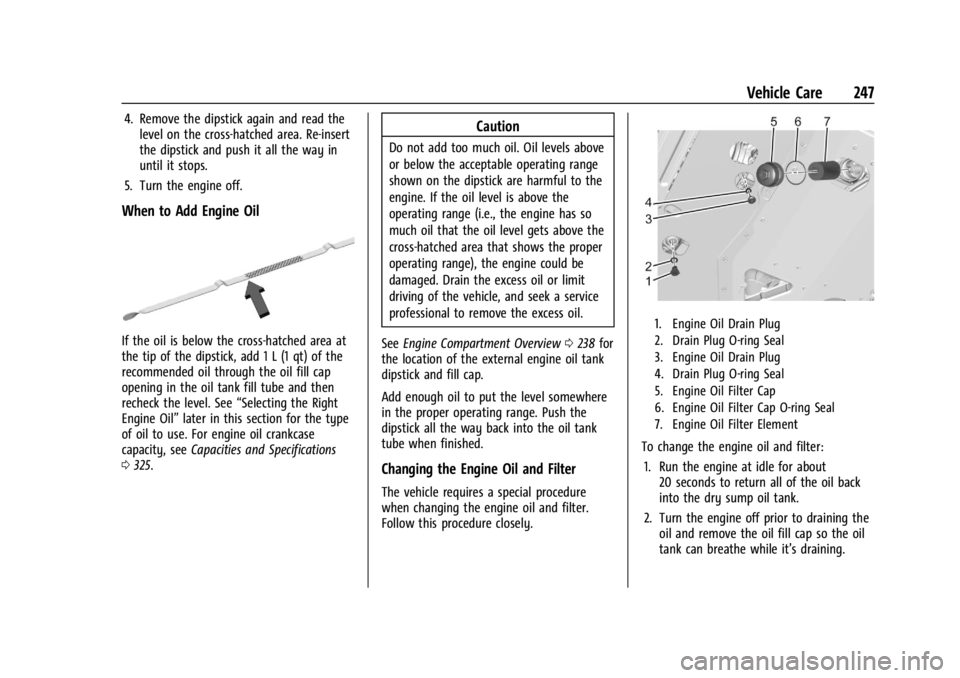
1. Engine Oil Drain Plug
2. Drain Plug O-ring Seal
3. Engine Oil Drain Plug
4. Drain Plug O-ring Seal
5. Engine Oil Filter Cap
6. Engine Oil Filter Cap O-ring Seal
7. Engine Oil Filter Element
To change the engine oil and filter:
1. Run the engine at idle for about 20 seconds to return all of the oil back
into the dry sump oil tank.
2. Turn the engine off prior to draining the oil and remove the oil fill cap so the oil
tank can breathe while it’s draining.
Page 251 of 362
Chevrolet Corvette Owner Manual (GMNA-Localizing-U.S./Canada/Mexico-
17272984) - 2024 - CRC - 2/20/23
250 Vehicle Care
and there could be no engine oil on the
dipstick. This is normal since the dipstick is
designed to read the engine oil level only
after the engine has run long enough to
reach normal operating temperature. Do not
add engine oil based on cold engine dipstick
readings. The engine oil level on the dipstick
must be checked while the engine is running
at idle.
To check the engine oil:1. Turn the engine on and let it warm up to at least 80 °C (175 °F).
2. Once the engine is warm, check the oil while the engine is running at idle.
{Warning
The engine oil dipstick handle may be
hot; it could burn you. Use a towel or
glove to touch the dipstick handle.
3. Remove the dipstick and wipe it with a clean lint-free paper towel or a cloth.
Re-insert the dipstick and push it all the
way in until it stops.
4. Remove the dipstick again and read the level on the cross-hatched area. Re-insert
the dipstick and push it all the way in
until it stops. 5. Turn the engine off.
When to Add Engine Oil
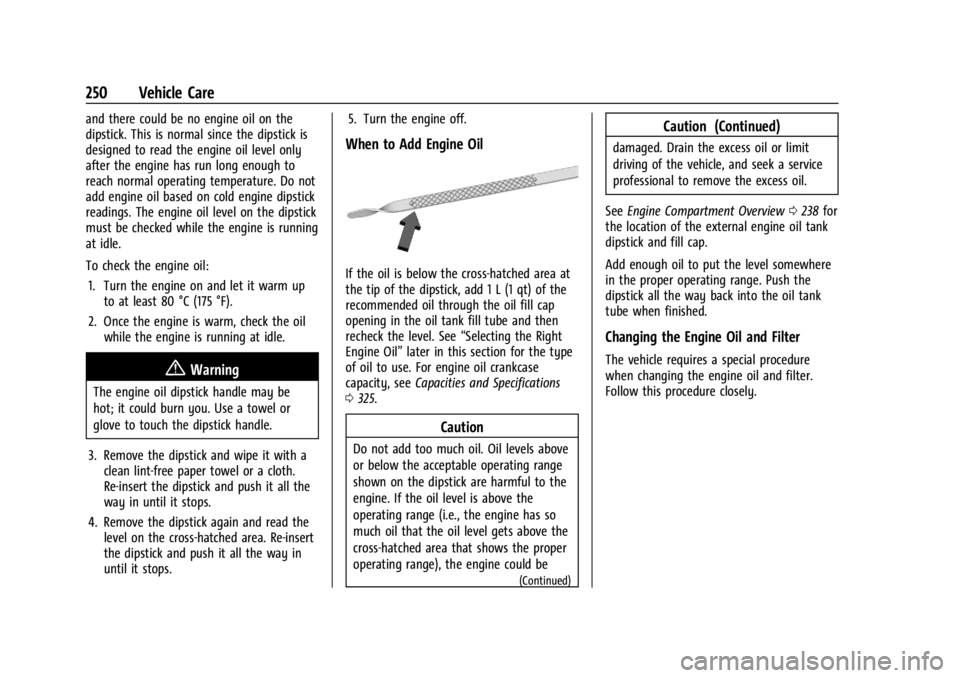
If the oil is below the cross-hatched area at
the tip of the dipstick, add 1 L (1 qt) of the
recommended oil through the oil fill cap
opening in the oil tank fill tube and then
recheck the level. See
“Selecting the Right
Engine Oil” later in this section for the type
of oil to use. For engine oil crankcase
capacity, see Capacities and Specifications
0 325.
Caution
Do not add too much oil. Oil levels above
or below the acceptable operating range
shown on the dipstick are harmful to the
engine. If the oil level is above the
operating range (i.e., the engine has so
much oil that the oil level gets above the
cross-hatched area that shows the proper
operating range), the engine could be
(Continued)
Caution (Continued)
damaged. Drain the excess oil or limit
driving of the vehicle, and seek a service
professional to remove the excess oil.
See Engine Compartment Overview 0238 for
the location of the external engine oil tank
dipstick and fill cap.
Add enough oil to put the level somewhere
in the proper operating range. Push the
dipstick all the way back into the oil tank
tube when finished.
Changing the Engine Oil and Filter
The vehicle requires a special procedure
when changing the engine oil and filter.
Follow this procedure closely.
Page 252 of 362
Chevrolet Corvette Owner Manual (GMNA-Localizing-U.S./Canada/Mexico-
17272984) - 2024 - CRC - 2/20/23
Vehicle Care 251
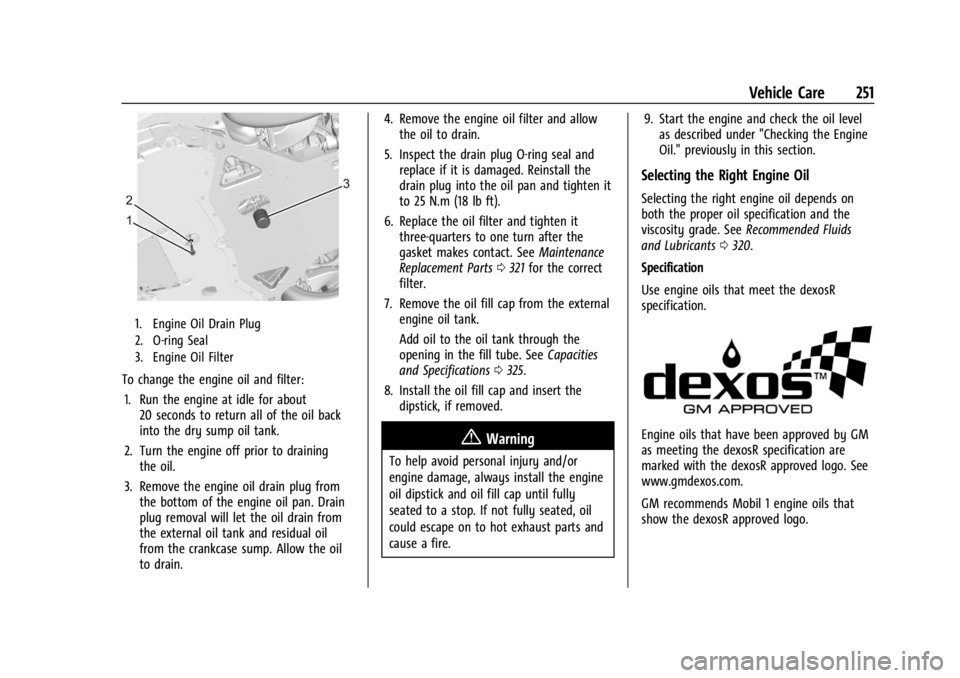
1. Engine Oil Drain Plug
2. O-ring Seal
3. Engine Oil Filter
To change the engine oil and filter:1. Run the engine at idle for about 20 seconds to return all of the oil back
into the dry sump oil tank.
2. Turn the engine off prior to draining the oil.
3. Remove the engine oil drain plug from the bottom of the engine oil pan. Drain
plug removal will let the oil drain from
the external oil tank and residual oil
from the crankcase sump. Allow the oil
to drain. 4. Remove the engine oil filter and allow
the oil to drain.
5. Inspect the drain plug O-ring seal and replace if it is damaged. Reinstall the
drain plug into the oil pan and tighten it
to 25 N.m (18 lb ft).
6. Replace the oil filter and tighten it three-quarters to one turn after the
gasket makes contact. See Maintenance
Replacement Parts 0321 for the correct
filter.
7. Remove the oil fill cap from the external engine oil tank.
Add oil to the oil tank through the
opening in the fill tube. See Capacities
and Specifications 0325.
8. Install the oil fill cap and insert the dipstick, if removed.
{Warning
To help avoid personal injury and/or
engine damage, always install the engine
oil dipstick and oil fill cap until fully
seated to a stop. If not fully seated, oil
could escape on to hot exhaust parts and
cause a fire. 9. Start the engine and check the oil level
as described under "Checking the Engine
Oil." previously in this section.
Selecting the Right Engine Oil
Selecting the right engine oil depends on
both the proper oil specification and the
viscosity grade. See Recommended Fluids
and Lubricants 0320.
Specification
Use engine oils that meet the dexosR
specification.
Engine oils that have been approved by GM
as meeting the dexosR specification are
marked with the dexosR approved logo. See
www.gmdexos.com.
GM recommends Mobil 1 engine oils that
show the dexosR approved logo.
Page 256 of 362
Chevrolet Corvette Owner Manual (GMNA-Localizing-U.S./Canada/Mexico-
17272984) - 2024 - CRC - 2/20/23
Vehicle Care 255
Engine Air Cleaner/Filter
Regularly clear any leaves, dirt, and debris
from the engine air cleaner filter and air
filter housing to maximize engine
performance and air filter life.
SeeEngine Compartment Overview 0238 for
the location of the engine air cleaner filter.
Caution
If water is sprayed and enters the engine
air cleaner/filter intake and housing, the
engine could be damaged. The repairs
would not be covered by the vehicle
warranty.
When to Inspect the Engine Air Cleaner Filter
For intervals on changing and inspecting the
engine air cleaner filter, see Maintenance
Schedule 0316.
For Z06 or E-Ray, additional inspections
should occur seasonally, in regions where
fallen leaves are common, and before
long-term storage of the vehicle. See Vehicle
Storage 0234. How to Inspect/Replace the Engine Air
Cleaner Filter
Do not start the engine or have the engine
running with the engine air cleaner filter
housing open. Before removing the engine
air cleaner filter, make sure that the engine
air cleaner filter housing and nearby
components are free of leaves, dirt, and
debris. Do not clean the engine air cleaner
filter or components with water or
compressed air.
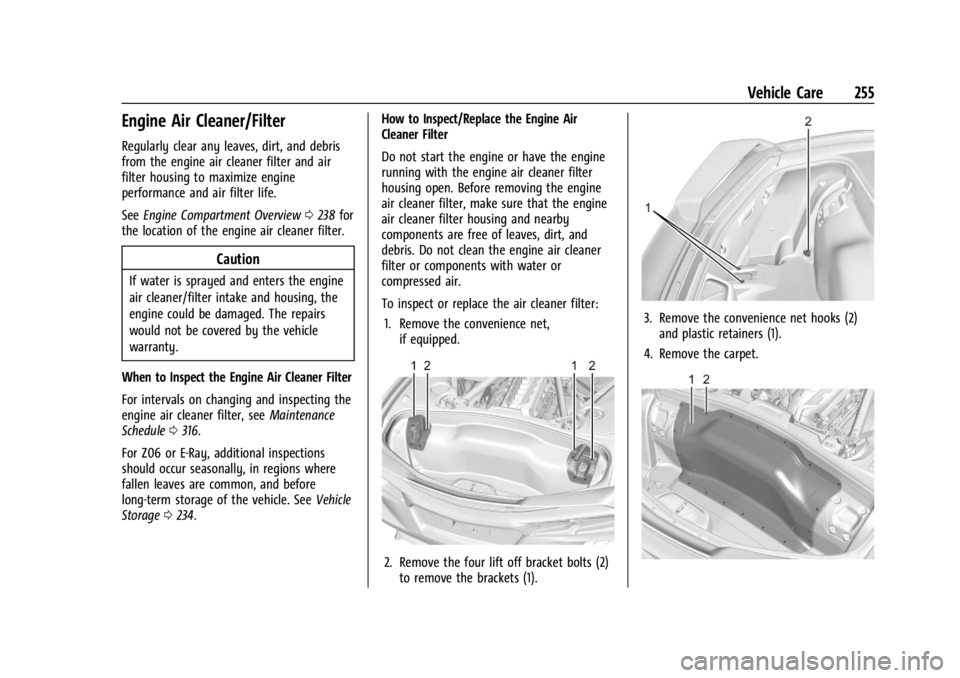
To inspect or replace the air cleaner filter:
1. Remove the convenience net, if equipped.
2. Remove the four lift off bracket bolts (2)to remove the brackets (1).
3. Remove the convenience net hooks (2)and plastic retainers (1).
4. Remove the carpet.
Page 258 of 362
Chevrolet Corvette Owner Manual (GMNA-Localizing-U.S./Canada/Mexico-
17272984) - 2024 - CRC - 2/20/23
Vehicle Care 257
Caution
If the air cleaner/filter is off, dirt can
easily get into the engine, which
could damage it. Always have the air
cleaner/filter in place when driving.
Cooling System (Engine)
The engine cooling system allows the
engine to maintain the correct working
temperature. Vehicles equipped with
Electrified Propulsion (E-Ray) have additonal
cooling systems. See Cooling System
(Electrified Propulsion) later in this section.
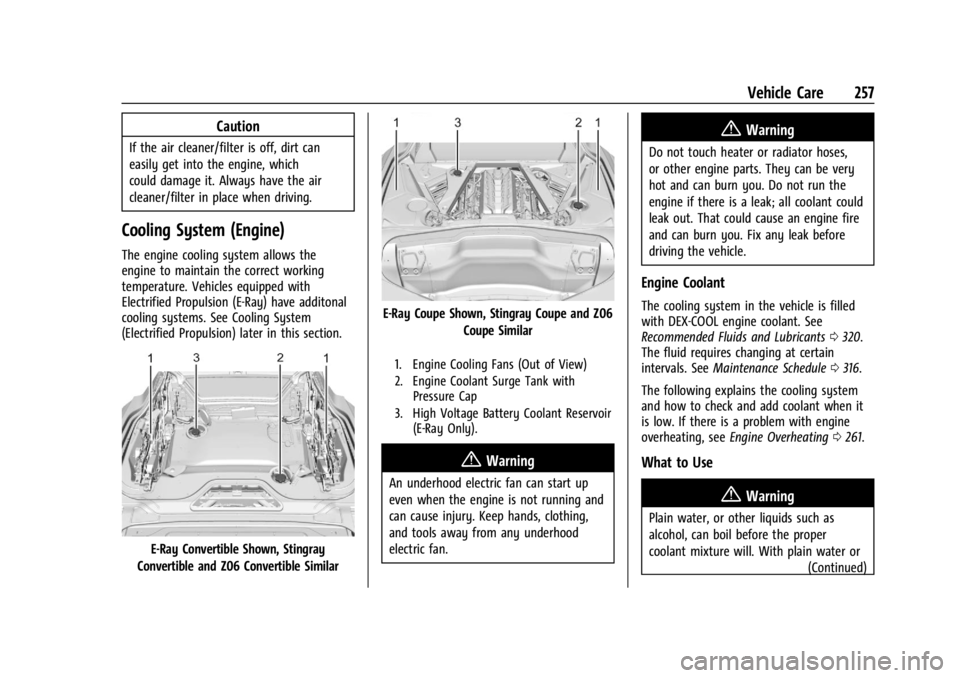
E-Ray Convertible Shown, Stingray
Convertible and Z06 Convertible Similar
E-Ray Coupe Shown, Stingray Coupe and Z06 Coupe Similar
1. Engine Cooling Fans (Out of View)
2. Engine Coolant Surge Tank withPressure Cap
3. High Voltage Battery Coolant Reservoir (E-Ray Only).
{Warning
An underhood electric fan can start up
even when the engine is not running and
can cause injury. Keep hands, clothing,
and tools away from any underhood
electric fan.
{Warning
Do not touch heater or radiator hoses,
or other engine parts. They can be very
hot and can burn you. Do not run the
engine if there is a leak; all coolant could
leak out. That could cause an engine fire
and can burn you. Fix any leak before
driving the vehicle.
Engine Coolant
The cooling system in the vehicle is filled
with DEX-COOL engine coolant. See
Recommended Fluids and Lubricants 0320.
The fluid requires changing at certain
intervals. See Maintenance Schedule 0316.
The following explains the cooling system
and how to check and add coolant when it
is low. If there is a problem with engine
overheating, see Engine Overheating 0261.
What to Use
{Warning
Plain water, or other liquids such as
alcohol, can boil before the proper
coolant mixture will. With plain water or
(Continued)
Page 260 of 362
Chevrolet Corvette Owner Manual (GMNA-Localizing-U.S./Canada/Mexico-
17272984) - 2024 - CRC - 2/20/23
Vehicle Care 259
How to Add Coolant to the Coolant
Surge Tank
{Warning
Spilling coolant on hot engine parts can
burn you. Coolant contains ethylene
glycol and it will burn if the engine parts
are hot enough.
{Warning
Steam and scalding liquids from a hot
cooling system are under pressure.
Turning the pressure cap, even a little,
can cause them to come out at high
speed and you could be burned. Never
turn the cap when the cooling system,
including the pressure cap, is hot. Wait
for the cooling system and pressure cap
to cool.
If coolant is needed, be sure the cooling
system is cool, then add the proper
DEX-COOL coolant mixture directly to the
surge tank. 1. Open the Hatch/Trunk. See
Hatch (Trunk)
0 20.
2. When the cooling system, including the
coolant surge tank pressure cap and
engine, is no longer hot, remove the
pressure cap.
Turn the pressure cap slowly
counterclockwise about one-quarter turn
and then stop.
If a hiss is heard, wait for that to stop.
A hiss means there is still some
pressure left.
3. Keep turning the pressure cap slowly, and remove it.
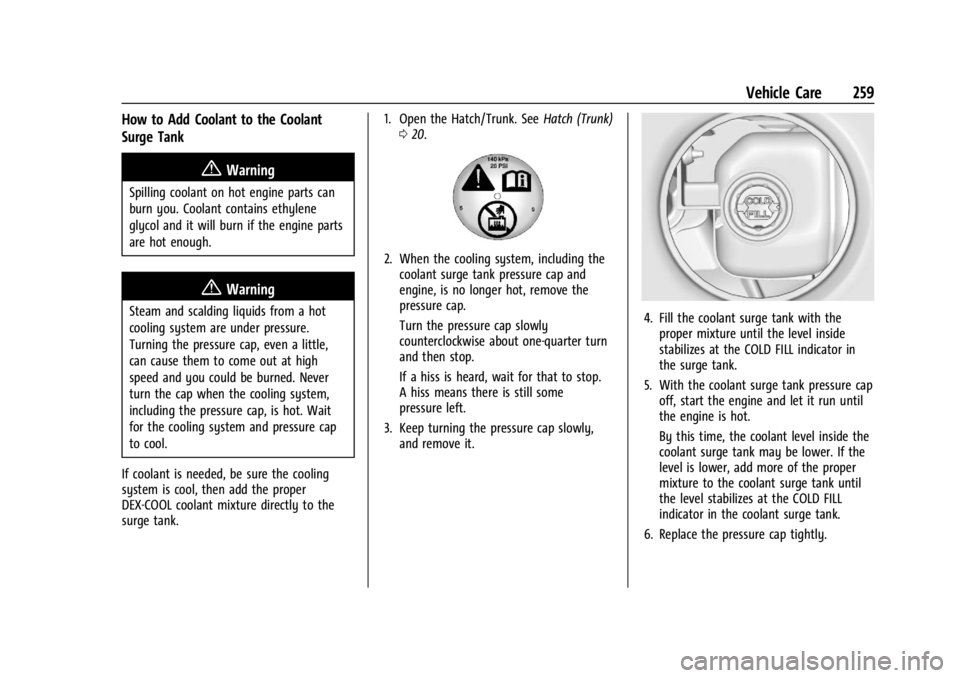
4. Fill the coolant surge tank with theproper mixture until the level inside
stabilizes at the COLD FILL indicator in
the surge tank.
5. With the coolant surge tank pressure cap off, start the engine and let it run until
the engine is hot.
By this time, the coolant level inside the
coolant surge tank may be lower. If the
level is lower, add more of the proper
mixture to the coolant surge tank until
the level stabilizes at the COLD FILL
indicator in the coolant surge tank.
6. Replace the pressure cap tightly.
Page 262 of 362
Chevrolet Corvette Owner Manual (GMNA-Localizing-U.S./Canada/Mexico-
17272984) - 2024 - CRC - 2/20/23
Vehicle Care 261
by your dealer. The high voltage cooling
system reservoirs have tamper- resistant
pressure caps. The coolant should only be
serviced by a qualified technician.
Engine Overheating
The vehicle has several indicators to warn of
engine overheating.
There is an engine coolant temperature
gauge on the instrument cluster. SeeEngine
Coolant Temperature Gauge 087. The
vehicle may also display a message on the
Driver Information Center (DIC).
If the decision is made not to lift the hatch
but to get service help right away, see
Roadside Assistance Program 0332.
If the decision is made to lift the hatch,
make sure the vehicle is parked on a level
surface.
Then check to see if the engine cooling fans
are running. There are two cooling fans
located in the front (one at each corner) and
two cooling fans in the rear (one on each
side of the engine). If the engine is
overheating, the fans should be running.
If they are not, do not continue to run the
engine, and have the vehicle serviced.
Caution
Do not run the engine if there is a leak
in the engine cooling system. This can
cause a loss of all coolant and can
damage the system and vehicle. Have
any leaks fixed right away.
If Steam Is Coming from the Engine
{Warning
Steam and scalding liquids from a hot
cooling system are under pressure.
Turning the pressure cap, even a little,
can cause them to come out at high
speed and you could be burned. Never
turn the cap when the cooling system,
including the pressure cap, is hot. Wait
for the cooling system and pressure cap
to cool.
If Steam Is Coming from the Engine
Compartment with no Overheat Warning
Water from rain and car washes could enter
the engine compartment and contact hot
surfaces. If steam is coming from the engine
compartment with no accompanying
overheat warning, no service is needed.
If No Steam Is Coming from the Engine
If an engine overheat warning is displayed
but no steam can be seen or heard, the
problem may not be too serious. Sometimes
the engine can get a little too hot when the
vehicle:
.Climbs a long hill on a hot day.
.Stops after high-speed driving.
.Idles for long periods in traffic.
If the overheat warning is displayed with no
sign of steam: 1. Turn the air conditioning off.
2. Turn the heater on to the highest temperature and to the highest fan
speed. Open the windows as necessary.
3. When it is safe to do so, pull off the road, shift to P (Park) or N (Neutral), and
let the engine idle.
If the engine coolant temperature gauge is
no longer in the shaded area or an overheat
warning no longer displays, the vehicle can
be driven. Continue to drive the vehicle
slowly for about 10 minutes. Keep a safe
vehicle distance from the vehicle in front.
If the warning does not come back on,
Page 268 of 362
Chevrolet Corvette Owner Manual (GMNA-Localizing-U.S./Canada/Mexico-
17272984) - 2024 - CRC - 2/20/23
Vehicle Care 267
12-Volt Lithium-Ion Battery (E-Ray)
{Warning
WARNING:Battery posts, terminals and
related accessories can expose you to
chemicals including lead and lead
compounds, which are known to the
State of California to cause cancer and
birth defects or other reproductive harm.
Wash hands after handling. For more
information go to
www.P65Warnings.ca.gov.
See California Proposition 65 Warning 01.
Charging the 12-volt Lithium-ion battery
The 12-volt lithium-ion battery can be
charged using a GM approved charger
designed for lithium-Ion batteries. Follow the
instructions that come with the GM
approved charger.
{Warning
Use only GM approved jump start boxes
and charging tools. Use of unapproved
jump start boxes, charging tools, a loose
battery, or battery charger may cause
personal injury, death, or damage to the (Continued)
Warning (Continued)
vehicle. For GM approved jump start
boxes or charging tools, see
https://gmdesolutions.com.
Use the Battery Voltage info tile to
determine if your battery is low and needs
to be charged. See Instrument Cluster081
under the “Info Tiles” section for more
information.
GM recommends charging your 12-volt
lithium-ion battery when storing your
vehicle for long periods of time. See “Vehicle
Storage” later on in this section.
If the vehicle isn’t starting and the 12-volt
lithium-ion battery has run down, charging
the 12-volt lithium-ion battery may solve the
issue. See Jump Starting - North America
0 299.
High Voltage Battery (E-Ray)
Only a trained service technician should
inspect, test, or replace the high voltage
battery. The dealer has information on
how to recycle the high voltage battery.
There is also information available at
https://www.recyclemybattery.com.
{Warning
Damage to the high voltage battery or
high voltage system can create a risk of
electric shock, overheating, or fire.
If the vehicle is damaged from a
moderate to severe crash, flood, fire,
or other event, the vehicle should be
inspected as soon as possible. Until the
vehicle has been inspected, store it
outside at least 15 m (50 ft) from any
structure or anything that can burn.
Ventilate the vehicle by opening a
window or a door.
Contact Customer Assistance as soon as
possible to determine whether an
inspection is needed. See Customer
Assistance Offices 0331.
If the vehicle is in a crash, the sensing
system may shut down the high voltage
system. When this occurs, the high voltage
battery is disconnected and the vehicle will
not start. The SERVICE VEHICLE SOON
message in the Driver Information Center
(DIC) will display. Before the vehicle can