2024 CHEVROLET CORVETTE transmission
[x] Cancel search: transmissionPage 233 of 362
Chevrolet Corvette Owner Manual (GMNA-Localizing-U.S./Canada/Mexico-
17272984) - 2024 - CRC - 2/20/23
232 Vehicle Care
General Information
For service and parts needs, visit your
dealer. You will receive genuine GM parts
and GM-trained and supported service
people.
Genuine GM parts have one of these marks:
California Perchlorate Materials
Requirements
Certain types of automotive applications,
such as airbag initiators, seat belt
pretensioners, and lithium batteries
contained in electronic keys, may contain
perchlorate materials. Perchlorate Material–
special handling may apply. See
www.dtsc.ca.gov/hazardouswaste/
perchlorate.
Accessories and Modifications
Adding non-dealer accessories or making
modifications to the vehicle can affect
vehicle performance and safety, including
such things as airbags, braking, stability,
ride and handling, emissions systems,
aerodynamics, durability, Driver Assistance
Systems, and electronic systems like antilock
brakes, traction control, and stability control.
These accessories or modifications could
even cause malfunction or damage not
covered by the vehicle warranty.
Damage to suspension components caused
by modifying vehicle height outside of
factory settings will not be covered by the
vehicle warranty. Damage to vehicle components resulting
from modifications or the installation or use
of non-GM certified parts, including control
module or software modifications, is not
covered under the terms of the vehicle
warranty and may affect remaining
warranty coverage for affected parts.
GM Accessories are designed to complement
and function with other systems on the
vehicle. See your dealer to accessorize the
vehicle using genuine GM Accessories
installed by a dealer technician.
Also, see
Adding Equipment to the
Airbag-Equipped Vehicle 061.
Lifting the Vehicle
{Warning
Lifting a vehicle can cause an injury. The
vehicle can slip off the jack and roll over
you or other people. You and they could
be badly injured. Find a level place to lift
your vehicle. To help prevent the vehicle
from moving:
1. Set the parking brake firmly.
2. Put the transmission in P (Park). (Continued)
Page 254 of 362
Chevrolet Corvette Owner Manual (GMNA-Localizing-U.S./Canada/Mexico-
17272984) - 2024 - CRC - 2/20/23
Vehicle Care 253
How to Reset the Engine Oil Life System
Reset the system whenever the engine oil is
changed so that the system can calculate
the next engine oil change. To reset the
system:1. Scroll through the DIC Info Pages menu until the remaining Engine Oil
percentage is displayed. See Driver
Information Center (DIC) 099.
2. Press and hold the thumbwheel on the DIC while the Oil Life display is active.
When prompted, confirm reset. The oil
life will change to 100%.
If the CHANGE ENGINE OIL SOON message
comes back on when the vehicle is started,
the engine oil life system has not reset.
Repeat the procedure.
Dual Clutch Transmission Fluid
How to Check Dual Clutch Transmission
Fluid
It is not necessary to check the transmission
fluid level. A transmission fluid leak is the
only reason for fluid loss. If a leak occurs,
take the vehicle to the dealer and have it
repaired as soon as possible. The vehicle is not equipped with a
transmission fluid level dipstick. There is a
special procedure for checking and changing
the transmission fluid. Because this
procedure is difficult, this should be done at
the dealer. Contact the dealer for additional
information or the procedure can be found
in the service manual. To purchase a service
manual, see
Publication Ordering
Information 0337.
Caution
Use of the incorrect transmission fluid
may damage the vehicle, and the
damage may not be covered by the
vehicle warranty. Always use the correct
transmission fluid. See Recommended
Fluids and Lubricants 0320.
Change the fluid and external canister filter
at the proper intervals. See Maintenance
Schedule 0316. Be sure to use the correct
fluid. See Recommended Fluids and
Lubricants 0320.
Dual Clutch Transmission Fluid Life
System
When to Change the Dual Clutch
Transmission Fluid
This vehicle has a computer that indicates
when to change the transmission fluid. This
is based on a combination of factors which
include temperature and miles driven. Based
on driving conditions, the mileage at which
a fluid change is indicated can vary
considerably. For the fluid life system to
work properly, the system must be reset
every time the fluid is changed. When the
system has calculated that fluid life has
been diminished, it indicates that a fluid
change is necessary. A CHANGE
TRANSMISSION FLUID SOON message comes
on. Change the fluid as soon as possible
within the next 1 000 km (600 mi). Failure
to change transmission fluid at required
intervals could lead to suboptimal
transmission performance. Your dealer has
trained service technicians who will change
the fluid and reset the system. If the system
is ever reset accidentally, the fluid must be
changed 72 000 km (45,000 mi) after the
last fluid change.
Page 255 of 362
Chevrolet Corvette Owner Manual (GMNA-Localizing-U.S./Canada/Mexico-
17272984) - 2024 - CRC - 2/20/23
254 Vehicle Care
When to Replace the Dual Clutch
Transmission Fluid Filter
This vehicle has a computer that indicates
when to change the transmission external
canister fluid filter. This is based on the
number of miles driven as outlined in the
Service and Maintenance section. For the
fluid filter life system to work properly, the
system must be reset every time the filter is
replaced. When the system has calculated
that the external canister filter is near the
mileage interval, a REPLACE TRANSMISSION
OIL FILTER SOON message comes on. Replace
the external canister filter before the
indicator reaches 0%.
Failure to replace the transmission filter at
required intervals could lead to suboptimal
transmission performance. Your dealer has
trained service technicians who will replace
the external canister filter and reset the
system. If the system is ever reset
accidentally, the filter should be replaced
according to the service intervals indicated
in the Service and Maintenance section until
the next filter change. If the next filter
change is the first, follow the service
interval until the second filter change,
resetting the filter life system at each filter
change.
How to Reset the Dual Clutch
Transmission Fluid and Filter Life System
Reset the respective system whenever the
transmission fluid or external canister filter
is replaced so that the system can calculate
the next service interval.
To reset:1. Place the vehicle in P (Park).
2. Select Transmission Fluid Life or Transmission Oil Filter Life on the DIC
menu. See Driver Information Center
(DIC) 099.
3. Press the thumbwheel to move to the Reset submenu. Select Reset
Transmission Fluid or Reset Transmission
Oil Filter. A confirmation page will be
displayed, press the thumbwheel again
to confirm the reset.
4. When the Transmission Fluid/Filter Life System is successfully reset, 100%
remaining life will be displayed.
Engine Air Filter Life System
If equipped, this feature provides the engine
air filter’s remaining life and best timing for
a change. The timing to change an engine
air filter depends on driving and
environmental conditions.
When to Change Engine Air Filter
When the Driver Information Center (DIC)
displays a message to replace the engine air
filter at the next oil change, follow this
timing.
When the DIC displays a message to replace
the engine air filter soon, replace the engine
air filter at the earliest convenience.
The system must be reset after the engine
air filter is changed.
If the DIC displays a message to check the
engine air filter system, see your dealer.
How to Reset Engine Air Filter Life
System
Reset the system whenever the engine air
filter is replaced so that the system can
calculate the next engine air filter change.
To reset:
1. Place the vehicle in P (Park).
2. Display the Air Filter Life on the DIC. See Driver Information Center (DIC) 099.
3. Press the thumbwheel on the steering wheel to move to the Reset/Disable
display area. Select Reset and press the
thumbwheel for several seconds.
4. Press the thumbwheel to confirm reset.
Page 270 of 362
Chevrolet Corvette Owner Manual (GMNA-Localizing-U.S./Canada/Mexico-
17272984) - 2024 - CRC - 2/20/23
Vehicle Care 269
negative (−) cable from the battery. All
vehicle memory settings will need to be
reset when battery power is restored.
12-volt Lithium-ion Battery (E-Ray)
When the vehicle is going to be stored for
longer than one week, the 12-volt lithium-ion
battery negative and Controller Area
Network (CAN) signal connectors should be
disconnected to preserve the life of the
12-volt lithium-ion battery. Ensure the signal
connector is facing downwards and shielded
from direct water exposure to prevent
corrosion while disconnected. A battery
maintainer package can be used to keep the
battery charged when the vehicle is not
in use.
{Warning
Lithium-ion battery cells contain
chemicals that can burn you and gas that
can explode under extreme conditions.
Explosive gases can cause blindness and/
or injury. You can be badly hurt if you
are not careful. Always wear eye
protection. SeeJump Starting - North
America 0299 for tips on working
around a lithium-ion battery without
getting hurt.
{Warning
Use only GM approved jump start boxes
and charging tools. Use of unapproved
jump start boxes, charging tools, a loose
battery, or battery charger may cause
personal injury, death, or damage to the
vehicle. For GM approved jump start
boxes or charging tools, see
https://gmdesolutions.com.
When storing the vehicle on a long-term
basis:
‐ Attach a compatible battery tender or
trickle charger to the 12-volt lithium-ion
battery.
‐ Keep the remote key more than 3 m
(10 ft) away from the vehicle.
High Voltage Battery (E-Ray)
After extended storage, it is possible that
the vehicle may not operate. If this happens,
the high voltage battery may need to be
plugged in and charged.
Park Brake and P (Park)
Mechanism Check
{Warning
When you are doing this check, the
vehicle could begin to move. You or
others could be injured and property
could be damaged. Make sure there is
room in front of the vehicle in case it
begins to roll. Be ready to apply the
regular brake at once should the vehicle
begin to move.
Park on a fairly steep hill, with the vehicle
facing downhill. Keeping your foot on the
regular brake, set the parking brake.
.To check the parking brake's holding
ability: With the engine running and the
transmission in N (Neutral), slowly remove
foot pressure from the regular brake
pedal. Do this until the vehicle is held by
the parking brake only.
.To check the P (Park) mechanism's holding
ability: With the engine running, shift to
P (Park). Then release the parking brake
followed by the regular brake.
Contact your dealer if service is required.
Page 275 of 362

Chevrolet Corvette Owner Manual (GMNA-Localizing-U.S./Canada/Mexico-
17272984) - 2024 - CRC - 2/20/23
274 Vehicle Care
The vehicle may not be equipped with all of
the fuses and relays shown.Fuses Usage
F1 –
F2 Front Wiper
F3 Cooling Fan 1
F4 – Fuses Usage
F5 Cooling Fan 2
F6 Front Blower F7 Automatic Level Control
F8 Shifter Interface Board Module Fuses
Usage
F9 Display IP Cluster/HVAC/ Center Stack Module
F10 Traction Power Inverter Module Battery 1
F11 USB
F12 Traction Power Inverter Module Battery 2
F13 Transmission Oil Pump Motor
F14 Glove Box F15 –
F16 –
Electrical Park Brake/
Automatic Occupant
Sensing (E-Ray)
F17 Remote Function Actuator
F18 Front Trunk Release
F19 Intelligent Battery Sensor
F20 Exterior Lighting Module 1
Page 278 of 362
Chevrolet Corvette Owner Manual (GMNA-Localizing-U.S./Canada/Mexico-
17272984) - 2024 - CRC - 2/20/23
Vehicle Care 277
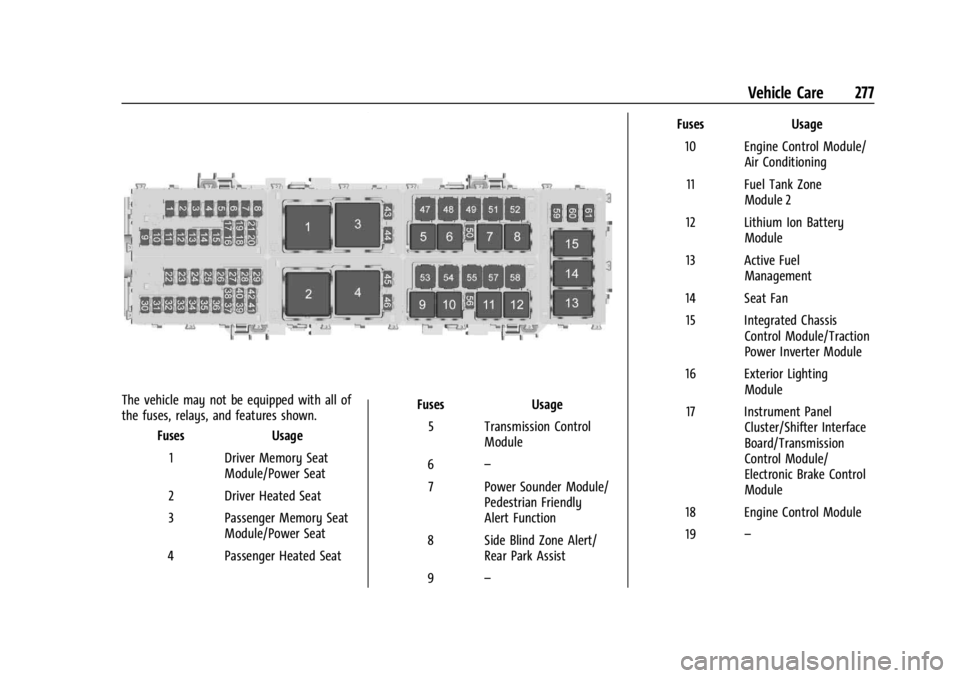
The vehicle may not be equipped with all of
the fuses, relays, and features shown.Fuses Usage
1 Driver Memory Seat Module/Power Seat
2 Driver Heated Seat
3 Passenger Memory Seat Module/Power Seat
4 Passenger Heated Seat Fuses
Usage
5 Transmission Control Module
6 –
7 Power Sounder Module/ Pedestrian Friendly
Alert Function
8 Side Blind Zone Alert/ Rear Park Assist
9 – Fuses
Usage
10 Engine Control Module/ Air Conditioning
11 Fuel Tank Zone Module 2
12 Lithium Ion Battery Module
13 Active Fuel Management
14 Seat Fan 15 Integrated Chassis Control Module/Traction
Power Inverter Module
16 Exterior Lighting Module
17 Instrument Panel Cluster/Shifter Interface
Board/Transmission
Control Module/
Electronic Brake Control
Module
18 Engine Control Module
19 –
Page 279 of 362

Chevrolet Corvette Owner Manual (GMNA-Localizing-U.S./Canada/Mexico-
17272984) - 2024 - CRC - 2/20/23
278 Vehicle Care
FusesUsage
20 Sensing and Diagnostic Module/Inside Rear
View Mirror
21 Exhaust Valve Solenoid
22 Fuel Pump/Fuel Tank Zone Module 1
23 Tonneau Left
24 Tonneau Right 25 Convertible Top Right
26 Convertible Top Left 27 Electronic Suspension Control
28 Scavenge Coolant Pump Motor
29 CGM
30 O2 Sensor 31 O2 Sensor/Engine Oil/ Canister Purge/Active
Fuel Management
32 Ignition Even
33 Ignition Odd
34 Engine Control Module 1 Fuses
Usage
35 Engine Control Module/ Mass Air Flow Sensor/
O2 Sensor/Air
Conditioning
36 Power Front Closure Module/Front Camera
Module
37 Canister Vent
38 Latch Control Module
39 Right Window Switch/ Door Lock
40 Left Window Switch/ Door Lock
41 Pedestrian Friendly Alert Module/High
Voltage System Lock
Out Switch
42 Engine Control Module 2
43 Charged Air Cooler
44 Air Conditioning Compressor
45 Transmission Control Module
46 – Fuses
Usage
47 DC/DC Battery 1
48 DC/DC Battery 2
49 Auxiliary Cooling Fan Right
50 Virtual Key Back up Module
51 Starter Pinion
52 Auxiliary Pump
53 Starter Solenoid
54 Auxiliary Cooling Fan Left
55 Automatic Leveling Control
56 Energy Storage Coolant Pump/Power Electronics
Coolant Pump
57 Rear Window Defogger
58 –
59 Left/Right Window
60 Passenger Power Seat 61 Driver Power Seat
Page 302 of 362
Chevrolet Corvette Owner Manual (GMNA-Localizing-U.S./Canada/Mexico-
17272984) - 2024 - CRC - 2/20/23
Vehicle Care 301
Jump Starting Procedure (All Models)
1. Check the other vehicle. It must have a12-volt battery with a negative ground
system.
Caution
If the other vehicle does not have a
12-volt system with a negative ground,
both vehicles can be damaged. Only use
a vehicle that has a 12-volt system with a
negative ground for jump starting.
2. Get the vehicles close enough so the jumper cables can reach, but be sure the
vehicles are not touching each other.
If they are, it could cause a ground
connection you do not want. You would
not be able to start the vehicle, and the
bad grounding could damage the
electrical systems.
To avoid the possibility of the vehicles
rolling, set the parking brake firmly on
both vehicles involved in the jump start
procedure. Put an automatic transmission
in P (Park) or a manual transmission in
Neutral before setting the parking
brakes.
Caution
If any accessories are left on or plugged
in during the jump starting procedure,
they could be damaged. The repairs
would not be covered by the vehicle
warranty. Whenever possible, turn off or
unplug all accessories on either vehicle
when jump starting.
3. Turn off the ignition on both vehicles. Unplug unnecessary accessories plugged
into the accessory power outlet. Turn off
the radio and all lamps that are not
needed. This will avoid sparks and help
save both batteries. And it could save
the radio!
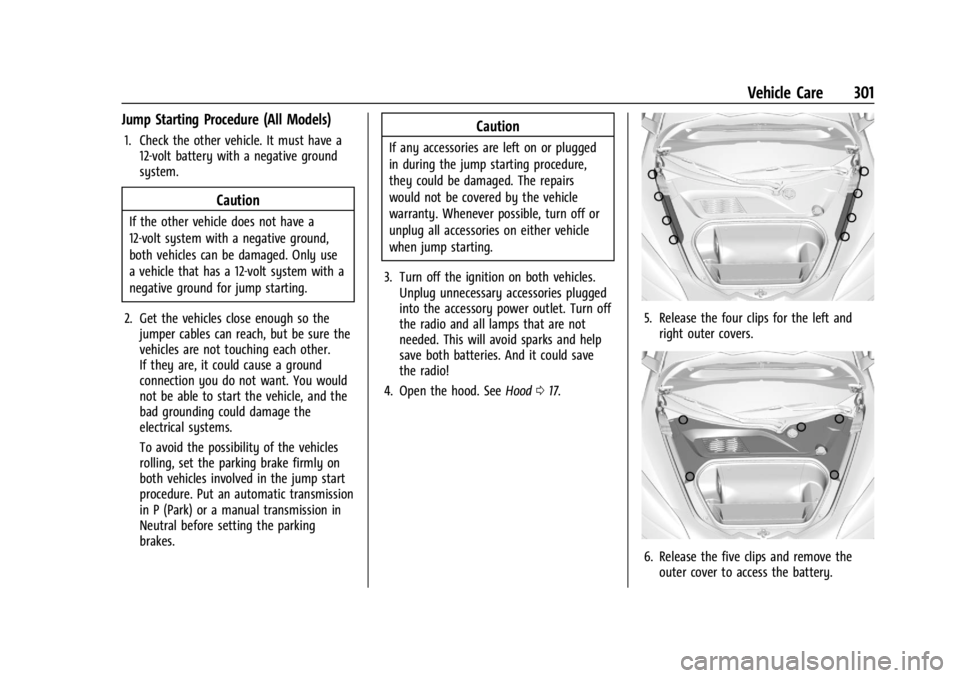
4. Open the hood. See Hood017.
5. Release the four clips for the left and
right outer covers.
6. Release the five clips and remove theouter cover to access the battery.