2024 CHEVROLET CORVETTE lights
[x] Cancel search: lightsPage 208 of 362
Chevrolet Corvette Owner Manual (GMNA-Localizing-U.S./Canada/Mexico-
17272984) - 2024 - CRC - 2/20/23
Driving and Operating 207
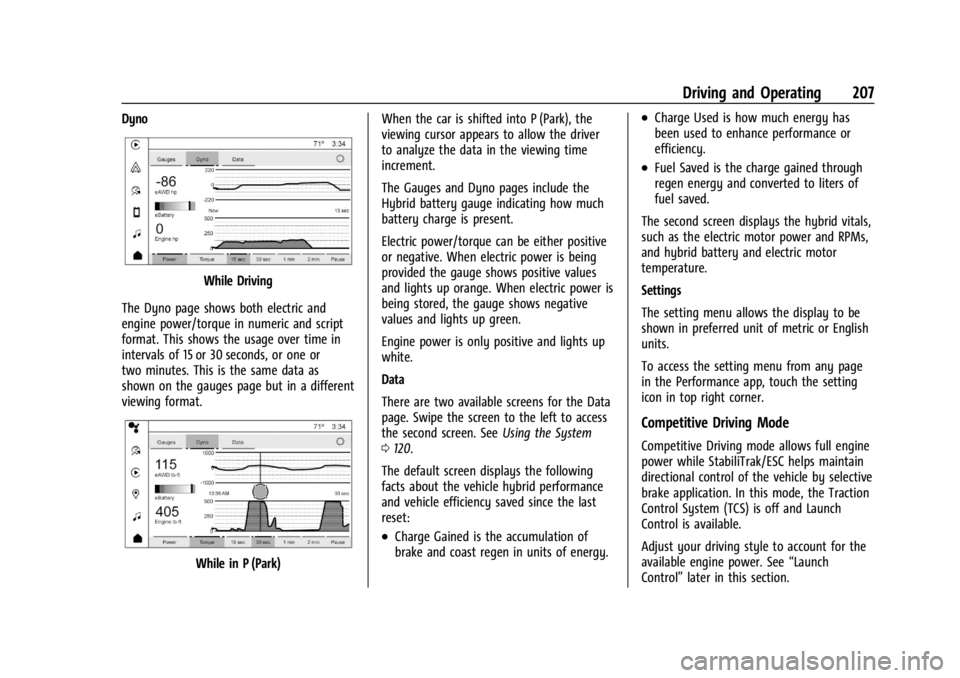
Dyno
While Driving
The Dyno page shows both electric and
engine power/torque in numeric and script
format. This shows the usage over time in
intervals of 15 or 30 seconds, or one or
two minutes. This is the same data as
shown on the gauges page but in a different
viewing format.
While in P (Park) When the car is shifted into P (Park), the
viewing cursor appears to allow the driver
to analyze the data in the viewing time
increment.
The Gauges and Dyno pages include the
Hybrid battery gauge indicating how much
battery charge is present.
Electric power/torque can be either positive
or negative. When electric power is being
provided the gauge shows positive values
and lights up orange. When electric power is
being stored, the gauge shows negative
values and lights up green.
Engine power is only positive and lights up
white.
Data
There are two available screens for the Data
page. Swipe the screen to the left to access
the second screen. See
Using the System
0 120.
The default screen displays the following
facts about the vehicle hybrid performance
and vehicle efficiency saved since the last
reset:
.Charge Gained is the accumulation of
brake and coast regen in units of energy.
.Charge Used is how much energy has
been used to enhance performance or
efficiency.
.Fuel Saved is the charge gained through
regen energy and converted to liters of
fuel saved.
The second screen displays the hybrid vitals,
such as the electric motor power and RPMs,
and hybrid battery and electric motor
temperature.
Settings
The setting menu allows the display to be
shown in preferred unit of metric or English
units.
To access the setting menu from any page
in the Performance app, touch the setting
icon in top right corner.
Competitive Driving Mode
Competitive Driving mode allows full engine
power while StabiliTrak/ESC helps maintain
directional control of the vehicle by selective
brake application. In this mode, the Traction
Control System (TCS) is off and Launch
Control is available.
Adjust your driving style to account for the
available engine power. See “Launch
Control” later in this section.
Page 209 of 362
Chevrolet Corvette Owner Manual (GMNA-Localizing-U.S./Canada/Mexico-
17272984) - 2024 - CRC - 2/20/23
208 Driving and Operating
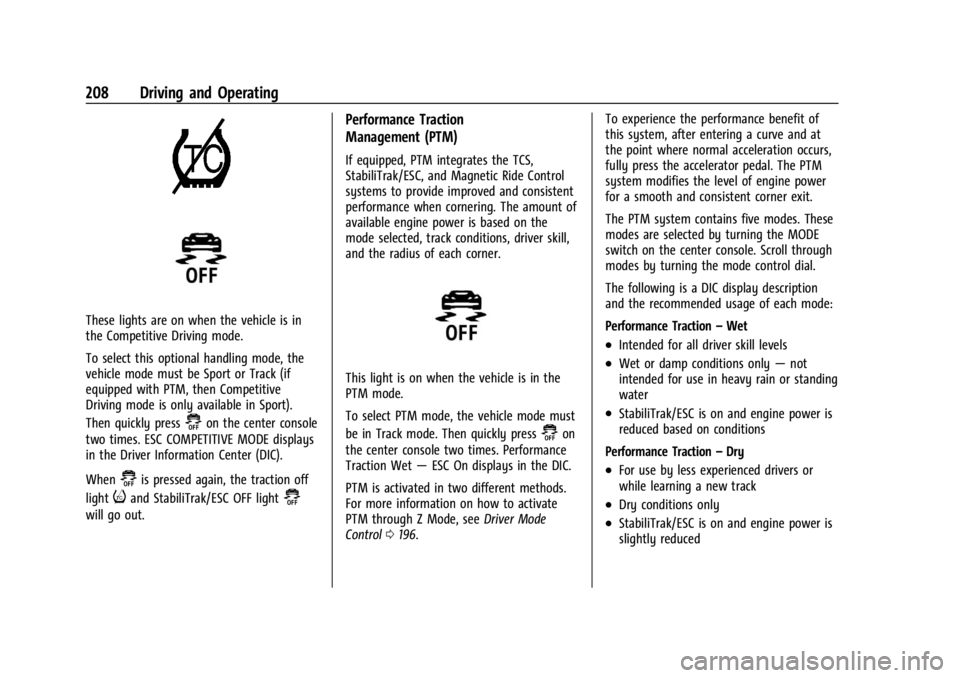
These lights are on when the vehicle is in
the Competitive Driving mode.
To select this optional handling mode, the
vehicle mode must be Sport or Track (if
equipped with PTM, then Competitive
Driving mode is only available in Sport).
Then quickly press
@on the center console
two times. ESC COMPETITIVE MODE displays
in the Driver Information Center (DIC).
When
@is pressed again, the traction off
light
iand StabiliTrak/ESC OFF light@
will go out.
Performance Traction
Management (PTM)
If equipped, PTM integrates the TCS,
StabiliTrak/ESC, and Magnetic Ride Control
systems to provide improved and consistent
performance when cornering. The amount of
available engine power is based on the
mode selected, track conditions, driver skill,
and the radius of each corner.
This light is on when the vehicle is in the
PTM mode.
To select PTM mode, the vehicle mode must
be in Track mode. Then quickly press
@on
the center console two times. Performance
Traction Wet —ESC On displays in the DIC.
PTM is activated in two different methods.
For more information on how to activate
PTM through Z Mode, see Driver Mode
Control 0196. To experience the performance benefit of
this system, after entering a curve and at
the point where normal acceleration occurs,
fully press the accelerator pedal. The PTM
system modifies the level of engine power
for a smooth and consistent corner exit.
The PTM system contains five modes. These
modes are selected by turning the MODE
switch on the center console. Scroll through
modes by turning the mode control dial.
The following is a DIC display description
and the recommended usage of each mode:
Performance Traction
–Wet
.Intended for all driver skill levels
.Wet or damp conditions only —not
intended for use in heavy rain or standing
water
.StabiliTrak/ESC is on and engine power is
reduced based on conditions
Performance Traction –Dry
.For use by less experienced drivers or
while learning a new track
.Dry conditions only
.StabiliTrak/ESC is on and engine power is
slightly reduced
Page 219 of 362
Chevrolet Corvette Owner Manual (GMNA-Localizing-U.S./Canada/Mexico-
17272984) - 2024 - CRC - 2/20/23
218 Driving and Operating
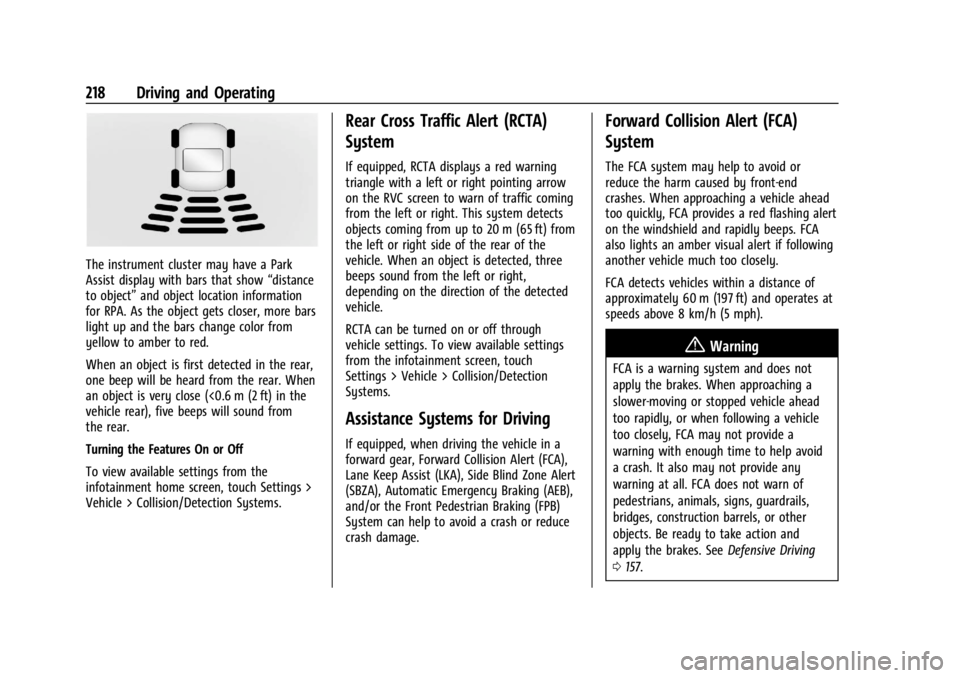
The instrument cluster may have a Park
Assist display with bars that show“distance
to object” and object location information
for RPA. As the object gets closer, more bars
light up and the bars change color from
yellow to amber to red.
When an object is first detected in the rear,
one beep will be heard from the rear. When
an object is very close (<0.6 m (2 ft) in the
vehicle rear), five beeps will sound from
the rear.
Turning the Features On or Off
To view available settings from the
infotainment home screen, touch Settings >
Vehicle > Collision/Detection Systems.
Rear Cross Traffic Alert (RCTA)
System
If equipped, RCTA displays a red warning
triangle with a left or right pointing arrow
on the RVC screen to warn of traffic coming
from the left or right. This system detects
objects coming from up to 20 m (65 ft) from
the left or right side of the rear of the
vehicle. When an object is detected, three
beeps sound from the left or right,
depending on the direction of the detected
vehicle.
RCTA can be turned on or off through
vehicle settings. To view available settings
from the infotainment screen, touch
Settings > Vehicle > Collision/Detection
Systems.
Assistance Systems for Driving
If equipped, when driving the vehicle in a
forward gear, Forward Collision Alert (FCA),
Lane Keep Assist (LKA), Side Blind Zone Alert
(SBZA), Automatic Emergency Braking (AEB),
and/or the Front Pedestrian Braking (FPB)
System can help to avoid a crash or reduce
crash damage.
Forward Collision Alert (FCA)
System
The FCA system may help to avoid or
reduce the harm caused by front-end
crashes. When approaching a vehicle ahead
too quickly, FCA provides a red flashing alert
on the windshield and rapidly beeps. FCA
also lights an amber visual alert if following
another vehicle much too closely.
FCA detects vehicles within a distance of
approximately 60 m (197 ft) and operates at
speeds above 8 km/h (5 mph).
{Warning
FCA is a warning system and does not
apply the brakes. When approaching a
slower-moving or stopped vehicle ahead
too rapidly, or when following a vehicle
too closely, FCA may not provide a
warning with enough time to help avoid
a crash. It also may not provide any
warning at all. FCA does not warn of
pedestrians, animals, signs, guardrails,
bridges, construction barrels, or other
objects. Be ready to take action and
apply the brakes. See Defensive Driving
0 157.
Page 225 of 362

Chevrolet Corvette Owner Manual (GMNA-Localizing-U.S./Canada/Mexico-
17272984) - 2024 - CRC - 2/20/23
224 Driving and Operating
SBZA Detection Zones
The SBZA sensor covers a zone
approximately one lane over from both
sides of the vehicle, or approximately
3.5 m (11 ft). The height of the zone is
approximately between 0.5 m (1.5 ft) and
2 m (6 ft) off the ground. This zone starts at
approximately the middle of the vehicle and
goes back 5 m (16 ft).
How the System Works
The SBZA symbol lights up in the side
mirrors when the system detects a moving
vehicle in the next lane over that is in the
side blind zone. This indicates it may be
unsafe to change lanes. Before making alane change, check the SBZA display, check
mirrors, glance over your shoulder, and use
the turn signals.
Left Side Mirror
DisplayRight Side Mirror Display
When the vehicle is started, both outside
mirror SBZA displays will briefly come on to
indicate the system is operating. When the
vehicle is in a forward gear, the left- or
right-side mirror display will light up if a
moving vehicle is detected in that blind
zone. If the turn signal is activated in the
same direction as a detected vehicle, this
display will flash as an extra warning not to
change lanes.
SBZA can be disabled through vehicle
personalization. To view available settings
from the infotainment screen, touch
Settings > Vehicle > Collision/Detection
Systems. If SBZA is disabled by the driver,
the SBZA mirror displays will not light up.
When the System Does Not Seem to
Work Properly
SBZA displays may not come on when
passing a vehicle quickly, for a stopped
vehicle. SBZA may alert to objects attached
to the vehicle, such as a bicycle, or object
extending out to either side of the vehicle.
This is normal system operation; the vehicle
does not need service.
SBZA may not always alert the driver to
vehicles in the side blind zone, especially in
wet conditions. The system does not need
to be serviced. The system may light up due
to guardrails, signs, trees, shrubs, and other
non-moving objects. This is normal system
operation; the vehicle does not need service.
SBZA may not operate when the SBZA
sensors in the left or right corners of the
rear bumper are covered with mud, dirt,
snow, ice, or slush, or in heavy rainstorms.
For cleaning instructions, see "Washing the
Vehicle" under Exterior Care0306. If the
DIC still displays the system unavailable
message after cleaning both sides of the
vehicle toward the rear corners of the
vehicle, see your dealer.
Page 304 of 362

Chevrolet Corvette Owner Manual (GMNA-Localizing-U.S./Canada/Mexico-
17272984) - 2024 - CRC - 2/20/23
Vehicle Care 303
4. Once the jump start box has beenconnected, set the jump start box to ON.
After the jump start box is powered on,
ensure the instrument cluster lights up
before starting the vehicle.
5. After the instrument cluster lights up, use a GM approved battery charger to
fully charge the battery.
Jumper Cable Removal 1. Set the jump start box to OFF.
2. Disconnect the black (–) cable to the negative post (–) on the discharged
lithium-ion battery.
3. Disconnect the red (+) cable to the discharged lithium-ion battery
positive (+) tab.
Charging The 12-Volt Lithium-Ion Battery
The 12-volt lithium-ion battery can be
charged using a GM approved charger
designed for lithium-ion batteries. Follow the
instructions listed in the charger operating
manual. See Battery - North America 0266
for more information.
Towing the Vehicle
Transporting a Disabled Vehicle
Caution
Incorrectly transporting a disabled vehicle
may cause damage to the vehicle. Use
proper tire straps to secure the vehicle to
the flatbed tow truck. Do not strap or
hook to any frame, underbody,
or suspension component not specified
below. Do not move vehicles with rear
axle tires on the ground. Damage is not
covered by the vehicle warranty.
Caution
The vehicle may be equipped with an
electric parking brake and/or an
electronic shifter. In the event of a loss of
12-volt battery power, the electric parking
brake cannot be released, and the vehicle
cannot be shifted to N (Neutral). Tire
skates or dollies must be used under the
non-rolling tires to prevent damage while
loading/unloading the vehicle. Dragging
the vehicle will cause damage not
covered by the vehicle warranty.
Caution
The vehicle may be equipped with a tow
eye. Improper use of the tow eye may
cause damage to the vehicle and is not
covered by the vehicle warranty.
If equipped, use the tow eye to load the
vehicle onto a flatbed tow truck from a
flat road surface, or to move the vehicle
a very short distance at a walking pace.
The tow eye is not designed for off-road
recovery. The vehicle must be in
N (Neutral) with the electric parking
brake released when using the tow eye.
Contact a professional towing service if the
disabled vehicle must be transported. GM
recommends a flatbed tow truck to
transport a disabled vehicle. Use ramps to
help reduce approach angles, if necessary.
If equipped, a tow eye may be located near
the spare tire or emergency jack. Do not use
the tow eye to pull the vehicle from the
snow, mud, sand, or ditch. Tow eye threads
may have right or left-hand threads. Use
caution when installing or removing the
tow eye.
Page 320 of 362
Chevrolet Corvette Owner Manual (GMNA-Localizing-U.S./Canada/Mexico-
17272984) - 2024 - CRC - 2/20/23
Service and Maintenance 319
The technician will perform the following
checks on your vehicle. For a complete list
of checks, inspections, and services, see your
dealer.
Some items may not apply to your vehicle
and/or region.
Diagnostics
.OnStar active, if equipped
.Service history/recall check
Engine Oil and Filter
.Engine oil
.Oil life monitor
‐Reset oil life monitor
Exterior Lights
.Visual inspection
Windshield and Wipers
.Visual inspection
Battery
.Battery visual inspection
.Battery test results
.Battery cables and connections
Systems, Fluids, and Visible Leak
Inspection
.Engine oil
.Transmission
.Drive axle
.Transfer case
.Engine cooling system
.Power steering, if equipped
.Fuel system
.Windshield washer fluid
Tire Inspection
.Tire pressure, tread depth, and wear
.Rotation, if applicable
.Alignment check, optional
.Reset tire pressure monitor
.Check tire sealant expiration date,
if equipped
.Check spare tire, if equipped
Brakes
.Check brake system
Visible and Functional Inspections
.Seat belt components
.Exhaust system
.Accelerator pedal
.Passenger compartment air filter,
if equipped
.Engine air filter
.Hoses
.Belts
.Shocks and struts
.Steering components
.Axle boots or driveshaft and u-joints
.Compartment lift struts, if equipped
.Floor mats secured, no interference with
pedals
.Horn
.Ignition lock, if equipped
.Starter switch
.Evaporative control system
Lubricate
.Chassis components
Special Application Services
.Severe Commercial Use Vehicles Only:
Lubricate chassis components every oil
change.
.Have underbody flushing service
performed. See "Underbody Maintenance"
in Exterior Care 0306.
Page 354 of 362

Chevrolet Corvette Owner Manual (GMNA-Localizing-U.S./Canada/Mexico-
17272984) - 2024 - CRC - 2/20/23
Index 353
F
FilterEngine Air Cleaner . . . . . . . . . . . . . . . . . . . . . 255
Flash-to-Pass . . . . . . . . . . . . . . . . . . . . . . . . . . . . . . 111
Flashers, Hazard Warning . . . . . . . . . . . . . . . . . 112
Flat Tire . . . . . . . . . . . . . . . . . . . . . . . . . . . . . . . . . 298
Floor Mats . . . . . . . . . . . . . . . . . . . . . . . . . . . . . . . .314
Fluid Brakes . . . . . . . . . . . . . . . . . . . . . . . . . . . . . . . . . 265
Dual Clutch Transmission . . . . . . . . . . . . . . 253
Dual Clutch Transmission LifeSystem . . . . . . . . . . . . . . . . . . . . . . . . . . . . . . 253
Washer . . . . . . . . . . . . . . . . . . . . . . . . . . . . . . . . 262
Folding Mirrors . . . . . . . . . . . . . . . . . . . . . . . . . . . .25
Frequency Statement
Radio . . . . . . . . . . . . . . . . . . . . . . . . . . . . . . . . . . 337
Front Air Dam . . . . . . . . . . . . . . . . . . . . . . . . . . . . . . . . 177
Heated and Ventilated Seats . . . . . . . . . . . . 44
Lift System . . . . . . . . . . . . . . . . . . . . . . . . . . . . 205
Lift System Light . . . . . . . . . . . . . . . . . . . . . . . 91
Fuel Additives . . . . . . . . . . . . . . . . . . . . . . . . . . . . . . 228
Economy, Driving for Better . . . . . . . . . . . 156
Filling a Portable Fuel Container . . . . . . . 229
Filling the Tank . . . . . . . . . . . . . . . . . . . . . . . . 228
Foreign Countries . . . . . . . . . . . . . . . . . . . . . . 228
Gauge . . . . . . . . . . . . . . . . . . . . . . . . . . . . . . . . . . 86 Fuel (cont'd)
Low Fuel Warning Light . . . . . . . . . . . . . . . . 97
Management, Active . . . . . . . . . . . . . . . . . . . 182
Prohibited Fuels . . . . . . . . . . . . . . . . . . . . . . . 227
Recommended . . . . . . . . . . . . . . . . . . . . . . . . . 227
Top Tier . . . . . . . . . . . . . . . . . . . . . . . . . . . . . . . 227
Fuses
Fuses and Circuit Breakers . . . . . . . . . . . . . 273
Instrument Panel Fuse Block . . . . . . . . . . . 273
Rear Compartment Fuse Block . . . . . . . . . 276
G
Garage Door Opener . . . . . . . . . . . . . . . . . . . . . 106Programming . . . . . . . . . . . . . . . . . . . . . . . . . . 106
Gas Strut(s) . . . . . . . . . . . . . . . . . . . . . . . . . . . . . . 270
Gauges Battery . . . . . . . . . . . . . . . . . . . . . . . . . . . . . . . . . 86
Engine Coolant Temperature . . . . . . . . . . . . 87
Fuel . . . . . . . . . . . . . . . . . . . . . . . . . . . . . . . . . . . . . 86
Odometer . . . . . . . . . . . . . . . . . . . . . . . . . . . . . . 85
Power Indicator . . . . . . . . . . . . . . . . . . . . . . . . . 87
Speedometer . . . . . . . . . . . . . . . . . . . . . . . . . . . 85
Stealth Drive Mode Capability . . . . . . . . . . 86
Tachometer . . . . . . . . . . . . . . . . . . . . . . . . . . . . . 85
Transmission Temperature . . . . . . . . . . . . . . 88
Trip Odometer . . . . . . . . . . . . . . . . . . . . . . . . . . 85
Warning Lights and Indicators . . . . . . . . . . 80 General Information
Service and Maintenance . . . . . . . . . . . . . . 315
Towing . . . . . . . . . . . . . . . . . . . . . . . . . . . . . . . . 230
Vehicle Care . . . . . . . . . . . . . . . . . . . . . . . . . . . 232
Global Positioning System (GPS) . . . . . . . . . .128
Glove Box . . . . . . . . . . . . . . . . . . . . . . . . . . . . . . . . . 71
GM Mobility Reimbursement Program . . . . . . . . . . . . . . . . . . . . . . . . . . . . . . . 332
Guidance Problems with the Route . . . . . . . . . . . . . . 128
H
Hatch . . . . . . . . . . . . . . . . . . . . . . . . . . . . . . . . . . . . . 20
Hazard Warning Flashers . . . . . . . . . . . . . . . . . 112
Head Restraints . . . . . . . . . . . . . . . . . . . . . . . . . . . 39
Head-Up Display (HUD) . . . . . . . . . . . . . . . . . . 102
HeadlampsAiming . . . . . . . . . . . . . . . . . . . . . . . . . . . . . . . . . 271
Automatic . . . . . . . . . . . . . . . . . . . . . . . . . . . . . . 111
Daytime Running Lamps (DRL) . . . . . . . . . . 111
Flash-to-Pass . . . . . . . . . . . . . . . . . . . . . . . . . . . . 111
High-Beam On Light . . . . . . . . . . . . . . . . . . . . 98
High/Low Beam Changer . . . . . . . . . . . . . . 110
Lamps On Reminder . . . . . . . . . . . . . . . . . . . . 99
Leveling Control . . . . . . . . . . . . . . . . . . . . . . . . 112
Heated
Mirrors . . . . . . . . . . . . . . . . . . . . . . . . . . . . . . . . . 26
Steering Wheel . . . . . . . . . . . . . . . . . . . . . . . . . 75
Page 355 of 362

Chevrolet Corvette Owner Manual (GMNA-Localizing-U.S./Canada/Mexico-
17272984) - 2024 - CRC - 2/20/23
354 Index
Heated (cont'd)Ventilated Front Seats . . . . . . . . . . . . . . . . . . 44
Heating . . . . . . . . . . . . . . . . . . . . . . . . . . . . . . . . . . 150
High Voltage Battery Gauge . . . . . . . . . . . . . . 86
High-Beam On Light . . . . . . . . . . . . . . . . . . . . . . 98
High-Speed Operation . . . . . . . . . . . . . . . . . . . 287
Hill Rollback Control . . . . . . . . . . . . . . . . . . . . . . . 196
Hill and Mountain Roads . . . . . . . . . . . . . . . . . 171
Hill Start Assist (HSA) . . . . . . . . . . . . . . . . . . . . 194
Hood . . . . . . . . . . . . . . . . . . . . . . . . . . . . . . . . . . . . . . 17
Horn . . . . . . . . . . . . . . . . . . . . . . . . . . . . . . . . . . . . . . .75
How to Wear Seat Belts Properly . . . . . . . . . 46
HVAC . . . . . . . . . . . . . . . . . . . . . . . . . . . . . . . . . . . . 150
Hybrid Battery Charging Light . . . . . . . . . . . . . . . . . . . . . . . . . . 87
I
Ignition Positions . . . . . . . . . . . . . . . . . . . . . . . . .178
Immobilizer . . . . . . . . . . . . . . . . . . . . . . . . . . . . . . . .23
IndicatorAuto Stop . . . . . . . . . . . . . . . . . . . . . . . . . . . . . . 98
Pedestrian Ahead . . . . . . . . . . . . . . . . . . . . . . . 94
Traffic Sign . . . . . . . . . . . . . . . . . . . . . . . . . . . . . 98
Vehicle Ahead . . . . . . . . . . . . . . . . . . . . . . . . . . 94
Indicators
Warning Lights and Gauges . . . . . . . . . . . . . 80
Infants and Young Children, Restraints . . . . 63 Information
Publication Ordering . . . . . . . . . . . . . . . . . . . 337
Infotainment Using the System . . . . . . . . . . . . . . . . . . . . . . 120
Infotainment System . . . . . . . . . . . . . . . . . . . . 340
Inspection Multi-Point Vehicle . . . . . . . . . . . . . . . . . . . . 318
Instrument Cluster . . . . . . . . . . . . . . . . . . . . . . . . .81
Instrument Panel Overview . . . . . . . . . . . . . . . . 4
Interior Rearview Mirrors . . . . . . . . . . . . . . . . . 26
Introduction . . . . . . . . . . . . . . . . . . . . . . . . . . . 2, 116
J
Jack Auxiliary . . . . . . . . . . . . . . . . . . . . . . . . . . . . . . . 125
Jump Starting - North America . . . . . . . . . . . . . . . 299
K
Keys . . . . . . . . . . . . . . . . . . . . . . . . . . . . . . . . . . . . . . . 6
Remote . . . . . . . . . . . . . . . . . . . . . . . . . . . . . . . . . . 7
Remote Operation . . . . . . . . . . . . . . . . . . . . . . . 7
L
Labeling, Tire Sidewall . . . . . . . . . . . . . . . . . . . 282
LampsCourtesy . . . . . . . . . . . . . . . . . . . . . . . . . . . . . . . . 113
Daytime Running (DRL) . . . . . . . . . . . . . . . . . 111
Engine Compartment . . . . . . . . . . . . . . . . . . . 114 Lamps (cont'd)
Exterior Controls . . . . . . . . . . . . . . . . . . . . . . . 109
Exterior Lamps Off Reminder . . . . . . . . . . 110
Exterior Lighting Battery Saver . . . . . . . . . 115
Flash-to-Pass . . . . . . . . . . . . . . . . . . . . . . . . . . . . 111
High/Low Beam Changer . . . . . . . . . . . . . . 110
Malfunction Indicator (Check
Engine) . . . . . . . . . . . . . . . . . . . . . . . . . . . . . . . 90
On Reminder . . . . . . . . . . . . . . . . . . . . . . . . . . . 99
Reading . . . . . . . . . . . . . . . . . . . . . . . . . . . . . . . . . 113
Lane Keep Assist Light . . . . . . . . . . . . . . . . . . . . . . . 94
Lap-Shoulder Belt . . . . . . . . . . . . . . . . . . . . . . . . . 48
LATCH, Lower Anchors and Tethers for Children . . . . . . . . . . . . . . . . . . . . . . . . . . . . . . . . . 67
LED Lighting . . . . . . . . . . . . . . . . . . . . . . . . . . . . . . 271
Leveling Control
Headlamp . . . . . . . . . . . . . . . . . . . . . . . . . . . . . . 112
Lifting the Vehicle, Tires . . . . . . . . . . . . . . . . . 232
Lighting Entry . . . . . . . . . . . . . . . . . . . . . . . . . . . . . . . . . . . 114
Exit . . . . . . . . . . . . . . . . . . . . . . . . . . . . . . . . . . . . . 114
Illumination Control . . . . . . . . . . . . . . . . . . . . 113
LED . . . . . . . . . . . . . . . . . . . . . . . . . . . . . . . . . . . . . 271
Lights Airbag Readiness . . . . . . . . . . . . . . . . . . . . . . . 88
All-Wheel-Drive . . . . . . . . . . . . . . . . . . . . . . . . . 93