2024 CHEVROLET CORVETTE ignition
[x] Cancel search: ignitionPage 37 of 362
Chevrolet Corvette Owner Manual (GMNA-Localizing-U.S./Canada/Mexico-
17272984) - 2024 - CRC - 2/20/23
36 Keys, Doors, and Windows
5. When possible, operate the convertibletop when the vehicle is stopped. The top
can be operated while driving below
50 km/h (31 mph) and will stop if that
speed is exceeded. The top operation will
take approximately 17 seconds. Make
sure the top operation can be completed
before that speed is reached.
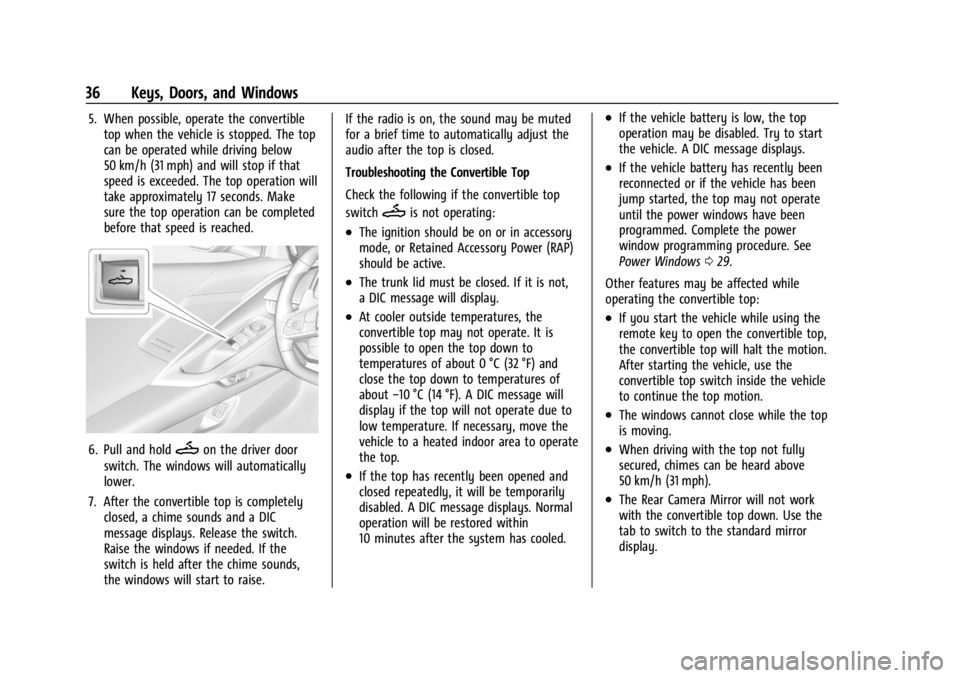
6. Pull and holdMon the driver door
switch. The windows will automatically
lower.
7. After the convertible top is completely closed, a chime sounds and a DIC
message displays. Release the switch.
Raise the windows if needed. If the
switch is held after the chime sounds,
the windows will start to raise. If the radio is on, the sound may be muted
for a brief time to automatically adjust the
audio after the top is closed.
Troubleshooting the Convertible Top
Check the following if the convertible top
switch
Mis not operating:
.The ignition should be on or in accessory
mode, or Retained Accessory Power (RAP)
should be active.
.The trunk lid must be closed. If it is not,
a DIC message will display.
.At cooler outside temperatures, the
convertible top may not operate. It is
possible to open the top down to
temperatures of about 0 °C (32 °F) and
close the top down to temperatures of
about
−10 °C (14 °F). A DIC message will
display if the top will not operate due to
low temperature. If necessary, move the
vehicle to a heated indoor area to operate
the top.
.If the top has recently been opened and
closed repeatedly, it will be temporarily
disabled. A DIC message displays. Normal
operation will be restored within
10 minutes after the system has cooled.
.If the vehicle battery is low, the top
operation may be disabled. Try to start
the vehicle. A DIC message displays.
.If the vehicle battery has recently been
reconnected or if the vehicle has been
jump started, the top may not operate
until the power windows have been
programmed. Complete the power
window programming procedure. See
Power Windows 029.
Other features may be affected while
operating the convertible top:
.If you start the vehicle while using the
remote key to open the convertible top,
the convertible top will halt the motion.
After starting the vehicle, use the
convertible top switch inside the vehicle
to continue the top motion.
.The windows cannot close while the top
is moving.
.When driving with the top not fully
secured, chimes can be heard above
50 km/h (31 mph).
.The Rear Camera Mirror will not work
with the convertible top down. Use the
tab to switch to the standard mirror
display.
Page 39 of 362

Chevrolet Corvette Owner Manual (GMNA-Localizing-U.S./Canada/Mexico-
17272984) - 2024 - CRC - 2/20/23
38 Keys, Doors, and Windows
5. HoldMuntil the tonneau cover is
completely closed. A chime will sound, a
DIC message will display, and the turn
signals will flash once.
Troubleshooting the Tonneau Cover —Engine
Access
Check the following if the tonneau cover is
not operating properly:
.The remote key must be used.
.The ignition must be off.
.The convertible top must be fully closed.
.The remote key may need to be closer to
the vehicle.
.Press and releaseQand then quickly
press and hold
Magain.
Page 40 of 362
Chevrolet Corvette Owner Manual (GMNA-Localizing-U.S./Canada/Mexico-
17272984) - 2024 - CRC - 2/20/23
Seats and Restraints 39
Seats and Restraints
Head Restraints
Head Restraints . . . . . . . . . . . . . . . . . . . . . . . . 39
Front Seats
Power Seat Adjustment . . . . . . . . . . . . . . . . 39
Reclining Seatbacks . . . . . . . . . . . . . . . . . . . . 40
Lumbar Adjustment . . . . . . . . . . . . . . . . . . . . . 41
Memory Seats . . . . . . . . . . . . . . . . . . . . . . . . . . 41
Heated and Ventilated Front Seats . . . . . 44
Seat Belts
Seat Belts . . . . . . . . . . . . . . . . . . . . . . . . . . . . . . 45
Buckle To Drive . . . . . . . . . . . . . . . . . . . . . . . . 46
How to Wear Seat Belts Properly . . . . . . 46
Lap-Shoulder Belt . . . . . . . . . . . . . . . . . . . . . . . 48
Seat Belt Use During Pregnancy . . . . . . . . 51
Seat Belt Extender . . . . . . . . . . . . . . . . . . . . . . 52
Safety System Check . . . . . . . . . . . . . . . . . . . 52
Seat Belt Care . . . . . . . . . . . . . . . . . . . . . . . . . . 52
Replacing Seat Belt System Parts after aCrash . . . . . . . . . . . . . . . . . . . . . . . . . . . . . . . . . 52
Airbag System
Airbag System . . . . . . . . . . . . . . . . . . . . . . . . . . 53
Where Are the Airbags? . . . . . . . . . . . . . . . . 54
When Should an Airbag Inflate? . . . . . . . . 55
What Makes an Airbag Inflate? . . . . . . . . . 55
How Does an Airbag Restrain? . . . . . . . . . 56 What Will You See after an Airbag
Inflates? . . . . . . . . . . . . . . . . . . . . . . . . . . . . . . 56
Passenger Sensing System . . . . . . . . . . . . . . 57
Servicing the Airbag-Equipped Vehicle . . . . . . . . . . . . . . . . . . . . . . . . . . . . . . . 60
Adding Equipment to the Airbag-Equipped Vehicle . . . . . . . . . . . . . . 61
Airbag System Check . . . . . . . . . . . . . . . . . . . 61
Replacing Airbag System Parts after a Crash . . . . . . . . . . . . . . . . . . . . . . . . . . . . . . . . . 62
Child Restraints
Older Children . . . . . . . . . . . . . . . . . . . . . . . . . . 62
Infants and Young Children . . . . . . . . . . . . . 63
Child Restraint Systems . . . . . . . . . . . . . . . . 65
Lower Anchors and Tethers for Children(LATCH System) . . . . . . . . . . . . . . . . . . . . . . . 67
Securing Child Restraints . . . . . . . . . . . . . . . 67
Head Restraints
The vehicle's front seats have head restraints
in the outboard seating positions that
cannot be adjusted.
The front seat outboard head restraints are
not removable.
Front Seats
Power Seat Adjustment
{Warning
The power seats will work with the
ignition off. Children could operate the
power seats and be injured. Never leave
children alone in the vehicle.
{Warning
You can lose control of the vehicle if you
try to adjust a driver seat while the
vehicle is moving. Adjust the driver seat
only when the vehicle is not moving.
Page 76 of 362
Chevrolet Corvette Owner Manual (GMNA-Localizing-U.S./Canada/Mexico-
17272984) - 2024 - CRC - 2/20/23
Instruments and Controls 75
Controls
Steering Wheel Adjustment
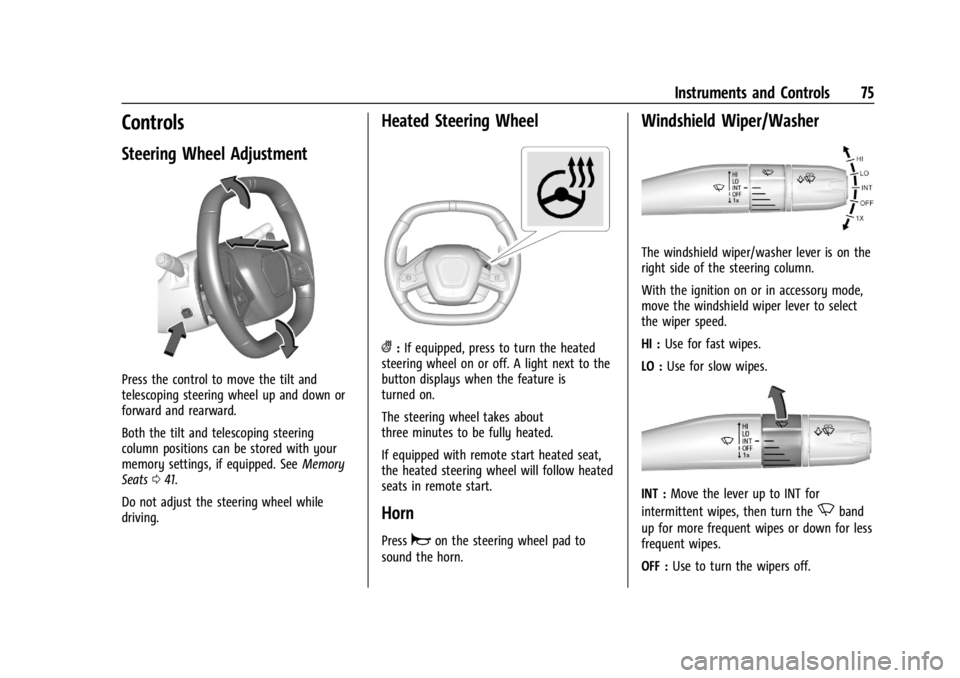
Press the control to move the tilt and
telescoping steering wheel up and down or
forward and rearward.
Both the tilt and telescoping steering
column positions can be stored with your
memory settings, if equipped. SeeMemory
Seats 041.
Do not adjust the steering wheel while
driving.
Heated Steering Wheel
(: If equipped, press to turn the heated
steering wheel on or off. A light next to the
button displays when the feature is
turned on.
The steering wheel takes about
three minutes to be fully heated.
If equipped with remote start heated seat,
the heated steering wheel will follow heated
seats in remote start.
Horn
Pressaon the steering wheel pad to
sound the horn.
Windshield Wiper/Washer
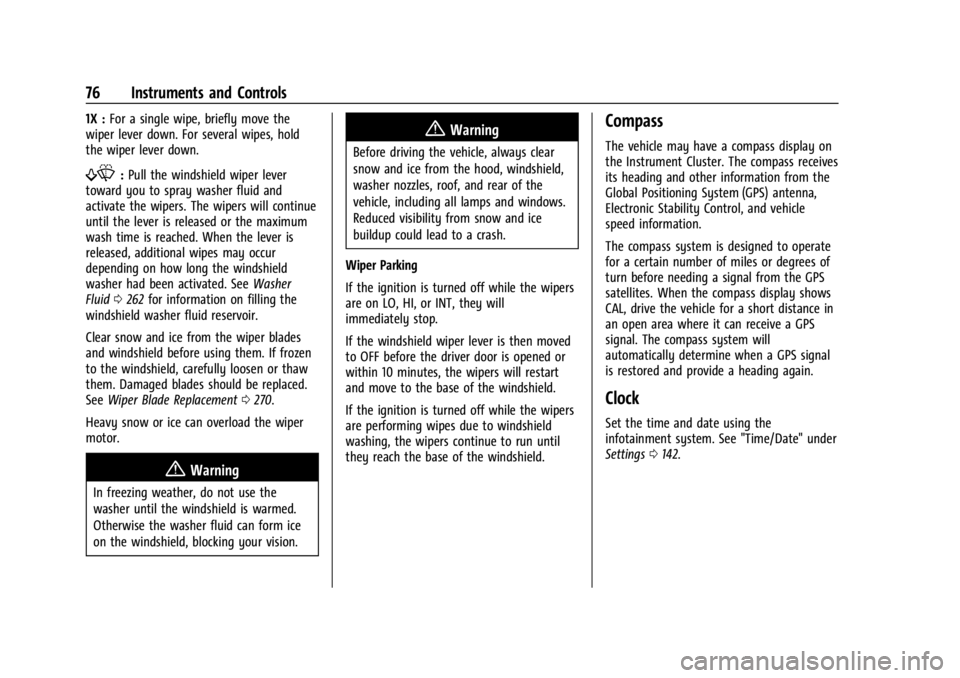
The windshield wiper/washer lever is on the
right side of the steering column.
With the ignition on or in accessory mode,
move the windshield wiper lever to select
the wiper speed.
HI : Use for fast wipes.
LO : Use for slow wipes.
INT : Move the lever up to INT for
intermittent wipes, then turn the
Nband
up for more frequent wipes or down for less
frequent wipes.
OFF : Use to turn the wipers off.
Page 77 of 362
Chevrolet Corvette Owner Manual (GMNA-Localizing-U.S./Canada/Mexico-
17272984) - 2024 - CRC - 2/20/23
76 Instruments and Controls
1X :For a single wipe, briefly move the
wiper lever down. For several wipes, hold
the wiper lever down.
f: Pull the windshield wiper lever
toward you to spray washer fluid and
activate the wipers. The wipers will continue
until the lever is released or the maximum
wash time is reached. When the lever is
released, additional wipes may occur
depending on how long the windshield
washer had been activated. See Washer
Fluid 0262 for information on filling the
windshield washer fluid reservoir.
Clear snow and ice from the wiper blades
and windshield before using them. If frozen
to the windshield, carefully loosen or thaw
them. Damaged blades should be replaced.
See Wiper Blade Replacement 0270.
Heavy snow or ice can overload the wiper
motor.
{Warning
In freezing weather, do not use the
washer until the windshield is warmed.
Otherwise the washer fluid can form ice
on the windshield, blocking your vision.
{Warning
Before driving the vehicle, always clear
snow and ice from the hood, windshield,
washer nozzles, roof, and rear of the
vehicle, including all lamps and windows.
Reduced visibility from snow and ice
buildup could lead to a crash.
Wiper Parking
If the ignition is turned off while the wipers
are on LO, HI, or INT, they will
immediately stop.
If the windshield wiper lever is then moved
to OFF before the driver door is opened or
within 10 minutes, the wipers will restart
and move to the base of the windshield.
If the ignition is turned off while the wipers
are performing wipes due to windshield
washing, the wipers continue to run until
they reach the base of the windshield.
Compass
The vehicle may have a compass display on
the Instrument Cluster. The compass receives
its heading and other information from the
Global Positioning System (GPS) antenna,
Electronic Stability Control, and vehicle
speed information.
The compass system is designed to operate
for a certain number of miles or degrees of
turn before needing a signal from the GPS
satellites. When the compass display shows
CAL, drive the vehicle for a short distance in
an open area where it can receive a GPS
signal. The compass system will
automatically determine when a GPS signal
is restored and provide a heading again.
Clock
Set the time and date using the
infotainment system. See "Time/Date" under
Settings 0142.
Page 78 of 362

Chevrolet Corvette Owner Manual (GMNA-Localizing-U.S./Canada/Mexico-
17272984) - 2024 - CRC - 2/20/23
Instruments and Controls 77
Power Outlets
There are two accessory power outlets:
Interior Power Outlet
Underhood Power OutletThe outlet under the glove box can be used
to plug in electrical equipment, such as a
cell phone.
Lift the cover to access and replace when
not in use.
The power outlet under the glove box is
powered when the ignition is on or in
accessory mode, or until the driver door is
opened within 10 minutes of turning off the
vehicle. See
Retained Accessory Power (RAP)
0 181.
The underhood outlet is powered at all
times. The vehicle battery may run down if
the power outlet is used while the ignition
is off. Use this power outlet for plugging in
a GM Approved battery maintainer,
if equipped.
{Warning
Power is always supplied to the
underhood outlet. Do not leave electrical
equipment plugged in when the vehicle is
not in use because the vehicle could
catch fire and cause injury or death.
Caution
Leaving electrical equipment plugged in
for an extended period of time while the
vehicle is off will drain the battery.
Always unplug electrical equipment when
not in use and do not plug in equipment
that exceeds the maximum 20 amp
rating.
Certain electrical accessories may not be
compatible with the accessory power outlet
and could overload vehicle or adapter fuses.
If a problem is experienced, see your dealer.
When adding electrical equipment, be sure
to follow the proper installation instructions
included with the equipment. See Add-On
Electrical Equipment 0230.
It is recommended that a qualified
technician or dealer be seen for the proper
installation of your equipment.
Page 87 of 362
Chevrolet Corvette Owner Manual (GMNA-Localizing-U.S./Canada/Mexico-
17272984) - 2024 - CRC - 2/20/23
86 Instruments and Controls
Battery Gauge (High Voltage)
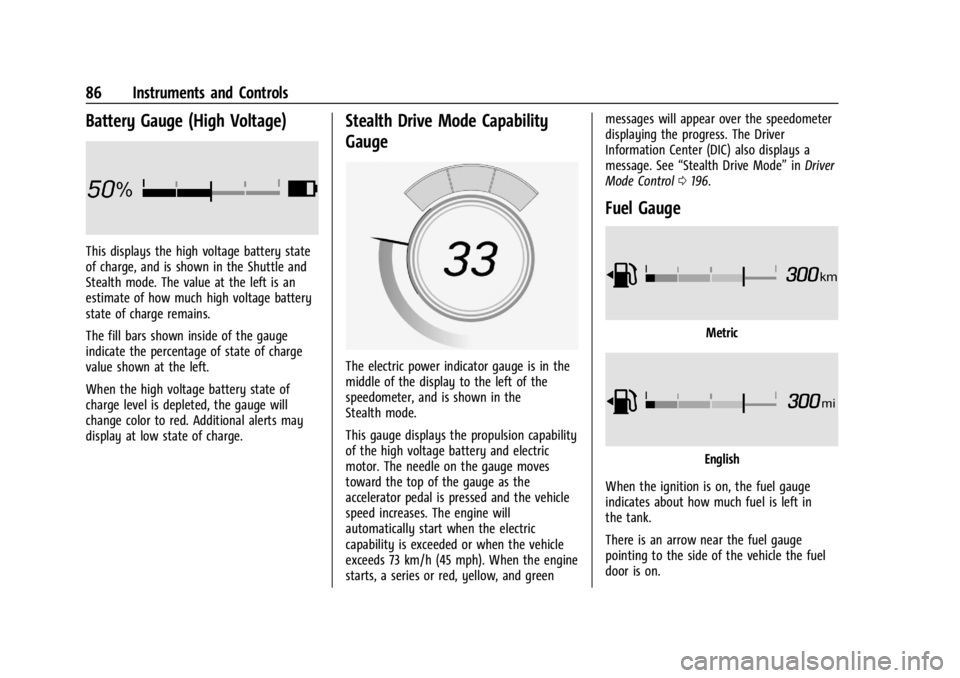
This displays the high voltage battery state
of charge, and is shown in the Shuttle and
Stealth mode. The value at the left is an
estimate of how much high voltage battery
state of charge remains.
The fill bars shown inside of the gauge
indicate the percentage of state of charge
value shown at the left.
When the high voltage battery state of
charge level is depleted, the gauge will
change color to red. Additional alerts may
display at low state of charge.
Stealth Drive Mode Capability
Gauge
The electric power indicator gauge is in the
middle of the display to the left of the
speedometer, and is shown in the
Stealth mode.
This gauge displays the propulsion capability
of the high voltage battery and electric
motor. The needle on the gauge moves
toward the top of the gauge as the
accelerator pedal is pressed and the vehicle
speed increases. The engine will
automatically start when the electric
capability is exceeded or when the vehicle
exceeds 73 km/h (45 mph). When the engine
starts, a series or red, yellow, and greenmessages will appear over the speedometer
displaying the progress. The Driver
Information Center (DIC) also displays a
message. See
“Stealth Drive Mode” inDriver
Mode Control 0196.
Fuel Gauge
Metric
English
When the ignition is on, the fuel gauge
indicates about how much fuel is left in
the tank.
There is an arrow near the fuel gauge
pointing to the side of the vehicle the fuel
door is on.
Page 88 of 362
Chevrolet Corvette Owner Manual (GMNA-Localizing-U.S./Canada/Mexico-
17272984) - 2024 - CRC - 2/20/23
Instruments and Controls 87
When the indicator nears empty, the low
fuel light comes on. There still is a little fuel
left, but the vehicle should be refueled soon.
The fuel gauge may:
.Take a little more, or less fuel to fill up
than it indicates. For example, the gauge
may have indicated the tank is half full,
but it actually will take a little more,
or less than half the tank's capacity to fill
the tank.
.Moves a little while turning a corner,
speeding up, or braking.
.Take a few seconds to stabilize after the
ignition is turned on and goes back to
empty when the ignition is turned off.
These are normal conditions, none of which
indicate a problem with the fuel gauge.
Hybrid Battery Charging Light
(Charge+)
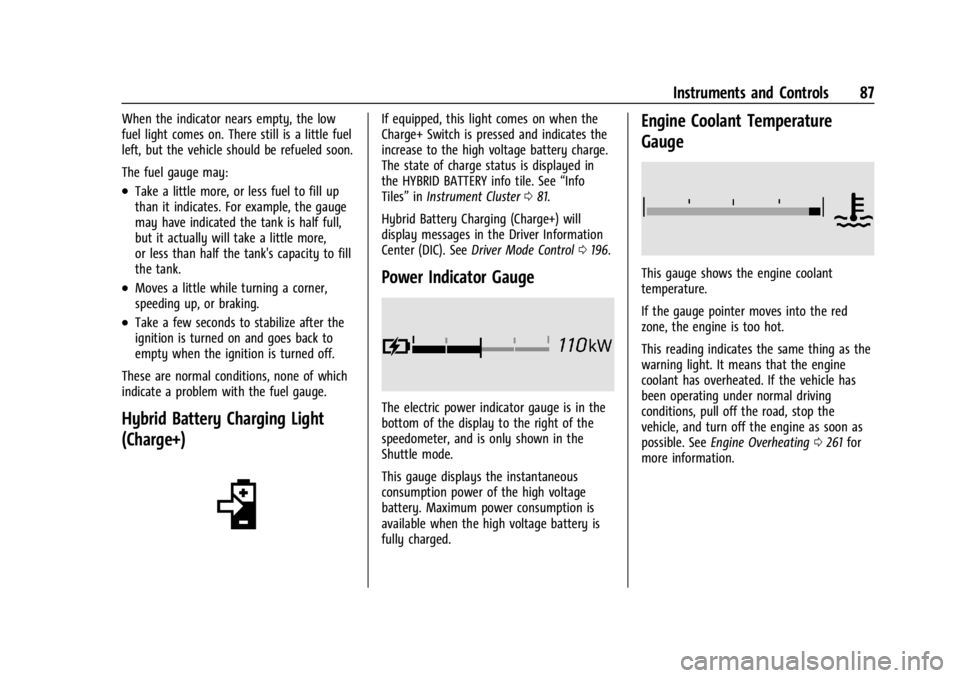
If equipped, this light comes on when the
Charge+ Switch is pressed and indicates the
increase to the high voltage battery charge.
The state of charge status is displayed in
the HYBRID BATTERY info tile. See “Info
Tiles” inInstrument Cluster 081.
Hybrid Battery Charging (Charge+) will
display messages in the Driver Information
Center (DIC). See Driver Mode Control 0196.
Power Indicator Gauge
The electric power indicator gauge is in the
bottom of the display to the right of the
speedometer, and is only shown in the
Shuttle mode.
This gauge displays the instantaneous
consumption power of the high voltage
battery. Maximum power consumption is
available when the high voltage battery is
fully charged.
Engine Coolant Temperature
Gauge
This gauge shows the engine coolant
temperature.
If the gauge pointer moves into the red
zone, the engine is too hot.
This reading indicates the same thing as the
warning light. It means that the engine
coolant has overheated. If the vehicle has
been operating under normal driving
conditions, pull off the road, stop the
vehicle, and turn off the engine as soon as
possible. See Engine Overheating 0261 for
more information.