2024 ACURA INTEGRA service
[x] Cancel search: servicePage 266 of 766
uuAudio System Basic Operation uAndroid AutoTM
264
Features
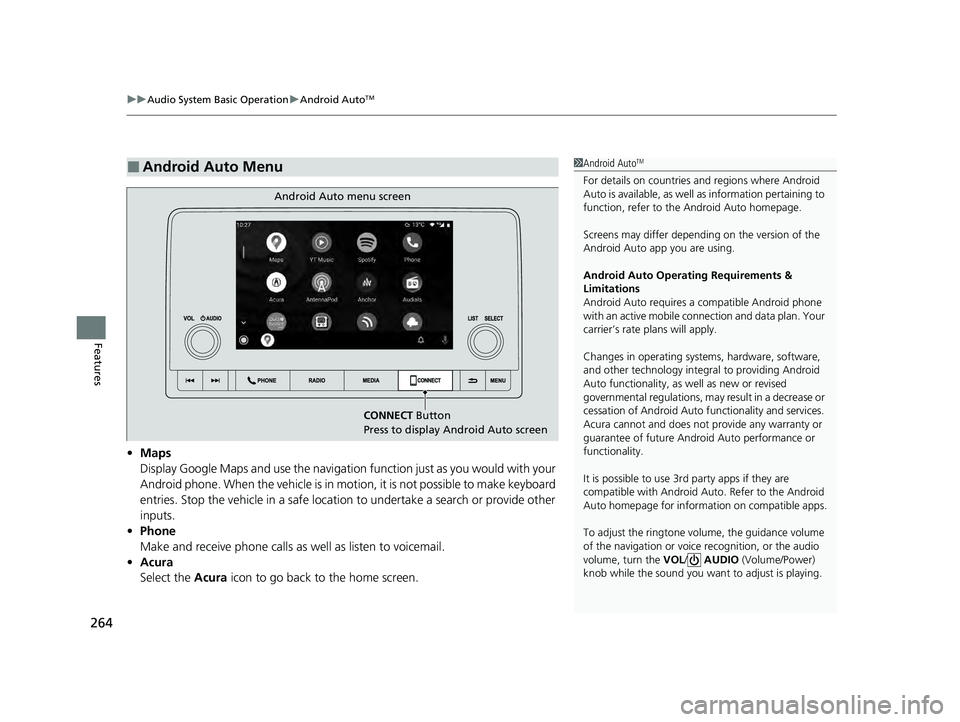
• Maps
Display Google Maps and use the navigation function just as you would with your
Android phone. When the vehicle is in motion, it is not possible to make keyboard
entries. Stop the vehicle in a safe location to undertake a search or provide other
inputs.
• Phone
Make and receive phone calls as well as listen to voicemail.
• Acura
Select the Acura icon to go back to the home screen.
■Android Auto Menu1Android AutoTM
For details on c ountries and regions where Android
Auto is available, as well as information pertaining to
function, refer to the Android Auto homepage.
Screens may differ depending on the version of the
Android Auto app you are using.
Android Auto Operating Requirements &
Limitations
Android Auto requires a compatible Android phone
with an active mobile connection and data plan. Your
carrier’s rate plans will apply.
Changes in operating systems, hardware, software,
and other technology integral to providing Android
Auto functionality, as well as new or revised
governmental regulations, may result in a decrease or
cessation of Android Auto functionality and services.
Acura cannot and does not provide any warranty or
guarantee of future Android Auto performance or
functionality.
It is possible to use 3r d party apps if they are
compatible with Android Auto. Refer to the Android
Auto homepage for informat ion on compatible apps.
To adjust the ringtone volume, the guidance volume
of the navigation or voice recognition, or the audio
volume, turn the VOL / AUDIO (Volume/Power)
knob while the sound you want to adjust is playing.
CONNECT Button
Press to display Android Auto screen
Android Auto menu screen
24 ACURA INTEGRA-313S56100.book 264 ページ 2023年2月13日 月曜日 午後2時41分
Page 318 of 766

316
uuAudio System Basic Operation uAcuraLink ®
Features
AcuraLink ®
AcuraLink® connects you to the latest info rmation from Acura. You can connect
your phone wirelessly through Wi-Fi or Bluetooth®.
2Wi-Fi Connection P. 323
2 Phone Setup P. 410
■Connect
Displays the connection status of the vehicle.
■Help & Support
Displays tips for vehicle usage, and gets support via road side or customer service
center.
■Message
Displays helpful and importa nt information from Acura.
■AcuraLink® Menu
1AcuraLink ®
The AcuraLink ® connect app is compatible with most
iPhone and Android phones.
Some cell phone carriers charge for tethering and
smartphone data use. Check your phone’s data
subscription package.
If there is an active connection to Appl e CarPlay or
Android Auto, AcuraLink ® can only be connected
through Wi-Fi.
24 ACURA INTEGRA-313S56100.book 316 ページ 2023年2月13日 月曜日 午後2時41分
Page 319 of 766

317
uuAudio System Basic Operation uAcuraLink ®
Continued
Features
Use the following procedure to connect to AcuraLink ® service.
■To enable the AcuraLink® service
1.Press the button.
2. Select General Settings .
3. Select System.
4. Select Data Sharing Setting .
5. Select ON.
■To link with AcuraLink ®
You can see the connection guide screen after
launching AcuraLink ® when there is no
connection to a network. If you do not need
this guide, select check-box and select OK.
■To Set Up to Connect AcuraLink ® Service
24 ACURA INTEGRA-313S56100.book 317 ページ 2023年2月13日 月曜日 午後2時41分
Page 327 of 766

325
uuAudio System Basic Operation uAT&T Hotspot*
Features
AT&T Hotspot*
If you have subscribed to AT&T hotspot services, your vehicle will provide data to
connect your mobile devices to the Internet. You can use the AT&T Hotspot app to
turn on/off vehicle data and monitor da ta usage left on your subscription.
a Hotspot Enable
Turn on/off AT&T Hotspot.
b Data Usage Bar
Check the current status of your data pl an. This Usage Bar will show your current
plan and how much data remains on your plan. Subscription plans for AT&T Hotspot
can be added/modified at www.att.com/acura.
c Plan Info
Shows your current AT&T subscription plan for the vehicle.
d Settings
Shows the current username and password for vehicle Hotspot. Settings can be
changed while the vehicle is not in motion.
e Help
■AT&T Hotspot Menu
1 AT&T Hotspot*
To use AT&T Hotspot servic es, your vehicle must be
subscribed to a data plan. If your vehicle is not
subscribed to a data plan, you can visit www.att.com/
acura to add vehicle data services.
Hotspot username and pass word can be changed in
the Settings of the AT&T Hotspot app. Settings
cannot be accessed while driving. Park in a safe place
to adjust Hotspot settings.
Alternatively, you can use your mobile hotspot to
connect the vehicle and other mobile devices to the
Internet. 2 Wi-Fi Connection P. 323
* Not available on all models
24 ACURA INTEGRA-313S56100.book 325 ページ 2023年2月13日 月曜日 午後2時41分
Page 329 of 766

Continued327
uuAudio System Basic Operation uApple CarPlay
Features• Phone
Access the contact list, make phone calls, or listen to voicemail.
• Messages
Check and reply to text messages, or have messages read to you.
• Music
Play music stored on your iPhone.
• Maps
Display Apple Maps and use the navigation function just as you would on your
iPhone.
• Acura
Select the Acura icon to go back to the home screen.
•
Go back to the Apple Ca rPlay Dashboard screen.
• Go back to the Apple CarPlay menu screen.
■Apple CarPlay Menu1Apple CarPlay
Apple CarPlay Operating Requirements &
Limitations
Apple CarPlay requi res a compatible iPhone with an
active cellular connecti on and data plan. Your
carrier’s rate plans will apply.
Changes in operating systems, hardware, software,
and other technology integral to providing Apple
CarPlay functionality, as well as new or revised
governmental regulations, may result in a decrease or
cessation of Apple CarPlay functionality and services.
Acura cannot and does not provide any warranty or
guarantee of future Appl e CarPlay performance or
functionality.
It is possible to use 3r d party apps if they are
compatible with Apple CarPlay. Refer to the Apple
homepage for information on compatible apps.
24 ACURA INTEGRA-313S56100.book 327 ページ 2023年2月13日 月曜日 午後2時41分
Page 336 of 766

uuAudio System Basic Operation uAndroid AutoTM
334
Features• Maps
Display Google Maps and use the navigation function just as you would with your
Android phone. When the vehicle is in motion, it is not possible to make keyboard
entries. Stop the vehicle in a safe location to undertake a search or provide other
inputs.
• Phone
Make and receive phone calls as well as listen to voicemail.
• Acura
Select the Acura icon to go back to the home screen.
• Operate Android Auto with your voice.
•
You can check Android notifications.
• (Android Auto Home)
Display useful information organized by Android Auto into simple cards that
appear just when they’re needed.
■Android Auto Menu1 Android AutoTM
For details on c ountries and regions where Android
Auto is available, as well as information pertaining to
function, refer to the Android Auto homepage.
Screens may differ depending on the version of the
Android Auto app you are using.
Android Auto Operating Requirements &
Limitations
Android Auto requires a compatible Android phone
with an active mobile connection and data plan. Your
carrier’s rate plans will apply.
Changes in operating systems, hardware, software,
and other technology integral to providing Android
Auto functionality, as well as new or revised
governmental regulations, may result in a decrease or
cessation of Android Auto functionality and services.
Acura cannot and does not provide any warranty or
guarantee of future Android Auto performance or
functionality.
It is possible to use 3r d party apps if they are
compatible with Android Auto. Refer to the Android
Auto homepage for informat ion on compatible apps.
24 ACURA INTEGRA-313S56100.book 334 ページ 2023年2月13日 月曜日 午後2時41分
Page 343 of 766

341
Features
General Information on the Audio System
SiriusXM® Radio Service*
1.You need your radio ID ready before registering for subscription. To see the ID on
the screen, select Channel 0.
2. Have your radio ID ready, and either call or visit the SiriusXM® website to
subscribe.
Switch to the SiriusXM ® mode by using the audio remote controls on the steering
wheel, or through the audio/information sc reen, and stay in this mode for about 30
minutes until the service is activated. Make su re your vehicle is in an open area with
good reception.
Channel **** is not subscribed. Call SiriusXM to subscribe.
*1
You are not subscribed to the channel selected.
Subscription Updated:
SiriusXM ® radio is receiving informat ion update from the network.
Channel Not Available:
No such channel exists, or the artist or title information is unavailable.
No Signal:
The signal is too weak in the current location.
Check Tuner:
There is a problem with the SiriusXM ® tuner. Contact a dealer.
Antenna Disconnected, Antenna Shorted:
There is a problem with the SiriusXM ® antenna. Contact a dealer.
*1 : ****part is variable characters, and will change depending upon the channel selected.
■Subscribing to SiriusXM® Radio
■Receiving SiriusXM ® Radio
■SiriusXM ® Radio Display Messages
1 Subscribing to SiriusXM ® Radio
Contact Information for SiriusXM ® Radio:
•U.S.: SiriusXM ® Radio at www.siriusxm.com/
subscribenow , or 1-866-635-2349
•Canada: SiriusXM ® Canada at www.siriusxm.ca/
subscribe-now , or 1-877-209-0079
1Receiving SiriusXM ® Radio
The SiriusXM ® satellites are in orbit over the equator;
therefore, objects south of the vehicle may cause
satellite rece ption interruptions. Sa tellite signals are
more likely to be blocked by tall buildings and
mountains the farther north you travel from the
equator.
You may experience rece ption problems under the
following circumstances:
•In a location with an obstruction to the south of
your vehicle.
•In tunnels•On the lower level of a multi-tiered road
•Large items carried on the roof rack
* Not available on all models
24 ACURA INTEGRA-313S56100.book 341 ページ 2023年2月13日 月曜日 午後2時41分
Page 345 of 766

343
uuGeneral Information on the Audio System uHonda App License Agreement
Continued
Features
Honda App License Agreement
PLEASE CAREFULLY READ THIS END USER LICENSE AGREEMENT (THI S “AGREEMENT”) WHICH GOVERNS YOUR USE OF THE SOFTWARE
INSTALLED ON YOUR HONDA OR ACURA VEHICLE (YOUR “VEHICLE”) AS WELL AS THE APPLICATIONS, SERVICES, FUNCTIONS, AND
CONTENT PROVIDED THROUGH THE SOFTWARE (COLLECTIVELY, THE “SERVICES”). YOUR USE OF THE SOFTWARE OR SERVICES WILL
SERVE AS YOUR CONSENT TO THE TERMS OF THIS AGREEMENT. THE SOFTWARE IS OWNED (OR LICENSED), PROVIDED, AND/OR
OPERATED BY AMERICAN HONDA MOTOR CO . INC., (“HONDA,” “US,” “WE,” OR “OUR”), WITH ITS BUSINESS ADDRESS AT 1919
TORRANCE BLVD., TORRANCE, CA 90501. REFERENCE TO “HONDA” IN THIS AGREEMENT INCLUDES HONDA’S PARENT COMPANY AND
ITS AFFILIATES AND DESIGNATED AGENTS. THE SERVICES ARE OWNED (OR LICENSED), PR OVIDED, AND/OR OPERATED BY HONDA OR A
THIRD-PARTY SERVICE PROVIDER (A “PROVI DER”). REFERENCE TO A “PROVIDER” IN THIS AGREEMENT INCLUDES SUCH PROVIDER’S
PARENT COMPANY, AFFILIATES, AND DESIGNATED AGENTS.
A. Description of the Software. The SOFTWARE includes the software, firmware and the like, installed and ex ecuting on your VEHICLE
during manufacture, and thereafter updated from time to time by HONDA, you or an authorized HONDA dealer (a “DEALER”). The
SOFTWARE allows you to access and use a variety of SERVICES, including but not limited to: (a) HONDA applications, services, an d content
provided through the SOFTWARE (together, “H ONDA SERVICES”); and (b) PROVIDER applicatio ns, services, and content provided through
the SOFTWARE (together, “PROVIDER SERVICES”), each of which may provide access to various information, media, content, and services.
B. SOFTWARE Licensing and Intellectual Property.
1. SOFTWARE. This AGREEMENT grants you a non-exclusive, limited, and revocable license to use the SOFTWARE and SERVICES solely (a)
as installed on your VEHICLE by HONDA, (b) as updated on your Vehicle by HONDA, you (but only as and when directed by HONDA), o r a
DEALER and (c) as permitted under the terms of this AGREEMENT.
2. HONDA Services. The SOFTWARE may provide you with access to various HONDA SERVICES. Inst allation, activation, or use of HONDA
SERVICES may require your consent to additi onal terms, conditions, and privacy policies applicable to those HONDA SERVICES (the
“HONDA TERMS”). You acknowledge and agree that any collection, use, sharing of data generated by your VEHICLE or your use of yo ur
VEHICLE, and your use of the HONDA SERVIC ES shall be subject to this AGREEMENT and any additional HONDA TERMS that may be
specifically applicable to such HONDA SERVICES or data generation. The HONDA SERVI CES may collect, use, and share such data while
you are using the SOFTWARE.
■END USER LICENSE AGREEMENT
24 ACURA INTEGRA-313S56100.book 343 ページ 2023年2月13日 月曜日 午後2時41分