2023 TOYOTA SUPRA stop start
[x] Cancel search: stop startPage 129 of 372
1293-1. CONTROLS
3
CONTROLS
The windshield washer nozzles
are automatically heated while
standby state is switched on.
In the fold-out position, the wip-
ers can be folded out from the
windshield, which is important,
for instance, when changing the
wiper blades or for folding away
under frosty conditions.1
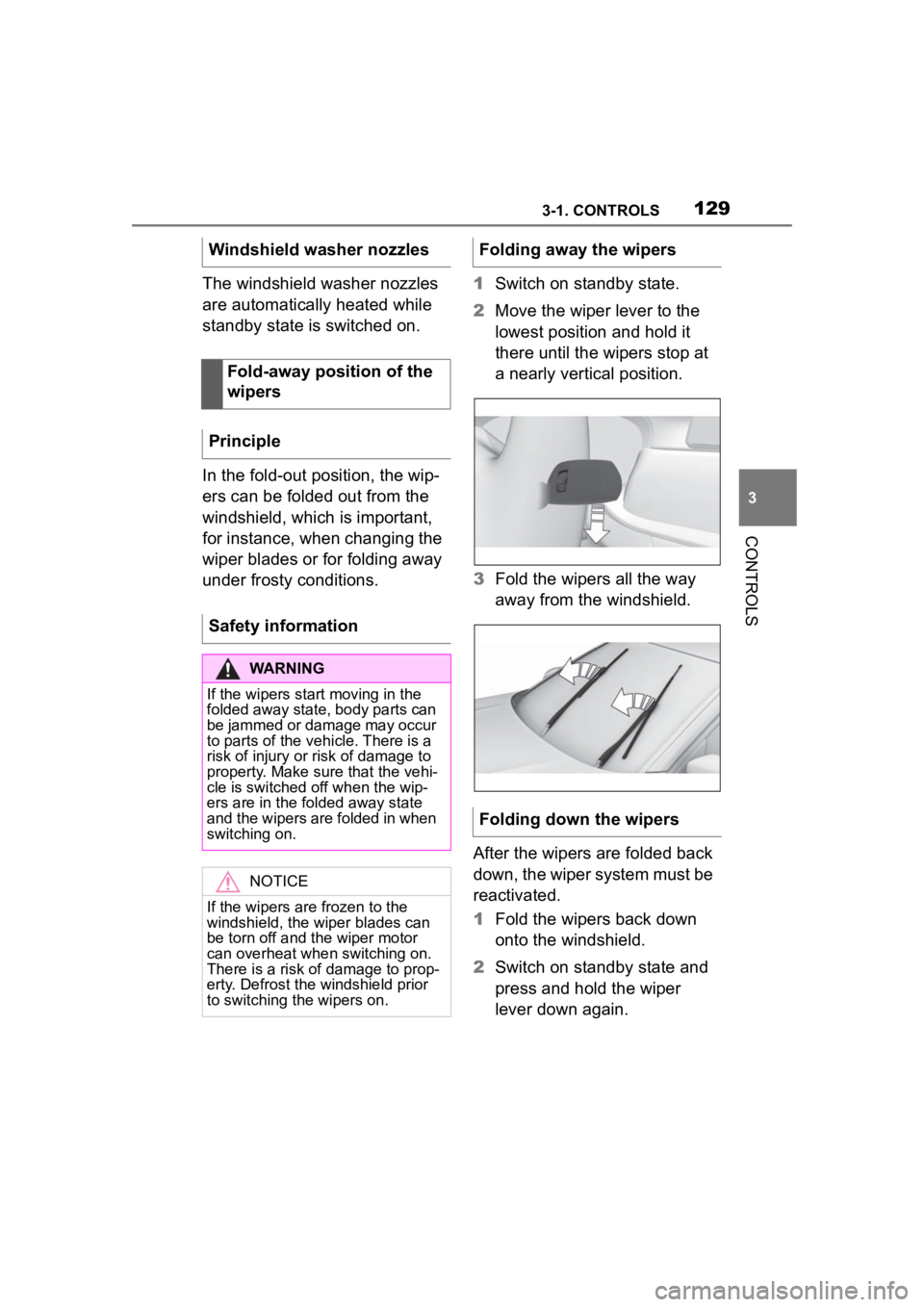
Switch on standby state.
2 Move the wiper lever to the
lowest position and hold it
there until the wipers stop at
a nearly vertical position.
3 Fold the wipers all the way
away from the windshield.
After the wipers are folded back
down, the wiper system must be
reactivated.
1 Fold the wipers back down
onto the windshield.
2 Switch on standby state and
press and hold the wiper
lever down again.
Windshield washer nozzles
Fold-away position of the
wipers
Principle
Safety information
WARNING
If the wipers start moving in the
folded away state, body parts can
be jammed or damage may occur
to parts of the vehicle. There is a
risk of injury or risk of damage to
property. Make sure that the vehi-
cle is switched off when the wip-
ers are in the folded away state
and the wipers are folded in when
switching on.
NOTICE
If the wipers are frozen to the
windshield, the wiper blades can
be torn off and the wiper motor
can overheat when switching on.
There is a risk of damage to prop-
erty. Defrost the windshield prior
to switching the wipers on.
Folding away the wipers
Folding down the wipers
Page 135 of 372

1353-1. CONTROLS
3
CONTROLSElectronically unlock the trans-
mission lock to maneuver vehi-
cle from a danger area.
Unlocking is possible, if the
starter can spin the engine.
Before unlocking the transmis-
sion lock, set the parking brake
to prevent the vehicle from roll-
ing away.
1Press and hold down brake
pedal.
2 Press the Start/Stop button.
The starter must audibly
start. Hold the Start/Stop but-
ton pressed.
3 With your free hand, press
the button on the selector
lever, arrow 1, and press the
selector lever into selector
lever position N and hold,
arrow N, until selector lever position N is displayed in the
instrument cluster.
A vehicle messag
e is displayed.
4Release Start/Stop button
and selector lever.
5 Release brake, as soon as
the starter stops.
6 Maneuver the vehicle from
the danger area and secure it
against moving on its own.
For additional information, see
the chapter on tow-starting and
towing, refer to page 326.
Launch Control enables opti-
mum acceleration on surfaces
with good traction under dry sur-
rounding conditions.
The use of Launch Control
causes premature component
wear since this function rep-
resents a very heavy load for
the vehicle.
Displays in the instrument
cluster
The selector lever posi-
tion is displayed, for
example P.
Electronic unlocking of
the transmission lock
General information
Engaging selector lever
position N
Launch Control
Concept
General information
1
R
N
Page 182 of 372

1823-1. CONTROLS
Only objects that are detected
by the system are taken into
account.
The following situations may not
be detected, for instance:
Thus, a system reaction might
not come or might come late.
The following situations may not
be detected, for instance:
Slow moving vehicles when
you approach them at high
speed.
Vehicles that suddenly swerve in front of you, or
sharply decelerating vehicles.
Vehicles with an unusual rear
appearance.
Two-wheeled vehicles ahead
of you.
If the vehicle speed exceeds
approx. 155 mph/250 km/h, the
system is deactivated temporar-
ily. When the vehicle slows
down to below this speed, the
system is reactivated.
Additional information:
• Cameras, refer to page 42.
• Radar sensors, refer to page 43.
The system may not be fully
functional in the following situa-
tions:
In tight curves.
If the driving stability control
systems are limited or deacti-
vated, for instance VSC OFF.
Up to 10 seconds after the
start of the engine via the
Start/Stop button.
The more sensitive the warning
System limits
Safety information
WARNING
The system is designed to oper-
ate in certain conditions and cir-
cumstances. Due to conditions or
other factors, the system may not
respond. There m ay be a risk of
accident or risk of damage to
property. Actively intervene as
warranted. Refer to the informa-
tion in this Owner’s Manual
regarding the scope of the sys-
tem’s operation and limitations.
Detection range
Upper speed limit
System limits of the sensors
Functional limitations
Warning sensitivity
Page 187 of 372

1873-1. CONTROLS
3
CONTROLS
Additional information:
• Cameras, refer to page 42.
• Radar sensors, refer to page 43.
The system may not be fully
functional or may not be avail-
able in the following situations:
If the driving stability control
systems are deactivated, for
instance VSC OFF.
Up to 10 seconds after the
start of the engine via the
Start/Stop button.
The lane departure warning
alerts when the vehicle is about
to run off the road or exit the
lane.
This camera-based system
warns starting at a minimum
speed.
The minimum speed is coun-
try-specific and is displayed in
the menu for the Toyota Supra
Safety systems.
Warnings are issued by means
of a steering wheel vibration. The severity of the steering
wheel vibration can be adjusted.
The system does not provide a
warning if the turn signal is set in
the respective direction before
leaving the lane.
Depending on the equipment
version, if in the speed range up
to 155 mph/250 km/h a lane
marking is crossed, the system
may intervene with a brief active
steering intervention in addition
to vibrating. The system thus
helps keep the vehicle in the
lane.
System limits of the sensors
Functional limitations
Lane departure warning
Concept
General information
Safety information
WARNING
The system cannot serve as a
substitute for the driver’s personal
judgment in assessing road and
traffic safety. There is a risk of an
accident. Adjust d
riving style to
traffic conditions. Watch traffic
closely and actively intervene
where appropriate. Do not jerk the
steering wheel in response to a
warning.
WARNING
Indicators and warnings cannot
serve as a substitute for the
driver
Page 191 of 372
1913-1. CONTROLS
3
CONTROLS
In addition, a vehicle message is
displayed.
The warning signal and vehicle
message are an encouragement
to pay closer attention to the
lane.
For instance, the warning will be
canceled in the following situa-
tions:
Automatically after a few sec-
onds.
When returning to your own
lane.
When braking hard.
When using the turn signal.
If VSC Vehicle Stability Con-
trol System intervenes.
Additional information: • Cameras, refer to page 45.
The system may not be fully
functional in the following situa-
tions:
In the event of missing, worn,
poorly visible, merging,
diverging, or multiple lane
markings such as in construc-
tion areas.
When lane markings are cov-
ered in snow, ice, dirt or
water.
In tight curves or on narrow
lanes.
When lane markings are cov-
ered by objects.
When driving very close to the
vehicle in front of you.
Up to 10 seconds after the
start of the engine via the
Start/Stop button.
A vehicle message may be dis-
played when the system is not
fully functional.
*: if equipped
Blind spot monitor detects vehi-
cles in the blind spot or vehicles
approaching from behind in the
adjacent lane. A warning is
issued in various gradations in
End of warning
System limits
Safety information
WARNING
The system is designed to oper-
ate in certain conditions and cir-
cumstances. Due to conditions or
other factors, the system may not
respond. There m ay be a risk of
accident or risk of damage to
property. Actively intervene as
needed. Refer to the information
in this Owner’s Manual regarding
the scope of the system’s opera-
tion and limitations.
System limits of the sensors
Functional limitations
Blind spot monitor*
Concept
Page 199 of 372

1993-1. CONTROLS
3
CONTROLS
This chapter describes all stan-
dard, country-specific and
optional features offered with
the series. It also describes fea-
tures and functions that are not
necessarily available in your
vehicle, e.g., due to the selected
options or country versions. This
also applies to safety-related
functions and systems. When
using these functions and sys-
tems, the applicable laws and
regulations must be observed.
ABS prevents locking of the
wheels during braking.
The vehicle maintains its steer-
ing power even during full brake
applications, which increases
the active safety.
ABS is operational every time
you start the engine.
Situations which the ABS can-
not operate sufficiently:
When entering a curve at an
excessively high rate of speed
In this case, even if the ABS oper-
ates, it cannot ope rate sufficiently
to avoid a possible dangerous situ-
ation. The driver is solely responsi-
ble for understanding their
surroundings and d riving at a safe
speed.
When you apply the brakes rap-
idly, the system automatically
produces the greatest possible
braking force boost. It reduces
the braking distance to a mini-
mum during emergency stop.
This system utilizes all of the
capabilities provided by the Anti-
lock Brake System ABS.
Do not reduce the pressure on
the brake pedal for the duration
of the emergency stop.
In combination with Dynamic
radar cruise control, this system
ensures that the brakes respond
even more rapidly when braking
in critical situations.
Driving stability con-
trol systems
Vehicle features and
options
Anti-lock Braking System
ABS
Brake assist
Adaptive brake assist
Page 261 of 372

2614-1. DRIVING TIPS
4
DRIVING TIPS
other vehicles, etc. Increase
the distance between your
vehicle and preceding vehi-
cles and drive safely at a
lower speed than normal,
avoiding sudden accelera-
tion, braking or steering oper-
ations.
Use the rear defroster and air
conditioning system to pre-
vent the windows from fog-
ging up.
Hydroplaning is more likely to
occur when driving on ruts or
through large puddles.
On wet or slushy roads, a
wedge of water can form
between the tires and road sur-
face.
This phenomenon is referred to
as hydroplaning. It is character-
ized by a partial or complete
loss of contact between the tires
and the road surface, ultimately
undermining your ability to steer
and brake the vehicle.
When driving through water, fol-
low the following:
Deactivate Auto Start/Stop
function.
Drive through calm water only.
Drive through water only if it is
not deeper than maximum 9.8
inches/25 cm.
Drive through water no faster
than walking speed, up to 3
mph/5 km/h.
The vehicle is equipped with an
Antilock Braking System ABS as
a standard feature.
Perform an emergency stop in
situations that require such.
Steering is still responsive. You
can still avoid any obstacles with
a minimum of steering effort.
Pulsation of the brake pedal and
sounds from the hydraulic cir-
cuits indicate that the Antilock
Braking System ABS is in its
active mode.
In certain braking situations, the
Hydroplaning
Driving through water
General information
Safety information
NOTICE
When driving too quickly through
too deep water, water can enter
into the engine compartment, the
electrical system or the transmis-
sion. There is a risk of damage to
property. When driving through
water, do not exc eed the maxi-
mum indicated water level and the
maximum speed for driving
through water.
Braking safely
General information
Page 265 of 372

2654-1. DRIVING TIPS
4
DRIVING TIPS
vehicle roll.
The flow of fuel is interrupted
while coasting.
Switch off the engine during lon-
ger stops, for instance at traffic
lights, railroad crossings or in
traffic congestion.
The Auto Start/Stop function of
the vehicle automatically
switches off the engine during a
stop.
If the engine is switched off and
then restarted rather than leav-
ing the engine running con-
stantly, fuel consumption and
emissions are reduced. Sav-
ings can begin within a few sec-
onds of switching off the engine.
In addition, fuel consumption is
also determined by other fac-
tors, such as driving style, road
conditions, maintenance or envi-
ronmental factors.
Functions such as seat heating
and the rear window defroster require a lot of energy and
increase fuel consumption,
especially in city and
stop-and-go traffic.
Switch off these functions if they
are not needed.
Have the vehicle maintained
regularly to achieve optimal
vehicle efficiency and service
life. Toyota recommends that
maintenance work be performed
by Toyota.
For information on the Mainte-
nance System, refer to page
308.
Switch off the engine
during longer stops
Switching off the engine
Auto Start/Stop function
Switch off any functions
that are not currently
needed
Have maintenance carried
out