Page 199 of 516
1974-2. Driving procedures
RAIZE_OM_General_BZ358E
Driving
4
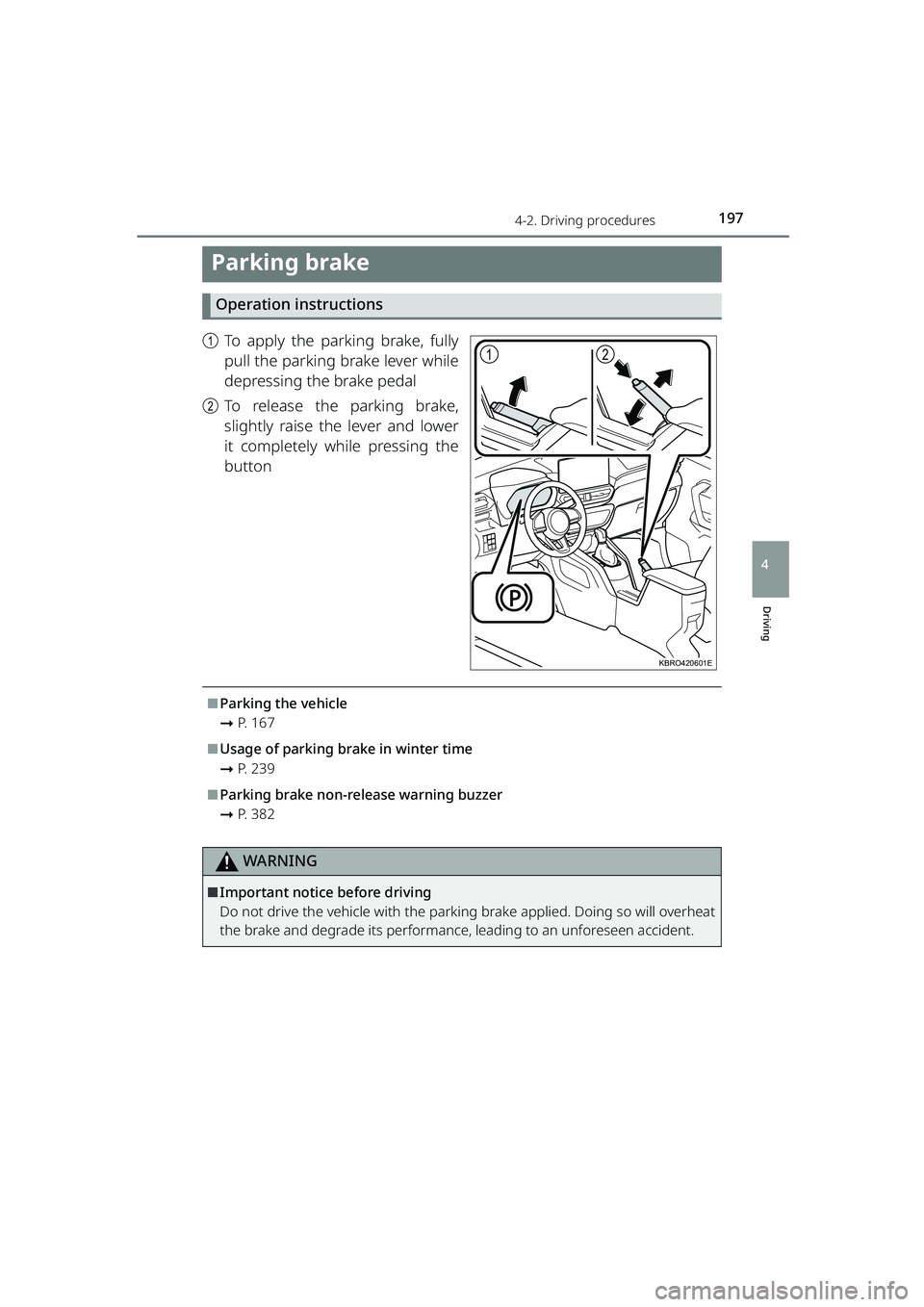
Parking brake
Operation instructions
aTo apply the parking brake, fully
pull the parking brake lever while
depressing the brake pedal
b To release the parking brake,
slightly raise the lever and lower
it completely while pressing the
button
⬛Parking the vehicle
➞P. 1 6 7
⬛Usage of parking brake in winter time
➞P. 2 3 9
⬛Parking brake non-release warning buzzer
➞P. 3 8 2
WARNING
⬛Important notice before driving
Do not drive the vehicle with the parking brake applied. Doing so will overheat
the brake and degrade its performance, leading to an unforeseen accident.
12
KBRO420601E
RAIZE_OM_General_BZ358E.book 197 ページ 2022年5月17日 火曜日 午後1時59分
Page 200 of 516

198
RAIZE_OM_General_BZ358E✽
: If equipped
4-3. Operating the lights and windshield wipers
Headlight switch
The headlights can be turned on automatically or manually.
Operation instructions
Moving the switch will turn the lights on and off, as specified below.
a : Turns off*
b
✽: Automatically turns on/
off the headlights, front position
lights, daytime running lights
✽( ➞ P. 199) and so on (when the
engine switch is “ON”)
c : Turns on the front posi-
tion lights, tail lights, license plate
lights, and instrument panel
lights
d : Turns on the lights speci-
fied above and the headlights
*Vehicles with daytime running light
system: the daytime running lights
turn on ( ➞P. 199)
Turn on high beam
a Switch to high beam when the
headlights are on
Return the lever to its original position
to return to low beam.
bHigh beam is turned on while you
pull the lever
Even if the headlights are off, the high
beam will turn on. Release the lever to
return to low beam or turn off high
beam.
1
2
4
3
KBRO430101E
1
2
KBRO430102E
RAIZE_OM_General_BZ358E.book 198 ページ 2022年5月17日 火曜日 午後1時59分
Page 202 of 516

2004-3. Operating the lights and windshield wipers
RAIZE_OM_General_BZ358E
✽: If equipped
⬛Automatic light off system
⚫While the lights are turned on, changi ng the engine switch from “ON” to
“ACC” or “OFF” will automatically turn off the lit lights.
⚫To turn the lights on again, turn “ON” the engine switch or move the head-
light switch to the position, and then move it to the or
position.
⬛Automatic light-off warning buzzer
When the headlights and tail lights are tu rned on with the engine switch set to
“ACC” or “OFF”, opening the driver’s door will cause the warning buzzer to
sound, letting the driver know that the lights have not been turned off.
⚫When the buzzer sounds , the warning message also appears for vehicles
with TFT color multi-information display. ( ➞P. 391)
⬛Power saving function
To prevent the battery from discharging, when the engine switch is set in “ACC”
or “OFF” and the headlights or tail lig hts are on, the power saving function is
activated and all lights are automatically turned off after about 10 minutes.
After light has been automatically turn ed off, perform any of the following
operations to cancel the power saving state and turn the lights back on.
⚫
When the engine switch is set to “ON”
⚫When the headlight switch is operated (However, the lights will turn off again
automatically after about 10 minutes)
⚫When one of the doors is opened or cl osed (However, the lights will automati-
cally turn off again after about 10 minutes)
⬛Customizations✽
You can change the timing of the headlight switch turning on and off automat-
ically at the position, etc.
(List of customizable features: ➞ P. 430)
NOTICE
⬛To prevent battery discharge
Do not leave the lights on for a long ti me with the engine stopped. Also, be
sure to turn off the lights when you leave the vehicle.
RAIZE_OM_General_BZ358E.book 200 ページ 2022年5月17日 火曜日 午後1時59分
Page 205 of 516
2034-3. Operating the lights and windshield wipers
RAIZE_OM_General_BZ358E
Driving
4
Windshield wipers and washer (front)
Operation instructions
Operate the lever as follows to operate the windshield wipers or
washer.
When is selected, the intermittent operation time changes according to the
vehicle speed.
a: Stopped
b : Intermittent windshield
wiper operation
The intermittent windshield wiper
operates more frequently as vehicle
speed becomes higher.
c : Low speed windshield
wiper operation
d : High speed windshield
wiper operation
e : Temporary operation
f : Dispense washer fluid
Pulling the lever operates the wind-
shield wipers and washer.
2
1
3
4
5
KBRO430301E
6
KBRO430302E
RAIZE_OM_General_BZ358E.book 203 ページ 2022年5月17日 火曜日 午後1時59分
Page 207 of 516
2054-3. Operating the lights and windshield wipers
RAIZE_OM_General_BZ358E
Driving
4
Windshield wipers and washer (rear)
Operation instructions
Moving the switch as shown here will activate the rear wiper.
a: Stopped
b : After moving at a slow
speed for approximately 4 sec-
onds, the intermittent wiper
operation starts
c : Normal operation
d : Dispense washer fluid
Pushing the lever forwards activates
the washer.
2
1
3
KBRO430401E
4
KBRO430402E
RAIZE_OM_General_BZ358E.book 205 ページ 2022年5月17日 火曜日 午後1時59分
Page 208 of 516

2064-3. Operating the lights and windshield wipers
RAIZE_OM_General_BZ358E✽
: If equipped
⬛Operating conditions
When the engine switch is “ON”
⬛When the washer flui d does not come out
If the washer fluid does not come out even though the washer fluid tank level
is not low, check the nozzles for clogging.
⬛Reverse wiper function
While the windshield wiper is operating, setting the shift lever to R will move
the rear wiper several times. After the windshield wiper is stopped, setting the
shift lever to R within approximately 10 seconds will also move the rear wiper
several times.
⬛Customizations
The settings such as operation intervals can be modified.
(List of customizable features: ➞ P. 430)
(For some of the features, the settings can be changed from the setup screen
of the multi-info rmation display
✽: ➞ P. 9 1 )
(For some of the features, the settings can be changed from the setup screen
of the TFT color multi-information display
✽: ➞ P. 104)
NOTICE
⬛When the rear window is dry
Do not use the windshield wipers,
as they may damage the windshield.
⬛When the washer flui d does not come out
Do not operate the switch continually
as you may damage th e washer fluid pump.
⬛When a nozzle becomes clogged
When a nozzle becomes clogged, contact your Toyota dealer.
Do not try to clear it with a pin or other object.
The nozzle will be damaged.
⬛To prevent battery discharge
Do not leave the windshield wipers on longer than necessary when the engine
is not running.
RAIZE_OM_General_BZ358E.book 206 ページ 2022年5月17日 火曜日 午後1時59分
Page 215 of 516

2134-5. Using the driving support systems
RAIZE_OM_General_BZ358E
Driving
4
How to set up
Go to the “Settings” menu on the TFT color multi-information display, you
can change the settings of BSM function/RCTA function ON (enabled)/OFF
(disabled). (➞P. 109)
⬛Visibility of the outside rear view mirror indicators
⚫It may be difficult to see if the outsid e rear view mirror indicators are lit or
flashing in the following cases:
⦁ Under strong sunlight
⦁ The outside rear view mirrors are covered with ice or snow
⬛Buzzers
⚫It may be difficult to hear the buzzers if there is a loud noise around, such as
high volume audio.
⬛When the TFT color multi-information display shows “BSM Radar Blocked
Temporarily Unavailable”
It is possible that the rear bumper near the sensors is covered with ice, snow,
or mud. If you remove the ice, snow, or mud covering the rear bumper near
the sensors, the function will start working normally again.
⬛When the TFT color multi-information display shows “BSM Temporary
Unavailable”
If you use the function in an extremely hot or cold environment or if the bat-
tery voltage is lower or higher than th e specified level, the system operation
will be temporarily stopped. If the BSM OFF indicator or the RCTA OFF indicator
remains lit for a long time, have the vehi cle inspected at your Toyota dealer.
⬛When the TFT color multi-information display shows “BSM Malfunction
Visit Your Dealer”
It is possible that the sensors have failed or their positions or orientations are
off. Have the vehicle inspec ted at your Toyota dealer.
⬛Customizations
The BSM and RCTA settings can be changed.
(List of customizable features: ➞ P. 430)
(The settings can be changed from the setup screen of the TFT color multi-
information display: ➞ P. 104)
RAIZE_OM_General_BZ358E.book 213 ページ 2022年5月17日 火曜日 午後1時59分
Page 230 of 516

2284-5. Using the driving support systems
RAIZE_OM_General_BZ358E✽
: If equipped
Rear-view camera✽
The rear-view camera is a device designed to assist driving when the
vehicle backs up, such as during pa rking, by displaying the vehicle’s
rear-view image on the display audio screen.
The operation may differ depending on the display audio your vehi-
cle has. For details, refer to the included instruction manual.
The screen illustration used in this document is an example. The actual
image displayed will be different from this illustration in terms of how the
vehicle appears. Rear-view camera screen display
When the shift lever is set to R with the engine switch turned “ON”, the dis-
play audio screen shows the vehicle’s rear-view image.
Setting the shift lever to other than R will restore the previous screen.
The rear-view camera image takes prec edence over any other screen dis-
play.
Precautions for the rear-view camera
⬛Screen projection range
KBRO460301
Projection rangeScreen
The screen shows a part of the
vehicle body (such as a bumper).
RAIZE_OM_General_BZ358E.book 228 ページ 2022年5月17日 火曜日 午後1時59分