Page 584 of 818

5827-3. Do-it-yourself maintenance
Prius Plug-in Hybrid_OM_OM47F38E_(EE)
WARNING
The engine compartment contains many mechanisms and fluids that may
move suddenly, become hot, or become el ectrically energized. To avoid death
or serious injury, observe the following precautions.
■ When working on the engine compartment
● Make sure that the “Accessory”, “Ignition ON” or mileage display (P. 213)
on the main display and the “READY” indicator are both off.
● Keep hands, clothing and tools away from the moving fan.
● Be careful not to touch the engine, power control unit, radiator, exhaust
manifold, etc. right after driving as they may be hot. Oil and other fluids
may also be hot.
● Do not leave anything that may burn easily, such as paper and rags, in the
engine compartment.
● Do not smoke, cause sparks or expose an open flame to fuel. Fuel fumes
are flammable.
● Be extremely cautious when working on the 12-volt battery. It contains poi-
sonous and corrosive sulfuric acid.
● Take care because brake fluid can harm your hands or eyes and damage
painted surfaces. If fluid gets on your hands or in your eyes, flush the
affected area with clean water immediately. If you still experience discom-
fort, consult a doctor.
■ When working near the electric cooling fans or radiator grille
Be sure the power switch is off.
With the power switch in ON mode, the electric cooling fans may automati-
cally start to run if the air conditioning is on and/or the coolant temperature
is high. ( P. 593)
■ Safety glasses
Wear safety glasses to prevent flying or falling material, fluid spray, etc.
from getting in your eyes.
Page 589 of 818
5877-3. Do-it-yourself maintenance
Prius Plug-in Hybrid_OM_OM47F38E_(EE)
7
Maintenance and care
Engine compar tment
IO73PH114
Engine coolant reservoir
( P. 591)
Fuse boxes ( P. 635)
Engine oil level dipstick
( P. 588)
Engine oil filler cap ( P. 589)
Washer fluid tank ( P. 598)
12-volt battery ( P. 594)
Power control unit coolant
reservoir ( P. 591)
Radiator ( P. 593)
Condenser ( P. 593)
Electric cooling fans
1
2
3
4
5
6
7
8
9
10
Page 596 of 818
5947-3. Do-it-yourself maintenance
Prius Plug-in Hybrid_OM_OM47F38E_(EE)
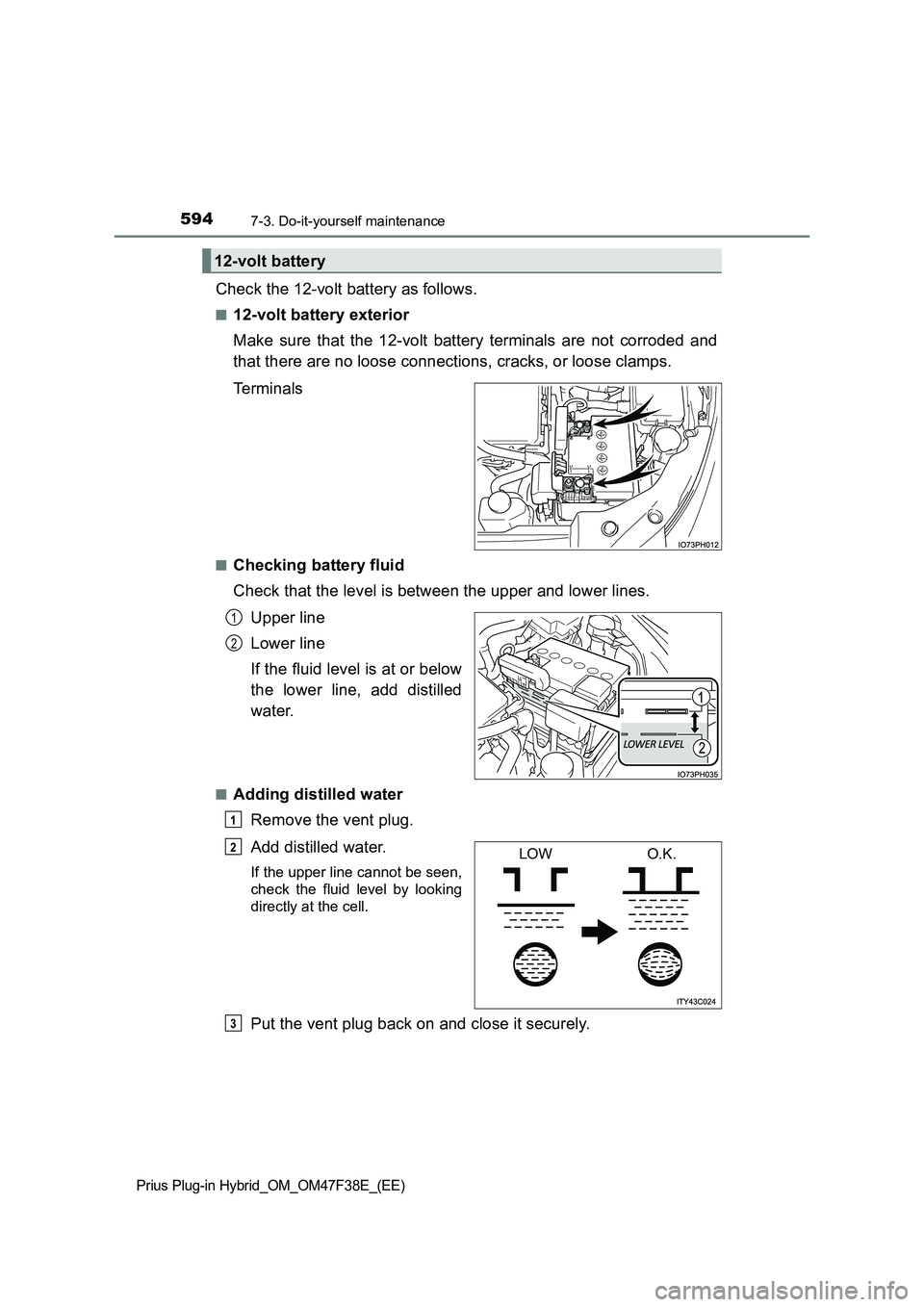
Check the 12-volt battery as follows.
■12-volt battery exterior
Make sure that the 12-volt battery terminals are not corroded and
that there are no loose connections, cracks, or loose clamps.
Terminals
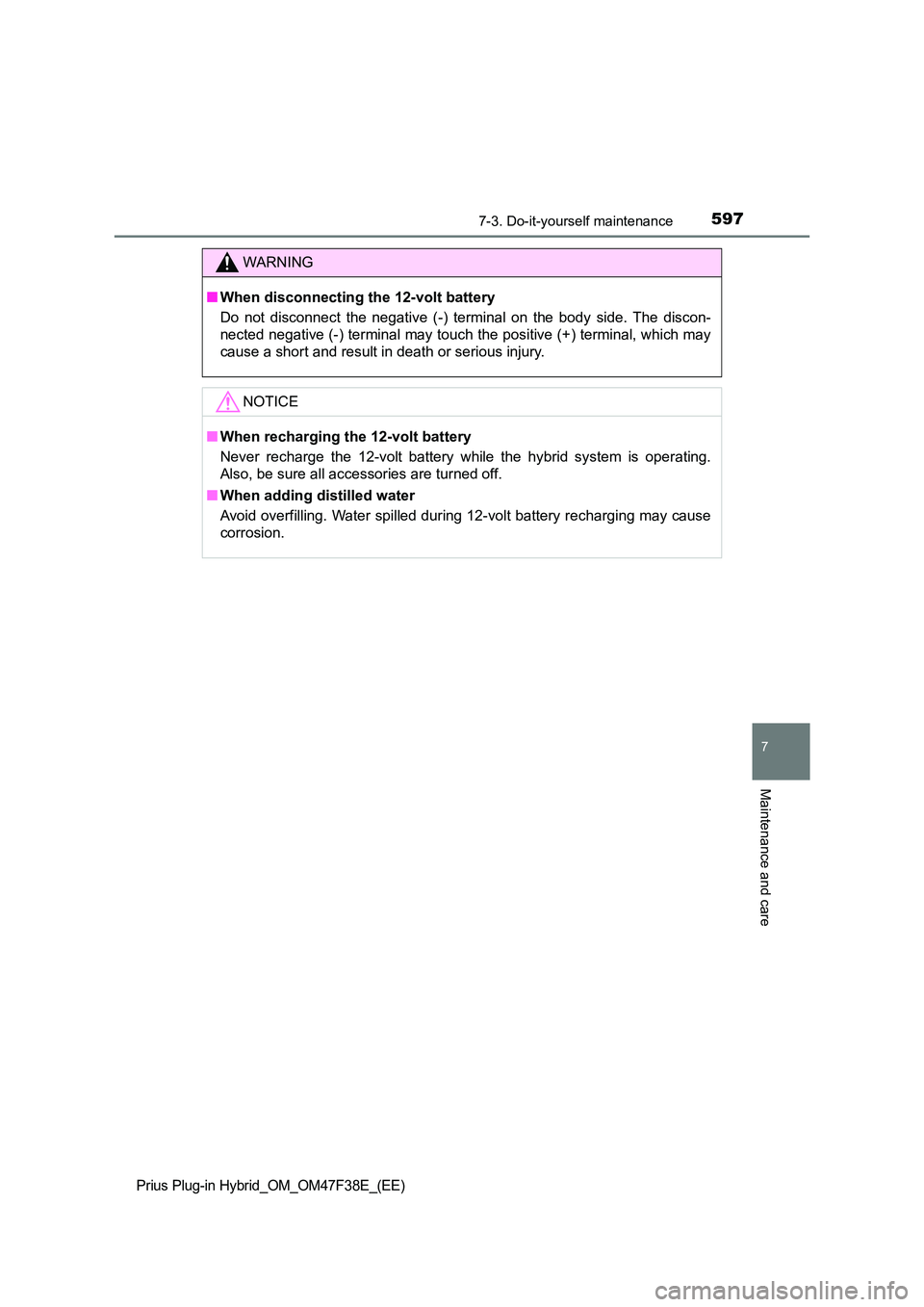
■Checking battery fluid
Check that the level is between the upper and lower lines.
Upper line
Lower line
If the fluid level is at or below
the lower line, add distilled
water.
■Adding distilled water
Remove the vent plug.
Add distilled water.
If the upper line cannot be seen,
check the fluid level by looking
directly at the cell.
Put the vent plug back on and close it securely.
12-volt battery
1
2
1
LOWO.K.2
3
Page 597 of 818
5957-3. Do-it-yourself maintenance
Prius Plug-in Hybrid_OM_OM47F38E_(EE)
7
Maintenance and care
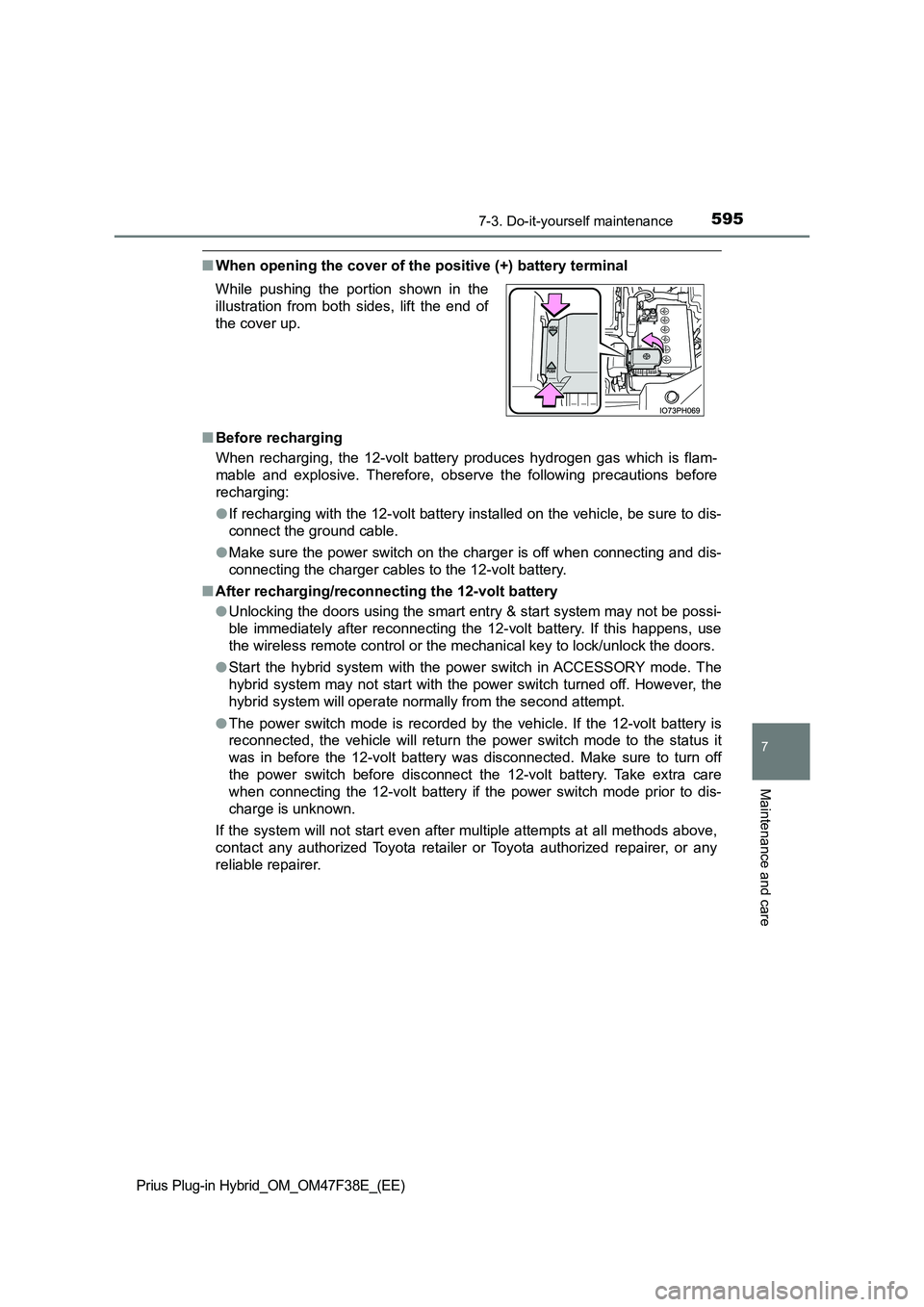
■When opening the cover of the positive (+) battery terminal
■ Before recharging
When recharging, the 12-volt battery produces hydrogen gas which is flam-
mable and explosive. Therefore, obser ve the following precautions before
recharging:
● If recharging with the 12-volt battery installed on the vehicle, be sure to dis-
connect the ground cable.
● Make sure the power switch on the charger is off when connecting and dis-
connecting the charger cables to the 12-volt battery.
■ After recharging/reconnecting the 12-volt battery
● Unlocking the doors using the smart entry & start system may not be possi-
ble immediately after reconnecting the 12-volt battery. If this happens, use
the wireless remote control or the mechanical key to lock/unlock the doors.
● Start the hybrid system with the power switch in ACCESSORY mode. The
hybrid system may not start with the power switch turned off. However, the
hybrid system will operate normally from the second attempt.
● The power switch mode is recorded by the vehicle. If the 12-volt battery is
reconnected, the vehicle will return the power switch mode to the status it
was in before the 12-volt battery was disconnected. Make sure to turn off
the power switch before disconnect the 12-volt battery. Take extra care
when connecting the 12-volt battery if the power switch mode prior to dis-
charge is unknown.
If the system will not start even after multiple attempts at all methods above,
contact any authorized Toyota retailer or Toyota authorized repairer, or any
reliable repairer.
While pushing the portion shown in the
illustration from both sides, lift the end of
the cover up.
Page 598 of 818
5967-3. Do-it-yourself maintenance
Prius Plug-in Hybrid_OM_OM47F38E_(EE)
WARNING
■Chemicals in the 12-volt battery
The 12-volt battery contains poisonous and corrosive sulfuric acid and may
produce hydrogen gas which is flammable and explosive. To reduce the risk
of death or serious injury, take the following precautions while working on or
near the 12-volt battery:
● Do not cause sparks by touching the 12-volt battery terminals with tools.
● Do not smoke or light a match near the 12-volt battery.
● Avoid contact with eyes, skin and clothes.
● Never inhale or swallow electrolyte.
● Wear protective safety glasses when working near the 12-volt battery.
● Keep children away from the 12-volt battery.
■ Where to safely charge the 12-volt battery
Always charge the 12-volt battery in an open area. Do not charge the 12-
volt battery in a garage or closed room where there is insufficient ventila-
tion.
■ Emergency measures regarding electrolyte
● If electrolyte gets in your eyes
Flush your eyes with clean water for at least 15 minutes and get immedi-
ate medical attention. If possible, continue to apply water with a sponge or
cloth while traveling to the nearest medical facility.
● If electrolyte gets on your skin
Wash the affected area thoroughly. If you feel pain or burning, get medical
attention immediately.
● If electrolyte gets on your clothes
It can soak through clothing on to your skin. Immediately take off the cloth-
ing and follow the procedure above if necessary.
● If you accidentally swallow electrolyte
Drink a large quantity of water or milk. Get emergency medical attention
immediately.
Page 599 of 818
5977-3. Do-it-yourself maintenance
Prius Plug-in Hybrid_OM_OM47F38E_(EE)
7
Maintenance and care
WARNING
■When disconnecting the 12-volt battery
Do not disconnect the negative (-) terminal on the body side. The discon-
nected negative (-) terminal may touch the positive (+) terminal, which may
cause a short and result in death or serious injury.
NOTICE
■ When recharging the 12-volt battery
Never recharge the 12-volt battery while the hybrid system is operating.
Also, be sure all accessories are turned off.
■ When adding distilled water
Avoid overfilling. Water spilled during 12-volt battery recharging may cause
corrosion.
Page 629 of 818

6277-3. Do-it-yourself maintenance
Prius Plug-in Hybrid_OM_OM47F38E_(EE)
7
Maintenance and care
Remove the air conditioning fil-
ter from the filter case and
replace it with a new one.
The “ UP” marks shown on the fil-
ter should be pointing up.
When installing, reverse the steps listed.
■ Checking interval
Inspect and replace the air conditioning filter according to the maintenance
schedule. In dusty areas or areas with heavy traffic flow, early replacement
may be required. (For scheduled maintenance information, please refer to the
“Toyota Service Booklet” or “Toyota Warranty Booklet”.)
■ If air flow from the vents decreases dramatically
The filter may be clogged. Check the filter and replace if necessary.
8
WARNING
■ When replacing the air conditioning filter
Observe the following precautions. Failure to do so may result in the air
conditioning system operating during t he procedure, possibly resulting in
injury.
● Check that the charging connector is not connected
The air conditioning may operate due to the “Climate Prep” ( P. 166) or
“Traction Battery Cooler” ( P. 145) setting. (if equipped)
● Do not use the Remote Air Conditioning System
9
Page 634 of 818
6327-3. Do-it-yourself maintenance
Prius Plug-in Hybrid_OM_OM47F38E_(EE)
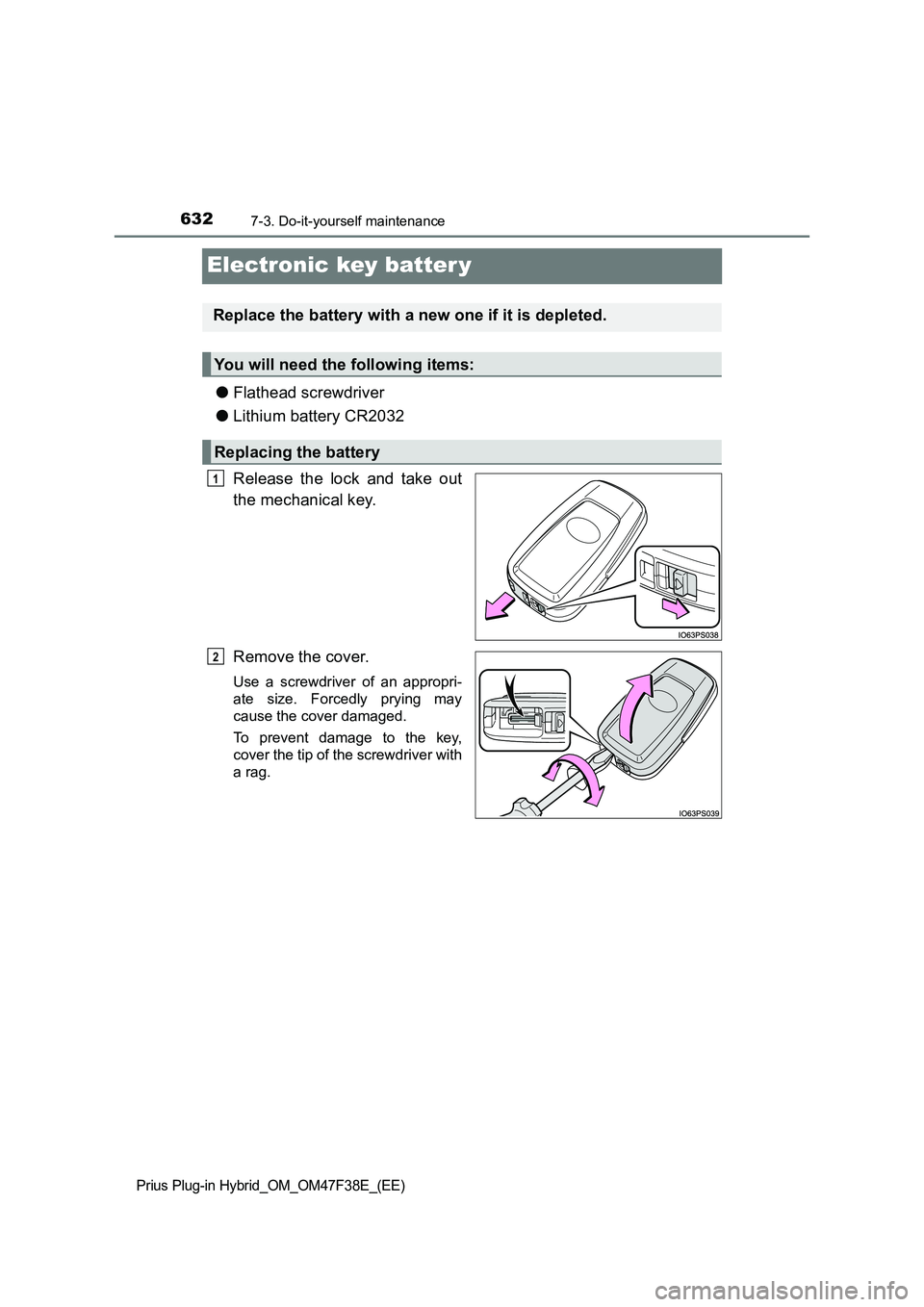
Electronic key batter y
●Flathead screwdriver
●Lithium battery CR2032
Release the lock and take out
the mechanical key.
Remove the cover.
Use a screwdriver of an appropri-
ate size. Forcedly prying may
cause the cover damaged.
To prevent damage to the key,
cover the tip of the screwdriver with
a rag.
Replace the battery with a new one if it is depleted.
You will need the following items:
Replacing the battery
1
2