Page 114 of 770
1122. Instrument cluster
PRIUS_OM_OM47F32E_(EE)
*1: These lights turn on when the power switch is turned to ON mode to indi-
cate that a system check is being performed. They will turn off after the
hybrid system is on, or after a few seconds. There may be a malfunction in
a system if a light does not come on, or turn off. Have the vehicle
inspected by any authorized Toyota retailer or Toyota authorized repairer,
or any reliable repairer.
*2: The light flashes or illuminates to indicate a malfunction.
*3: The light flashes to indicate a malfunction.
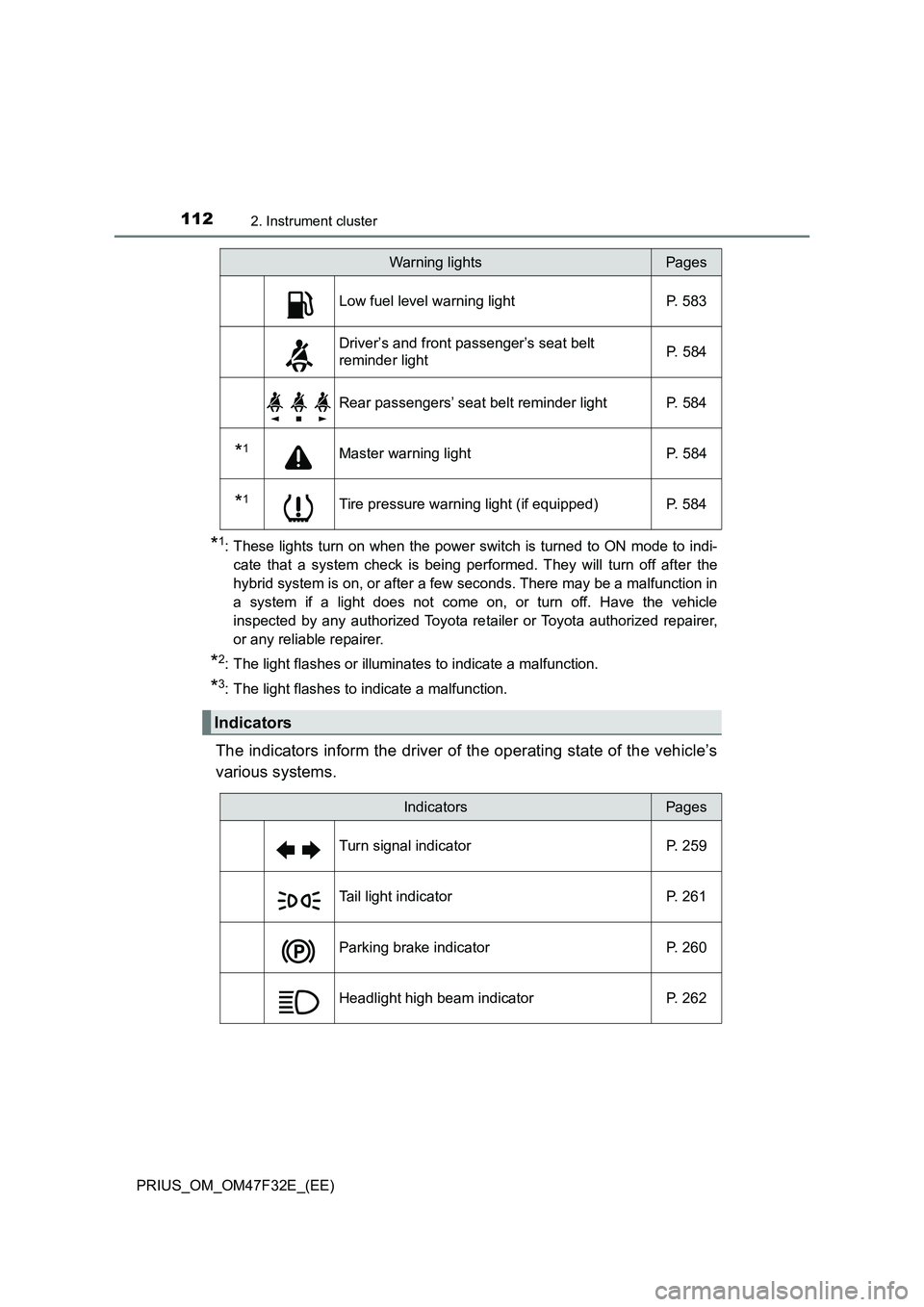
The indicators inform the driver of the operating state of the vehicle’s
various systems.
Low fuel level warning light P. 583
Driver’s and front passenger’s seat belt
reminder lightP. 584
Rear passengers’ seat belt reminder light P. 584
*1Master warning light P. 584
*1Tire pressure warning light (if equipped) P. 584
Indicators
Warning lightsPages
IndicatorsPages
Turn signal indicator P. 259
Tail light indicator P. 261
Parking brake indicator P. 260
Headlight high beam indicator P. 262
Page 116 of 770

1142. Instrument cluster
PRIUS_OM_OM47F32E_(EE)
*1: These lights turn on when the power switch is turned to ON mode to indi-
cate that a system check is being performed. They will turn off after the
hybrid system is on, or after a few seconds. There may be a malfunction in
a system if a light does not come on, or turn off. Have the vehicle
inspected by any authorized Toyota re tailer or Toyota authorized repairer,
or any reliable repairer.
*2: The light flashes to indicate that the system is operating.
*3: The light comes on when the system is turned off.
*4: Depending on the operating condition, the color and illuminating/flashing
state of the light change.
■Main display and multi-information display
*: The displayed indicator changes according to the current driving mode.
Toyota parking assist-sensor indicator
(if equipped) P. 381
*1, 3PKSB OFF indicator (if equipped) P. 396
*1S-IPA indicator (if equipped) P. 409
*1“PASSENGER AIR BAG” indicator P. 51
Indicators and symbols displayed on the display
IndicatorsPages
IndicatorsPages
EV drive mode indicator P. 250
*“ECO MODE” indicator P. 351
*“PWR MODE” indicator P. 351
EV Indicator P. 133
Speed limiter indicator (if equipped) P. 353
Page 117 of 770
1152. Instrument cluster
2
Instrument cluster
PRIUS_OM_OM47F32E_(EE)■
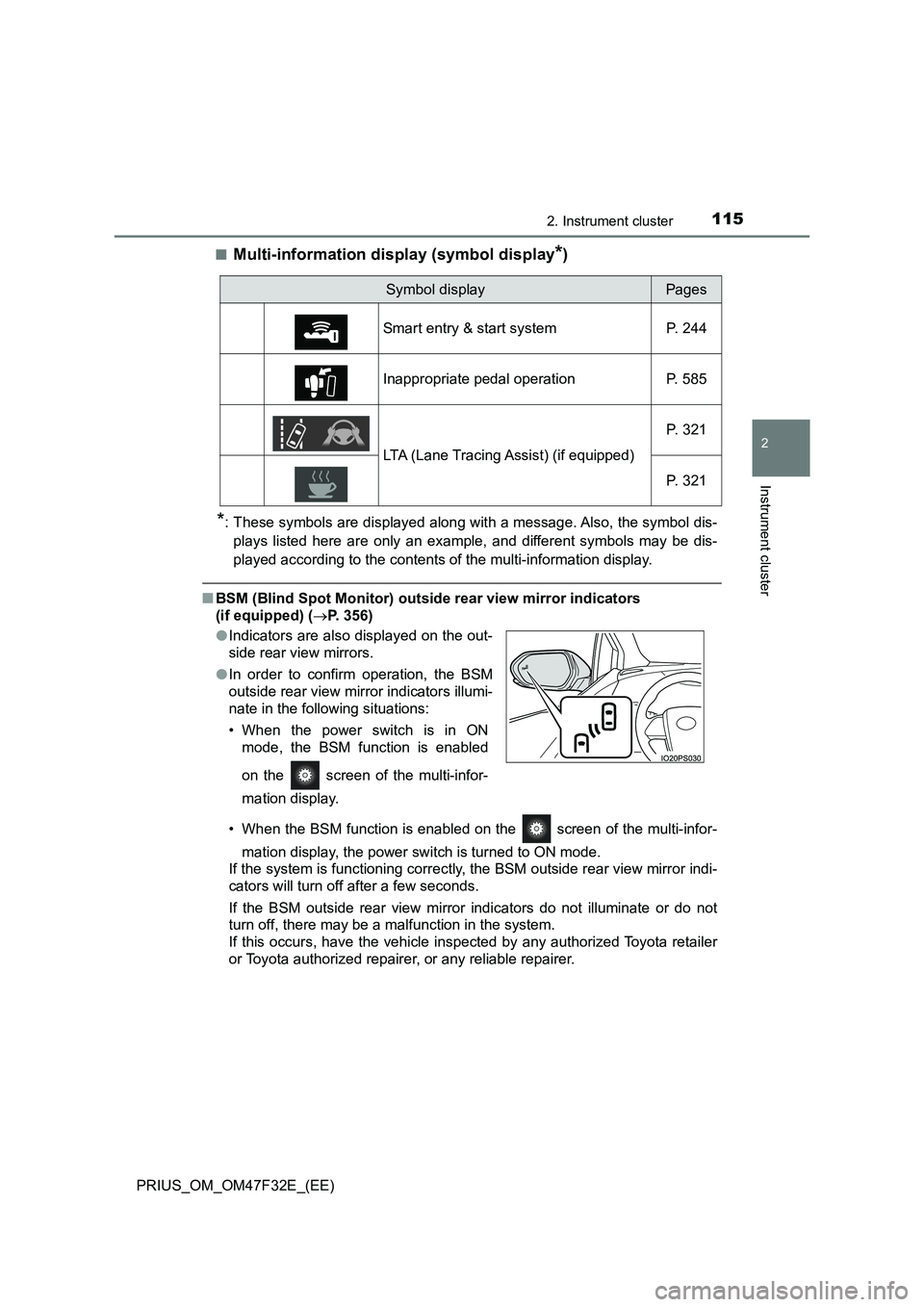
Multi-information display (symbol display*)
*: These symbols are displayed along with a message. Also, the symbol dis-
plays listed here are only an example, and different symbols may be dis-
played according to the contents of the multi-information display.
■BSM (Blind Spot Monitor) outside rear view mirror indicators
(if equipped) (P. 356)
• When the BSM function is enabled on the screen of the multi-infor-
mation display, the power switch is turned to ON mode.
If the system is functioning correctly, the BSM outside rear view mirror indi-
cators will turn off after a few seconds.
If the BSM outside rear view mirror indicators do not illuminate or do not
turn off, there may be a malfunction in the system.
If this occurs, have the vehicle inspected by any authorized Toyota retailer
or Toyota authorized repairer, or any reliable repairer.
Symbol displayPages
Smart entry & start system P. 244
Inappropriate pedal operation P. 585
LTA (Lane Tracing Assist) (if equipped)P. 321
P. 321
●Indicators are also displayed on the out-
side rear view mirrors.
●In order to confirm operation, the BSM
outside rear view mirror indicators illumi-
nate in the following situations:
• When the power switch is in ON
mode, the BSM function is enabled
on the screen of the multi-infor-
mation display.
Page 128 of 770
1262. Instrument cluster
PRIUS_OM_OM47F32E_(EE)
■Outside temperature display
●In the following situations, the correct outside temperature may not be dis-
played, or the display may take longer than normal to change.
• When stopped, or driving at low speeds (less than 20 km/h [12 mph])
• When the outside temperature has changed suddenly (at the entrance/
exit of a garage, tunnel, etc.)
●When “-” or “E” is displayed, the system may be malfunctioning.
Take your vehicle to any authorized Toyota retailer or Toyota authorized
repairer, or any reliable repairer.
■Distance to empty
●This distance is computed based on your average fuel consumption. As a
result, the actual distance that can be driven may differ from that displayed.
●When only a small amount of fuel is added to the tank, the display may not
be updated.
When refueling, turn the power switch off. If the vehicle is refueled without
turning the power switch off, the display may not be updated.
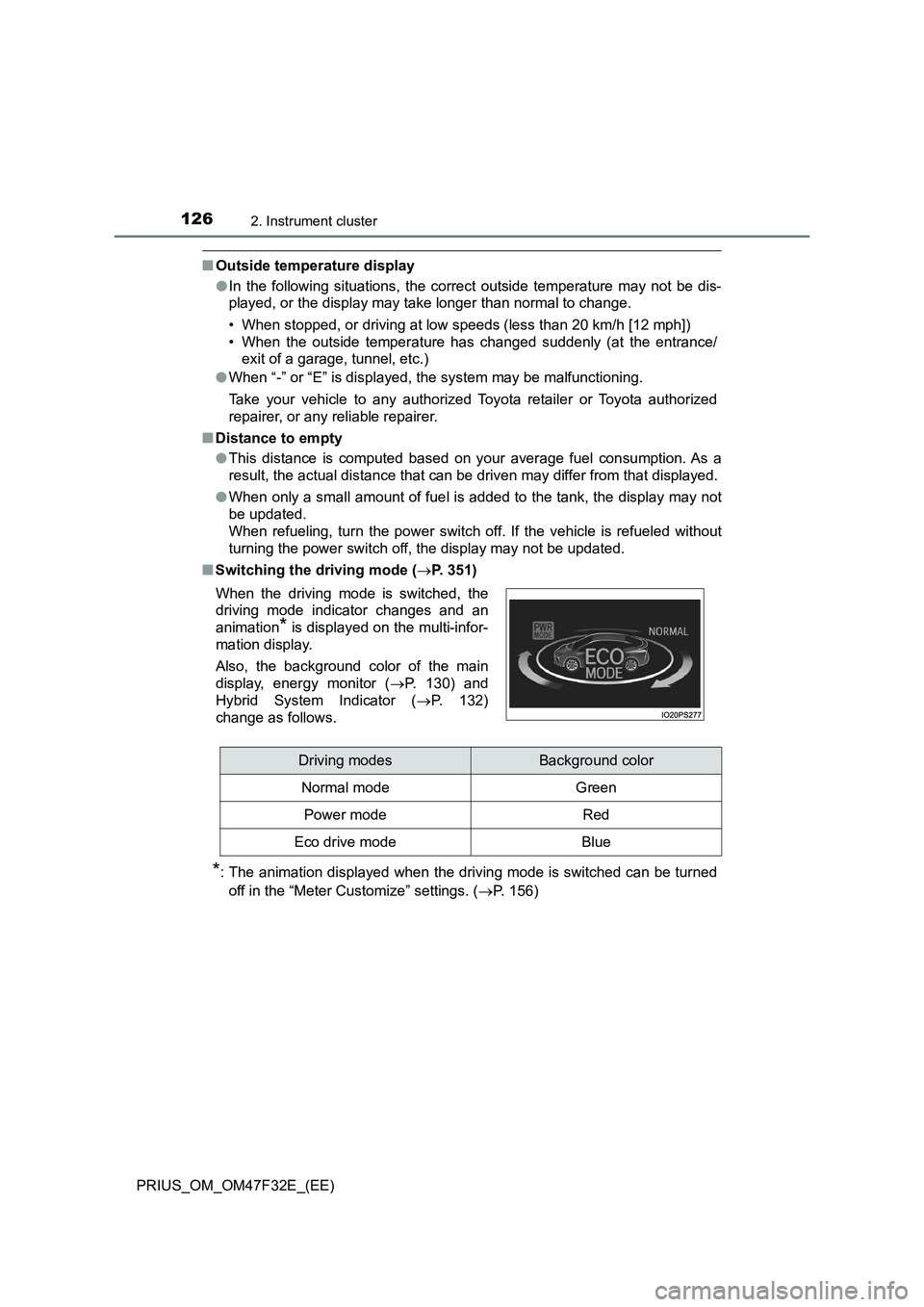
■Switching the driving mode (P. 351)
*: The animation displayed when the driving mode is switched can be turned
off in the “Meter Customize” settings. (P. 156) When the driving mode is switched, the
driving mode indicator changes and an
animation
* is displayed on the multi-infor-
mation display.
Also, the background color of the main
display, energy monitor (P. 130) and
Hybrid System Indicator (P. 132)
change as follows.
Driving modesBackground color
Normal mode Green
Power modeRed
Eco drive modeBlue
Page 151 of 770
1492. Instrument cluster
2
Instrument cluster
PRIUS_OM_OM47F32E_(EE)
*1: “LO” is displayed if the temperature is adjusted to the lowest setting, and
“HI” is displayed if the temperature is adjusted to the highest setting.
*2: The selectable modes differ depending on whether a passenger is present.
(P. 461)
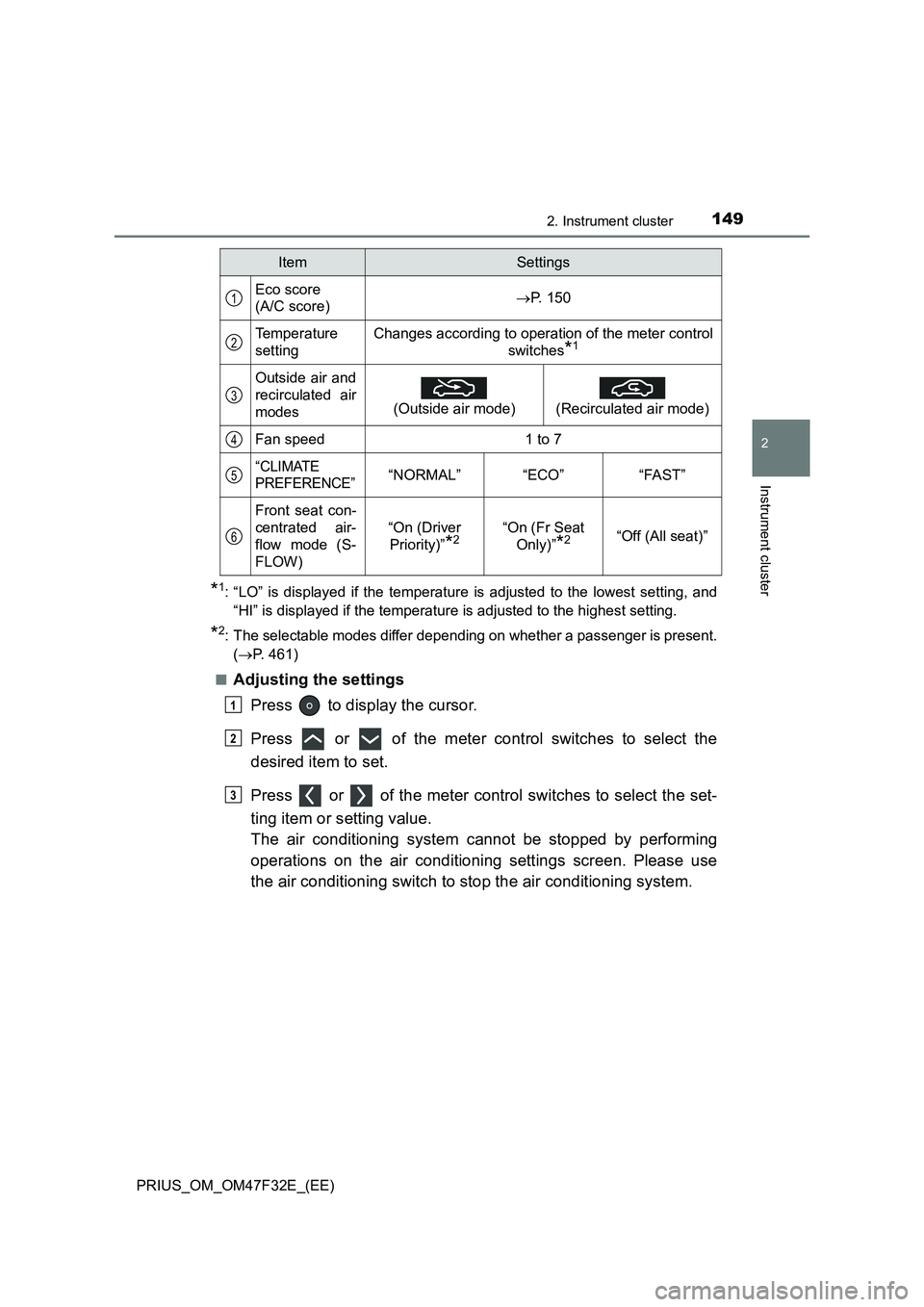
■
Adjusting the settings
Press to display the cursor.
Press or of the meter control switches to select the
desired item to set.
Press or of the meter control switches to select the set-
ting item or setting value.
The air conditioning system cannot be stopped by performing
operations on the air conditioning settings screen. Please use
the air conditioning switch to stop the air conditioning system.
ItemSettings
Eco score
(A/C score)P. 150
Temperature
settingChanges according to operation of the meter control
switches
*1
Outside air and
recirculated air
modes
(Outside air mode)
(Recirculated air mode)
Fan speed1 to 7
“CLIMATE
PREFERENCE”“NORMAL”“ECO”“FAST”
Front seat con-
centrated air-
flow mode (S-
FLOW)
“On (Driver
Priority)”
*2“On (Fr Seat
Only)”
*2“Off (All seat)”
1
2
3
4
5
6
1
2
3
Page 152 of 770
1502. Instrument cluster
PRIUS_OM_OM47F32E_(EE)■
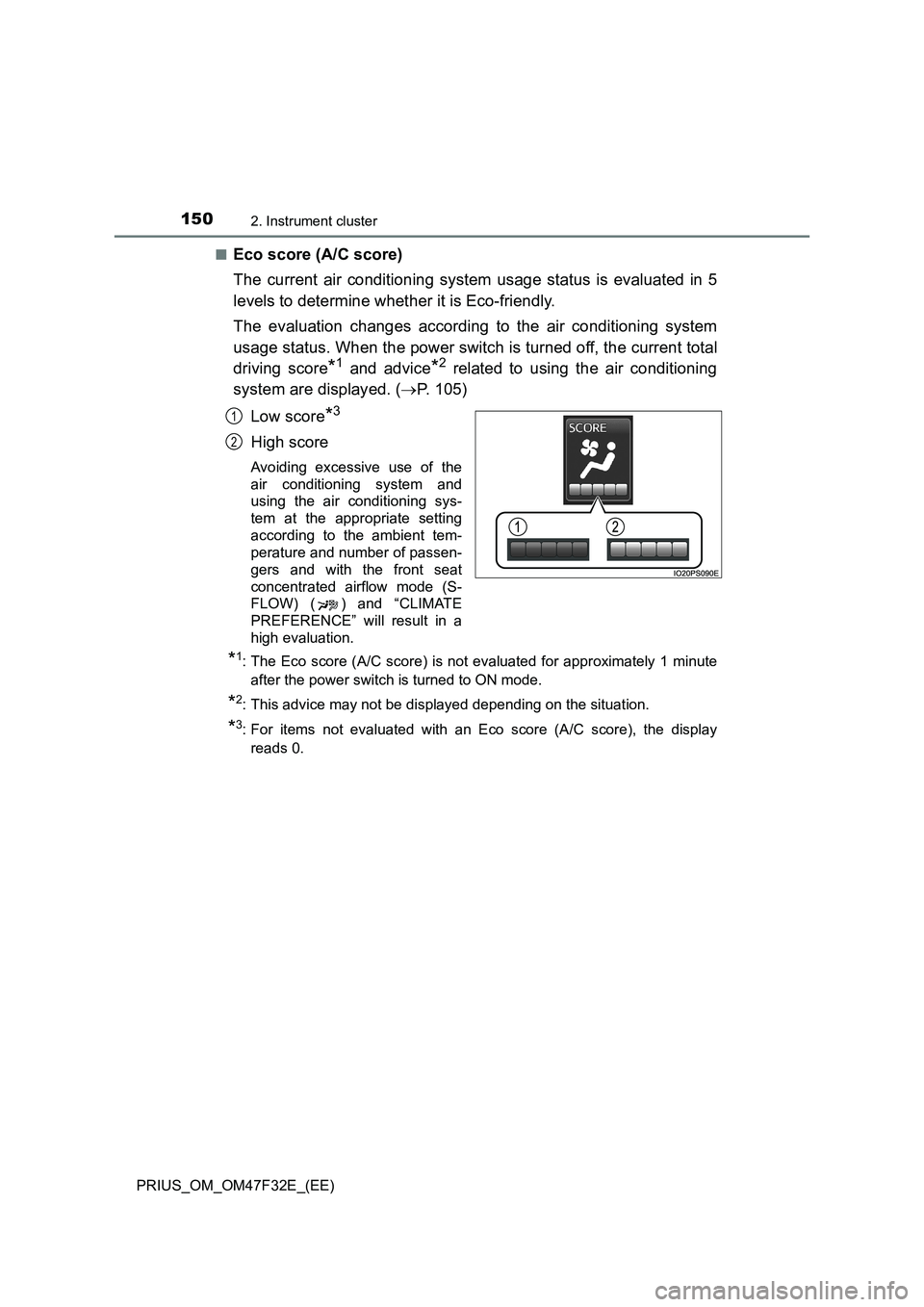
Eco score (A/C score)
The current air conditioning system usage status is evaluated in 5
levels to determine whether it is Eco-friendly.
The evaluation changes according to the air conditioning system
usage status. When the power switch is turned off, the current total
driving score
*1 and advice*2 related to using the air conditioning
system are displayed. (P. 105)
Low score
*3
High score
Avoiding excessive use of the
air conditioning system and
using the air conditioning sys-
tem at the appropriate setting
according to the ambient tem-
perature and number of passen-
gers and with the front seat
concentrated airflow mode (S-
FLOW) ( ) and “CLIMATE
PREFERENCE” will result in a
high evaluation.
*1: The Eco score (A/C score) is not evaluated for approximately 1 minute
after the power switch is turned to ON mode.
*2: This advice may not be displayed depending on the situation.
*3: For items not evaluated with an Eco score (A/C score), the display
reads 0.
1
2
Page 153 of 770
1512. Instrument cluster
2
Instrument cluster
PRIUS_OM_OM47F32E_(EE)
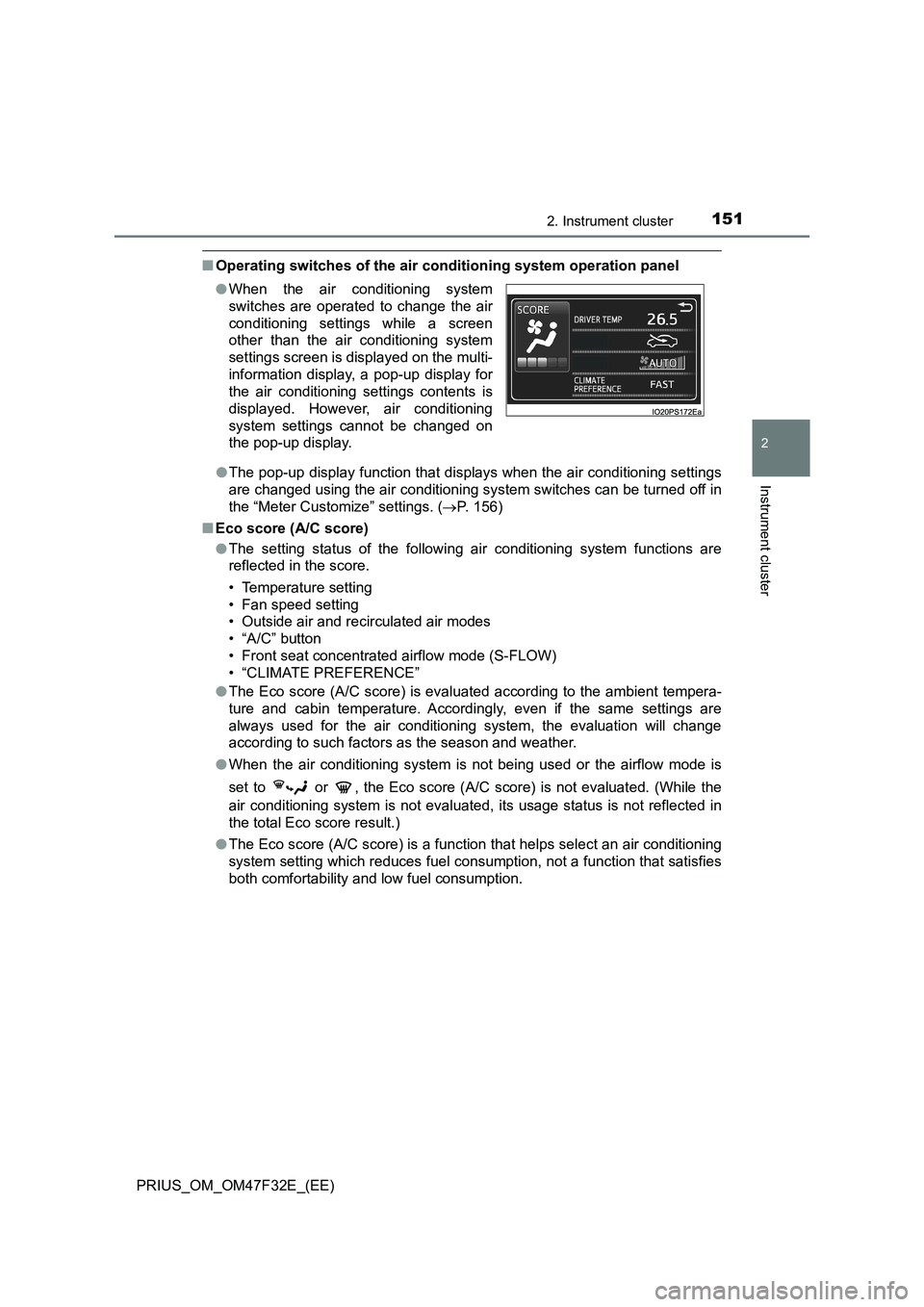
■Operating switches of the air conditioning system operation panel
●The pop-up display function that displays when the air conditioning settings
are changed using the air conditioning system switches can be turned off in
the “Meter Customize” settings. (P. 156)
■Eco score (A/C score)
●The setting status of the following air conditioning system functions are
reflected in the score.
• Temperature setting
• Fan speed setting
• Outside air and recirculated air modes
• “A/C” button
• Front seat concentrated airflow mode (S-FLOW)
• “CLIMATE PREFERENCE”
●The Eco score (A/C score) is evaluated according to the ambient tempera-
ture and cabin temperature. Accordingly, even if the same settings are
always used for the air conditioning system, the evaluation will change
according to such factors as the season and weather.
●When the air conditioning system is not being used or the airflow mode is
set to or , the Eco score (A/C score) is not evaluated. (While the
air conditioning system is not evaluated, its usage status is not reflected in
the total Eco score result.)
●The Eco score (A/C score) is a function that helps select an air conditioning
system setting which reduces fuel consumption, not a function that satisfies
both comfortability and low fuel consumption. ●When the air conditioning system
switches are operated to change the air
conditioning settings while a screen
other than the air conditioning system
settings screen is displayed on the multi-
information display, a pop-up display for
the air conditioning settings contents is
displayed. However, air conditioning
system settings cannot be changed on
the pop-up display.
Page 158 of 770
1562. Instrument cluster
PRIUS_OM_OM47F32E_(EE)■
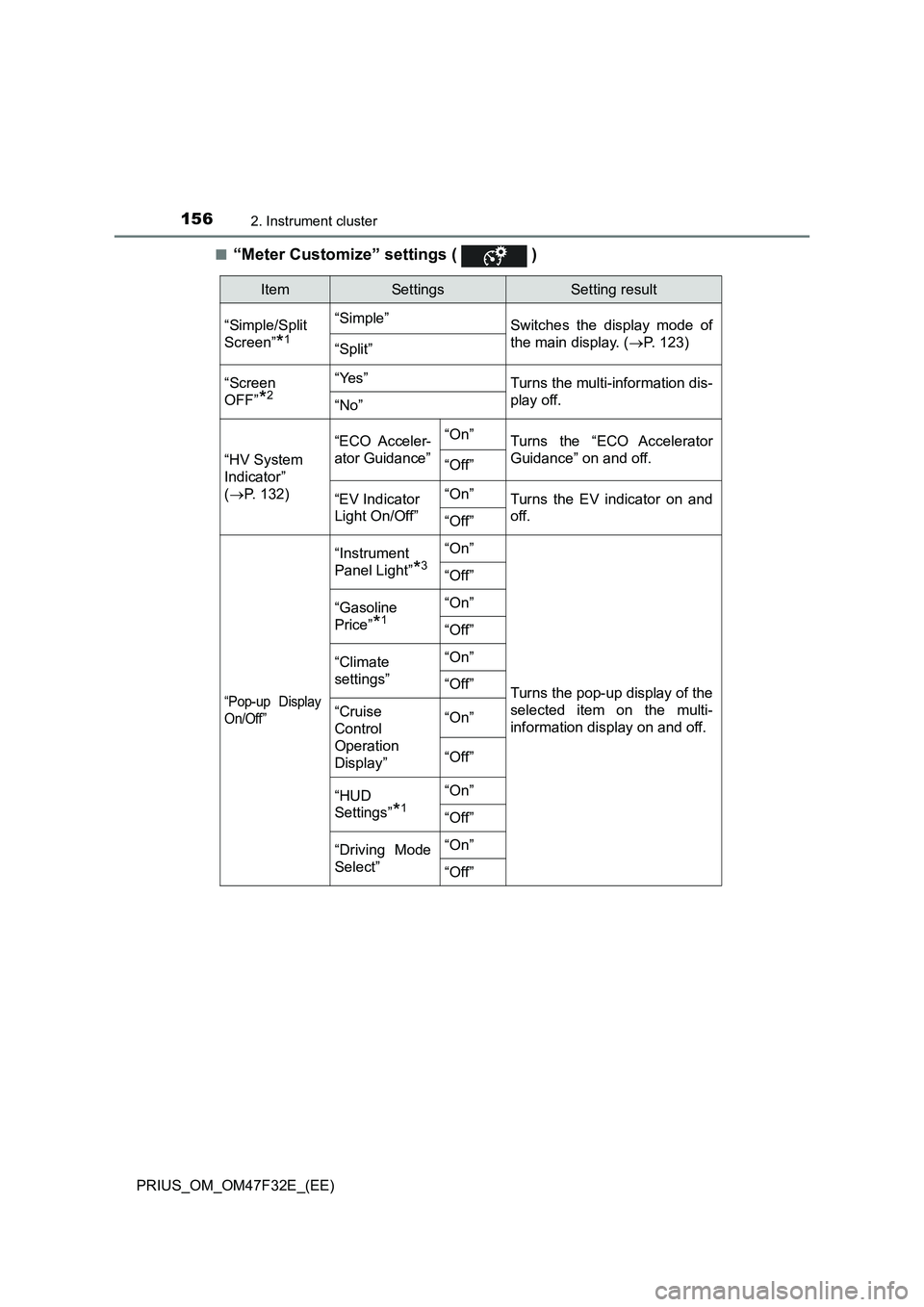
“Meter Customize” settings ( )
ItemSettingsSetting result
“Simple/Split
Screen”
*1
“Simple”
Switches the display mode of
the main display. (P. 123)
“Split”
“Screen
OFF”
*2
“Yes”Turns the multi-information dis-
play off.
“No”
“HV System
Indicator”
(P. 132)“ECO Acceler-
ator Guidance”“On”
Turns the “ECO Accelerator
Guidance” on and off.
“Off”
“EV Indicator
Light On/Off”“On”Turns the EV indicator on and
off.
“Off”
“Pop-up Display
On/Off”
“Instrument
Panel Light”
*3
“On”
Turns the pop-up display of the
selected item on the multi-
information display on and off.
“Off”
“Gasoline
Price”
*1
“On”
“Off”
“Climate
settings”“On”
“Off”
“Cruise
Control
Operation
Display”“On”
“Off”
“HUD
Settings”
*1
“On”
“Off”
“Driving Mode
Select”“On”
“Off”