Page 331 of 770
329
4
4-5. Using the driving support systems
Driving
PRIUS_OM_OM47F32E_(EE)
Dynamic radar cruise controlwith full-speed
range
In vehicle-to-vehicle distance control mode, the vehicle automatically
accelerates, decelerates and stops to match the speed changes of the
preceding vehicle even if the accelerator pedal is not depressed. In
constant speed control mode, the vehicle runs at a fixed speed.
Use the dynamic radar cruise control with full-speed range on free-
ways and highways.
●Vehicle-to-vehicle distance control mode (P. 333)
●Constant speed control mode (P. 340)
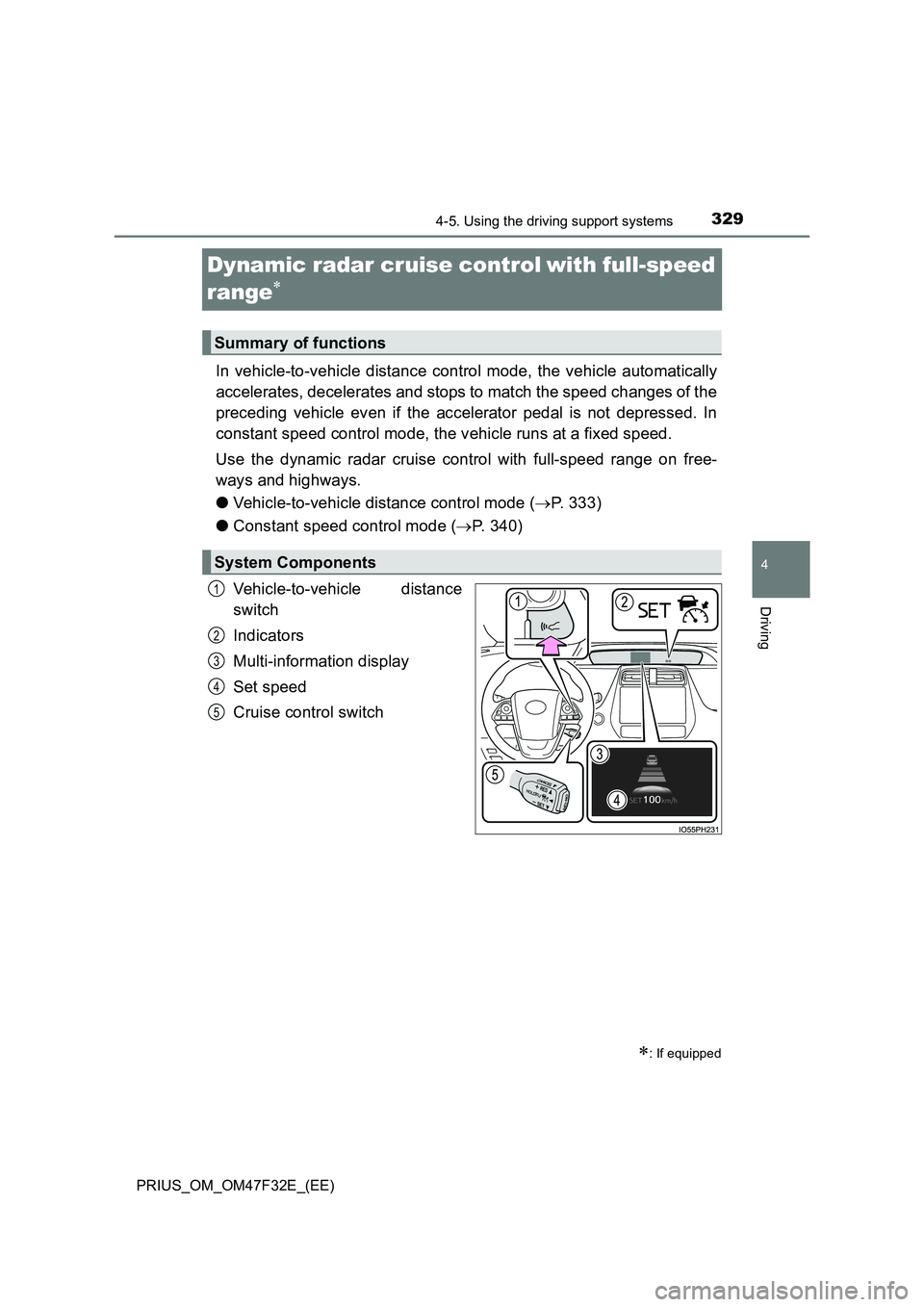
Vehicle-to-vehicle distance
switch
Indicators
Multi-information display
Set speed
Cruise control switch
: If equipped
Summary of functions
System Components
1
2
3
4
5
Page 337 of 770
3354-5. Using the driving support systems
4
Driving
PRIUS_OM_OM47F32E_(EE)
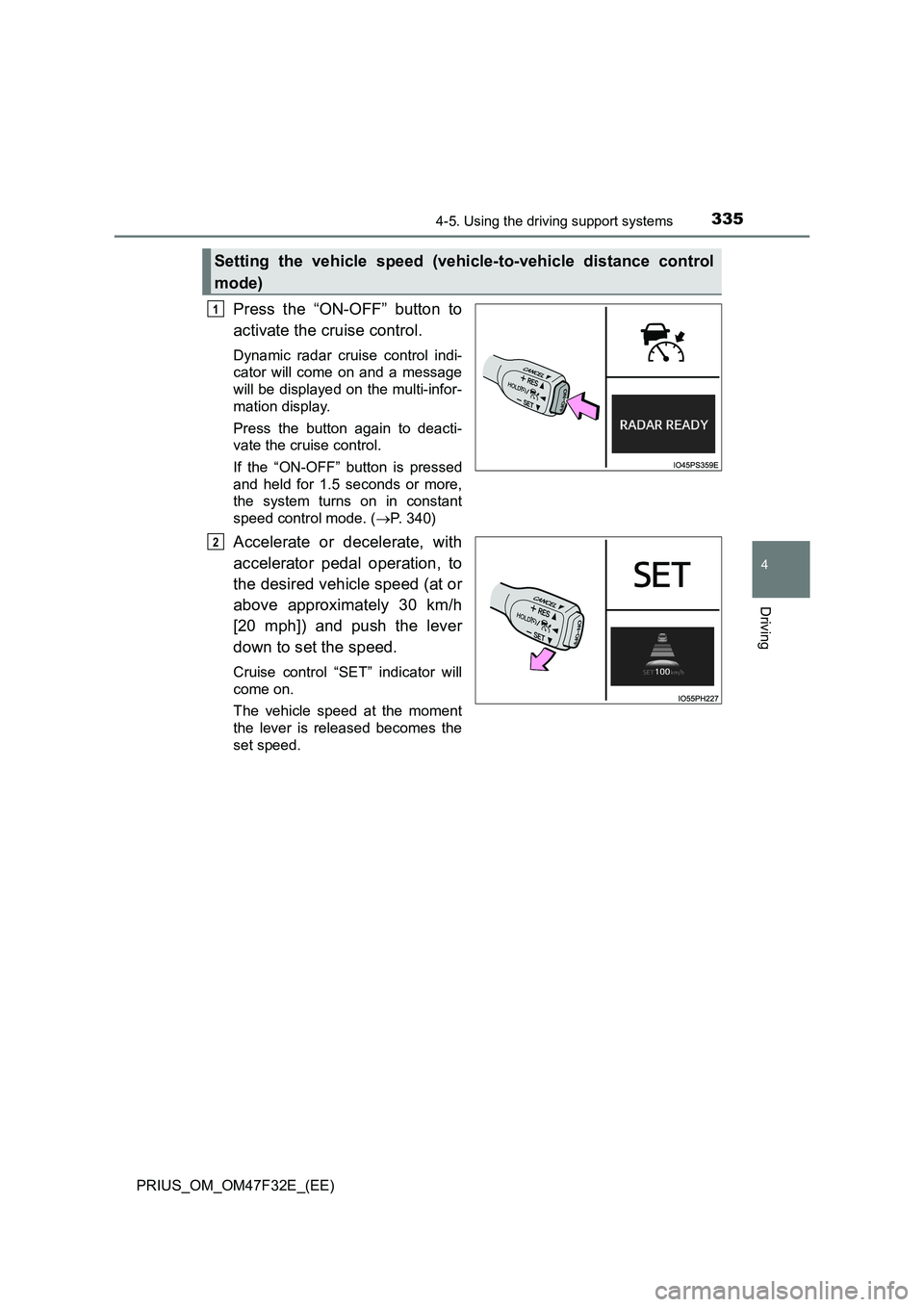
Press the “ON-OFF” button to
activate the cruise control.
Dynamic radar cruise control indi-
cator will come on and a message
will be displayed on the multi-infor-
mation display.
Press the button again to deacti-
vate the cruise control.
If the “ON-OFF” button is pressed
and held for 1.5 seconds or more,
the system turns on in constant
speed control mode. (P. 340)
Accelerate or decelerate, with
accelerator pedal operation, to
the desired vehicle speed (at or
above approximately 30 km/h
[20 mph]) and push the lever
down to set the speed.
Cruise control “SET” indicator will
come on.
The vehicle speed at the moment
the lever is released becomes the
set speed.
Setting the vehicle speed (vehicle-to-vehicle distance control
mode)
1
2
Page 338 of 770
3364-5. Using the driving support systems
PRIUS_OM_OM47F32E_(EE)
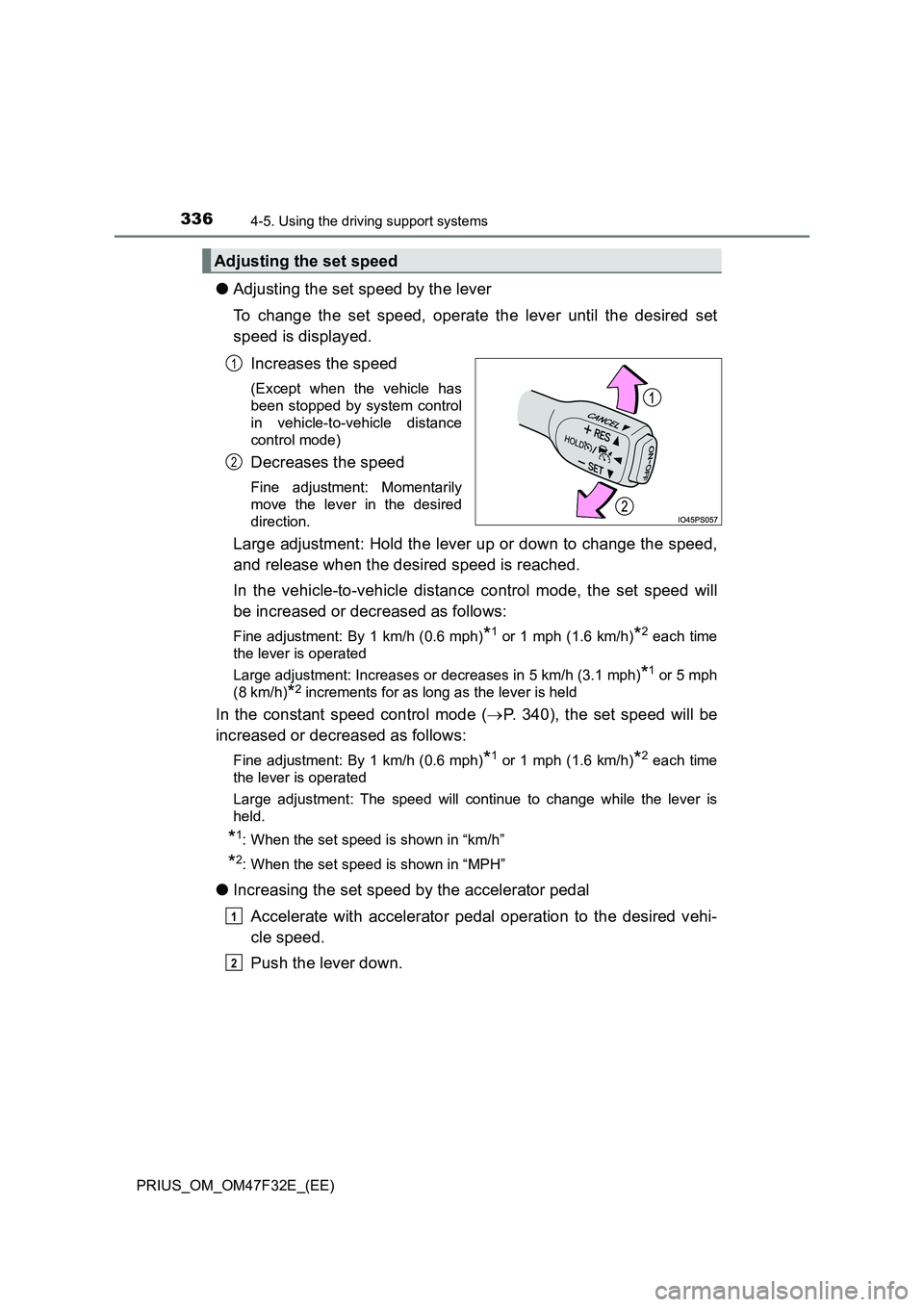
●Adjusting the set speed by the lever
To change the set speed, operate the lever until the desired set
speed is displayed.
Increases the speed
(Except when the vehicle has
been stopped by system control
in vehicle-to-vehicle distance
control mode)
Decreases the speed
Fine adjustment: Momentarily
move the lever in the desired
direction.
Large adjustment: Hold the lever up or down to change the speed,
and release when the desired speed is reached.
In the vehicle-to-vehicle distance control mode, the set speed will
be increased or decreased as follows:
Fine adjustment: By 1 km/h (0.6 mph)*1 or 1 mph (1.6 km/h)*2 each time
the lever is operated
Large adjustment: Increases or decreases in 5 km/h (3.1 mph)
*1 or 5 mph
(8 km/h)
*2 increments for as long as the lever is held
In the constant speed control mode (P. 340), the set speed will be
increased or decreased as follows:
Fine adjustment: By 1 km/h (0.6 mph)*1 or 1 mph (1.6 km/h)*2 each time
the lever is operated
Large adjustment: The speed will continue to change while the lever is
held.
*1: When the set speed is shown in “km/h”
*2: When the set speed is shown in “MPH”
●Increasing the set speed by the accelerator pedal
Accelerate with accelerator pedal operation to the desired vehi-
cle speed.
Push the lever down.
Adjusting the set speed
1
2
1
2
Page 341 of 770
3394-5. Using the driving support systems
4
Driving
PRIUS_OM_OM47F32E_(EE)
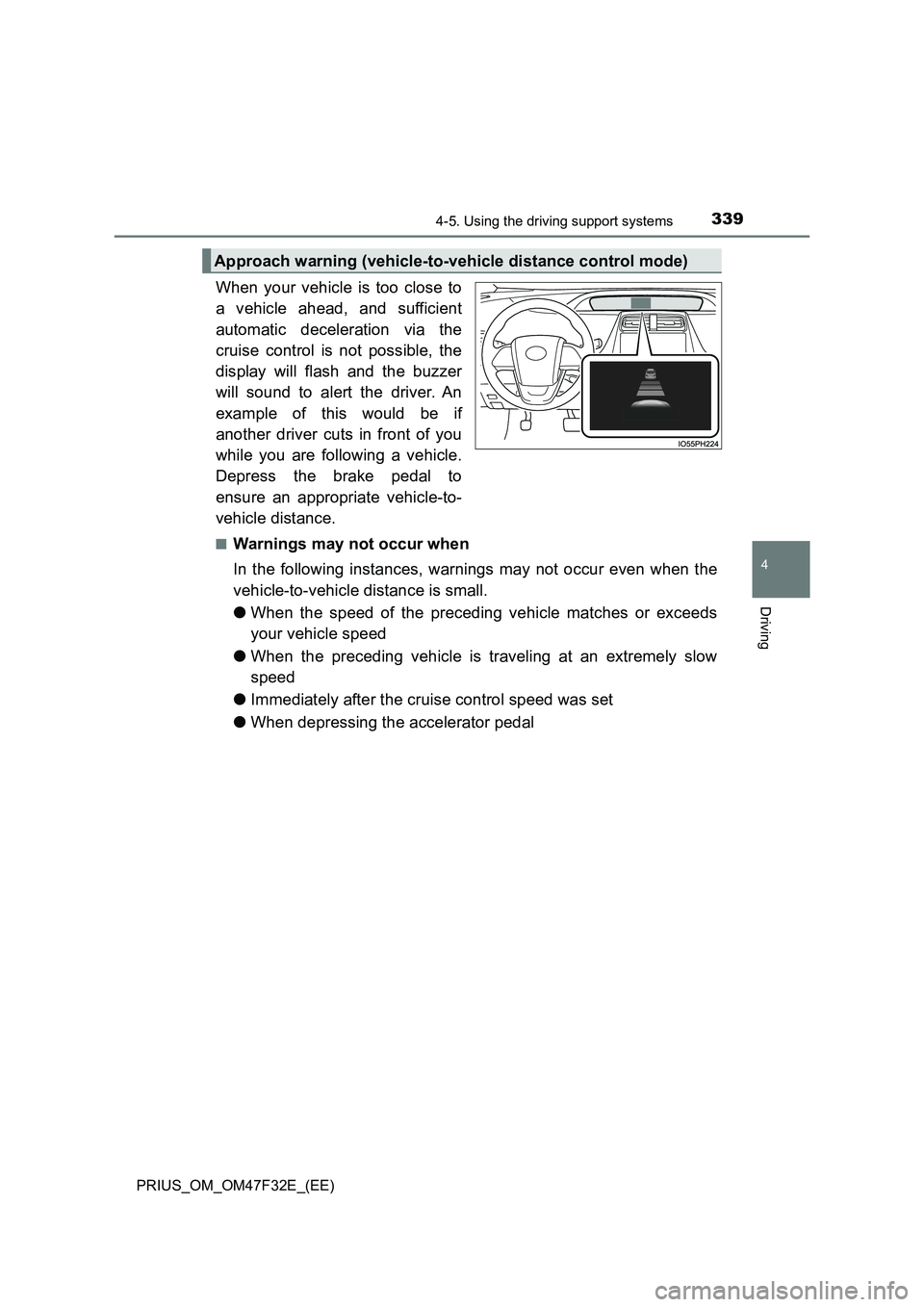
When your vehicle is too close to
a vehicle ahead, and sufficient
automatic deceleration via the
cruise control is not possible, the
display will flash and the buzzer
will sound to alert the driver. An
example of this would be if
another driver cuts in front of you
while you are following a vehicle.
Depress the brake pedal to
ensure an appropriate vehicle-to-
vehicle distance.
■Warnings may not occur when
In the following instances, warnings may not occur even when the
vehicle-to-vehicle distance is small.
●When the speed of the preceding vehicle matches or exceeds
your vehicle speed
●When the preceding vehicle is traveling at an extremely slow
speed
●Immediately after the cruise control speed was set
●When depressing the accelerator pedal
Approach warning (vehicle-to-vehicle distance control mode)
Page 343 of 770
3414-5. Using the driving support systems
4
Driving
PRIUS_OM_OM47F32E_(EE)
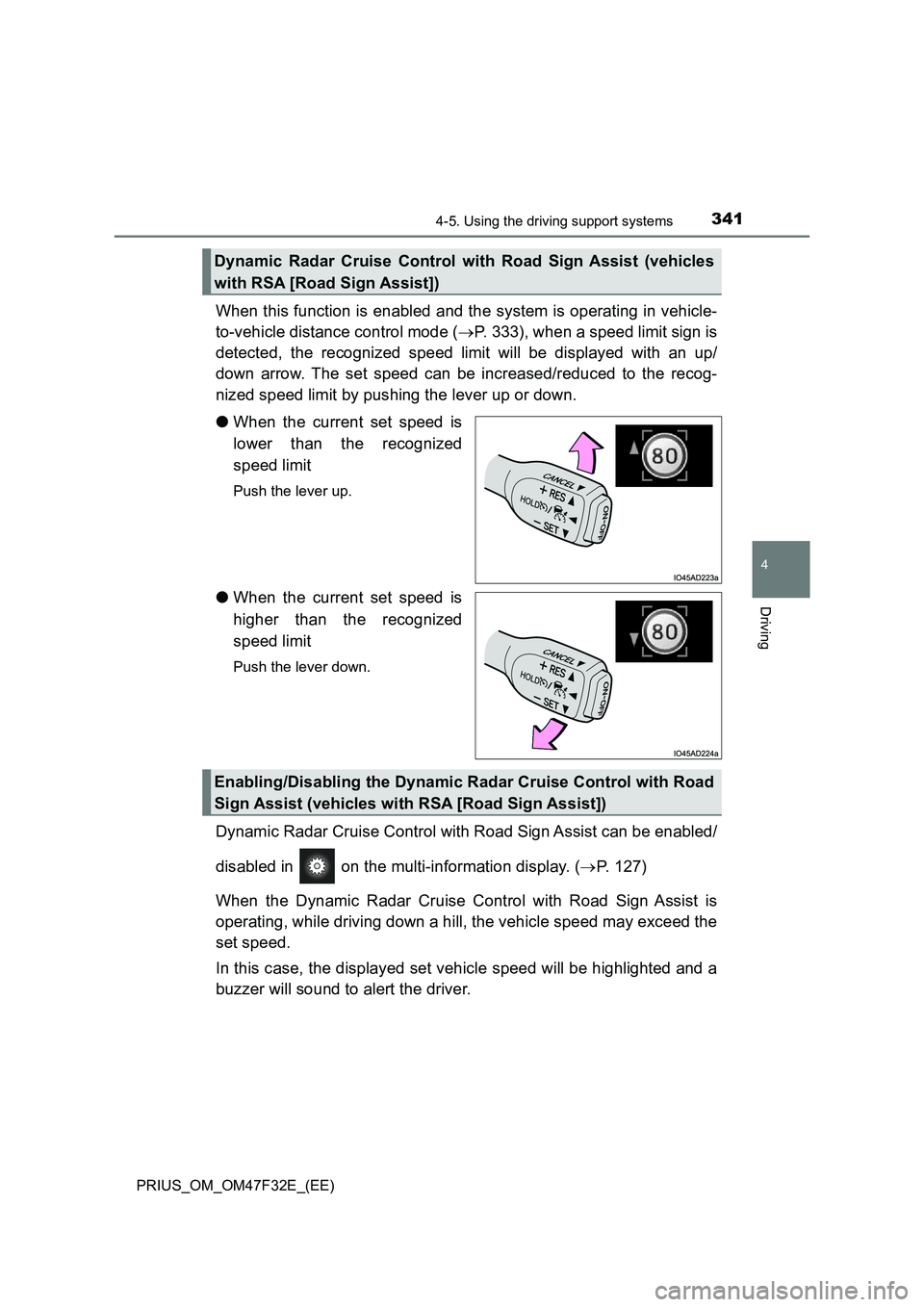
When this function is enabled and the system is operating in vehicle-
to-vehicle distance control mode (P. 333), when a speed limit sign is
detected, the recognized speed limit will be displayed with an up/
down arrow. The set speed can be increased/reduced to the recog-
nized speed limit by pushing the lever up or down.
●When the current set speed is
lower than the recognized
speed limit
Push the lever up.
●When the current set speed is
higher than the recognized
speed limit
Push the lever down.
Dynamic Radar Cruise Control with Road Sign Assist can be enabled/
disabled in on the multi-information display. (P. 127)
When the Dynamic Radar Cruise Control with Road Sign Assist is
operating, while driving down a hill, the vehicle speed may exceed the
set speed.
In this case, the displayed set vehicle speed will be highlighted and a
buzzer will sound to alert the driver.
Dynamic Radar Cruise Control with Road Sign Assist (vehicles
with RSA [Road Sign Assist])
Enabling/Disabling the Dynamic Radar Cruise Control with Road
Sign Assist (vehicles with RSA [Road Sign Assist])
Page 345 of 770
3434-5. Using the driving support systems
4
Driving
PRIUS_OM_OM47F32E_(EE)■Automatic cancelation of constant speed control mode
Constant speed control mode is automatically canceled in the following situa-
tions:
●Actual vehicle speed is more than approximately 16 km/h (10 mph) below
the set vehicle speed.
●Actual vehicle speed falls below approximately 30 km/h (20 mph).
●VSC is activated.
●TRC is activated for a period of time.
●When the VSC or TRC system is turned off.
●When the brake control or output restriction control of a driving support sys-
tem operates. (For example: Pre-Collision System, Drive-Start Control)
If constant speed control mode is automatically canceled for any reasons
other than the above, there may be a malfunction in the system. Contact any
authorized Toyota retailer or Toyota authorized repairer, or any reliable
repairer.
■The Dynamic Radar Cruise Control with Road Sign Assist may not oper-
ate properly when (vehicles with RSA [Road Sign Assist])
As the Dynamic Radar Cruise Control with Road Sign Assist may not oper-
ate properly in conditions in which RSA may not operate or detect correctly
(P. 327), when using this function, make sure to check the speed limit
sign displayed.
In the following situations, the set speed may not be changed to the recog-
nized speed limit by pushing the lever up or down.
●If speed limit information is not available
●When the recognized speed limit is the same as the set speed
●When the recognized speed limit is outside of the speed range that the
dynamic radar cruise control system can operate
■Brake operation
A brake operation sound may be heard and the brake pedal response may
change, but these are not malfunctions.
■Warning messages and buzzers for dynamic radar cruise control with
full-speed range
Warning messages and buzzers are used to indicate a system malfunction or
to inform the driver of the need for caution while driving. If a warning message
is shown on the multi-information display, read the message and follow the
instructions. (P. 294, 589)
Page 351 of 770
3494-5. Using the driving support systems
4
Driving
PRIUS_OM_OM47F32E_(EE)
■Cruise control can be set when
●The shift position is in D.
●Vehicle speed is above approximately 30 km/h (20 mph).
■Accelerating after setting the vehicle speed
●The vehicle can be accelerated by operating accelerator pedal. After accel-
eration, the set speed resumes.
●Even without canceling the cruise control, the set speed can be increased
by first accelerating the vehicle to the desired speed and then pushing the
lever down to set the new speed.
■Automatic cancelation of cruise control
Cruise control is automatically canceled in any of the following situations.
●Actual vehicle speed falls more than approximately 16 km/h (10 mph) below
the set speed.
At this time, the memorized set speed is not retained.
●Actual vehicle speed is below approximately 30 km/h (20 mph).
●VSC is activated.
●TRC is activated for a period of time.
●When the VSC or TRC system is turned off.
■If “Cruise Control Malfunction Visit Your Dealer” is displayed on the
multi-information display
Press the “ON-OFF” button once to deactivate the system, and then press
the button again to reactivate the system.
If the cruise control speed cannot be set or if the cruise control cancels imme-
diately after being activated, there may be a malfunction in the cruise control
system. Have the vehicle inspected by any authorized Toyota retailer or
Toyota authorized repairer, or any reliable repairer.
Page 354 of 770

3524-5. Using the driving support systems
PRIUS_OM_OM47F32E_(EE)
Normal mode
Suitable for normal driving.
When normal mode is selected, the “ECO MODE” and “PWR MODE”
indicators turn off.
Power mode
Suitable for when crisp handling and enhanced accelerator
response are desired, such as when driving on mountainous roads.
When power mode is selected, the “PWR MODE” indicator will illumi-
nate on the main display.
Eco drive mode
Suitable for driving that improves fuel economy by generating
torque in response to accelerator pedal operations more smoothly
than in normal mode.
When Eco drive mode is selected, the “ECO MODE” indicator will illumi-
nate on the main display.
While the air conditioning is being used, the system automatically
switches to air conditioning eco mode (P. 462), allowing for driving
that leads to even better fuel economy.
■When canceling Eco drive mode/power mode
●Press the switch again. Also, power mode will be canceled automatically
when the power switch is turned off.
●However, Normal mode and Eco drive mode will not be canceled automati-
cally until the switch is pressed, even if the power switch is turned off.
■Switching the driving mode when in EV drive mode
P. 251
1
2
3