Page 271 of 770

2694-3. Operating the lights and wipers
4
Driving
PRIUS_OM_OM47F32E_(EE)●In the situations shown below, the system may not be able to accurately
detect surrounding brightness levels. This may cause the low beams to
remain on or the high beams to cause problems for pedestrians, vehicles
ahead or other parties. In these cases, manually switch between the high
and low beams.
• In bad weather (rain, snow, fog, sandstorms etc.)
• The windshield is obscured by fog, mist, ice, dirt etc.
• The windshield is cracked or damaged.
• The front camera is deformed or dirty.
• The front camera temperature is extremely high.
• Surrounding brightness levels are equal to those of headlights, tail lights
or fog lights.
• Vehicles ahead have headlights that are either switched off, dirty, are
changing color, or are not aimed properly.
• When driving through an area of intermittently changing brightness and
darkness.
• When frequently and repeatedly driving ascending/descending roads, or
roads with rough, bumpy or uneven surfaces (such as stone-paved
roads, gravel tracks etc.).
• When frequently and repeatedly taking curves or driving on a winding
road.
• There is a highly reflective object ahead of the vehicle, such as a sign or
a mirror.
• The back of a vehicle ahead is highly reflective, such as a container on a
truck.
• The vehicle’s headlights are damaged or dirty.
• The vehicle is listing or tilting, due to a flat tire, a trailer being towed etc.
• The high beam and low beam are repeatedly being switched between in
an abnormal manner.
• The driver believes that the high beam may be causing problems or dis-
tress to other drivers or pedestrians nearby.
■If “Headlight System Malfunction Visit Your Dealer” is displayed on the
multi-information display
The system may be malfunctioning. Have the vehicle inspected by any autho-
rized Toyota retailer or Toyota authorized repairer, or any reliable repairer.
Page 279 of 770
277
4
4-4. Refueling
Driving
PRIUS_OM_OM47F32E_(EE)
Opening the fuel tank cap
●Turn the power switch off and ensure that all the doors and win-
dows are closed.
●Confirm the type of fuel.
■Fuel types
P. 668
■Fuel tank opening for unleaded gasoline
To help prevent incorrect fueling, your vehicle has a fuel tank opening that
only accommodates the special nozzle on unleaded fuel pumps.
■Gasoline price setting screen (if equipped)
After refueling more than approximately 5 L (1.3 gal., 1.1 Imp.gal.) and turn-
ing the power switch to ON mode, the gasoline price setting screen will be
automatically displayed on the multi-information display. (P. 104)
Perform the following steps to open the fuel tank cap:
Before refueling the vehicle
Page 296 of 770

2944-5. Using the driving support systems
PRIUS_OM_OM47F32E_(EE)■If a warning message is displayed on the multi-information display
A system may be temporarily unavailable or there may be a malfunction in
the system.
●In the following situations, perform the actions specified in the table. When
the normal operating conditions are detected, the message will disappear
and the system will become operational.
If the message does not disappear, contact any authorized Toyota retailer or
Toyota authorized repairer, or any reliable repairer.
SituationActions
When the area around a cam-
era is covered with dirt, mois-
ture (fogged up, covered with
condensation, ice, etc.), or
other foreign matter
Using the wiper and A/C function,
remove the dirt and other attached mat-
ter. (P. 462)
When the temperature around
the front camera is outside of
the operational range, such as
when the vehicle is in the sun or
in an extremely cold environ-
ment
If the front camera is hot, such as after
the vehicle had been parked in the sun,
use the air conditioning system to
decrease the temperature around the
front camera.
If a sunshade was used when the vehi-
cle was parked, depending on its type,
the sunlight reflected from the surface
of the sunshade may cause the tem-
perature of the front camera to become
excessively high.
If the front camera is cold, such after the
vehicle is parked in an extremely cold
environment, use the air conditioning
system to increase the temperature
around the front camera.
The area in front of the front
camera is obstructed, such as
when the hood is open or a
sticker is attached to the part of
the windshield in front of the
front camera.
Close the hood, remove the sticker, etc.
to clear the obstruction.
When “Pre-Collision System
Unavailable” is displayed.Check whether there is attached materi-
als on the radar sensor and radar sensor
cover, and if there is, remove it.
Page 297 of 770
2954-5. Using the driving support systems
4
Driving
PRIUS_OM_OM47F32E_(EE)●In the following situations, if the situation has changed (or the vehicle has
been driven for some time) and the normal operating conditions are
detected, the message will disappear and the system will become opera-
tional.
If the message does not disappear, contact any authorized Toyota retailer or
Toyota authorized repairer, or any reliable repairer.
• When the temperature around the radar sensor is outside of the opera-
tional range, such as when the vehicle is in the sun or in an extremely
cold environment
• When the front camera cannot detect objects in front of the vehicle, such
as when driving in the dark, snow, or fog, or when bright lights are shining
into the front camera
• Depending on the conditions in the vicinity of the vehicle, the radar may
judge the surrounding environment can not be properly recognized. In
that case, “Pre-Collision System Unavailable” is displayed.
Page 299 of 770
2974-5. Using the driving support systems
4
Driving
PRIUS_OM_OM47F32E_(EE)■
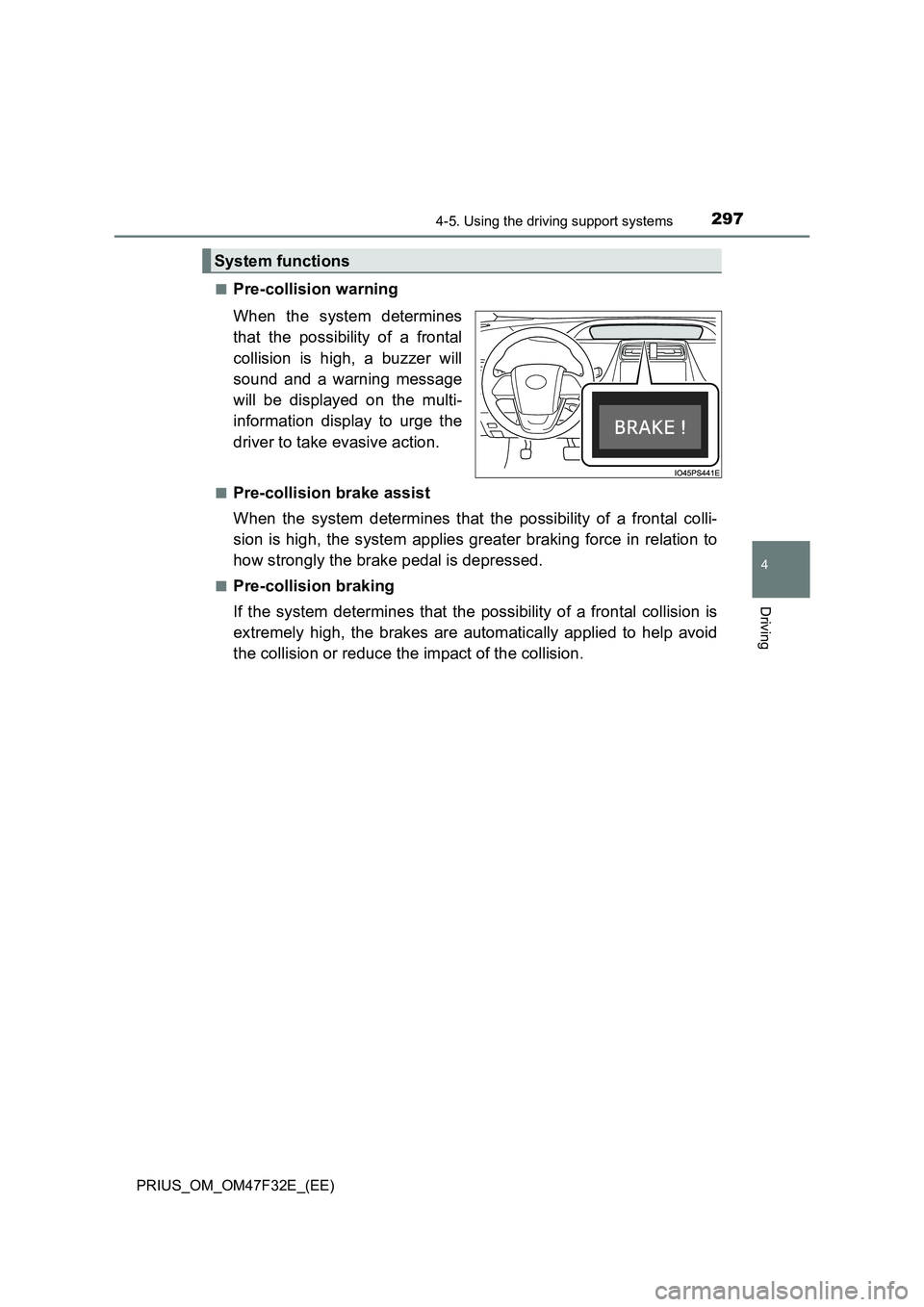
Pre-collision warning
When the system determines
that the possibility of a frontal
collision is high, a buzzer will
sound and a warning message
will be displayed on the multi-
information display to urge the
driver to take evasive action.
■Pre-collision brake assist
When the system determines that the possibility of a frontal colli-
sion is high, the system applies greater braking force in relation to
how strongly the brake pedal is depressed.
■Pre-collision braking
If the system determines that the possibility of a frontal collision is
extremely high, the brakes are automatically applied to help avoid
the collision or reduce the impact of the collision.
System functions
Page 302 of 770
3004-5. Using the driving support systems
PRIUS_OM_OM47F32E_(EE)■
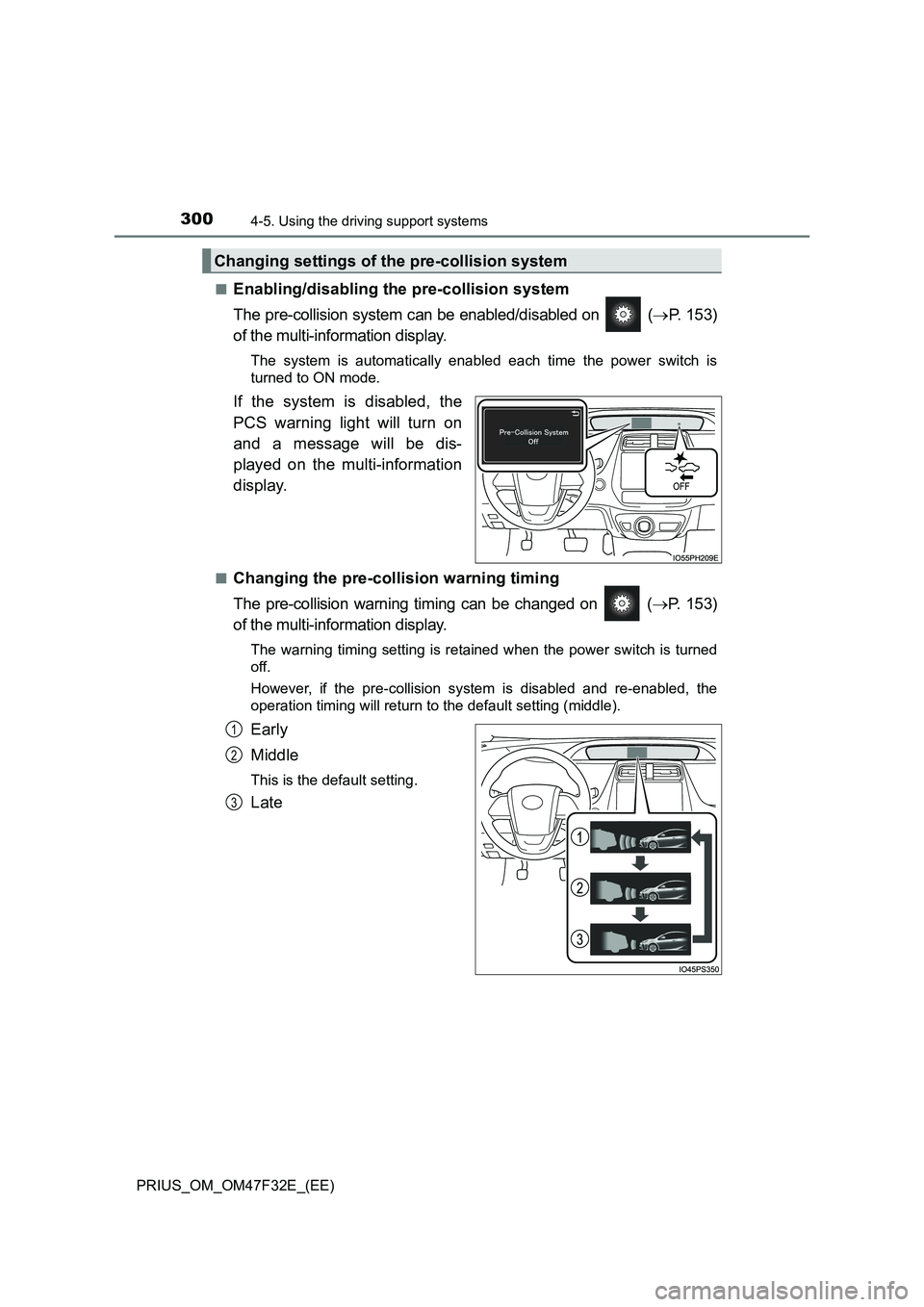
Enabling/disabling the pre-collision system
The pre-collision system can be enabled/disabled on (P. 153)
of the multi-information display.
The system is automatically enabled each time the power switch is
turned to ON mode.
If the system is disabled, the
PCS warning light will turn on
and a message will be dis-
played on the multi-information
display.
■Changing the pre-collision warning timing
The pre-collision warning timing can be changed on (P. 153)
of the multi-information display.
The warning timing setting is retained when the power switch is turned
off.
However, if the pre-collision system is disabled and re-enabled, the
operation timing will return to the default setting (middle).
Early
Middle
This is the default setting.
Late
Changing settings of the pre-collision system
1
2
3
Page 308 of 770

3064-5. Using the driving support systems
PRIUS_OM_OM47F32E_(EE)• While driving on a curve and for a few seconds after driving on a curve
• If your vehicle is skidding
• If the wheels are misaligned
• If a wiper blade is blocking the front camera
• The vehicle is being driven at extremely high speeds
• When driving on a hill
• If the radar sensor or front camera is misaligned
●In some situations such as the following, sufficient braking force may not be
obtained, preventing the system from performing properly:
• If the braking functions cannot operate to their full extent, such as when
the brake parts are extremely cold, extremely hot, or wet
• If the vehicle is not properly maintained (brakes or tires are excessively
worn, improper tire inflation pressure, etc.)
• When the vehicle is being driven on a gravel road or other slippery sur-
face
■If VSC is disabled
●If VSC is disabled (P. 443), the pre-collision brake assist and pre-collision
braking functions are also disabled.
●The PCS warning light will turn on and “VSC Turned Off Pre-Collision Brake
System Unavailable” will be displayed on the multi-information display. • If the front of the vehicle is raised or
lowered
Page 311 of 770
3094-5. Using the driving support systems
4
Driving
PRIUS_OM_OM47F32E_(EE)
WARNING
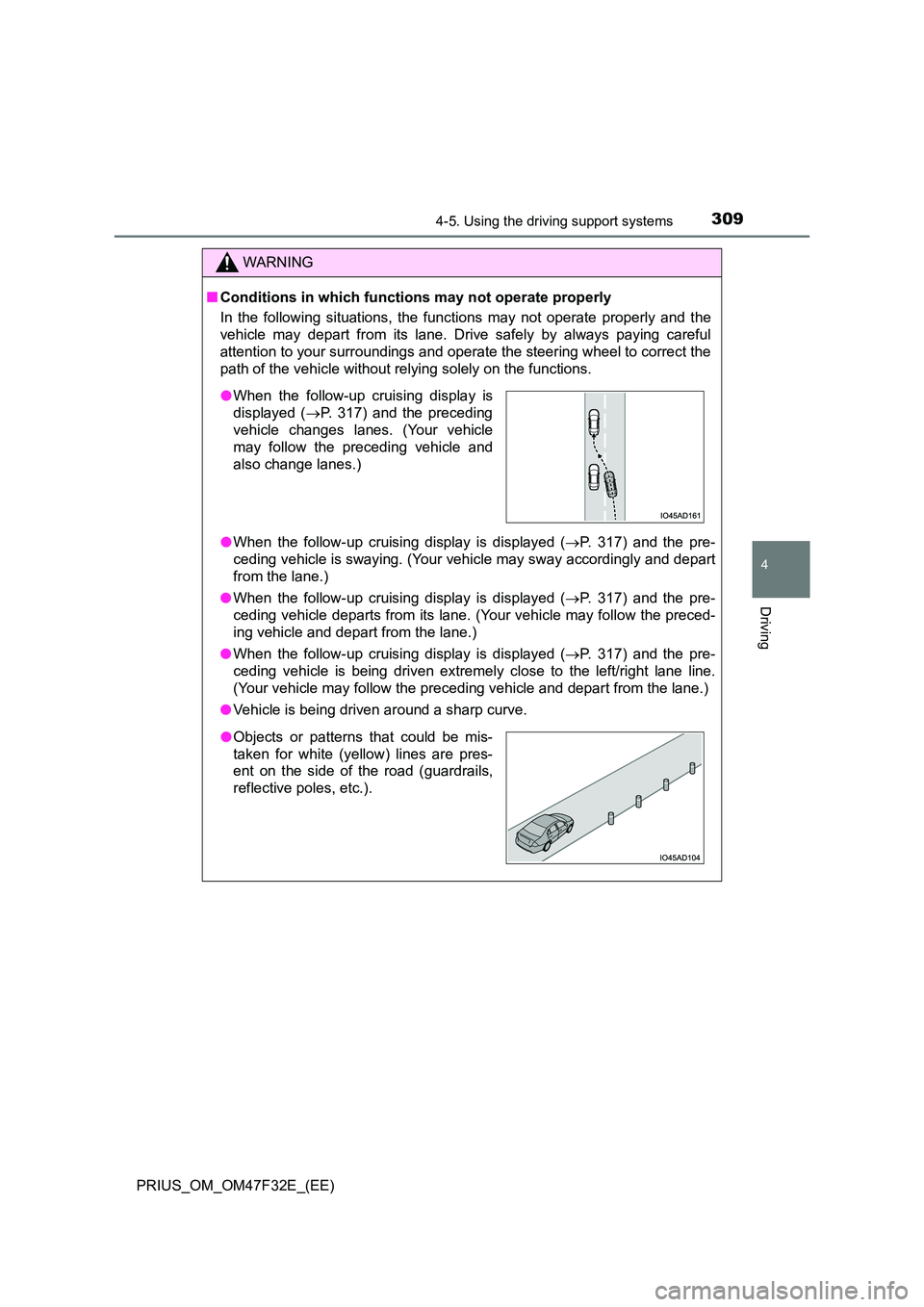
■Conditions in which functions may not operate properly
In the following situations, the functions may not operate properly and the
vehicle may depart from its lane. Drive safely by always paying careful
attention to your surroundings and operate the steering wheel to correct the
path of the vehicle without relying solely on the functions.
● When the follow-up cruising display is displayed (P. 317) and the pre-
ceding vehicle is swaying. (Your vehicle may sway accordingly and depart
from the lane.)
● When the follow-up cruising display is displayed (P. 317) and the pre-
ceding vehicle departs from its lane. (Your vehicle may follow the preced-
ing vehicle and depart from the lane.)
● When the follow-up cruising display is displayed (P. 317) and the pre-
ceding vehicle is being driven extremely close to the left/right lane line.
(Your vehicle may follow the preceding vehicle and depart from the lane.)
● Vehicle is being driven around a sharp curve.
●When the follow-up cruising display is
displayed ( P. 317) and the preceding
vehicle changes lanes. (Your vehicle
may follow the preceding vehicle and
also change lanes.)
●Objects or patterns that could be mis-
taken for white (yellow) lines are pres-
ent on the side of the road (guardrails,
reflective poles, etc.).