2023 TOYOTA HIGHLANDER engine
[x] Cancel search: enginePage 494 of 552

4948-2. Customization
8-2.Customization
■Changing by using the navi-
gation/multimedia system
1 Select on the main menu.
2 Select “Vehicle customize”.
3 Select the item to change the
settings of from the list.
Various setting can be changed.
Refer to the list o f settings that can
be changed for details.
For functions that can be turned
on/off, select (On)/
(Off).
■Changing by using the
meter control switches
7-inch display
1 Select of the multi-infor-
mation display and then
press .
2 Press or of the meter
control switch to select the desired item to be custom-
ized.
3 Press or press and hold .
The available settings will differ
depending on if is pressed or
pressed and held. Follow the
instructions on the display.
12.3-inch display
1 Select of the multi-infor-
mation display and then
press .
2 Press or of the meter
control switch to select the
desired item to be custom-
ized.
3 Press or press and hold .
The available settings will differ
depending on if is pressed or
pressed and held. Follow the
instructions on the display.
■When customizing using the
navigation/multimedia system
Stop the vehicle in a safe place,
apply the parking brake, and shift
the shift lever to P . Also, to prevent
battery discharge, leave the engine
running while customizing the fea-
tures.
Customizable features
Your vehicle includes a vari-
ety of electronic features
that can be personalized to
suit your preferences. The
settings of these features
can be changed using the
multi-information display,
the navigation/multimedia
system, or at your Toyota
dealer.
Customizing vehicle fea-
tures
Page 495 of 552

4958-2. Customization
8
Vehicle specifications
Some function settings are changed simultaneously with other func-
tions being customized. Contact y our Toyota dealer for further
details.
Settings that can be changed usi ng the navigation/multimedia
system screen
Settings that can be changed using the meter control switches
Settings that can be changed by your Toyota dealer
Definition of symbols: O = Av ailable, — = Not available
■Gauges, meters and multi-information display ( P.74, 79, 82,
87, 96)
WARNING
■During customization
As the engine needs to be run-
ning during customization, ensure
that the vehicle is parked in a
place with adequate ventilation. In
a closed area such as a garage,
exhaust gases including harmful
carbon monoxide (CO) may col-
lect and enter the vehicle. This
may lead to death or a serious
health hazard.
NOTICE
■During customization
To prevent batte ry discharge,
ensure that the engine is running
while customizing features.
Customizable Features
Function*1Default settingCustomized setting
LanguageEnglishFrenchOO—Spanish
Units*2miles (MPG)
km (km/L)
OO—km (L/100 km)
miles (MPG Impe-
rial)
Meter Type*32-dial1-dial—O—non-dial
Page 500 of 552
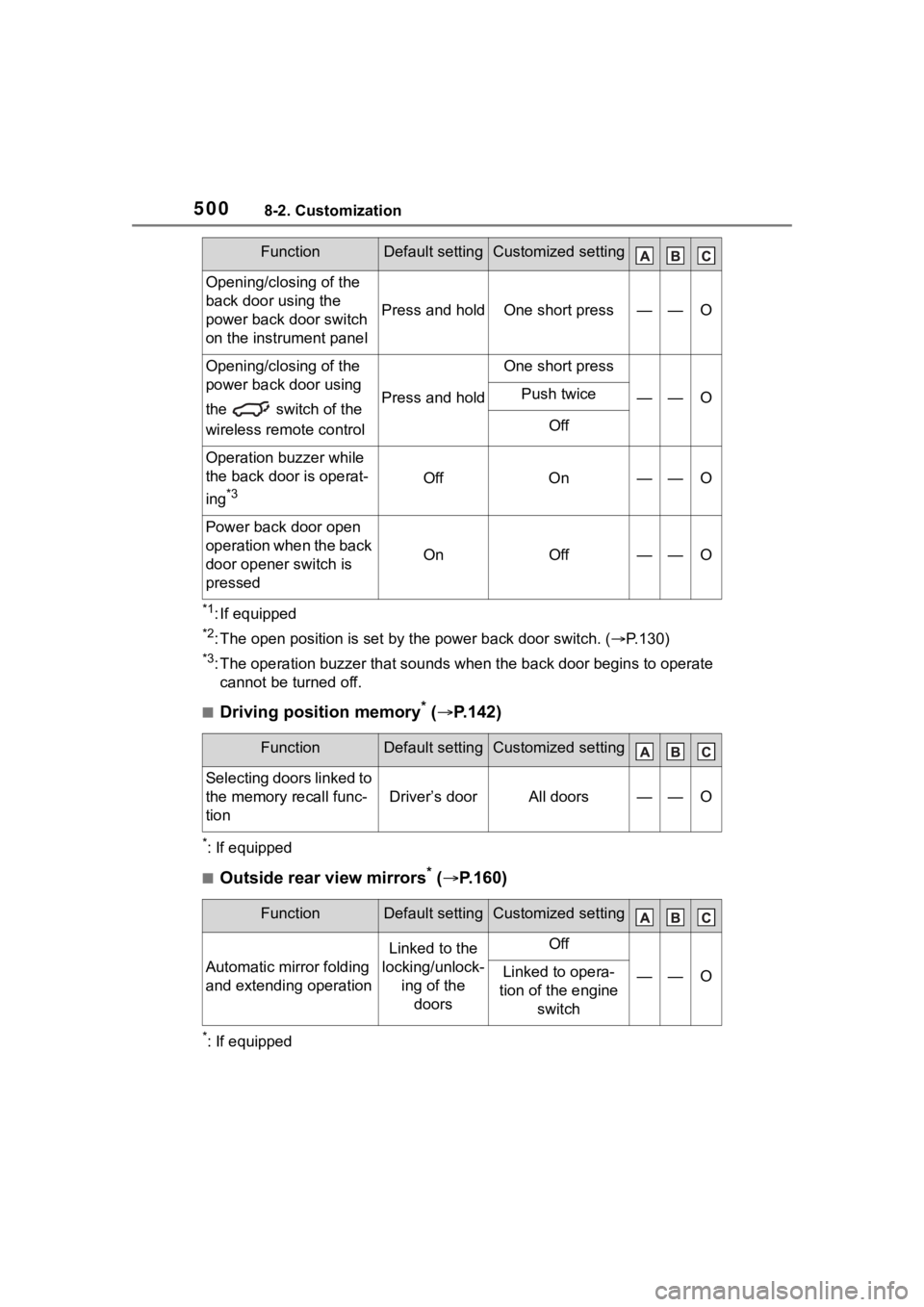
5008-2. Customization
*1: If equipped
*2: The open position is set by the power back door switch. ( P.130)
*3: The operation buzzer that sounds when the back door begins to operate
cannot be turned off.
■Driving position memory* ( P.142)
*: If equipped
■Outside rear view mirrors* ( P.160)
*: If equipped
Opening/closing of the
back door using the
power back door switch
on the instrument panel
Press and holdOne short press——O
Opening/closing of the
power back door using
the switch of the
wireless remo te control
Press and hold
One short press
——OPush twice
Off
Operation buzzer while
the back door is operat-
ing
*3OffOn——O
Power back door open
operation when the back
door opener switch is
pressed
OnOff——O
FunctionDefault settingCustomized setting
Selecting doors linked to
the memory recall func-
tion
Driver’s doorAll doors——O
FunctionDefault settingCustomized setting
Automatic mirror folding
and extending operation
Linked to the
locking/unlock- ing of the doorsOff
——OLinked to opera-
tion of the engine switch
FunctionDefault settingCustomized setting
Page 502 of 552
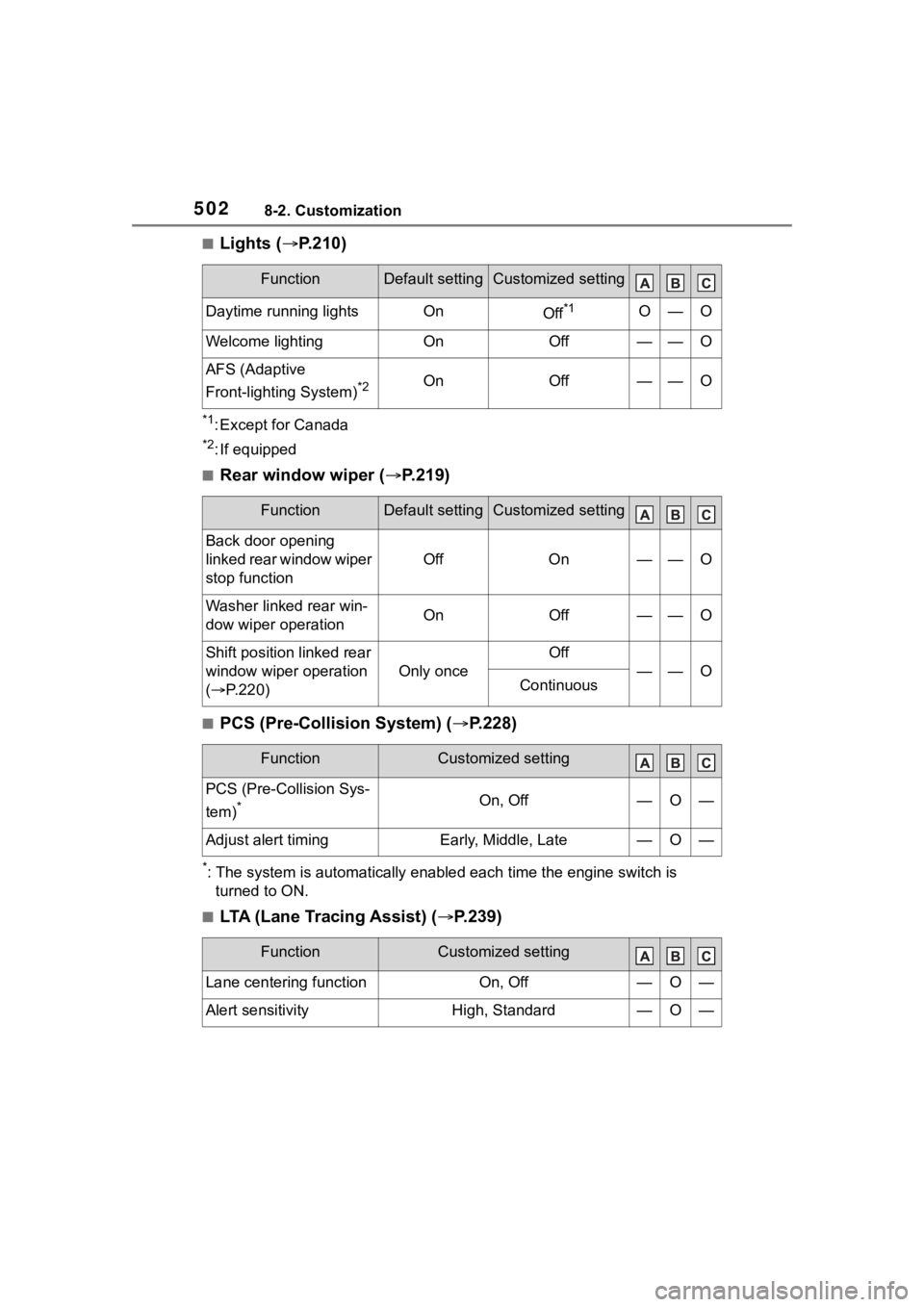
5028-2. Customization
■Lights (P.210)
*1: Except for Canada
*2: If equipped
■Rear window wiper ( P.219)
■PCS (Pre-Collision System) ( P.228)
*: The system is automatically enabl ed each time the engine switch is
turned to ON.
■LTA (Lane Tracing Assist) ( P.239)
FunctionDefault settingCustomized setting
Daytime running lightsOnOff*1O—O
Welcome lightingOnOff——O
AFS (Adaptive
Front-lighting System)
*2OnOff——O
FunctionDefault settingCustomized setting
Back door opening
linked rear window wiper
stop function
OffOn——O
Washer linked rear win-
dow wiper operationOnOff——O
Shift position linked rear
window wiper operation
( P.220)
Only once
Off
——OContinuous
FunctionCustomized setting
PCS (Pre-Collision Sys-
tem)
*On, Off—O—
Adjust alert timingEarly, Middle, Late—O—
FunctionCustomized setting
Lane centering functionOn, Off—O—
Alert sensitivityHigh, Standard—O—
Page 505 of 552
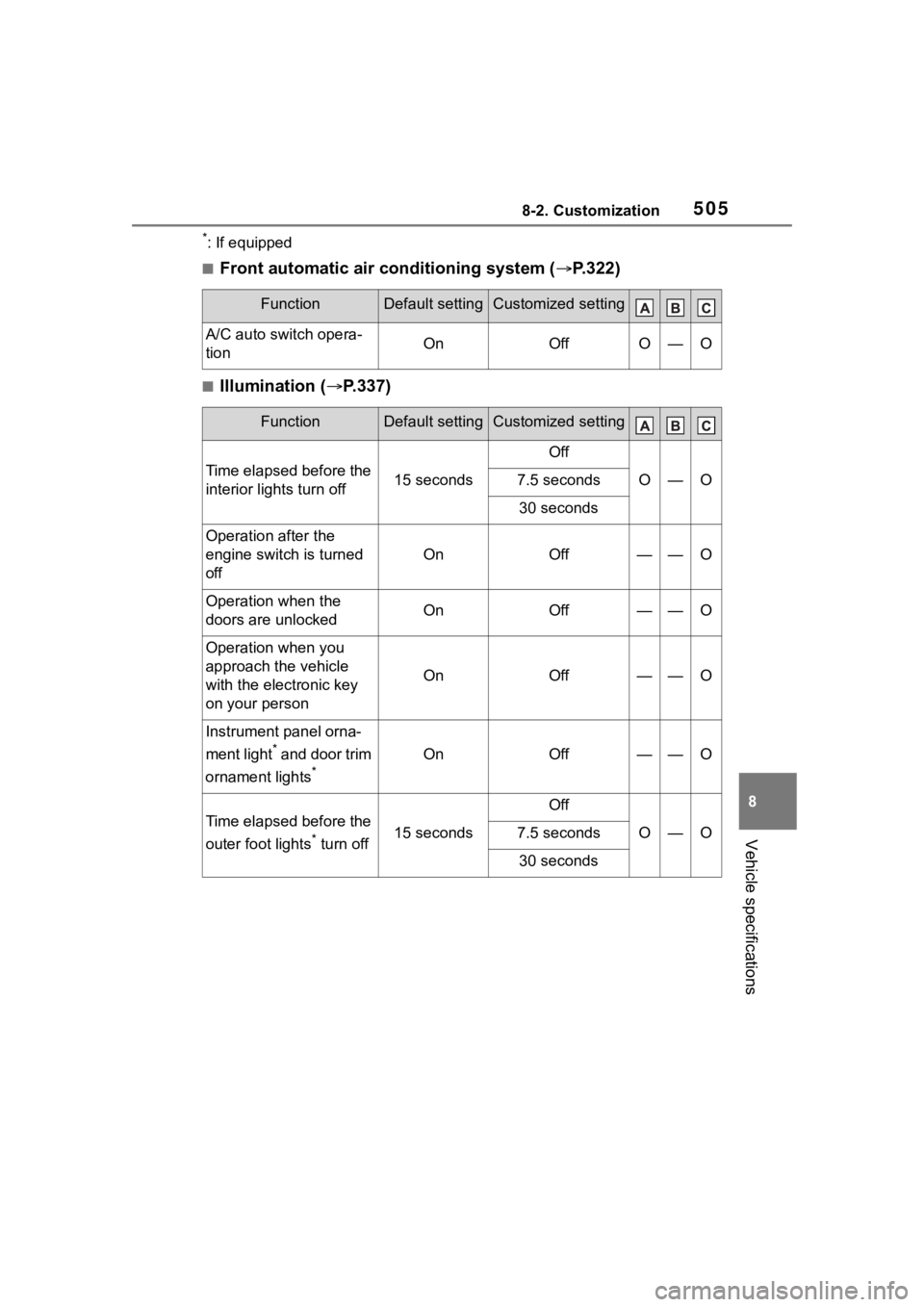
5058-2. Customization
8
Vehicle specifications
*: If equipped
■Front automatic air conditioning system (P.322)
■Illumination ( P.337)
FunctionDefault settingCustomized setting
A/C auto switch opera-
tionOnOffO—O
FunctionDefault settingCustomized setting
Time elapsed before the
interior lights turn off15 seconds
Off
O—O7.5 seconds
30 seconds
Operation after the
engine switch is turned
off
OnOff——O
Operation when the
doors are unlockedOnOff——O
Operation when you
approach the vehicle
with the electronic key
on your person
OnOff——O
Instrument panel orna-
ment light
* and door trim
ornament lights
*
OnOff——O
Time elapsed before the
outer foot lights
* turn off15 seconds
Off
O—O7.5 seconds
30 seconds
Page 522 of 552

522What to do if... (Troubleshooting)
1-1.What to do if... (Troubleshooting)What to do if... (Troubleshooting)
If you lose your mechanical
keys, new genuine mechani-
cal keys can be made by your
Toyota dealer. ( P.461)
If you lose your electronic
keys, the risk of vehicle theft
increases significantly. Con-
tact your Toyota dealer imme-
diately. ( P.461)
Is the electronic key battery
weak or depleted? ( P.410)
Is the engine switch in ON?
When locking the doors, turn the
engine switch off. ( P.198)
Is the electronic key left inside
the vehicle?
When locking the doors, make sure
that you have the electronic key on
your person.
The function may not operate properly due to the condition
of the radio wave. (
P.133)
Is the child-protector lock set?
The rear door cannot be opened
from inside the vehicle when the
lock is set. Open the rear door from
outside and then unlock the
child-protector lock. ( P. 1 1 8 )
Did you press the engine
switch while firmly depress-
ing the brake pedal?
( P.197)
Is the shift lever in P?
( P.197)
Is the electronic key any-
where detectable inside the
vehicle? ( P.132)
Is the electronic key battery
weak or depleted? ( P.410)
In this case, the engine can be
started in a temporary way.
( P.464)
Is the battery discharged?
( P.465)
If you have a problem,
check the following before
contacting your Toyota
dealer.
The doors cannot be
locked, unlocked, opened
or closed
You lose your keys
The doors cannot be
locked or unlocked
The rear door cannot be
opened
If you think something is
wrong
The engine does not start
Page 523 of 552

523What to do if... (Troubleshooting)
Is the engine switch in ON?
If you cannot release the shift lever
by depressing the brake pedal with
the engine switch in ON ( P.202)
Is the window lock switch
pressed?
The power window except for the
one at the driver’s seat cannot be
operated if the win dow lock switch
is pressed. ( P.164)
The auto power off function
will be operated if the vehicle
is left in ACC or ON (the
engine is not running) for a
period of time. ( P.200)
The seat belt reminder light is
flashing
Are the driver and the passengers
wearing the seat belts? ( P.434)
The parking brake indicator is
on
Is the parking brake released?
( P.205)
Depending on the situation,
other types of warning buzzer
may also sound. ( P.431, 442)
Did anyone inside the vehicle
open a door during setting the
alarm?
The sensor detects it and the alarm
sounds. ( P. 7 0 )
Do one of the following to stop
the alarms:
Unlock the doors.
Turn the engine switch to
ACC or ON, or start the
engine.
Is the message displayed on
the multi-information display?
Check the message on the
multi-informat ion display. (P.442)
When a warning light turns on
or a warning message is dis-
played, refer to P.431, 442.
The shift lever cannot be
shifted from P even if you
depress the brake pedal
The windows do not open
or close by operating the
power window switches
The engine switch is
turned off automatically
A warning buzzer sounds
during driving
An alarm is activated and
the horn sounds (vehicles
with an alarm)
A warning buzzer sounds
when leaving the vehicle
A warning light turns on
or a warning message is
displayed
Page 526 of 552

526Alphabetical Index
AWD Control ............................. 91
B
Back door ................................ 119
Back-up lightsReplacing light bulbs ............ 415
Battery Battery checking................... 391
If the battery is discharged ... 465
Preparing and c hecking before
winter.................................. 314
Replacing ............................. 467
Warning light ........................ 432
Blind Spot Monitor (BSM) ...... 270
Brake Brake hold ............................ 208
Fluid ............................. 390, 479
Parking brake ....................... 205
Warning light ........................ 431
Brake assist ............................ 307
Break-in tips ........ ................... 175
Brightness control Instrument panel light control81, 86
BSM (Blind Spot Monitor) ...... 270
Buzzer Hands off steering wheel warn-ing (LTA) ............................. 248
C
Care Exterior ................................. 370
Interior .................................. 373
Seat belts ............................. 373
Wheels and wheel ornaments........................................... 370
Cargo capacity ....................... 184
Cargo net hooks .. ................... 344
Chains ..................................... 315
Child restraint system Fixed with a LATCH system ... 60 Fixed with a seat belt..............55
Front passenger occupant clas-
sification system ...................43
Points to remember ................50
Riding with children ................49
Types of child restraint system installation method ...............52
Using an anchor bracket ........62
Child safety Airbag precautions .................39
Back door precautions.......... 119
Battery precautions ......392, 468
Child restraint system .............52
Heated steering wheel and seat heater precautio ns..............335
How your child should wear the seat belt ................................28
Moon roof precautions..........166
Panoramic moon roof precau- tions ....................................170
Power window lock switch ....164
Power window precautions...163
Rear door child-protectors .... 118
Seat belt extender precautions .............................................29
Seat belt precautions..............49
Child-protectors...................... 118
Cleaning Exterior .................................370
Interior ..................................373
Radar sensor ........................224
Seat belts .............................373
Wheels and wheel ornaments...........................................370
Clock ................... .....79, 81, 82, 86
Coat hooks ..............................357
Condenser ............. ..................390
Console box ............................341
Consumption screen ..............108
Conversation mirror ...............359
Cooling system .......................389 Engine overheating ..............469