2023 TOYOTA HIGHLANDER engine
[x] Cancel search: enginePage 444 of 552

4447-2. Steps to take in an emergency
■If “Engine Stopped Steering
Power Low” is displayed
This message is displayed if the
engine is stopped while driving.
When steering wheel operations are
heavier than usual, grip the steering
wheel firmly and operate it using
more force th an usual.
■If “Power reduced to lower
engine temp” is displayed
This message may be displayed
when the engine coolant tempera-
ture is high.
At that time, the engine power out-
put is reduced until the temperature
decreases to the specified level. It is
still possible to con tinue driving nor-
mally, meanwhile the acceleration
performance or vehicle speed may
be lowered. After driving for a while
and the engine coolant temperature
is dropped, this m essage will disap-
pear and engine po wer output will
resume once the engine coolant
temperature has decreased to nor-
mal.
If after driving fo r a while the mes-
sage does not disappear or it comes
on and off frequently, contact your
Toyota dealer.
■If “Shift to P when Parked” is
displayed
This message is displayed when the
driver’s door is opened without turn-
ing the engine switch off with the
shift lever in any position other than
P. Change the shift lever to P.
■If “Auto Power OFF to Conserve
Battery” is displayed
Power was cut off due to the auto-
matic power off function. Next time
when starting the engine, increase
the engine speed slightly and main-
tain that level for approximately 5
minutes to recha rge the battery.
■If “Headlight System Malfunc-
tion Visit Your Dealer” is dis-
played
The following systems may be mal- functioning. Hav
e the vehicle
inspected by your Toyota dealer
immediately.
●The LED headlight system (if AFS
[Adaptive Front-lighting System]
equipped)
●AFS (Adaptive Front-lighting Sys-
tem) (if equipped)
●The automatic headlight leveling
system (if equipped)
●Automatic High Beam
■If “Radar Cruise Control
Unavailable See Owner's Man-
ual” is shown
The dynamic radar cruise control
with full-speed range system is sus-
pended temporarily or until the prob-
lem shown in the message is
resolved. (causes and coping meth-
ods: P.226)
■If “Radar Cruise Control
Unavailable” is shown
The dynamic radar cruise control
with full-speed range system cannot
be used temporarily. Use the system
when it becomes available again.
■If a message that indicates the
malfunction of front camera is
displayed
The following systems may be sus-
pended until the problem shown in
the message is resolved. (P.226,
437)
●PCS (Pre-Collision system)
●LTA (Lane Tracing Assist)
●Automatic High Beam
●RSA (Road Sign Assist) (if
equipped)
●Dynamic radar cruise control with
full-speed range
■If a message that indicates the
malfunction of radar sensor is
displayed
The following systems may be sus-
pended until the problem shown in
the message is resolved. (P.226,
437)
Page 445 of 552
4457-2. Steps to take in an emergency
7
When trouble arises
●PCS (Pre-Collision system)
●LTA (Lane Tracing Assist)
●Dynamic radar cruise control with
full-speed range
■If “AWD System Overheated
Switching to 2WD Mode” or
“AWD System Overheated 2WD
Mode Engaged” is displayed
This message may be displayed
when driving under extremely high
load conditions.
Drive the vehicle at low speeds or
stop the vehicle in a safe place with
the engine running until the mes-
sage is cleared.
If the message is not cleared, have
the vehicle inspected by your Toyota
dealer.
■If “Check Fuel Cap” is dis-
played
The fuel tank cap is not properly
installed. Correctly install the fuel
tank cap.
■If “Maintenance Required
Soon” is displayed
Indicates that all maintenance
according to the dr iven distance on
the maintenance schedule
* should
be performed soon.
Comes on approximately 4500
miles (7200 km) after the message
has been reset. If necessary, per-
form maintenance. Please reset the
message after the maintenance is
performed. ( P.377)
*: Refer to the separate “Scheduled
Maintenance Guide” or “Owner’s
Manual Supplement” for the main-
tenance interval applicable to your
vehicle.
■If “Maintenance Required Visit
Your Dealer” is displayed
Indicates that all maintenance is
required to correspond to the driven
distance on the maintenance sched-
ule
*. Comes on approximately 5000
miles (8000 km) after the message
has been reset. (The indicator will
not work properly unless the mes-
sage has been rese
t.) Perform the
necessary maintenance. Please
reset the message after the mainte-
nance is performed. ( P.377)
*: Refer to the separate “Scheduled
Maintenance Guide” or “Owner’s
Manual Supplement” for the main-
tenance interval applicable to your
vehicle.
■If “Oil Maintenance Required
Soon” is displayed
Indicates that the engine oil should
be scheduled to be changed.
Check the engine oil and change it if
necessary. After changing the
engine oil, make sure to reset the
message. ( P.388)
■If “Oil Maintenance Required” is
displayed
Indicates that the engine oil should
be changed.
Check and change the engine oil,
and oil filter by your Toyota dealer.
After changing the engine oil, make
sure to reset t he message.
( P.388)
■If a message that indicates the
need for visiting your Toyota
dealer is displayed
The system or part shown on the
multi-information di splay is malfunc-
tioning. Have the vehicle inspected
by your Toyota dealer immediately.
■If a message that indicates the
need for referring to Owner’s
Manual is displayed
●If any of the following messages
are shown on the multi-informa-
tion display, it may indicate a mal-
function. Immediately stop the
vehicle and contact your Toyota
dealer.
• “Braking Power Low Stop in a Safe Place See Owner's Manual”
Page 446 of 552

4467-2. Steps to take in an emergency
• “Oil Pressure Low Stop in a Safe
Place See Owner's Manual”
• “Charging System Malfunction
Stop in a Safe Place See Owner's
Manual”
●If “Smart Key System Malfunction
See Owner's Manual” is shown on
the multi-information display, it
may indicate a malfunction. Have
the vehicle inspected by your Toy-
ota dealer immediately.
●If any of the following messages
are shown on the multi-informa-
tion display, follow the instruc-
tions.
• “Engine Coolant Temp High Stop
in a Safe Place See Owner's Man-
ual” ( P.469)
• “High Transmission Fluid Temp
See Owner's Manual” ( P.201)
Stop the vehicle in a safe
place on a hard, flat surface.
Set the parking brake.
Shift the shift lever to P.
Stop the engine.
Turn on the emergency flash-
ers. ( P.424)
For vehicles with power back
door: Turn off the power back
door system. ( P.494)
NOTICE
■If “High Power Consumption
Partial Limit on AC/Heater
Operation” is displayed fre-
quently
There is a possible malfunction
relating to the charging system or
the battery may be deteriorating.
Have the vehicle inspected by
your Toyota dealer.
If you have a flat tire
Your vehicle is equipped
with a spare tire. The flat tire
can be replaced with the
spare tire.
For details about tires:
P.393
WARNING
■If you have a flat tire
Do not continue driving with a flat
tire.
Driving even a short distance with
a flat tire can damage the tire and
the wheel beyond repair, which
could result in an accident.
Before jacking up the
vehicle
Page 448 of 552
4487-2. Steps to take in an emergency
When replacing tires on a vehi-
cle with wheel lock nuts, use the
following procedures to remove
and install the wheel lock nuts.
The wheel lock key is stored in
the tray inside the luggage com- partment. Always return the
wheel lock key to its original
position after use, so that it does
not get lost. (
P.447)
■Removal
For ease of removal, the wheel
lock nut should always be the
first one loosened.
1 Place the wheel lock key on
top of the wheel lock nut,
turning until the wheel lock
key and wheel lock nut pat-
terns engage.
2 Place the wheel nut wrench
on the wheel lock key, and
while applying pressure on
the wheel lock key, loosen
the wheel lock nut.
■Installation
For ease of installation, the
wheel lock nut should always be
the last one tightened.
1 By hand, install a wheel lock
nut on each wheel.
2 Place the wheel lock key on
top of the wheel lock nut,
turning until the wheel lock
key and wheel lock nut pat-
terns engage.
3 Place the wheel nut wrench
on the wheel lock key, and
while applying pressure on
the wheel lock key, tighten
the wheel lock nut to the rec-
ommended torque.
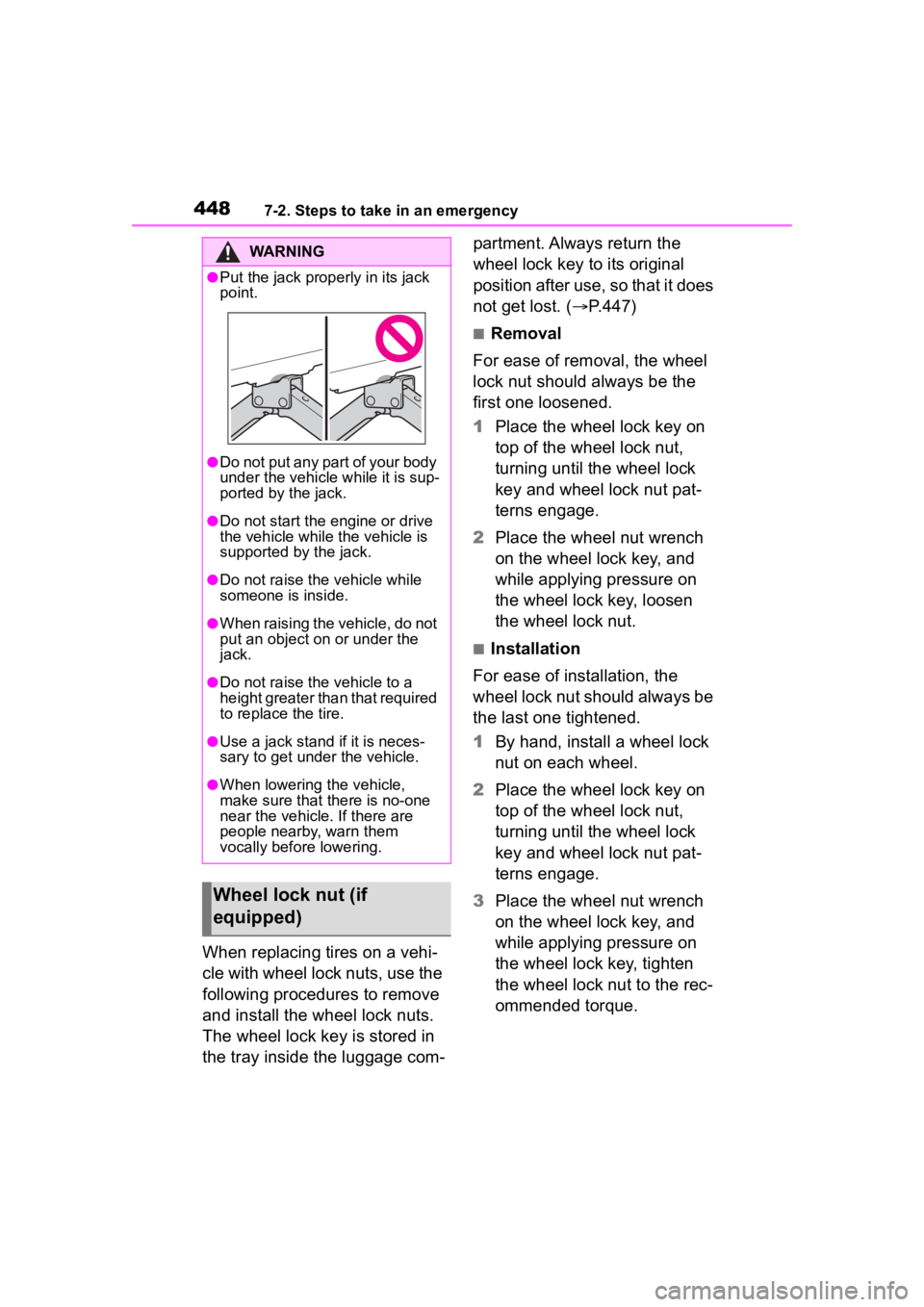
WARNING
●Put the jack prope rly in its jack
point.
●Do not put any part of your body
under the vehicle while it is sup-
ported by the jack.
●Do not start the engine or drive
the vehicle while the vehicle is
supported by the jack.
●Do not raise the vehicle while
someone is inside.
●When raising the vehicle, do not
put an object on or under the
jack.
●Do not raise the vehicle to a
height greater than that required
to replace the tire.
●Use a jack stand if it is neces-
sary to get under the vehicle.
●When lowering the vehicle,
make sure that there is no-one
near the vehicle. If there are
people nearby, warn them
vocally before lowering.
Wheel lock nut (if
equipped)
Page 458 of 552

4587-2. Steps to take in an emergency
WARNING
■When using the compact
spare tire (vehicles with a
compact spare tire)
●Remember that the compact
spare tire provided is specifi-
cally designed for use with your
vehicle. Do not use your com-
pact spare tire on another vehi-
cle.
●Do not use more than one com-
pact spare tire simultaneously.
●Replace the compact spare tire
with a standard tire as soon as
possible.
●Avoid sudden acceleration,
abrupt steering, sudden brak-
ing and shifting operations that
cause sudden engine braking.
■When the compact spare tire
is attached (vehicles with a
compact spare tire)
The vehicle speed may not be
correctly detecte d, and the follow-
ing systems may not operate cor-
rectly:
• ABS & Brake assist
• VSC
• TRAC
• EPS
• Dynamic radar cruise control with full-speed range
• PCS (Pre-Collision System)
• LTA (Lane Tracing Assist)
• Automatic High Beam
• AFS (Adaptive Front-lighting System) (if equipped)
• Tire pressure warning system
• Intuitive parking assist (if equipped)
• PKSB (Parking Support Brake) (if equipped)
• Toyota parking assist monitor (if equipped)
• Panoramic view monitor (if equipped)
• BSM (Blind Spot Monitor) (if equipped)
• RCTA (if equipped)
• Navigation system (if equipped)
Also, not only c an the following
system not be utilized fully, but it
may even negatively affect the
drive-train components:
• AWD system (AWD models)
■Speed limit when using the
compact spare tire (vehicles
with a compact spare tire)
Do not drive at speeds in excess
of 50 mph (80 km /h) when a com-
pact spare tire is installed on the
vehicle.
The compact spare tire is not
designed for driving at high
speeds. Failure to observe this
precaution may lead to an acci-
dent causing death or serious
injury.
■After using the tools and jack
Before driving, ma ke sure all the
tools and jack are securely in
place in their storage location to
reduce the possibility of personal
injury during a collision or sudden
braking.
Page 460 of 552
4607-2. Steps to take in an emergency
One of the following may be the
cause of the problem:
There may not be sufficient
fuel in the vehicle’s tank.
Refuel the vehicle.
The engine may be flooded.
Try to restart the engine again
following correct starting pro-
cedures. ( P.197)
There may be a malfunction
in the engine immobilizer sys-
tem. ( P. 6 9 )
One of the following may be the
cause of the problem:
The battery may be dis-
charged. ( P.465)
The battery terminal connec-
tions may be loose or cor-
roded. ( P.391)
The engine starting system may
be malfunctioning due to an
electrical problem such as elec-
tronic key battery depletion or a
blown fuse. However, an interim
measure is available to start the
engine. ( P.460)
One of the following may be the
cause of the problem:
One or both of the battery ter-
minals may be disconnected.
( P.391)
The battery may be dis-
charged. ( P.465)
Contact your Toyota dealer if the
problem cannot be repaired, or if
repair procedures are unknown.
When the engine does not start,
the following steps can be used
as an interim measure to start
the engine if the engine switch is
If the engine will not
start
If the engine will not start
even though correct starting
procedures are being fol-
lowed ( P.197), consider
each of the following points:
The engine wil l not start
even though the starter
motor operates normally.
The starter motor turns
over slowly, the interior
lights and headlights are
dim, or the horn does not
sound or sounds at a low
volume.
The starter motor does
not turn over
The starter motor does
not turn over, the interior
lights and headlights do
not turn on, or the horn
does not sound.
Starting the engine in an
emergency
Page 461 of 552

4617-2. Steps to take in an emergency
7
When trouble arises
functioning normally.
Do not use this starting proce-
dure except in cases of emer-
gency.
1Pull the parking brake switch
to check that the parking
brake is set. ( P.205)
Parking brake indicator will come
on.
2 Shift the shift lever to P.
3 Turn the engine switch to
ACC.
4 Press and hold the engine
switch for about 15 seconds
while depressing the brake
pedal firmly.
Even if the engine can be
started using the above steps,
the system may be malfunction-
ing. Have the vehicle inspected
by your Toyota dealer.
If you lose your keys
New genuine mechanical
keys can be made by your
Toyota dealer using another
mechanical key and the key
number stamped on your
key number plate.
Keep the plate in a safe
place such as your wallet,
not in the vehicle.
NOTICE
■When an electronic key is lost
If the electronic key remains lost,
the risk of vehicle theft increases
significantly. Visit your Toyota
dealer immediately with all
remaining electronic keys that
were provided with your vehicle.
Page 463 of 552

4637-2. Steps to take in an emergency
7
When trouble arises
■When the electronic key does
not work properly
●Make sure that the smart key sys-
tem has not been deactivated in
the customization setting. If it is
off, turn the function on. (Custom-
izable features: P.494)
●Check if battery-saving mode is
set. If it is set, cancel the function.
( P.133)
■Unlocking the door
Use the mechanical key
( P.114) in order to perform the
following operations: 1
Locks all the doors
2 Unlocks all the doors
Turning the key unlocks the driver’s
door. Turning the key again unlocks
the other doors.
■Key linked functions
1 Closes the windows and the
moon roof
* (turn and hold)
2 Opens the windows and the
moon roof
* (turn and hold)
These settings mus t be customized
at your Toyota dealer.
*: If equipped
If the electronic key
does not operate prop-
erly
If communication between
the electronic key and vehi-
cle is interrupted ( P.133)
or the electronic key cannot
be used because the battery
is depleted, the smart key
system and wireless remote
control cannot be used. In
such cases, the doors can
be opened and the engine
can be started by following
the procedure below.
Locking and unlocking
the doors