2023 TOYOTA COROLLA tow
[x] Cancel search: towPage 2 of 468
2TABLE OF CONTENTS
For your information ........................5
Reading this manual ...................... 11
How to search ................................ 12
Pictorial index ................................ 13
1-1. For safe use Before driving ........................ 24
For safe driving ..................... 25
Seat belts .............................. 27
SRS airbags .......................... 31
Front passenger occupant clas- sification system.................. 41
Exhaust gas precautions....... 46
1-2. Child safety Riding with children ............... 47
Child restraint systems .......... 48
1-3. Emergency assistance Safety Connect ..................... 72
1-4. Theft deterrent system Engine immobilizer system ... 77
Alarm ..................................... 78
2-1. Instrument cluster Warning lights and indicators............................................ 82
Gauges and meters (4.2-inch display)................................ 86
Gauges and meters (7-inch dis- play) .................................... 89
Multi-information display (4.2-inch display)................. 91
Multi-information display (7-inch display)................................ 97
Fuel consumption information ......................................... 1023-1. Key information
Keys ................................... 106
3-2. Opening, closing and locking the doors
Doors ................................. 111
Trunk .................................. 117
Smart key system .............. 120
3-3. Adjusting the seats Front seats ......................... 125
Rear seats.......................... 126
Head restraints................... 128
3-4. Adjusting the steering wheel and mirrors
Steering wheel ................... 130
Inside rear view mirror ....... 131
Outside rear view mirrors ... 132
3-5. Opening and closing the win- dows
Power windows .................. 134
Moon roof ........................... 137
3-6. Favorite settings My Settings ........................ 140
4-1. Before driving Driving the vehicle.............. 143
Cargo and luggage ............ 149
Vehicle load limits .............. 152
Trailer towing...................... 152
Dinghy towing .................... 153
4-2. Driving procedures Engine (ignition) switch (vehicles without a smart key system)........ ................................. 154
Eng
ine (ignition) switch (vehicles
with a smart key system) . 155
1For safety and security
2Vehicle status information
and indicators
3Before driving
4Driving
Page 4 of 468

4TABLE OF CONTENTS
Tire inflation pressure.........328
Wheels ............................... 330
Air conditioning filter ........... 331
Wireless remote control/elec- tronic key battery.............. 333
Checking and replacing fuses ......................................... 336
Headlight aim ..................... 339
Light bulbs .......................... 340
7-1. Essential information Emergency flashers ........... 348
If your vehicle has to be stopped in an emergency .............. 348
If the vehicle is submerged or water on the road is rising......................................... 350
7-2. Steps to take in an emergency If your vehicle needs to be towed......................................... 351
If you think something is wrong ......................................... 354
Fuel pump shut off system ......................................... 355
If a warning light turns on or a warning buzzer sounds .... 356
If a warning message is dis- played .............................. 366
If you have a flat tire ........... 370
If the engine will not start ... 379
If you lose your keys .......... 381
If the electronic key does not operate properly ............... 381
If the vehicle battery is dis- charged ............................ 383
If your vehicle overheats .... 387
If the vehicle becomes stuck ......................................... 3898-1. Specifications
Maintenance data (fuel, oil level, etc.) .................................. 392
Fuel information ................. 399
Tire information .................. 401
8-2. Customization Customizable features ....... 412
8-3. Initialization Items to initialize ................ 422
9-1. For owners Reporting safety defects for U.S. owners ............................. 424
Reporting safety defects for Canadian owners ............. 424
Seat belt instructions for Cana- dian owners (in French) ... 425
SRS airbag instructions for Canadian owners (in French)......................................... 426
What to do if... (Troubleshooting) ......................................... 436
Alphabetical Index.............. 439
7When trouble arises
8Vehicle specifications
9For owners
Index
Page 15 of 468
15Pictorial index
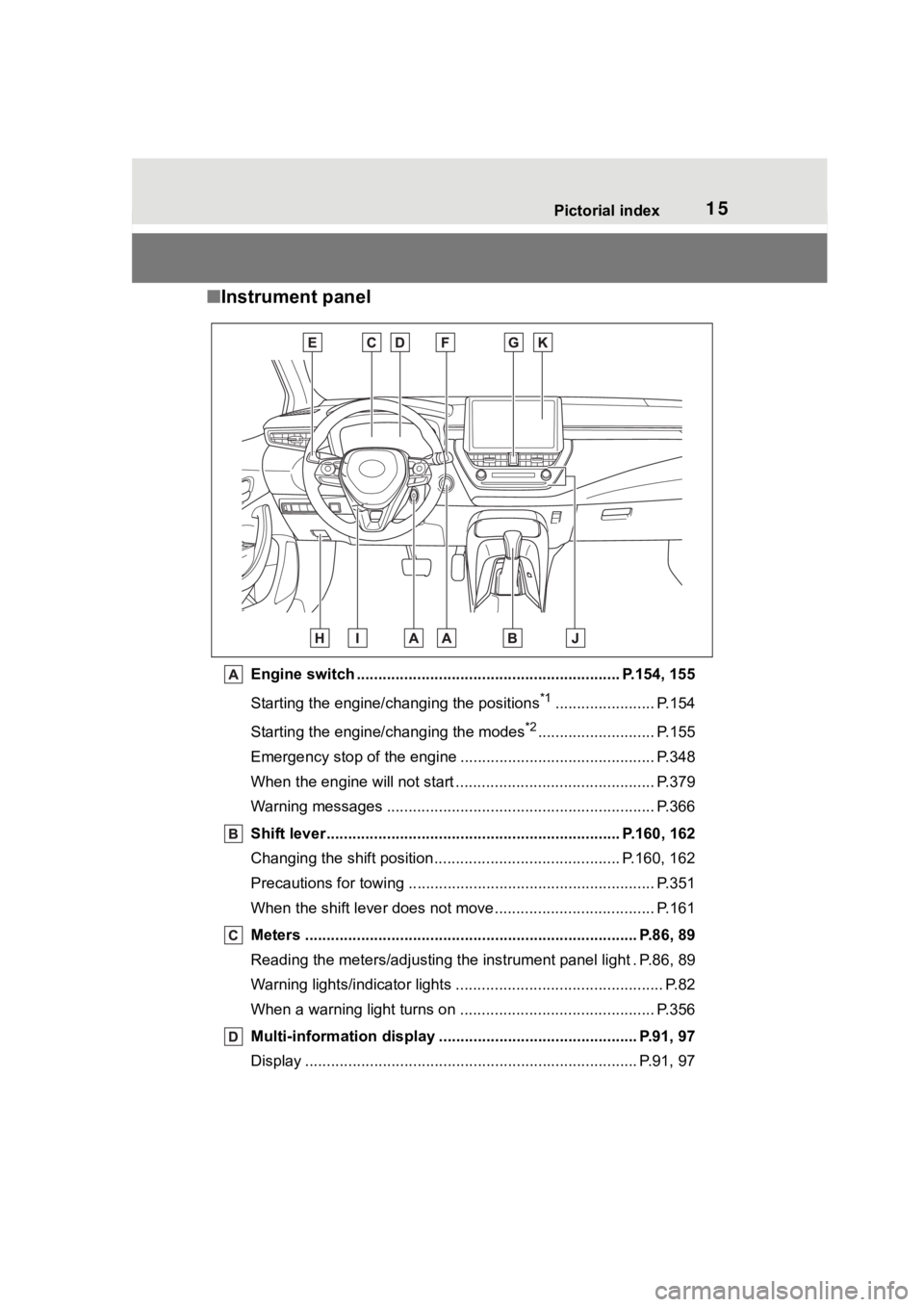
■Instrument panel
Engine switch ............................................................. P.154, 155
Starting the engine/changing the positions
*1....................... P.154
Starting the engine/changing the modes
*2........................... P.155
Emergency stop of the engin e ............................................. P.348
When the engine will not start ................................. ............. P.379
Warning messages ............................................... ............... P.366
Shift lever.................................................... ................ P.160, 162
Changing the shift position.................................... ....... P.160, 162
Precautions for towing .. ....................................... ................ P.351
When the shift lever does not move............................. ........ P.161
Meters ............................................................................. P.86, 89
Reading the meters/adjusting the instrument panel light . P.86, 8 9
Warning lights/indicator lights ................................ ................ P.82
When a warning light turns on .................................. ........... P.356
Multi-information display . ............................................. P.91, 97
Display ........................................................ ..................... P.91, 97
Page 38 of 468
381-1. For safe use
WARNING
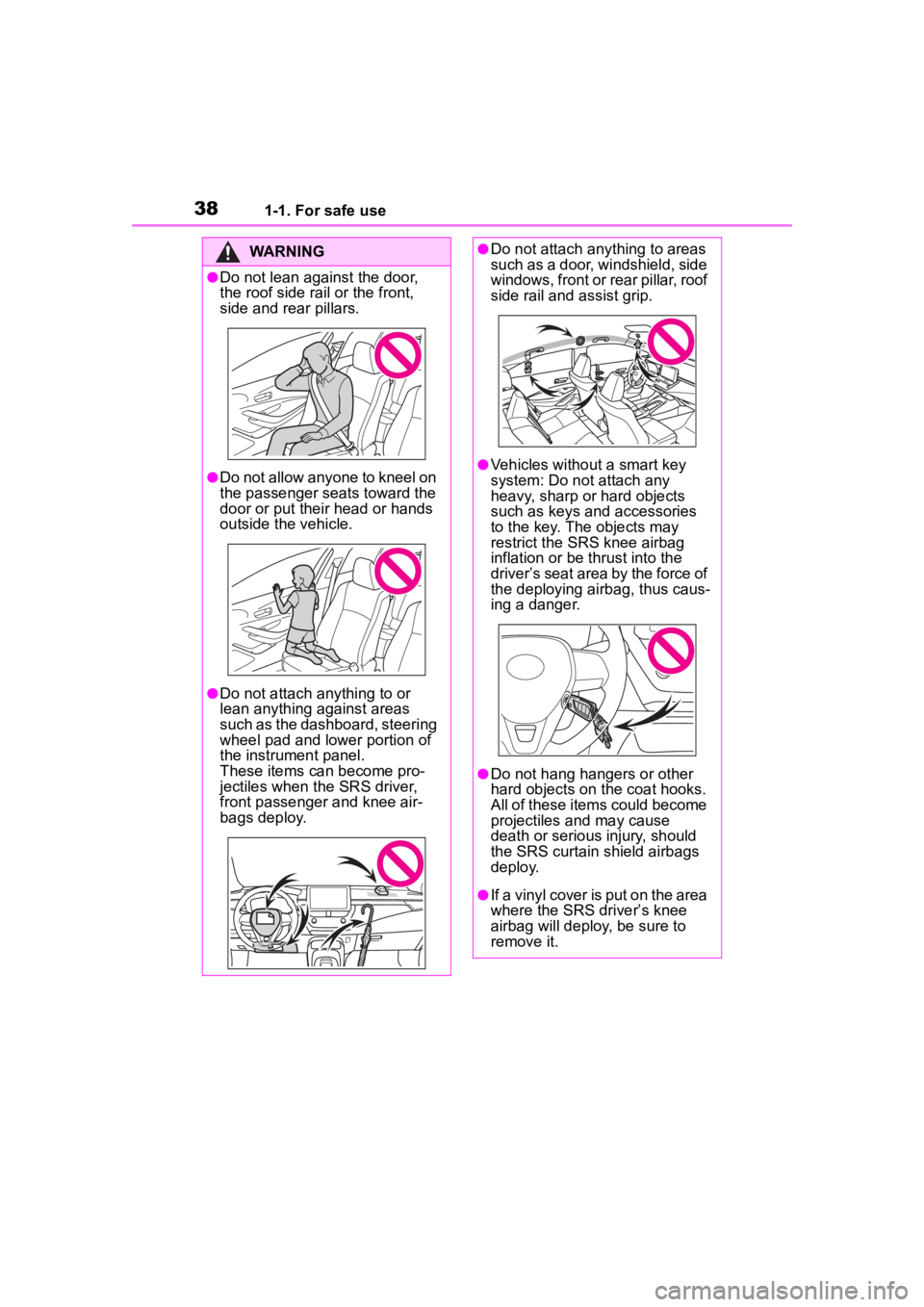
●Do not lean against the door,
the roof side rail or the front,
side and rear pillars.
●Do not allow anyone to kneel on
the passenger seats toward the
door or put their head or hands
outside the vehicle.
●Do not attach anything to or
lean anything against areas
such as the dashboard, steering
wheel pad and lower portion of
the instrument panel.
These items can become pro-
jectiles when the SRS driver,
front passenger and knee air-
bags deploy.
●Do not attach anything to areas
such as a door, windshield, side
windows, front or rear pillar, roof
side rail and assist grip.
●Vehicles without a smart key
system: Do not attach any
heavy, sharp or hard objects
such as keys and accessories
to the key. The objects may
restrict the SRS knee airbag
inflation or be thrust into the
driver’s seat area by the force of
the deploying airbag, thus caus-
ing a danger.
●Do not hang hangers or other
hard objects on the coat hooks.
All of these items could become
projectiles and may cause
death or serious injury, should
the SRS curtain shield airbags
deploy.
●If a vinyl cover is put on the area
where the SRS driver’s knee
airbag will deploy, be sure to
remove it.
Page 63 of 468
631-2. Child safety
1
For safety and security
restraint.
Otherwise, put the head
restraint in the upper most
position. (P.128)
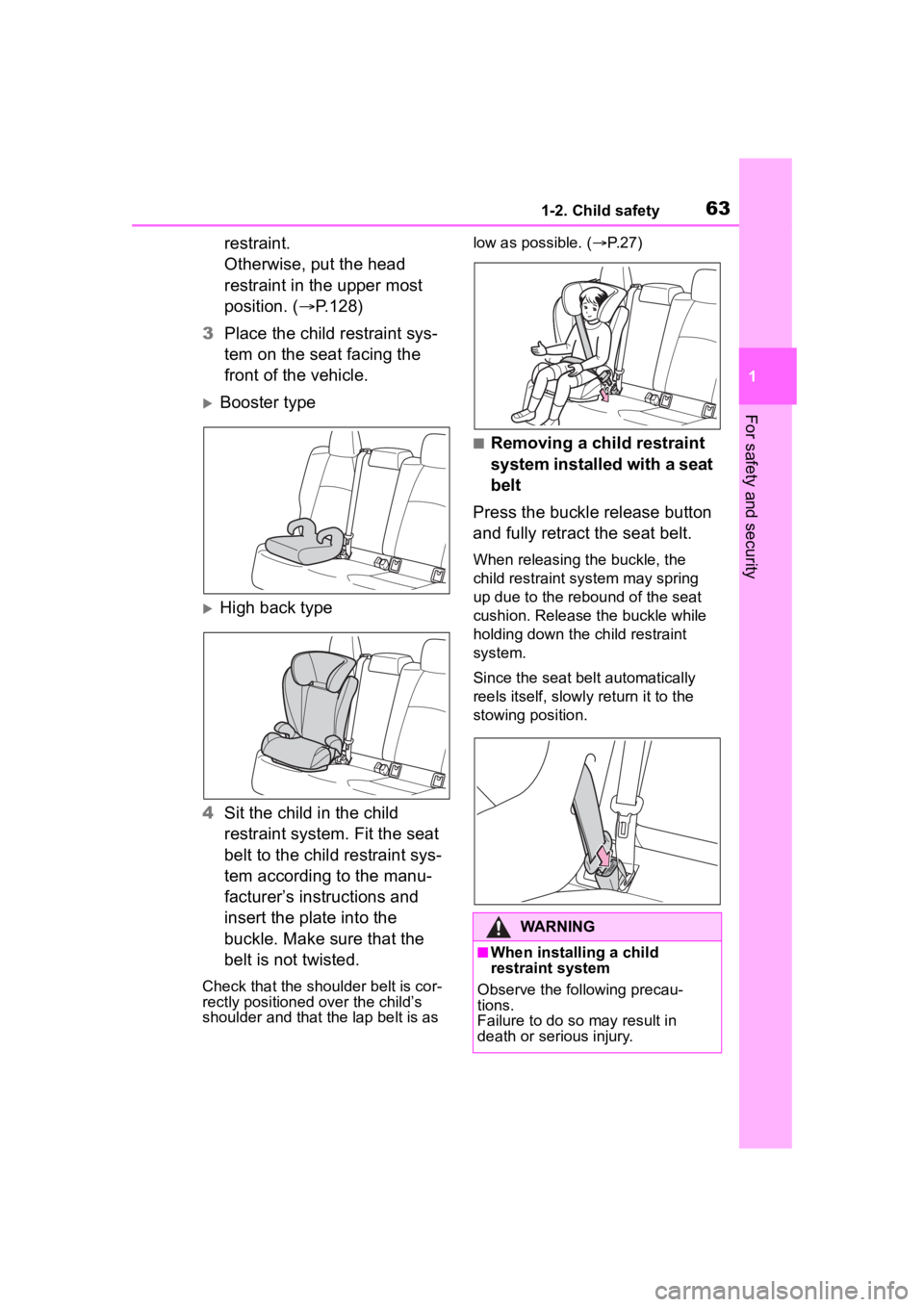
3 Place the child restraint sys-
tem on the seat facing the
front of the vehicle.
Booster type
High back type
4 Sit the child in the child
restraint system. Fit the seat
belt to the child restraint sys-
tem according to the manu-
facturer’s instructions and
insert the plate into the
buckle. Make sure that the
belt is not twisted.
Check that the shoulder belt is cor-
rectly positioned over the child’s
shoulder and that the lap belt is as low as possible. (
P. 2 7 )
■Removing a child restraint
system installed with a seat
belt
Press the buckle release button
and fully retract the seat belt.
When releasing the buckle, the
child restraint system may spring
up due to the rebound of the seat
cushion. Release the buckle while
holding down the child restraint
system.
Since the seat belt automatically
reels itself, slowly return it to the
stowing position.
WARNING
■When installing a child
restraint system
Observe the following precau-
tions.
Failure to do so may result in
death or serious injury.
Page 75 of 468
751-3. Emergency assistance
1
For safety and security
to reach the Safety Connect
response center. The answer-
ing agent will determine your
vehicle’s location, assess the
emergency, and dispatch the
necessary assistance required.
If you accidentally press the “SOS”
button, tell the response-center
agent that you are not experiencing
an emergency.
■Enhanced Roadside Assis-
tance
Enhanced Roadside Assistance
adds GPS data to the already
included warranty-based Toyota
roadside service.
Subscribers can press the
“SOS” button to reach a Safety
Connect response-center agent,
who can help with a wide range
of needs, such as: towing, flat
tire, fuel delivery, etc. For a
description of the Enhanced
Roadside Assistance services
and their limitations, please see
the Safety Connect Terms and
Conditions, which are available
at Toyota.com in the United
States, Toyotapr.com in Puerto
Rico and Toyota.ca in Canada.
Important! Read this informa-
tion before using Safety Con-
nect.
■Exposure to radio fre-
quency signals
The Safety Connect system
installed in your vehicle is a
low-power radio transmitter and
receiver. It receives and also
sends out radio frequency (RF)
signals.
In August 1996, the Federal
Communications Commission
(FCC) adopted RF exposure
guidelines with safety levels for
mobile wireless phones. Those
guidelines are consistent with
the safety standards previously
set by the following U.S. and
international standards bodies.
ANSI (American National
Standards Institute) C95.1
[1992]
NCRP (National Council on
Radiation Protection and
Measurement) Report 86
[1986]
ICNIRP (International Com-
mission on Non-Ionizing Radi-
ation Protection) [1996]
Those standards were based on
comprehensive and periodic
evaluations of the relevant sci-
entific literature. Over 120 scien-
tists, engineers, and physicians
from universities, and govern-
ment health agencies and
industries reviewed the avail-
able body of research to
develop the ANSI Standard
(C95.1).
Safety information for
Safety Connect
Page 109 of 468
1093-1. Key information
3
Before driving
Locks the doors (P. 1 1 1 )
Unlocks the doors ( P. 1 1 1 )
Opens the windows
*1 and
moon roof
*1, 2 ( P. 1 1 1 )
Opens the trunk ( P. 1 1 8 )
Sounds the alarm ( P.109)
*1:This setting must be customized
at your Toyota dealer.
*2: If equipped
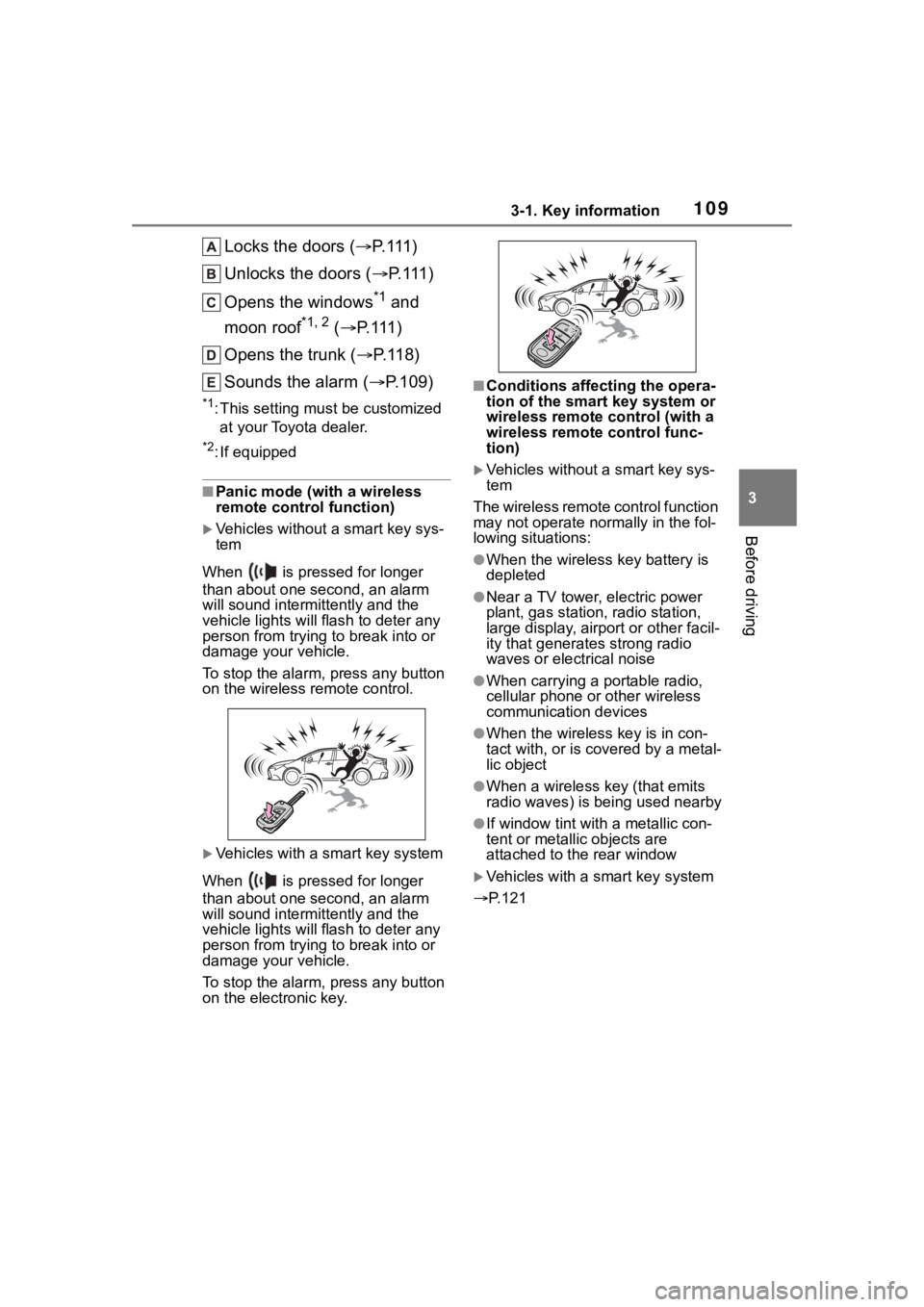
■Panic mode (with a wireless
remote control function)
Vehicles without a smart key sys-
tem
When is pressed for longer
than about one second, an alarm
will sound intermittently and the
vehicle lights will f lash to deter any
person from trying to break into or
damage your vehicle.
To stop the alarm, press any button
on the wireless re mote control.
Vehicles with a smart key system
When is pressed for longer
than about one second, an alarm
will sound intermittently and the
vehicle lights will f lash to deter any
person from trying to break into or
damage your vehicle.
To stop the alarm, press any button
on the electronic key.
■Conditions affecting the opera-
tion of the smart key system or
wireless remote control (with a
wireless remote control func-
tion)
Vehicles without a smart key sys-
tem
The wireless remote control function
may not operate normally in the fol-
lowing situations:
●When the wireles s key battery is
depleted
●Near a TV tower, electric power
plant, gas station, radio station,
large display, airpo rt or other facil-
ity that generates strong radio
waves or electrical noise
●When carrying a portable radio,
cellular phone or other wireless
communication devices
●When the wireless key is in con-
tact with, or is c overed by a metal-
lic object
●When a wireless key (that emits
radio waves) is being used nearby
●If window tint wit h a metallic con-
tent or metallic objects are
attached to the rear window
Vehicles with a smart key system
P.121
Page 110 of 468
1103-1. Key information
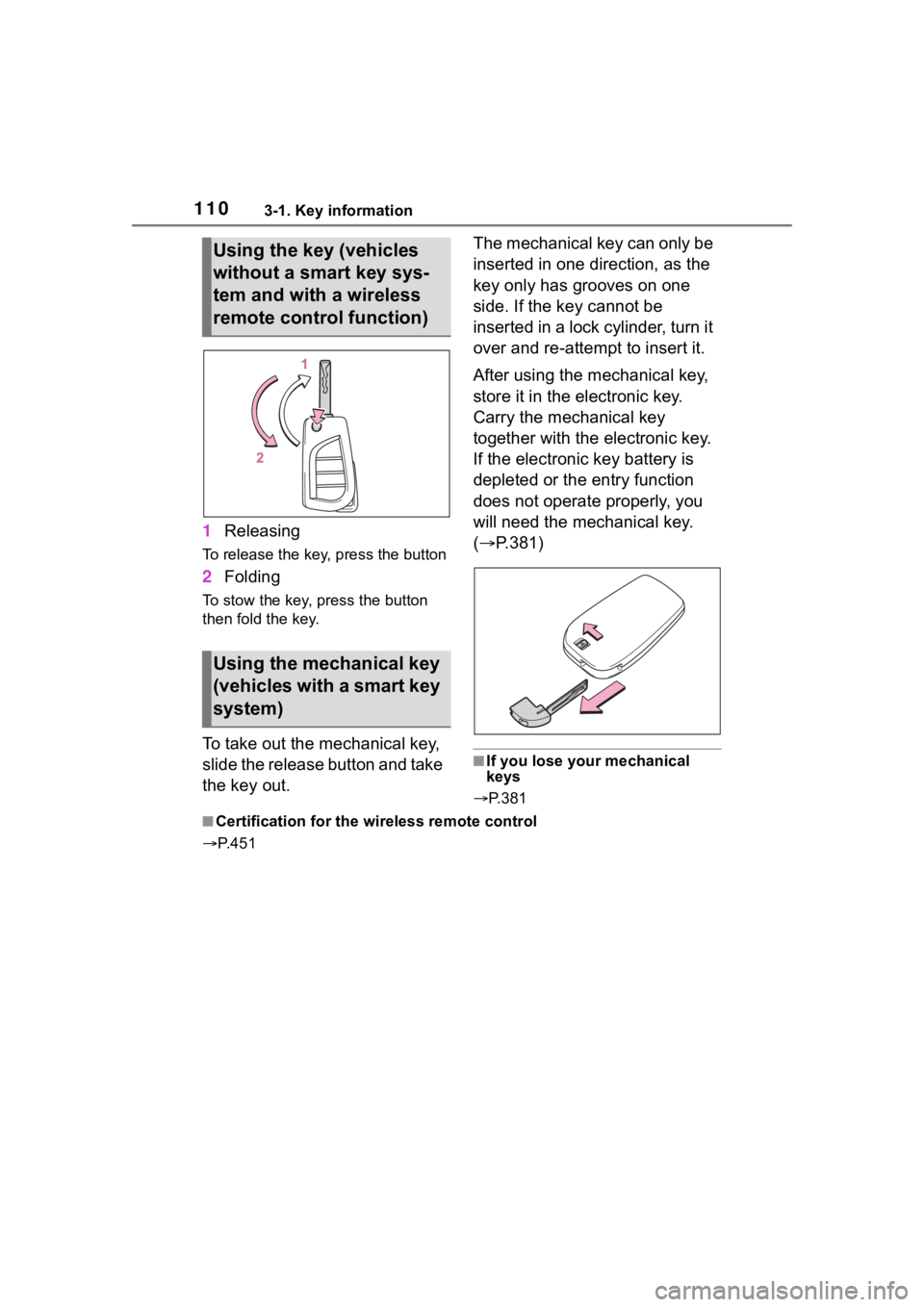
1Releasing
To release the key, press the button
2Folding
To stow the key, press the button
then fold the key.
To take out the mechanical key,
slide the release button and take
the key out. The mechanical key can only be
inserted in one direction, as the
key only has grooves on one
side. If the key cannot be
inserted in a lock cylinder, turn it
over and re-attempt to insert it.
After using the mechanical key,
store it in the electronic key.
Carry the mechanical key
together with the electronic key.
If the electronic key battery is
depleted or the entry function
does not operate properly, you
will need the mechanical key.
(
P.381)
■If you lose your mechanical
keys
P.381
■Certification for the wireless remote control
P. 4 5 1
Using the key (vehicles
without a smart key sys-
tem and with a wireless
remote control function)
Using the mechanical key
(vehicles with a smart key
system)