2023 TOYOTA COROLLA steering
[x] Cancel search: steeringPage 211 of 468

2114-5. Using the driving support systems
4
Driving
PDA (Proactive driv-
ing assist)
When a detectable object
(P.212) is detected, the
proactive driving assist
operates the brakes and
steering wheel to help pre-
vent the vehicle from
approaching too close to
the object.
WARNING
■For safe use
Driving safely is solely the respon-
sibility of the driver.
●The proactive driving assist is
designed to provide some
assistance for regular braking
and steering operations, as well
as helping to prevent the vehicle
from approaching too close to a
detectable object. However, the
scope of this assistance is lim-
ited.
The driver should perform brake
and steering operations as neces-
sary. Read the following items
carefully. Do not overly rely on the
proactive driving assist and
always drive carefully.( P.213)
●The proactive driving assist is
not a system which reduces the
amount of attention necessary
for safe driving. Even if the sys-
tem is operating correctly, the
surrounding conditions as rec-
ognized by the driver and
detected by the system may dif-
fer. It is necessary for the driver
to pay attention, assess risks,
and ensure safety. Over-reli-
ance on this system to drive the
vehicle safely may lead to an
accident resulting in death or
serious injury.
●Proactive driving assist is not a
system which allows for inatten-
tive driving and is not a system
which assists in poor visibility
conditions. The driver is solely
responsible for paying attention
to their surroundings and driving
safely.
■When turning proactive driv-
ing assist off
●Situations in which the sensors
may not operate properly
: P. 1 8 8
●When it is necessary to disable
the system : P.184
Page 212 of 468
2124-5. Using the driving support systems
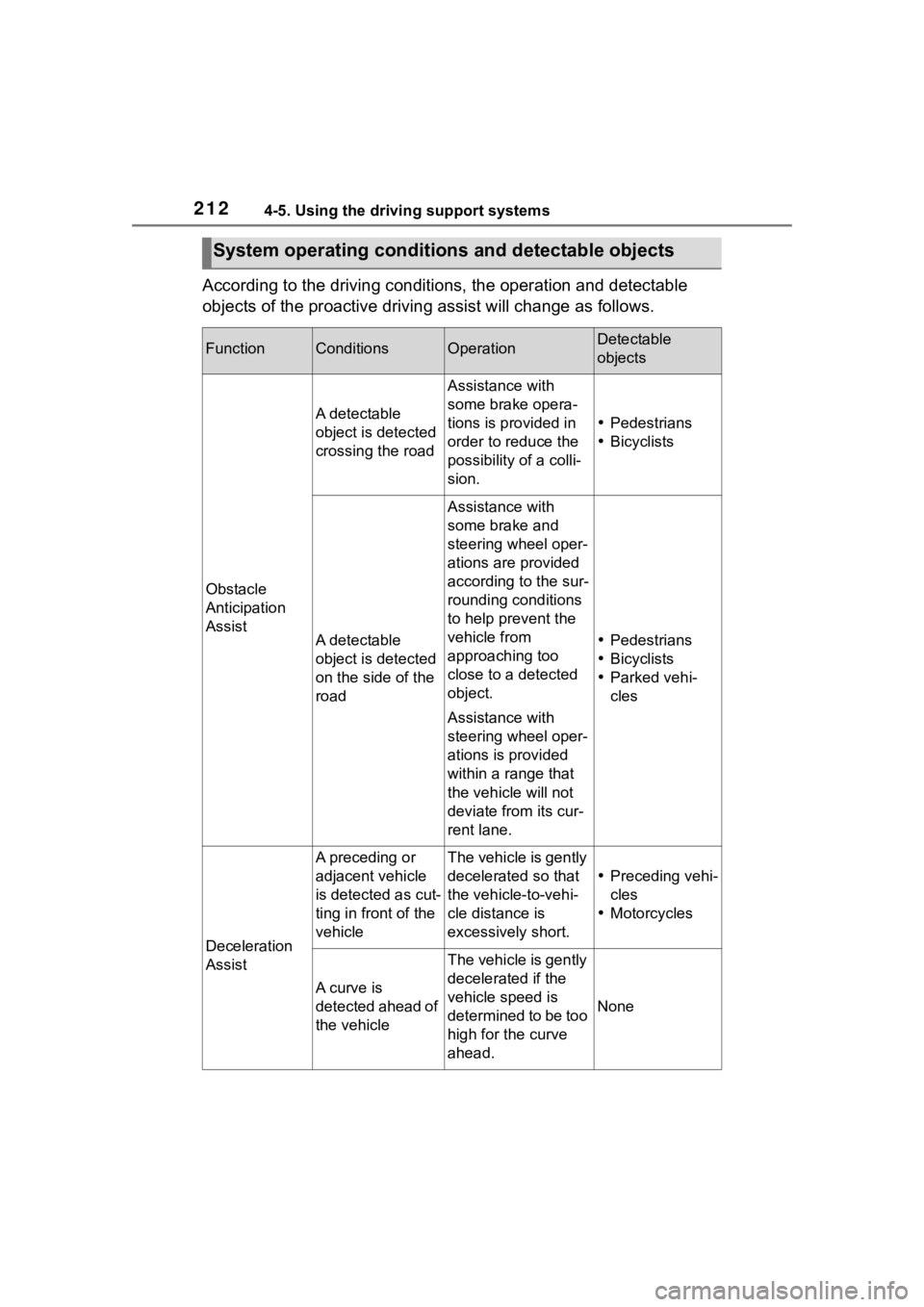
According to the driving conditions, the operation and detectable
objects of the proactive driving assist will change as follows.
System operating conditi ons and detectable objects
FunctionConditionsOperationDetectable
objects
Obstacle
Anticipation
Assist
A detectable
object is detected
crossing the road
Assistance with
some brake opera-
tions is provided in
order to reduce the
possibility of a colli-
sion.
Pedestrians
Bicyclists
A detectable
object is detected
on the side of the
road
Assistance with
some brake and
steering wheel oper-
ations are provided
according to the sur-
rounding conditions
to help prevent the
vehicle from
approaching too
close to a detected
object.
Assistance with
steering wheel oper-
ations is provided
within a range that
the vehicle will not
deviate from its cur-
rent lane.
Pedestrians
Bicyclists
Parked vehi-
cles
Deceleration
Assist
A preceding or
adjacent vehicle
is detected as cut-
ting in front of the
vehicleThe vehicle is gently
decelerated so that
the vehicle-to-vehi-
cle distance is
excessively short.
Preceding vehi-
cles
Motorcycles
A curve is
detected ahead of
the vehicle
The vehicle is gently
decelerated if the
vehicle speed is
determined to be too
high for the curve
ahead.
None
Page 213 of 468
2134-5. Using the driving support systems
4
Driving
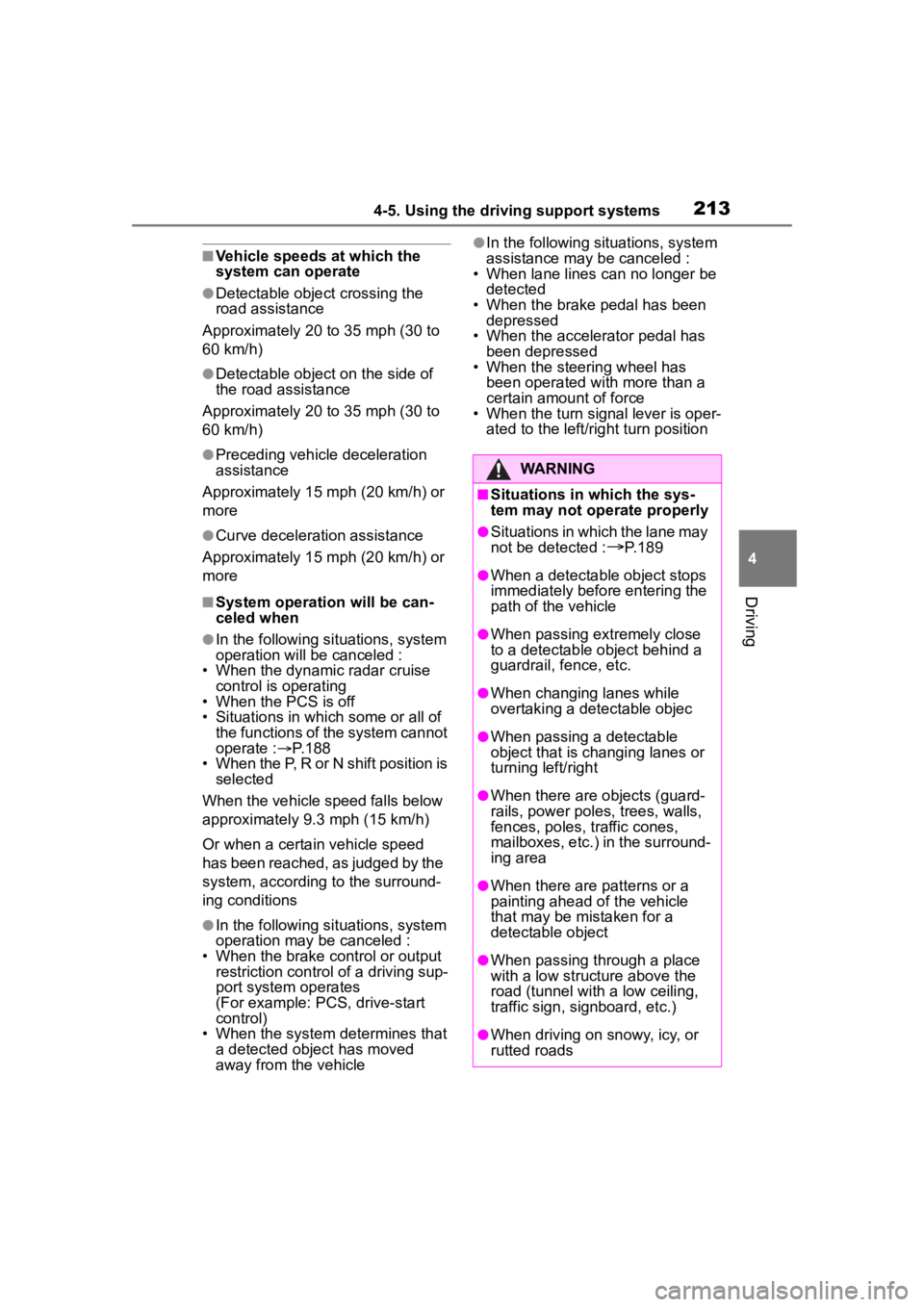
■Vehicle speeds at which the
system can operate
●Detectable object crossing the
road assistance
Approximately 20 to 35 mph (30 to
60 km/h)
●Detectable object on the side of
the road assistance
Approximately 20 to 35 mph (30 to
60 km/h)
●Preceding vehicle deceleration
assistance
Approximately 15 mph (20 km/h) or
more
●Curve decelerati on assistance
Approximately 15 mph (20 km/h) or
more
■System operation will be can-
celed when
●In the following si tuations, system
operation will be canceled :
• When the dynamic radar cruise control is operating
• When the PCS is off
• Situations in whi ch some or all of
the functions of the system cannot
operate : P. 1 8 8
• When the P, R or N shift position is selected
When the vehicle speed falls below
approximately 9.3 mph (15 km/h)
Or when a certain vehicle speed
has been reached, as judged by the
system, according to the surround-
ing conditions
●In the following si tuations, system
operation may be canceled :
• When the brake control or output restriction control of a driving sup-
port system operates
(For example: PCS, drive-start
control)
• When the system determines that a detected object has moved
away from the vehicle
●In the following situations, system
assistance may be canceled :
• When lane lines can no longer be
detected
• When the brake pedal has been
depressed
• When the accelerator pedal has been depressed
• When the steering wheel has
been operated wi th more than a
certain amount of force
• When the turn signal lever is oper-
ated to the left/right turn position
WARNING
■Situations in which the sys-
tem may not ope rate properly
●Situations in which the lane may
not be detected :
P.189
●When a detectable object stops
immediately before entering the
path of the vehicle
●When passing extremely close
to a detectable object behind a
guardrail, fence, etc.
●When changing lanes while
overtaking a detectable objec
●When passing a detectable
object that is changing lanes or
turning left/right
●When there are objects (guard-
rails, power poles, trees, walls,
fences, poles, traffic cones,
mailboxes, etc.) in the surround-
ing area
●When there are patterns or a
painting ahead of the vehicle
that may be mistaken for a
detectable object
●When passing through a place
with a low structure above the
road (tunnel with a low ceiling,
traffic sign, signboard, etc.)
●When driving on snowy, icy, or
rutted roads
Page 215 of 468
2154-5. Using the driving support systems
4
Driving
The proactive driving assist
can be enabled/disabled
through a customize setting. (
P.412)
The following settings of the
proactive driving assist can be
changed through customize
settings.( P.412)
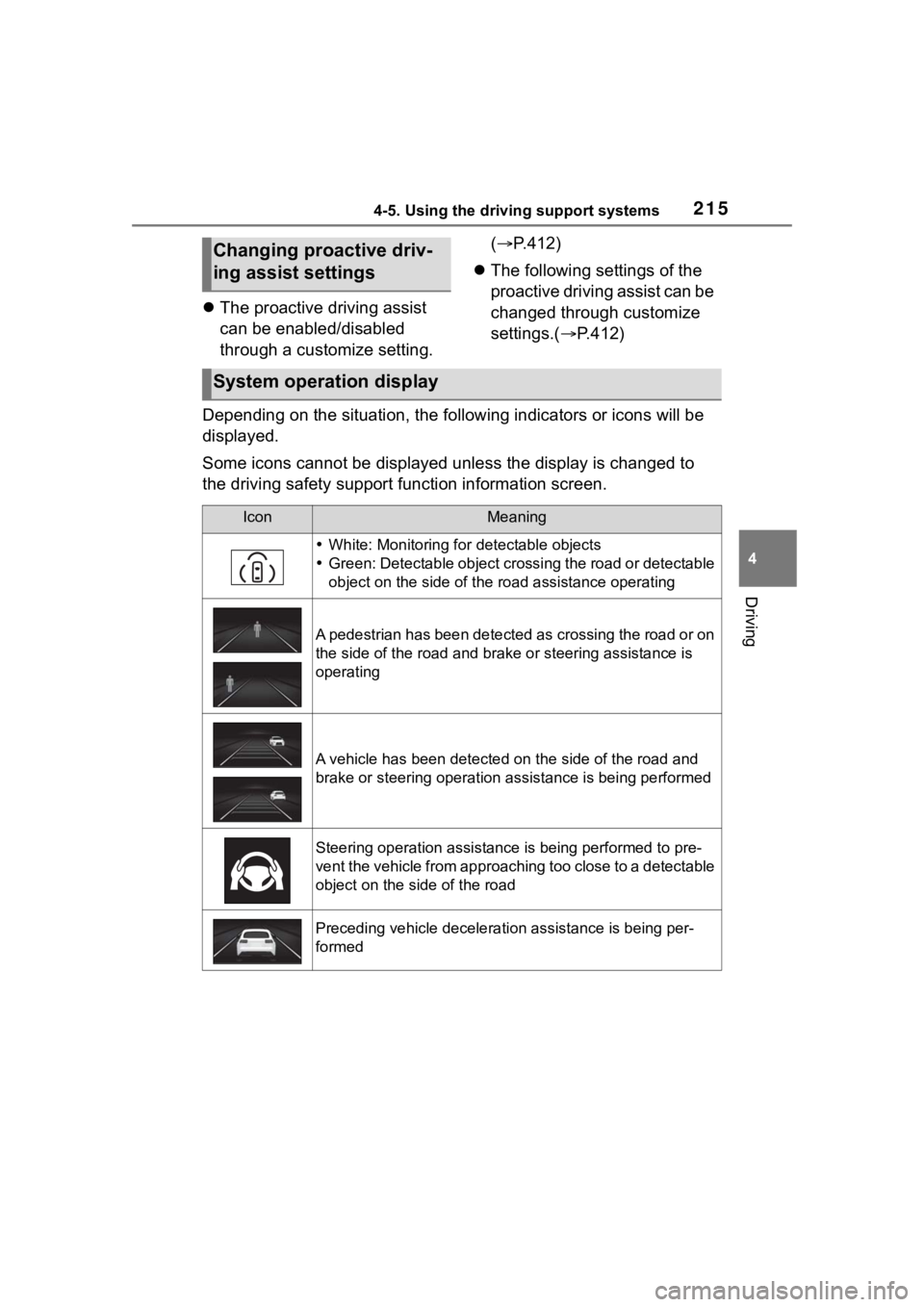
Depending on the situation, the following indicators or icons w ill be
displayed.
Some icons cannot be displayed unless the display is changed to
the driving safety support function information screen.
Changing proactive driv-
ing assist settings
System operation display
IconMeaning
White: Monitoring for detectable objects
Green: Detectable object crossing the road or detectable
object on the side of the road assistance operating
A pedestrian has been detected as crossing the road or on
the side of the road and bra ke or steering assistance is
operating
A vehicle has been detected on the side of the road and
brake or steering operation assistance is being performed
Steering operation assistance is being performed to pre-
vent the vehicle from approaching too close to a detectable
object on the side of the road
Preceding vehicle deceleration assistance is being per-
formed
Page 216 of 468
2164-5. Using the driving support systems
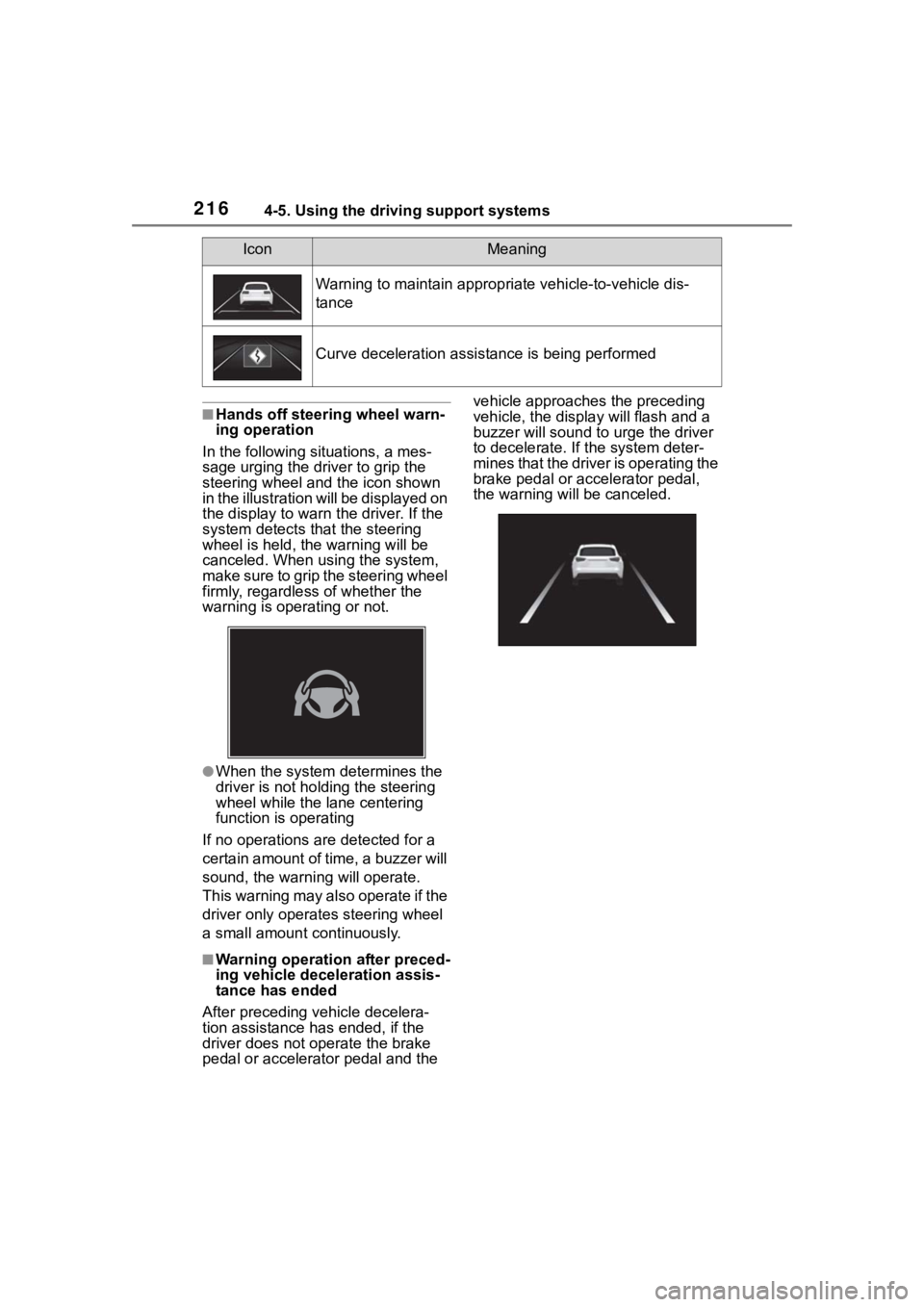
■Hands off steering wheel warn-
ing operation
In the following situations, a mes-
sage urging the dr iver to grip the
steering wheel and the icon shown
in the illustration will be displayed on
the display to warn the driver. If the
system detects that the steering
wheel is held, the warning will be
canceled. When using the system,
make sure to grip the steering wheel
firmly, regardless of whether the
warning is operating or not.
●When the system determines the
driver is not holding the steering
wheel while the lane centering
function is operating
If no operations are detected for a
certain amount of time, a buzzer will
sound, the warnin g will operate.
This warning may also operate if the
driver only operates steering wheel
a small amount continuously.
■Warning operation after preced-
ing vehicle deceleration assis-
tance has ended
After preceding vehicle decelera-
tion assistance has ended, if the
driver does not operate the brake
pedal or accelerator pedal and the vehicle approaches the preceding
vehicle, the displa
y will flash and a
buzzer will sound to urge the driver
to decelerate. If the system deter-
mines that the driver is operating the
brake pedal or accelerator pedal,
the warning will be canceled.
Warning to maintain appropriate vehicle-to-vehicle dis-
tance
Curve deceleration assistance is being performed
IconMeaning
Page 227 of 468
2274-5. Using the driving support systems
4
Driving
lane is the passing lane may be
based solely on the location of the
steering wheel in the vehicle
(left-hand drive/right-hand drive). If
the vehicle is driven in a location
where the passing lane is on the
opposite side of that where the
vehicle was originally sold, the
vehicle may accelerate when the
turn signal lever is operated away
from the passing lane. (e.g. The
vehicle was manufactured for a
right-hand traffic location, but is
being driven in a left-hand traffic
location. The vehicle may acceler-
ate when the turn signal lever is
operated to the right.)
If your vehicle is being driven at
approximately 50 mph (80 km/h) or
more and the lane is changed to
that with a vehicle traveling slower
than your vehicle, when the turn
signal lever is operated the vehicle
will gradually decelerate to assist in
changing lanes.
The settings of Dynamic radar
cruise control can be changed
through customize settings.
( P.412)
Changing Dynamic radar
cruise control settings
Cruise control
The vehicle can be driven at
a set speed even if the
accelerator pedal is not
depressed.
Use the cruise control only
on highways and express-
ways.
WARNING
■For safe use
●Driving safely is solely the
responsibility of the driver.
Therefore, do not overly rely on
this system. The driver is solely
responsible for paying attention
to the vehicle’s surroundings
and driving safely.
●Set the speed appropriately
according to the speed limit,
traffic flow, road conditions,
weather conditions, etc. The
driver is responsible for confirm-
ing the set speed.
■Situations in which cruise
control should not be used
Do not use the cruise control in
the following situ ations. As the
system will not be able to provide
appropriate control, using it may
lead to an acciden t resulting in
death or serious injury.
●On roads with sharp bends
●On winding roads
●On slippery roads, such as
those covered with rain, ice or
snow
●On steep downhills, or where
there are sudden changes
between sharp up and down
gradients
Page 230 of 468
2304-5. Using the driving support systems
Operation of this system is sep-
arated into 4 control states.
Emergency Driving
Stop System
The emergency driving stop
system is a system which
automatically decelerates
and stops the vehicle within
its lane if the driver
becomes unable to continue
driving the vehicle, such as
if they have suffered a medi-
cal emergency, etc.
During LTA (Lane Tracing
Assist) control, if the sys-
tem does not detect driving
operations, such as if the
driver is not holding the
steering wheel, and deter-
mines the driver is not
responsive, the vehicle will
be decelerated and stopped
within its current lane to
help avoid a collision or
reduce the impact of a colli-
sion.
WARNING
■For safe use
●Driving safely is solely the
responsibility of the driver. Pay
careful attention to the sur-
rounding conditions in order to
ensure safe driving. The emer-
gency driving stop system is
designed to provide support in
an emergency where it is diffi-
cult for the driver to continue
driving, such as if they have had
a medical emergency. It is not
designed to support driving
while drowsy or in poor physical
health, or inattentive driving.
●Although the emergency driv-
ing stop system is designed to
decelerate the vehicle within its
lane to help avoid or help
reduce the impact of a collision
if the system determines that it
is difficult for the driver to con-
tinue driving, its effectiveness
may change according to vari-
ous conditions. Therefore, it
may not always be able to
achieve the same level of per-
formance. Also, if the operating
conditions are not met, this
function will not operate.
●After the emergency driving
stop system operates, if driving
becomes possible again, imme-
diately begin driving again or, if
necessary, park the vehicle on
the shoulder of the road and set
a warning reflecto r and flare to
warn other drivers of your
stopped vehicle.
●After this system operates, pas-
sengers should attend to the
driver as necessary and take
appropriate hazard prevention
measures, such as moving to a
place where safety can be
ensured, such as the shoulder
of the road or behind a guard-
rail.
●This system detects the condi-
tion of the driver through the
operation of the steering wheel.
This system may operate if the
driver is aware but intentionally
and continuously does not oper-
ate the vehicle. Also, the system
may not operate if it cannot
determine that the driver is not
responsive, such as if they are
leaning on the steering wheel.
Summary of the system
Page 231 of 468
2314-5. Using the driving support systems
4
Driving
Through control state “warning
phase 1” and “warning phase 2”,
the system determines if the
driver is aware and responsive
while outputting a warning and
controlling the vehicle speed. If
the system determines the
driver is not responsive, it will
operate in control state “deceler-
ation stop phase” and “stop hold
phase” and decelerate and stop
the vehicle. It will then operate
continuously in “stop hold
phase”.
■Operating conditions
This system opera tes when all of
the following cond itions are met:
●When the LTA is on
●When the vehicle speed is
approximately 30 mph (50 km/h)
or more
■Operation cancelation condi-
tions
In the following si tuations, system
operation will be canceled:
●When LTA control has been can-
celed (the LTA switch has been
pressed, etc.)
●When the dynamic radar cruise
control has been canceled
●When driver operations are
detected (the steering wheel is
held, the brake pedal, accelerator
pedal, parking brake, hazard light
switch, or turn sig nal lever is oper-
ated)
●When the driving assist switch is
pressed while in the stop and hold
phase
●When the engine switch has been
turned from ON to off
●Situations in whic h some or all of
the functions of the system cannot operate:
P. 1 8 9
■LTA control when operation is
canceled
When emergency driving stop sys-
tem operation is canceled, LTA con-
trol may also be canceled.
If driving operations are not
detected after the hands off
steering wheel warning oper-
ates, a buzzer will sound inter-
mittently and a message will be
displayed to warn the driver, and
the system will judge if the driver
is responsive or not. If driving
operations, such as holding the
steering wheel, are not per-
formed within a certain amount
of time, the system will enter
warning phase 2.
After entering warning phase 2,
a buzzer will sound in short
intervals and a message will be
displayed to warn the driver, and
the vehicle will slowly deceler-
ate. If driving operations, such
as holding the steering wheel,
are not performed within a cer-
tain amount of time, the system
will determine that the driver is
not responsive and enter the
deceleration stop phase.
The audio system will be muted
until the driver becomes respon-
sive.
When the vehicle is decelerating,
Warning phase 1
Warning phase 2