Page 82 of 468
822-1. Instrument cluster
2-1.Instrument cluster
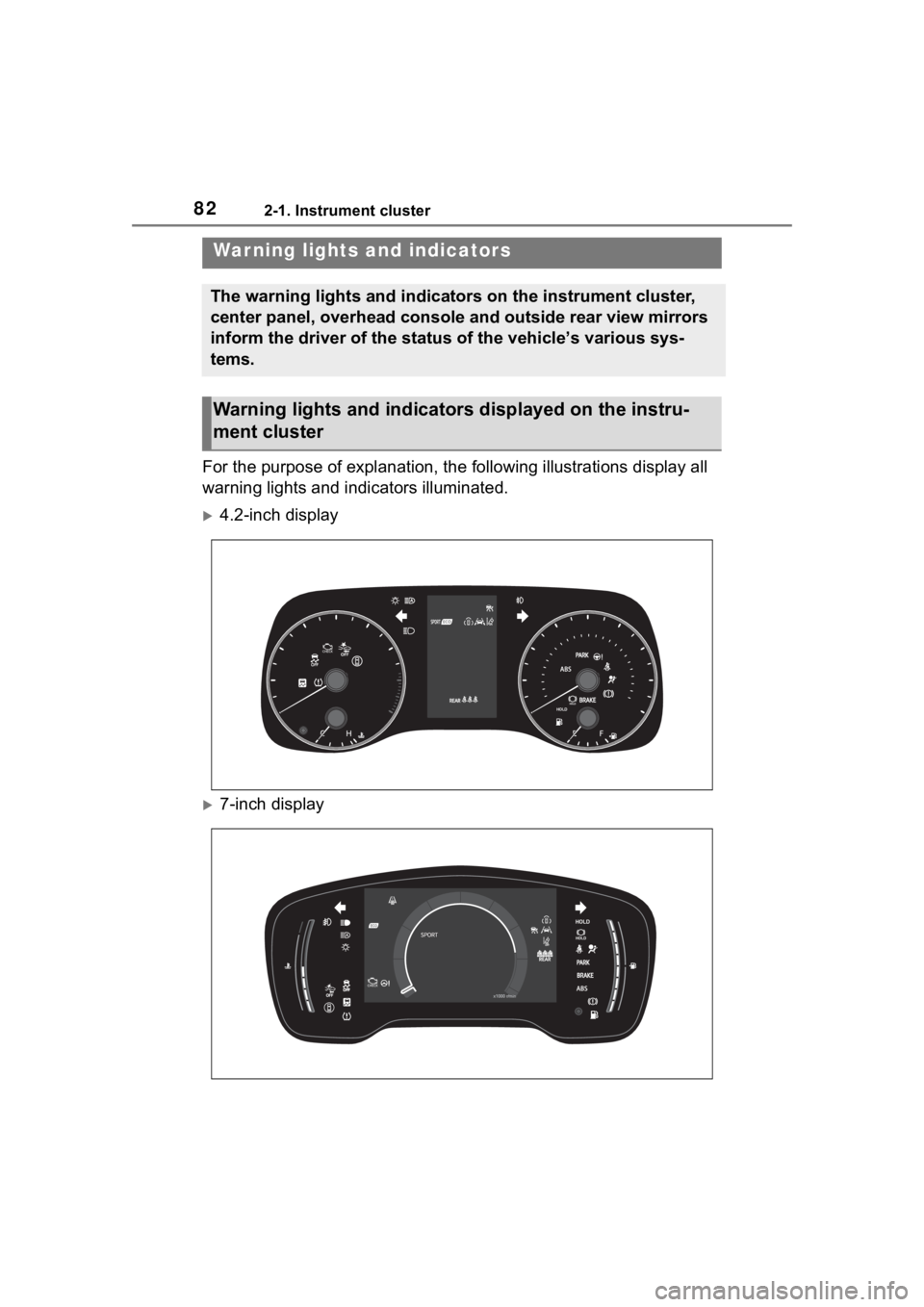
For the purpose of explanation, the following illustrations display all
warning lights and indicators illuminated.
4.2-inch display
7-inch display
War ning lights and indicators
The warning lights and indicators on the instrument cluster,
center panel, overhead console and outside rear view mirrors
inform the driver of the status of the vehicle’s various sys-
tems.
Warning lights and indicators displayed on the instru-
ment cluster
Page 83 of 468
832-1. Instrument cluster
2
Vehicle status information and indicators
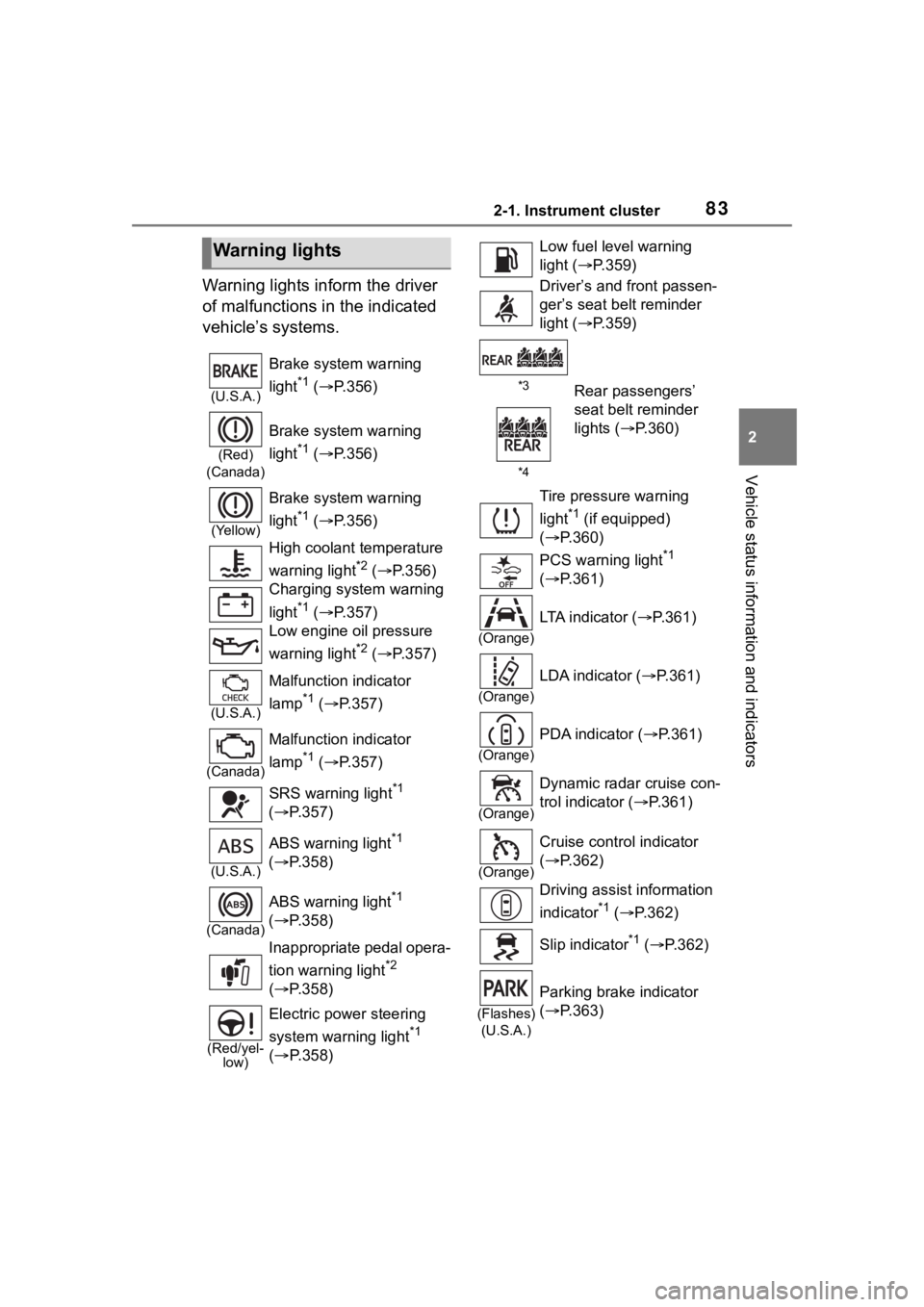
Warning lights inform the driver
of malfunctions in the indicated
vehicle’s systems.
Warning lights
(U.S.A.)
Brake system warning
light
*1 ( P.356)
(Red)
(Canada)
Brake system warning
light
*1 ( P.356)
(Yellow)
Brake system warning
light
*1 ( P.356)
High coolant temperature
warning light
*2 ( P.356)
Charging system warning
light
*1 ( P.357)
Low engine oil pressure
warning light
*2 ( P.357)
(U.S.A.)
Malfunction indicator
lamp
*1 ( P.357)
(Canada)
Malfunction indicator
lamp
*1 ( P.357)
SRS warning light
*1
( P.357)
(U.S.A.)
ABS warning light*1
( P.358)
(Canada)
ABS warning light*1
( P.358)
Inappropriate pedal opera-
tion warning light
*2
( P.358)
(Red/yel-
low)
Electric power steering
system warning light
*1
( P.358)
Low fuel leve l warning
light ( P.359)
Driver’s and front passen-
ger’s seat belt reminder
light ( P.359)
*3Rear passengers’
seat belt reminder
lights ( P.360)
*4
Tire pressure warning
light
*1 (if equipped)
( P.360)
PCS warning light
*1
( P.361)
(Orange)
LTA indicator ( P.361)
(Orange)
LDA indicator ( P.361)
(Orange)
PDA indicator ( P.361)
(Orange)
Dynamic radar cruise con-
trol indicator ( P.361)
(Orange)
Cruise control indicator
( P.362)
Driving assist information
indicator
*1 ( P.362)
Slip indicator
*1 ( P.362)
(Flashes)
(U.S.A.)
Parking brake indicator
( P.363)
Page 84 of 468

842-1. Instrument cluster
*1: These lights come on when the engine switch is turned to ON to
indicate that a system check is
being performed. They will turn
off after the engine is started, or
after a few seconds. There may
be a malfunction in a system if
the lights do not come on, or turn
off. Have the vehicle inspected
by your Toyota dealer.
*2: This light illuminates on the multi-information display.
*3: 4.2-inch display.
*4: 7-inch display.
The indicators inform the driver
of the operating state of the
vehicle’s various systems.
(Flashes)
(Canada)
Parking brake indicator
( P.363)
(Flashes)
Brake hold operated indi-
cator
*1( P.363)
WARNING
■If a safety system warning
light does not come on
Should a safety system light such
as the ABS and SRS warning light
not come on when you start the
engine, this could mean that
these systems are not available to
help protect you in an accident,
which could result in death or seri-
ous injury. Have the vehicle
inspected by your Toyota dealer
immediately if this occurs.
Indicators
Turn signal indicator
( P.167)
(U.S.A.)
Headlight indicator
( P.173)
(Canada)
Tail light indicator
( P.173)
Headlight high beam indi-
cator ( P.175)
Automatic High Beam
indicator ( P.175)
PCS warning light
*1, 2
( P.191)
Dynamic radar cruise con-
trol indicator ( P.222)
Cruise control indicator
( P.228)
(Green/W
hite/Orang e
[Flashes])LDA indicator ( P.210)
(Green/W
hite/Orang e
[Flashes])LTA indicator ( P.205)
(Green/W
hite)PDA indicator ( P. 2 1 1 )
BSM outside rear view
mirror indicators
*1,3 (if
equipped) ( P.233)
Driving assist information
indicator
*1,2 ( P.233,
237)
(Flashes)
Slip indicator*1 ( P.249)
Page 91 of 468

912-1. Instrument cluster
2
Vehicle status information and indicators
can be used to record and display
different distances independently.
To reset, display the desired trip
meter and press and hold the dis-
play change button.
The brightness of the instrument
panel lights can be adjusted.
1Brighter
2 Darker
■Instrument panel light bright-
ness adjustment
The brightness of the instrument
panel lights can be adjusted sepa-
rately for when the tail lights are on
and off.
■The clocks can be adjusted
on the audio system
screen.
Refer to “MULTIMEDIA
OWNER’S MANUAL”.
■Display
Driving support system status
display area
Displays an image when the follow-
ing systems are operating and a
menu icon other than is
selected:
• LTA (Lane Tracing Assist)
• LDA (Lane Departure Alert)
• Dynamic radar cruise control
• RSA (Road Sign Assist) (if equipped) ( P.217)
Content display area
By selecting menu icons on the
multi-information di splay, a variety
of driving-related information can
be displayed. The multi-information
display can also be used to change
display settings and other vehicle
settings.
Warning or advice pop-up displays
are also displayed in certain situa-
tions.
■Menu icons
The menu icons will be dis-
played by pressing the or
Changing the instrument
panel light brightness
Adjusting the clock
Multi-infor mation dis-
play (4.2-inch display)
Display and menu icons
Page 131 of 468
1313-4. Adjusting the steering wheel and mirrors
3
Before driving
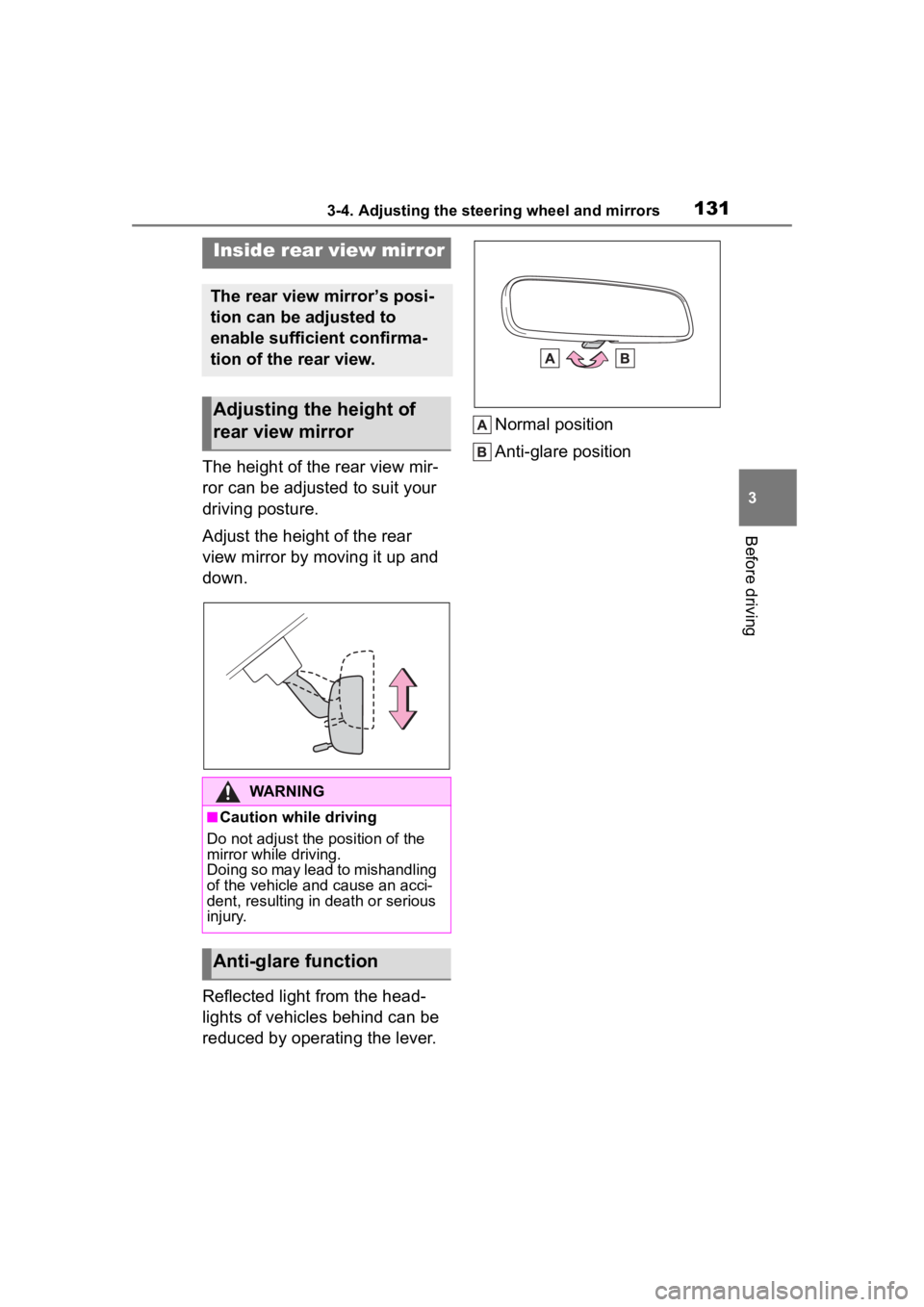
The height of the rear view mir-
ror can be adjusted to suit your
driving posture.
Adjust the height of the rear
view mirror by moving it up and
down.
Reflected light from the head-
lights of vehicles behind can be
reduced by operating the lever.Normal position
Anti-glare position
Inside rear view mirror
The rear view mirror’s posi-
tion can be adjusted to
enable sufficient confirma-
tion of the rear view.
Adjusting the height of
rear view mirror
WARNING
■Caution while driving
Do not adjust the position of the
mirror while driving.
Doing so may lead to mishandling
of the vehicle and cause an acci-
dent, resulting in death or serious
injury.
Anti-glare function
Page 175 of 468
1754-3. Operating the lights and wipers
4
Driving
■Customization
Some functions can be customized.
( P.412)
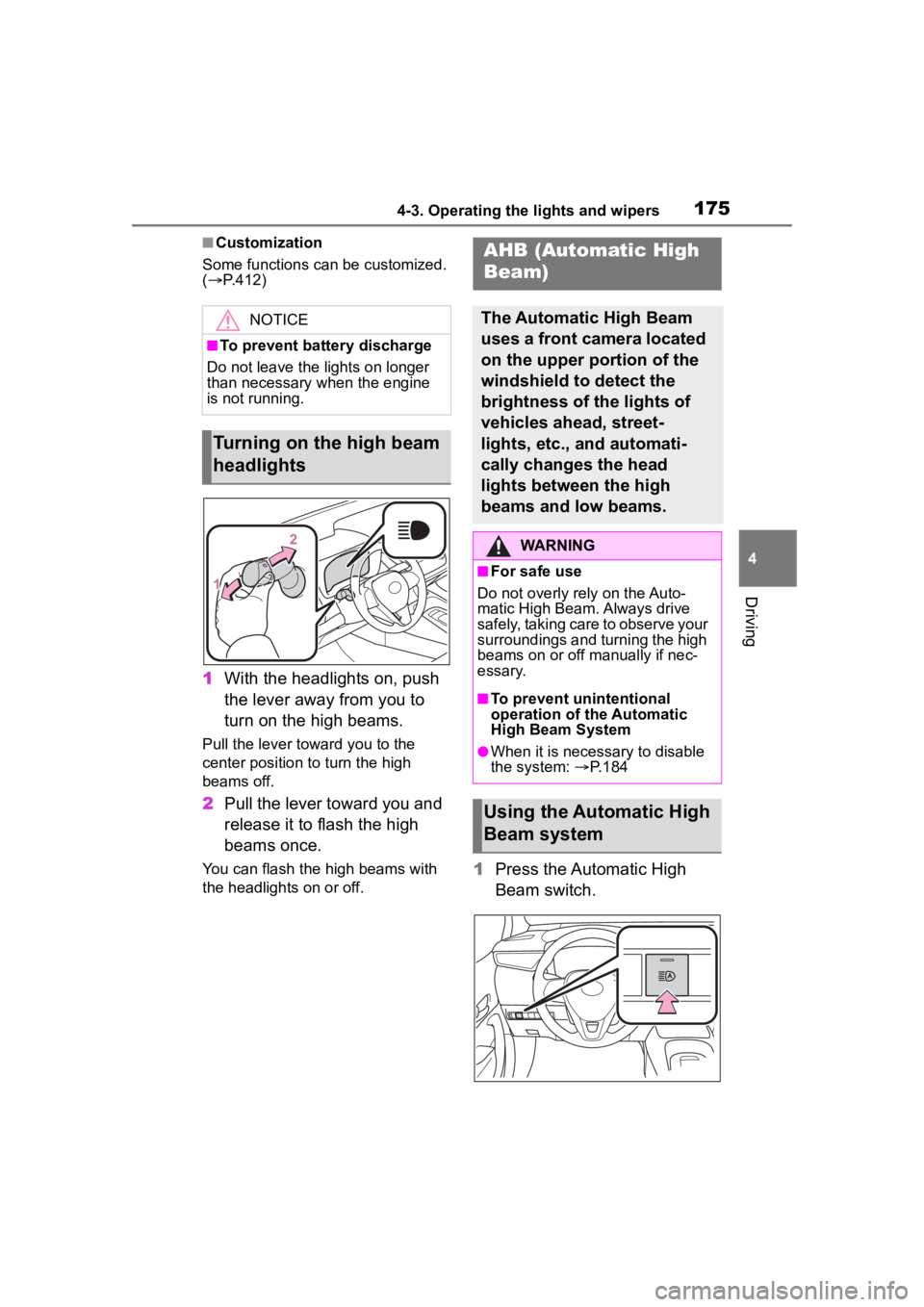
1 With the headlights on, push
the lever away from you to
turn on the high beams.
Pull the lever toward you to the
center position to turn the high
beams off.
2Pull the lever toward you and
release it to flash the high
beams once.
You can flash the high beams with
the headlights on or off.1Press the Automatic High
Beam switch.
NOTICE
■To prevent battery discharge
Do not leave the lights on longer
than necessary when the engine
is not running.
Turning on the high beam
headlights
AHB (Automatic High
Beam)
The Automatic High Beam
uses a front camera located
on the upper portion of the
windshield to detect the
brightness of the lights of
vehicles ahead, street-
lights, etc., and automati-
cally changes the head
lights between the high
beams and low beams.
WARNING
■For safe use
Do not overly rely on the Auto-
matic High Beam. Always drive
safely, taking care to observe your
surroundings and turning the high
beams on or off manually if nec-
essary.
■To prevent unintentional
operation of the Automatic
High Beam System
●When it is necessary to disable
the system: P.184
Using the Automatic High
Beam system
Page 179 of 468
1794-3. Operating the lights and wipers
4
Driving
operation
3 (U.S.A.) or (Canada)
High speed windshield wiper
operation
4 (U.S.A.) or (Canada)
Temporary operation
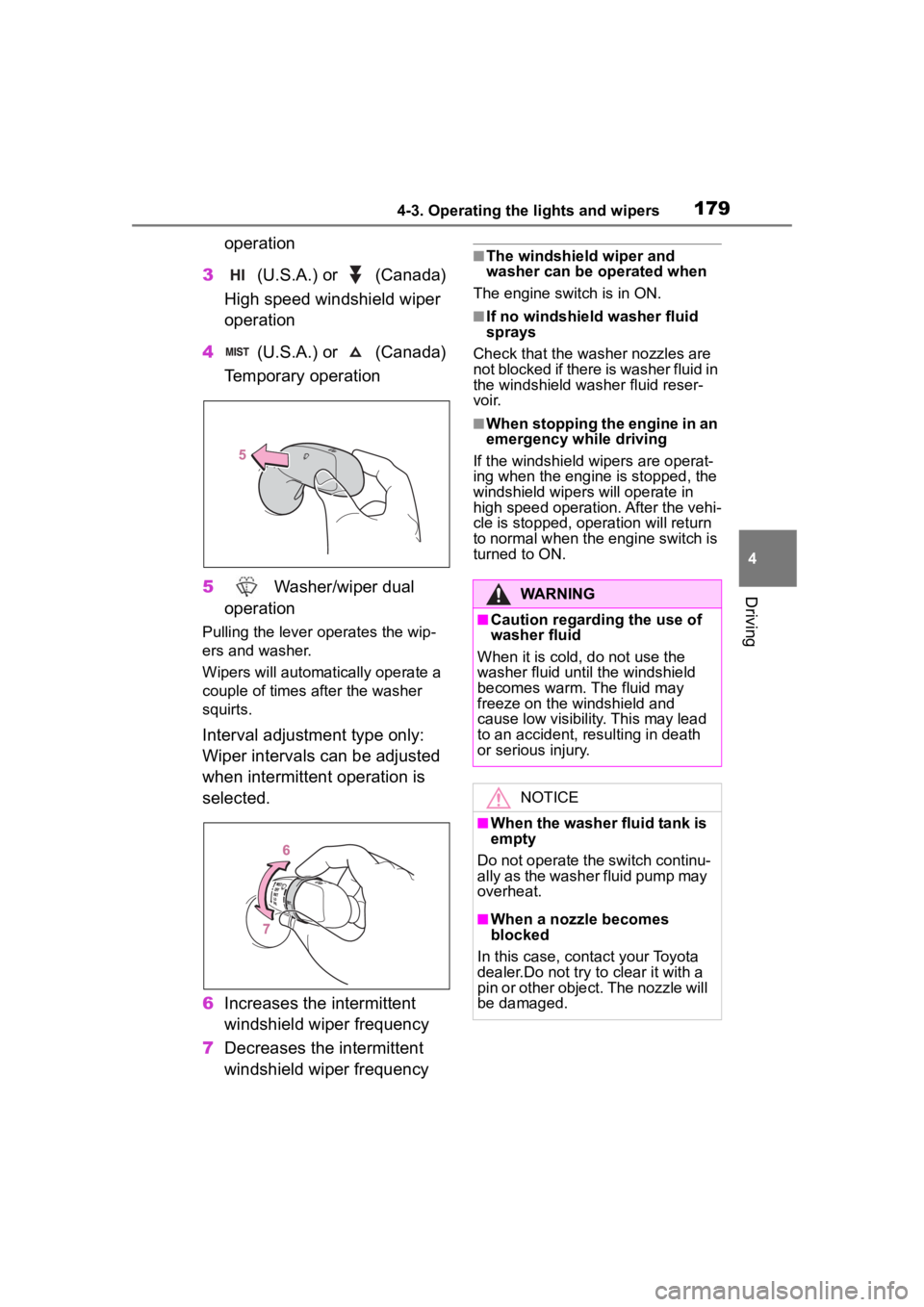
5 Washer/wiper dual
operation
Pulling the lever o perates the wip-
ers and washer.
Wipers will automatically operate a
couple of times after the washer
squirts.
Interval adjustment type only:
Wiper intervals can be adjusted
when intermittent operation is
selected.
6 Increases the intermittent
windshield wiper frequency
7 Decreases the intermittent
windshield wiper frequency
■The windshield wiper and
washer can be operated when
The engine switch is in ON.
■If no windshield washer fluid
sprays
Check that the washer nozzles are
not blocked if there is washer fluid in
the windshield washer fluid reser-
voir.
■When stopping the engine in an
emergency while driving
If the windshield wipers are operat-
ing when the engine is stopped, the
windshield wipers will operate in
high speed operation. After the vehi-
cle is stopped, operation will return
to normal when the engine switch is
turned to ON.
WARNING
■Caution regarding the use of
washer fluid
When it is cold, do not use the
washer fluid unt il the windshield
becomes warm. The fluid may
freeze on the windshield and
cause low visibility. This may lead
to an accident, resulting in death
or serious injury.
NOTICE
■When the washer fluid tank is
empty
Do not operate the switch continu-
ally as the washer fluid pump may
overheat.
■When a nozzle becomes
blocked
In this case, contact your Toyota
dealer.Do not try to clear it with a
pin or other object. The nozzle will
be damaged.
Page 188 of 468

1884-5. Using the driving support systems
■Situations in which the sensors
may not operate properly
●When the height or inclination of
the vehicle has been changed due
to modifications
●When the windshield is dirty,
fogged up, cracked or damaged
●When the ambient temperature is
high or low
●When mud, water, snow, dead
insects, foreign matter, etc., is
attached to the front of the sensor
●When in inclement weather such
as heavy rain, fog, snow, or a
sandstorm
●When water, snow, dust, etc. is
thrown up in front of the vehicle, or
when driving through mist or
smoke
●When the headlig hts are not illu-
minated while driving in the dark,
such as at night o r when in a tun-
nel
●When the lens of a headlight is
dirty and illumination is weak
●When the headlights are mis-
aligned
●When a headlight is malfunction-
ing
●When the headlights of another
vehicle, sunlight, or reflected light
shines directly into the front cam-
era
●When the brightness of the sur-
rounding area changes suddenly
●When driving near a TV tower,
broadcasting station, electric
power plant, radar equipped vehi-
cles, etc., or other location where
strong radio waves or electrical
noise may be present
●When a wiper blade is blocking
the front camera
●When in a location or near objects
which strongly reflect radio waves,
such as the following:
• Tunnels
• Truss bridges
• Gravel roads
• Rutted, snow-covered roads
• Walls
• Large trucks
• Manhole covers
• Guardrail
• Metal plates
●When near a step or protrusion
●When a detectable vehicle is nar-
row, such as a small mobility vehi-
cle
●When a detectable vehicle has a
small front or rear end, such as an
unloaded truck
●When a detectable vehicle has a
low front or rear end, such as a
low bed trailer
●When a detectable vehicle has
extremely high ground clearance
WARNING
■Front camera installation area
on the windshield
If the system determines that the
windshield may be fogged up, it
will automatically operate the
heater to defog the part of the
windshield around the front cam-
era. When cleaning, etc., be care-
ful not to touch the area around
the front camera until the wind-
shield has cooled sufficiently, as
touching it may cause burns.