2023 TOYOTA COROLLA HYBRID power steering
[x] Cancel search: power steeringPage 2 of 496
2TABLE OF CONTENTS
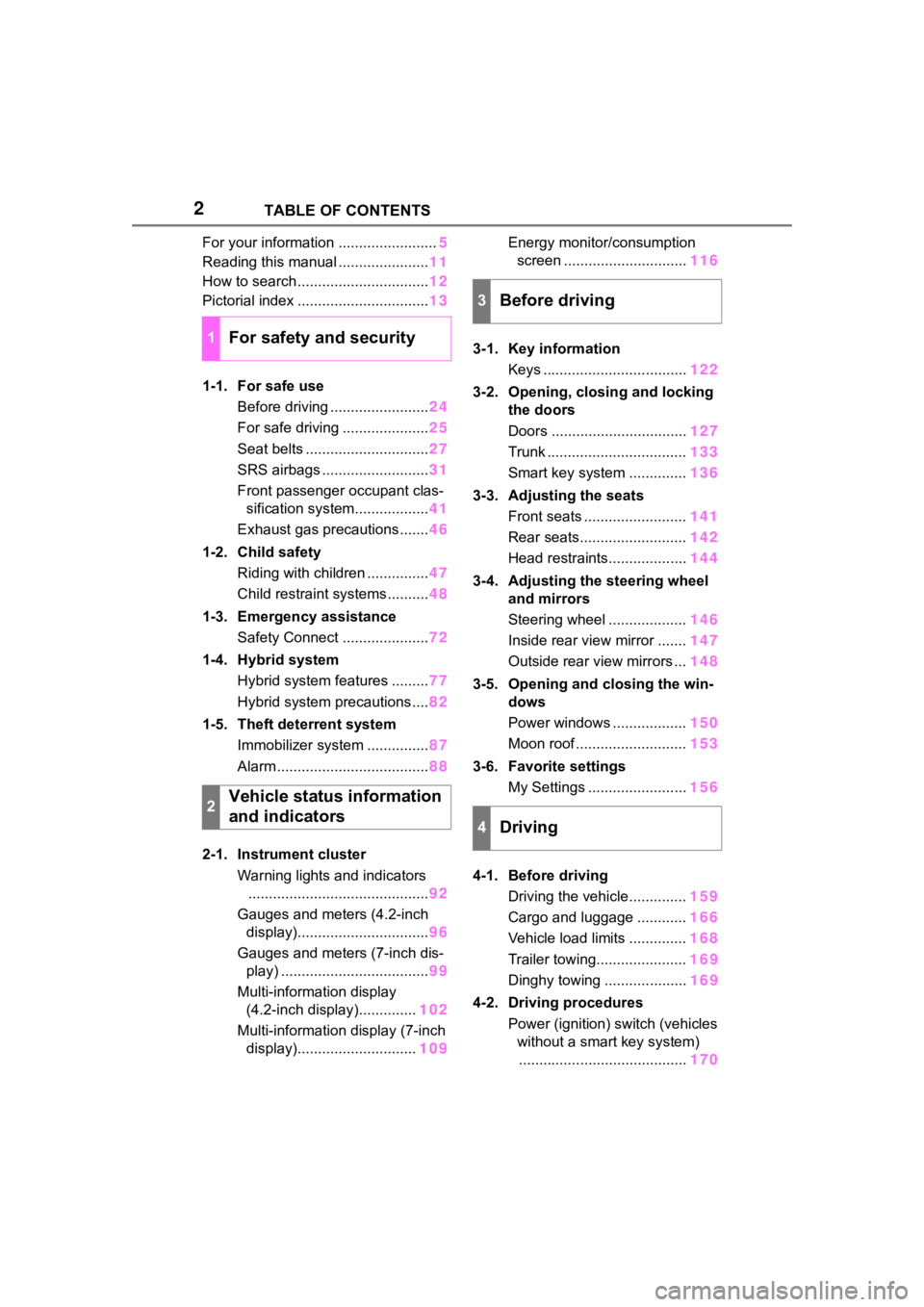
For your information ........................5
Reading this manual ...................... 11
How to search ................................ 12
Pictorial index ................................ 13
1-1. For safe use Before driving ........................ 24
For safe driving ..................... 25
Seat belts .............................. 27
SRS airbags .......................... 31
Front passenger occupant clas- sification system.................. 41
Exhaust gas precautions....... 46
1-2. Child safety Riding with children ............... 47
Child restraint systems .......... 48
1-3. Emergency assistance Safety Connect ..................... 72
1-4. Hybrid system Hybrid system features ......... 77
Hybrid system precautions .... 82
1-5. Theft deterrent system Immobilizer system ............... 87
Alarm ..................................... 88
2-1. Instrument cluster Warning lights and indicators............................................ 92
Gauges and meters (4.2-inch display)................................ 96
Gauges and meters (7-inch dis- play) .................................... 99
Multi-information display (4.2-inch display).............. 102
Multi-information display (7-inch display)............................. 109Energy monitor/consumption
screen .............................. 116
3-1. Key information Keys ................................... 122
3-2. Opening, closing and locking the doors
Doors ................................. 127
Trunk .................................. 133
Smart key system .............. 136
3-3. Adjusting the seats Front seats ......................... 141
Rear seats.......................... 142
Head restraints................... 144
3-4. Adjusting the steering wheel and mirrors
Steering wheel ................... 146
Inside rear view mirror ....... 147
Outside rear view mirrors ... 148
3-5. Opening and closing the win- dows
Power windows .................. 150
Moon roof ........................... 153
3-6. Favorite settings My Settings ........................ 156
4-1. Before driving Driving the vehicle.............. 159
Cargo and luggage ............ 166
Vehicle load limits .............. 168
Trailer towing...................... 16
9
Dinghy towing ....................16
9
4-2. Driving procedures Power (ignition) switch (vehicles without a smart key system)......................................... 170
1For safety and security
2Vehicle status information
and indicators
3Before driving
4Driving
Page 3 of 496

3TABLE OF CONTENTS
1
2
3
4
5
6
7
8
9
10
Power (ignition) switch (vehicles with a smart key system) . 172
EV drive mode ................... 178
Hybrid transmission............ 180
Turn signal lever................. 182
Parking brake ..................... 183
Brake Hold ......................... 187
4-3. Operating the lights and wip- ers
Headlight switch ................. 189
AHB (Automatic High Beam) ......................................... 191
Windshield wipers and washer ......................................... 194
4-4. Refueling Opening the fuel tank cap .. 196
4-5. Using the driving support sys- tems
Toyota Safety Sense 3.0 soft-ware update ..................... 199
Toyota Safety Sense 3.0 .... 201
PCS (Pre-Collision System) ......................................... 207
LTA (Lane Tracing Assist)... 218
LDA (Lane Departure Alert) ......................................... 223
PDA (Proactive driving assist) ......................................... 228
RSA (Road Sign Assist) ..... 234
Dynamic radar cruise control ......................................... 236
Cruise control ..................... 244
Emergency Driving Stop System ......................................... 247
BSM (Blind Spot Monitor)... 249
RCTA (Rear Cross Traffic Alert) function ............................ 254
Safe Exit Assist .................. 260
Driving mode select switch ......................................... 264
Driving assist systems........ 2664-6. Driving tips
Hybrid vehicle driving tips .. 271
Winter driving tips .............. 273
5-1. Using the air conditioning system and defogger
Automatic air conditioning sys-
tem ................................... 278
Heated steering wheel/seat heaters ............................. 284
5-2. Using the interior lights Interior lights list ................. 286
5-3. Using the storage features List of storage features ...... 288
5-4. Other interior features Other interior features ........ 291
6-1. Maintenance and care Cleaning and protecting the vehicle exterior................. 302
Cleaning and protecting the vehicle interior.................. 305
6-2. Maintenance Maintenance requirements......................................... 308
General maintenance......... 310
Emission inspection and mainte- nance (I/M) programs
......312
6-3. Do-it-yourself maintenance Do-it-yourself service precau-tions ................................. 314
Hood .................................. 316
Positioning a floor jack ....... 317
Engine compartment .......... 318
Tires ................................... 325
Tire inflation pressure......... 342
Wheels ............................... 344
5Interior features
6Maintenance and care
Page 17 of 496
17Pictorial index
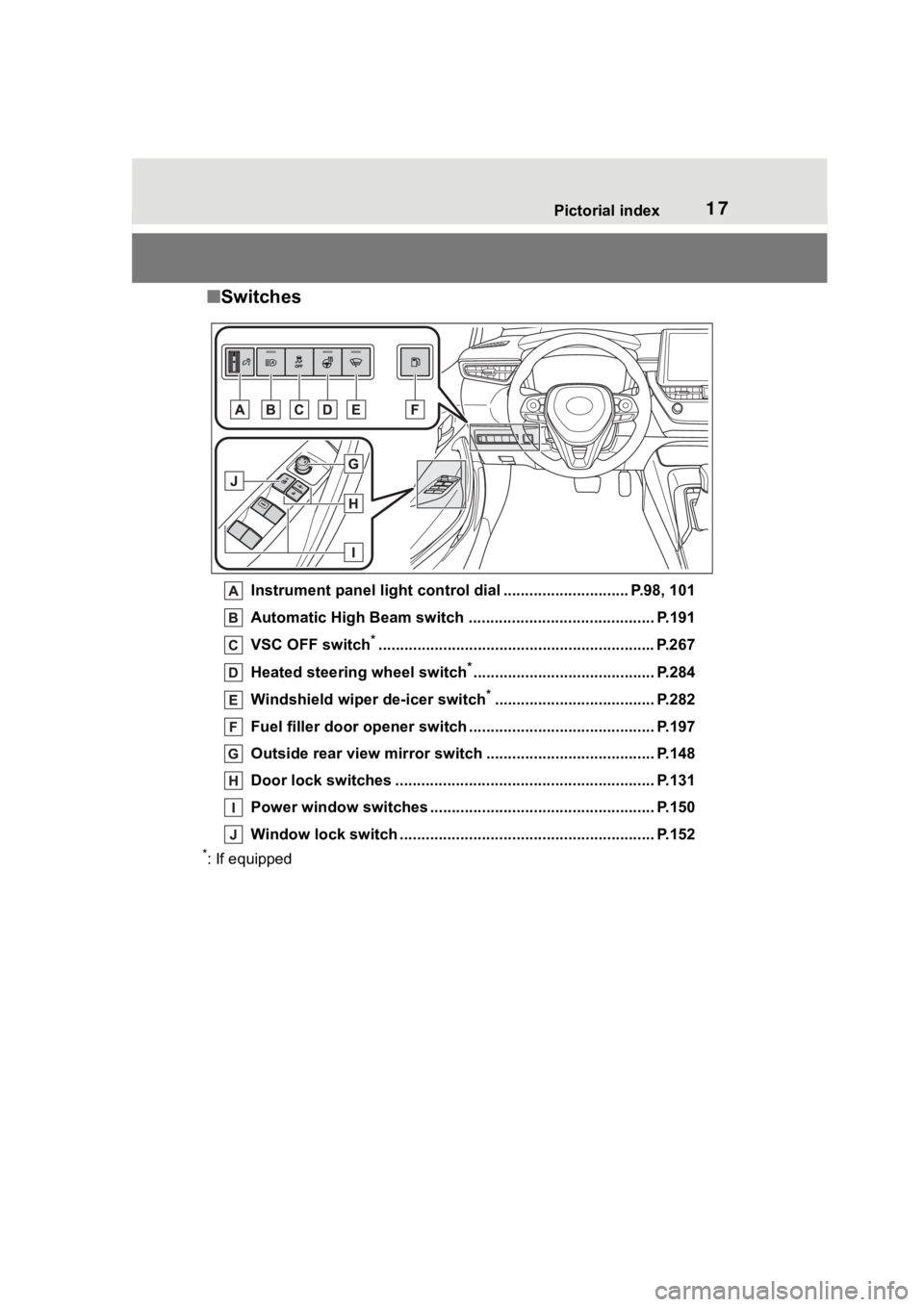
■Switches
Instrument panel light cont rol dial ............................. P.98, 101
Automatic High Beam switch ..................................... ...... P.191
VSC OFF switch
*............................................................... .P.267
Heated steering wheel switch
*.......................................... P.284
Windshield wiper de-icer switch
*..................................... P.282
Fuel filler door opener swi tch ........................................... P.197
Outside rear view mirror s witch ....................................... P.148
Door lock switches ............................................................ P.131
Power window switches ....... ............................................. P.150
Window lock switch ............................................. .............. P.152
*: If equipped
Page 93 of 496
932-1. Instrument cluster
2
Vehicle status information and indicators
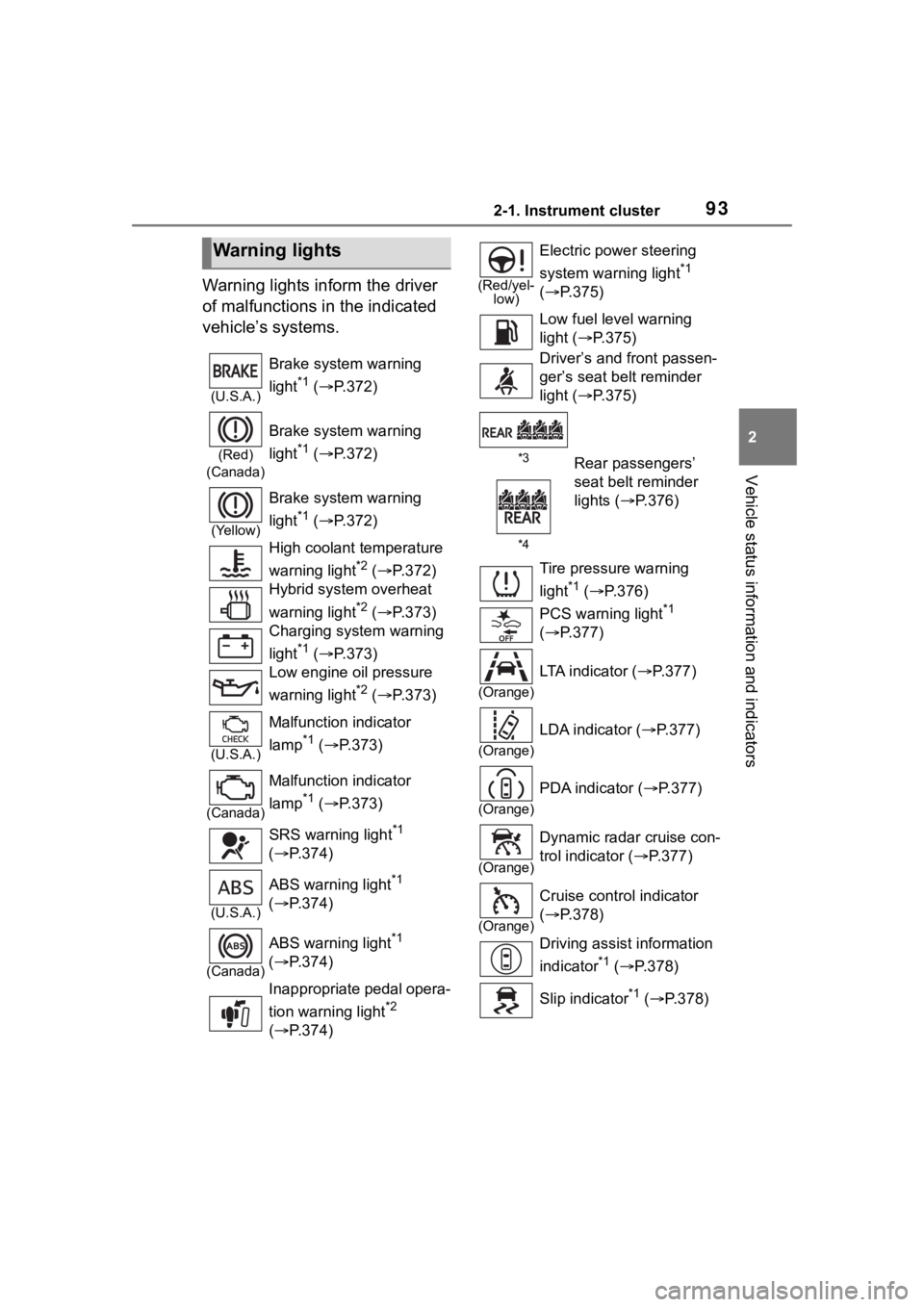
Warning lights inform the driver
of malfunctions in the indicated
vehicle’s systems.
Warning lights
(U.S.A.)
Brake system warning
light
*1 ( P.372)
(Red)
(Canada)
Brake system warning
light
*1 ( P.372)
(Yellow)
Brake system warning
light
*1 ( P.372)
High coolant temperature
warning light
*2 ( P.372)
Hybrid system overheat
warning light
*2 ( P.373)
Charging system warning
light
*1 ( P.373)
Low engine oil pressure
warning light
*2 ( P.373)
(U.S.A.)
Malfunction indicator
lamp
*1 ( P.373)
(Canada)
Malfunction indicator
lamp
*1 ( P.373)
SRS warning light
*1
( P.374)
(U.S.A.)
ABS warning light*1
( P.374)
(Canada)
ABS warning light*1
( P.374)
Inappropriate pedal opera-
tion warning light
*2
( P.374)
(Red/yel-
low)
Electric power steering
system warning light
*1
( P.375)
Low fuel leve l warning
light ( P.375)
Driver’s and front passen-
ger’s seat belt reminder
light ( P.375)
*3Rear passengers’
seat belt reminder
lights ( P.376)
*4
Tire pressure warning
light
*1 ( P.376)
PCS warning light
*1
( P.377)
(Orange)
LTA indicator ( P.377)
(Orange)
LDA indicator ( P.377)
(Orange)
PDA indicator ( P.377)
(Orange)
Dynamic radar cruise con-
trol indicator ( P.377)
(Orange)
Cruise control indicator
( P.378)
Driving assist information
indicator
*1 ( P.378)
Slip indicator
*1 ( P.378)
Page 121 of 496
121
3
3
Before driving
Before driving
.3-1. Key informationKeys ............................ 122
3-2. Opening, closing and locking the doors
Doors .......................... 127
Trunk ........................... 133
Smart key system ....... 136
3-3. Adjusting the seats Front seats .................. 141
Rear seats................... 142
Head restraints............ 144
3-4. Adjusting the steering wheel and mirrors
Steering wheel ............ 146
Inside rear view mirror .................................. 147
Outside rear view mirrors .................................. 148
3-5. Opening and closing the windows
Power windows ........... 150
Moon roof .................... 153
3-6. Favorite settings My Settings ................. 156
Page 148 of 496
1483-4. Adjusting the steering wheel and mirrors
■When using the outside rear
view mirrors in a cold weather
When it is cold and the outside rear
view mirrors are frozen, it may not
be possible to fold /extend them or
adjust the mirror surface. Remove
the ice, snow, etc. covering the out-
side rear view mirrors.
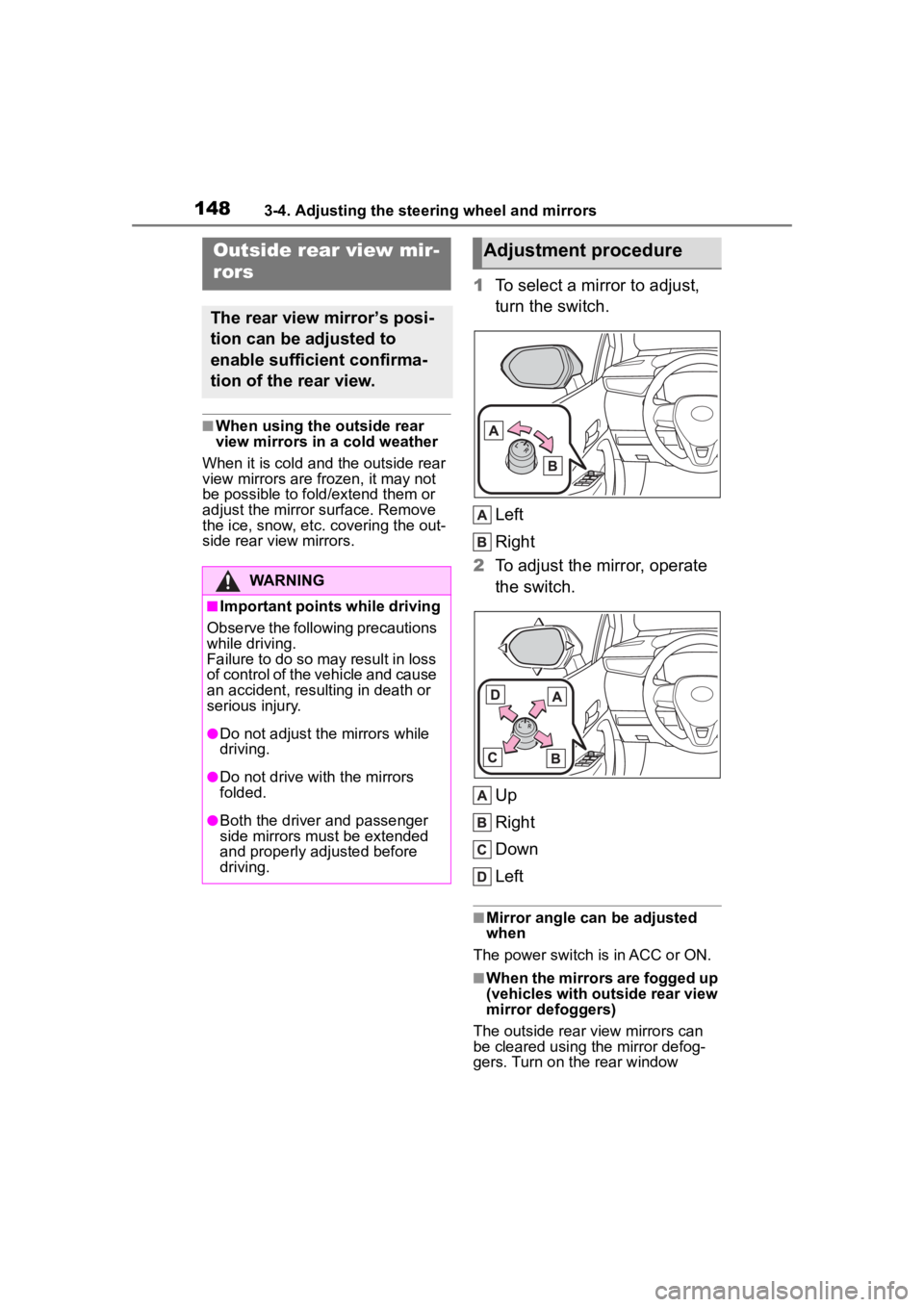
1 To select a mirror to adjust,
turn the switch.
Left
Right
2 To adjust the mirror, operate
the switch.
Up
Right
Down
Left
■Mirror angle can be adjusted
when
The power switch is in ACC or ON.
■When the mirrors are fogged up
(vehicles with outside rear view
mirror defoggers)
The outside rear view mirrors can
be cleared using the mirror defog-
gers. Turn on the rear window
Outside rear view mir-
rors
The rear view mirror’s posi-
tion can be adjusted to
enable sufficient confirma-
tion of the rear view.
WARNING
■Important points while driving
Observe the following precautions
while driving.
Failure to do so may result in loss
of control of the vehicle and cause
an accident, resul ting in death or
serious injury.
●Do not adjust the mirrors while
driving.
●Do not drive with the mirrors
folded.
●Both the driver and passenger
side mirrors must be extended
and properly adjusted before
driving.
Adjustment procedure
Page 164 of 496
1644-1. Before driving
WARNING
●If the electronically controlled
brake system does not operate,
do not follow other vehicles
closely and avoid hills or sharp
turns that require braking.
In this case, braking is still pos-
sible, but the brake pedal
should be depressed more
firmly than usual. Also, the brak-
ing distance will increase. Have
your brakes fixed immediately.
●The brake system consists of 2
or more individual hydraulic sys-
tems; if one of the systems fails,
the other(s) will still operate. In
this case, the brake pedal
should be depressed more
firmly than usua l and the brak-
ing distance will increase. Have
your brakes fixed immediately.
■If the vehicle becomes stuck
Do not spin the wheels exces-
sively when a driven wheel is up
in the air, or the vehicle is stuck in
sand, mud, etc. This may damage
the driveline components or pro-
pel the vehicle forward or back-
ward, causing an accident.
NOTICE
■When driving the vehicle
●Do not depress t he accelerator
and brake pedals at the same
time during drivin g, as this may
restrain the hybrid system out-
put.
●Do not use the accelerator
pedal or depress the accelera-
tor and brake pedals at the
same time to hold the vehicle on
a hill.
■When parking the vehicle
Always set the parking brake and
shift the shift lever to P. Failure to
do so may cause the vehicle to
move or the vehicle may acceler-
ate suddenly if t he accelerator
pedal is accidentally depressed.
■Avoiding damage to vehicle
parts
●Do not turn the steering wheel
fully in either direction and hold
it there for an extended period
of time.
Doing so may damage the
power steering.
●When driving over bumps in the
road, drive as slowly as possible
to avoid damaging the wheels,
underside of the vehicle, etc.
■If you get a flat tire while driv-
ing
A flat or damaged tire may cause
the following situations. Hold the
steering wheel firmly and gradu-
ally depress the brake pedal to
slow down the vehicle.
●It may be difficult to control your
vehicle.
●The vehicle will make abnormal
sounds or vibrations.
●The vehicle will lean abnor-
mally.
Information on what to do in case
of a flat tire (
P.398)
■When encountering flooded
roads
Do not drive on a road that has
flooded after h eavy rain etc.
Doing so may cause the following
serious damage to the vehicle:
●Engine stalling
●Short in electrical components
Page 170 of 496
1704-2. Driving procedures
4-2.Driving procedures
1Check that the parking brake
is set. ( 183)
2 Check that the shift lever is in
P.
3 Firmly depress the brake
pedal.
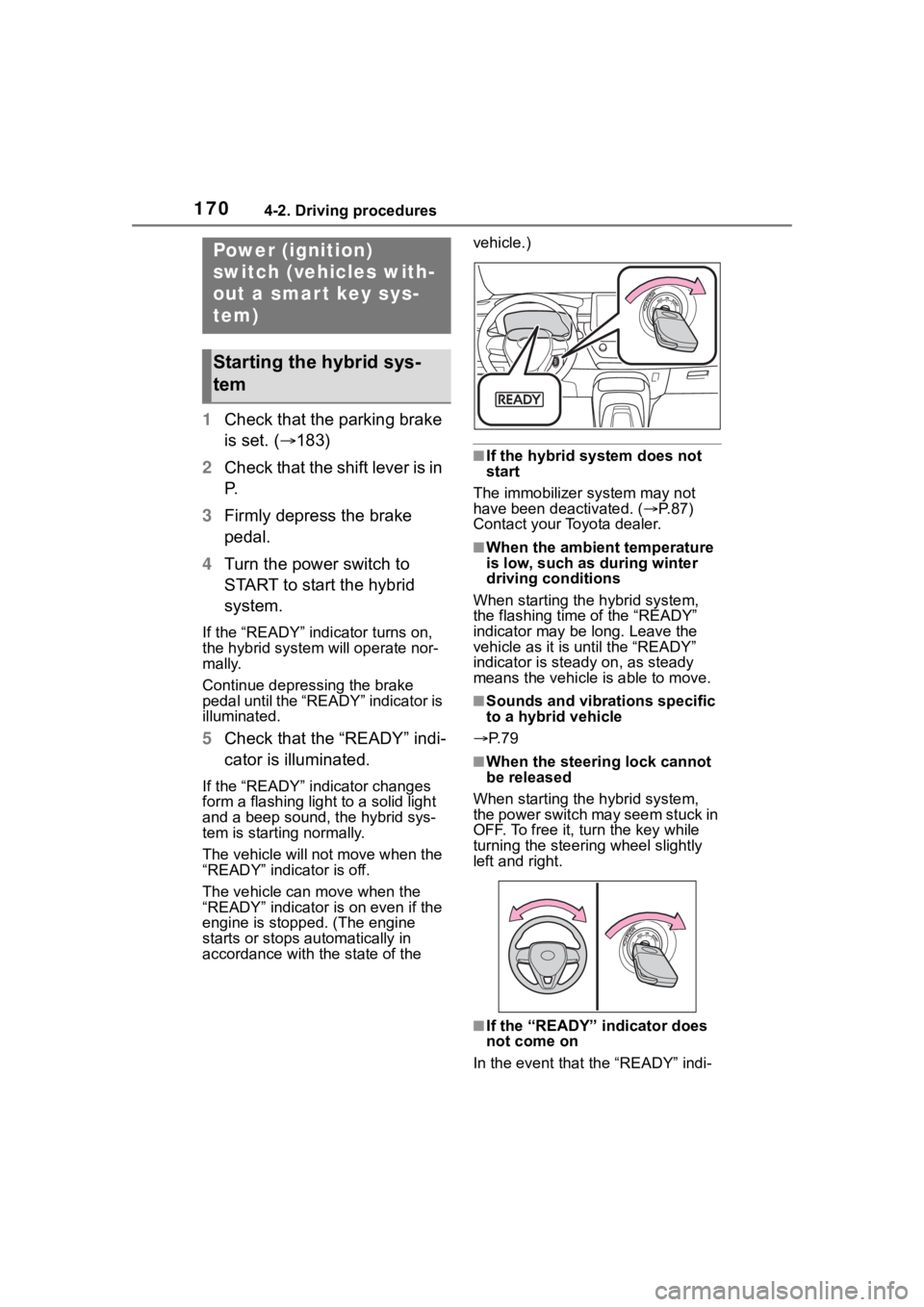
4 Turn the power switch to
START to start the hybrid
system.
If the “READY” indicator turns on,
the hybrid system will operate nor-
mally.
Continue depressing the brake
pedal until the “READY” indicator is
illuminated.
5Check that the “READY” indi-
cator is illuminated.
If the “READY” indicator changes
form a flashing light to a solid light
and a beep sound, the hybrid sys-
tem is starting normally.
The vehicle will not move when the
“READY” indicator is off.
The vehicle can move when the
“READY” indicator i s on even if the
engine is stopped. (The engine
starts or stops automatically in
accordance with the state of the vehicle.)
■If the hybrid system does not
start
The immobilizer system may not
have been deactivated. ( P. 8 7 )
Contact your Toyota dealer.
■When the ambient temperature
is low, such as during winter
driving conditions
When starting the hybrid system,
the flashing time of the “READY”
indicator may be long. Leave the
vehicle as it is until the “READY”
indicator is steady on, as steady
means the vehicle is able to move.
■Sounds and vibrations specific
to a hybrid vehicle
P. 7 9
■When the steering lock cannot
be released
When starting the hybrid system,
the power switch may seem stuck in
OFF. To free it, turn the key while
turning the steering wheel slightly
left and right.
■If the “READY” indicator does
not come on
In the event that the “READY” indi-
Power (ignition)
switch (vehicles with-
out a smart key sys-
tem)
Starting the hybrid sys-
tem