2023 TOYOTA COROLLA CROSS Multi function
[x] Cancel search: Multi functionPage 393 of 500
3937-2. Steps to take in an emergency
7
When trouble arises
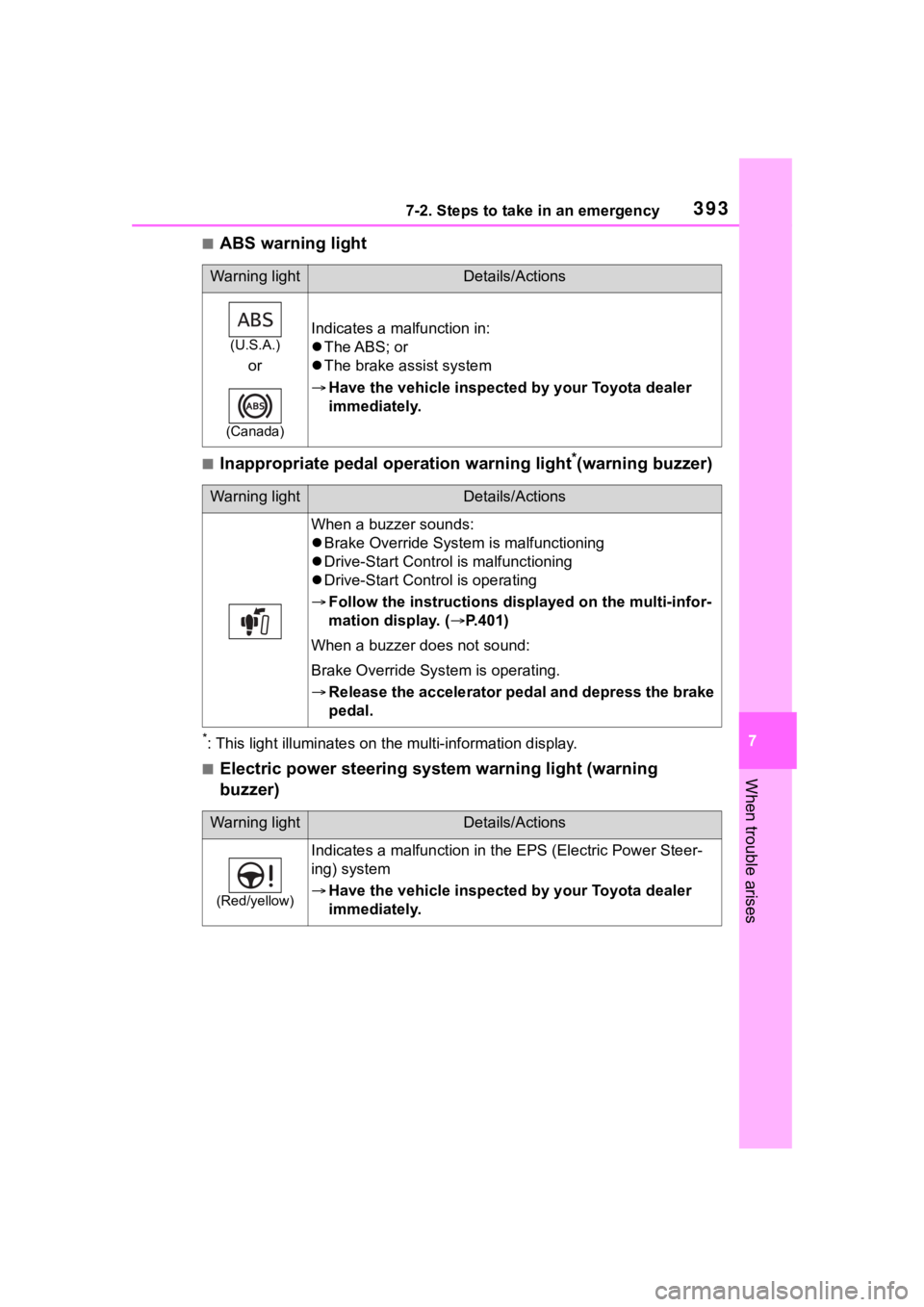
■ABS warning light
■Inappropriate pedal operation warning light*(warning buzzer)
*: This light illuminat es on the multi-information display.
■Electric power steering system warning light (warning
buzzer)
Warning lightDetails/Actions
(U.S.A.)
or
(Canada)
Indicates a malfunction in:
The ABS; or
The brake assist system
Have the vehicle inspected by your Toyota dealer
immediately.
Warning lightDetails/Actions
When a buzzer sounds:
Brake Override System is malfunctioning
Drive-Start Control is malfunctioning
Drive-Start Cont rol is operating
Follow the instructions di splayed on the multi-infor-
mation display. ( P.401)
When a buzzer does not sound:
Brake Override System is operating.
Release the accelerator pedal and depress the brake
pedal.
Warning lightDetails/Actions
(Red/yellow)
Indicates a malfunction in th e EPS (Electric Power Steer-
ing) system
Have the vehicle inspected by your Toyota dealer
immediately.
Page 395 of 500
3957-2. Steps to take in an emergency
7
When trouble arises
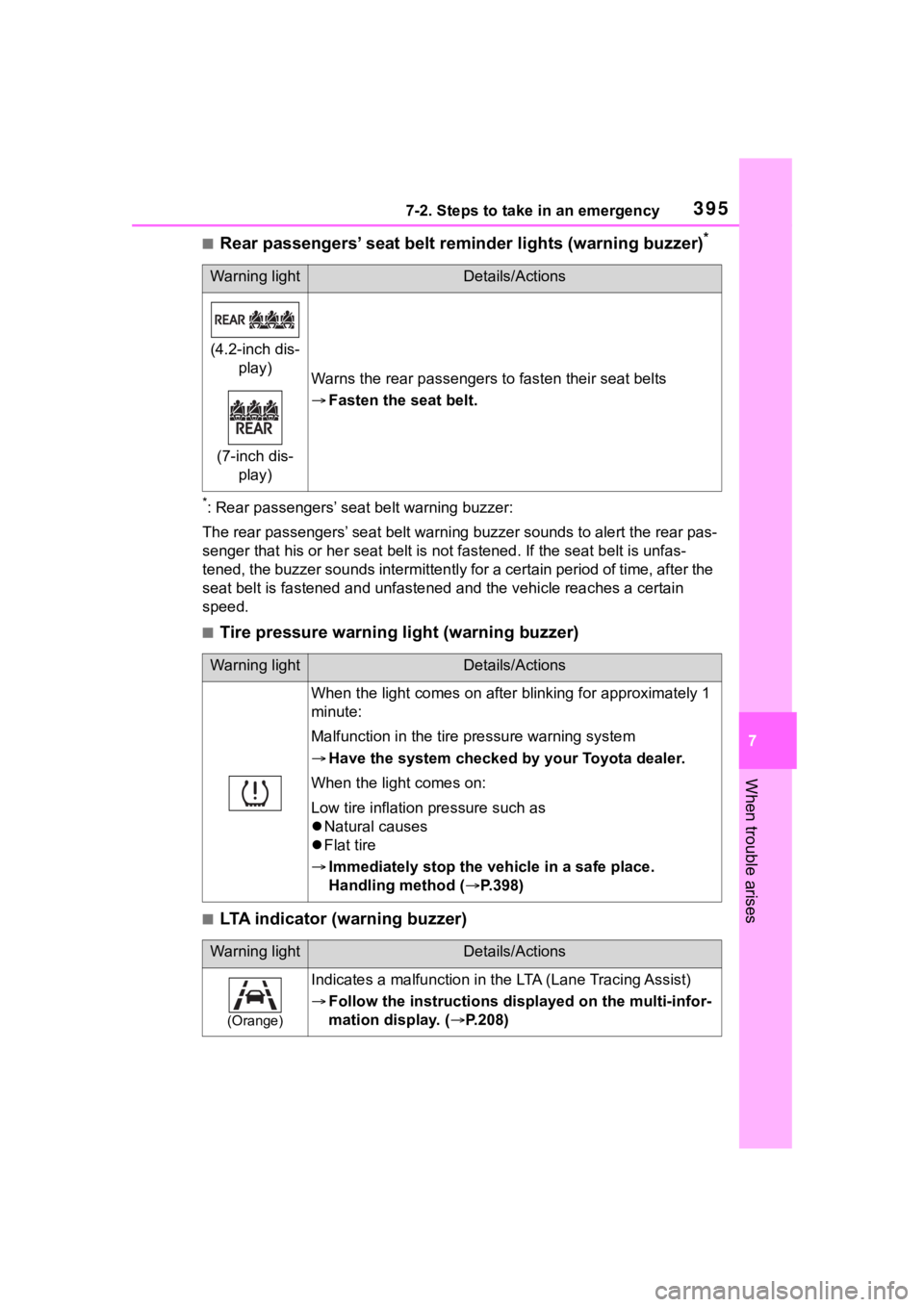
■Rear passengers’ seat belt reminder lights (warning buzzer)*
*: Rear passengers’ seat belt warning buzzer:
The rear passengers’ seat belt warning buzzer sounds to alert t he rear pas-
senger that his or he r seat belt is not fastened. If the seat b elt is unfas-
tened, the buzzer sounds intermittently for a certain period of time, after the
seat belt is fastened and unfast ened and the vehicle reaches a certain
speed.
■Tire pressure warning light (warning buzzer)
■LTA indicator (warning buzzer)
Warning lightDetails/Actions
(4.2-inch dis- play)
(7-inch dis- play)
Warns the rear passengers to fasten their seat belts
Fasten the seat belt.
Warning lightDetails/Actions
When the light comes on after blinking for approximately 1
minute:
Malfunction in the tire pressure warning system
Have the system checked by your Toyota dealer.
When the light comes on:
Low tire inflation pressure such as
Natural causes
Flat tire
Immediately stop the vehicle in a safe place.
Handling method ( P.398)
Warning lightDetails/Actions
(Orange)
Indicates a malfunction in the LTA (Lane Tracing Assist)
Follow the instructions di splayed on the multi-infor-
mation display. ( P.208)
Page 396 of 500

3967-2. Steps to take in an emergency
■LDA indicator (warning buzzer)
■Stop & Start cancel indicator (warning buzzer)
■Intuitive parking assist OFF indicator (warning buzzer)
■PCS warning light (warning buzzer)
■Dynamic radar cruise control indicator (warning buzzer)
Warning lightDetails/Actions
(Orange)
Indicates a malfunction in the LDA (Lane Departure Alert).
Follow the instructions di splayed on the multi-infor-
mation display. ( P.401)
Warning lightDetails/Actions
(Flashes)
Indicates a malfunction in the Stop & Start system
Have the vehicle inspected by your Toyota dealer
immediately.
Warning lightDetails/Actions
(if equipped)
Indicates a malfunction in the intuitive parking assist func-
tion
Have the vehicle inspected by your Toyota dealer
immediately.
Indicates that the system is te mporarily unavailable, possi-
bly due to a sensor being dirty or covered with ice, etc.
Follow the instructions di splayed on the multi-infor-
mation display. ( P.259)
Warning lightDetails/Actions
(Orange)
Indicates a malfuncti on in the PCS (Pre-Collision System).
Follow the instructions display ed on the multi-information
display.
If the PCS (Pre-Collision Syst em) or VSC (Vehicle Stability
Control) system is disabled, the PCS warning light will illu-
minate.
Warning lightDetails/Actions
(Orange)
Indicates a malfunction in the dynamic radar cruise control.
Follow the instructions di splayed on the multi-infor-
mation display. ( P.220)
Page 397 of 500
3977-2. Steps to take in an emergency
7
When trouble arises
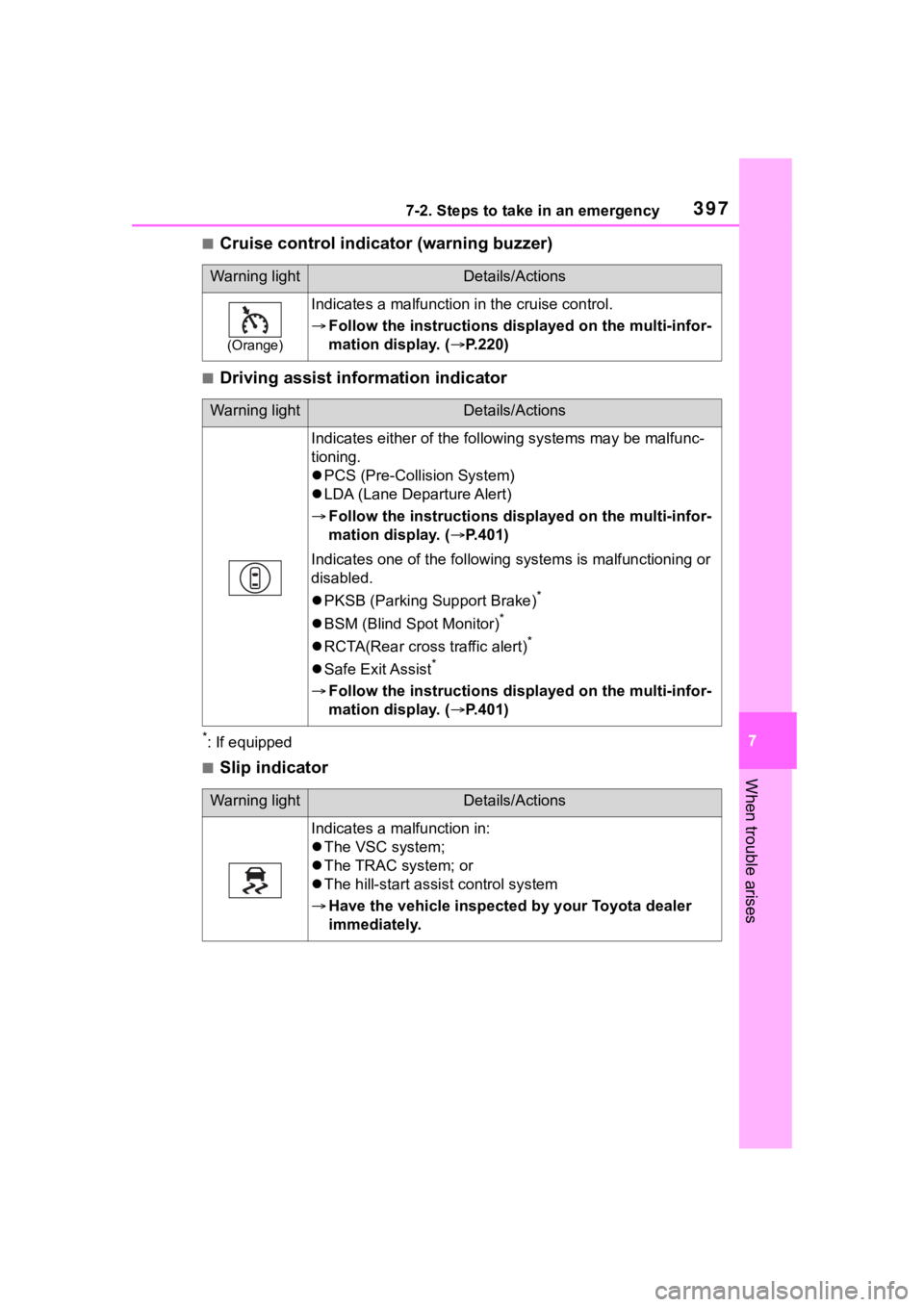
■Cruise control indicator (warning buzzer)
■Driving assist information indicator
*: If equipped
■Slip indicator
Warning lightDetails/Actions
(Orange)
Indicates a malfunction in the cruise control.
Follow the instructions di splayed on the multi-infor-
mation display. ( P.220)
Warning lightDetails/Actions
Indicates either of the follo wing systems may be malfunc-
tioning.
PCS (Pre-Collision System)
LDA (Lane Departure Alert)
Follow the instructions di splayed on the multi-infor-
mation display. ( P.401)
Indicates one of the following systems is malfunctioning or
disabled.
PKSB (Parking Support Brake)
*
BSM (Blind Spot Monitor)*
RCTA(Rear cross traffic alert)*
Safe Exit Assist*
Follow the instructions di splayed on the multi-infor-
mation display. ( P.401)
Warning lightDetails/Actions
Indicates a malfunction in:
The VSC system;
The TRAC system; or
The hill-start assist control system
Have the vehicle inspected by your Toyota dealer
immediately.
Page 401 of 500

4017-2. Steps to take in an emergency
7
When trouble arises
■Warning messages
The warning messages explained
below may differ from the actual
messages according to operation
conditions and vehicle specifica-
tions.
■Warning buzzer
A buzzer may sound when a mes-
sage is displayed.
The buzzer may not be audible if the
vehicle is in a noisy location or if the
audio system volume is high.
■If “Engine Oil Level Low Add or
Replace” is displayed
The engine oil level is low. Check
NOTICE
■To ensure the tire pressure
warning system operates
properly
Do not install tires with different
specifications or makers, as the
tire pressure warning system may
not operate properly.
If a war ning message
is displayed
The multi-information dis-
play shows warnings for
system malfunctions and
incorrectly performed oper-
ations, and messages that
indicate a need for mainte-
nance. When a message is
displayed, perform the
appropriate corrective
action for the message.
If a warning message is dis-
played again after the
appropriate actions have
been performed, contact
your Toyota dealer.
Additionally, if a warning
light comes on or flashes at
the same time that a warn-
ing message is displayed,
take the appropriate correc-
tive action for the warning
light. ( P.391)
Page 402 of 500

4027-2. Steps to take in an emergency
the level of the engine oil, and add if
necessary.
This message may appear if the
vehicle is stopped on a slope. Move
the vehicle to a level surface and
check to see if the message disap-
pears.
■If “Engine Stopped Steering
Power Low” is displayed
This message is displayed if the
engine is stopped while driving.
When steering wheel operations are
heavier than usual, grip the steering
wheel firmly and operate it using
more force th an usual.
■If “Auto power off to conserve
battery” is displayed
Power was cut off due to the auto-
matic power off function. Next time
when starting the engine, increase
the engine speed slightly and main-
tain that level for approximately 5
minutes to recha rge the battery.
■If “Headlight System Malfunc-
tion Visit Your Dealer” is dis-
played
The following systems may be mal-
functioning. Have the vehicle
inspected by your Toyota dealer
immediately.
●The LED headlight system
●AFS (Adaptive Fr ont-lighting Sys-
tem) (if equipped)
●The automatic headlight leveling
system (if equipped)
●Automatic High Beam
■If “AWD System Malfunction
2WD Mode Engaged Visit Your
Dealer” or “AWD System Over-
heated Switching to 2WD
Mode” is displayed
This message may be displayed
when driving under extremely high
load conditions.
Drive the vehicle at low speeds and
stop the vehicle in a safe place with
the engine operating until the mes-
sage is cleared. If the message is not cleared, have
the vehicle inspected by your Toyota
dealer.
■If “System Malfunction Visit
Your Dealer” is displayed
Indicates one of the following sys-
tems is disabled.
●PCS (Pre-Collision System)
●LTA (Lane Tracing Assist)
●LDA (Lane Departure Alert)
●AHB (Automatic High Beam)
●Dynamic radar cruise control
● RSA (Road Sign Assist) (if
equipped)
● BSM (Blind Spot Monitor) (if
equipped)
● RCTA (Rear Cross Traffic
Alert) (if equipped)
● Safe Exit Assist (if equipped)
●Intuitive parking assist (if
equipped)
●PKSB (Parking Support Brake)
(if equipped)
Have the vehicle inspected by your
Toyota dealer immediately.
■If a message that indicates the
need for visiting your Toyota
dealer is displayed
The system or part shown on the
multi-information di splay is malfunc-
tioning. Have the vehicle inspected
by your Toyota dealer immediately.
■If “System Stopped See
Owner's Manual” is displayed
Indicates one of the following sys-
tems is disabled.
●PCS (Pre-Collision System)
●LDA (Lane Departure Alert)
●LTA (Lane Tracing Assist)
●AHB (Automatic High Beam)
●Dynamic radar cruise control
Page 405 of 500
4057-2. Steps to take in an emergency
7
When trouble arises
necessary maintenance. Please
reset the message after the mainte-
nance is performed. ( P.428)
*: Refer to the separate “Scheduled
Maintenance” or “Owner’s Man-
ual Supplement” for the mainte-
nance interval applicable to your
vehicle.
■If a message that indicates the
need for referring to Owner’s
Manual is displayed
●If “Engine Coolant Temp High” is
displayed, follow the instructions
accordingly. ( P.423)
●If the following m essage is dis-
played on the multi-information
display, it may indicate a malfunc-
tion. Have the vehicle inspected
by your Toyota dealer immedi-
ately.
• “Smart Key System malfunction”
●If any of the following messages
are displayed on the multi-infor-
mation display, it may indicate a
malfunction. Immediately stop the
vehicle and contact your Toyota
dealer.
• “Braking Power Low”
• “Oil Pressure Low”
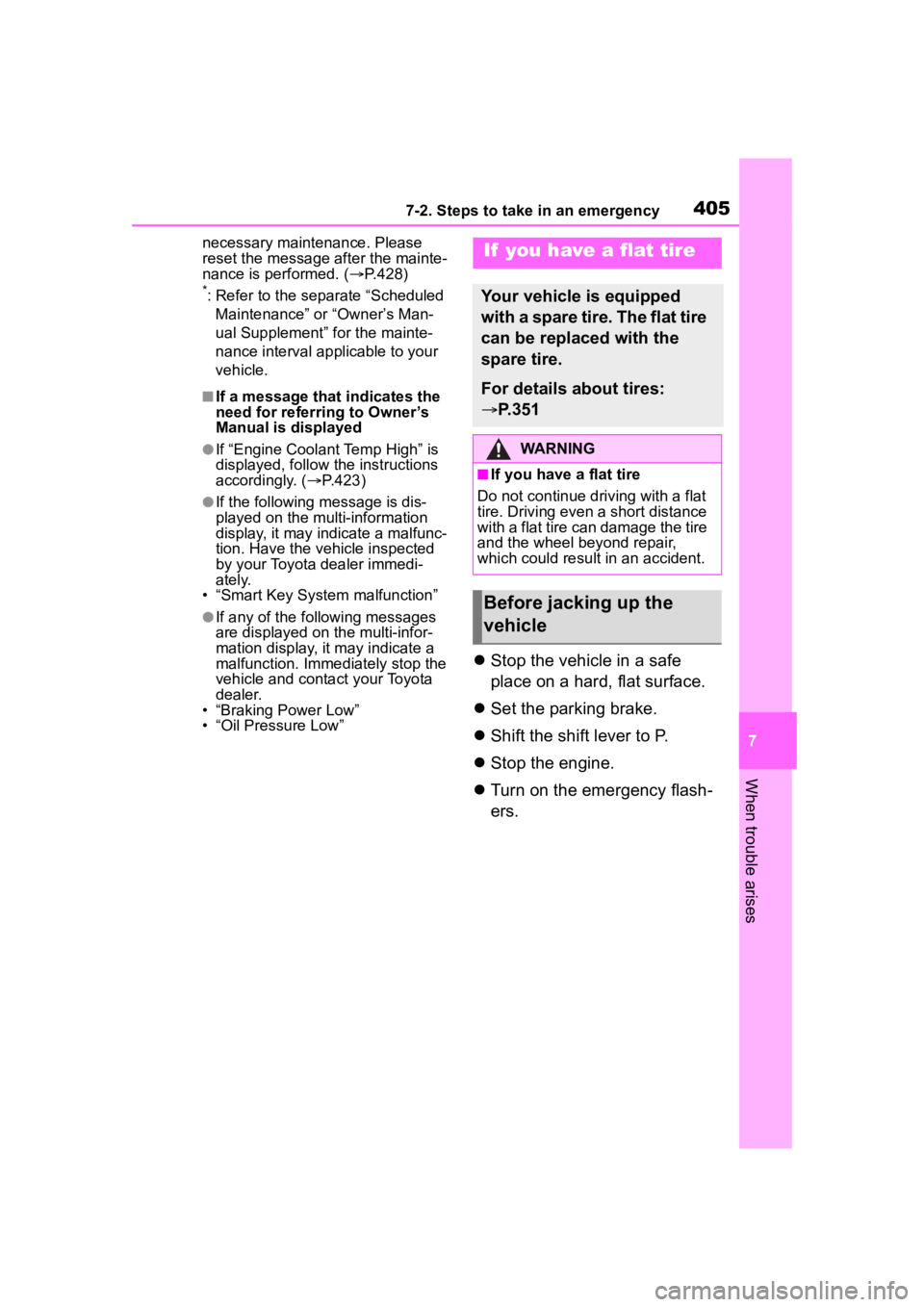
Stop the vehicle in a safe
place on a hard, flat surface.
Set the parking brake.
Shift the shift lever to P.
Stop the engine.
Turn on the emergency flash-
ers.
If you have a flat tire
Your vehicle is equipped
with a spare tire. The flat tire
can be replaced with the
spare tire.
For details about tires:
P.351
WARNING
■If you have a flat tire
Do not continue driving with a flat
tire. Driving even a short distance
with a flat tire can damage the tire
and the wheel beyond repair,
which could resul t in an accident.
Before jacking up the
vehicle
Page 418 of 500
4187-2. Steps to take in an emergency
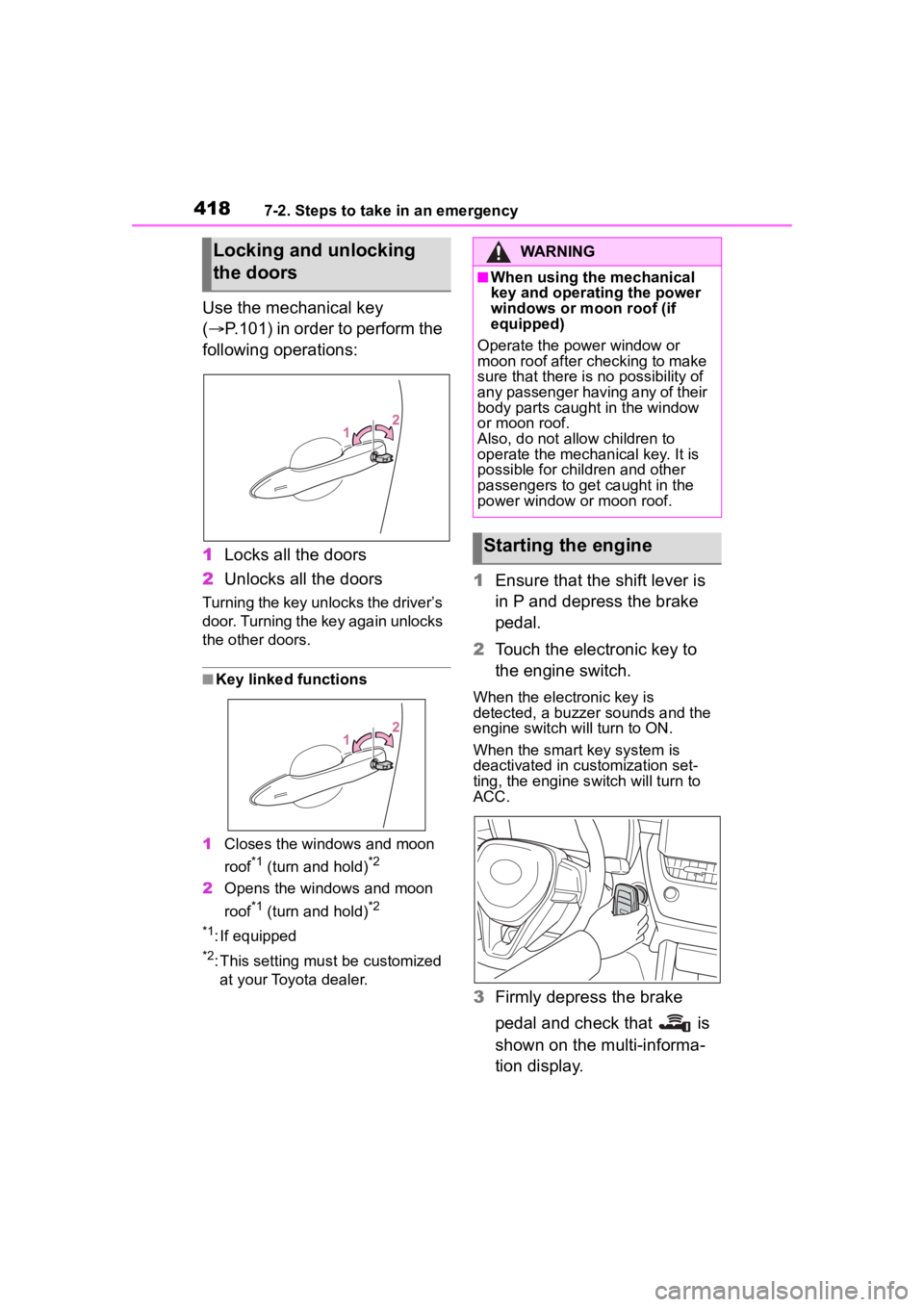
Use the mechanical key
(P.101) in order to perform the
following operations:
1 Locks all the doors
2 Unlocks all the doors
Turning the key unlocks the driver’s
door. Turning the key again unlocks
the other doors.
■Key linked functions
1 Closes the windows and moon
roof
*1 (turn and hold)*2
2Opens the windows and moon
roof
*1 (turn and hold)*2
*1
: If equipped
*2: This setting mu st be customized
at your Toyota dealer.
1 Ensure that the shift lever is
in P and depress the brake
pedal.
2 Touch the electronic key to
the engine switch.
When the electronic key is
detected, a buzzer sounds and the
engine switch will turn to ON.
When the smart key system is
deactivated in customization set-
ting, the engine switch will turn to
ACC.
3Firmly depress the brake
pedal and check that is
shown on the multi-informa-
tion display.
Locking and unlocking
the doorsWARNING
■When using the mechanical
key and operating the power
windows or moon roof (if
equipped)
Operate the power window or
moon roof after checking to make
sure that there is no possibility of
any passenger having any of their
body parts caught in the window
or moon roof.
Also, do not allo w children to
operate the mechanical key. It is
possible for children and other
passengers to get caught in the
power window or moon roof.
Starting the engine