2023 TOYOTA 4RUNNER tow
[x] Cancel search: towPage 3 of 608
3
1
8 7
6
5
4
3
2
9
4RUNNER (U)4-1. Before driving
Driving the vehicle ............. 166
Cargo and luggage............ 176
Vehicle load limits ............. 181
Trailer towing..................... 182
Dinghy towing.................... 198
4-2. Driving procedures Engine (ignition) switch ..... 199
Automatic transmission ..... 205
Turn signal lever................ 210
Parking brake .................... 211
4-3. Operating the lights and wipers
Headlight switch ................ 212
AHB (Automatic High Beam) ............................. 217
Fog light switch ................. 221
Windshield wipers and washer ............................ 223
Rear window wiper and washer ............................ 226
4-4. Refueling Opening the fuel tank cap .................................. 229 4-5. Using the driving
support systems
Toyota Safety Sense P ...... 232
PCS (Pre-Collision System) ........................... 239
LDA (Lane Departure Alert) ................................ 249
Dynamic radar cruise control.............................. 257
BSM (Blind Spot Monitor) ........................... 270
Intuitive parking assist ....... 277
RCTA (Rear Cross Traffic Alert) ..................... 286
Four-wheel drive system (part-time
4WD models)................... 294
Four-wheel drive system (full-time
4WD models)................... 298
Active traction control system ............................. 302
AUTO LSD system (2WD models) ................. 304
Rear differential lock system ............................. 306
Downhill assist control system ............................. 309
Crawl Control ..................... 312
Multi-terrain Select............. 315
Driving assist systems ....... 322
4-6. Driving tips Winter driving tips .............. 331
Off-road precautions .......... 335
4Driving
Page 5 of 608

5
1
8 7
6
5
4
3
2
9
4RUNNER (U)6-1. Maintenance and care
Cleaning and protecting the vehicle exterior .......... 396
Cleaning and protecting the vehicle interior ........... 400
6-2. Maintenance Maintenance requirements ................... 403
General maintenance ........ 405
Emission inspection and maintenance (I/M)
programs ......................... 408
6-3. Do-it-yourself maintenance
Do-it-yourself service precautions ..................... 409
Hood.................................. 412
Engine compartment ......... 413
Tires .................................. 427
Tire inflation pressure........ 440
Wheels .............................. 443
Air conditioning filter .......... 445
Electronic key battery ........ 447
Checking and replacing fuses ............................... 450
Light bulbs ......................... 453 7-1. Essential information
Emergency flashers ........... 466
If your vehicle has to be stopped in
an emergency.................. 467
If the vehicle is submerged or water
on the road is rising ......... 468
7-2. Steps to take in an emergency
If your vehicle needs to be towed ...................... 469
If you think something is wrong ........................... 475
Fuel pump shut off system ............................. 476
If a warning light turns on or a warning
buzzer sounds ................. 477
If a warning message is displayed...................... 488
If you have a flat tire .......... 493
If the engine will not start ................................. 509
If you cannot operate back door opener ............ 511
If the electronic key does not operate
properly ........................... 512
If the vehicle battery is discharged ................... 515
If your vehicle overheats......................... 519
If the vehicle becomes stuck ................................ 522
6Maintenance and care7When trouble arises
Page 18 of 608
18Pictorial index
4RUNNER (U)
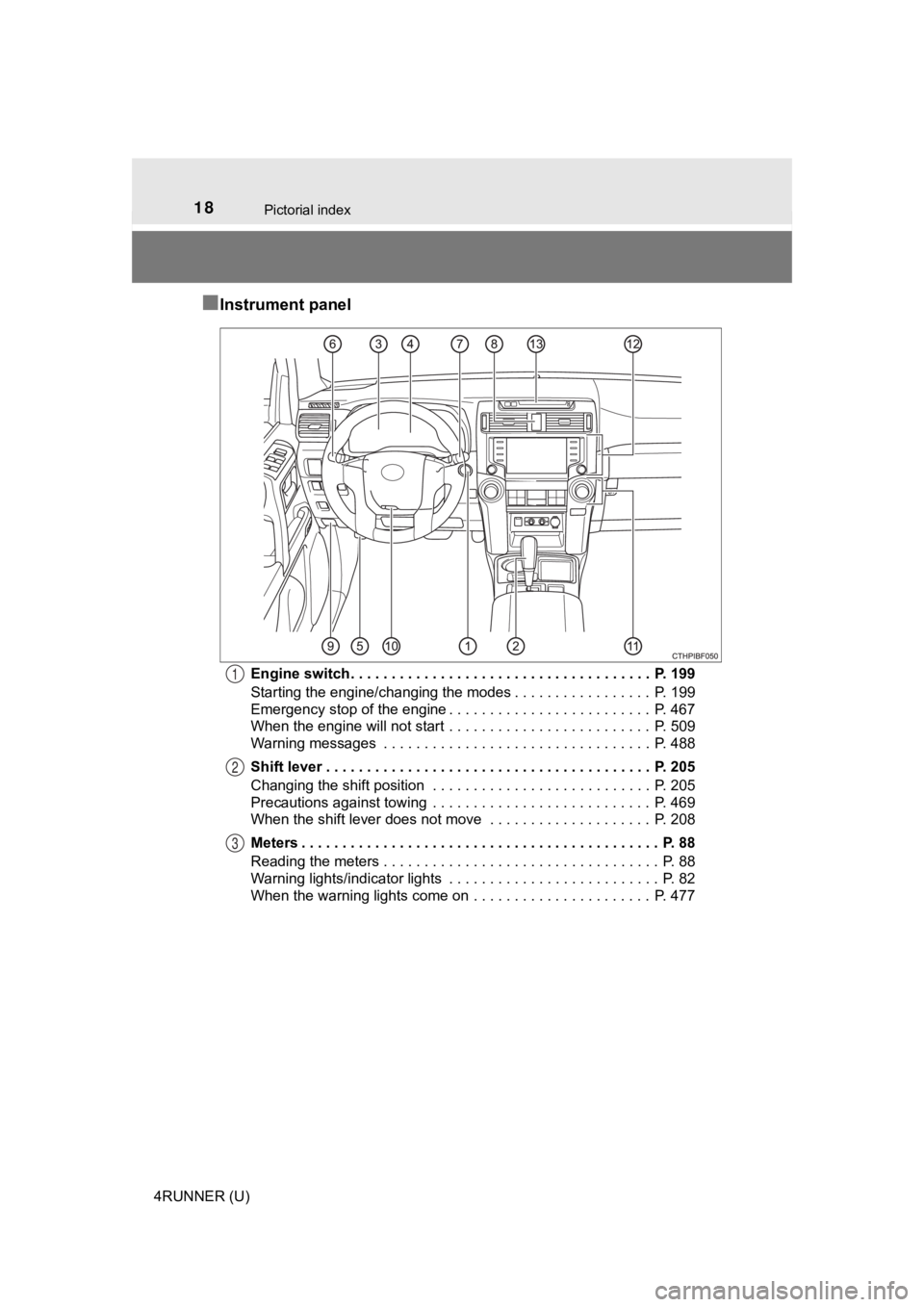
■Instrument panel
Engine switch . . . . . . . . . . . . . . . . . . . . . . . . . . . . . . . . . . . . . P. 199
Starting the engine/changing the modes . . . . . . . . . . . . . . . . . P. 199
Emergency stop of the engine . . . . . . . . . . . . . . . . . . . . . . . . . P. 467
When the engine will not start . . . . . . . . . . . . . . . . . . . . . . . . . P. 509
Warning messages . . . . . . . . . . . . . . . . . . . . . . . . . . . . . . . . . P. 488
Shift lever . . . . . . . . . . . . . . . . . . . . . . . . . . . . . . . . . . . . . . . . P. 205
Changing the shift position . . . . . . . . . . . . . . . . . . . . . . . . . . . P. 205
Precautions against towing . . . . . . . . . . . . . . . . . . . . . . . . . . . P. 469
When the shift lever does not move . . . . . . . . . . . . . . . . . . . . P. 208
Meters . . . . . . . . . . . . . . . . . . . . . . . . . . . . . . . . . . . . . . . . . . . . P. 88
Reading the meters . . . . . . . . . . . . . . . . . . . . . . . . . . . . . . . . . . P. 88
Warning lights/indicator lights . . . . . . . . . . . . . . . . . . . . . . . . . . P. 82
When the warning lights come on . . . . . . . . . . . . . . . . . . . . . . P. 4771
2
3
Page 39 of 608

391-1. For safe use
1
For safety and security
4RUNNER (U)
Your vehicle is equipped with ADVANCED AIRBAGS designed based
on the US motor vehicle safety standards (FMVSS208). The airbag
sensor assembly (ECU) controls airbag deployment based on infor -
mation obtained from the sensors etc. shown in the system compo -
nents diagram above. This information includes crash severity a nd
occupant information. As the airbags deploy, a chemical reaction in
the inflators quickly fills the airbags with non-toxic gas to h elp restrain
the motion of t he occupants.
WARNING
■SRS airbag precautions
Observe the following precautions regarding the SRS airbags.
Failure to do so may cause death or serious injury.
● The driver and all passengers in the vehicle must wear their se at belts
properly.
The SRS airbags are supplemental devices to be used with the se at belts.
● The SRS driver airbag deploys with considerable force, and can cause
death or serious injury especially if the driver is very close to the airbag.
The National Highway Traffic Safety Administration (NHTSA) advi ses:
Since the risk zone for the driver’s airbag is the first 2 - 3 in. (50 - 75 mm)
of inflation, placing yourself 10 in. (250 mm) from your driver airbag pro-
vides you with a clear margin of safety. This distance is measured from
the center of the steering wheel to your breastbone. If you sit less than 10
in. (250 mm) away now, you can change your driving position in several
ways:
• Move your seat to the rear as far as you can while still reach ing the ped-
als comfortably.
• Slightly recline the back of the seat.
Although vehicle designs vary, many drivers can achieve the 10 in. (250
mm) distance, even with the driver seat all the way forward, si mply by
reclining the back of the seat somewhat. If reclining the back of your
seat makes it hard to see the road, raise yourself by using a firm, non-
slippery cushion, or raise the seat if your vehicle has that feature.
• If your steering wheel is adjustable, tilt it downward. This points the air-
bag toward your chest instead of your head and neck.
The seat should be adjusted as recommended by NHTSA above, while
still maintaining control of the foot pedals, steering wheel, and your view
of the instrument panel controls.
Page 41 of 608
411-1. For safe use
1
For safety and security
4RUNNER (U)
WARNING
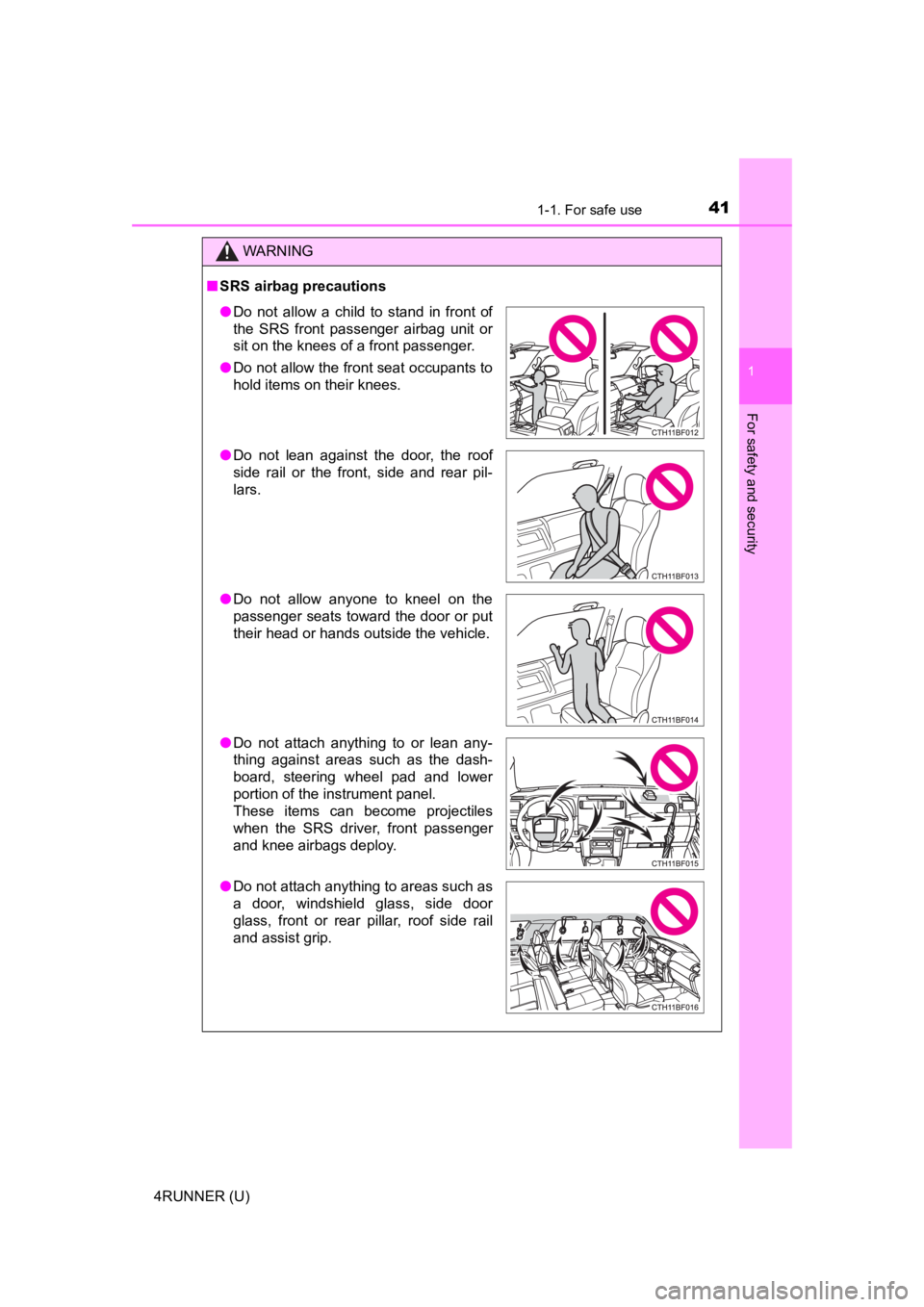
■SRS airbag precautions
● Do not allow a child to stand in front of
the SRS front passenger airbag unit or
sit on the knees of a front passenger.
● Do not allow the front seat occupants to
hold items on their knees.
● Do not lean against the door, the roof
side rail or the front, side and rear pil-
lars.
● Do not allow anyone to kneel on the
passenger seats toward the door or put
their head or hands outside the vehicle.
● Do not attach anything to or lean any-
thing against areas such as the dash-
board, steering wheel pad and lower
portion of the instrument panel.
These items can become projectiles
when the SRS driver, front passenger
and knee airbags deploy.
● Do not attach anything to areas such as
a door, windshield glass, side door
glass, front or rear pillar, roof side rail
and assist grip.
Page 76 of 608
761-2. Emergency assistance
4RUNNER (U)■
Enhanced Roadside Assistance
Enhanced Roadside As
sistance adds GPS data to the already
included warranty-based Toyota roadside service.
Subscribers can press the “SOS” button to reach a Safety Connec t
response-center agent, who can he lp with a wide range of needs,
such as: towing, flat tire, fuel delivery, etc. For a description of the
Enhanced Roadside Assistance se rvices and their limitations,
please see the Safety Connect Te rms and Conditions, which are
available at Toyota.com in the United States, Toyotapr.com in
Puerto Rico and Toyota.ca in Canada.
Important! Read this informatio n before using Safety Connect.
■Exposure to radio frequency signals
The Safety Connect system installed in your vehicle is a low-po wer
radio transmitter and receiver. I t receives and also sends out radio
frequency (RF) signals.
In August 1996, the Federal Communications Commission (FCC)
adopted RF exposure guidelines with safety levels for mobile wi re-
less phones. Those guidelines are consistent with the safety stan-
dards previously set by the following U.S. and international
standards bodies.
● ANSI (American National Stand ards Institute) C95.1 [1992]
● NCRP (National Council on Radi ation Protection and Measure-
ment) Report 86 [1986]
● ICNIRP (International Commission on Non-Ionizing Radiation
Protection) [1996]
Those standards were based on comprehensive and periodic eval-
uations of the relevant scienti fic literature. Over 120 scientists, engi-
neers, and physicians from unive rsities, and government health
agencies and industries reviewed the available body of research to
develop the ANSI Standard (C95.1).
The design of Safety Connect complies with the FCC guidelines i n
addition to those standards.
Safety information for Safety Connect
Page 117 of 608

1173-2. Opening, closing and locking the doors
3
Operation of each component
4RUNNER (U)■
Conditions affecting operation
The smart key system uses weak radio waves. In the following si tuations, the
communication between the electronic key and the vehicle may be affected,
preventing the smart key system, wireless remote control and en gine immobi-
lizer system from operating properly. (Ways of coping: P. 512)
● When the electronic key battery is depleted
● Near a TV tower, electric power plant, gas station, radio stati on, large dis-
play, airport or other facility that generates strong radio wav es or electrical
noise
● When carrying a portable radio, cellular phone, cordless phone or other
wireless communication device
● When the electronic key is in contact with, or is covered by the following
metallic objects
• Cards to which aluminum foil is attached
• Cigarette boxes that have aluminum foil inside
• Metallic wallets or bags
• Coins
• Hand warmers made of metal
• Media such as CDs and DVDs
● When multiple electronic keys are in the vicinity
● When other wireless keys (that emit radio waves) are being used nearby
● When carrying the electronic key together with the following devices that
emit radio waves
• Another vehicle’s electronic key or a wireless key that emits radio waves
• Personal computers or personal digital assistants (PDAs)
• Digital audio players
• Portable game systems
● If window tint with a metallic content or metallic objects are attached to the
back window
● When the electronic key is placed near a battery charger or ele ctronic
devices
● When the vehicle is parked in a pay parking spot where radio wa ves are
emitted.
If the doors cannot be locked/unlocked using the smart key syst em, lock/
unlock the doors by performing any of the following:
● Bring the electronic key close to either front door handle and operate the
entry function.
● Operate the wireless remote control.
If the doors cannot be locked/unlocked using the above methods, use the
mechanical key. ( P. 512)
If the engine cannot be started using the smart key system, ref er to P. 513.
Page 134 of 608
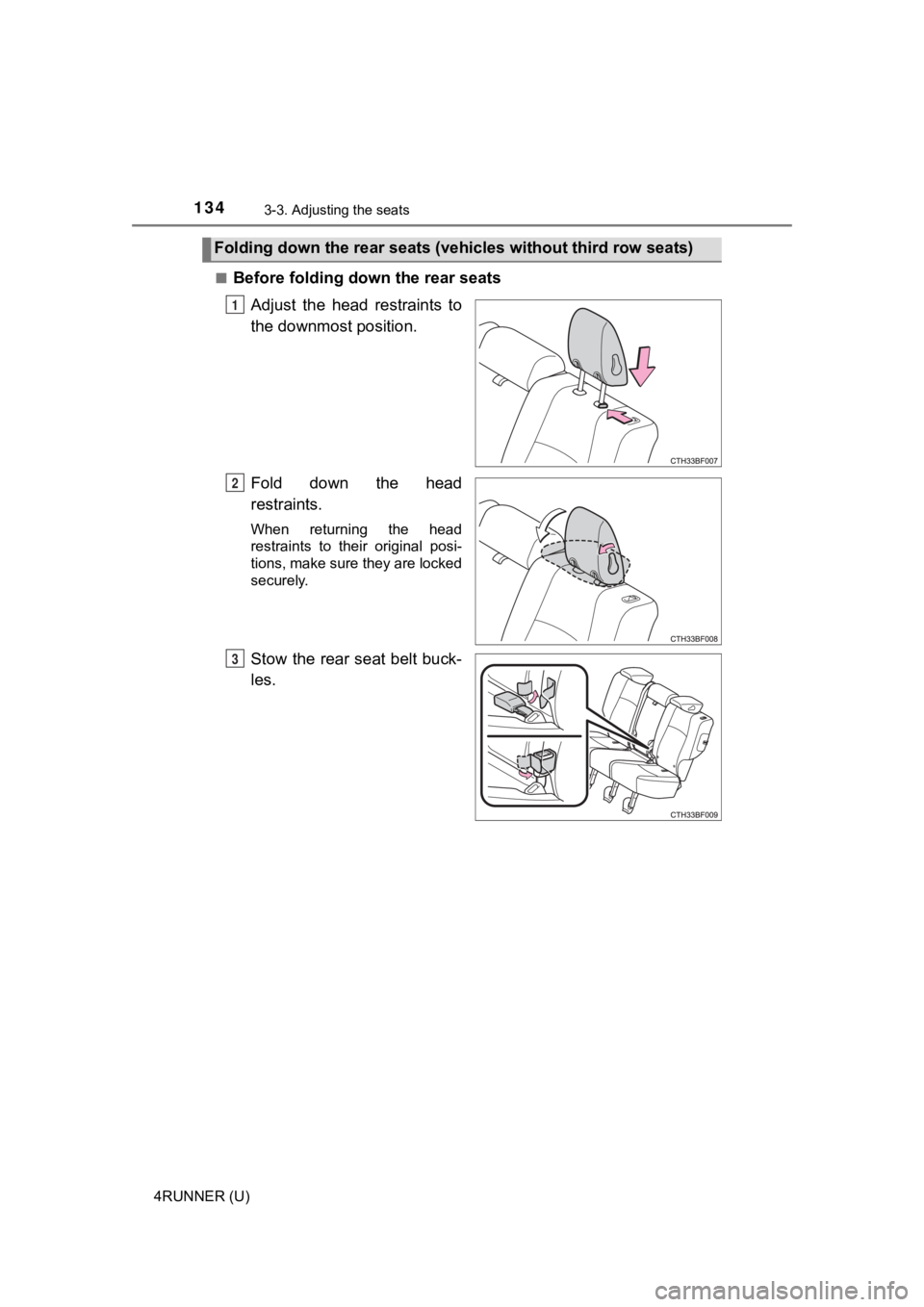
1343-3. Adjusting the seats
4RUNNER (U)■
Before folding down the rear seats
Adjust the head restraints to
the downmost position.
Fold down the head
restraints.
When returning the head
restraints to their original posi-
tions, make sure they are locked
securely.
Stow the rear seat belt buck-
les.
Folding down the rear seats (vehi cles without third row seats)
1
2
3