Page 202 of 296
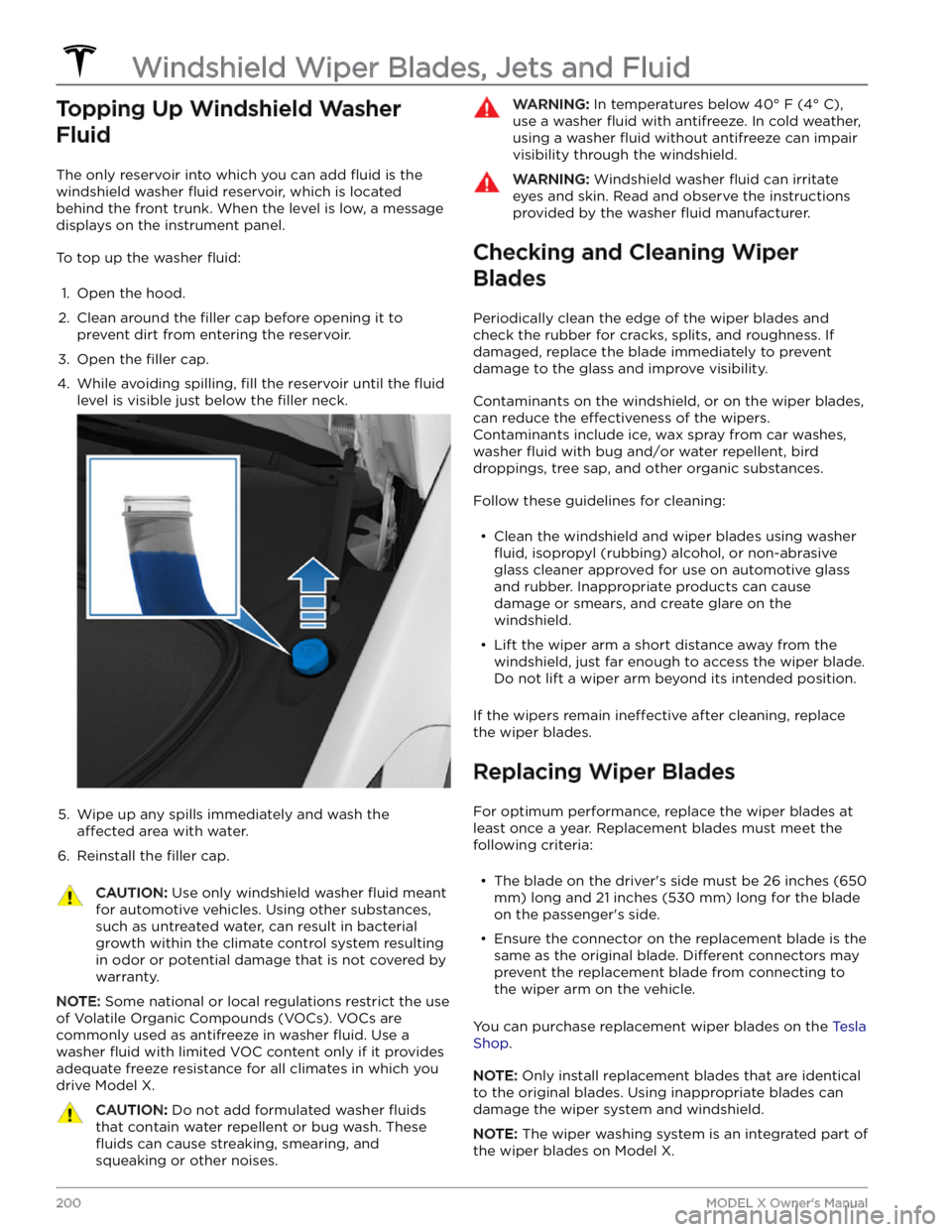
Topping Up Windshield Washer
Fluid
The only reservoir into which you can add fluid is the
windshield washer
fluid reservoir, which is located
behind the front trunk. When the level is low, a message
displays on the
instrument panel.
To top up the washer fluid:
1.
Open the hood.
2.
Clean around the filler cap before opening it to
prevent dirt from entering the reservoir.
3.
Open the filler cap.
4.
While avoiding spilling, fill the reservoir until the fluid
level is visible just below the filler neck.
5.
Wipe up any spills immediately and wash the
affected area with water.
6.
Reinstall the filler cap.
CAUTION: Use only windshield washer fluid meant
for automotive vehicles. Using other substances,
such as untreated water, can result in bacterial
growth within the climate control system resulting
in odor or potential damage that is not covered by
warranty.
NOTE: Some national or local regulations restrict the use
of Volatile Organic Compounds (VOCs). VOCs are commonly used as antifreeze in washer
fluid. Use a
washer
fluid with limited VOC content only if it provides
adequate freeze resistance for all climates in which you drive
Model X.
CAUTION: Do not add formulated washer fluids
that contain water repellent or bug wash. These
fluids can cause streaking, smearing, and
squeaking or other noises.
WARNING: In temperatures below 40
Page 209 of 296
Canada:
Mexico:
CAUTION: To prevent damage, never load Model X
so that it is heavier than GVWR or exceeds the
individual GAWR weights.
Calculating Load Limits
1.
Locate the statement
Page 213 of 296

Motor Type
Motor Type
Model S
Model XModel S Plaid
Model X Plaid
Front and rear
motorAC permanent magnet synchronous
motor, liquid-cooled, with variable
frequency driveAC permanent magnet synchronous motor, carbon-
fiber-wrapped rotor, liquid-cooled, with variable
frequency drive (2x motors in the rear)
Transmission
TransmissionModel XModel X PlaidTypeSingle speed fixed gearSingle speed fixed gearOverall Final Drive
Ratio
Front unit motor: 7.56:1
Rear unit motor: 9.04:1Front unit motor: 7.56:1
Rear unit motor: 7.56:1
Reverse GearReverse direction of motor, limited to
15 mph (24 km/h)
Reverse direction of motor, limited to
15 mph (24 km/h)
Steering
SteeringSpecificationsTypeVariable rack and pinion with electronic power steering, speed sensitiveNumber of turns lock to lock2.33Turning Circle (curb to curb)40.3 ft/12.3 m
Brakes
BrakesSpecifications
Type
4-wheel anti-lock braking system (ABS) with Electronic Brake
Force Distribution, Integrated Advanced Stability Control and Electronic Accelerator pedal actuated regenerative braking systemCalipersFront: Four piston, fixedRear: Single piston, floatingRotor Diameters (ventilated)Front: 15.59
Page 223 of 296

DO NOT TRANSPORT WITH
WHEELS ON THE GROUND
The front and rear motors in Model X generate power
when the wheels spin. Always transport
Model X with all
four tires
off the ground. Ensure that the tires are unable
to spin at any time during transport.
WARNING: NEVER TRANSPORT YOUR VEHICLE
WITH THE TIRES IN A POSITION WHERE THEY
CAN SPIN. DOING SO CAN LEAD TO SIGNIFICANT
DAMAGE AND OVERHEATING. IN RARE CASES
EXTREME OVERHEATING MAY CAUSE THE
SURROUNDING COMPONENTS TO IGNITE.
Do not transport Model X using any method that is not
specified by Tesla. Adhere to the instructions provided in
the following sections and observe all warnings and
cautions provided. Damage caused by improper
transporting of your vehicle is not covered by the
warranty.
NOTE: Tesla is not liable or responsible for reimbursing
services not dispatched through Tesla Roadside Assistance.
Approved Methods for Transporting
A flatbed truck or comparable transport vehicle is the
recommended method of transporting
Model X. The
vehicle can face either direction when using a
flatbed.
If Model X must be transported without a flatbed truck,
then wheel lifts and dollies must be used to ensure that
all four wheels are
off of the ground. This method may
only be used for a maximum of
35 miles (55 km), and
must not exceed the manufacturer speed rating of the
dollies. With this method, Tesla recommends the vehicle
faces forward so that the front wheels are lifted and the rear wheels are on dollies.
NOTE: Transporting Model X with the front wheels on
dollies is not recommended, but may be done if an
external
steering yoke (or steering wheel) lock is applied
and care is taken to prevent the front wheels from
spinning.
CAUTION: DO NOT TRANSPORT YOUR VEHICLE
IF THERE IS ANY CHANCE OF ANY OF THE
WHEELS SPINNING.
CAUTION: Enable Transport Mode (see Activate
Transport Mode on page 222) before winching
Model X onto a flatbed truck. If Transport Mode is
not available or the touchscreen is not accessible,
self-loading dollies or tire skates must be used to
load the vehicle into the approved transportation
position. Tesla is not responsible for any damage
caused by or during the transport of Model X,
including personal property damage or damage
caused by using self-loading dollies or tire skates.
NOTE: Transport Mode is only intended to allow for
winching
Model X onto a flatbed truck or repositioning
the vehicle out of a parking space. While in Transport Mode, the tires are allowed to rotate slowly (under
3
mph or 5 km/h) and for a very short distance (less than
30 feet or 10 meters). See Activate Transport Mode on
page 222. Exceeding these boundaries can lead to
significant damage and overheating that is not covered
by the warranty.
WARNING: Model X is equipped with high voltage
components that may be compromised as a result
of a collision (see High Voltage Components on
page 176). Before transporting Model X, it is
important to assume these components are
energized. Always follow high voltage safety
precautions (wearing personal protection
equipment, etc.) until emergency response
professionals have evaluated the vehicle and can
accurately confirm that all high voltage systems
are no longer energized. Failure to do so may
result in serious injury.
Instructions for Transporters
221Roadside Assistance
Page 224 of 296
Disable the Self-Leveling Air Suspension System
NOTE: If Model X has no low voltage power, you need an
external
low voltage power supply to use the
touchscreen. See
If Vehicle Has No Power on page 224.
Your Model X is equipped with an air suspension system
that automatically self-levels the vehicle, even when
power is
off. To prevent damage, you must activate Jack
mode to disable self-leveling:
1.
Touch Controls > Suspension on the touchscreen.
2.
Press the brake pedal, and then touch Very High to
maximize height.
3.
Touch Controls > Service > Jack Mode.
NOTE: Jack mode cancels when driving speed exceeds
4 mph (7 km/h).
Activate Transport Mode
Transport Mode keeps the parking brake disengaged
while winching
Model X onto a flatbed truck. When
active, Transport Mode displays a message indicating that the vehicle will remain free-rolling. The following are required to enable Transport Mode:
Page 227 of 296
NOTE: In the unlikely event your vehicle runs out of
range while driving, pull over when safe to do so and contact
Tesla Roadside Assistance on page 220 or your
preferred tow provider.
If Model X runs out of range, the low voltage battery is
no longer supported
Page 256 of 296

In some cases, your vehicle may be unable to continue driving. If this occurs, another vehicle alert should also be
present to provide more information and recommended actions.
This alert may be caused by a temporary condition that will be resolved automatically. If this alert clears during your
current drive, or is no longer present when you start your next drive, it was likely caused by a temporary condition.
No action is required.
This alert may also indicate a condition requiring front motor inspection and service. If this alert persists throughout
subsequent drives, it is recommended that you schedule service. Your vehicle is OK to drive in the meantime.
DI_a166
Vehicle automatically parked to prevent rollaway
Fasten seatbelt and close door to stay in gear
What this alert means:
Your vehicle has automatically shifted into Park (P) because it determined the driver was leaving or no longer
present. This is expected vehicle behavior under various circumstances.
Your vehicle will automatically shift into Park if all of these conditions are true:
Page 260 of 296
PCS_a016
Cannot charge - Poor grid power quality possible
Retry / Try other charge location or Supercharging
What this alert means:
Charging has stopped due to a condition that prevents your vehicle from charging with AC power. DC fast charging /
Supercharging should still function as expected.
This may be due to power supply disturbances caused by the external charging equipment or by the electrical
power grid. In some cases, this condition may be the result of using nearby electric devices that draw a lot of power.
If these possible causes can be ruled out, then a condition with your vehicle itself may also be affecting AC charging.
What to do:
If this alert is accompanied by another alert that specifies the condition affecting AC charging, start by investigating
that alert.
Further troubleshooting tips based on equipment type:


