2023 SUBARU SOLTERRA power outlet
[x] Cancel search: power outletPage 90 of 628
902-2. Charging
Owners Manual_USA_M42C01_en
■Automatic check function
This is an automatic system
check that is run before
charging begins to check for
problems in the operation of the
electrical leakage detection
function.
If a malfunction is found in the elec-
trical leakage detection function as
a result of the c heck, the error
warning indicator flashes to inform
the user. ( P. 9 0 )
■Temperature detection
function
A temperature detection func-
tion is equipped to the plug.
While charging, if heat is gener-
ated due to looseness on the
outlet side etc., this function
suppresses heat by controlling
the charging current.
■Conditions for supplying
current to the vehicle
The CCID (Charging Circuit
Interrupting Device) is designed
to prevent electrical current from
being supplied to the charging
connector when it is not con-
nected to the vehicle, even if the plug is inserted into the outlet.
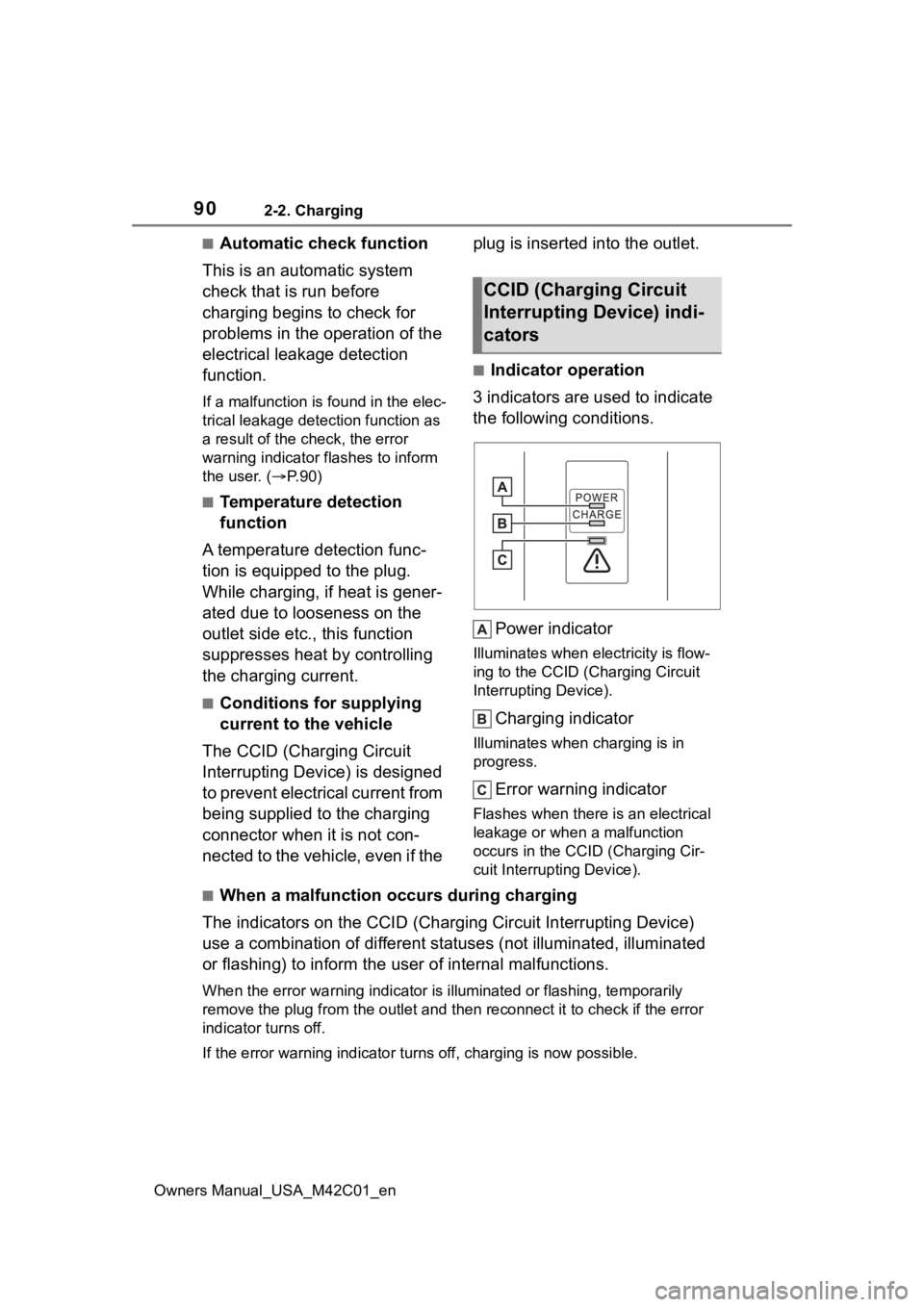
■Indicator operation
3 indicators are used to indicate
the following conditions.
Power indicator
Illuminates when electricity is flow-
ing to the CCID (C harging Circuit
Interrupting Device).
Charging indicator
Illuminates when charging is in
progress.
Error warning indicator
Flashes when there is an electrical
leakage or when a malfunction
occurs in the CCI D (Charging Cir-
cuit Interrupting Device).
■When a malfunction occurs during charging
The indicators on the CCID (Charging Circuit Interrupting Devic e)
use a combination of different statuses (not illuminated, illum inated
or flashing) to inform the user of internal malfunctions.
When the error wa rning indicator is illuminated or flashing, te mporarily
remove the plug from the outlet and then reconnect it to check if the error
indicator turns off.
If the error warning indicator turns off, charging is now possi ble.
CCID (Charging Circuit
Interrupting Device) indi-
cators
Page 91 of 628
912-2. Charging
Owners Manual_USA_M42C01_en
2
Electric Vehicle system
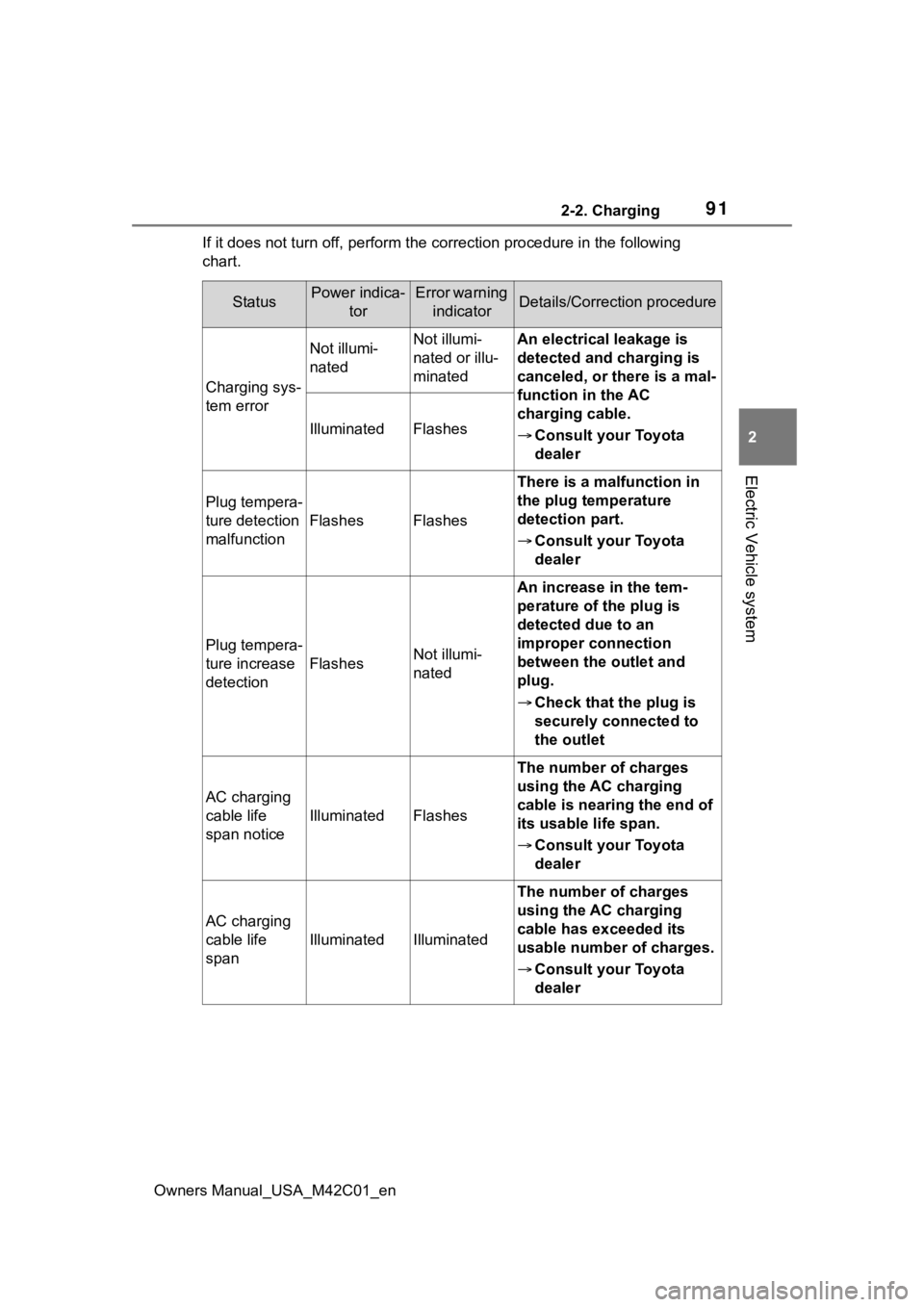
If it does not turn off, perform t he correction procedure in the following
chart.
StatusPower indica- torError warning indicatorDetails/Correction procedure
Charging sys-
tem error
Not illumi-
natedNot illumi-
nated or illu-
minatedAn electrical leakage is
detected and charging is
canceled, or there is a mal-
function in the AC
charging cable.
Consult your Toyota
dealer
IlluminatedFlashes
Plug tempera-
ture detection
malfunction
FlashesFlashes
There is a malfunction in
the plug temperature
detection part.
Consult your Toyota
dealer
Plug tempera-
ture increase
detection
FlashesNot illumi-
nated
An increase in the tem-
perature of the plug is
detected due to an
improper connection
between the outlet and
plug.
Check that the plug is
securely connected to
the outlet
AC charging
cable life
span notice
IlluminatedFlashes
The number of charges
using the AC charging
cable is nearing the end of
its usable life span.
Consult your Toyota
dealer
AC charging
cable life
span
IlluminatedIlluminated
The number of charges
using the AC charging
cable has exceeded its
usable number of charges.
Consult your Toyota
dealer
Page 96 of 628
962-2. Charging
Owners Manual_USA_M42C01_en
Connect to an AC 120 V out-
let (NEMA 5-15R) with a
Ground-Fault Circuit-Inter-
rupter (GFCI) and a circuit
breaker. Use of a 15A individ-
ual circuit is strongly recom-
mended to ensure AC
charging cable will operate
properly.
When charging outdoors,
make sure to connect to a
weatherproof outlet that is
certified for outdoor use.
Checking Ground-Fault Cir-
cuit-Interrupter (GFCI) opera-
tion before its use is
recommended.
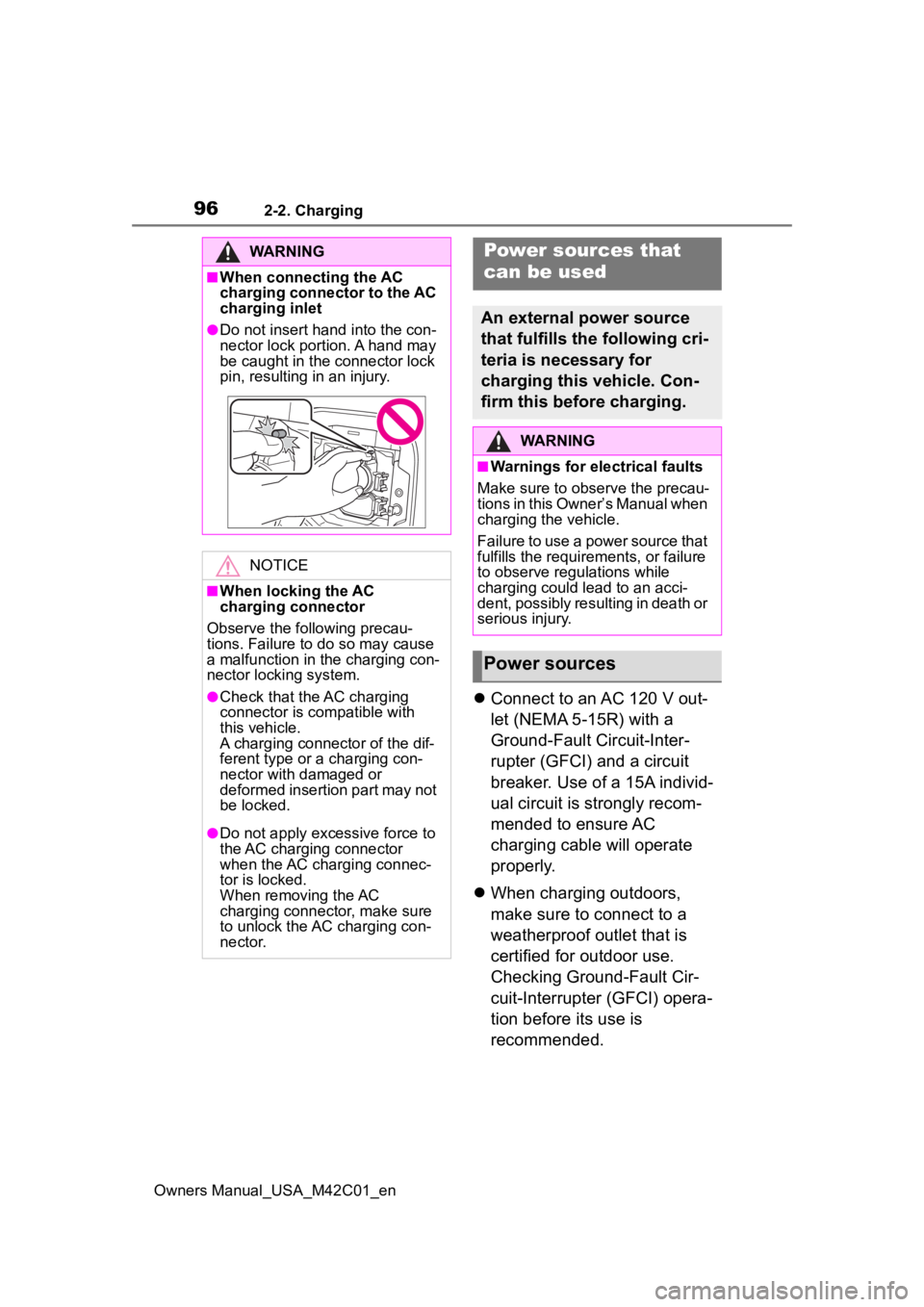
WARNING
■When connecting the AC
charging connector to the AC
charging inlet
●Do not insert hand into the con-
nector lock portion. A hand may
be caught in the connector lock
pin, resulting in an injury.
NOTICE
■When locking the AC
charging connector
Observe the following precau-
tions. Failure to do so may cause
a malfunction in the charging con-
nector locking system.
●Check that the AC charging
connector is compatible with
this vehicle.
A charging connector of the dif-
ferent type or a charging con-
nector with damaged or
deformed insertion part may not
be locked.
●Do not apply excessive force to
the AC charging connector
when the AC charging connec-
tor is locked.
When removing the AC
charging connector, make sure
to unlock the AC charging con-
nector.
Power sources that
can be used
An external power source
that fulfills the following cri-
teria is necessary for
charging this vehicle. Con-
firm this before charging.
WARNING
■Warnings for electrical faults
Make sure to observe the precau-
tions in this Owner’s Manual when
charging the vehicle.
Failure to use a power source that
fulfills the requirements, or failure
to observe regulations while
charging could lead to an acci-
dent, possibly resulting in death or
serious injury.
Power sources
Page 97 of 628
972-2. Charging
Owners Manual_USA_M42C01_en
2
Electric Vehicle system
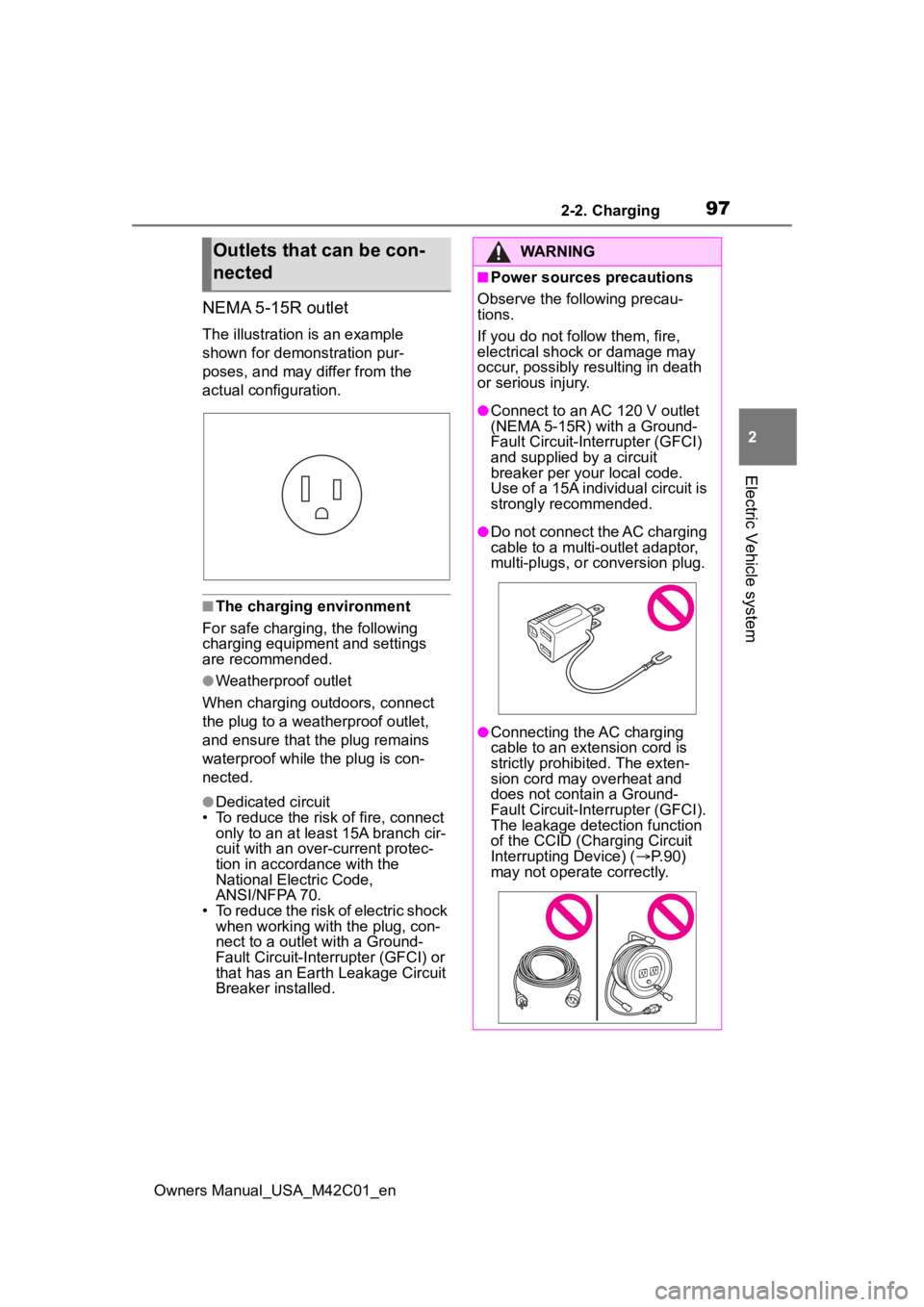
NEMA 5-15R outlet
The illustration is an example
shown for demonstration pur-
poses, and may differ from the
actual configuration.
■The charging environment
For safe charging, the following
charging equipment and settings
are recommended.
●Weatherproof outlet
When charging outdoors, connect
the plug to a weatherproof outlet,
and ensure that the plug remains
waterproof while the plug is con-
nected.
●Dedicated circuit
• To reduce the risk of fire, connect
only to an at least 15A branch cir-
cuit with an over- current protec-
tion in accordance with the
National Electric Code,
ANSI/NFPA 70.
• To reduce the risk of electric shock when working with the plug, con-
nect to a outlet with a Ground-
Fault Circuit-Interrupter (GFCI) or
that has an Earth Leakage Circuit
Breaker installed.
Outlets that can be con-
nectedWARNING
■Power sources precautions
Observe the following precau-
tions.
If you do not fo llow them, fire,
electrical shock or damage may
occur, possibly resulting in death
or serious injury.
●Connect to an AC 120 V outlet
(NEMA 5-15R) with a Ground-
Fault Circuit-Interrupter (GFCI)
and supplied by a circuit
breaker per your local code.
Use of a 15A individual circuit is
strongly recommended.
●Do not connect the AC charging
cable to a multi-outlet adaptor,
multi-plugs, or conversion plug.
●Connecting the AC charging
cable to an extension cord is
strictly prohibited. The exten-
sion cord may overheat and
does not contain a Ground-
Fault Circuit-Interrupter (GFCI).
The leakage detection function
of the CCID (Charging Circuit
Interrupting Device) ( P.90)
may not operate correctly.
Page 104 of 628

1042-2. Charging
Owners Manual_USA_M42C01_en
●Avoid frequent DC charging
Also, if the capacit y of the traction
battery capacity reduces, the dis-
tance that can be driven decreases.
However, vehicle performance does
not significantly become worse.
■When the remaining charge of
the traction battery is low after
charging
In the following situations, the
remaining charge of the traction bat-
tery after charging completes may
be less than normal in order to pro-
tect the traction bat tery (the driving
range after the battery is fully
charged may be shorter).
*
●Charging is perf ormed when the
outside temperature is low or high
●Charging is perf ormed immedi-
ately after high-l oad driving or in
extreme heat
In any other situati on, if the remain-
ing charge of the traction battery is
significantly lower than normal after
charging completes, have the vehi-
cle inspected by your Toyota dealer.
*: When this occurs, even if the remaining charge display of the
traction battery shows that it is
fully charged, the remaining
charge rapidly decreases faster
than normal.
■When the charging amount sent
to the traction battery
decreases
When the amount of power supplied
by the charger is low or operation of
the battery heater, etc., reduces the
charging power sent to the traction
battery, the charging amount sent to
the traction battery may decrease.
■Certification
This device complies with Part 15 of
the FCC Rules. Operation is subject
to the following two conditions:
(1) this device may not cause harm- ful interference, and (2) this device
must accept any interference
received, including interference that
may cause undesired operation.
■Charging time may increase
In the following situ ations, charging
time may become longer than nor-
mal:
●In very hot or very cold tempera-
tures.
●When the traction battery
becomes hot, such as immedi-
ately after high-load driving.
●The vehicle is consuming a lot of
electricity, for e xample, when the
headlights are on, etc.
●When using “My Room Mode”.
( P.129)
●There is a power outage during
charging.
●There is an interruption in the
electrical supply.
●There is a drop in the voltage of
external power source.
●The charge in the 12-volt battery
is low, for example due to the
vehicle being left unused for a
long period of time.
●When the upper limit of charging
current is changed in the charging
current setting of the vehicle
( P.108)
●When the battery heater operates.
( P. 9 9 )
●When the “Battery Cooler” is oper-
ated before charging. ( P. 9 9 )
●When the plug generates heat
due to a loose outlet connection,
etc.
●When adjusting the power supply
with the charger.
●When frequently and repeatedly
using DC charging.
●When selecting “DC charging
power” setting other than “MAX”.
●When the temperature of
charging-related parts is high.
Page 106 of 628
1062-2. Charging
Owners Manual_USA_M42C01_en
P.102
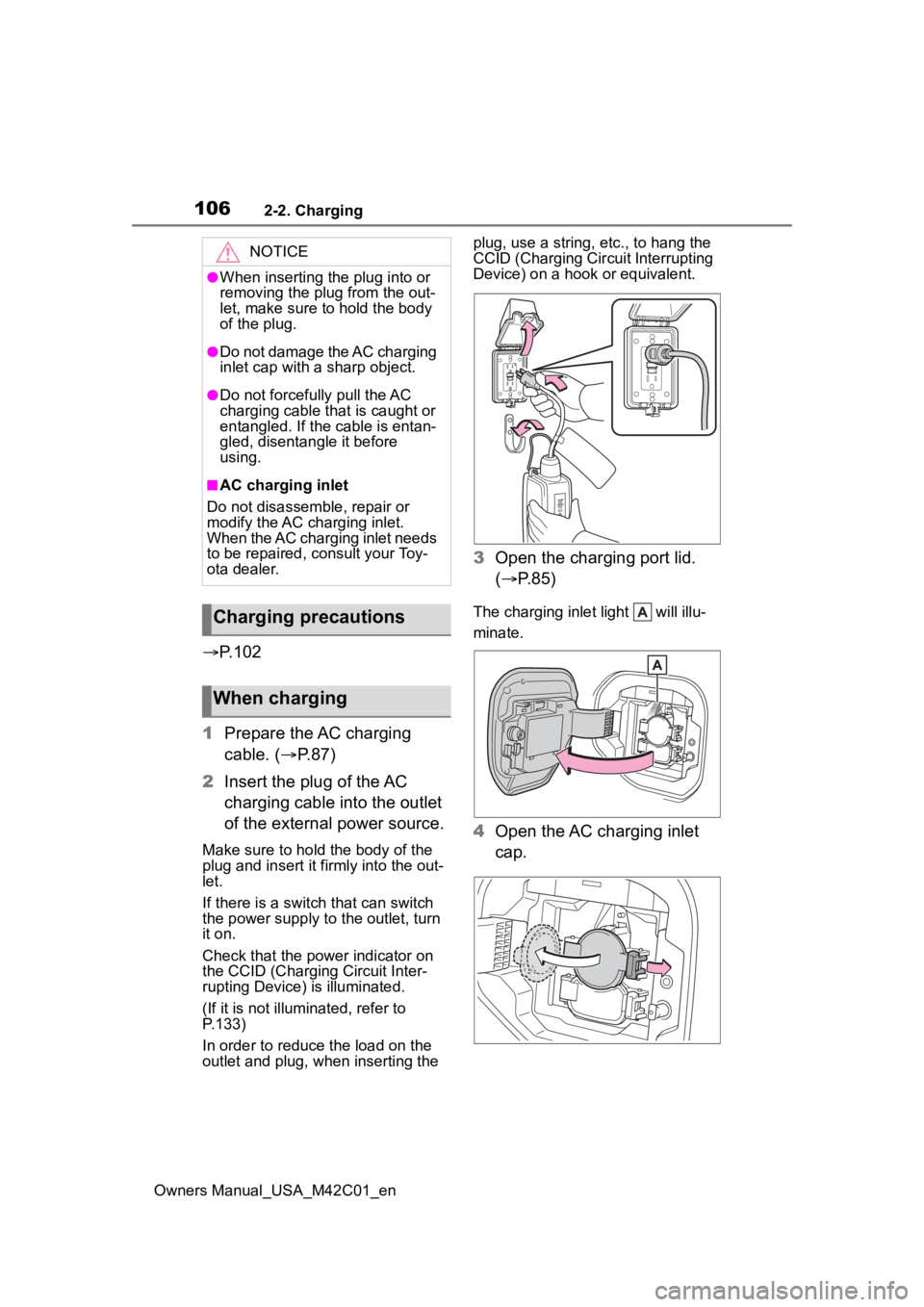
1 Prepare the AC charging
cable. ( P.87)
2 Insert the plug of the AC
charging cable into the outlet
of the external power source.
Make sure to hold the body of the
plug and insert it firmly into the out-
let.
If there is a switch that can switch
the power supply to the outlet, turn
it on.
Check that the power indicator on
the CCID (Charging Circuit Inter-
rupting Device) is illuminated.
(If it is not illuminated, refer to
P.133)
In order to reduce the load on the
outlet and plug, when inserting the plug, use a string, e
tc., to hang the
CCID (Charging Cir cuit Interrupting
Device) on a hook or equivalent.
3 Open the charging port lid.
( P.85)
The charging inlet light will illu-
minate.
4Open the AC charging inlet
cap.
NOTICE
●When inserting the plug into or
removing the plug from the out-
let, make sure to hold the body
of the plug.
●Do not damage the AC charging
inlet cap with a sharp object.
●Do not forcefully pull the AC
charging cable that is caught or
entangled. If the cable is entan-
gled, disentangle it before
using.
■AC charging inlet
Do not disassemble, repair or
modify the AC charging inlet.
When the AC charging inlet needs
to be repaired, consult your Toy-
ota dealer.
Charging precautions
When charging
Page 109 of 628

1092-2. Charging
Owners Manual_USA_M42C01_en
2
Electric Vehicle system
1 Press or of the meter
control switches to select .
2 Press or of the meter
control switches to select “Vehi-
cle Settings”, and then press and
hold .
3 Press or of the meter
control switches to select
“Charging Settings”, and then
press .
The “Charging Sett ings” screen will
be displayed.
4 Press or of the meter
control switches to select
“Charging Limit”, and then press
.
The “Charging Limit” screen will be
displayed.
5 Select “Full”, “90%”, “80%”,
“70%”, “60%” or “50%” and then
press .
●Setting operations on multimedia
1 Select .
2 Select “Vehicle customize”.
3 Select “Charging”.
4 Select “Charging limit”.
5 Select “Full”, “90%”, “80%”,
“70%”, “60%” or “50%”.
If the setting is changed during DC
charging, charging may stop due to
the operation of the DC charger
timer and the traction battery cannot
be fully charged.
■Protection function of AC
charging inlet overheating
By installing a temp erature sensor
to the AC charging inlet, prevents
parts from melting when the tem-
perature rises due to foreign matter
entering the charging connector. When a certain temperature
increase is detected, charging is
stopped immediately.
After this, when the power switch is
off, a message will be displayed on
the multi-information display
(
P.140)
WARNING
■When charging
Observe the following precau-
tions.
Failure to do so may cause an
unexpected accident, resulting in
death or serious injury.
●Connect to a power source suit-
able for charging. ( P. 9 6 )
●Check that the AC charging
cable, plug and outlet are free of
foreign matter.
●Before charging, check that the
AC charging inlet is not
deformed, damaged or cor-
roded, and check that the inlet
is free of foreign matter such as
dirt, snow and ice.
If there is dirt or dust in these
areas, remove completely
before inserting the charging
connector.
●Do not get the te rminals of the
AC charging inlet wet.
●Only use outlets where the plug
can be securely inserted.
●Do not bundle or wind the AC
charging cable while charging,
as doing so may result in over-
heating.
●Do not touch the terminals of
the charging connector and AC
charging inlet with a sharp metal
objects (needles, etc.,) or
hands, or short them with for-
eign objects.
Page 110 of 628
1102-2. Charging
Owners Manual_USA_M42C01_en
WARNING
●When charging outdoors, make
sure to connect to a weather-
proof outlet for outdoor use.
Ensure the weatherproof outlet
cover closes completely. If the
weatherproof outlet cover can-
not be closed, install a weather-
proof outlet cover that will close.
●In order to stop charging at the
charging station, follow the
instructions of the charger.
●If any heat, smoke, odors, noise
or other abnormalities are
noticed during charging, stop
charging immediately.
●Do not insert the plug if the out-
let is submerged in water or
snow.
●When charging while it is raining
or snowing, do not connect or
disconnect the plug if your
hands are wet. Also, do not get
the plug or outlet wet.
●Do not charge the vehicle
during a lightning storm.
●Prevent the AC charging cable
from being caught in the door or
back door.
●Do not let the wheels on the AC
charging cable, plug, charging
connector and CCID (Charging
Circuit Interrupting Device).
●Firmly insert the plug into the
outlet.
●Do not use an extension cord
and converting adaptor.
●Close the hood before using the
charging system.
The cooling fan may start oper-
ating suddenly. Touching or get-
ting close to rotating parts such
as the fan may cause your
hands or clothes (especially a
necktie or scarf) to become
caught and result in a serious
injury.
●After connecting the charging
cable, confirm that it is not
wound around anything.
●If the power indicator on the
CCID (Charging Circuit Inter-
rupting Device) does not illumi-
nate after plugging the AC
charging cable into the outlet,
unplug it immediately.
■If the error warn ing indicator
on the CCID (Charging Circuit
Interrupting Device) illumi-
nates or flashes during
charging
There may be an electrical leak-
age in the power source path, or
there may be a malfunction in the
AC charging cable or CCID
(Charging Circuit Interrupting
Device).
Refer to P.90 and follow the cor-
rection procedure. If the error
warning indicator does not turn off
even after performing the correc-
tion procedure, immediately stop
charging, remove the AC
charging cable and contact your
Toyota dealer. Continuing to
charge the vehicle in that condi-
tion may lead to u nforeseen acci-
dents or serious injury.