2023 SUBARU BRZ warning
[x] Cancel search: warningPage 260 of 432
Tire Pressure Monitoring System (TPMS) (If Equipped)
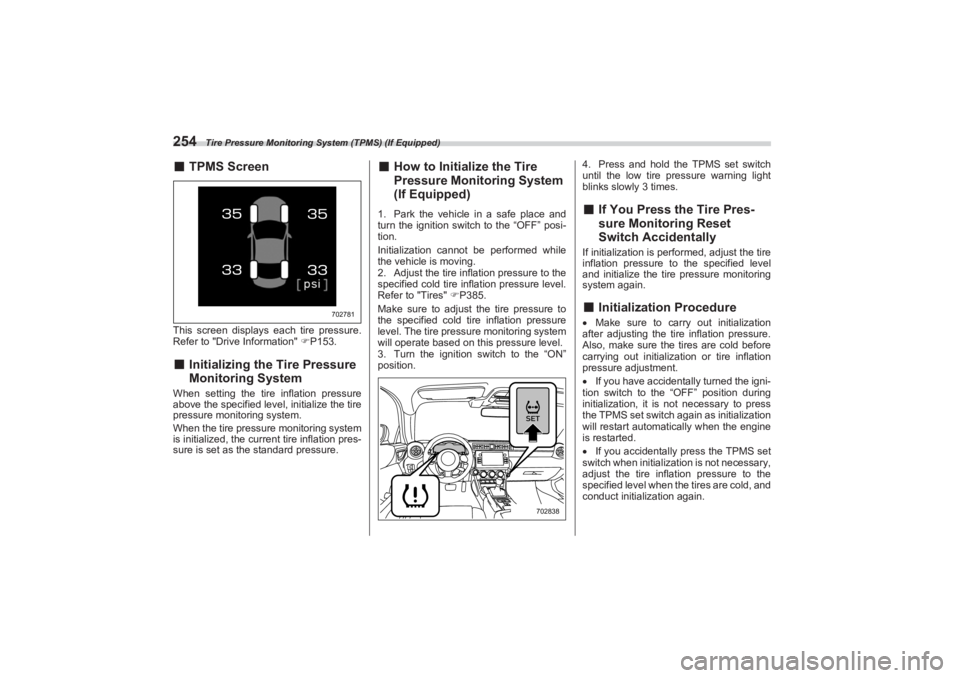
254■TPMS ScreenThis screen displays ea ch tire pressure.
Refer to "Drive Information" P153.■ Initializing the Tire Pressure
Monitoring SystemWhen setting the tire inflation pressure
above the specified level, initialize the tire
pressure monitoring system.
When the tire pressure monitoring system
is initialized, the current tire inflation pres-
sure is set as the standard pressure.
■ How to Initialize the Tire
Pressure Monitoring System
(If Equipped)1. Park the vehicle in a safe place and
turn the ignition switch to the “OFF” posi-
tion.
Initialization cannot be performed while
the vehicle is moving.
2. Adjust the tire infl ation pressure to the
specified cold tire inflation pressure level.
Refer to "Tires" P385.
Make sure to adjust the tire pressure to
the specified cold tire inflation pressure
level. The tire pre ssure monitoring system
will operate based on this pressure level.
3. Turn the ignition switch to the “ON”
position. 4. Press and hold the TPMS set switch
until the low tire pressure warning light
blinks slowly 3 times.
■ If You Press the Tire Pres -
sure Monitoring Reset
Switch AccidentallyIf initialization is perf ormed, adjust the tire
inflation pressure to the specified level
and initialize the tire pressure monitoring
system again.■ Initialization ProcedureMake sure to carry out initialization
after adjusting the tire inflation pressure.
Also, make sure the tires are cold before
carrying out initialization or tire inflation
pressure adjustment.
If you have accidentally turned the igni-
tion switch to the “OFF” position during
initialization, it is not necessary to press
the TPMS set switch again as initialization
will restart automatically when the engine
is restarted.
If you accidentally press the TPMS set
switch when initialization is not necessary,
adjust the tire inflation pressure to the
specified level when the tires are cold, and
conduct initialization again.
702781
702838
BRZ_U.book 254 ページ 2022年3月29日 火曜日 午後3時59分
Page 261 of 432

Parking Your Vehicle
255
Starting and Operating7
– CONTINUED –
■When Initialization of the Tire
Pressure Monitoring System
has FailedInitialization can be completed in a few
minutes. However, in the following case,
the settings have not been recorded and
the system will not o perate properly. If
repeated attempts to record tire inflation
pressure settings ar e unsuccessful, have
the vehicle checked at your SUBARU
dealer.
When operating the TPMS set switch,
low tire pressure warning light does not
blink 3 times.
After carrying out the initialization
procedure, the low tire pressure warning
light blinks for 1 minute then stays on after
driving for 20 minutes.
■ Registering ID CodesEvery tire pressure warning valve and
transmitter has a unique ID code. In addi-
tion to the set of tire pressure monitoring
system sensor ID code s initially registered
to the vehicle, a second set of ID codes
can be registered.
A second set of tire pressure monitoring
system sensor ID codes can be registered
at your SUBARU dealer. When 2 sets of
ID codes have been registered, either ID
code set can be selected.■ Changing the ID code set1. Park the vehicle in a safe place and
turn the ignition swit ch to the “ON” posi-
tion.
2. Press the TPMS set switch 3 times
within 3 seconds.
3. The low tire pressure warning light will
illuminate for 3 seconds and then blink 3
times.
4. The low tire pressure warning light will
blink for 1 minute and then illuminate.
5. When the ID code change has
completed, the tire pressure monitoring
light will turn off.
Check that tire pressures are displayed on
the TPMS screen.
7-16. Parking Your Vehicle■ Parking BrakeTo set the parking brake, depress the
brake pedal firmly and hold it down until
the parking brake lever is fully pulled up.
WARNING
Do not operate the TPMS set switch
without first adjust ing the tire infla-
tion pressure to the specified level.
Otherwise, the low tire pressure
warning light may not come on even
if the tire inflation pressure is low,
or it may come on when the tire
inflation pressure is actually nor-
mal.
WARNING
Never leave unattended children
or pets in the vehicle. They could
accidentally injure themselves or
others through inadvertent oper-
ation of the vehicle. Also, on hot
or sunny days, the temperature in
a closed vehicle could quickly
become high enough to cause
severe or possibly fatal injuries to
people. Do not park the vehicle over flam-
mable materials such as dry
grass, waste paper or rags, as
they may burn easily if they come
near hot engine or exhaust
system parts. Be sure to stop the engine if you
take a nap in the vehicle. If engine
exhaust gas enters the passenger
compartment, occupants in the
vehicle could die from carbon
monoxide (CO) contained in the
exhaust gas.
BRZ_U.book 255 ページ 2022年3月29日 火曜日 午後3時59分
Page 262 of 432
Parking Your Vehicle
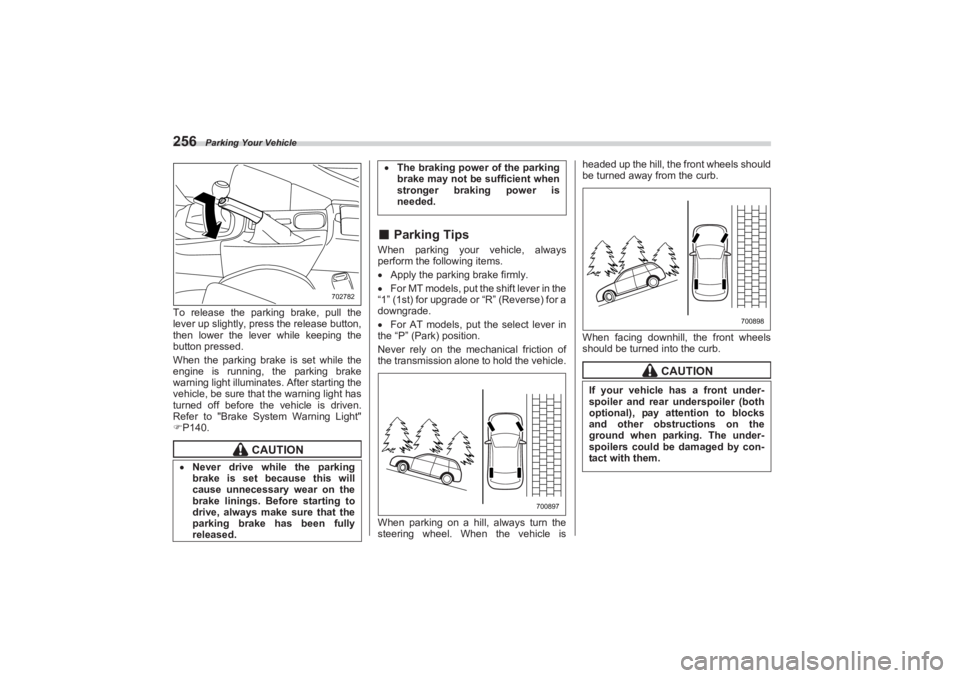
256To release the parking brake, pull the
lever up slightly, press the release button,
then lower the lever while keeping the
button pressed.
When the parking brake is set while the
engine is running, the parking brake
warning light illuminates. After starting the
vehicle, be sure that the warning light has
turned off before the vehicle is driven.
Refer to "Brake System Warning Light"
P140.
■ Parking TipsWhen parking your vehicle, always
perform the following items.
Apply the parking brake firmly.
For MT models, put the shift lever in the
“1” (1st) for upgrade or “R” (Reverse) for a
downgrade.
For AT models, put the select lever in
the “P” (Park) position.
Never rely on the mechanical friction of
the transmission alone to hold the vehicle.
When parking on a hill, always turn the
steering wheel. When the vehicle is headed up the hill, the front wheels should
be turned away from the curb.
When facing downhill, the front wheels
should be turned into the curb.
CAUTION
Never drive while the parking
brake is set because this will
cause unnecessary wear on the
brake linings. Before starting to
drive, always make sure that the
parking brake has been fully
released.
702782
The braking power of the parking
brake may not be sufficient when
stronger braking power is
needed.
700897
CAUTION
If your vehicle has a front under-
spoiler and rear underspoiler (both
optional), pay attention to blocks
and other obstructions on the
ground when parking. The under-
spoilers could be damaged by con-
tact with them.
700898
BRZ_U.book 256 ページ 2022年3月29日 火曜日 午後3時59分
Page 263 of 432
Hill Start Assist System
257
Starting and Operating7
– CONTINUED –
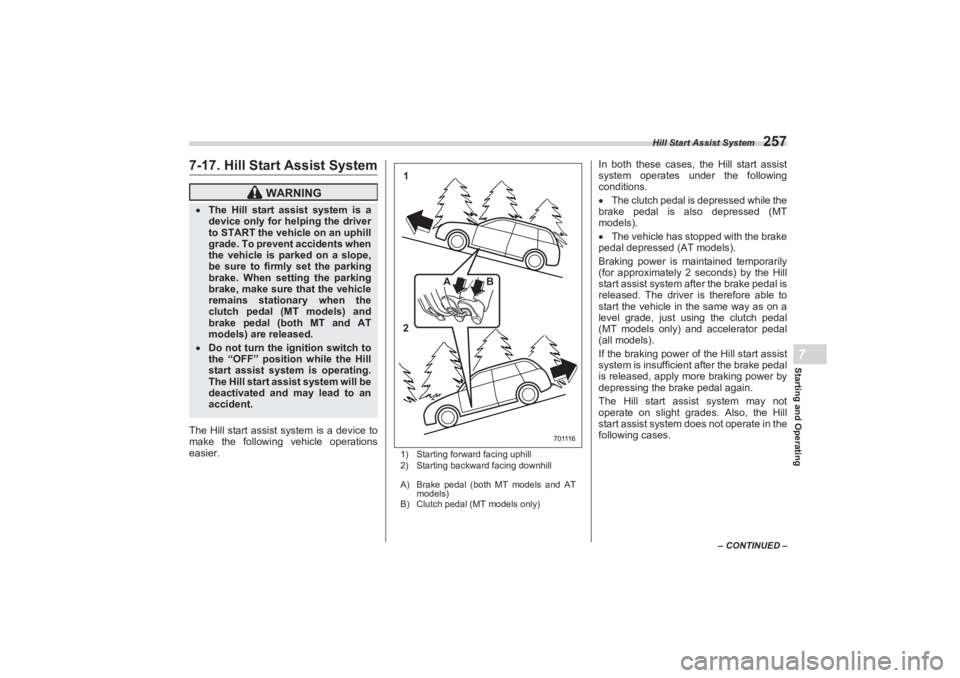
7-17. Hill Start Assist SystemThe Hill start assist system is a device to
make the following vehicle operations
easier.
1) Starting forward facing uphill
2) Starting backward facing downhill
A) Brake pedal (both MT models and AT
models)
B) Clutch pedal (MT models only)
In both these cases, the Hill start assist
system operates under the following
conditions.
The clutch pedal is depressed while the
brake pedal is also depressed (MT
models).
The vehicle has stopped with the brake
pedal depressed (AT models).
Braking power is maintained temporarily
(for approximately 2 seconds) by the Hill
start assist system after the brake pedal is
released. The driver is therefore able to
start the vehicle in the same way as on a
level grade, just using the clutch pedal
(MT models only) and accelerator pedal
(all models).
If the braking power of the Hill start assist
system is insufficient after the brake pedal
is released, apply more braking power by
depressing the brake pedal again.
The Hill start assist system may not
operate on slight grades. Also, the Hill
start assist system does not operate in the
following cases.
WARNING
The Hill start assist system is a
device only for helping the driver
to START the vehicle on an uphill
grade. To prevent accidents when
the vehicle is parked on a slope,
be sure to firmly set the parking
brake. When setting the parking
brake, make sure that the vehicle
remains stationary when the
clutch pedal (MT models) and
brake pedal (both MT and AT
models) are released. Do not turn the ig nition switch to
the “OFF” position while the Hill
start assist system is operating.
The Hill start assist system will be
deactivated and may lead to an
accident.
1
2 BA
7 0 111 6
BRZ_U.book 257 ページ 2022年3月29日 火曜日 午後3時59分
Page 265 of 432
Hill Start Assist System
259
Starting and Operating7
– CONTINUED –
NOTEIf you make an error when performing
any steps in the following procedure,
place the ignition switch in the “OFF”
position once and then start over
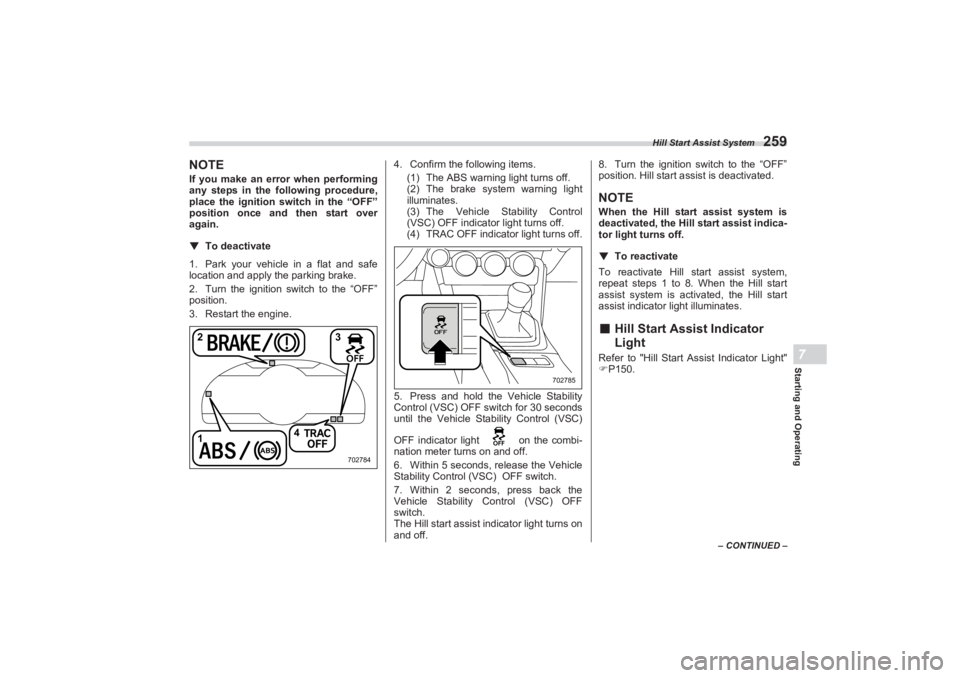
again.▼ To deactivate
1. Park your vehicle in a flat and safe
location and apply the parking brake.
2. Turn the ignition switch to the “OFF”
position.
3. Restart the engine. 4. Confirm the following items.
(1) The ABS warning light turns off.
(2) The brake system warning light
illuminates.
(3) The Vehicle Stability Control
(VSC) OFF indicator light turns off.
(4) TRAC OFF indicator light turns off.
5. Press and hold the Vehicle Stability
Control (VSC) OFF switch for 30 seconds
until the Vehicle Stability Control (VSC)
OFF indicator light on the combi-
nation meter turns on and off.
6. Within 5 seconds, release the Vehicle
Stability Control ( VSC) OFF switch.
7. Within 2 seconds, press back the
Vehicle Stability Control (VSC) OFF
switch.
The Hill start assist i ndicator light turns on
and off. 8. Turn the ignition switch to the “OFF”
position. Hill start a ssist is deactivated.
NOTEWhen the Hill start assist system is
deactivated, the Hill start assist indica-
tor light turns off.
▼ To reactivate
To reactivate Hill start assist system,
repeat steps 1 to 8. When the Hill start
assist system is activa ted, the Hill start
assist indicator light illuminates.■ Hill Start Assist Indicator
LightRefer to "Hill Start A ssist Indicator Light"
P150.
1 4
23
702784
702785
BRZ_U.book 259 ページ 2022年3月29日 火曜日 午後3時59分
Page 266 of 432
Cruise Control (Models without the EyeSight system)
2607-18. Cruise Control (Models without the EyeSight system)NOTEFor models with the EyeSight system:
Refer to the Owner’s Manual supple-
ment for the EyeSight system.
Cruise control enables you to maintain a
constant vehicle speed without holding
your foot on the accelerator pedal and it is
operative when the vehicle speed is 20
mph (30 km/h) or more.
NOTEMake sure the cruise control system is
turned off when the cruise control is
not in use to avoid unintentionally set-
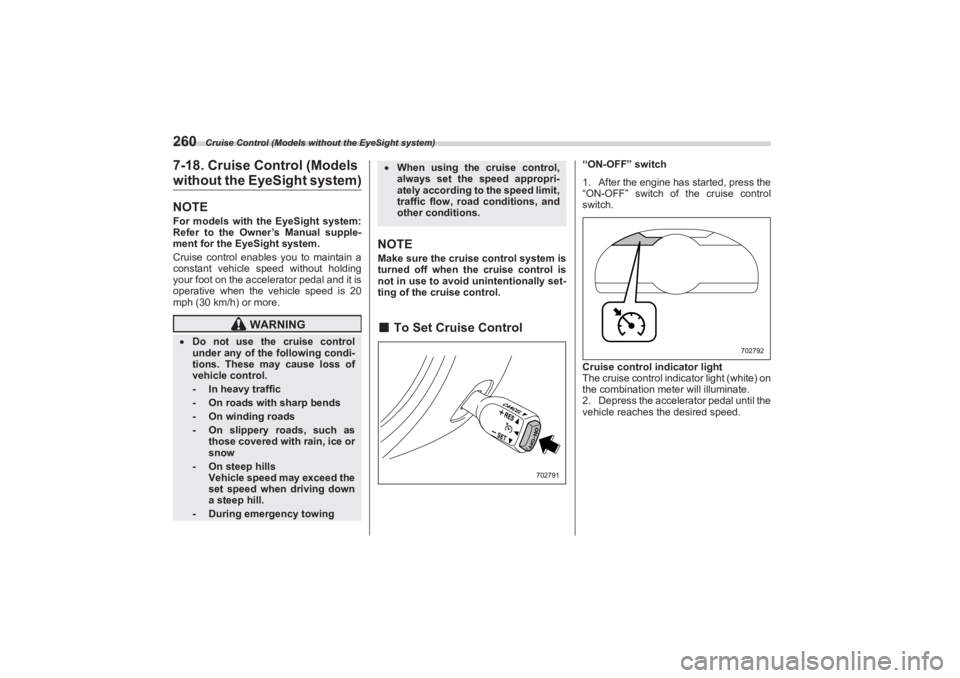
ting of the cruise control.■ To Set Cruise Control
“ON-OFF” switch
1. After the engine has started, press the
“ON-OFF” switch of the cruise control
switch.
Cruise control indicator light
The cruise control indicator light (white) on
the combination meter will illuminate.
2. Depress the accelerator pedal until the
vehicle reaches the desired speed.
WARNING
Do not use the cruise control
under any of the following condi-
tions. These may cause loss of
vehicle control.
- In heavy traffic- On roads with sharp bends- On winding roads- On slippery roads, such as
those covered with rain, ice or
snow- On steep hills
Vehicle speed may exceed the
set speed when driving down
a steep hill.- During emergency towing
When using the cruise control,
always set the speed appropri-
ately according to the speed limit,
traffic flow, road conditions, and
other conditions.
702791
702792
BRZ_U.book 260 ページ 2022年3月29日 火曜日 午後3時59分
Page 269 of 432
Rear View Camera
263
Starting and Operating7
– CONTINUED –
the switch. The vehicle speed at that
moment will be memorized and treated as
the new set speed.
When setting the displayed unit as
“MPH”:
The set speed can be decreased 1 mph
(1.6 km/h) each time by pushing the cruise
control switch to the “-SET” side.
When setting the displayed unit as
“km/h”:
The set speed can be decreased 1 km/h
(0.6 mph) each time by pushing the cruise
control switch to the “-SET” side.▼ To decrease the speed (by brake
pedal)
1. Depress the brake pedal to release
cruise control temporarily.
2. When the speed decreases to the
desired speed, push the cruise control
switch to the “-SET” side once. Now the
desired speed is set and the vehicle will
keep running at that speed without
depressing the accelerator pedal.■ Cruise Control Indicator
LightRefer to "Combination Meter Settings"
P130.
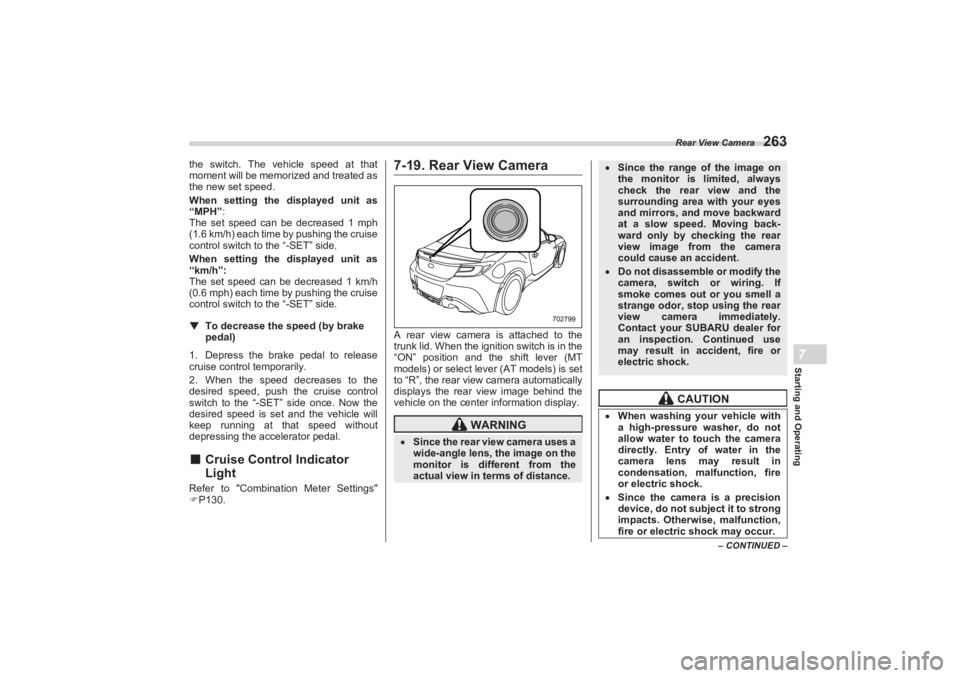
7-19. Rear View CameraA rear view camera is attached to the
trunk lid. When the ignition switch is in the
“ON” position and the shift lever (MT
models) or select lever (AT models) is set
to “R”, the rear view camera automatically
displays the rear view image behind the
vehicle on the center information display.
WARNING
Since the rear view camera uses a
wide-angle lens, the image on the
monitor is diffe rent from the
actual view in terms of distance.
702799
Since the range of the image on
the monitor is limited, always
check the rear view and the
surrounding area with your eyes
and mirrors, and move backward
at a slow speed. Moving back-
ward only by checking the rear
view image from the camera
could cause an accident. Do not disassemble or modify the
camera, switch or wiring. If
smoke comes out or you smell a
strange odor, stop using the rear
view camera immediately.
Contact your SUBARU dealer for
an inspection. Continued use
may result in accident, fire or
electric shock.
CAUTION
When washing your vehicle with
a high-pressure washer, do not
allow water to touch the camera
directly. Entry of water in the
camera lens may result in
condensation, malfunction, fire
or electric shock. Since the camera is a precision
device, do not subject it to strong
impacts. Otherwise, malfunction,
fire or electric shock may occur.
BRZ_U.book 263 ページ 2022年3月29日 火曜日 午後3時59分
Page 272 of 432

Rear View Camera
266Range of view
Image from cameraThe area above the camera cannot be
viewed. If there is an object that has a
wide projection on its upper part such as a
sign pole behind the vehicle, the projec-
tion cannot be seen on the screen.■ Help LinesThe help lines are a guide to help you
realize the actual distance from the screen
image.NOTEIf you shift to the “R” range within sev-
eral seconds after turning on the igni-
tion switch, the warning message may
not be displayed. Wait for several sec-
onds after turning on the ignition switch before shif
ting to the “R”
range. Then, the warning message will
be displayed.
Help lines
1) Vehicle width line (oblique vertical line)
2) Approx. 10 ft (3 m) from the bumper
(green horizontal line)
3) Approx. 6 ft (2 m) from the bumper
(green horizontal line)
4) Approx. 3 ft (1 m) from the bumper
(yellow horizontal line)
5) Approx. 1.5 ft (0.5 m) from the bumper
(red horizontal line)
6) Vehicle centerline
7) Dynamic guidelinesWhen the shift lever/se lect lever is set to
“R”, the monitor screen displays the help
lines together with the rear view image.
NOTEWhen “Steering Angle Lines” is off,
the dynamic guidelines will be disap-
pear on the center information display.
To turn the dynamic guidelines on and
off, refer to "G eneral settings" P161.
▼ Difference between screen image
and actual roadThe distance markers show the distance
for a level road when the vehicle is not
loaded. It may be different from the actual
distance depending on the loading condi-
tions or road conditions.
601105
702392
5 4
3
2 1
6 7
Check Surroundings Before Backing Up
CAUTION
When moving backward, always
check the back with your eyes
without relying on the help lines.
Otherwise, it may cause an acci-
dent or injury. The actual position may be
different from the indication of
the help lines. Differences may oc cur due to the
number of passengers or the
loaded cargo. When the vehicle is on a slope or
inclined against the road, the
indication is diffe rent from the
actual position.
BRZ_U.book 266 ページ 2022年3月29日 火曜日 午後3時59分