2023 SUBARU BRZ warning
[x] Cancel search: warningPage 189 of 432
Wiper and Washer
183
Instruments and Controls3
– CONTINUED –
3-14. Wiper and Washer
NOTEThe windshield wiper motor is
protected against overloads by a
circuit breaker. If the motor operates
continuously under an unusually
heavy load, the circuit breaker may trip
to stop the motor temporarily. If this
happens, park your vehicle in a safe
location, turn off th e wiper switch, and
wait for approximately 10 minutes. The
circuit breaker will reset itself, and the
wipers will again operate normally.
Clean your blade rubbers and
window glass periodically with a
washer solution to prevent streaking,
WARNING
In freezing weather, do not use the
windshield washer until the wind-
shield is sufficiently warmed by the
defroster.Otherwise the washer fluid can
freeze on the windshield, blocking
your view.
CAUTION
Do not operate the washer contin-
uously for more than 10 seconds,
or when the washer fluid tank is
empty. This may cause over-
heating of the washer motor.
Check the washer fluid level
frequently, such as at fuel stops. Do not operate the wipers when
the windshield is dry. This may
scratch the glass, damage the
blade rubbers and cause the
wiper motor to bu rn out. Before
operating the wiper on a dry wind-
shield always use the windshield
washer.
In freezing weather, be sure that
the blade rubbers are not frozen
to the windshield before
switching on the wipers.
Attempting to op erate the wiper
with the blade rubbers frozen to
the window glass could cause not
only the blade rubbers to be
damaged but also might cause
the wiper motor to fail. If the blade
rubbers are frozen to the window
glass, be sure to operate the
defroster before turning on the
wiper. If the wipers stop during opera-
tion because of ice or some other
obstruction on the window, this
might cause the wiper motor to
fail even if the wiper switch is
turned off. If this occurs,
promptly stop the vehicle in a
safe location, turn the ignition
switch to the “OFF” position and
clean the window glass to allow
proper wiper operation.
Use clean water if windshield
washer fluid is unavailable. In
areas where water freezes in
winter, use SUBARU Windshield
Washer Fluid or the equivalent.
Refer to "Windshield Washer
Fluid" P366.
Also, when driving the vehicle
when there are freezing tempera-
tures, use non-freezing type
wiper blades. Do not clean the wiper blades
with gasoline or a solvent, such
as paint thinner or benzine. This
will cause deterioration of the
wiper blades.
BRZ_U.book 183 ページ 2022年3月29日 火曜日 午後3時59分
Page 198 of 432
Mirrors
192If the garage door status indicators do not
flash, additional HomeLink
® information
and programming videos can be found
online at www.HomeLink.com and
www.youtube.com/HomeLinkGentex.
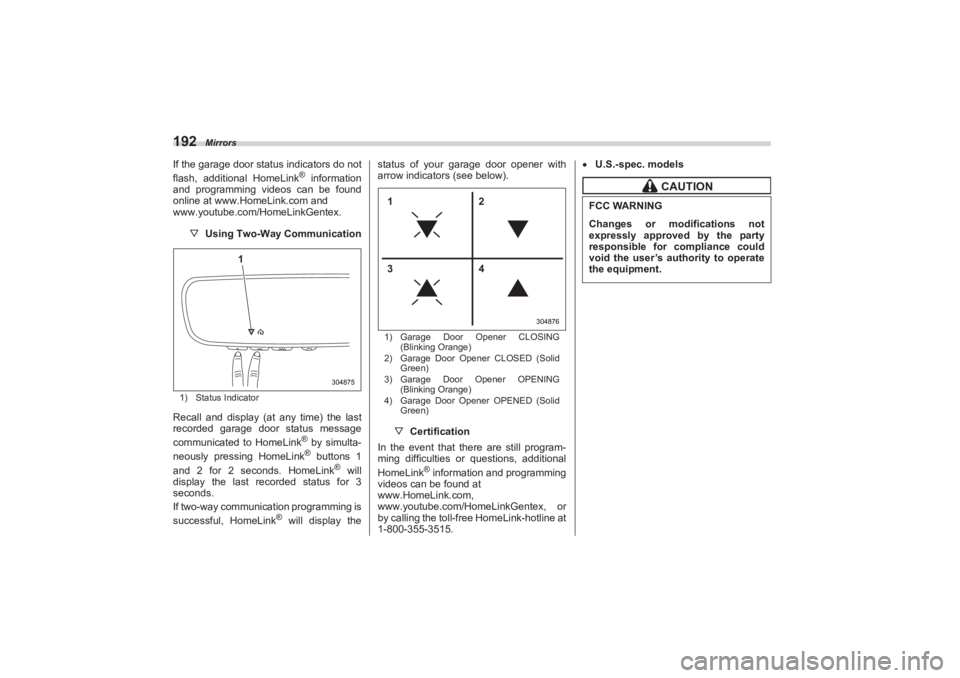
▽ Using Two-Way Communication1) Status IndicatorRecall and display (at any time) the last
recorded garage door status message
communicated to HomeLink
® by simulta-
neously pressing HomeLink® buttons 1
and 2 for 2 seconds. HomeLink
® will
display the last recorded status for 3
seconds.
If two-way communication programming is
successful, HomeLink
® will display the status of your garage door opener with
arrow indicators (see below).
1) Garage Door Opener CLOSING
(Blinking Orange)
2) Garage Door Opener CLOSED (Solid
Green)
3) Garage Door Opener OPENING
(Blinking Orange)
4) Garage Door Opener OPENED (Solid
Green)▽ Certification
In the event that there are still program-
ming difficulties or questions, additional
HomeLink
® information and programming
videos can be found at
www.HomeLink.com,
www.youtube.com/HomeLinkGentex, or
by calling the toll-free HomeLink-hotline at
1-800-355-3515.
U.S.-spec. models
304875
1
304876
12
34
CAUTION
FCC WARNINGChanges or modifications not
expressly approved by the party
responsible for compliance could
void the user’s authority to operate
the equipment.
BRZ_U.book 192 ページ 2022年3月29日 火曜日 午後3時59分
Page 200 of 432
Mirrors
194
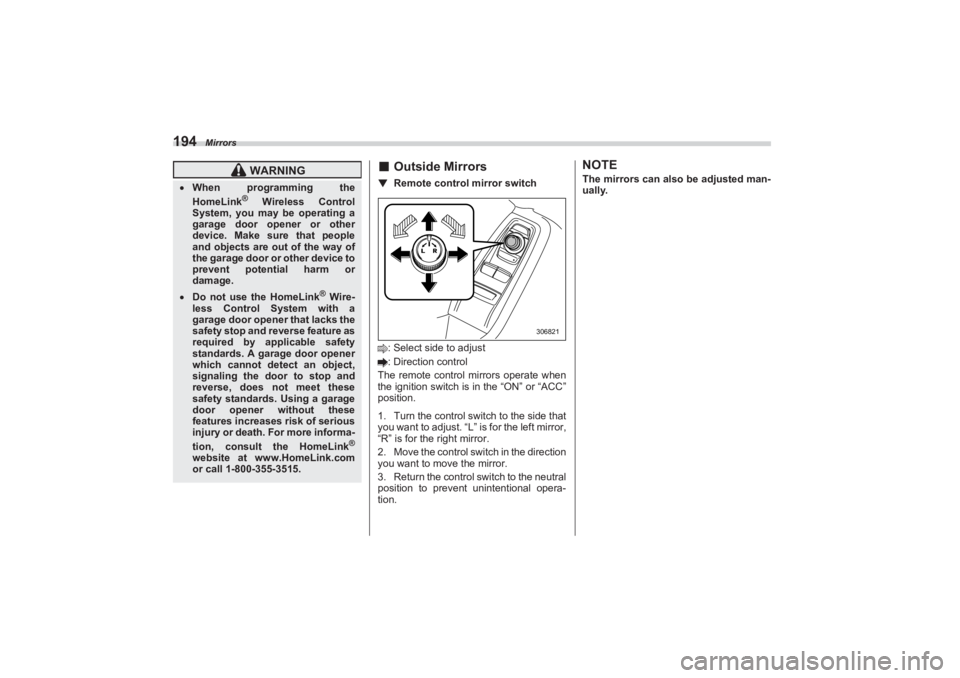
■Outside Mirrors▼ Remote control mirror switch: Select side to adjust
: Direction control
The remote control mirrors operate when
the ignition switch is in the “ON” or “ACC”
position.
1. Turn the control switch to the side that
you want to adjust. “L” is for the left mirror,
“R” is for the right mirror.
2. Move the control swit ch in the direction
you want to move the mirror.
3. Return the control switch to the neutral
position to prevent unintentional opera-
tion.
NOTEThe mirrors can also be adjusted man-
ually.
WARNING
When programming the
HomeLink
® Wireless Control
System, you may be operating a
garage door opener or other
device. Make sure that people
and objects are out of the way of
the garage door or other device to
prevent potential harm or
damage.
Do not use the HomeLink
® Wire-
less Control System with a
garage door opener that lacks the
safety stop and reverse feature as
required by applicable safety
standards. A garage door opener
which cannot detect an object,
signaling the door to stop and
reverse, does not meet these
safety standards. Using a garage
door opener without these
features increases risk of serious
injury or death. For more informa-
tion, consult the HomeLink
®
website at www.HomeLink.com
or call 1-800-355-3515.
306821
BRZ_U.book 194 ページ 2022年3月29日 火曜日 午後3時59分
Page 201 of 432
Tilt/Telescopic Steering Wheel
195
Instruments and Controls3
3-17. Tilt/Telescopic SteeringWheel
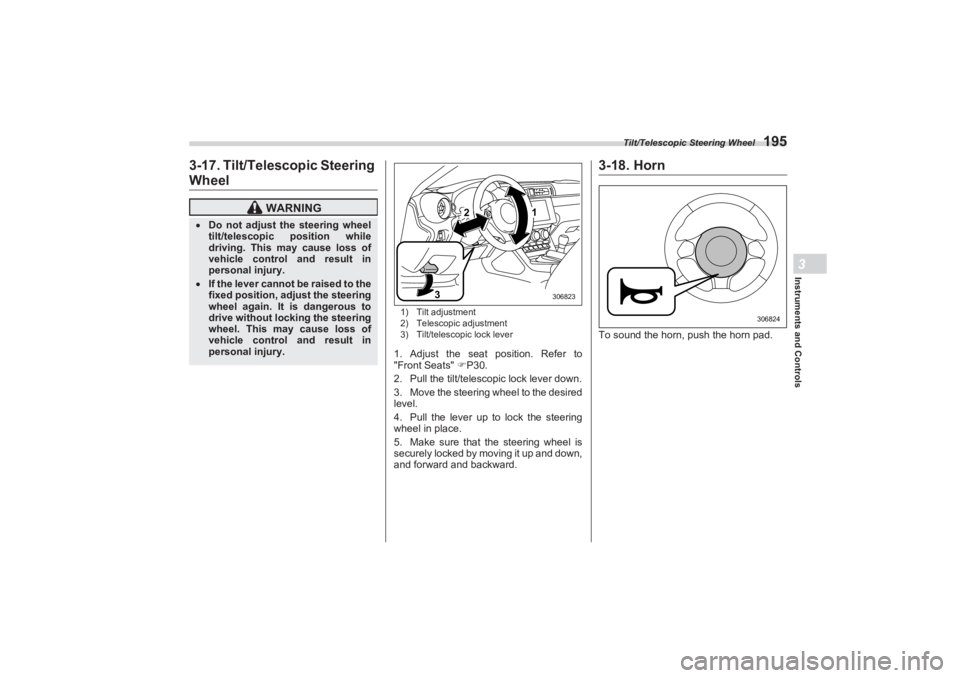
1) Tilt adjustment
2) Telescopic adjustment
3) Tilt/telescopic lock lever1. Adjust the seat position. Refer to
"Front Seats" P30.
2. Pull the tilt/telescopic lock lever down.
3. Move the steering wheel to the desired
level.
4. Pull the lever up to lock the steering
wheel in place.
5. Make sure that the steering wheel is
securely locked by moving it up and down,
and forward and backward.
3-18. HornTo sound the horn, push the horn pad.
WARNING
Do not adjust the steering wheel
tilt/telescopic position while
driving. This may cause loss of
vehicle control and result in
personal injury. If the lever cannot be raised to the
fixed position, adjust the steering
wheel again. It is dangerous to
drive without locking the steering
wheel. This may cause loss of
vehicle control and result in
personal injury.
2
3
1
306823
306824
BRZ_U.book 195 ページ 2022年3月29日 火曜日 午後3時59分
Page 204 of 432
Ventilator Control
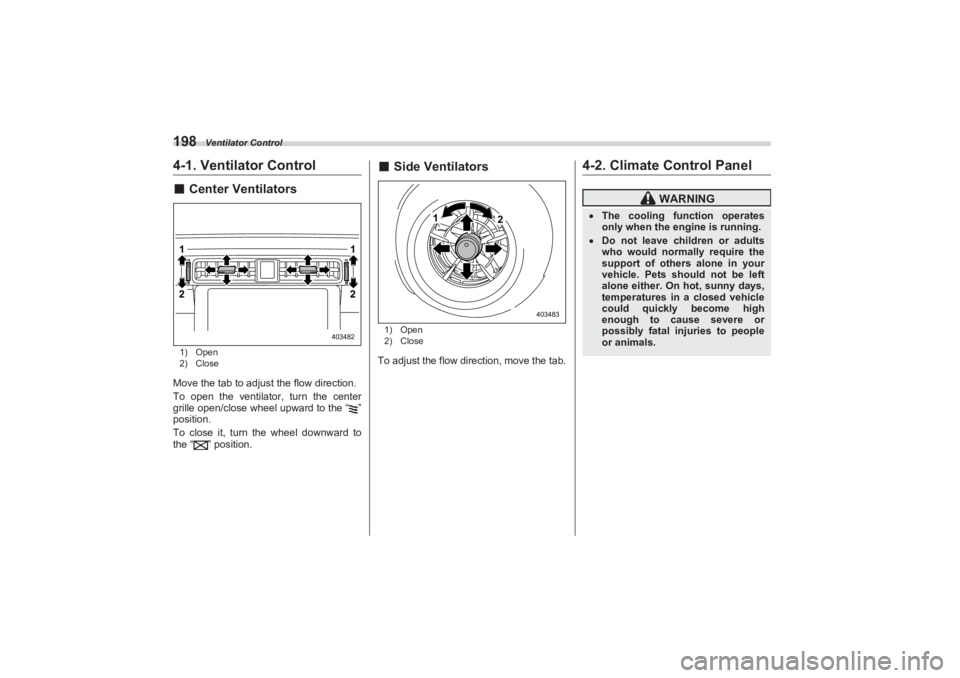
1984-1. Ventilator Control■Center Ventilators1) Open
2) CloseMove the tab to adjust the flow direction.
To open the ventilator, turn the center
grille open/close wheel upward to the “ ”
position.
To close it, turn th e wheel downward to
the “ ” position.
■ Side Ventilators1) Open
2) CloseTo adjust the flow direction, move the tab.
4-2. Climate Control Panel
21
21
403482
2
1
403483
WARNING
The cooling function operates
only when the engine is running. Do not leave children or adults
who would normally require the
support of others alone in your
vehicle. Pets should not be left
alone either. On hot, sunny days,
temperatures in a closed vehicle
could quickly become high
enough to cause severe or
possibly fatal injuries to people
or animals.
BRZ_U.book 198 ページ 2022年3月29日 火曜日 午後3時59分
Page 209 of 432
Defrosting
203
Climate Control4
– CONTINUED –
To turn off the air conditioner, press the
button again. The indicator light will turn
off.NOTEFor efficient defogging or dehumidify-
ing in cold weather, turn on the air
conditioner. However, if the ambient
temperature decreases to approxi-
mately 32°F (0°C), the air conditioner
and dehumidification system may not
work properly.■ Air Inlet SelectionSelect the air inlet by pressing the air inlet
selection button.
Recirculation:
When the indicator light on the air inlet
selection button illuminates, interior air is
recirculated inside the vehicle. Press the
air inlet selection button to the ON position
in the following cases.
- When driving on a dusty road
- When you want cooling perfor-
mance to increase (for example, in
particularly hot weather)
Outside air circulation:
When the indicator light on the air inlet
selection button does not illuminate,
outside air is drawn into the passenger
compartment. Press the air inlet selection button to the OFF position in the following
cases.
- When the road is no longer dusty
- When the interior has cooled to a
comfortable temperature
NOTEWhen outside air circulation is
selected, the system may automati-
cally adjust the air inlet setting
depending on such factors as the tem-
perature setting, the temperature
inside the vehicle, or conditions out-
side the vehicle.■ To Turn Off the Climate
Control SystemTo turn off the clim ate control system,
press the ON/OFF button.
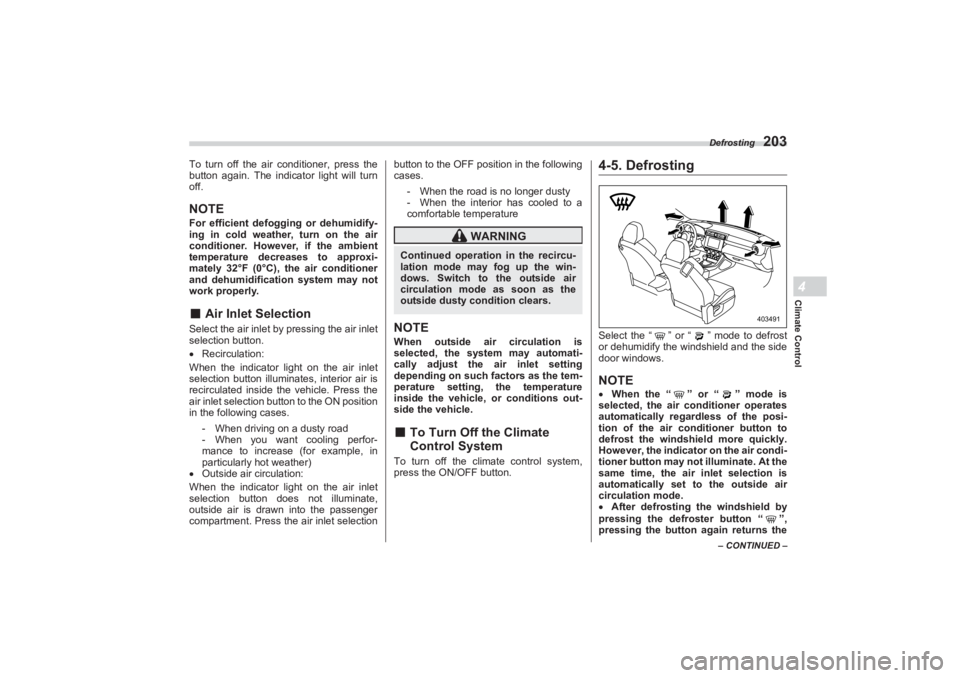
4-5. DefrostingSelect the “ ” or “ ” mode to defrost
or dehumidify the windshield and the side
door windows.NOTE When the “” or “” mode is
selected, the air conditioner operates
automatically regardless of the posi-
tion of the air conditioner button to
defrost the wi ndshield more quickly.
However, the indicator on the air condi-
tioner button may not illuminate. At the
same time, the air inlet selection is
automatically set to the outside air
circulation mode.
After defrosting the windshield by
pressing the defroster button “ ”,
pressing the button again returns the
WARNING
Continued operation in the recircu-
lation mode may fog up the win-
dows. Switch to the outside air
circulation mode as soon as the
outside dusty condition clears.
403491
BRZ_U.book 203 ページ 2022年3月29日 火曜日 午後3時59分
Page 227 of 432

Starting and Operating7
Starting and Operating
7-1. Fuel.......................................................................223
Fuel Requirements .......................................................223
Fuel Filler Lid and Cap .................................................224
7-2. State Emission Testing (U.S. Only) ...................227
7-3. Preparing to Drive ...............................................228
7-4. Starting and Stopping Engine ...........................229
Safety Precautions ............................................ ...........229
Operating Range for Push-Button Start System .......229
General Precautions When St arting Engine ..............229
Starting Engine .............................................................230
Stopping Engine ...........................................................232
When Access Key Fob Does Not Operate
Properly.......................................................................232
Steering Lock ................................................................232
7-5. Manual Transmission .........................................233
Shifting Speeds ............................................................234
Driving Tips ...................................................................235
7-6. Automatic Transmission ....................................235
Select Lever ..... .......................................... ...................236
Adaptive Control...........................................................237
Shift Lock Function ......................................................238
Selection of Manual Mode ...........................................239
Driving Tips ...................................................................240
7-7. Driving Mode Select Switch (If Equipped) ........241
Normal Mode .................................................................241
Sport Mode ....................................................................241
Snow Mode....................................................................241
Driving Mode Select Switch.........................................241
7-8. Active Sound Control .........................................242
7-9. Power Steering ....................................................242
7-10. Braking...............................................................243
Braking Tips ..................................................................243 Brake System ............................................................... 244
Disc Brake Pad Wear Warning Indicators ................. 245
7-11. ABS (Anti-Lock Brake System) ........................245
ABS Self-Check............................................................ 245
ABS Warning Light ...................................................... 245
7-12. Electronic Brake Force Distribution (EBD)
System ...............................................................246
EBD System Malfunctions .......................................... 246
7-13. Vehicle Stability Control (VSC)/TRAC
System ...............................................................247
Vehicle Stability Control (VSC) System ..................... 247
TRAC System ............................................................... 247
Vehicle Stability Control (VSC) System Monitor....... 248
Vehicle Stability Control (VSC) OFF Switch .............. 248
7-14. TRACK Mode .....................................................250
TRACK Mode ................................................................ 250
Selecting TRAC Mode and Ve hicle Stability Control
(VSC) Mode ............................................................... 251
7-15. Tire Pressure Monitoring System (TPMS)
(If Equipped) ......................................................251
Certification for the Transmitter ................................. 253
Certification for the Receiver...................................... 253
TPMS Screen ................................................................ 254
Initializing the Tire Pressure Monitoring System ..... 254
How to Initialize the Tire Pressure Monitoring
System (If Equipped) ................................................. 254
If You Press the Tire Pressure Monitoring Reset
Switch Accidentally................................................... 254
Initialization Procedure ............................................... 254
When Initialization of the Tire Pressure Monitoring System has Failed ..................................................... 255
Registering ID Codes .................................................. 255
BRZ_U.book 221 ページ 2022年3月29日 火曜日 午後3時59分
Page 228 of 432

Starting and Operating
Changing the ID code set ............................................ 255
7-16. Parking Your Vehicle ........................................255
Parking Brake ............................................................... 255
Parking Tips.................................................................. 256
7-17. Hill Start Assist System ....................................257
To Activate/Deactivate the Hill Start Assist
System ........................................................................ 258
Hill Start Assist Indicator Light................................... 259
7-18. Cruise Control (Models without the
EyeSight system) ..............................................260
To Set Cruise Control .................................................. 260
To Temporarily Cancel the Cr uise Control ................ 261
To Turn Off the Cruise Control ................................... 262
To Change the Cruising Speed ................................... 262
Cruise Control Indicator Light .................................... 263
7-19. Rear View Camera .............................................263
How to Use the Rear View Camera ............................. 264
Viewing Range on the Screen ..................................... 265
Help Lines ..................................................................... 266
7-20. BSD/RCTA (If Equipped)...................................268
System Features .......................................................... 268 System Operation......................................................... 270
BSD/RCTA Approach Indi
cator Light/Warning
Buzzer ......................................................................... 271
BSD/RCTA OFF Indicator ............................................ 273
BSD/RCTA Warning Indicator ..................................... 274
To Turn On/Off the BSD/RCTA .................................... 274
Certification for the BSD/RCTA................................... 274
Handling of Radar Sensors ......................................... 276
7-21. Reverse Automatic Braking (RAB) System
(If Equipped) ..................................................... 277
Reverse Automatic Braking (RAB) System
Overview ..................................................................... 278
Operating Conditions................................................... 279
Sonar Audible Alarm .................................................... 282
Automatic Braking Operation ..................................... 284
Canceling the Reverse Au tomatic Braking (RAB)
System Operation ...................................................... 285
Reverse Automatic Braking (RAB) System
ON/OFF Setting .......................................................... 286
RAB Warning Indicator ................................................ 286
Handling of the Sonar Sensors ................................... 286
BRZ_U.book 222 ページ 2022年3月29日 火曜日 午後3時59分