2023 SUBARU BRZ ignition
[x] Cancel search: ignitionPage 255 of 432

Vehicle Stability Control (VSC)/TRAC System
249
Starting and Operating7
– CONTINUED –
▼Disabling the TRAC System
If the vehicle gets stuck in mud, dirt or
snow, the TRAC system may reduce
power from the engine to the wheels.
Pressing the Vehicle Stability Control
(VSC) OFF switch to turn the system off
may make it easier for you to rock the
vehicle in order to free it. In this case, the
brake LSD function remains on. To turn
the TRAC system off, quickly press and
release the button. The TRAC OFF indi-
cator light will come on. Press the button
again to turn the system back on.
Creating adequate driving wheel slip by
deactivating the TRAC system may help
to recover from the loss of traction. Use
the Vehicle Stability Control (VSC) OFF
switch as necessary.
A standing start on a steeply sloping
road with a snowy, gravel-covered, or
otherwise slippery surface
Extrication of the vehicle when its
wheels are stuck in mud or deep snow ▼
Turning Off both Vehicle Stability
Control (VSC) and TRAC Systems
To turn the Vehicle Stability Control (VSC)
systems and TRAC system off, press and
hold the Vehicle Stability Control (VSC)
OFF switch for more than 3 seconds while
the vehicle is stopped. The TRAC OFF
indicator light and the Vehicle Stability
Control (VSC) OFF indicator light will
come on. However, on vehicles with an
automatic transmissi on, the brake LSD
function will remain on. Press the button
again to turn the systems back on. With
the Vehicle Stability Control (VSC) system
and TRAC system deactivated, traction
and stability enhancement offered by
Vehicle Stability Control (VSC) system
and TRAC system is unavailable. There-
fore you should not deactivate the Vehicle Stability Control (VSC) system and TRAC
system except under above-mentioned
situations.
NOTE When the switch has been pressed
to deactivate the Vehicle Stability
Control (VSC) system and TRAC
system, the Vehicle Stability Control
(VSC) system and TRAC system auto-
matically reactivates itself the next
time the ignition swit ch is turned to the
“OFF” position and the engine is
restarted.
If the switch is held down for 30
seconds or longer, the indicator light
turns off, the Vehicle Stability Control
(VSC) system is activated, and the
system ignores any further pressing of
the switch. To make the switch usable
again, turn the ignition switch to the
“OFF” position and restart the engine.
When the switch is pressed to deac-
tivate the Vehicle Stability Control
(VSC) system and TRAC system, the
vehicle’s running performance is
comparable with that of a vehicle that
does not have a Vehicle Stability
Control (VSC) system and TRAC
system. Do not deac tivate the Vehicle
Stability Control (VSC) system and
TRAC system except when absolutely
necessary.
702831
BRZ_U.book 249 ページ 2022年3月29日 火曜日 午後3時59分
Page 257 of 432

Tire Pressure Monitoring System (TPMS) (If Equipped)
251
– CONTINUED –
Starting and Operating7
■Selecting TRAC Mode and Vehicle Stability Control (VSC) ModeModes can be selected to suit your driving conditions as follows:NOTEWhen the ignition switch is turned “OFF” position af ter driving in TRACK mode,
the mode is automa tically deactivated.Driving con-
ditions TRAC modes Vehicle Sta-
bility Control
(VSC) modes Brake LSD
function Indicator lights
Normal roads Normal mode Normal mode Normal mode ―
Rough roads Off Normal mode Normal mode
Sport driving TRACK mode TRACK mode TRACK mode
Off OffTRACK mode
(AT models)
Off (MT mod-
els)
7-15. Tire Pressure Moni -
toring System (TPMS) (If Equipped)Low tire pressure warning lightThe tire pressure monitoring system
provides the driver with a warning
message by sending a signal from a
sensor that is installed in each wheel
when tire pressure is severely low.
The tire pressure monitoring system will
activate only when the vehicle is driven at
speeds above 25 mph (40 km/h). Also,
this system may not react immediately to
a sudden drop in tire pressure (for
example, a blow-out caused by running
over a sharp object).
702780
BRZ_U.book 251 ページ 2022年3月29日 火曜日 午後3時59分
Page 260 of 432
Tire Pressure Monitoring System (TPMS) (If Equipped)
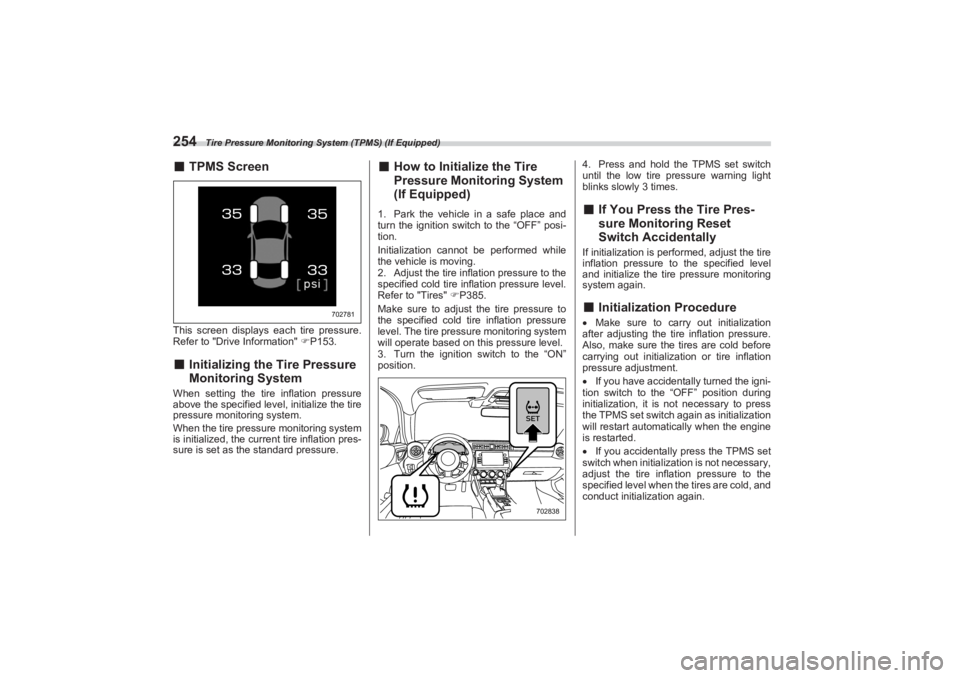
254■TPMS ScreenThis screen displays ea ch tire pressure.
Refer to "Drive Information" P153.■ Initializing the Tire Pressure
Monitoring SystemWhen setting the tire inflation pressure
above the specified level, initialize the tire
pressure monitoring system.
When the tire pressure monitoring system
is initialized, the current tire inflation pres-
sure is set as the standard pressure.
■ How to Initialize the Tire
Pressure Monitoring System
(If Equipped)1. Park the vehicle in a safe place and
turn the ignition switch to the “OFF” posi-
tion.
Initialization cannot be performed while
the vehicle is moving.
2. Adjust the tire infl ation pressure to the
specified cold tire inflation pressure level.
Refer to "Tires" P385.
Make sure to adjust the tire pressure to
the specified cold tire inflation pressure
level. The tire pre ssure monitoring system
will operate based on this pressure level.
3. Turn the ignition switch to the “ON”
position. 4. Press and hold the TPMS set switch
until the low tire pressure warning light
blinks slowly 3 times.
■ If You Press the Tire Pres -
sure Monitoring Reset
Switch AccidentallyIf initialization is perf ormed, adjust the tire
inflation pressure to the specified level
and initialize the tire pressure monitoring
system again.■ Initialization ProcedureMake sure to carry out initialization
after adjusting the tire inflation pressure.
Also, make sure the tires are cold before
carrying out initialization or tire inflation
pressure adjustment.
If you have accidentally turned the igni-
tion switch to the “OFF” position during
initialization, it is not necessary to press
the TPMS set switch again as initialization
will restart automatically when the engine
is restarted.
If you accidentally press the TPMS set
switch when initialization is not necessary,
adjust the tire inflation pressure to the
specified level when the tires are cold, and
conduct initialization again.
702781
702838
BRZ_U.book 254 ページ 2022年3月29日 火曜日 午後3時59分
Page 261 of 432

Parking Your Vehicle
255
Starting and Operating7
– CONTINUED –
■When Initialization of the Tire
Pressure Monitoring System
has FailedInitialization can be completed in a few
minutes. However, in the following case,
the settings have not been recorded and
the system will not o perate properly. If
repeated attempts to record tire inflation
pressure settings ar e unsuccessful, have
the vehicle checked at your SUBARU
dealer.
When operating the TPMS set switch,
low tire pressure warning light does not
blink 3 times.
After carrying out the initialization
procedure, the low tire pressure warning
light blinks for 1 minute then stays on after
driving for 20 minutes.
■ Registering ID CodesEvery tire pressure warning valve and
transmitter has a unique ID code. In addi-
tion to the set of tire pressure monitoring
system sensor ID code s initially registered
to the vehicle, a second set of ID codes
can be registered.
A second set of tire pressure monitoring
system sensor ID codes can be registered
at your SUBARU dealer. When 2 sets of
ID codes have been registered, either ID
code set can be selected.■ Changing the ID code set1. Park the vehicle in a safe place and
turn the ignition swit ch to the “ON” posi-
tion.
2. Press the TPMS set switch 3 times
within 3 seconds.
3. The low tire pressure warning light will
illuminate for 3 seconds and then blink 3
times.
4. The low tire pressure warning light will
blink for 1 minute and then illuminate.
5. When the ID code change has
completed, the tire pressure monitoring
light will turn off.
Check that tire pressures are displayed on
the TPMS screen.
7-16. Parking Your Vehicle■ Parking BrakeTo set the parking brake, depress the
brake pedal firmly and hold it down until
the parking brake lever is fully pulled up.
WARNING
Do not operate the TPMS set switch
without first adjust ing the tire infla-
tion pressure to the specified level.
Otherwise, the low tire pressure
warning light may not come on even
if the tire inflation pressure is low,
or it may come on when the tire
inflation pressure is actually nor-
mal.
WARNING
Never leave unattended children
or pets in the vehicle. They could
accidentally injure themselves or
others through inadvertent oper-
ation of the vehicle. Also, on hot
or sunny days, the temperature in
a closed vehicle could quickly
become high enough to cause
severe or possibly fatal injuries to
people. Do not park the vehicle over flam-
mable materials such as dry
grass, waste paper or rags, as
they may burn easily if they come
near hot engine or exhaust
system parts. Be sure to stop the engine if you
take a nap in the vehicle. If engine
exhaust gas enters the passenger
compartment, occupants in the
vehicle could die from carbon
monoxide (CO) contained in the
exhaust gas.
BRZ_U.book 255 ページ 2022年3月29日 火曜日 午後3時59分
Page 264 of 432
Hill Start Assist System
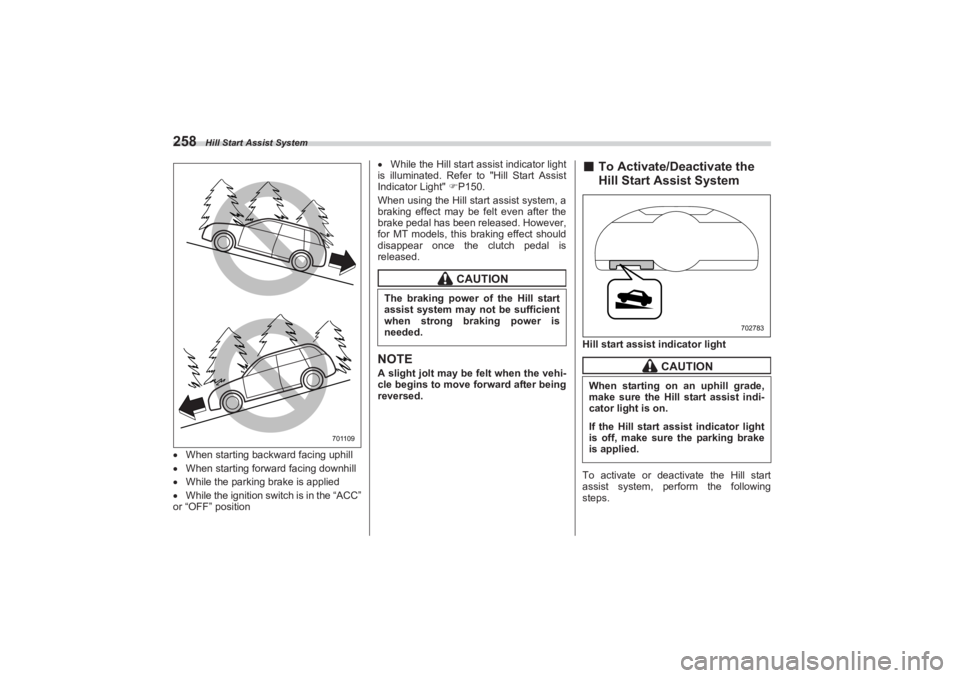
258When starting backward facing uphill
When starting forward facing downhill
While the parking brake is applied
While the ignition switch is in the “ACC”
or “OFF” position
While the Hill start assist indicator light
is illuminated. Refer to "Hill Start Assist
Indicator Light" P150.
When using the Hill start assist system, a
braking effect may be felt even after the
brake pedal has been released. However,
for MT models, this braking effect should
disappear once the clutch pedal is
released.
NOTEA slight jolt may be felt when the vehi-
cle begins to move forward after being
reversed.
■ To Activate/Deactivate the
Hill Start Assist SystemHill start assis t indicator light
To activate or deactivate the Hill start
assist system, perform the following
steps.
701109
CAUTION
The braking power of the Hill start
assist system may not be sufficient
when strong braking power is
needed.
CAUTION
When starting on an uphill grade,
make sure the Hill start assist indi-
cator light is on.If the Hill start assist indicator light
is off, make sure the parking brake
is applied.
702783
BRZ_U.book 258 ページ 2022年3月29日 火曜日 午後3時59分
Page 265 of 432
Hill Start Assist System
259
Starting and Operating7
– CONTINUED –
NOTEIf you make an error when performing
any steps in the following procedure,
place the ignition switch in the “OFF”
position once and then start over
again.▼ To deactivate
1. Park your vehicle in a flat and safe
location and apply the parking brake.
2. Turn the ignition switch to the “OFF”
position.
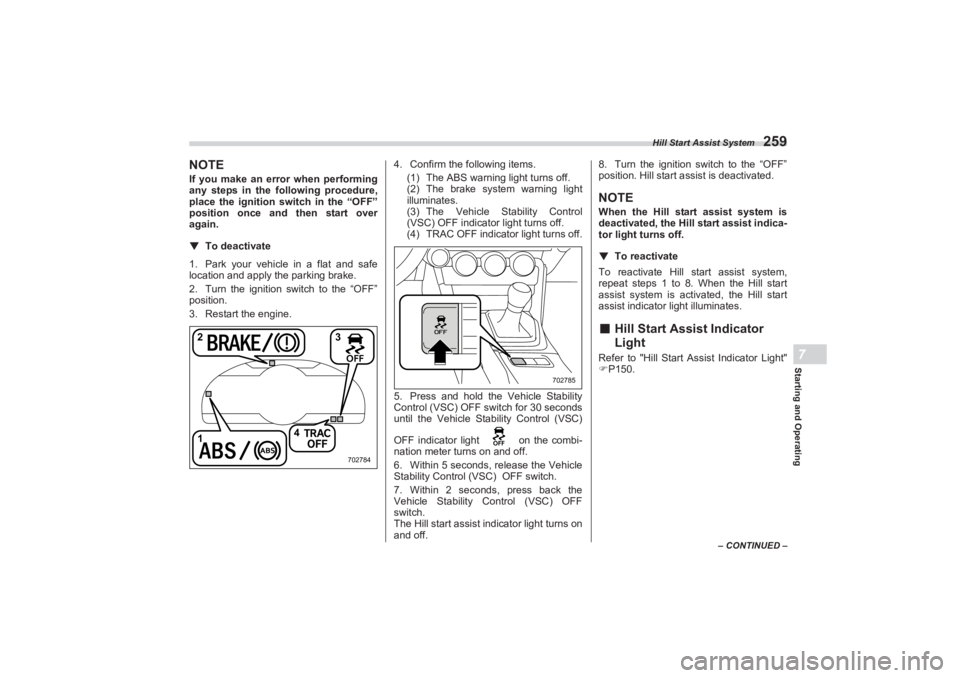
3. Restart the engine. 4. Confirm the following items.
(1) The ABS warning light turns off.
(2) The brake system warning light
illuminates.
(3) The Vehicle Stability Control
(VSC) OFF indicator light turns off.
(4) TRAC OFF indicator light turns off.
5. Press and hold the Vehicle Stability
Control (VSC) OFF switch for 30 seconds
until the Vehicle Stability Control (VSC)
OFF indicator light on the combi-
nation meter turns on and off.
6. Within 5 seconds, release the Vehicle
Stability Control ( VSC) OFF switch.
7. Within 2 seconds, press back the
Vehicle Stability Control (VSC) OFF
switch.
The Hill start assist i ndicator light turns on
and off. 8. Turn the ignition switch to the “OFF”
position. Hill start a ssist is deactivated.
NOTEWhen the Hill start assist system is
deactivated, the Hill start assist indica-
tor light turns off.
▼ To reactivate
To reactivate Hill start assist system,
repeat steps 1 to 8. When the Hill start
assist system is activa ted, the Hill start
assist indicator light illuminates.■ Hill Start Assist Indicator
LightRefer to "Hill Start A ssist Indicator Light"
P150.
1 4
23
702784
702785
BRZ_U.book 259 ページ 2022年3月29日 火曜日 午後3時59分
Page 268 of 432
Cruise Control (Models without the EyeSight system)
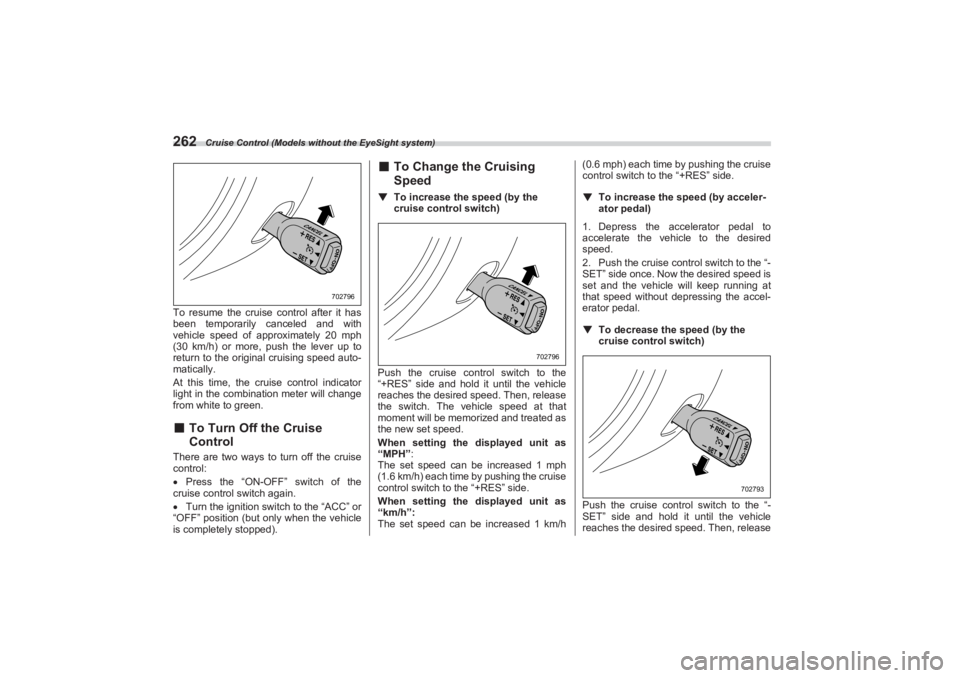
262To resume the cruise control after it has
been temporarily canceled and with
vehicle speed of approximately 20 mph
(30 km/h) or more, pu sh the lever up to
return to the original cruising speed auto-
matically.
At this time, the cruise control indicator
light in the combination meter will change
from white to green.■ To Turn Off the Cruise
ControlThere are two ways to turn off the cruise
control:
Press the “ON-OFF” switch of the
cruise control switch again.
Turn the ignition switch to the “ACC” or
“OFF” position (but only when the vehicle
is completely stopped).
■ To Change the Cruising
Speed▼ To increase the speed (by the
cruise control switch)
Push the cruise cont rol switch to the
“+RES” side and hold it until the vehicle
reaches the desired speed. Then, release
the switch. The vehicle speed at that
moment will be memorized and treated as
the new set speed.
When setting the displayed unit as
“MPH”:
The set speed can be increased 1 mph
(1.6 km/h) each time by pushing the cruise
control switch to the “+RES” side.
When setting the displayed unit as
“km/h”:
The set speed can be increased 1 km/h (0.6 mph) each time by pushing the cruise
control switch to the “+RES” side.
▼ To increase the speed (by acceler -
ator pedal)
1. Depress the accelerator pedal to
accelerate the vehicle to the desired
speed.
2. Push the cruise control switch to the “-
SET” side once. Now the desired speed is
set and the vehicle will keep running at
that speed without depressing the accel-
erator pedal.
▼ To decrease the speed (by the
cruise control switch)
Push the cruise cont rol switch to the “-
SET” side and hold it until the vehicle
reaches the desired speed. Then, release
702796
702796
702793
BRZ_U.book 262 ページ 2022年3月29日 火曜日 午後3時59分
Page 269 of 432
Rear View Camera
263
Starting and Operating7
– CONTINUED –
the switch. The vehicle speed at that
moment will be memorized and treated as
the new set speed.
When setting the displayed unit as
“MPH”:
The set speed can be decreased 1 mph
(1.6 km/h) each time by pushing the cruise
control switch to the “-SET” side.
When setting the displayed unit as
“km/h”:
The set speed can be decreased 1 km/h
(0.6 mph) each time by pushing the cruise
control switch to the “-SET” side.▼ To decrease the speed (by brake
pedal)
1. Depress the brake pedal to release
cruise control temporarily.
2. When the speed decreases to the
desired speed, push the cruise control
switch to the “-SET” side once. Now the
desired speed is set and the vehicle will
keep running at that speed without
depressing the accelerator pedal.■ Cruise Control Indicator
LightRefer to "Combination Meter Settings"
P130.
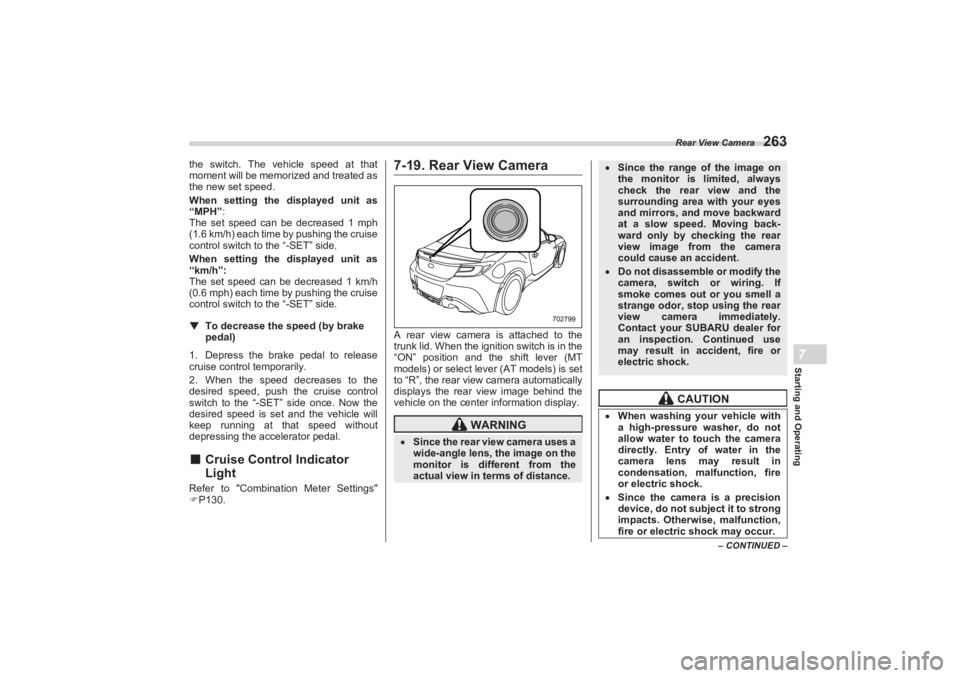
7-19. Rear View CameraA rear view camera is attached to the
trunk lid. When the ignition switch is in the
“ON” position and the shift lever (MT
models) or select lever (AT models) is set
to “R”, the rear view camera automatically
displays the rear view image behind the
vehicle on the center information display.
WARNING
Since the rear view camera uses a
wide-angle lens, the image on the
monitor is diffe rent from the
actual view in terms of distance.
702799
Since the range of the image on
the monitor is limited, always
check the rear view and the
surrounding area with your eyes
and mirrors, and move backward
at a slow speed. Moving back-
ward only by checking the rear
view image from the camera
could cause an accident. Do not disassemble or modify the
camera, switch or wiring. If
smoke comes out or you smell a
strange odor, stop using the rear
view camera immediately.
Contact your SUBARU dealer for
an inspection. Continued use
may result in accident, fire or
electric shock.
CAUTION
When washing your vehicle with
a high-pressure washer, do not
allow water to touch the camera
directly. Entry of water in the
camera lens may result in
condensation, malfunction, fire
or electric shock. Since the camera is a precision
device, do not subject it to strong
impacts. Otherwise, malfunction,
fire or electric shock may occur.
BRZ_U.book 263 ページ 2022年3月29日 火曜日 午後3時59分