2023 PEUGEOT EXPERT ESP
[x] Cancel search: ESPPage 63 of 348
61
Ease of use and comfort
3
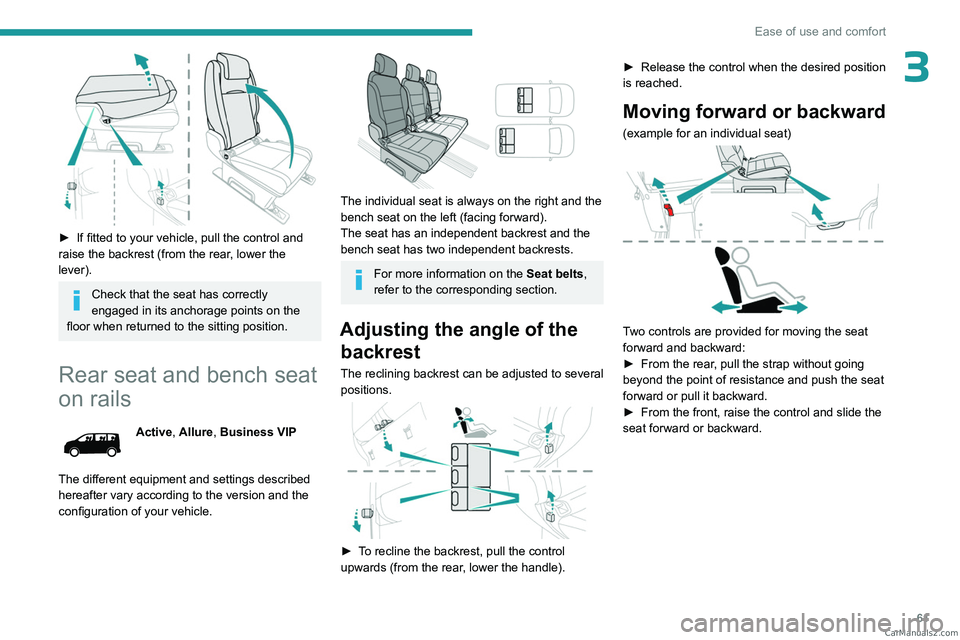
► If fitted to your vehicle, pull the control and
raise the backrest (from the rear , lower the
lever).
Check that the seat has correctly
engaged in its anchorage points on the
floor when returned to the sitting position.
Rear seat and bench seat
on rails
Active, Allure, Business VIP
The different equipment and settings described
hereafter vary according to the version and the
configuration of your vehicle.
The individual seat is always on the right and the
bench seat on the left (facing forward).
The seat has an independent backrest and the
bench seat has two independent backrests.
For more information on the Seat belts,
refer to the corresponding section.
Adjusting the angle of the backrest
The reclining backrest can be adjusted to several
positions.
► To recline the backrest, pull the control
upwards (from the rear, lower the handle). ►
Release the control when the desired position
is reached.
Moving forward or backward
(example for an individual seat)
Two controls are provided for moving the seat
forward and backward:
►
From the rear
, pull the strap without going
beyond the point of resistance and push the seat
forward or pull it backward.
►
From the front, raise the control and slide the
seat forward or backward. CarM an uals 2 .c o m
Page 65 of 348
63
Ease of use and comfort
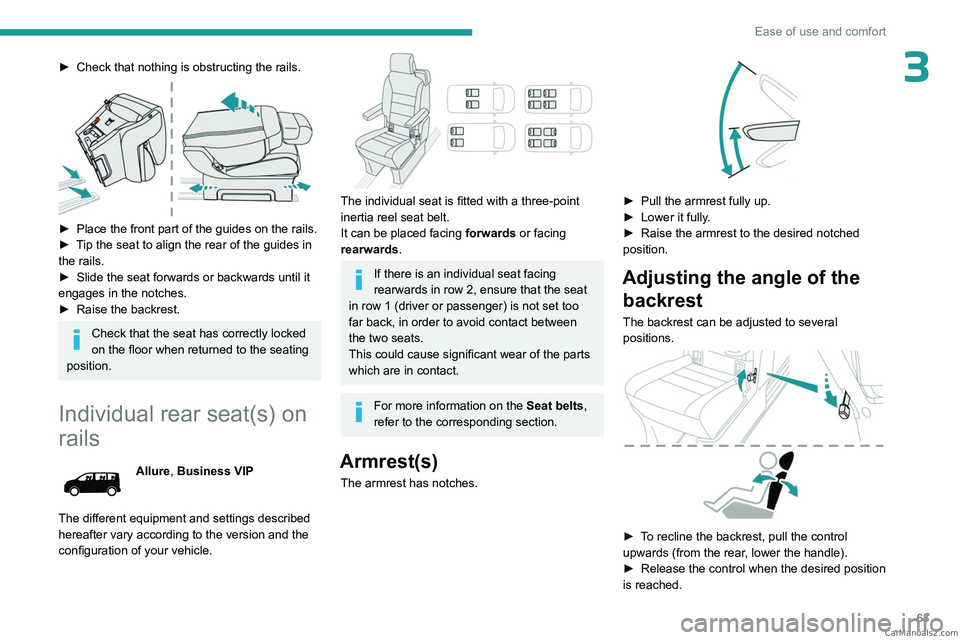
3► Check that nothing is obstructing the rails.
► Place the front part of the guides on the rails.
► T ip the seat to align the rear of the guides in
the rails.
►
Slide the seat forwards or backwards until it
engages in the notches.
►
Raise the backrest.
Check that the seat has correctly locked
on the floor when returned to the seating
position.
Individual rear seat(s) on
rails
Allure, Business VIP
The different equipment and settings described
hereafter vary according to the version and the
configuration of your vehicle.
The individual seat is fitted with a three-point
inertia reel seat belt.
It can be placed facing forwards or facing
rearwards .
If there is an individual seat facing
rearwards in row 2, ensure that the seat
in row 1 (driver or passenger) is not set too
far back, in order to avoid contact between
the two seats.
This could cause significant wear of the parts
which are in contact.
For more information on the Seat belts,
refer to the corresponding section.
Armrest(s)
The armrest has notches.
► Pull the armrest fully up.
► Lower it fully .
►
Raise the armrest to the desired notched
position.
Adjusting the angle of the backrest
The backrest can be adjusted to several
positions.
► To recline the backrest, pull the control
upwards (from the rear, lower the handle).
►
Release the control when the desired position
is reached. CarM an uals 2 .c o m
Page 67 of 348
65
Ease of use and comfort
3Refitting
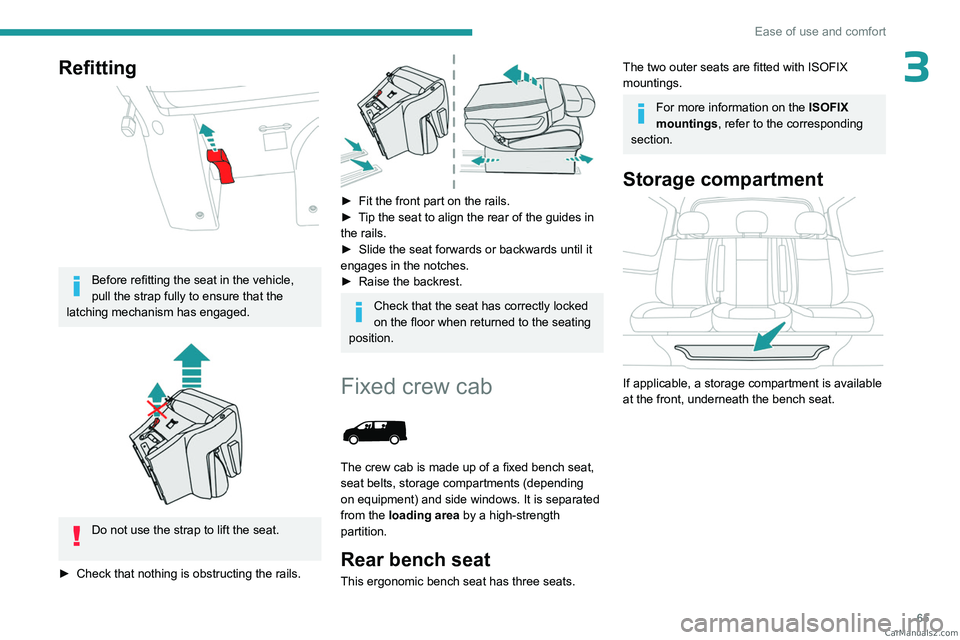
Before refitting the seat in the vehicle,
pull the strap fully to ensure that the
latching mechanism has engaged.
Do not use the strap to lift the seat.
►
Check that nothing is obstructing the rails.
► Fit the front part on the rails.
► T ip the seat to align the rear of the guides in
the rails.
►
Slide the seat forwards or backwards until it
engages in the notches.
►
Raise the backrest.
Check that the seat has correctly locked
on the floor when returned to the seating
position.
Fixed crew cab
The crew cab is made up of a fixed bench seat,
seat belts, storage compartments (depending
on equipment) and side windows. It is separated
from the loading area by a high-strength
partition.
Rear bench seat
This ergonomic bench seat has three seats.
The two outer seats are fitted with ISOFIX
mountings.
For more information on the ISOFIX
mountings , refer to the corresponding
section.
Storage compartment
If applicable, a storage compartment is available
at the front, underneath the bench seat. CarM an uals 2 .c o m
Page 71 of 348
69
Ease of use and comfort
3Any liquid which could spill risks causing an electrical short circuit and therefore a
potential fire.
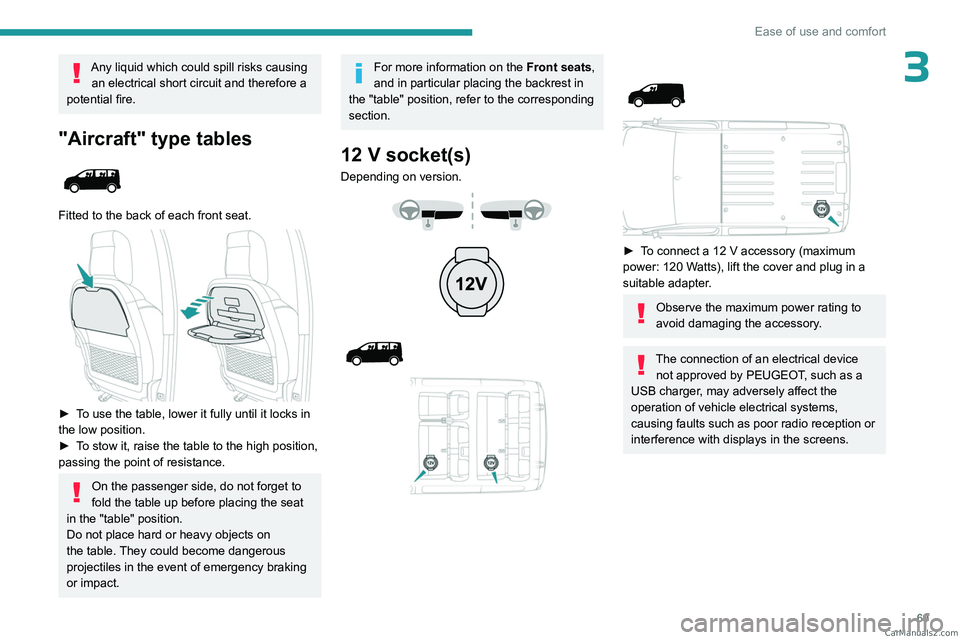
"Aircraft" type tables
Fitted to the back of each front seat.
► To use the table, lower it fully until it locks in
the low position.
►
T
o stow it, raise the table to the high position,
passing the point of resistance.
On the passenger side, do not forget to
fold the table up before placing the seat
in the "table" position.
Do not place hard or heavy objects on
the table. They could become dangerous
projectiles in the event of emergency braking
or impact.
For more information on the Front seats,
and in particular placing the backrest in
the "table" position, refer to the corresponding
section.
12 V socket(s)
Depending on version.
► To connect a 12 V accessory (maximum
power: 120 Watts), lift the cover and plug in a
suitable adapter.
Observe the maximum power rating to
avoid damaging the accessory.
The connection of an electrical device not approved by PEUGEOT, such as a
USB charger, may adversely affect the
operation of vehicle electrical systems,
causing faults such as poor radio reception or
interference with displays in the screens. CarM an uals 2 .c o m
Page 74 of 348

72
Ease of use and comfort
Recommendations on
loading
The weight of the load must comply with the Gross Train Weight (GTW).
For more information on Engine technical
data and towed loads , refer to the
corresponding section.
If you are using a carrying system (roof
bars/roof rack), comply with the
maximum loads associated with this system.
For more information on Roof bars/Roof
rack , refer to the corresponding section.
Make sure that the size, shape and
volume of the loads carried are
compatible with the highway code and safety
regulations and do not impair the driver’s field
of vision.
The load must be evenly distributed in the loading area so as not to interfere
with driving the vehicle.
Place the load close to the side wall panels,
or push it against the side wall panels
between the wheel arches.
However, it is recommended that heavy
objects are placed as close to the cab as
possible as a precaution in case of sharp
braking.
Firmly secure all parts of the load using
the stowing rings on the floor of the
loading area.
For more information on the Interior fittings
and in particular on the stowing rings, refer to
the corresponding section.
To avoid the risk of injury or accident, the load must be made stable so that it
cannot slide, tip over, fall or be projected. To
do this, use only retaining straps that conform
to current standards (DIN, for example).
For more information on putting straps in
place, refer to the manufacturer’s user guide.
To prevent the load from sliding, there must
not be any empty spaces between the load
items and the vehicle wall panels.
As well as the straps, optimise the stability
of the load with stable handling equipment
(wedges, rigid blocks of wood or padding).
When washing your vehicle, never clean
the inside directly using a water jet.
Seating area fittings
High load retaining net
This allows the use of the entire loading capacity,
up to the roof:
–
behind the front seats in row 1, when the rear
seats (and bench seats) in rows 2 and 3 are
folded or removed,
–
behind the rear seats (and bench seats) in row
2, when the rear seats (and bench seats) in row
3 are folded or removed.
Upper fixings
► Unclip the anchorage cover in the roof on
each side.
Lower fixings (behind row 1)
If your vehicle has fixed one-piece bench seats
or seats and bench seats:
CarM an uals 2 .c o m
Page 75 of 348
73
Ease of use and comfort
3
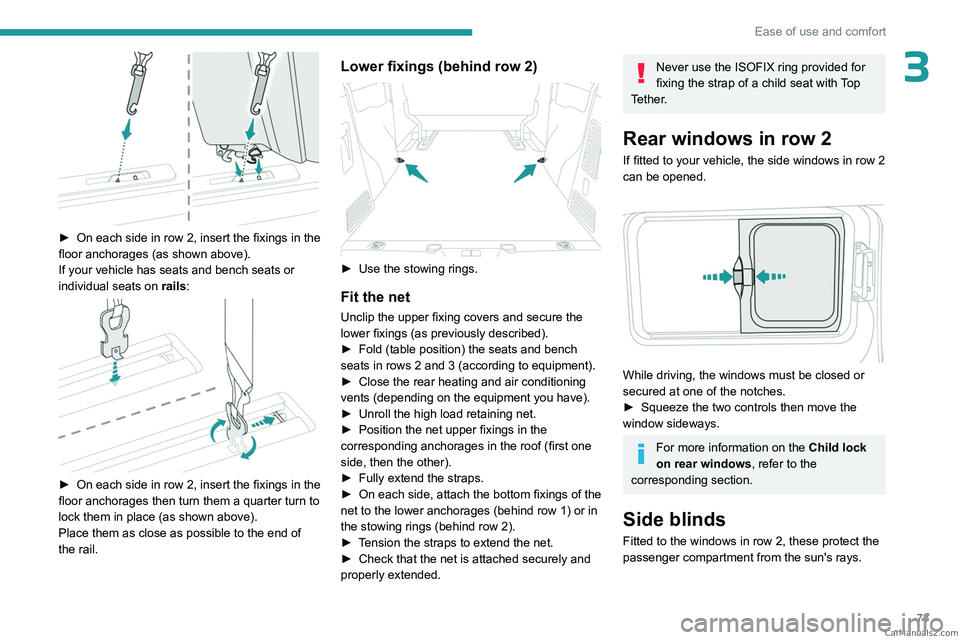
► On each side in row 2, insert the fixings in the
floor anchorages (as shown above).
If your vehicle has seats and bench seats or
individual seats on rails:
► On each side in row 2, insert the fixings in the
floor anchorages then turn them a quarter turn to
lock them in place (as shown above).
Place them as close as possible to the end of
the rail.
Lower fixings (behind row 2)
► Use the stowing rings.
Fit the net
Unclip the upper fixing covers and secure the
lower fixings (as previously described).
►
Fold (table position) the seats and bench
seats in rows 2 and 3 (according to equipment).
►
Close the rear heating and air conditioning
vents (depending on the equipment you have).
►
Unroll the high load retaining net.
►
Position the net upper fixings in the
corresponding anchorages in the roof (first one
side, then the other).
►
Fully extend the straps.
►
On each side, attach the bottom fixings of the
net to the lower anchorages (behind row 1) or in
the stowing rings (behind row 2).
►
T
ension the straps to extend the net.
►
Check that the net is attached securely and
properly extended.
Never use the ISOFIX ring provided for
fixing the strap of a child seat with Top
Tether.
Rear windows in row 2
If fitted to your vehicle, the side windows in row 2
can be opened.
While driving, the windows must be closed or
secured at one of the notches.
►
Squeeze the two controls then move the
window sideways.
For more information on the Child lock
on rear windows , refer to the
corresponding section.
Side blinds
Fitted to the windows in row 2, these protect the
passenger compartment from the sun's rays.
CarM an uals 2 .c o m
Page 80 of 348

78
Ease of use and comfort
When towing a large load on a steep gradient
in high temperatures, switching off the air
conditioning increases the available engine
power, enhancing the towing capacity.
Avoid driving for too long with the ventilation off or with prolonged operation
of interior air recirculation. Risk of misting and
deterioration of the air quality!
If the interior temperature is very high
after the vehicle has stood for a long
time in the sunshine, air the passenger
compartment for a few moments.
Put the air flow control at a setting high
enough to quickly change the air in the
passenger compartment.
Condensation created by the air
conditioning results in a discharge of
water underneath the vehicle. This is perfectly
normal.
Servicing the ventilation and air
conditioning system
►
Ensure that the passenger compartment
filter is in good condition and have the filter
elements replaced regularly
.
We recommend using a composite passenger
compartment filter. Its specific active additive
helps protect against polluting gases and bad
smells.
► To ensure correct operation of the
air conditioning system, have it checked
according to the recommendations in the
Manufacturer’s service schedule.
Contains R134A fluorinated
greenhouse gases
Depending on version and country of sale, the
air conditioning system may contain R134A
fluorinated greenhouse gases. Gas capacity
0.5
kg (+/- 0.025 kg), GWP index 1430 (CO
2 equivalent: 0.715 t).
Stop & Start
The heating and air conditioning systems
only work when the engine is running.
Temporarily deactivate the Stop & Start
system to maintain a comfortable temperature
in the passenger compartment.
For more information on Stop & Start, refer
to the corresponding section.
ECO driving mode
Selecting this mode reduces electrical
energy consumption, but restricts the
performance of the heating and air
conditioning systems, although it does not
deactivate them.
Heating
Manual air conditioning
The air conditioning system only operates with the engine running.
1. Temperature.
2. Air flow.
3. Air distribution.
4. Interior air recirculation.
5. Air conditioning on/off.
Air flow
► Turn the thumbwheel 2 to obtain a
comfortable air flow.
If you set the air flow control to the
minimum position (off), the temperature
in the vehicle will no longer be controlled. A
slight air flow can still be felt however,
resulting from the forward movement of the
vehicle. CarM an uals 2 .c o m
Page 82 of 348
80
Ease of use and comfort
Temperature is no longer controlled. A slight air
flow can still be felt, however, resulting from the
forward movement of the vehicle.
►
Press button
2 "+" to switch the system on
again.
Temperature
The driver and front passenger can each set the
temperature to suit their preferences.
The value shown on the display is a level
of comfort, not a temperature in Celsius or
Fahrenheit.
►
Push button
1 down to decrease the value or
up to increase it.
A setting of around 21 provides optimum comfort. Depending on your
requirements, a setting between 18 and 24 is
normal.
In addition, we recommend avoiding left/right
setting differences of more than 3.
On entering the vehicle, if the interior
temperature is significantly colder or
warmer than the comfort value setting, there
is no need to alter the value displayed in
order to reach the required level of comfort.
The system compensates automatically and
corrects the temperature difference as quickly
as possible.
For maximum cooling or heating of the
passenger compartment, it is possible to
exceed the minimum value 14 or the
maximum value 28.
►
Push button
1 down until "LO" is
displayed or up until "HI" is displayed.
"Mono" function
The comfort setting for the passenger's side
can be indexed to the driver's comfort setting
(mono-zone).
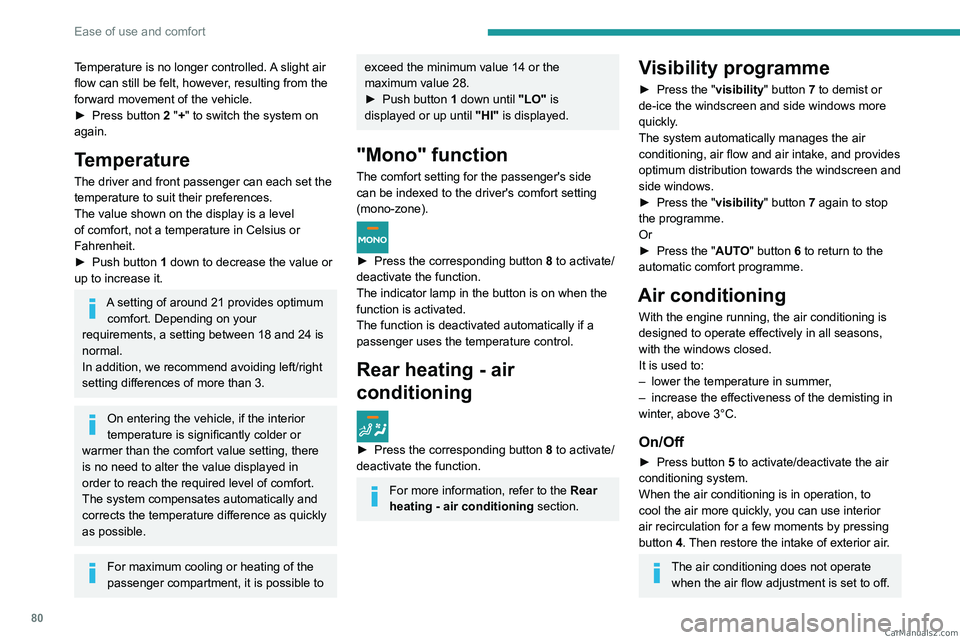
► Press the corresponding button 8 to activate/
deactivate the function.
The indicator lamp in the button is on when the
function is activated.
The function is deactivated automatically if a
passenger uses the temperature control.
Rear heating - air
conditioning
► Press the corresponding button 8 to activate/
deactivate the function.
For more information, refer to the Rear
heating - air conditioning section.
Visibility programme
► Press the "visibility" button 7 to demist or
de-ice the windscreen and side windows more
quickly.
The system automatically manages the air
conditioning, air flow and air intake, and provides
optimum distribution towards the windscreen and
side windows.
►
Press the "
visibility" button 7 again to stop
the programme.
Or
►
Press the "
AUTO" button 6 to return to the
automatic comfort programme.
Air conditioning
With the engine running, the air conditioning is
designed to operate effectively in all seasons,
with the windows closed.
It is used to:
–
lower the temperature in summer
,
–
increase the effectiveness of the demisting in
winter
, above 3°C.
On/Off
► Press button 5 to activate/deactivate the air
conditioning system.
When the air conditioning is in operation, to
cool the air more quickly, you can use interior
air recirculation for a few moments by pressing
button
4. Then restore the intake of exterior air.
The air conditioning does not operate when the air flow adjustment is set to off. CarM an uals 2 .c o m