2023 PEUGEOT EXPERT check engine
[x] Cancel search: check enginePage 139 of 348

137
Driving
6► Keep your foot on the brake pedal until the
READY indicator lamp comes on and an audible
signal is emitted, indicating that the vehicle is
ready to drive.
►
With your foot on the brake, select mode
D
or R.
►
Release the brake pedal, then accelerate.
On starting, the instrument panel lights up
and the power indicator needle performs one
sweep then moves to the "neutral" position.
The
steering column automatically unlocks (you may
hear a sound and feel the steering wheel move).
Switching off
► If using a conventional or remote control
key , turn the key fully to position 1 (Stop).
►
If using Keyless Entry and Start, press the
"
START/STOP" button.
Before exiting the vehicle, check that:
–
The drive selector is in mode P
.
–
The READY indicator lamp is off.
The drive selector moves automatically
to mode P when the motor is switched off
or when the driver's door is opened.
If the driver's door is opened while the
required conditions for switching off are
not met, an audible signal is emitted,
accompanied by the display of a warning
message.
Special case with Keyless
Entry and Start
Switching on the ignition without
starting the engine
With the "Keyless Entry and Start"
electronic key inside the vehicle, pressing
the "START/STOP" button, without depressing
any of the pedals , allows the ignition to be
switched on.
►
Press this button again to switch off the
ignition and allow the vehicle to be locked.
Back-up starting
A back-up reader is fitted to the steering column,
to enable the engine to be started if the system
fails to detect the key in the recognition zone, or
if the battery in the electronic key is flat.
► Place and hold the remote control against the
back-up reader .
►
W
ith a manual gearbox, place the gear lever
in neutral, then fully depress the clutch pedal.
►
W
ith an automatic gearbox or a drive
selector, select mode
P, then depress the brake
pedal.
►
Press the "
START/STOP" button. The engine starts.
Remote control not recognised
If the remote control is no longer in the
recognition zone, a message appears on the
instrument panel when closing a door or trying to
switch off the engine.
►
Press the "
START/STOP" button for about
3 seconds to confirm switching off the engine,
then contact a PEUGEOT dealer or a qualified
workshop.
Forced switch-off (also called
Back-up switch-off)
In case of emergency only, the engine can be
switched off without conditions (even when
driving).
►
T
o do this, press and hold the " START/
STOP" button for about 5 seconds.
In this case, the steering column locks as soon
as the vehicle stops.
"Key off" mode
"Key off" mode allows you to lock the vehicle
while leaving the engine running without the
key or Keyless Entry and Start being inside the
vehicle.
This mode allows electrical devices to continue
operating to ensure thermal comfort, vehicle
security and operation of the vehicle systems
needed for the task. CarM an uals 2 .c o m
Page 141 of 348
139
Driving
6In the event of a battery failure, the
electric parking brake will not operate.
As a safety measure, with a manual gearbox,
if the parking brake is not applied, immobilise
the vehicle by engaging a gear.
As a safety measure, with an automatic
gearbox or drive selector, if the parking brake
is not applied, immobilise the vehicle by
placing the supplied chock against one of the
wheels.
Contact a PEUGEOT dealer or a qualified
workshop.
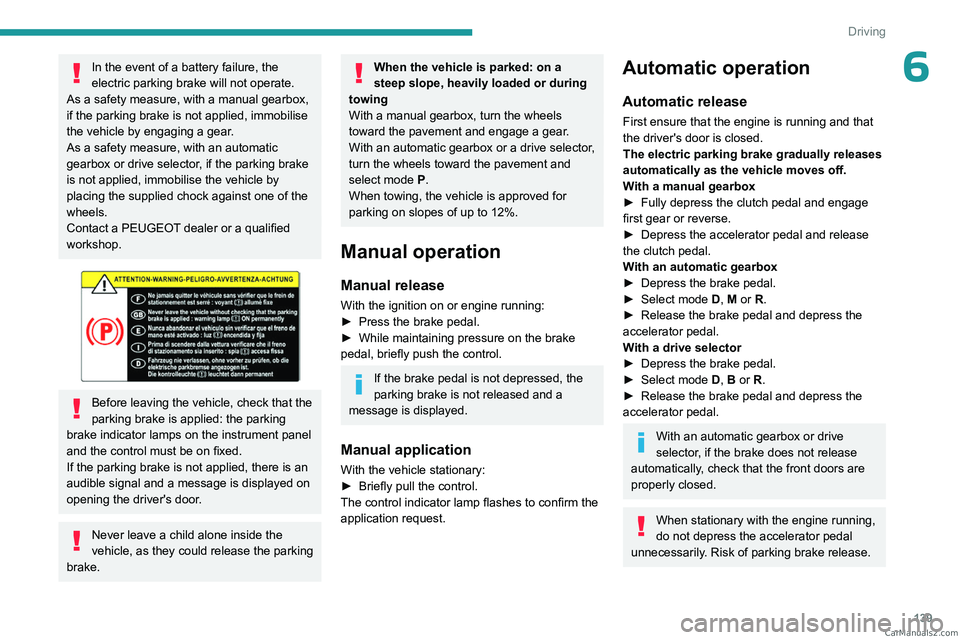
Before leaving the vehicle, check that the
parking brake is applied: the parking
brake indicator lamps on the instrument panel
and the control must be on fixed.
If the parking brake is not applied, there is an
audible signal and a message is displayed on
opening the driver's door.
Never leave a child alone inside the
vehicle, as they could release the parking
brake.
When the vehicle is parked: on a
steep slope, heavily loaded or during
towing
With a manual gearbox, turn the wheels
toward the pavement and engage a gear.
With an automatic gearbox or a drive selector,
turn the wheels toward the pavement and
select mode
P.
When towing, the vehicle is approved for
parking on slopes of up to 12%.
Manual operation
Manual release
With the ignition on or engine running:
► Press the brake pedal.
►
While maintaining pressure on the brake
pedal, briefly push the control.
If the brake pedal is not depressed, the
parking brake is not released and a
message is displayed.
Manual application
With the vehicle stationary:
► Briefly pull the control.
The control indicator lamp flashes to confirm the
application request.
Automatic operation
Automatic release
First ensure that the engine is running and that
the driver's door is closed.
The electric parking brake gradually releases
automatically as the vehicle moves off.
With a manual gearbox
►
Fully depress the clutch pedal and engage
first gear or reverse.
►
Depress the accelerator pedal and release
the clutch pedal.
W
ith an automatic gearbox
►
Depress the brake pedal.
►
Select mode
D, M or R.
►
Release the brake pedal and depress the
accelerator pedal.
W
ith a drive selector
►
Depress the brake pedal.
►
Select mode
D, B or R.
►
Release the brake pedal and depress the
accelerator pedal.
With an automatic gearbox or drive
selector, if the brake does not release
automatically, check that the front doors are
properly closed.
When stationary with the engine running,
do not depress the accelerator pedal
unnecessarily. Risk of parking brake release. CarM an uals 2 .c o m
Page 143 of 348

141
Driving
6Hill start assist
This system keeps the vehicle briefly stationary
(for approximately 2 seconds) when making a hill
start, while you transfer your foot from the brake
pedal to the accelerator pedal.
The system is only active when:
–
The vehicle is completely stationary
, with your
foot on the brake pedal.
–
Certain slope conditions are met.
–
The driver
’s door is closed.
Do not leave the vehicle while it is being
held temporarily by hill start assist.
If someone needs to get out of the vehicle
with the engine running, apply the parking
brake manually. Then check that the parking
brake indicator lamp and the P indicator lamp
in the electric parking brake control are on
fixed.
The hill start assist function cannot be deactivated. However, using the parking
brake to immobilise the vehicle interrupts its
operation.
If your vehicle has an automatic gearbox
and you have to move off on a steep
slope (uphill or downhill) with a loaded
vehicle, press the brake pedal, select
position D, release the parking brake then
release the brake pedal.
Operation
Facing uphill, with the vehicle stationary,
the vehicle is held for a short time when the
driver releases the brake pedal:
–
If first gear or neutral is engaged on a manual
gearbox.
–
If mode
D or M is selected on an automatic
gearbox.
–
If mode
D or B is selected on the drive
selector.
Facing downhill, with the vehicle stationary
and reverse gear engaged, the vehicle is held
for a short time when the driver releases the
brake pedal.
Malfunction
If the event of a malfunction, these
warning lamps light up on the
instrument panel, accompanied by the display of
a message.
Have it checked by a PEUGEOT dealer or a
qualified workshop.
6-speed manual gearbox
Engaging 5th or 6th gear
► Move the gear selector fully to the right to
engage 5th or 6th gear.
Failure to follow this instruction could
cause permanent damage to the gearbox
(inadvertent engagement of 3
rd or 4th gear).
Engaging reverse gear
► Raise the ring under the knob and move the
gear lever to the left, then forwards. CarM an uals 2 .c o m
Page 147 of 348

145
Driving
6Invalid value during manual
operation
This symbol is displayed if a gear is not engaged correctly (gear selector between
two positions).
►
Place the selector "correctly" at a position.
Switching off the vehicle
Before switching off the engine, select position
P then apply the parking brake to immobilise
the vehicle, unless this is set to automatic mode
(with electric parking brake).
Check that mode
P has been engaged and that
the electric parking brake has been applied
automatically; if not, apply it manually.
The corresponding indicator lamps in the
selector and the electric parking brake control
lever must be on, as well as those on the
instrument panel.
A point of resistance may be noticed when moving to position P.
If the selector is not in position P, when the
driver's door is opened or approximately 45
seconds after the ignition is switched off,
an audible signal sounds and a message
appears.
►
Return the drive selector to position P
;
the audible signal stops and the message
disappears.
When positioned on a steep slope with a
loaded vehicle, depress the brake
pedal, select position P, apply the parking
brake, unless it is set to automatic mode (with
electric parking brake), then release the brake
pedal.
In all circumstances, ensure that the
selector is in position P before leaving
your vehicle.
Malfunction
When the ignition is on, a message appears on
the instrument panel to indicate a fault with the
gearbox.
In this case, the gearbox goes into back-up
mode and is locked in 3
rd gear. You may feel a
significant jolt (without risk to the gearbox) when
changing from
P
to R and from N to R.
Do not exceed 62 mph (100
km/h), local speed
restrictions permitting.
Have it checked by a PEUGEOT dealer or a
qualified workshop.
There is a risk of damaging the gearbox: – If the accelerator and brake pedals are
depressed simultaneously
.
–
In the event of a battery failure, forcing the
selector from position P
to another position.
If your vehicle has an automatic gearbox,
do not try to start the engine by pushing
the vehicle.
Drive selector (Electric)
The drive selector is a pulse selector with a
regenerative braking function.
The drive selector provides traction control
based on the driving style, the road profile and
the vehicle load.
With regenerative braking activated, it also
manages engine braking when the accelerator
pedal is released.
P. Park
Button for parking the vehicle: the front
wheels are locked (the button lights up to
indicate that it is activated).
R. Reverse
To engage reverse gear, with your foot on the
brake pedal. CarM an uals 2 .c o m
Page 150 of 348
148
Driving
(depending on engine), when you place the gear
lever in neutral and release the clutch pedal.
With an automatic gearbox: when the brake
pedal is depressed or when the position
N
is
selected, with the vehicle stationary.
Time counter
A time counter adds up the time spent in standby
during the journey. It is reset to zero every time
the ignition is switched on.
Special cases
The engine will not go into standby if the
conditions for operation are not met and in the
following cases:
–
Steep slope (ascending or descending).
–
V
ehicle has not exceeded 6 mph (10 km/h)
since the last engine start (with the key or the
START/STOP button).
–
Needed
to maintain a comfortable temperature
in the passenger compartment.
–
Demisting active.
In these cases, this indicator lamp flashes
for a few seconds, then goes off.
After the engine has restarted, STOP mode is not available until the vehicle
has reached a speed of 5 mph (8
km/h).
During parking manoeuvres, STOP mode
is not available for a few seconds after
coming out of reverse gear or turning the
steering wheel.
Restarting the engine (START mode)
The engine automatically restarts as soon as the
driver indicates the intention of moving off again:
With a manual gearbox: when the clutch pedal
is fully depressed.
With an automatic gearbox:
–
With the selector in position D
or M: when the
brake pedal is released.
–
With the selector in position N
and the brake
pedal released: when the position D or M is
selected.
–
With the selector in position P
and the brake
pedal depressed: when the position R, N, D or M
is selected.
–
When the reverse gear is engaged.
Special cases
The engine will restart automatically if the
conditions for operation are met again and in the
following cases:
–
Deselecting the Sport mode (depending on
equipment).
–
With a
manual gearbox: vehicle speed
exceeds 16 mph (25 km/h) or 2 mph (3 km/h)
(depending on engine).
–
With an
automatic gearbox, vehicle speed
exceeds 2 mph (3
km/h).
In these cases, this indicator lamp flashes
for a few seconds, then goes off.
Malfunctions
Depending on the vehicle’s equipment:
In the event of a system malfunction, this
warning lamp flashes on the instrument
panel.
The warning lamp in this button flashes and a message appears, accompanied by
an audible signal.
Have it checked by a PEUGEOT dealer or a
qualified workshop.
The vehicle stalls in STOP mode
All of the instrument panel warning lamps come
on if there is a fault.
Depending on version, a warning message
may also be displayed, prompting you to place
the gear selector in position N and depress the
brake pedal.
►
Switch off the ignition then start the engine
again with the key or the " ST
ART/STOP" button.
12 V battery
The Stop & Start system requires a
12 V battery of specific technology and
specification.
All work must be carried out only by a
PEUGEOT
dealer or a qualified workshop
Tyre under-inflation detection
This system alerts the driver if one or more tyres
suffer a drop in pressure.
The alert is raised when the vehicle is moving,
not when stationary. CarM an uals 2 .c o m
Page 160 of 348
158
Driving
Cruise control can also be paused
temporarily:
–
by pressing the brake pedal.
–
by pressing the clutch pedal with a manual
gearbox (depending on the engine fitted).
–
automatically
, if the electronic stability
control (ESC) system is triggered.
Changing the cruise speed
setting
The cruise control must be active.
To change the cruise speed setting, based on
the vehicle’s current speed:
►
For steps of +/- 1
mph (1 km/h), briefly
press
2-SET- or 3-SET+ repeatedly.
►
For steps of +/- 5
mph (5 km/h), press and
hold
2-SET- or 3-SET+.
Pressing and holding 2-SET - or 3-SET+
results in a rapid change in the speed of
the vehicle.
As a precaution, we recommend setting a cruise speed fairly close to the current
speed of your vehicle, to avoid any sudden
acceleration or deceleration of the vehicle.
To change the cruise speed setting using memorised speed settings and from the touch
screen:
►
Press
5-MEM to display the memorised
speed settings.
► Press the touch screen button for the desired
speed setting.
The selection screen closes after a few
moments.
This setting becomes the new cruise speed.
T
o change the cruise speed setting using the
speed suggested by the Road signs recognition
function displayed on the instrument panel:
►
Press
5-MEM once; a message is displayed,
confirming the memorisation request.
►
Press
5-MEM again to save the suggested
speed.
The new speed setting value is displayed on the
instrument panel.
Temporarily exceeding the
programmed speed
If needed (when overtaking, for example),
it is possible to exceed the programmed
speed by pressing the accelerator pedal.
Cruise control is temporarily deactivated and the
programmed speed displayed flashes.
To return to the programmed speed, simply
release the accelerator pedal.
Once the vehicle has returned to the
programmed speed, cruise control takes over
again and the programmed speed setting stops
flashing.
When descending a steep hill, the cruise
control system cannot prevent the
vehicle from exceeding the programmed
speed.
You may have to brake to control the speed of
your vehicle. In this case, the cruise control is
automatically paused.
To activate the system again, with the vehicle
speed above 25 mph (40
km/h), press button
4.
Switching off
► Turn the thumbwheel 1 to the "0” position: the
cruise control information disappears from the
screen.
Malfunction
In the event of a malfunction, dashes are
displayed flashing and then fixed instead of the
speed setting.
Have it checked by a PEUGEOT dealer or a
qualified workshop.
Adaptive cruise control
Refer to the General recommendations
on the use of driving and
manoeuvring aids and to Cruise control
- particular recommendations. CarM an uals 2 .c o m
Page 167 of 348

165
Driving
6This may be caused by a reduced visibility
(e.g. rain, fog, snow, blinding by low sun) or by
a real sensor blockage. In this case, stop the
vehicle and verify if the front camera or the front
radar is covered by dirt, snow, ice or anything
preventing the sensing.
In the event of a malfunction, this warning
lamp lights up on the instrument panel,
accompanied by the display of a message and
an audible signal.
Have it checked by a PEUGEOT dealer or a
qualified workshop.
If these warning lamps come on after the
engine has been switched off and then
restarted, contact a PEUGEOT dealer or a
qualified workshop to have the system checked.
These warning lamps light up on the instrument panel and/or in the
warning lamp display for seat belts and front
passenger airbag to indicate that the driver's
and/or front passenger's seat belt is not fastened
(depending on version). The automatic braking
system is deactivated until the seat belts are
fastened.
Lane departure warning
For more information, refer to the
General recommendations on the use
of driving and manoeuvring aids .
This system, using a camera which recognises
solid or broken lines, detects the involuntary
crossing of longitudinal traffic lane markings on
the ground.
If the direction indicator is not used at speeds
above 50 mph (80
km/h) and there is a risk of
one of these lines on the road surface being
crossed, the system triggers the alert.
This system is particularly useful on motorways
and main roads.
Detection - Alert
You are alerted by the flashing of this warning lamp in the instrument panel,
accompanied by an audible signal.
No warning is transmitted while the
direction indicator is active and for
approximately 20 seconds after the direction
indicator is switched off.
Activation/Deactivation
With audio system
► To activate or deactivate the system, press
this button.
The indicator lamp is on when the system is
activated.
With touch screen
The settings are changed via the vehicle configuration menu.
Malfunction
Depending on the vehicle’s equipment:The indicator lamp in this button flashes.
or
/The button flashes and a fault appears.
Consult a PEUGEOT dealer or a qualified
workshop. CarM an uals 2 .c o m
Page 172 of 348

170
Driving
Malfunction
In the event of a malfunction when
changing into reverse gear, this warning
lamp lights up on the instrument panel,
accompanied by the display of a message and
an audible signal (short beep).
Have it checked by a PEUGEOT dealer or a
qualified workshop.
Visiopark 1
For more information, refer to the
General recommendations on the use
of driving and manoeuvring aids .
As soon as reverse gear is engaged with the
engine running, this system displays views of
your vehicle’s close surroundings on the touch
screen using a camera located at the rear of the
vehicle.
The screen is divided into two parts with a
contextual view and a view from above the
vehicle in its close surroundings.
The parking sensors supplement the information
on the view from above the vehicle.
Various contextual views may be displayed:
–
Standard view
.
–
180° view
.
–
Zoom view
.
AUTO mode is activated by default.
In this mode, the system chooses the best view
to display
(standard or zoom).
You can change the type of view at any time
during a manoeuvre.
The system status is not saved when the ignition
is switched off.
Principle of operation
Using the rear camera, the vehicle's close
surroundings are recorded during manoeuvres
at low speed.
An image from above your vehicle in its close
surroundings is reconstructed (represented
between the brackets) in real time and as the
manoeuvre progresses.
It facilitates the alignment of your vehicle when
parking and allows obstacles close to the vehicle
to be seen. It is automatically deleted if the
vehicle remains stationary for too long.
The display disappears above approximately 6 mph (10 km/h).
The system is automatically deactivated
about 7 seconds after coming out of reverse
or on opening a door or the boot.
Activation
Activation is automatic on engaging reverse gear
at a speed lower than 6 mph (10 km/h).
CarM an uals 2 .c o m