2023 NISSAN SENTRA tire pressure
[x] Cancel search: tire pressurePage 11 of 556
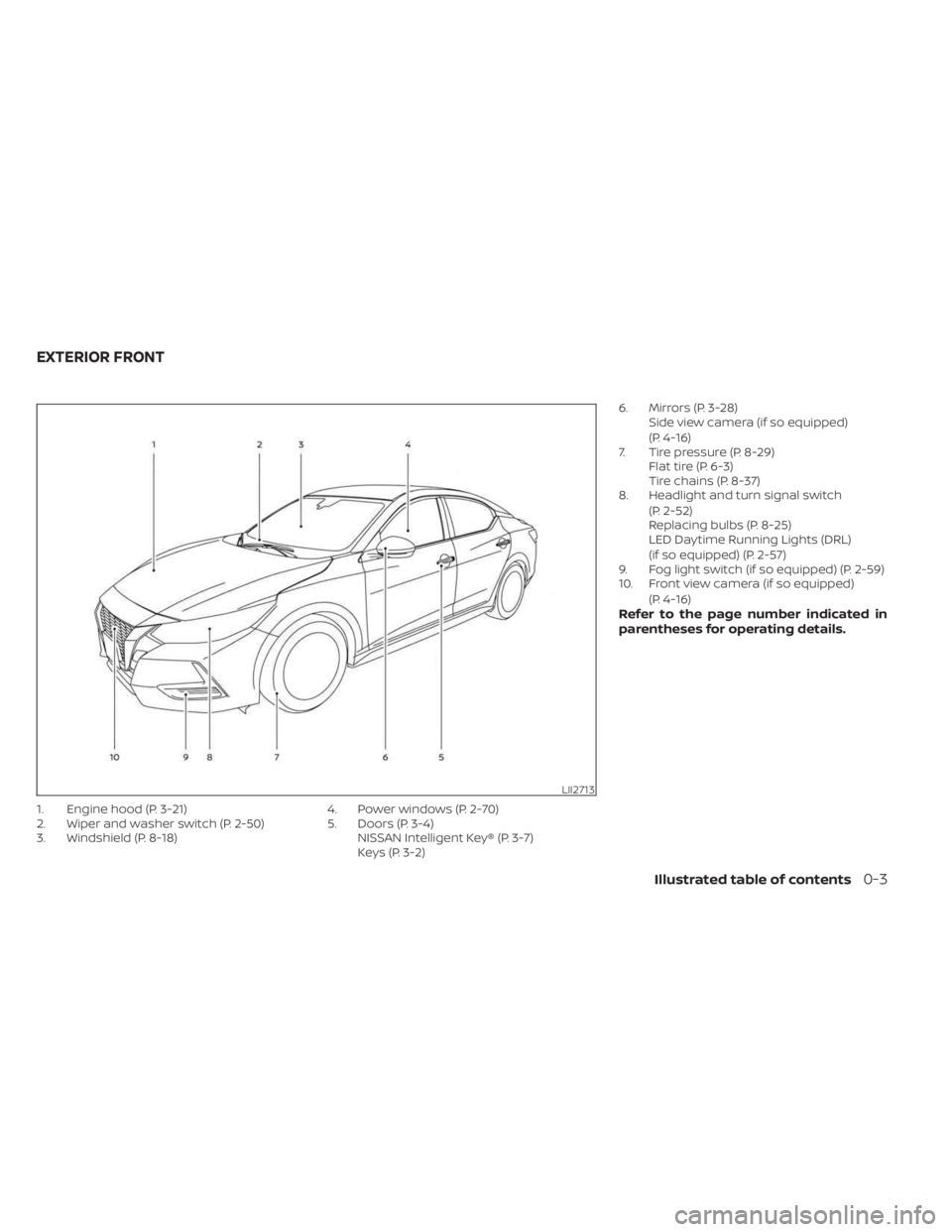
1. Engine hood (P. 3-21)
2. Wiper and washer switch (P. 2-50)
3. Windshield (P. 8-18)4. Power windows (P. 2-70)
5. Doors (P. 3-4)
NISSAN Intelligent Key® (P. 3-7)
Keys (P. 3-2) 6. Mirrors (P. 3-28)
Side view camera (if so equipped)
(P. 4-16)
7. Tire pressure (P. 8-29) Flat tire (P. 6-3)
Tire chains (P. 8-37)
8. Headlight and turn signal switch
(P. 2-52)
Replacing bulbs (P. 8-25)
LED Daytime Running Lights (DRL)
(if so equipped) (P. 2-57)
9. Fog light switch (if so equipped) (P. 2-59)
10. Front view camera (if so equipped)
(P. 4-16)
Refer to the page number indicated in
parentheses for operating details.
LII2713
EXTERIOR FRONT
Illustrated table of contents0-3
Page 17 of 556
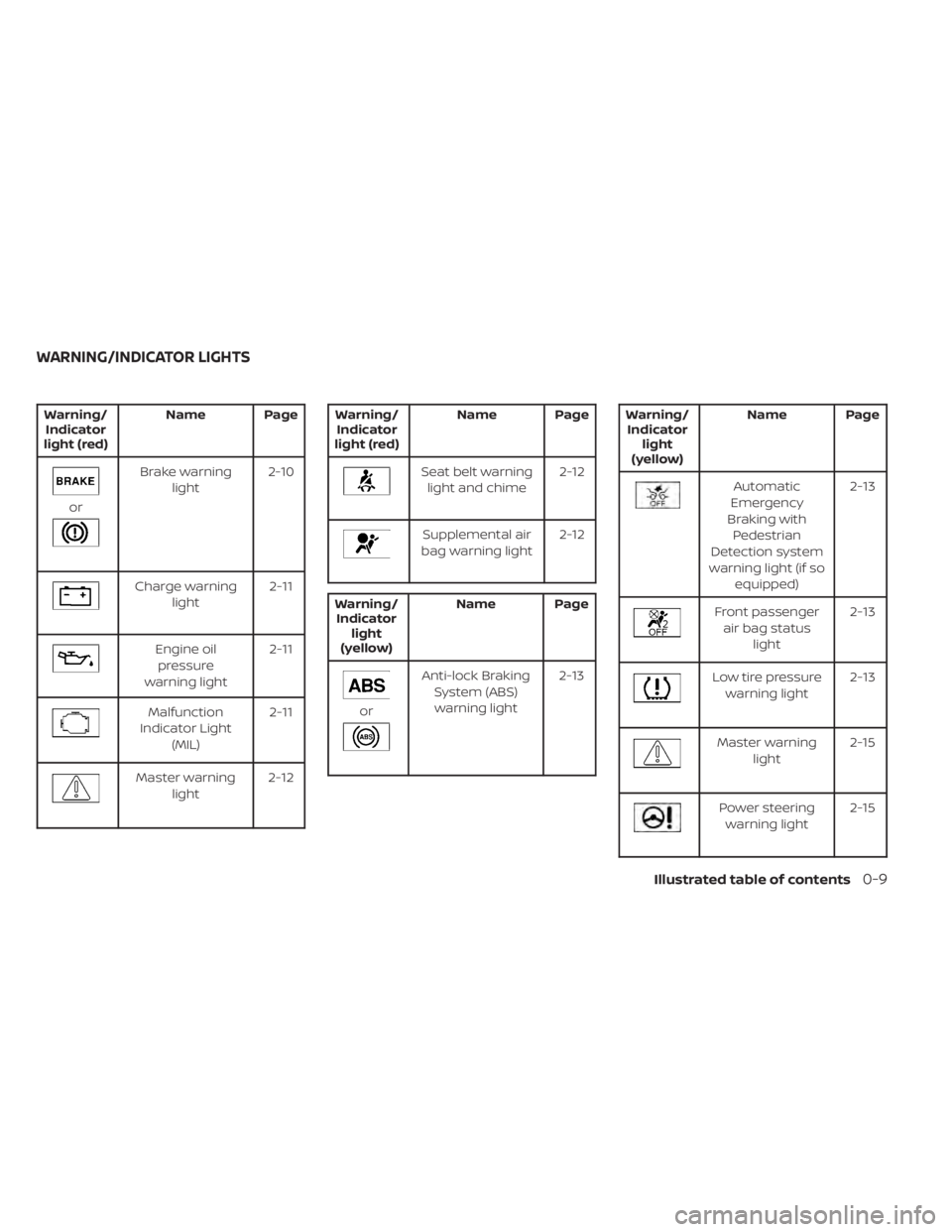
Warning/Indicator
light (red) Name Page
or
Brake warning
light 2-10
Charge warning
light 2-11
Engine oil
pressure
warning light 2-11
Malfunction
Indicator Light (MIL) 2-11
Master warning
light 2-12
Warning/
Indicator
light (red) Name Page
Seat belt warning
light and chime 2-12
Supplemental air
bag warning light 2-12
Warning/
Indicator light
(yellow) Name Page
or
Anti-lock Braking
System (ABS)warning light 2-13
Warning/
Indicator light
(yellow) Name Page
Automatic
Emergency
Braking with Pedestrian
Detection system
warning light (if so equipped) 2-13
Front passenger
air bag status light 2-13
Low tire pressure
warning light 2-13
Master warning
light 2-15
Power steering
warning light 2-15
WARNING/INDICATOR LIGHTS
Illustrated table of contents0-9
Page 95 of 556
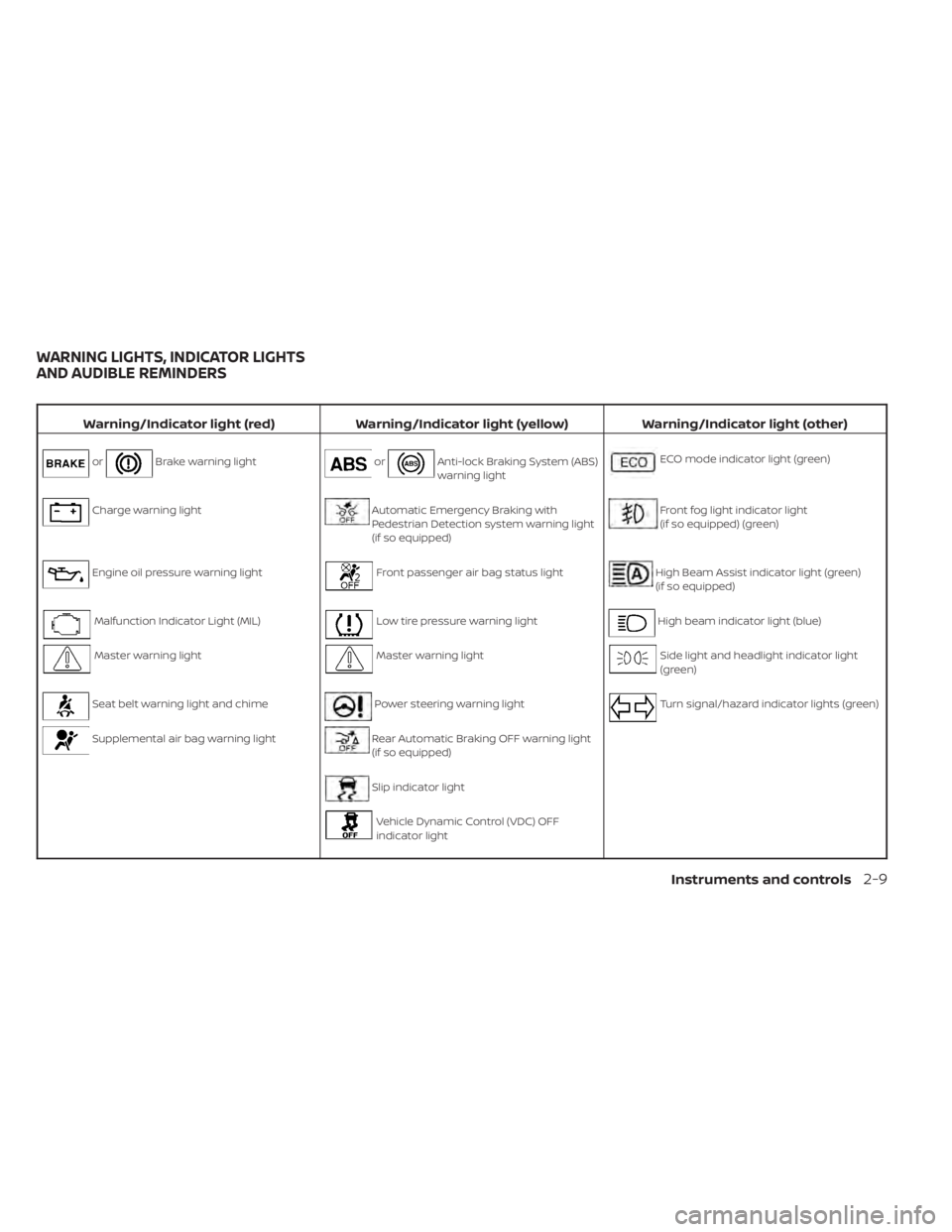
Warning/Indicator light (red)Warning/Indicator light (yellow) Warning/Indicator light (other)
orBrake warning lightorAnti-lock Braking System (ABS)
warning lightECO mode indicator light (green)
Charge warning lightAutomatic Emergency Braking with
Pedestrian Detection system warning light
(if so equipped)Front fog light indicator light
(if so equipped) (green)
Engine oil pressure warning lightFront passenger air bag status lightHigh Beam Assist indicator light (green)
(if so equipped)
Malfunction Indicator Light (MIL)Low tire pressure warning lightHigh beam indicator light (blue)
Master warning lightMaster warning lightSide light and headlight indicator light
(green)
Seat belt warning light and chimePower steering warning lightTurn signal/hazard indicator lights (green)
Supplemental air bag warning lightRear Automatic Braking OFF warning light
(if so equipped)
Slip indicator light
Vehicle Dynamic Control (VDC) OFF
indicator light
WARNING LIGHTS, INDICATOR LIGHTS
AND AUDIBLE REMINDERS
Instruments and controls2-9
Page 99 of 556
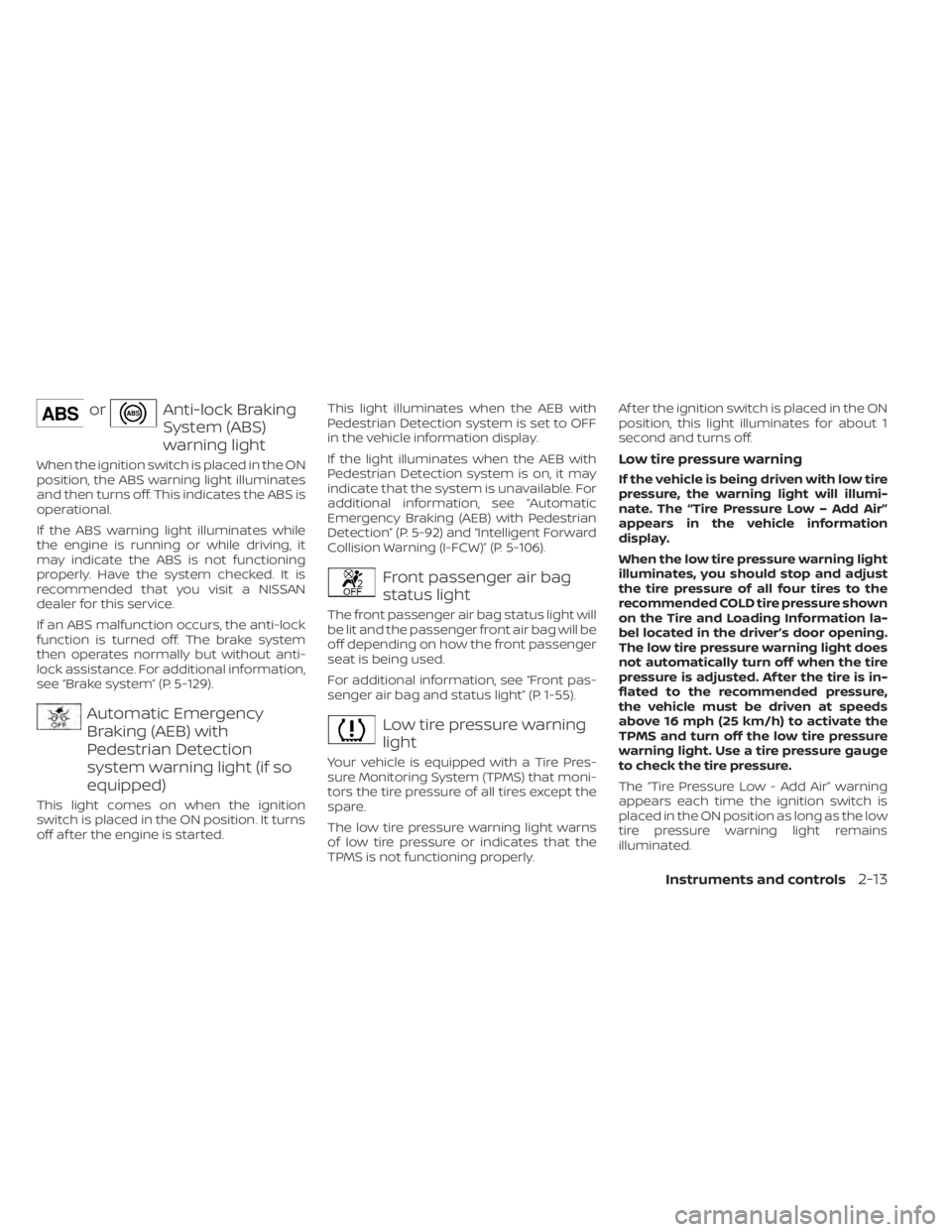
orAnti-lock Braking
System (ABS)
warning light
When the ignition switch is placed in the ON
position, the ABS warning light illuminates
and then turns off. This indicates the ABS is
operational.
If the ABS warning light illuminates while
the engine is running or while driving, it
may indicate the ABS is not functioning
properly. Have the system checked. It is
recommended that you visit a NISSAN
dealer for this service.
If an ABS malfunction occurs, the anti-lock
function is turned off. The brake system
then operates normally but without anti-
lock assistance. For additional information,
see “Brake system” (P. 5-129).
Automatic Emergency
Braking (AEB) with
Pedestrian Detection
system warning light (if so
equipped)
This light comes on when the ignition
switch is placed in the ON position. It turns
off af ter the engine is started.This light illuminates when the AEB with
Pedestrian Detection system is set to OFF
in the vehicle information display.
If the light illuminates when the AEB with
Pedestrian Detection system is on, it may
indicate that the system is unavailable. For
additional information, see “Automatic
Emergency Braking (AEB) with Pedestrian
Detection” (P. 5-92) and “Intelligent Forward
Collision Warning (I-FCW)” (P. 5-106).
Front passenger air bag
status light
The front passenger air bag status light will
be lit and the passenger front air bag will be
off depending on how the front passenger
seat is being used.
For additional information, see “Front pas-
senger air bag and status light” (P. 1-55).
Low tire pressure warning
light
Your vehicle is equipped with a Tire Pres-
sure Monitoring System (TPMS) that moni-
tors the tire pressure of all tires except the
spare.
The low tire pressure warning light warns
of low tire pressure or indicates that the
TPMS is not functioning properly.Af ter the ignition switch is placed in the ON
position, this light illuminates for about 1
second and turns off.
Low tire pressure warning
If the vehicle is being driven with low tire
pressure, the warning light will illumi-
nate. The “Tire Pressure Low – Add Air”
appears in the vehicle information
display.
When the low tire pressure warning light
illuminates, you should stop and adjust
the tire pressure of all four tires to the
recommended COLD tire pressure shown
on the Tire and Loading Information la-
bel located in the driver’s door opening.
The low tire pressure warning light does
not automatically turn off when the tire
pressure is adjusted. Af ter the tire is in-
flated to the recommended pressure,
the vehicle must be driven at speeds
above 16 mph (25 km/h) to activate the
TPMS and turn off the low tire pressure
warning light. Use a tire pressure gauge
to check the tire pressure.
The “Tire Pressure Low - Add Air” warning
appears each time the ignition switch is
placed in the ON position as long as the low
tire pressure warning light remains
illuminated.
Instruments and controls2-13
Page 100 of 556

For additional information, see “Vehicle in-
formation display 4.2 inch (11 cm) Type A”
(P. 2-18), “Vehicle information display 7 inch
(18 cm) Type B” (P. 2-32) and “Tire Pressure
Monitoring System (TPMS)” (P. 5-5).
TPMS malfunction
If the TPMS is not functioning properly, the
low tire pressure warning light will flash for
approximately 1 minute when the ignition
switch is placed in the ON position. The
light will remain on af ter 1 minute. Have the
system checked. It is recommended that
you visit a NISSAN dealer for this service.
The “Tire Pressure Low— Add Air” warning
does not appear if the low tire pressure
warning light illuminates to indicate a
TPMS malfunction.
For additional information, see “Tire Pres-
sure Monitoring System (TPMS)” (P. 5-5) and
“Tire pressure” (P. 8-29).
WARNING
• Radio waves could adversely affect
electric medical equipment. Those
who use a pacemaker should contact
the electric medical equipment
manufacturer for the possible influ-
ences before use. •
If the light does not illuminate with
the ignition switch placed in the ON
position, have the vehicle checked as
soon as possible. It is recommended
that you visit a NISSAN dealer for this
service.
• If the light illuminates while driving,
avoid sudden steering maneuvers or
abrupt braking, reduce vehicle
speed, pull off the road to a safe loca-
tion and stop the vehicle as soon as
possible. Driving with under-inflated
tires may permanently damage the
tires and increase the likelihood of
tire failure. Serious vehicle damage
could occur and may lead to an acci-
dent and could result in serious per-
sonal injury or death. Check the tire
pressure for all four tires. Adjust the
tire pressure to the recommended
COLD tire pressure show on the Tire
and Loading Information label lo-
cated in the driver’s door opening to
turn the low tire pressure warning
light off. If the light still illuminates
while driving af ter adjusting the tire
pressure, a tire may be flat or the
TPMS may be malfunctioning. If you
have a flat tire, replace it with a spare
tire as soon as possible. If no tire is flat and all tires are properly inflated,
have the vehicle checked. It is recom-
mended that you visit a NISSAN
dealer for this service.
• When using a wheel without the
TPMS such as the spare tire, the TPMS
will not function and the low tire
pressure warning light will flash for
approximately 1 minute. The light will
remain on af ter 1 minute. Have your
tires replaced and/or TPMS system
reset as soon as possible. It is recom-
mended that you visit a NISSAN
dealer for these services.
• Replacing tires with those not origi-
nally specified by NISSAN could af-
fect the proper operation of the
TPMS.
CAUTION
• The TPMS is not a substitute for the
regular tire pressure check. Be sure
to check the tire pressure regularly.
• If the vehicle is being driven at
speeds of less than 16 mph (25 km/h),
the TPMS may not operate correctly.
• Be sure to install the specified size of
tires to the four wheels correctly.
2-14Instruments and controls
Page 101 of 556
Master warning light
When the ignition switch is in the ON posi-
tion, the master warning light illuminates if
any of the following are displayed on the
vehicle information display:
• Low washer fluid warning
• Loose fuel cap warning
• Low tire pressure warning
• Emergency brake warning
• Lock warning
• Shipping mode warning
• Door/Trunk open warning (when vehicleis moving)
• LED Headlight system warning (if so equipped)
• Chassis Control system fault warning (if so equipped)
• Service CVT warnings
• Service engine warnings
• Rear emergency braking warning (If so equipped)
• Parking sensor error warning
• Driver Attention Alert warning (if so equipped)
• ITS system malfunction warning • Traffic Sign Recognition warnings (if so
equipped)
• I-Key system warnings
For additional information, see “Vehicle in-
formation display 4.2 inch (11 cm) Type A”
(P. 2-18) or “Vehicle information display 7
inch (18 cm) Type B” (P. 2-32).
Power steering warning
light
WARNING
• If the engine is not running or is
turned off while driving, the power
assist for the steering will not work.
Steering will be harder to operate.
• When the power steering warning
light illuminates with the engine run-
ning, there will be no power assist for
the steering. You will still have control
of the vehicle but the steering will be
harder to operate. Have the power
steering system checked. It is recom-
mended that you visit a NISSAN
dealer for this service. When the ignition switch is placed in the ON
position, the power steering warning light
illuminates. Af ter starting the engine, the
power steering warning light turns off. This
indicates the power steering system is
operational.
If the power steering warning light illumi-
nates while the engine is running, it may
indicate the power steering system is not
functioning properly and may need servic-
ing. Have the power steering system
checked. It is recommended that you visit a
NISSAN dealer for this service.
When the power steering warning light illu-
minates with the engine running, there will
be no power assist for the steering but you
will still have control of the vehicle. At this
time, greater steering effort is required to
operate the steering wheel, especially in
sharp turns and at low speeds.
For additional information, see “Power
steering” (P. 5-128).
Rear Automatic Braking
(RAB) OFF warning light (if
so equipped)
This light comes on when the ignition
switch is placed in the ON position. It turns
off af ter the engine is started.
Instruments and controls2-15
Page 107 of 556

ECO Mode Setting
The ECO mode setting menu allows the user to change the settings for the ECO mode.
Some menu items shown below may not be equipped on your vehicle.
Menu itemExplanation
ECO Customize Displays available ECO mode settings.
Cruise Control Allows user to set the Cruise Control mode to Normal or ECO. For additional information, see “Cruise Control”
(P. 5-59).
Air Conditioning Allows user to set the Air Conditioning mode to Normal or ECO. For additional information, see “Heater and air
conditioner” (P. 4-32, 4-39).
ECO Info Settings Displays available ECO information settings.
ECO Indicator Allows user to turn the ECO indicator on or off.
ECO Drive Report Allows user to turn the ECO Drive Report on or off.
View History Displays the history report for the vehicle.
TPMS Settings
The TPMS settings menu allows the user to change the tire pressure units displayed in the vehicle information display.
Menu item Explanation
TPMS Setting Displays available TPMS settings.
Tire Pressure Unit Allows user to select the tire pressure units that will display in the vehicle information display.
Clock
Menu item Explanation
Clock Allows user to adjust the clock settings and time within the vehicle information display. Adjustments that can
be made include automatically setting the time, 12H/24H format and manually setting the time. If these op-
tions do not appear, the clock must be set within the center display. For additional information, refer to the
separate NissanConnect® Owner’s Manual (if so equipped).
Instruments and controls2-21
Page 109 of 556
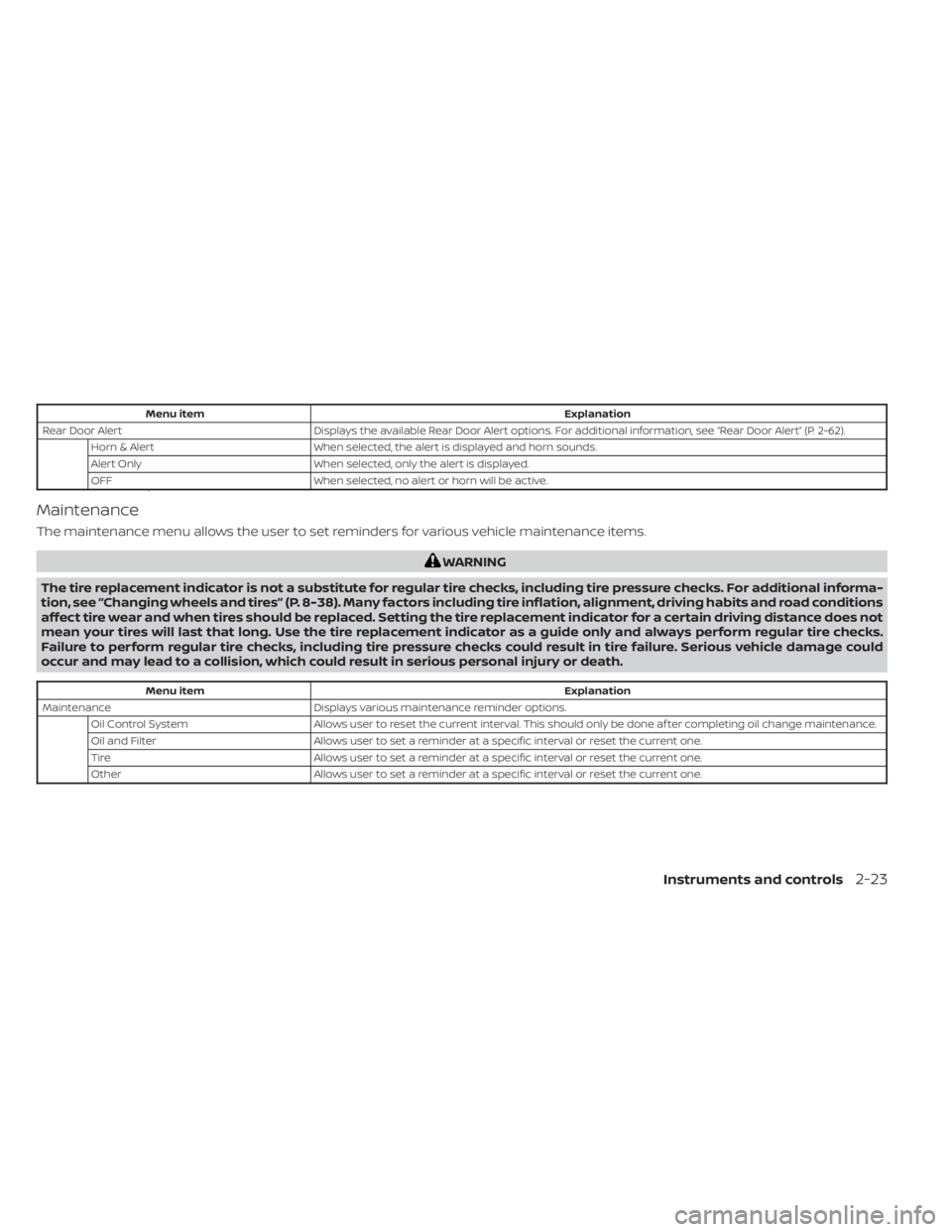
Menu itemExplanation
Rear Door Alert Displays the available Rear Door Alert options. For additional information, see “Rear Door Alert” (P. 2-62).
Horn & Alert When selected, the alert is displayed and horn sounds.
Alert Only When selected, only the alert is displayed.
OFF When selected, no alert or horn will be active.
Maintenance
The maintenance menu allows the user to set reminders for various vehicle maintenance items.
WARNING
The tire replacement indicator is not a substitute for regular tire checks, including tire pressure checks. For additional informa-
tion, see “Changing wheels and tires” (P. 8-38). Many factors including tire inflation, alignment, driving habits and road conditions
affect tire wear and when tires should be replaced. Setting the tire replacement indicator for a certain driving distance does not
mean your tires will last that long. Use the tire replacement indicator as a guide only and always perform regular tire checks.
Failure to perform regular tire checks, including tire pressure checks could result in tire failure. Serious vehicle damage could
occur and may lead to a collision, which could result in serious personal injury or death.
Menu item Explanation
Maintenance Displays various maintenance reminder options.
Oil Control System Allows user to reset the current interval. This should only be done af ter completing oil change maintenance.
Oil and Filter Allows user to set a reminder at a specific interval or reset the current one.
Tire Allows user to set a reminder at a specific interval or reset the current one.
Other Allows user to set a reminder at a specific interval or reset the current one.
Instruments and controls2-23