2023 NISSAN SENTRA maintenance menu
[x] Cancel search: maintenance menuPage 105 of 556

SETTINGS
The setting mode allows you to change the
information displayed in the vehicle infor-
mation display:
• VDC Setting• Driver Assistance
• ECO Mode Setting
• TPMS Settings
• Clock
• Vehicle Settings• Maintenance
• Customize Display
• Unit
• Language
• Factory Reset
VDC Setting
The VDC Setting menu allows the user to enable or disable the Vehicle Dynamic Control (VDC) system.
Menu item
Explanation
System Allows the user turn the VDC system on or off. For additional information, see “Vehicle Dynamic Control (VDC)
system” (P. 5-131).
Driver Assistance
The driver assistance menu allows the user to change the settings for driving, parking, and braking aids.
Some menu items shown below may not be equipped on your vehicle.
Menu item Explanation
Emergency Brake Displays available emergency braking options.
Front Allows user to turn the front emergency braking system on or off. For additional information, see “Automatic
Emergency Braking (AEB) with Pedestrian Detection” (P. 5-92) and “Intelligent Forward Collision Warning (I-FCW)”
(P. 5-106).
Rear Allows user to turn the rear emergency braking system on or off. For additional information, see "Rear Automatic
Braking (RAB)” (P. 5-85).
Lane Displays available lane options.
Lane Departure Warning Allows user to turn the Lane Departure Warning (LDW) system on or off. For additional information, see “Lane De-
parture Warning (LDW)” (P. 5-29).
Instruments and controls2-19
Page 109 of 556
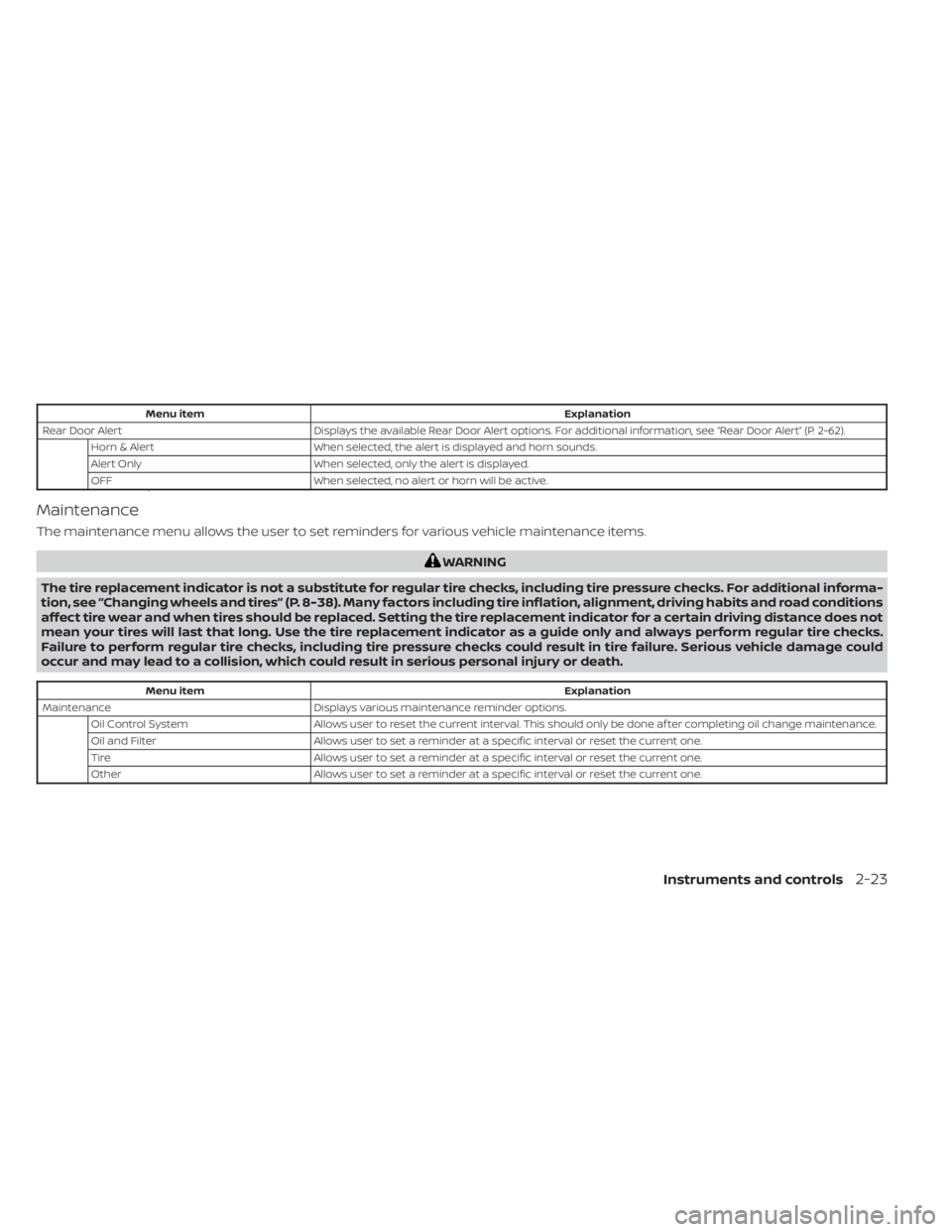
Menu itemExplanation
Rear Door Alert Displays the available Rear Door Alert options. For additional information, see “Rear Door Alert” (P. 2-62).
Horn & Alert When selected, the alert is displayed and horn sounds.
Alert Only When selected, only the alert is displayed.
OFF When selected, no alert or horn will be active.
Maintenance
The maintenance menu allows the user to set reminders for various vehicle maintenance items.
WARNING
The tire replacement indicator is not a substitute for regular tire checks, including tire pressure checks. For additional informa-
tion, see “Changing wheels and tires” (P. 8-38). Many factors including tire inflation, alignment, driving habits and road conditions
affect tire wear and when tires should be replaced. Setting the tire replacement indicator for a certain driving distance does not
mean your tires will last that long. Use the tire replacement indicator as a guide only and always perform regular tire checks.
Failure to perform regular tire checks, including tire pressure checks could result in tire failure. Serious vehicle damage could
occur and may lead to a collision, which could result in serious personal injury or death.
Menu item Explanation
Maintenance Displays various maintenance reminder options.
Oil Control System Allows user to reset the current interval. This should only be done af ter completing oil change maintenance.
Oil and Filter Allows user to set a reminder at a specific interval or reset the current one.
Tire Allows user to set a reminder at a specific interval or reset the current one.
Other Allows user to set a reminder at a specific interval or reset the current one.
Instruments and controls2-23
Page 120 of 556

• Digital speed and average speed
• Instant fuel economy/ average fueleconomy
• Tire Pressure
• Audio/telephone
• Intelligent Cruise Control (ICC)
• Speed Limit Sign
• Driving Aids
• Settings
• Warnings*
*Warnings will only display if there are any
present. For additional information, see
“Vehicle information display warnings and
indicators” (P. 2-41).
To control what items display in the vehicle
information display, see “How to use the
vehicle information display” (P. 2-33).RESETTING THE DRIVE COMPUTER
The drive computer is divided across three
screens:
• Average Speed
• Average Fuel Economy
• Trip Distance & Time
1. Press the
buttons
until you reach the desired drive com-
puter mode.
2. Press and hold the OK button for ap- proximately 1 second to reset the infor-
mation on the currently displayed
screen.
NOTE:
If you wish to reset all drive computer
values at once, press and hold the OK
button for approximately 3 seconds until
a reset menu appears; and follow the
instructions.
SETTINGS
The setting mode allows you to change the
information displayed in the vehicle infor-
mation display. It also allows you to change
vehicle functions:
• VDC Setting
• Driver Assistance
• ECO Mode Setting
• TPMS Setting
• Clock
• Vehicle Settings
• Maintenance
• Customize Display
• Unit/Language
• Factory Reset
VDC Setting
The VDC Setting menu allows the user to enable or disable the Vehicle Dynamic Control (VDC) system.
Menu item Explanation
System Allows the user turn the VDC system on or off. For additional information, see “Vehicle Dynamic Control (VDC)
system” (P. 5-131).
2-34Instruments and controls
Page 124 of 556
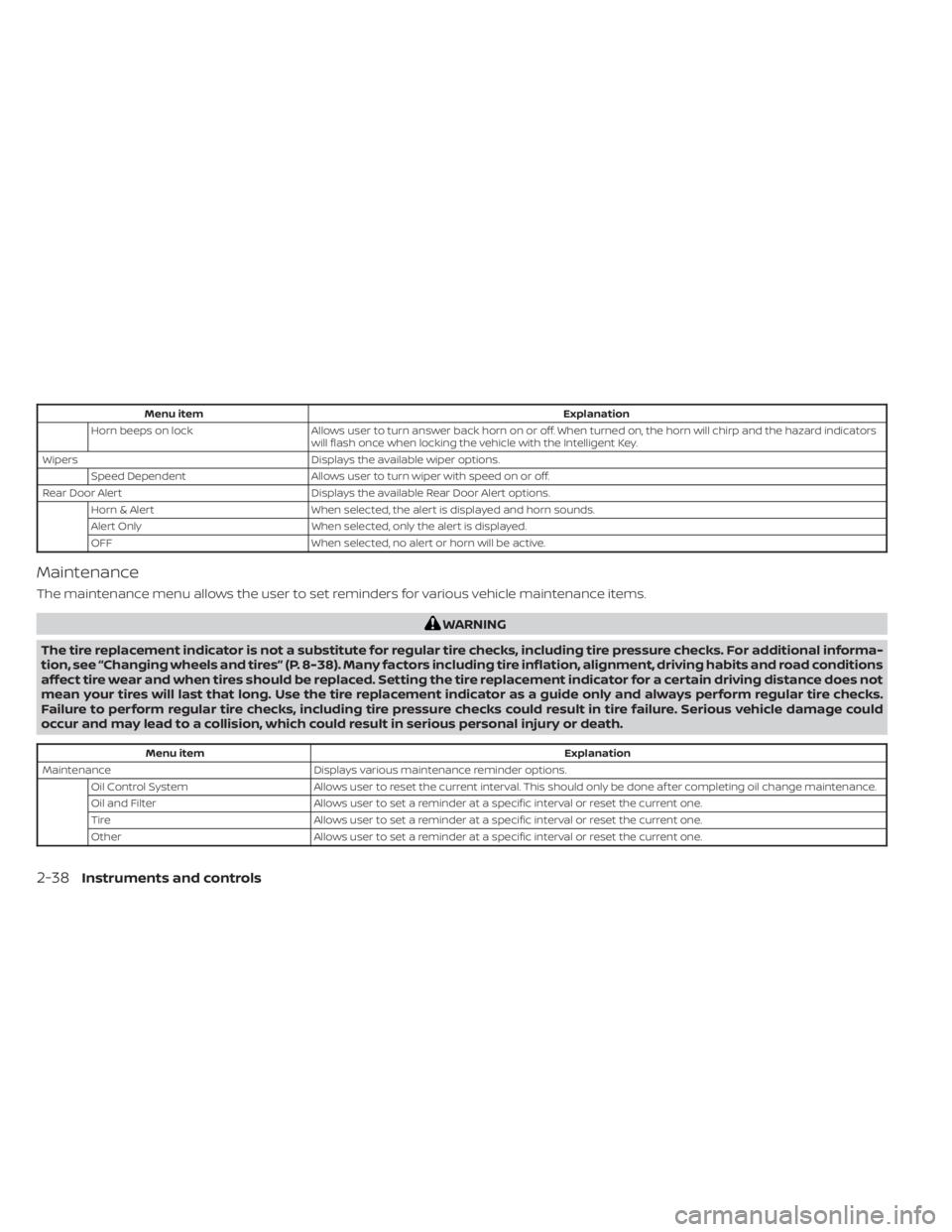
Menu itemExplanation
Horn beeps on lock Allows user to turn answer back horn on or off. When turned on, the horn will chirp and the hazard indicators
will flash once when locking the vehicle with the Intelligent Key.
Wipers Displays the available wiper options.
Speed Dependent Allows user to turn wiper with speed on or off.
Rear Door Alert Displays the available Rear Door Alert options.
Horn & Alert When selected, the alert is displayed and horn sounds.
Alert Only When selected, only the alert is displayed.
OFF When selected, no alert or horn will be active.
Maintenance
The maintenance menu allows the user to set reminders for various vehicle maintenance items.
WARNING
The tire replacement indicator is not a substitute for regular tire checks, including tire pressure checks. For additional informa-
tion, see “Changing wheels and tires” (P. 8-38). Many factors including tire inflation, alignment, driving habits and road conditions
affect tire wear and when tires should be replaced. Setting the tire replacement indicator for a certain driving distance does not
mean your tires will last that long. Use the tire replacement indicator as a guide only and always perform regular tire checks.
Failure to perform regular tire checks, including tire pressure checks could result in tire failure. Serious vehicle damage could
occur and may lead to a collision, which could result in serious personal injury or death.
Menu item Explanation
Maintenance Displays various maintenance reminder options.
Oil Control System Allows user to reset the current interval. This should only be done af ter completing oil change maintenance.
Oil and Filter Allows user to set a reminder at a specific interval or reset the current one.
Tire Allows user to set a reminder at a specific interval or reset the current one.
Other Allows user to set a reminder at a specific interval or reset the current one.
2-38Instruments and controls
Page 192 of 556
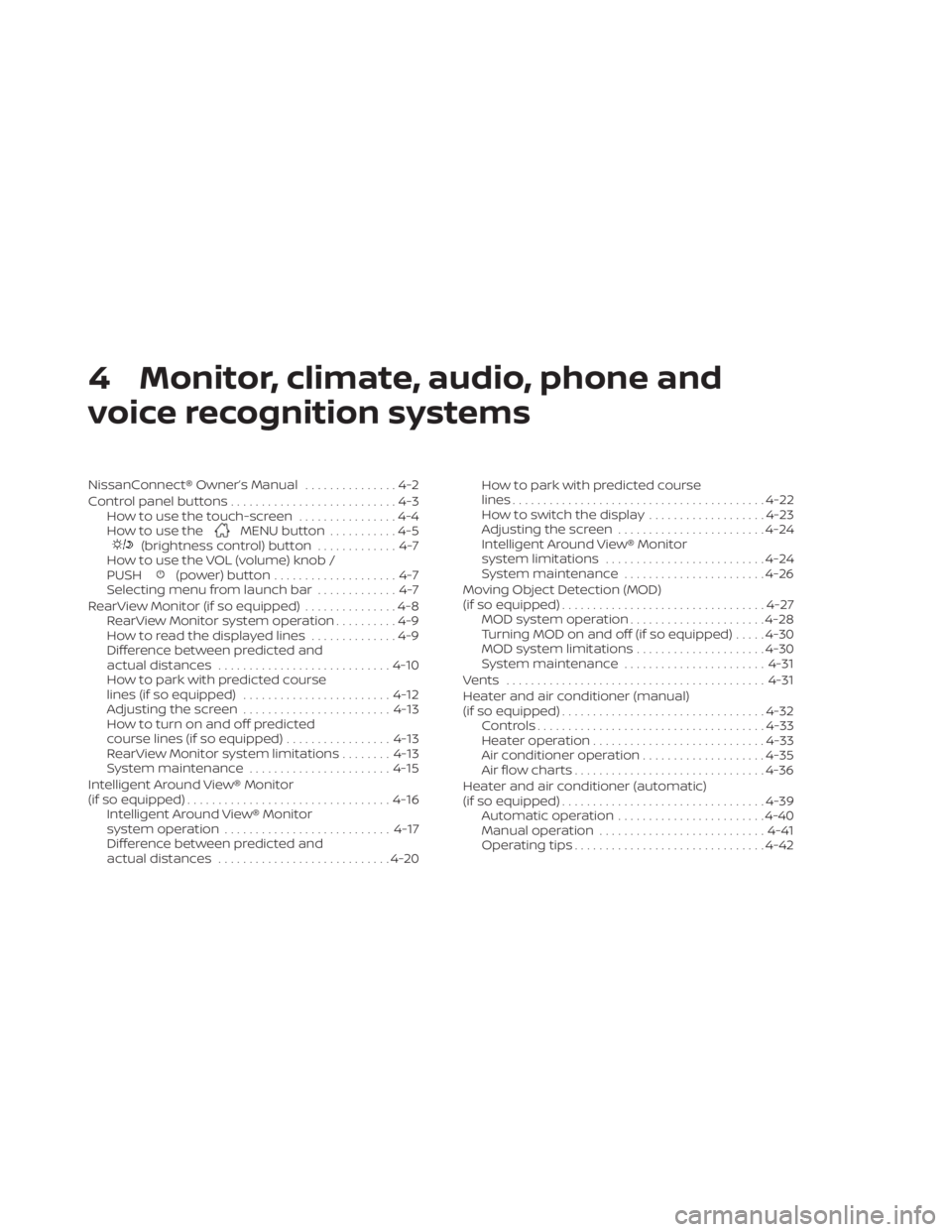
4 Monitor, climate, audio, phone and
voice recognition systems
NissanConnect® Owner’s Manual...............4-2
Control panel buttons ...........................4-3
How to use the touch-screen ................4-4
How to use the
MENU button ...........4-5(brightness control) button .............4-7
How to use the VOL (volume) knob /
PUSH
(power)button....................4-7
Selecting menu from launch bar .............4-7
RearView Monitor (if so equipped) ...............4-8
RearView Monitor system operation ..........4-9
How to read the displayed lines ..............4-9
Difference between predicted and
actual distances ............................ 4-10
How to park with predicted course
lines (if so equipped) ........................ 4-12
Adjusting the screen ........................ 4-13
How to turn on and off predicted
course lines (if so equipped) .................4-13
RearView Monitor system limitations ........4-13
System maintenance ....................... 4-15
Intelligent Around View® Monitor
(if so equipped) ................................. 4-16
Intelligent Around View® Monitor
system operation ........................... 4-17
Difference between predicted and
actual distances ............................ 4-20How to park with predicted course
lines
......................................... 4-22
How to switch the display ...................4-23
Adjusting the screen ........................ 4-24
Intelligent Around View® Monitor
system limitations .......................... 4-24
System maintenance .......................4-26
Moving Object Detection (MOD)
(if so equipped) ................................. 4-27
MOD system operation ......................4-28
Turning MOD on and off (if so equipped) .....4-30
MOD system limitations .....................4-30
System maintenance ....................... 4-31
Vents .......................................... 4-31
Heater and air conditioner (manual)
(if so equipped) ................................. 4-32
Controls ..................................... 4-33
Heater operation ............................ 4-33
Air conditioner operation ....................4-35
Air flow charts ............................... 4-36
Heater and air conditioner (automatic)
(if so equipped) ................................. 4-39
Automatic operation ........................ 4-40
Manual operation ........................... 4-41
Operating tips ............................... 4-42
Page 197 of 556
Touch-screen maintenance
If you clean the display screen, use a dry,
sof t cloth. If additional cleaning is neces-
sary, use a small amount of neutral deter-
gent with a sof t cloth. Never spray the
screen with water or detergent. Dampen
the cloth first and then wipe the screen.
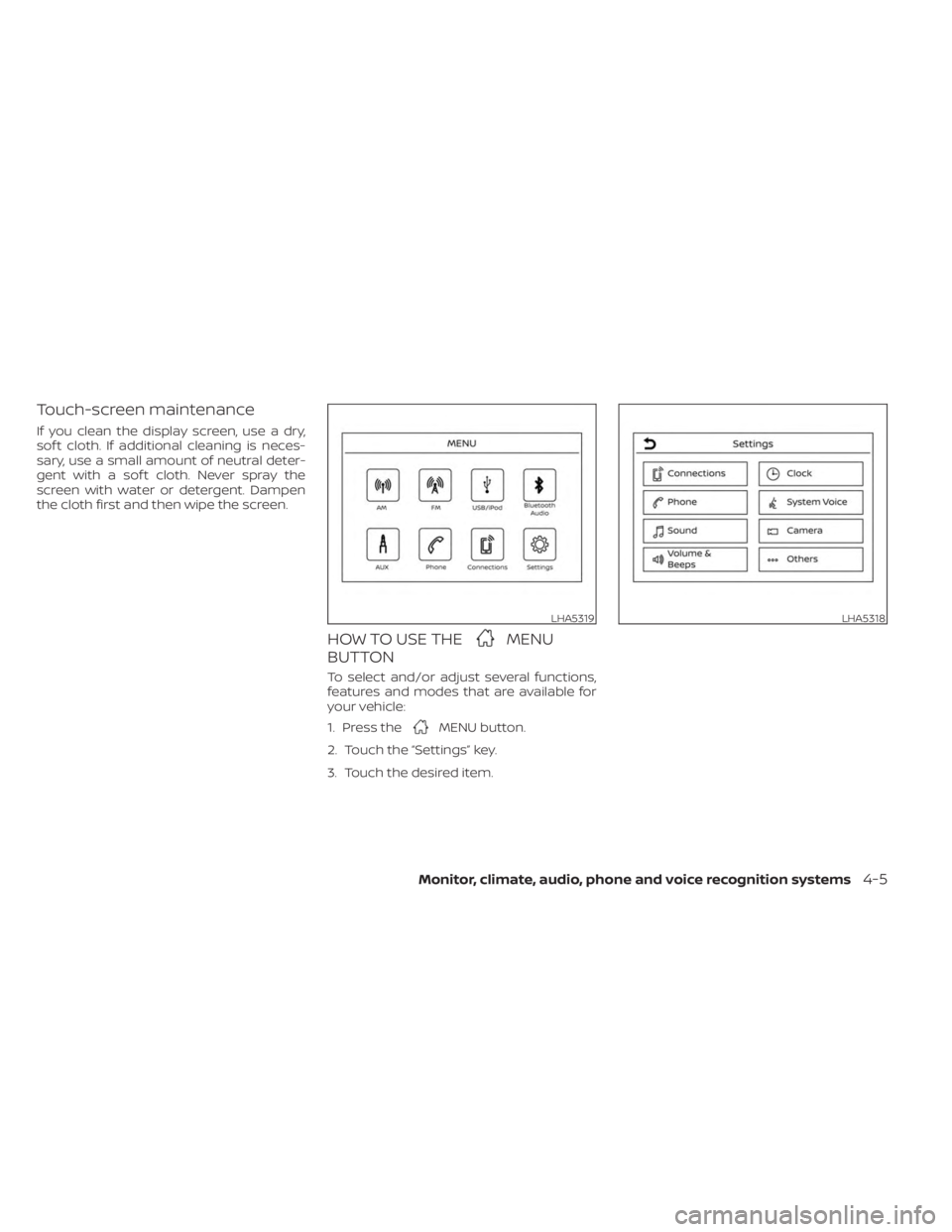
HOW TO USE THEMENU
BUTTON
To select and/or adjust several functions,
features and modes that are available for
your vehicle:
1. Press the
MENU button.
2. Touch the “Settings” key.
3. Touch the desired item.
LHA5319LHA5318
Monitor, climate, audio, phone and voice recognition systems4-5
Page 542 of 556
Intelligent Forward Collision Warning
(I-FCW).....................5-106Intelligent Key systemKey operating range............3-9Key operation................3-10Mechanical key................3-3Remote keyless entry operation. . . .3-13Troubleshooting guide.......3-16,3-17Warning signals...........3-16,3-17Intelligent Trace Control..........5-133Interior light...............2-74,2-75Interior trunk lid release...........3-22iPod® Player................. .4-56ISOFIX child restraints.............1-25
J
Jump starting..............6-9, 8-14
K
Key.........................3-2Key fob battery replacement........8-23Keyless entry
With Intelligent Key system
(See Intelligent Key system)
.......3-13KeysNISSAN Intelligent Key®........3-2,3-7NISSAN Vehicle Immobilizer System
keys..................... .3-3
L
Labels
Air conditioner specification label. . .10-14C.M.V.S.S. certification label.......10-13Emission control information label. .10-13Engine serial number..........10-13F.M.V.S.S. certification label........10-13Tire and Loading Information label. .10-14Vehicle identification number (VIN)
plate.................... .10-12Warning labels (for SRS)..........1-65Lane Departure Warning (LDW).......5-29LATCH (Lower Anchors and Tethers for
CHildren) System...............1-25Launch bar menu................4-7License plate
Installing the license plate........10-15LightAir bag warning light........1-65, 2-12Brake light (See stop light)........8-27Bulb check/instrument panel......2-10Bulb replacement.............8-27Charge warning light............2-11Exterior and Interior lights........8-27Fog light switch..............2-59Fog lights..................8-26Headlight and turn signal switch. . . .2-52Headlight control switch.........2-52Headlights..................8-25Interior light..............2-74,2-75Light bulbs.................8-25Low tire pressure warning light.....2-13
Low windshield-washer fluid
warning light.............2-28, 2-43Spotlights (See map light)........2-75Trunk light..................2-76Lights......................8-25Map lights..................2-75Lock
Child safety rear door lock.........3-7Door locks................. .3-4Fuel-filler door lock opener lever. . . .3-23Power door locks...........3-5, 3-6Trunk lid lock opener lever........3-22Loose fuel cap warning........2-28,2-42Low fuel warning light.........2-28, 2-43Low tire pressure warning light.......2-13Low windshield-washer fluid
warning light..............2-28, 2-43Luggage (See vehicle loading
information)................. .10-16
M
Maintenance
General maintenance...........9-2Inside the vehicle..............9-3Maintenance precautions.........8-2Outside the vehicle.............9-2Seat belt maintenance..........1-20Under the hood and vehicle.......9-4Maintenance requirements..........9-2Maintenance schedules............9-7Malfunction indicator light..........2-11Manual front seat adjustment........1-3
11-4
Page 543 of 556
Map lights....................2-75Menu button...................4-5Meters and gauges..............2-4Instrument brightness control.....2-58Mirror
Automatic anti-glare inside mirror. . .3-28Outside mirror control..........3-29Outside mirrors..............3-29Rearview...................3-28Vanity mirror................3-27Mirrors......................3-28Moonroof.................2-73,7-5Moving Object Detection (MOD)......4-27
N
NISSAN Intelligent Key®..........3-2,3-7NISSAN Intelligent Key® battery
discharge indicator..............5-13NISSAN Vehicle Immobilizer
System................. .2-49, 5-14NissanConnect® Owner's Manual......4-2
O
Octane rating (See fuel octane rating). .10-6Oil
Capacities and recommended
fuel/lubricants
...............10-2Changing engine oil............8-6Changing engine oil filter.........8-6Checking engine oil level.........8-6Engine oil.................. .8-6
Engine oil and oil filter
recommendation.............10-7Engine oil viscosity.............10-7Outside mirror control............3-29Outside mirrors................3-29Overhead sunglasses holder........2-68Overheat
If your vehicle overheats.........6-11Owner's manual order form........10-25Owner's manual/service manual
order information..............10-25
P
ParkingParking/parking on hills.........5-127Parking brake.................5-22Phone, Bluetooth® hands-free system. .4-66PowerPower door locks...........3-5, 3-6Power outlet................2-64Powerrearwindows............2-71Power steering system.........5-128Power windows..............2-70Rear power windows...........2-71Power outlet................. .2-64Power steering................5-128Precautions
Maintenance precautions.........8-2Precautions on booster
seats...............1-30, 1-36, 1-40Precautions on child
restraints............1-30, 1-36, 1-40
Precautions on seat belt usage.....1-12Precautions on supplemental
restraint system..............1-44Precautions when starting and
driving.................... .5-4Push starting..................6-11
R
Radio
Car phone or CB radio..........4-66FM/AM radio................4-48Readiness for inspection maintenance
(I/M) test................... .10-24Rear Automatic Braking (RAB). . . .2-15, 5-85Rear Cross Traffic Alert (RCTA).......5-48Rear Door Alert.........2-27,2-42, 2-62Rear power windows.............2-71Rear seat.....................1-7Rear Sonar System (RSS)..........5-135Rear window and outside mirror
defroster switch................2-51Rearview mirror................3-28RearView Monitor................4-8Recommended Fluids............10-2Recorders
Event Data................ .10-24Refrigerant recommendation.......10-8Registering a vehicle in another
country.................... .10-12Remote Engine Start..........3-18,5-15Reporting safety defects (US only). . . .10-22
11-5