2023 NISSAN SENTRA ECU
[x] Cancel search: ECUPage 176 of 556
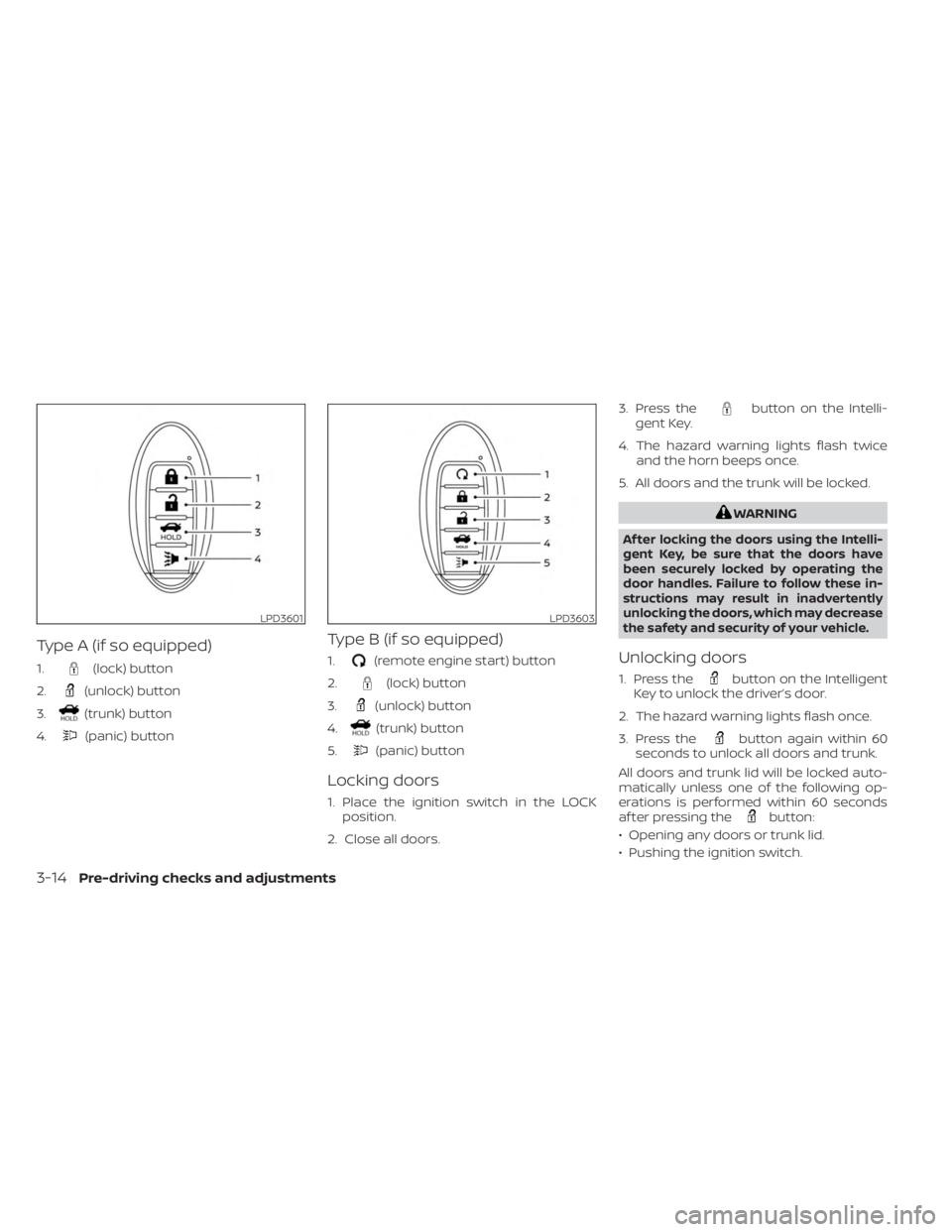
Type A (if so equipped)
1.(lock) button
2.
(unlock) button
3.
(trunk) button
4.
(panic) button
Type B (if so equipped)
1.(remote engine start) button
2.
(lock) button
3.
(unlock) button
4.
(trunk) button
5.
(panic) button
Locking doors
1. Place the ignition switch in the LOCK position.
2. Close all doors. 3. Press the
button on the Intelli-
gent Key.
4. The hazard warning lights flash twice and the horn beeps once.
5. All doors and the trunk will be locked.
WARNING
Af ter locking the doors using the Intelli-
gent Key, be sure that the doors have
been securely locked by operating the
door handles. Failure to follow these in-
structions may result in inadvertently
unlocking the doors, which may decrease
the safety and security of your vehicle.
Unlocking doors
1. Press thebutton on the Intelligent
Key to unlock the driver’s door.
2. The hazard warning lights flash once.
3. Press the
button again within 60
seconds to unlock all doors and trunk.
All doors and trunk lid will be locked auto-
matically unless one of the following op-
erations is performed within 60 seconds
af ter pressing the
button:
• Opening any doors or trunk lid.
• Pushing the ignition switch.
LPD3601LPD3603
3-14Pre-driving checks and adjustments
Page 178 of 556
TROUBLESHOOTING GUIDE
(Continuously Variable
Transmission only)
Verif y the location of all Intelligent Keys that
are programmed for the vehicle. If another
Intelligent Key is in range or inside the ve-
hicle, the vehicle system may respond dif-
ferently than expected.
SymptomPossible CauseRemedy
When pushing the ignition switch
to stop the engine The Shif t to Park warning light in the instrument
panel illuminates and the inside chime sounds con-
tinuously. The shif t lever is not in the P (Park)
position.
Make sure that the shif t lever is in
the P (Park) position.
When pushing the door handle
request switch (if so equipped) to
lock the door The outside chime sounds for a few seconds.
The Intelligent Key is inside the ve-
hicle or the trunk.Be sure to carry the Intelligent Key
with you.
When closing the doors The outside chime sounds 3 times.
The ignition switch is in the ACC
position.Place the ignition switch in the
OFF position.
The Shif t to Park warning light in the instrument
panel illuminates and the outside chime sounds
continuously. The ignition switch is in the OFF
position and the shif t lever is not in
the P (Park) position.Make sure that the shif t lever is in
the P (Park) position and place the
ignition switch in the OFF position.
Few seconds af ter closing the driver’s door, the Rear
Door Alert warning message appears on the dis-
play, the horn sounds six times, or a Check Back
Seat For All Articles warning appears on the display. The Rear Door Alert is activated.
Check the back seat for all articles,
press the OK button to clear the
Rear Door Alert warning message.
The outside chime sounds for approximately 3 sec-
onds and all the doors unlock. The Intelligent Key is inside the ve-
hicle or the trunk.Be sure to carry the Intelligent Key
with you.
When closing the trunk lid The outside chime sounds for few seconds and the
trunk lid opens. The Intelligent Key is inside the
trunk.Be sure to carry the Intelligent Key
with you.
When pushing the
button
on the Intelligent Key to lock the
door The outside chime sounds for a few seconds and all
the doors unlock. The Intelligent Key is inside the ve-
hicle or the trunk.
Be sure to carry the Intelligent Key
with you.
A door is not closed securely. Close the doors securely.
3-16Pre-driving checks and adjustments
Page 182 of 556

• The alarm sounds due to illegal entry intothe vehicle.
• The ignition switch is pushed without an Intelligent Key in the vehicle.
• The ignition switch is pushed with an In- telligent Key in the vehicle but the brake
pedal is not depressed.
• The accelerator pedal is depressed.
• The vehicle moves af ter a remote engine start. (The hazard indicator flashers blink
once and the engine is stopped).
CONDITIONS THE REMOTE ENGINE
START WILL NOT WORK
The Remote Engine Start will not operate if
any of the following conditions are present:
• The ignition switch is placed in the ONposition.
• The hood is not securely closed.
• The hazard indicator lights are on.
• The engine is still running. The engine must be completely stopped. Wait at
least 6 seconds if the engine goes from
running to off. This is not applicable when
extending engine run time.
• The
button is not pressed and held
for at least 2 seconds. • The
button is not pressed and held
within 5 seconds of pressing the lock
button.
• The brake is pressed.
• The doors are not closed and locked.
• The trunk is open.
• The I-Key System Error warning or any engine-related warning shows in the ve-
hicle information display.
• The alarm sounds due to illegal entry into the vehicle.
• Two Remote Engine Starts, or a single Remote Engine Start with an extension,
have already been used. (To use the Re-
mote Engine Start function again, the ve-
hicle needs to be driven at speeds of 4
mph (7 km/h)).
• The vehicle is not in P (Park).
• There is a detected registered key already inside of the vehicle.
The Remote Engine Start may display a
warning or indicator in the vehicle informa-
tion display. For additional information, see
“Vehicle information display 4.2 inch (11 cm)
Type A” (P. 2-18) or “Vehicle information dis-
play 7 inch (18 cm) Type B” (P. 2-32).
3-20Pre-driving checks and adjustments
Page 184 of 556
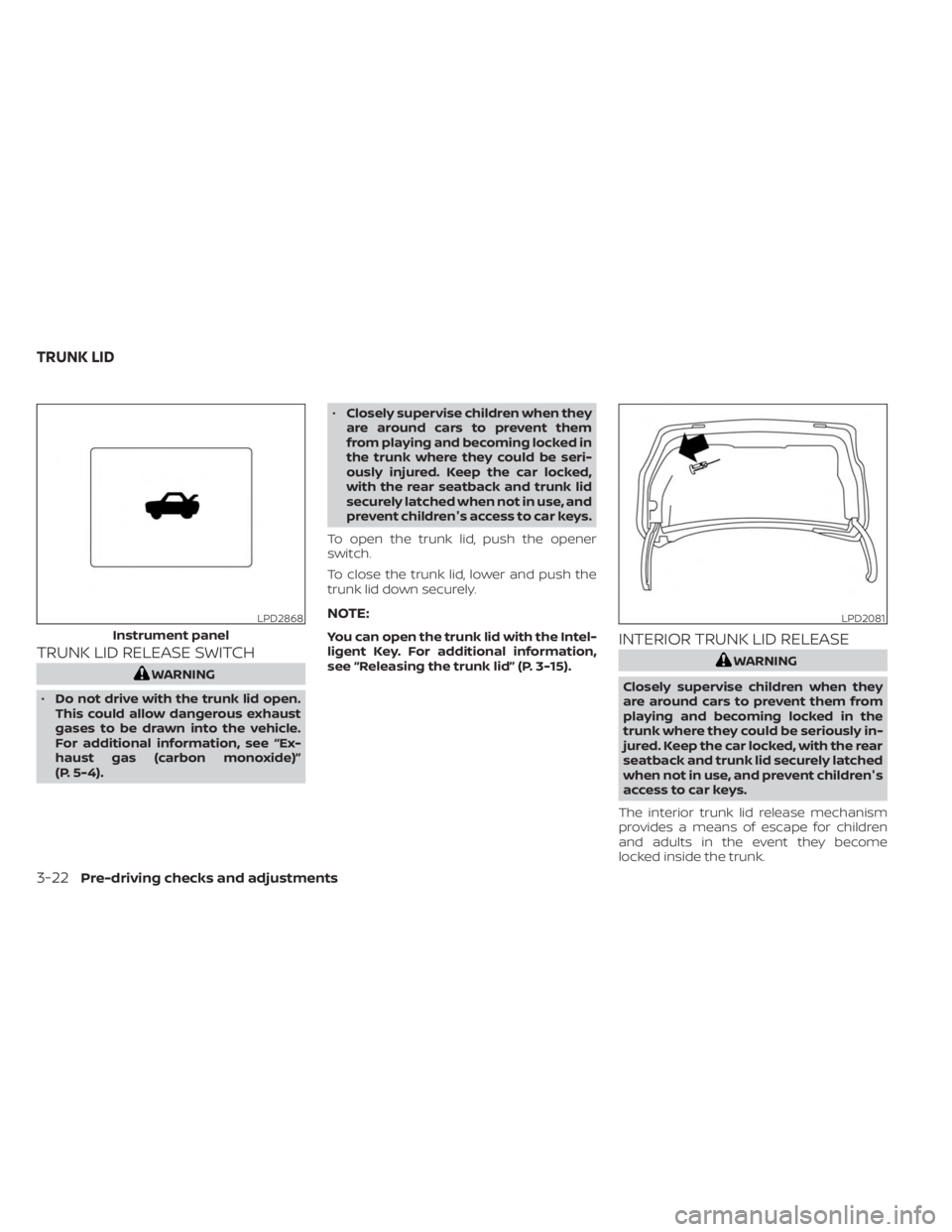
TRUNK LID RELEASE SWITCH
WARNING
• Do not drive with the trunk lid open.
This could allow dangerous exhaust
gases to be drawn into the vehicle.
For additional information, see “Ex-
haust gas (carbon monoxide)”
(P. 5-4). •
Closely supervise children when they
are around cars to prevent them
from playing and becoming locked in
the trunk where they could be seri-
ously injured. Keep the car locked,
with the rear seatback and trunk lid
securely latched when not in use, and
prevent children's access to car keys.
To open the trunk lid, push the opener
switch.
To close the trunk lid, lower and push the
trunk lid down securely.
NOTE:
You can open the trunk lid with the Intel-
ligent Key. For additional information,
see “Releasing the trunk lid” (P. 3-15).INTERIOR TRUNK LID RELEASE
WARNING
Closely supervise children when they
are around cars to prevent them from
playing and becoming locked in the
trunk where they could be seriously in-
jured. Keep the car locked, with the rear
seatback and trunk lid securely latched
when not in use, and prevent children's
access to car keys.
The interior trunk lid release mechanism
provides a means of escape for children
and adults in the event they become
locked inside the trunk.
LPD2868
Instrument panel
LPD2081
TRUNK LID
3-22Pre-driving checks and adjustments
Page 185 of 556
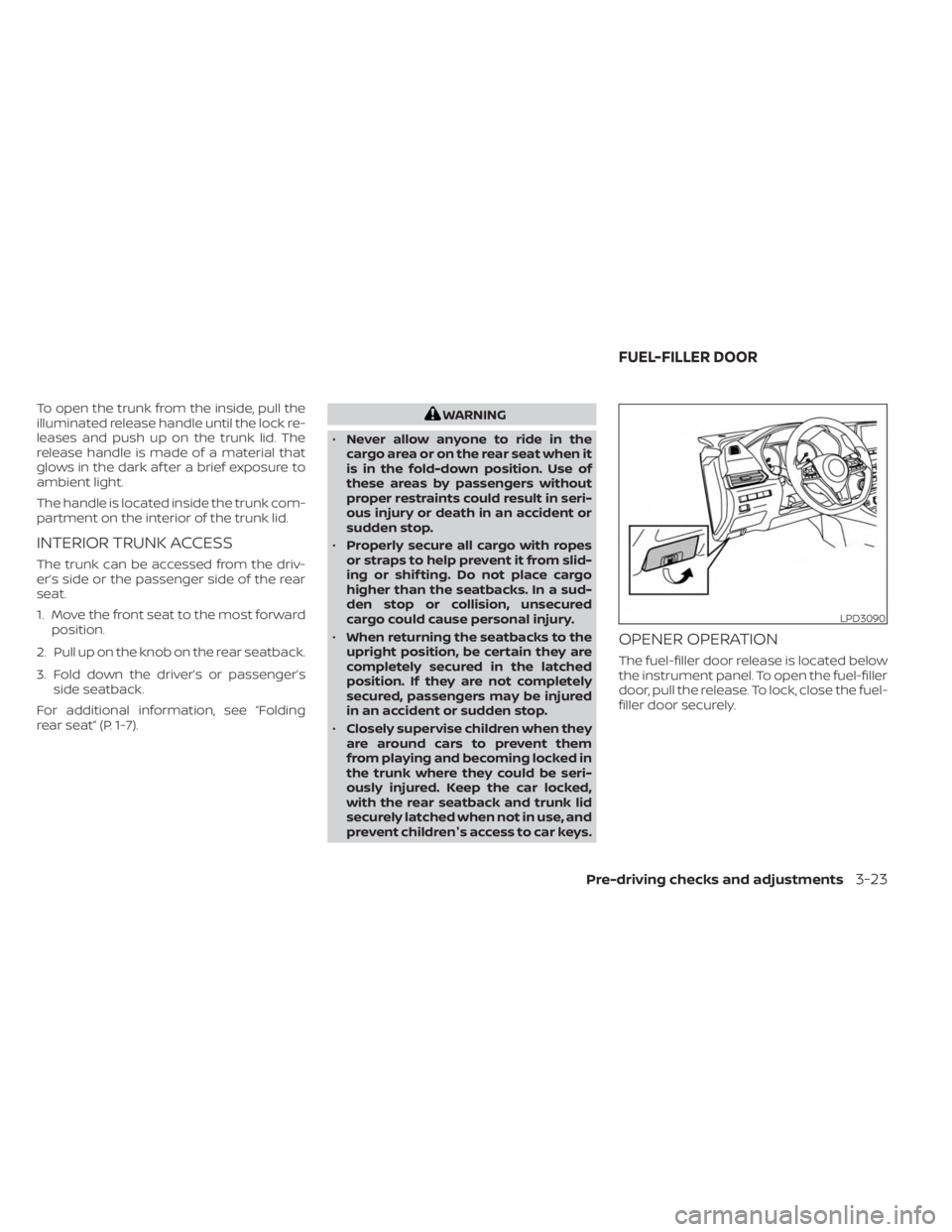
To open the trunk from the inside, pull the
illuminated release handle until the lock re-
leases and push up on the trunk lid. The
release handle is made of a material that
glows in the dark af ter a brief exposure to
ambient light.
The handle is located inside the trunk com-
partment on the interior of the trunk lid.
INTERIOR TRUNK ACCESS
The trunk can be accessed from the driv-
er’s side or the passenger side of the rear
seat.
1. Move the front seat to the most forwardposition.
2. Pull up on the knob on the rear seatback.
3. Fold down the driver’s or passenger’s side seatback.
For additional information, see “Folding
rear seat” (P. 1-7).
WARNING
• Never allow anyone to ride in the
cargo area or on the rear seat when it
is in the fold-down position. Use of
these areas by passengers without
proper restraints could result in seri-
ous injury or death in an accident or
sudden stop.
• Properly secure all cargo with ropes
or straps to help prevent it from slid-
ing or shif ting. Do not place cargo
higher than the seatbacks. In a sud-
den stop or collision, unsecured
cargo could cause personal injury.
• When returning the seatbacks to the
upright position, be certain they are
completely secured in the latched
position. If they are not completely
secured, passengers may be injured
in an accident or sudden stop.
• Closely supervise children when they
are around cars to prevent them
from playing and becoming locked in
the trunk where they could be seri-
ously injured. Keep the car locked,
with the rear seatback and trunk lid
securely latched when not in use, and
prevent children's access to car keys.
OPENER OPERATION
The fuel-filler door release is located below
the instrument panel. To open the fuel-filler
door, pull the release. To lock, close the fuel-
filler door securely.
LPD3090
FUEL-FILLER DOOR
Pre-driving checks and adjustments3-23
Page 206 of 556
•Underneath the bumper and the cor-
ner areas of the bumper cannot be
viewed on the RearView Monitor be-
cause of its monitoring range limita-
tion. The system will not show small
objects below the bumper, and may
not show objects close to the bum-
per or on the ground.
• Objects viewed in the RearView
Monitor differ from actual distance
because a wide-angle lens is used.
• Objects in the RearView Monitor will
appear visually opposite compared
to when viewed in the rearview and
outside mirrors.
• Use the displayed lines as a refer-
ence. The lines are highly affected by
the number of occupants, fuel level,
vehicle position, road conditions and
road grade.
• Make sure that the trunk is securely
closed when backing up.
• Do not put anything on the rearview
camera. The rearview camera is in-
stalled above the license plate. •
When washing the vehicle with high
pressure water, be sure not to spray it
around the camera. Otherwise, water
may enter the camera unit causing
water condensation on the lens, a
malfunction, fire or an electric shock.
• Do not strike the camera. It is a preci-
sion instrument. Otherwise, it may
malfunction or cause damage result-
ing in a fire or an electric shock.
The following are operating limitations and
do not represent a system malfunction:
• When the temperature is extremely high or low, the screen may not clearly display
objects.
• When strong light directly shines on the camera, objects may not be displayed
clearly.
• Vertical lines may be seen in objects on the screen. This is due to strong reflected
light from the bumper.
• The screen may flicker under fluorescent light.
• The colors of objects on the RearView Monitor may differ somewhat from the
actual color of objects.
• Objects on the monitor may not be clear in a dark environment. • There may be a delay when switching
between views.
• If dirt, rain or snow accumulate on the camera, the RearView Monitor may not
display objects clearly. Clean the camera.
• Do not use wax on the camera lens. Wipe off any wax with a clean cloth dampened
with a diluted mild cleaning agent, then
wipe with a dry cloth.
4-14Monitor, climate, audio, phone and voice recognition systems
Page 217 of 556
WARNING
Listed below are the system limitations
for Intelligent Around View® Monitor.
Failure to operate the vehicle in accor-
dance with these system limitations
could result in serious injury or death.
• Do not use the Intelligent Around
View® Monitor with the outside mir-
rors in the stored position, and make
sure that the trunk is securely closed
when operating the vehicle using the
Intelligent Around View® Monitor.
• The apparent distance between ob-
jects viewed on the Intelligent
Around View® Monitor differs from
the actual distance.
• The cameras are installed on the
front grille, the outside mirrors and
above the rear license plate. Do not
put anything such as a license plate
frame on the vehicle that covers or
blocks the view of the cameras.
• When washing the vehicle with high
pressure water, be sure not to spray it
around the cameras. Otherwise, wa-
ter may enter the camera unit caus-
ing water condensation on the lens, a
malfunction, fire or an electric shock. •
Do not strike the cameras. They are
precision instruments. Doing so
could cause a malfunction or cause
damage resulting in a fire or an elec-
tric shock.
There are some areas where the system
will not show objects and the system does
not warn of moving objects. When in the
front or rear view display, an object below
the bumper or on the ground may not be
viewed
O1. When in the bird’s-eye view, a tall
object near the seam
O2of the camera
viewing areas will not appear in the
monitor.
The following are operating limitations and
do not represent a system malfunction:
• There may be a delay when switching between views.
• When the temperature is extremely high or low, the screen may not display objects
clearly.
• When strong light directly shines on the camera, objects may not be displayed
clearly.
• The screen may flicker under fluorescent light.
• The colors of objects on the Intelligent Around View® Monitor may differ some-
what from the actual color of objects. • Objects on the Intelligent Around View®
Monitor may not be clear and the color of
the object may differ in a dark
environment.
• There may be differences in sharpness between each camera view of the bird's-
eye view.
• Do not use wax on the camera lens. Wipe off any wax with a clean cloth that has
been dampened with a diluted mild
cleaning agent, then wipe with a dry
cloth.
Monitor, climate, audio, phone and voice recognition systems4-25
Page 280 of 556
WARNING
• Do not leave children or adults who
would normally require the assis-
tance of others alone in your vehicle.
Pets should also not be lef t alone.
They could accidentally injure them-
selves or others through inadvertent
operation of the vehicle. Also, on hot,
sunny days, temperatures in a closed
vehicle could quickly become high
enough to cause severe or possibly
fatal injuries to people or animals.
• Closely supervise children when they
are around cars to prevent them
from playing and becoming locked in
the trunk where they could be seri-
ously injured. Keep the car locked,
with the rear seatback and trunk lid
securely latched when not in use, and
prevent children's access to car keys.
EXHAUST GAS (carbon monoxide)
WARNING
• Do not breathe exhaust gases; they
contain colorless and odorless car-
bon monoxide. Carbon monoxide is
dangerous. It can cause uncon-
sciousness or death. •
If you suspect that exhaust fumes
are entering the vehicle, drive with all
windows fully open, and have the ve-
hicle inspected immediately.
• Do not run the engine in closed
spaces such as a garage.
• Do not park the vehicle with the en-
gine running for any extended length
of time.
• Keep the rear vent windows, doors
and trunk lids (if so equipped) closed
while driving, otherwise exhaust
gases could be drawn into the pas-
senger compartment. If you must
drive with one of these open, follow
these precautions:
1. Open all the windows.
2. Set the
air recirculation but-
ton to off and the fan control dial
to high to circulate the air.
• If electrical wiring or other cable con-
nections must pass to a trailer
through the seal on the trunk lid or
the body, follow the manufacturer's
recommendation to prevent carbon
monoxide entry into the vehicle.
• The exhaust system and body should
be inspected by a qualified mechanic
whenever: a. The vehicle is raised for service.
b. You suspect that exhaust fumes
are entering into the passenger
compartment.
c. You notice a change in the sound of the exhaust system.
d. You have had an accident involv- ing damage to the exhaust sys-
tem, underbody, or rear of the
vehicle.
THREE-WAY CATALYST
The three-way catalyst is an emission con-
trol device installed in the exhaust system.
Exhaust gases in the three-way catalyst
are burned at high temperatures to help
reduce pollutants.
WARNING
• The exhaust gas and the exhaust
system are very hot. Keep people,
animals or flammable materials
away from the exhaust system
components.
• Do not stop or park the vehicle over
flammable materials such as dry
grass, waste paper or rags. They may
ignite and cause a fire.
PRECAUTIONS WHEN STARTING AND
DRIVING
5-4Starting and driving