2023 NISSAN PATHFINDER wiper blades
[x] Cancel search: wiper bladesPage 187 of 665

•The rain-sensing auto wipers are in-
tended for use during rain. If the
switch is lef t in the AUTO position, the
wipers may operate unexpectedly
when dirt, fingerprints, oil film or in-
sects are stuck on or around the sen-
sor. The wipers may also operate
when exhaust gas or moisture affect
the rain sensor.
• When the windshield glass is coated
with water repellent, the speed of the
rain-sensing auto wipers may be
higher even though the amount of
the rainfall is small.
• Be sure to turn off the rain-sensing
auto wiper system when you use a
car wash.
• The rain-sensing auto wipers may
not operate if rain does not hit the
rain sensor even if it is raining.
• Using Genuine NISSAN wiper blades
is recommended for proper opera-
tion of the rain-sensing auto wiper
system. For additional information,
see “Windshield wiper blades”
(P. 8-18). The rain-sensing auto wiper system can
automatically turn on the wipers and ad-
just the wiper speed depending on the
rainfall and the vehicle speed by using the
rain sensor located on the upper part of
the windshield.
To set the rain-sensing auto wiper system,
place the lever in the AUTO position
O1. The
wiper will sweep once while the ignition
switch is in the ON position.
The rain sensor sensitivity level can be ad-
justed by turning the knob toward the rear
O2(Low) or toward the frontO3(High).
– High — High sensitive operation
– Low — Low sensitive operation
To turn the rain-sensing auto wiper system
off, rotate the lever to the OFF position, or
rotate the lever to the low or high position.
The rain-sensing feature may be disabled.
For additional information, see “Vehicle in-
formation display–7 inch (18 cm) Type A”
(P. 2-23) or “Vehicle information display—12.3
inch (31 cm) Type B” (P. 2-48).
REAR SWITCH OPERATION
WARNING
In freezing temperatures the washer
solution may freeze on the rear window
and obscure your vision which may
lead to an accident. Warm the rear win-
dow with the defroster before you
wash the rear window.
LIC4682
2-80Instruments and controls
Page 448 of 665

•For the ProPILOT Assist system to op-
erate properly, the windshield in
front of the camera must be clean.
Replace worn wiper blades. The cor-
rect size wiper blades must be used
to help make sure the windshield is
kept clean. Only use Genuine NISSAN
wiper blades, or equivalent wiper
blades, that are specifically designed
for use on your vehicle model and
model year. It is recommended that
you visit a NISSAN dealer for the cor-
rect parts for your vehicle.
Steering Assist temporary
standby
Automatic standby due to driving
operation:
When the driver activates the turn signal,
the Steering Assist is temporarily placed in
a standby mode. (The Steering Assist re-
starts automatically when the operating
conditions are met again.)
Automatic standby:
In the following cases, a chime sounds and
the Steering Assist is placed in a temporary
standby mode. (The Steering Assist re-
starts automatically when the operating
conditions are met again.) • When lane markers on both sides are no
longer detected
• When a vehicle ahead is no longer de- tected under approximately 37 mph (60
km/h)
Steering Assist cancel
Under the following conditions, the Steer-
ing Assist cancels, a warning message is
displayed and the Steering Assist status
indicator and the Steering Assist indicator
turn off:
• When unusual lane markers appear inthe traveling lane or when the lane
marker cannot be correctly detected for
some time due to certain conditions (for
example, a snow rut, the reflection of light
on a rainy day, the presence of several
unclear lane markers)
• When the windshield wiper operates in the high (HI) speed operation (the Steer-
ing Assist is disabled when the wiper op-
erates for more than approximately 10
seconds)
Action to take:
Turn the ICC system off using the CANCEL
switch. When the conditions listed above
are no longer present, turn the ICC system
on again.
Steering Assist malfunction
When the system malfunctions, it turns off
automatically. The Steering Assist status
warning illuminates (orange). A chime may
sound depending on the situation.
Action to take:
Stop the vehicle in a safe location, place the
vehicle in the P (Park) position, turn the en-
gine off, restart the engine, resume driving,
and set the Intelligent Cruise Control sys-
tem again. If the warning (orange) contin-
ues to illuminate, the Steering Assist is mal-
functioning. Although the vehicle is still
drivable under normal conditions, have the
system checked. It is recommended that
you visit a NISSAN dealer for this service.
Steering Assist maintenance
The camera sensor is located above the
inside mirror.
To keep the proper operation of the system
and prevent a system malfunction, be sure
to observe the following:
• Always keep the windshield clean.
• Do not attach a sticker (including trans- parent material) or install an accessory
near the camera unit.
Starting and driving5-125
Page 519 of 665

FREEING A FROZEN DOOR LOCK
To prevent a door lock from freezing, apply
de-icer through the key hole. If the lock
becomes frozen, heat the key before in-
serting it into the key hole, or use the
NISSAN Intelligent Key®.
ANTIFREEZE
In the winter when it is anticipated that the
temperature will drop below 32°F (0°C),
check the antifreeze to assure proper win-
ter protection. For additional information,
see “Engine cooling system” (P. 8-4).
BATTERY
If the battery is not fully charged during
extremely cold weather conditions, the
battery fluid may freeze and damage the
battery. To maintain maximum efficiency,
the battery should be checked regularly.
For additional information, see “Battery”
(P. 8-13).
DRAINING OF COOLANT WATER
If the vehicle is to be lef t outside without
antifreeze, drain the cooling system, includ-
ing the engine block. Refill before operating
the vehicle. For additional information, see
“Changing engine coolant” (P. 8-5).
TIRE EQUIPMENT
1. SUMMER tires have a tread designed toprovide superior performance on dry
pavement. However, the performance of
these tires will be substantially reduced
in snowy and icy conditions. If you oper-
ate your vehicle on snowy or icy roads,
NISSAN recommends the use of MUD &
SNOW or ALL SEASON TIRES on all four
wheels. It is recommended that you visit
a NISSAN dealer for the tire type, size,
speed rating and availability information.
2. For additional traction on icy roads, studded tires may be used. However,
some U.S. states and Canadian prov-
inces prohibit their use. Check local,
state and provincial laws before install-
ing studded tires.
Skid and traction capabilities of studded
snow tires on wet or dry surfaces may be
poorer than that of non-studded snow
tires.
3. Tire chains may be used. For additional information, see “Tire chains” (P. 8-38).
4-Wheel Drive (4WD) model
If you install snow tires, they must also be
the same size, brand, construction and
tread pattern on all four wheels.
SPECIAL WINTER EQUIPMENT
It is recommended that the following items
be carried in the vehicle during winter:
• A scraper and stiff-bristled brush to re-move ice and snow from the windows
and wiper blades.
• A sturdy, flat board to be placed under the jack to give it firm support.
• A shovel to dig the vehicle out of snowdrif ts.
• Extra washer fluid to refill the windshield- washer fluid reservoir.
DRIVING ON SNOW OR ICE
WARNING
• Wet ice (32°F, 0°C and freezing rain),
very cold snow or ice can be slick and
very hard to drive on. The vehicle will
have much less traction or “grip” un-
der these conditions. Try to avoid
driving on wet ice until the road is
salted or sanded.
COLD WEATHER DRIVING
5-196Starting and driving
Page 548 of 665

8 Do-it-yourself
Maintenance precautions.......................8-2
Engine compartment check locations ...........8-3
Engine cooling system ..........................8-4
Checking engine coolant level ................8-5
Changing engine coolant ....................8-5
Engine oil .......................................8-6
Checking engine oil level .....................8-6
Changing engine oil and oil filter ..............8-6
Automatic Transmission Fluid (ATF) .............8-10
Brake fluid ....................................... 8-11
Windshield-washer fluid .........................8-11
Windshield-washer fluid reservoir ............8-11
Battery......................................... 8-13
Jump starting ............................... 8-14
Variable voltage control system ................8-15
Drive belt ....................................... 8-15
Spark plugs .................................... 8-16
Replacing spark plugs .......................8-16
Air cleaner ..................................... 8-17
In-cabin microfilter .......................... 8-17Windshield wiper blades
........................8-18
Cleaning .................................... 8-18
Replacing ................................... 8-18
Brakes ......................................... 8-20
Fuses .......................................... 8-20
Engine compartment ....................... 8-21
Passenger compartment ...................8-22
Battery replacement ........................... 8-24
NISSAN Intelligent Key® ......................8-24
Lights .......................................... 8-26
Headlights .................................. 8-26
Fog lights (if so equipped) ...................8-26
Exterior and interior lights ...................8-26
Wheels and tires ............................... 8-28
Tire pressure ................................ 8-28
Tire labeling ................................. 8-33
Types of tires ................................ 8-37
Tire chains .................................. 8-38
Changing
wheels and tires .................. 8-39
Page 565 of 665
CLEANING
If your windshield is not clear af ter using
the windshield-washer or if a wiper blade
chatters when running, wax or other mate-
rial may be on the blade or windshield.
Clean the outside of the windshield with a
washer solution or a mild detergent. Your
windshield is clean if beads do not form
when rinsing with clear water.
Clean each blade by wiping it with a cloth
soaked in a washer solution or a mild de-
tergent. Then rinse the blades with clear
water. If your windshield is still not clear
af ter cleaning the blades and using the
wiper, replace the blades.
CAUTION
Worn windshield wiper blades can
damage the windshield and impair
driver vision.
REPLACING
Replace the wiper blades if they are worn.
To replace the windshield wiper blades, fol-
low the procedure below:
1. When the ignition switch is ON or within 60 seconds af ter placing the ignition
switch from the ON to OFF position,
place the windshield wiper and washer
lever into the OFF position.
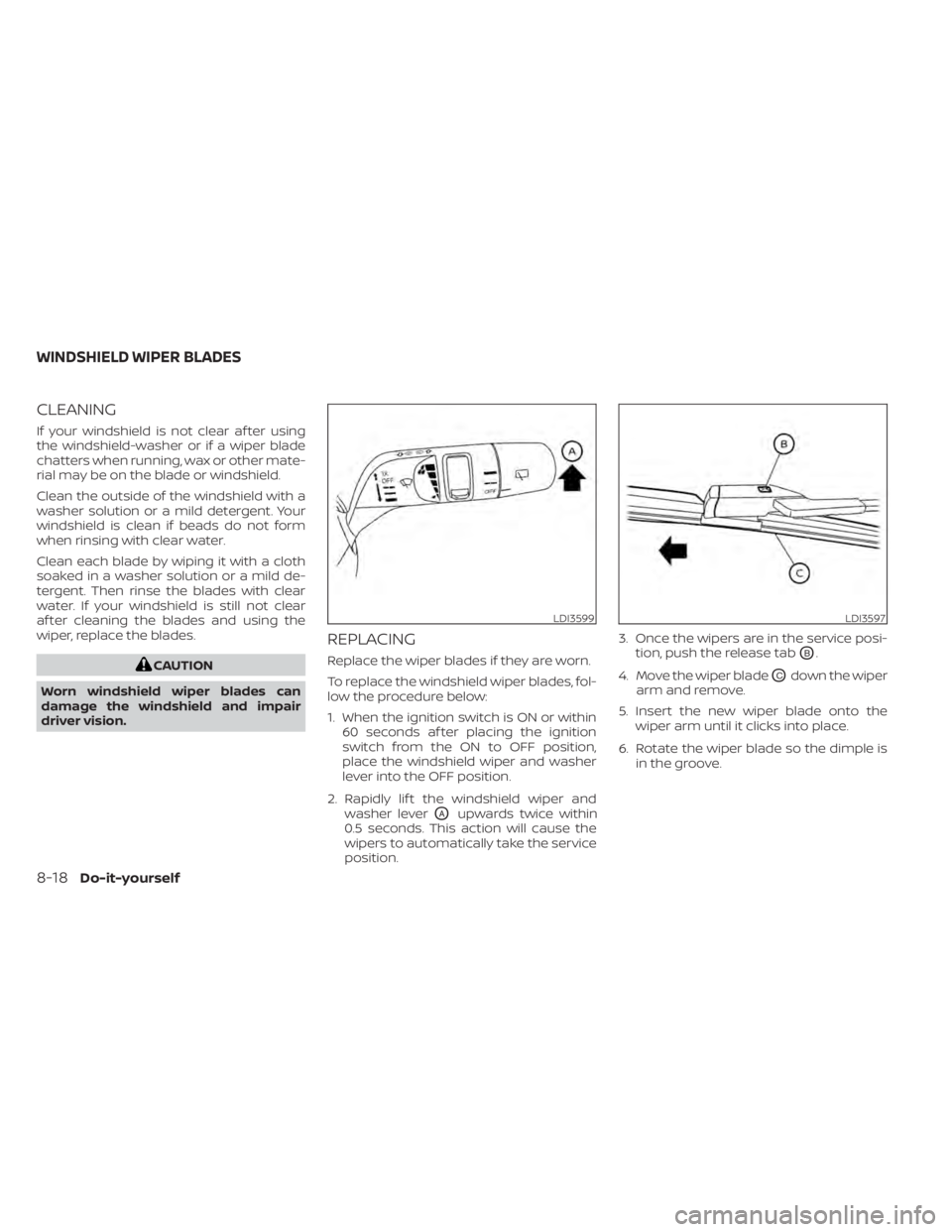
2. Rapidly lif t the windshield wiper and washer lever
OAupwards twice within
0.5 seconds. This action will cause the
wipers to automatically take the service
position. 3. Once the wipers are in the service posi-
tion, push the release tab
OB.
4. Move the wiper blade
OCdown the wiper
arm and remove.
5. Insert the new wiper blade onto the wiper arm until it clicks into place.
6. Rotate the wiper blade so the dimple is in the groove.
LDI3599LDI3597
WINDSHIELD WIPER BLADES
8-18Do-it-yourself
Page 566 of 665
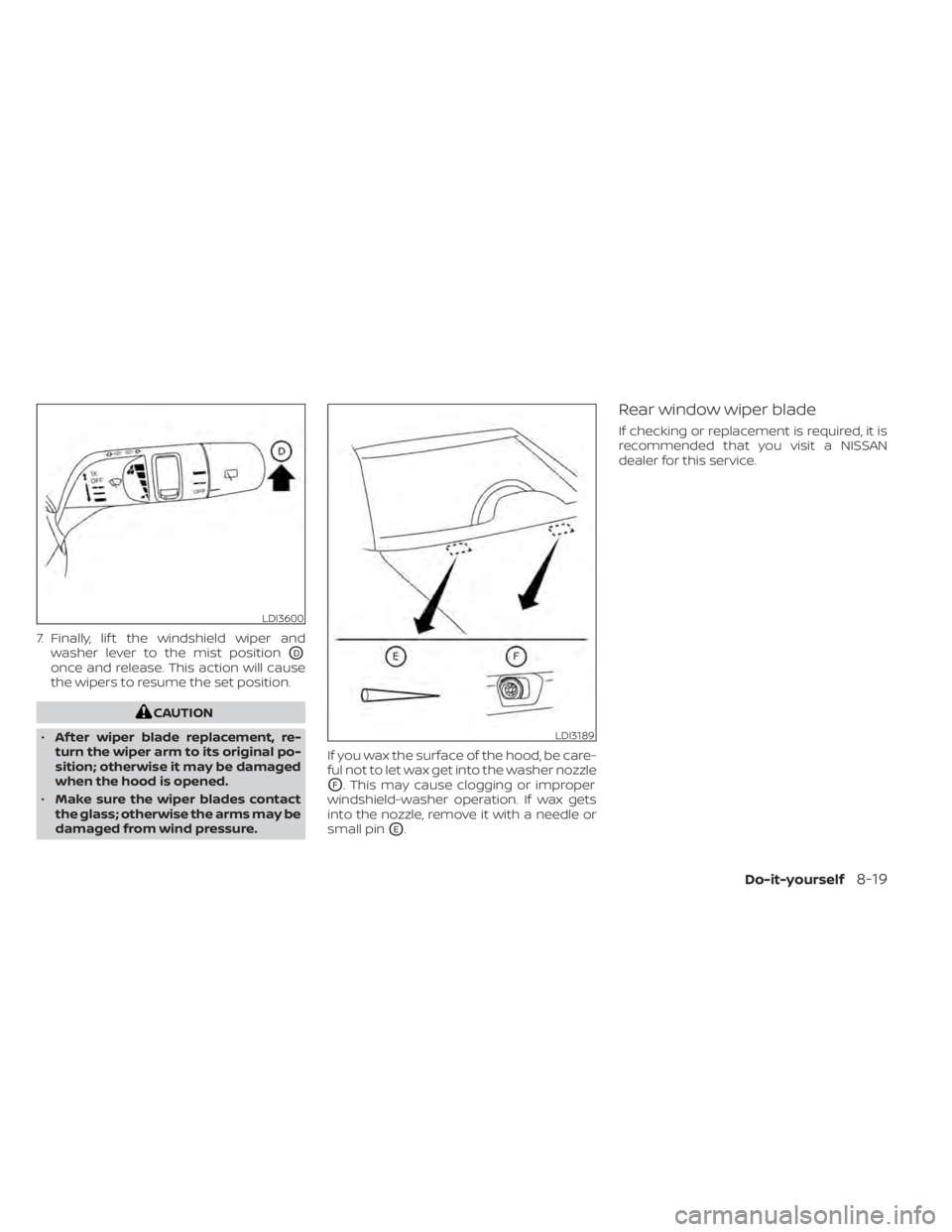
7. Finally, lif t the windshield wiper andwasher lever to the mist position
OD
once and release. This action will cause
the wipers to resume the set position.
CAUTION
• Af ter wiper blade replacement, re-
turn the wiper arm to its original po-
sition; otherwise it may be damaged
when the hood is opened.
• Make sure the wiper blades contact
the glass; otherwise the arms may be
damaged from wind pressure. If you wax the surface of the hood, be care-
ful not to let wax get into the washer nozzle
OF. This may cause clogging or improper
windshield-washer operation. If wax gets
into the nozzle, remove it with a needle or
small pin
OE.
Rear window wiper blade
If checking or replacement is required, it is
recommended that you visit a NISSAN
dealer for this service.
LDI3600
LDI3189
Do-it-yourself8-19
Page 592 of 665

Doors and engine hood:Check that the
doors and engine hood operate properly.
Also ensure that all latches lock securely.
Lubricate hinges, latches, latch pins, rollers
and links if necessary. Make sure that the
secondary latch keeps the hood from
opening when the primary latch is
released.
When driving in areas using road salt or
other corrosive materials, check lubrica-
tion frequently.
Check that the gas stays or struts properly
and securely hold the hood, trunk, or rear
hatch fully open. If the hood, trunk, or rear
hatch is not held open, have the gas stays
or struts replaced.
Lights*: Clean the headlights on a regular
basis. Make sure that the headlights, stop
lights, tail lights, turn signal lights, and other
lights are all operating properly and in-
stalled securely. Also check headlight aim.
Road wheel nuts (lug nuts)*: When check-
ing the tires, make sure no wheel nuts are
missing, and check for any loose wheel
nuts. Tighten if necessary.
Tire rotation*: Rotate tires at the specified
interval shown in the maintenance
schedule. Tires*:
Check the pressure with a gauge
of ten and always prior to long distance
trips. If necessary, adjust the pressure in all
tires, including the spare, to the pressure
specified. Check carefully for damage, cuts
or excessive wear.
Tire Pressure Monitoring System (TPMS)
tire pressure sensor: It is recommended
that you replace the TPMS tire pressure
sensor assembly when the tires are re-
placed due to wear or age.
Wheel alignment and balance: If the ve-
hicle should pull to either side while driving
on a straight and level road, or if you detect
uneven or abnormal tire wear, there may
be a need for wheel alignment. If the steer-
ing wheel or seat vibrates at normal high-
way speeds, wheel balancing may be
needed.
For additional information regarding tires,
refer to “Important Tire Safety Information”
(US) or “Tire Safety Information” (Canada) in
the Warranty Information Booklet.
Windshield: Clean the windshield on a
regular basis. Check the windshield at least
every six months for cracks or other dam-
age. Have a damaged windshield repaired
by a qualified repair facility. It is recom-
mended that you have a damaged wind- shield repaired by a NISSAN dealer, or a
NISSAN Certified Collision Center. To locate
a collision center in your area, refer to
http://collision.nissanusa.com.
Windshield wiper blades*:
Check for
cracks or wear if they do not wipe properly.
Inside the vehicle
The maintenance items listed here should
be checked on a regular basis, such as
when performing scheduled maintenance,
cleaning the vehicle, etc.
Accelerator pedal: Check the pedal for
smooth operation and make sure the
pedal does not catch or require uneven
effort. Keep the floor mat away from the
pedal.
Brake pedal: Check the pedal for smooth
operation. If the brake pedal suddenly goes
down further than normal, the pedal feels
spongy or the vehicle seems to take longer
to stop, have your vehicle checked imme-
diately. It is recommended that you visit a
NISSAN dealer for this service. Keep the
floor mat away from the pedal.
Brakes: Check that the brakes do not pull
the vehicle to one side when applied.
Maintenance and schedules9-3
Page 656 of 665
Wheel/tire size...............10-10Wheels and tires..........8-28,10-10Tire pressureLow tire pressure warning light.....2-18Tire Pressure Monitoring System (TPMS).5-5Top tether strap child restraint.......1-40Towing2-wheel drive models...........6-164-wheel drive models...........6-15Flat towing................ .10-32Tow truck towing..............6-14Towing load/specification.......10-23Trailer towing...............10-20Towing a trailer................10-20Traffic Sign Recognition (TSR)........5-35Transceiver
HomeLink® Universal
Transceiver
........2- 125, 2-128, 2-129Transmission
Driving with automatic
transmission
................5-18Travel (See registering a vehicle in another
country).................... .10-11Trip odometer..................2-7Turn signal switch..............2-88
U
Uniform tire quality grading........10-33USB/iPod® Charging Ports.........2-103
V
Vanity mirror..................3-36Variable voltage control system......8-15Vehicle dimensions and weights.....10-10Vehicle Dynamic Control (VDC)
system.....................5-177Vehicle identification.............10-11Vehicle identification number (VIN). . . .10-11Vehicle identification number (VIN) (Chassis
number)................... .10-11Vehicle identification number (VIN)
plate...................... .10-11Vehicle immobilizer system.....2-77,5-16Vehicle information display.....2-23,2-48Vehicle loading information........10-15Vehicle recovery................6-17Vehicle security system...........2-76Vehicle security system (NISSAN Vehicle Im-
mobilizer System), engine start. . .2-77, 5-16Vents...................... .4-31Visors......................3-36
W
Walk away lock function...........3-17Warning
Air bag warning light........1-80, 2-16Battery charge warning light......2-15Brake warning light............2-14Engine oil pressure warning light. . . .2-15Hazard warning flasher switch......6-2Low fuel warning light.......2-41, 2-67
Low tire pressure warning light.....2-18Low windshield-washer fluid warning
light................. .2-41, 2-68Seat belt warning light.......1-23,2-16Supplemental air bag warning
light..................1-80, 2-16Vehicle security system..........2-76Warning labels (for SRS)..........1-80Warning/indicator lights and audible
reminders..................2-12Warning lights.................2-12Warning lights, indicator lights and audible
reminders....................2-12Warning/indicator lights and audible
reminders....................2-12Audible reminders.............2-12Indicator lights...............2-12Warning lights................2-12Washer switch
Rear window wiper and washer
switches
.................. .2-80Weights (See dimensions and
weights)................... .10-10Wheel/tire size................10-10Wheels and tires............8-28,10-10When traveling or registering in another
country.................... .10-11Windows....................2-117Locking passengers' windows.....2-118Powerrearwindows...........2-118Power windows..............2-117Rear power windows...........2-118Windshield wiper blades...........8-18Windshield-washer fluid...........8-11
11-7