2023 NISSAN PATHFINDER Idling stop
[x] Cancel search: Idling stopPage 19 of 665

1. Vents (P. 4-31)
2. Headlight/fog light (if so equipped)/turn signal switch (P. 2-82, 2-89) 3. Paddle shif ter (P. 5-24)
4. Driver supplemental air bag (P. 1-59)
Horn (P. 2-89) 5. Meters and gauges (P. 2-6)
Warning and indicator lights (P. 2-12)
Vehicle information display (P. 2-23,
2-48)
6. Cruise control switches (if so equipped)
(P. 5-87)
ProPILOT Assist switches (if so
equipped) (P. 5-88)
Bluetooth® Hands-Free Phone System*
7. Wiper and washer switch (P. 2-78) Rear window wiper and washer switch
(P. 2-80)
8. Center display* Navigation system* (if so equipped)
9. Audio controls*
10. Front passenger supplemental air bag
(P. 1-59)
11. Front passenger supplemental knee air
bag (P. 1-77)
12. Glove box (P. 2-110)
13. Passenger heated seat switch
(if so equipped) (P. 2-91)
Passenger climate-controlled seat
switch (if so equipped) (P. 2-90)
14. Automatic heater and air conditioning
controls (P. 4-32)
15. Heated steering wheel switch
(if so equipped) (P. 2-93)
16. Hazard warning flasher switch (P. 6-2)
17. Idling stop OFF switch (P. 5-195)
LII2671
INSTRUMENT PANEL
0-6Illustrated table of contents
Page 111 of 665

1. Vents (P. 4-31)
2. Headlight/fog light (if so equipped)/turn signal switch (P. 2-82, 2-89) 3. Paddle shif ter (P. 5-24)
4. Driver supplemental air bag (P. 1-59)
Horn (P. 2-89) 5. Meters and gauges (P. 2-6)
Warning and indicator lights (P. 2-12)
Vehicle information display (P. 2-23,
2-48)
6. Cruise control switches (if so equipped)
(P. 5-87)
ProPILOT Assist switches
(if so equipped) (P. 5-88)
Bluetooth® Hands-Free Phone System*
7. Wiper and washer switch (P. 2-78) Rear window wiper and washer switch
(P. 2-80)
8. Center display* Navigation system* (if so equipped)
9. Audio controls*
10. Front passenger supplemental air bag
(P. 1-59)
11. Front passenger supplemental knee air
bag (P. 1-77)
12. Glove box (P. 2-110)
13. Passenger heated seat switch
(if so equipped) (P. 2-91)
Passenger climate-controlled seat
switch (if so equipped) (P. 2-90)
14. Automatic heater and air conditioning
controls (P. 4-32)
15. Heated steering wheel switch
(if so equipped) (P. 2-93)
16. Hazard warning flasher switch (P. 6-2)
17. Idling stop OFF switch (P. 5-195)
LII2671
INSTRUMENT PANEL
2-4Instruments and controls
Page 135 of 665

13. Traffic Sign Recognition (if so
equipped)
The Traffic Sign Recognition (TSR) system
provides the driver with information about
the most recently detected speed limit.
For additional information, see “Traffic Sign
Recognition (TSR) (P. 5-35).
14. Idling Stop System (if so
equipped)
The Idling Stop System provides the driver
with information about the amount of fuel
saved while using the system.
For additional information, see “Idling Stop
System” (P. 5-189).
OIL CONTROL SYSTEM (if so
equipped)
The oil control system can be accessed in
the Maintenance portion of the vehicle in-
formation display settings.
Engine oil information informs the distance
to oil change. Never exceed one year or
10,000 miles (16,000 km) between oil
change intervals for the 3.5L 6 cylinder
(VQ35DD engine model).
Display when
ignition is ONDisplay timing Action Re-
quired
Engine Oil Ser-
vice due in xxx
miles Remaining oil
life is less than
940 miles (1500
km). Plan to have
your vehicle
serviced.
Engine Oil Ser-
vice due Remaining oil
lifeis0miles(0
km). Have your ve-
hicle serviced
within two
weeks or less
than 500 miles
(800 km).
The oil change interval cannot be adjusted
manually.
The distance to oil change interval is calcu-
lated depending on the driving conditions
and set automatically by the oil control sys-
tem. A reminder will be displayed when ap-
proaching the end of the service interval.
When the Factory Reset option is selected
in the vehicle information display, the oil
control system will also be reset to initial
value. Please change the engine oil when
Factory Reset is selected.
CAUTION
If the oil replacement indicator is dis-
played, change the engine oil within
two weeks or less than 500 miles (800
km).
Operating the vehicle with deteriorated
oil can damage the engine.
To reset oil control system:
1. Place the ignition switch in the ON position.
2. Push the
andbuttons located
on the steering wheel until “Settings” dis-
plays in the vehicle information display.
Use the scroll dial to select “Mainte-
nance”. Then, press the scroll dial.
3. Select the “Service” and press the scroll dial.
4. Press the scroll dial according to the re- set instructions displayed at the bottom
of the “Service” maintenance screen.
For additional information, see “Mainte-
nance” (P. 2-62).
2-28Instruments and controls
Page 138 of 665

Menu itemExplanation
Front Sonar Allows user to turn the front sonar on or off.
Rear Sonar Allows user to turn the rear sonar on or off.
Sonar Distance Allows user to set the distance sensor range to Long/Medium/Short.
Sonar Volume Allows the user to set the parking sensor volume to High/Medium/Low.
Rear Cross Traffic Alert Allows user to turn the Rear Cross Traffic Alert (RCTA) system on or off. For additional information, see “Rear Cross Traffic A lert
(RCTA)” (P. 5-77).
Driver Alertness Allows user to turn the Intelligent Driver Alertness on or off. For additional information, see “Intelligent Driver Alertness (I-D A)”
(P. 5-165).
Timer Alert Allows user to set the timer alert.
Low Temp. Alert Allows user to turn the low temperature alert on or off.
ECO Mode Setting
The ECO mode setting menu allows the user to change the settings for the ECO mode.
Some menu items shown below may not be equipped on your vehicle.
Menu item Explanation
ECO Customize Displays available ECO mode settings.
Cruise Control Allows user to turn the cruise control ECO option on or off. For additional information, see “Cruise Control” (P. 5-87).
Idling stop Allows user to turn the Idling Stop System (ISS) ECO option on or off. For additional information, see “Idling Stop
System” (P. 5-189).
Air Conditioning Allows user to turn the Air Conditioning ECO option on or off. For additional information, see “ECO Customize”
(P. 5-34).
ECO Drive Assist Displays available ECO information settings.
ECO Indicator Allows user to turn the ECO indicator on or off.
ECO Drive Report Allows user to turn the ECO Drive Report on or off.
View History Displays the history report for the vehicle.
Tire Pres ECO advice Allows user to turn the tire pressure ECO advice on or off.
Instruments and controls2-31
Page 143 of 665
Customize Display
The customize display menu allows the user to customize the information that appears in the vehicle information display.
Some menu items shown below may not be equipped on your vehicle.
Menu itemExplanation
Main Menu Selection Displays the available screens that can be shown in the vehicle information display.
Home Allows user to turn the home screen on or off in the vehicle information display.
Blank Allows user to turn the blank on or off in the vehicle information display.
Speed Allows user to turn the speed screen on or off in the vehicle information display.
Drive Computer Allows user to turn the drive computer screen on or off in the vehicle information display.
Fuel Economy Allows user to turn the fuel economy screen on or off in the vehicle information display.
ECO Pedal Guide Allows user to turn the ECO Pedal guide screen on or off in the vehicle information display.
TPMS Allows user to turn the TPMS screen on or off in the vehicle information display.
Idling Stop Allows user to turn the Idling stop screen on or off in the vehicle information display.
4x4–I Allows user to turn the 4x4–I screen on or off in the vehicle information display.
Navigation Allows user to turn the navigation screen on or off in the vehicle information display.
Audio Allows user to turn the audio controls screen on or off in the vehicle information display.
Driving Aids Allows user to turn the driving aids screen on or off in the vehicle information display.
Cruise Allows user to turn the cruise control screen on or off in the vehicle information display.
Speed Limit Sign Allows user to turn the speed limit sign screen on or off in the vehicle information display.
Route Guidance Displays the available route guidance settings.
Alerts Allows user to turn the alerts on or off.
Transition (Cruise) Allows user to turn the transition (cruise) on or off.
Welcome Effect Displays the available welcome effect settings.
Gauges Allows user to turn the gauges effect on or off.
Animation Allows user to turn the animation effect on or off.
Operation guidance Displays the available operation guidance settings.
2-36Instruments and controls
Page 150 of 665

Steep Slope Apply foot
brake
This indicator appears, and chime sounds
if the “Caution Steep slope” indicator has
appeared over about 3 minutes. Then the
parking brake will automatically be applied
and the brake force of the automatic brake
hold will be released, and the vehicle may
move or roll away unexpectedly. Apply the
foot brake to stop the vehicle moving.
For additional information, see “Automatic
brake hold” (P. 5-28).
Time for a break?
This indicator appears when the set time is
reached. The time can be set up to six
hours. For additional information, see “Set-
tings” (P. 2-29).
Tire Pressure Low - Add Air
This warning appears when the low tire
pressure warning light in the meter illumi-
nates and low tire pressure is detected. The
warning appears each time the ignition
switch is placed in the ON position as long
as the low tire pressure warning light re-
mains illuminated. If this warning appears,
stop the vehicle and adjust the tire pres-
sures of all four tires to the recommendedCOLD tire pressure shown on the Tire and
Loading Information label. For additional
information, see “Low tire pressure warning
light” (P. 2-18) and “Tire Pressure Monitoring
System (TPMS)” (P. 5-5).
TPMS Error: See Owner’s Manual
This warning appears when there is an er-
ror with your TPMS. If this warning appears,
have the system checked. It is recom-
mended that you visit a NISSAN dealer for
this service.
Transmission Shif t Position
indicator
This indicator shows the transmission shif t
position.
When parked apply parking
brake
This message appears when a malfunc-
tion occurs in the electric shif t control sys-
tem below 6 mph (10 km/h).
Have the system checked. It is recom-
mended that you visit a NISSAN dealer for
this service.
4WD Error: See Owner’s Manual
This warning appears when the 4-Wheel
Drive (4WD) system is not functioning prop-
erly while the engine is running. Reduce
vehicle speed and have your vehicle
checked by a NISSAN dealer as soon as
possible. For additional information, see
“Intelligent 4x4 (I-4x4)” (P. 5-171).
4WD High Temp. Stop Vehicle
This warning appears when the oil tem-
perature of the powertrain parts will in-
crease due to the difference in rotation be-
tween the front and rear wheels is large
(wheel slip), such as when driving the ve-
hicle on rough roads, through sand or mud,
or freeing a stuck vehicle. If this warning is
displayed, stop the vehicle with the engine
idling, as soon as it is safe to do so. In these
cases, the 4WD changes to 2WD to protect
the powertrain parts. Then if the warning
turns off, you can continue 4WD driving.
Tire Size Incorrect See Owner’s
Manual
This warning may appear if there is a large
difference between the diameters of the
front and rear wheels. Pull off the road in a
safe area, with the engine idling. Check that
all the tire sizes, brand, construction and
tread patterns are the same, that the tire
Instruments and controls2-43
Page 152 of 665

For additional information, see:
• Automatic Emergency Braking (AEB) withPedestrian Detection (P. 5-137)
• ProPILOT Assist (P. 5-88)
• Intelligent Forward Collision Warning (I- FCW) (P. 5-149)
Hands on detection
warning
This warning appears when the Steering
Assist system is engaged and the following
condition(s) occur:
• When not holding the steering wheel
• When there is no steering wheeloperation
Hold onto the steering wheel immediately.
When the steering operation is detected,
the warning turns off and the Steering As-
sist function is automatically restored.
For additional information, see “ProPILOT
Assist” (P. 5-88).
Idling Stop System
This indicator shows the Idling Stop Sys-
tem status.
For addition information, see “Idling Stop
System” (P. 5-189).
Intelligent Lane
Intervention (I-LI)/
Intelligent Blind Spot
Intervention (I-BSI)/
ProPILOT Assist indicator
This indicator shows when the I-LI, I-BSI or
ProPILOT Assist system is engaged.
For additional information, see “Intelligent
Lane Intervention (I-LI)” (P. 5-45), “Intelligent
Blind Spot Intervention (I-BSI)” (P. 5-65) or
“ProPILOT Assist” (P. 5-88).
Lane Departure Warning
(LDW) indicator
This indicator appears when the LDW sys-
tem is unavailable.
For additional information, see “Lane De-
parture Warning (LDW)” (P. 5-38).
Malfunction: See Owner’s Manual
This warning appears when one or more of
the following systems (if so equipped) is
not functioning properly:
• Rear Automatic Braking (RAB)
• Traffic Sign Recognition (TSR)
If one or more of these warning appears,
have the system checked. It is recom-
mended that you visit a NISSAN dealer for
this service.
Malfunction
This warning appears when one or more of
the following systems (if so equipped) mal-
function:
• Rear Cross Traffic Alert (RCTA)
• Automatic Emergency Braking (AEB) with Pedestrian Detection
• Intelligent Forward Collision Warning (I-FCW)
If one or more of these warning appears,
have the system checked. It is recom-
mended that you visit a NISSAN dealer for
this service.
Not Available Bad Weather
This message may appear when the Steer-
ing Assist system is engaged.
Under the following conditions, the Steer-
ing Assist system is automatically
canceled:
• When the wiper (HI) operates.
• When lane markers in the traveling lane cannot be correctly detected for a period
of time due to such items as a snow rut,
reflection of light on a rainy day or several
unclear lane markers are present.
Instruments and controls2-45
Page 160 of 665
13. Traffic Sign Recognition (if so
equipped)
The Traffic Sign Recognition (TSR) system
provides the driver with information about
the most recently detected speed limit.
For additional information, see “Traffic Sign
Recognition (TSR) (P. 5-35).
14. Idling Stop System (if so
equipped)
The Idling Stop System provides the driver
with information about the amount of fuel
saved while using the system.
For additional information, see “Idling Stop
System” (P. 5-189).
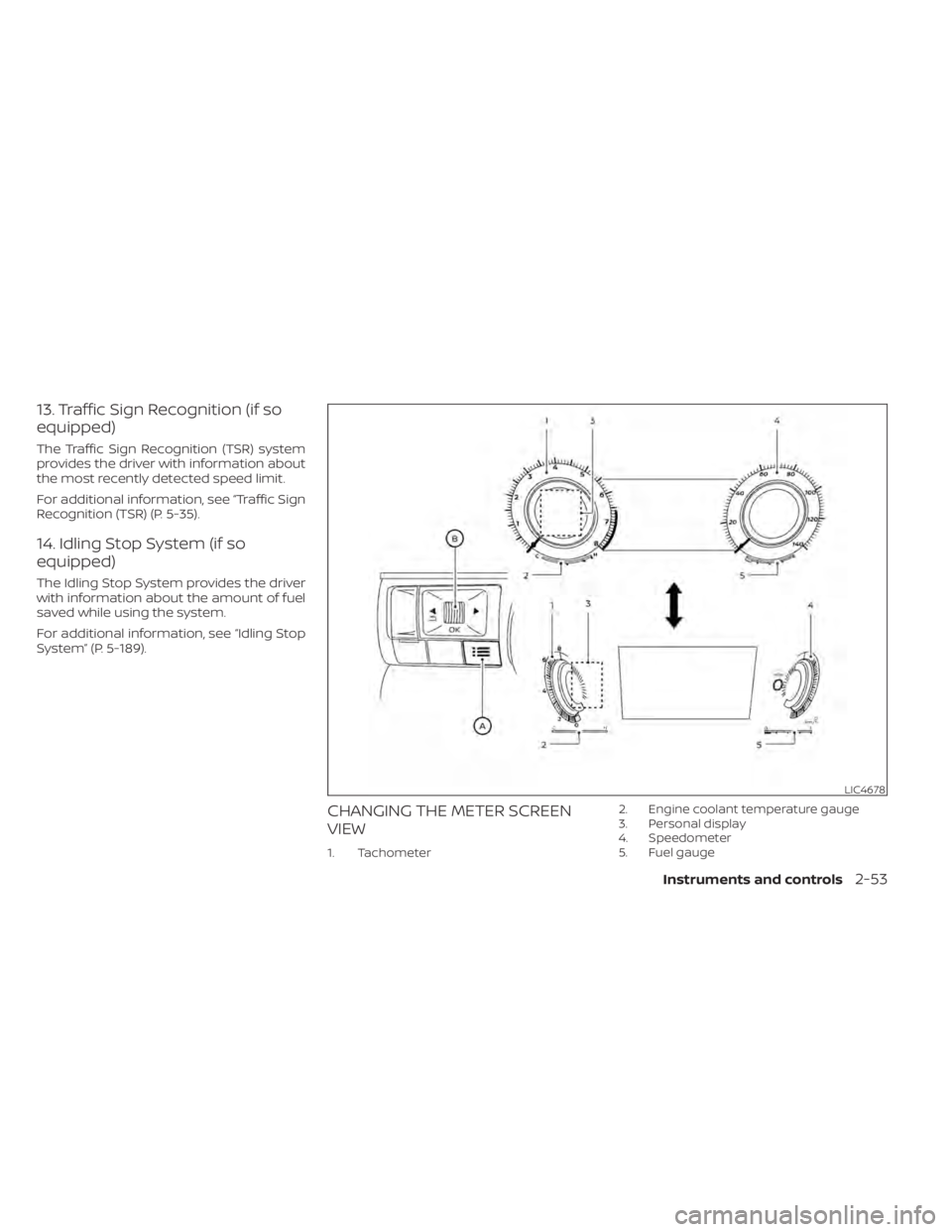
CHANGING THE METER SCREEN
VIEW
1. Tachometer2. Engine coolant temperature gauge
3. Personal display
4. Speedometer
5. Fuel gauge
LIC4678
Instruments and controls2-53