2023 NISSAN PATHFINDER TPMS
[x] Cancel search: TPMSPage 166 of 665

Menu itemExplanation
ECO Drive Assist Displays available ECO information settings.
ECO Indicator Allows user to turn the ECO indicator on or off.
ECO Drive Report Allows user to turn the ECO Drive Report on or off.
View History Displays the history report for the vehicle.
Tire Pres ECO advice Allows user to turn the tire pressure ECO advice on or off.
TPMS Setting
The TPMS settings menu allows the user to view or change the tire pressure units displayed in the vehicle information display.
Some menu items shown below may not be equipped on your vehicle.
Menu item Explanation
Tire Pressure Unit Allows user to select the tire pressure units that will display in the vehicle information display.
Clock
Allows user to adjust the clock settings and time within the vehicle information display.
Some menu items shown below may not be equipped on your vehicle.
Menu item Explanation
Display Allows user to turn the display on or off.
Clock Mode Allows user to adjust the clock mode to Auto, Manual or Time Zone.
Clock Format Allows user to adjust the clock format to 24H or 12H.
Daylight Saving Allows user to turnon or off the daylight saving mode.
Time Zone Allows user to select a time zone.
Set Clock Manually Allows user to set the clock manually.
Instruments and controls2-59
Page 170 of 665
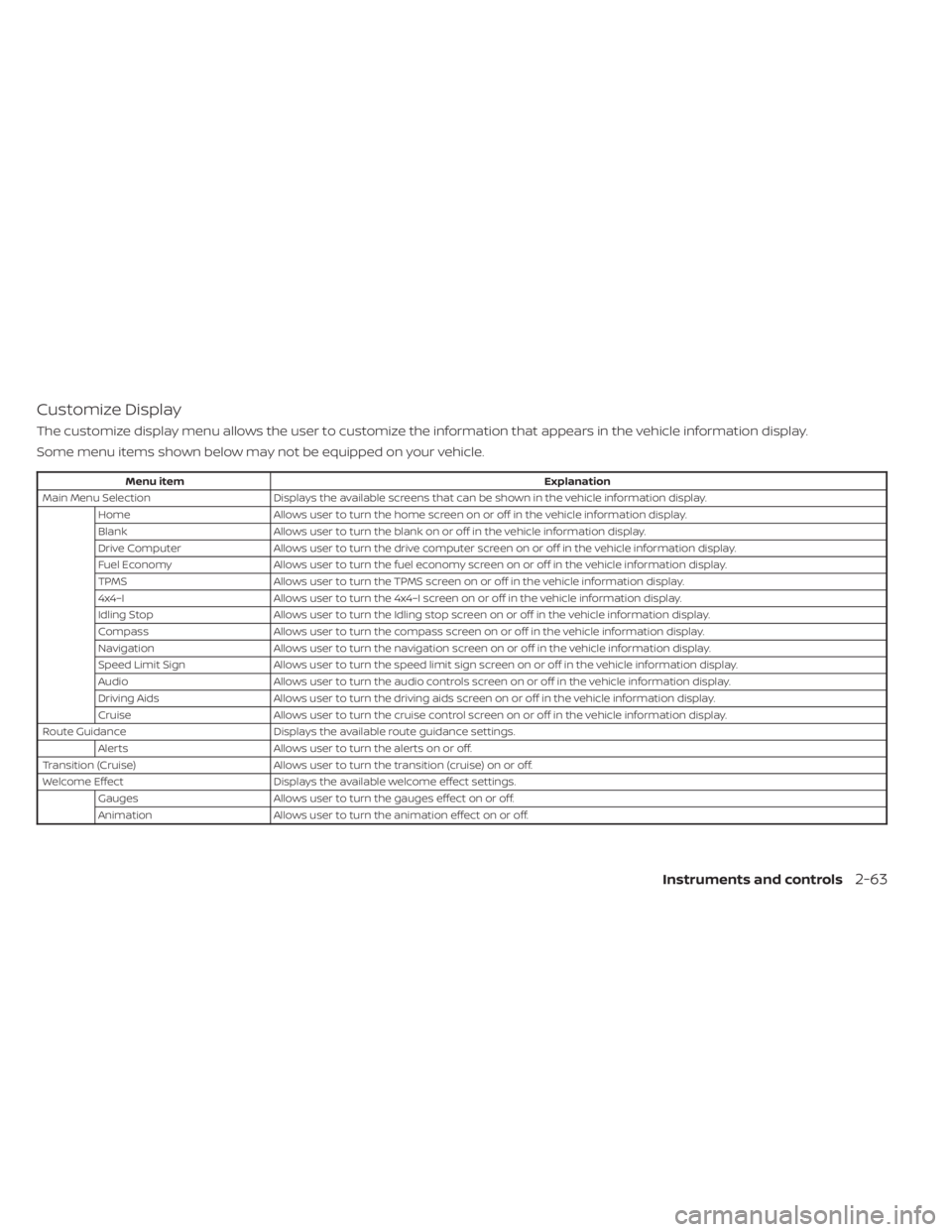
Customize Display
The customize display menu allows the user to customize the information that appears in the vehicle information display.
Some menu items shown below may not be equipped on your vehicle.
Menu itemExplanation
Main Menu Selection Displays the available screens that can be shown in the vehicle information display.
Home Allows user to turn the home screen on or off in the vehicle information display.
Blank Allows user to turn the blank on or off in the vehicle information display.
Drive Computer Allows user to turn the drive computer screen on or off in the vehicle information display.
Fuel Economy Allows user to turn the fuel economy screen on or off in the vehicle information display.
TPMS Allows user to turn the TPMS screen on or off in the vehicle information display.
4x4–I Allows user to turn the 4x4–I screen on or off in the vehicle information display.
Idling Stop Allows user to turn the Idling stop screen on or off in the vehicle information display.
Compass Allows user to turn the compass screen on or off in the vehicle information display.
Navigation Allows user to turn the navigation screen on or off in the vehicle information display.
Speed Limit Sign Allows user to turn the speed limit sign screen on or off in the vehicle information display.
Audio Allows user to turn the audio controls screen on or off in the vehicle information display.
Driving Aids Allows user to turn the driving aids screen on or off in the vehicle information display.
Cruise Allows user to turn the cruise control screen on or off in the vehicle information display.
Route Guidance Displays the available route guidance settings.
Alerts Allows user to turn the alerts on or off.
Transition (Cruise) Allows user to turn the transition (cruise) on or off.
Welcome Effect Displays the available welcome effect settings.
Gauges Allows user to turn the gauges effect on or off.
Animation Allows user to turn the animation effect on or off.
Instruments and controls2-63
Page 174 of 665

Electric shif t control
system indicator
This indicator appears when a malfunction
occurs in the electric shif t control system.
When the master warning indicator ap-
pears, the chime sounds and the following
message is displayed in the vehicle infor-
mation display: “When parked apply park-
ing brake”.
When the ignition is placed in the OFF posi-
tion, the chime sounds continuously. En-
sure the parking brake is applied
Have the system checked. It is recom-
mended that you visit a NISSAN dealer for
this service.
Front fog light indicator
(green)
The front fog light indicator appears when
the front fog lights are on. For additional
information, see “Fog light switch” (P. 2-89).
Headlight System Error: See Owner’s
Manual
This warning appears when there is an er-
ror with the system. For additional informa-
tion, see “Headlight and turn signal switch”
(P. 2-82).
High Beam Assist indicator
(green)
This indicator appears when the head-
lights come on while the headlight switch
is in the AUTO position with the high beams
selected and the engine running. This indi-
cates that the high beam assist is
operational.
For additional information, see “Headlight
and turn signal switch” (P. 2-82).
High beam indicator (blue)
This blue indicator appears when the
headlight high beams are on and goes out
when the low beams are selected.
The high beam indicator also appears
when the passing signal is activated.
Hill descent control system
ON indicator
When the ignition switch is placed in the ON
position, this indicator appears briefly and
then turns off.
The indicator appears when the hill de-
scent control system is activated.
If the hill descent control switch is on and
the indicator blinks, the system is not
engaged.If the indicator does not appear when the
hill descent switch is on, the system may
not be functioning properly. Have the sys-
tem checked. It is recommended that you
visit a NISSAN dealer for this service.
For additional information, see “Hill descent
control switch” (P. 2-94) “Hill descent control
system” (P. 5-182).
Low Fuel
This warning appears when the fuel level in
the fuel tank is getting low. Refuel as soon
as it is convenient, preferably before the
fuel gauge reaches 0 (Empty).
There will be
a small reserve of fuel in the tank when
the fuel gauge needle reaches 0 (Empty).
Low Outside Temperature
This warning appears if the outside tem-
perature is below 37°F (3°C). The tempera-
ture can be changed to display in Celsius or
Fahrenheit. For additional information, see
“Driver Assistance” (P. 2-56).
Low tire pressure indicator
Your vehicle is equipped with a Tire Pres-
sure Monitoring System (TPMS) that moni-
tors the tire pressure of all tires except the
spare.
Instruments and controls2-67
Page 175 of 665

The low tire pressure indicator warns of low
tire pressure or indicates that the TPMS is
not functioning properly.
Af ter the ignition switch is placed in the ON
position, this indicator appears for about 1
second and turns off.
Low Washer Fluid
This warning appears when the
windshield-washer fluid is at a low level.
Add windshield-washer fluid as necessary.
For additional information, see
“Windshield-washer fluid” (P. 8-11).
Malfunction Indicator (MIL)
If this indicator appears steady or blinks
while the engine is running, it may indicate
a potential emission control malfunction.
The MIL may also come on steady if the
vehicle runs out of fuel. Check to make sure
that the vehicle has at least 3 gallons (11.4
liters) of fuel in the fuel tank.
Af ter a few driving trips, the
indicator
should turn off if no other potential emis-
sion control system malfunction exists.
If this indicator appears steady for 20 sec-
onds and then blinks for 10 seconds when
the engine is not running, it indicates that the vehicle is not ready for an emission
control system inspection/maintenance
test. For additional information, see “Readi-
ness for Inspection/Maintenance (I/M) test”
(P. 10-36).
Master warning indicator
When the ignition is in the ON position, the
master warning indicator appears with
various other warning messages.
For additional information, see “Vehicle in-
formation display–7 inch (18 cm) Type A”
(P. 2-23) or “Vehicle information display—12.3
inch (31 cm) Type B” (P. 2-48).
Neutral Hold Mode activated
This message appears when the Neutral
hold mode is activated. To exit the Neutral
hold mode, place the vehicle in any other
shif t position other than N (Neutral). For
additional information, see “Neutral hold
mode function” (P. 5-23).
Neutral Hold Mode was not activated
This message appears when the Neutral
hold mode is unavailable. To activate the
Neutral hold mode, wait for a while without
shif ting and then perform the operations
again. For additional information, see “Neu-
tral hold mode function” (P. 5-23).
Neutral Hold Mode guidance
This message appears af ter approxi-
mately 5 seconds when the ignition switch
is placed in the OFF position while the shif t
position is in the N (Neutral) position (Neu-
tral hold mode is available). For additional
information, see “Neutral hold mode func-
tion” (P. 5-23).
Parking Sensor Error: See Owner’s
Manual
This warning appears when there is an er-
ror with the system. For additional informa-
tion, see “Front and rear sonar system”
(P. 5-183).
Power will turn off to save the battery
Under the specific conditions, this warning
may appear in the vehicle information dis-
play af ter a period of time if the ignition
switch is in the ON position and if the ve-
hicle is in P (Park). For additional informa-
tion, see “Push-button ignition switch posi-
tions” (P. 5-14).
Power turned off to save the battery
Under the specific conditions, this warning
may appear af ter the ignition switch is au-
tomatically turned off. For additional infor-
mation, see “Push-button ignition switch
positions” (P. 5-14).
2-68Instruments and controls
Page 177 of 665
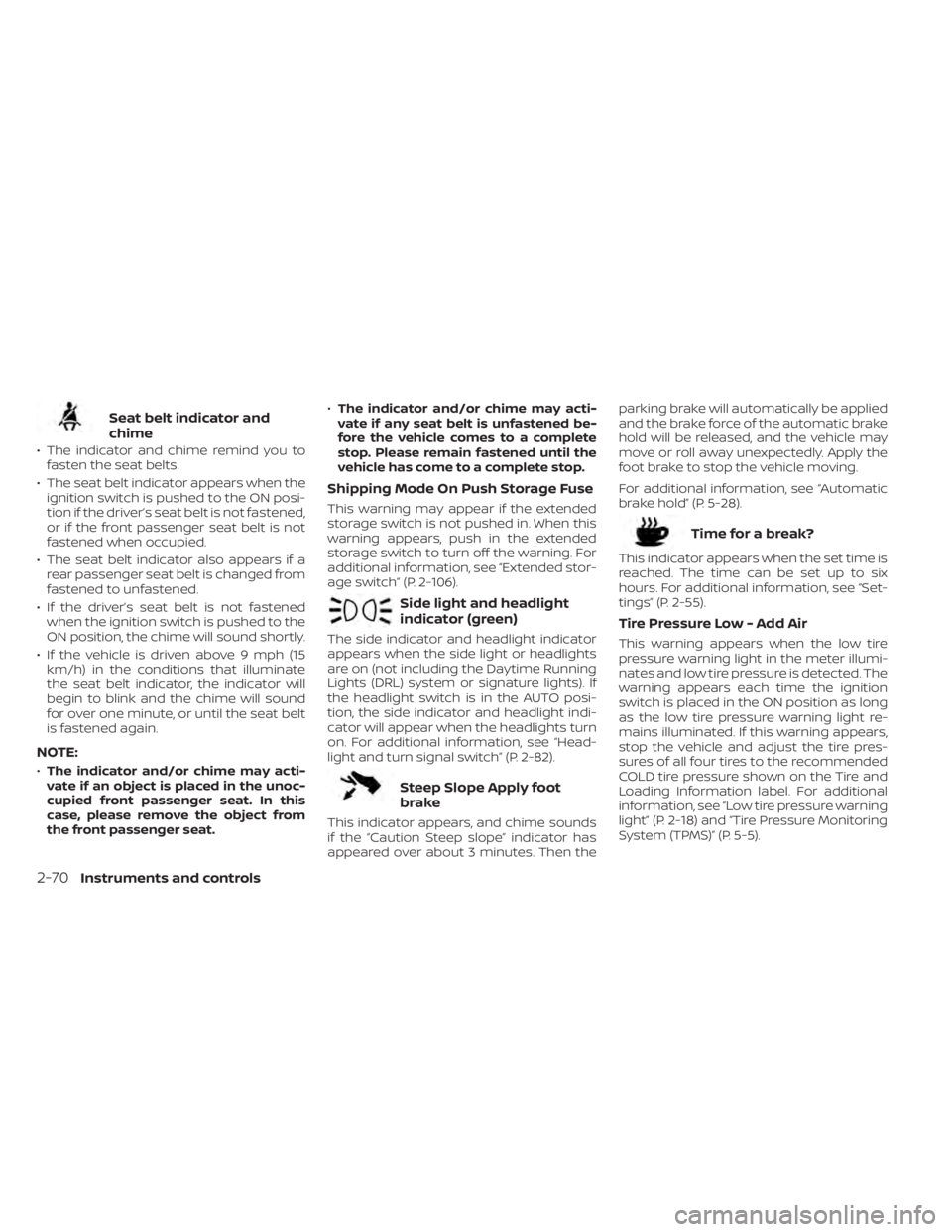
Seat belt indicator and
chime
• The indicator and chime remind you tofasten the seat belts.
• The seat belt indicator appears when the ignition switch is pushed to the ON posi-
tion if the driver’s seat belt is not fastened,
or if the front passenger seat belt is not
fastened when occupied.
• The seat belt indicator also appears if a rear passenger seat belt is changed from
fastened to unfastened.
• If the driver’s seat belt is not fastened when the ignition switch is pushed to the
ON position, the chime will sound shortly.
• If the vehicle is driven above 9 mph (15 km/h) in the conditions that illuminate
the seat belt indicator, the indicator will
begin to blink and the chime will sound
for over one minute, or until the seat belt
is fastened again.
NOTE:
•The indicator and/or chime may acti-
vate if an object is placed in the unoc-
cupied front passenger seat. In this
case, please remove the object from
the front passenger seat. •
The indicator and/or chime may acti-
vate if any seat belt is unfastened be-
fore the vehicle comes to a complete
stop. Please remain fastened until the
vehicle has come to a complete stop.
Shipping Mode On Push Storage Fuse
This warning may appear if the extended
storage switch is not pushed in. When this
warning appears, push in the extended
storage switch to turn off the warning. For
additional information, see “Extended stor-
age switch” (P. 2-106).
Side light and headlight
indicator (green)
The side indicator and headlight indicator
appears when the side light or headlights
are on (not including the Daytime Running
Lights (DRL) system or signature lights). If
the headlight switch is in the AUTO posi-
tion, the side indicator and headlight indi-
cator will appear when the headlights turn
on. For additional information, see “Head-
light and turn signal switch” (P. 2-82).
Steep Slope Apply foot
brake
This indicator appears, and chime sounds
if the “Caution Steep slope” indicator has
appeared over about 3 minutes. Then the parking brake will automatically be applied
and the brake force of the automatic brake
hold will be released, and the vehicle may
move or roll away unexpectedly. Apply the
foot brake to stop the vehicle moving.
For additional information, see “Automatic
brake hold” (P. 5-28).
Time for a break?
This indicator appears when the set time is
reached. The time can be set up to six
hours. For additional information, see “Set-
tings” (P. 2-55).
Tire Pressure Low - Add Air
This warning appears when the low tire
pressure warning light in the meter illumi-
nates and low tire pressure is detected. The
warning appears each time the ignition
switch is placed in the ON position as long
as the low tire pressure warning light re-
mains illuminated. If this warning appears,
stop the vehicle and adjust the tire pres-
sures of all four tires to the recommended
COLD tire pressure shown on the Tire and
Loading Information label. For additional
information, see “Low tire pressure warning
light” (P. 2-18) and “Tire Pressure Monitoring
System (TPMS)” (P. 5-5).
2-70Instruments and controls
Page 178 of 665

TPMS Error: See Owner’s Manual
This warning appears when there is an er-
ror with your TPMS. If this warning appears,
have the system checked. It is recom-
mended that you visit a NISSAN dealer for
this service.
Transmission Shif t Position
indicator
This indicator shows the transmission shif t
position.
Turn signal/hazard
indicators (green)
The appropriate indicator flashes when the
turn signal switch is activated.
Both indicators flash when the hazard
switch is turned on.
When parked apply parking
brake
This message appears when a malfunc-
tion occurs in the electric shif t control sys-
tem below 6 mph (10 km/h).
Have the system checked. It is recom-
mended that you visit a NISSAN dealer for
this service.
4WD Error: See Owner’s Manual
This warning appears when the 4-Wheel
Drive (4WD) system is not functioning prop-
erly while the engine is running. Reduce
vehicle speed and have your vehicle
checked by a NISSAN dealer as soon as
possible. For additional information, see
“Intelligent 4x4 (I-4x4)” (P. 5-171).
4WD High Temp. Stop Vehicle
This warning appears when the oil tem-
perature of the powertrain parts will in-
crease due to the difference in rotation be-
tween the front and rear wheels is large
(wheel slip), such as when driving the ve-
hicle on rough roads, through sand or mud,
or freeing a stuck vehicle. If this warning is
displayed, stop the vehicle with the engine
idling, as soon as it is safe to do so. In these
cases, the 4WD changes to 2WD to protect
the powertrain parts. Then if the warning
turns off, you can continue 4WD driving.
Tire Size Incorrect See Owner’s
Manual
This warning may appear if there is a large
difference between the diameters of the
front and rear wheels. Pull off the road in a
safe area, with the engine idling. Check that
all the tire sizes, brand, construction and
tread patterns are the same, that the tirepressure is correct and that the tires are
not excessively worn. If you have any prob-
lems, please change tires or adjust to the
correct tire pressure. Do not select the
SNOW or SAND or MUD/RUT (if so equipped)
mode with the Drive Mode Selector and do
not drive fast. For additional information,
see “Intelligent 4x4 (I-4x4)” (P. 5-171).
Automatic Emergency
Braking (AEB) with
Pedestrian Detection
system warning indicator
This warning appears when the ignition
switch is placed in the ON position.
This warning appears when the AEB with
Pedestrian Detection system is set to OFF
in the vehicle information display.
If the warning appears when the AEB with
Pedestrian Detection system is on, it may
indicate that the system is unavailable. For
additional information, see “Automatic
Emergency Braking (AEB) with Pedestrian
Detection” (P. 5-137).
Instruments and controls2-71
Page 323 of 665
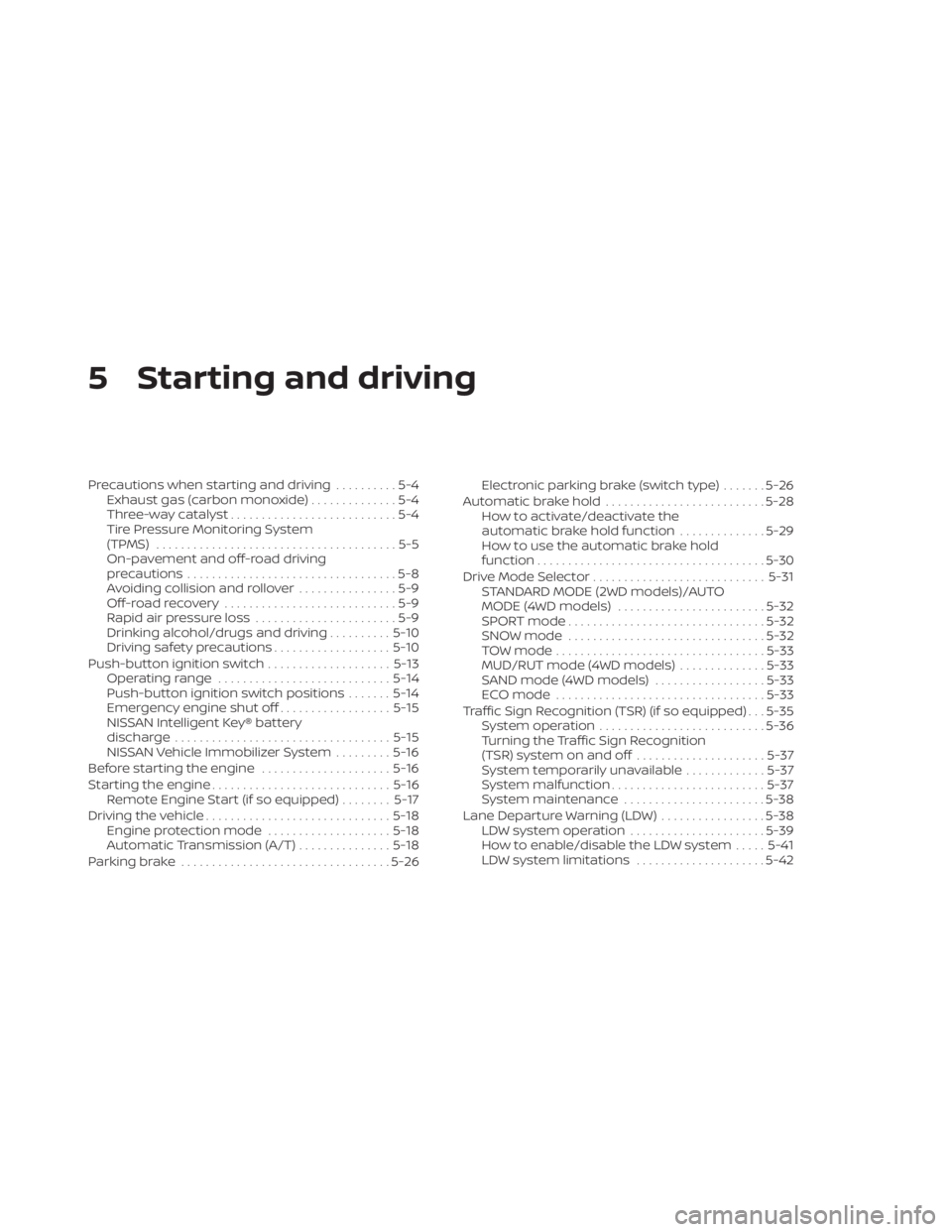
5 Starting and driving
Precautions when starting and driving..........5-4
Exhaust gas (carbon monoxide) ..............5-4
Three-way catalyst ...........................5-4
Tire Pressure Monitoring System
(TPMS) .......................................5-5
On-pavement and off-road driving
precautions ..................................5-8
Avoiding collision and rollover ................5-9
Off-roadrecovery ............................5-9
Rapid air pressure loss .......................5-9
Drinking alcohol/drugs and driving ..........5-10
Driving safety precautions ...................5-10
Push-button ignition switch ....................5-13
Operating range ............................ 5-14
Push-button ignition switch positions .......5-14
Emergency engine shut off ..................5-15
NISSAN Intelligent Key® battery
discharge ................................... 5-15
NISSAN Vehicle Immobilizer System .........5-16
Before starting the engine .....................5-16
Starting the engine ............................. 5-16
Remote Engine Start (if so equipped) ........5-17
Driving the vehicle .............................. 5-18
Engine protection mode ....................5-18
Automatic Transmission (A/T) ...............5-18
Parking brake .................................. 5-26Electronic parking brake (switch type)
.......5-26
Automatic brake hold .......................... 5-28
How to activate/deactivate the
automatic brake hold function ..............5-29
How to use the automatic brake hold
function ..................................... 5-30
Drive Mode Selector ............................ 5-31
STANDARD MODE (2WD models)/AUTO
MODE (4WD models) ........................ 5-32
SPORT mode ................................ 5-32
SNOW mode ................................ 5-32
TOW mode .................................. 5-33
MUD/RUT mode (4WD models) ..............5-33
SAND mode (4WD models) ..................5-33
ECO mode .................................. 5-33
Traffic Sign Recognition (TSR) (if so equipped) . . . 5-35 System operation ........................... 5-36
Turning the Traffic Sign Recognition
(TSR) system on and off .....................5-37
System temporarily unavailable .............5-37
S
ystem malfunction ......................... 5-37
System maintenance .......................5-38
Lane Departure Warning (LDW) .................5-38
LDW system operation ......................5-39
How to enable/disable the LDW system .....5-41
LDW system limitations .....................5-42
Page 328 of 665

•Do not stop or park the vehicle over
flammable materials such as dry
grass, waste paper or rags. They may
ignite and cause a fire.
CAUTION
• Do not use leaded gasoline. Deposits
from leaded gasoline will seriously
reduce the three-way catalyst's abil-
ity to help reduce exhaust pollutants.
• Keep your engine tuned up. Malfunc-
tions in the ignition, fuel injection, or
electrical systems can cause overrich
fuel flow into the three-way catalyst,
causing it to overheat. Do not keep
driving if the engine misfires, or if no-
ticeable loss of performance or other
unusual operating conditions are de-
tected. Have the vehicle inspected
promptly. It is recommended that
you visit a NISSAN dealer for this
service.
• Avoid driving with an extremely low
fuel level. Running out of fuel could
cause the engine to misfire, damag-
ing the three-way catalyst.
• Do not race the engine while warm-
ing it up. •
Do not push or tow your vehicle to
start the engine.
TIRE PRESSURE MONITORING
SYSTEM (TPMS)
Each tire, including the spare (if provided),
should be checked monthly when cold and
inflated to the inflation pressure recom-
mended by the vehicle manufacturer on
the vehicle placard or tire inflation pressure
label. (If your vehicle has tires of a different
size than the size indicated on the vehicle
placard or tire inflation pressure label, you
should determine the proper tire inflation
pressure for those tires.)
As an added safety feature, your vehicle
has been equipped with a Tire Pressure
Monitoring System (TPMS) that illuminates
a low tire pressure telltale when one or
more of your tires is significantly under-
inflated. Accordingly, when the low tire
pressure telltale illuminates, you should
stop and check all your tires as soon as
possible, and inflate them to the proper
pressure. Driving on a significantly under-
inflated tire causes the tire to overheat and
can lead to tire failure. Under-inflation also
reduces fuel efficiency and tire tread life,
and may affect the vehicle’s handling and
stopping ability. Please note that the TPMS is not a substi-
tute for proper tire maintenance, and it is
the driver’s responsibility to maintain cor-
rect tire pressure, even if under-inflation
has not reached the level to trigger illumi-
nation of the TPMS low tire pressure telltale.
Your vehicle has also been equipped with a
TPMS malfunction indicator to indicate
when the system is not operating properly.
The TPMS malfunction indicator is com-
bined with the low tire pressure telltale.
When the system detects a malfunction,
the telltale will flash for approximately one
minute and then remain continuously illu-
minated. This sequence will continue upon
subsequent vehicle start-ups as long as
the malfunction exists. When the malfunc-
tion indicator is illuminated, the system
may not be able to detect or signal low tire
pressure as intended. TPMS malfunctions
may occur for a variety of reasons, includ-
ing the installation of replacement or alter-
nate tires or wheels on the vehicle that
prevent the TPMS from functioning prop-
erly. Always check the TPMS malfunction
telltale af ter replacing one or more tires or
wheels on your vehicle to ensure that the
replacement or alternate tires and wheels
allow the TPMS to continue to function
properly.
Starting and driving5-5