2023 NISSAN PATHFINDER lock
[x] Cancel search: lockPage 310 of 665
TURNING MOD ON AND OFF
To turn the MOD system on or off:
1. Press the
orbutton on the
steering wheel and select “Settings” in
the vehicle information display.
2. Using the scroll dial, select “Driver Assis- tance” and press the OK button.
3. Select “Parking Aids”.
4. Toggle ON or OFF “Moving Object” using the OK button.
MOD SYSTEM LIMITATIONS
WARNING
Listed below are the system limitations
for MOD. Failure to operate the vehicle
in accordance with these system limi-
tations could result in serious injury or
death.
• Do not use the MOD system when
towing a trailer. The system may not
function properly.
• Excessive noise (for example, audio
system volume or open vehicle win-
dow) will interfere with the chime
sound, and it may not be heard. •
The MOD system performance will be
limited according to environmental
conditions and surrounding objects
such as:
– When there is low contrast be-
tween background and the mov-
ing objects.
– When there is a blinking source of
light.
– When strong light such as another
vehicle’s headlight or sunlight is
present.
– When camera orientation is not in
its usual position, such as when a
mirror is folded.
– When there is dirt, water drops or
snow on the camera lens.
– When the position of the moving
objects in the display is not
changed.
• The MOD system might detect flow-
ing water droplets on the camera
lens, white smoke from the muffler,
moving shadows, etc.
• The MOD system may not function
properly depending on the speed, di-
rection, distance or shape of the
moving objects. •
If your vehicle sustains damage to
the parts where the camera is in-
stalled, leaving it misaligned or bent,
the sensing zone may be altered and
the MOD system may not detect ob-
jects properly.
• When the temperature is extremely
high or low, the screen may not dis-
play objects clearly. This is not a
malfunction.
NOTE:
The green MOD icon will change to or-
ange if one of the following has oc-
curred:
• When the system is malfunctioning.
• When the component temperature
reaches a high level (icon will blink).
• When the rearview camera has de-
tected a blockage (icon will blink).
If the icon light continues to illuminate
orange, have the MOD system checked. It
is recommended that you visit a NISSAN
dealer for this service.
Monitor, climate, audio, phone and voice recognition systems4-29
Page 313 of 665
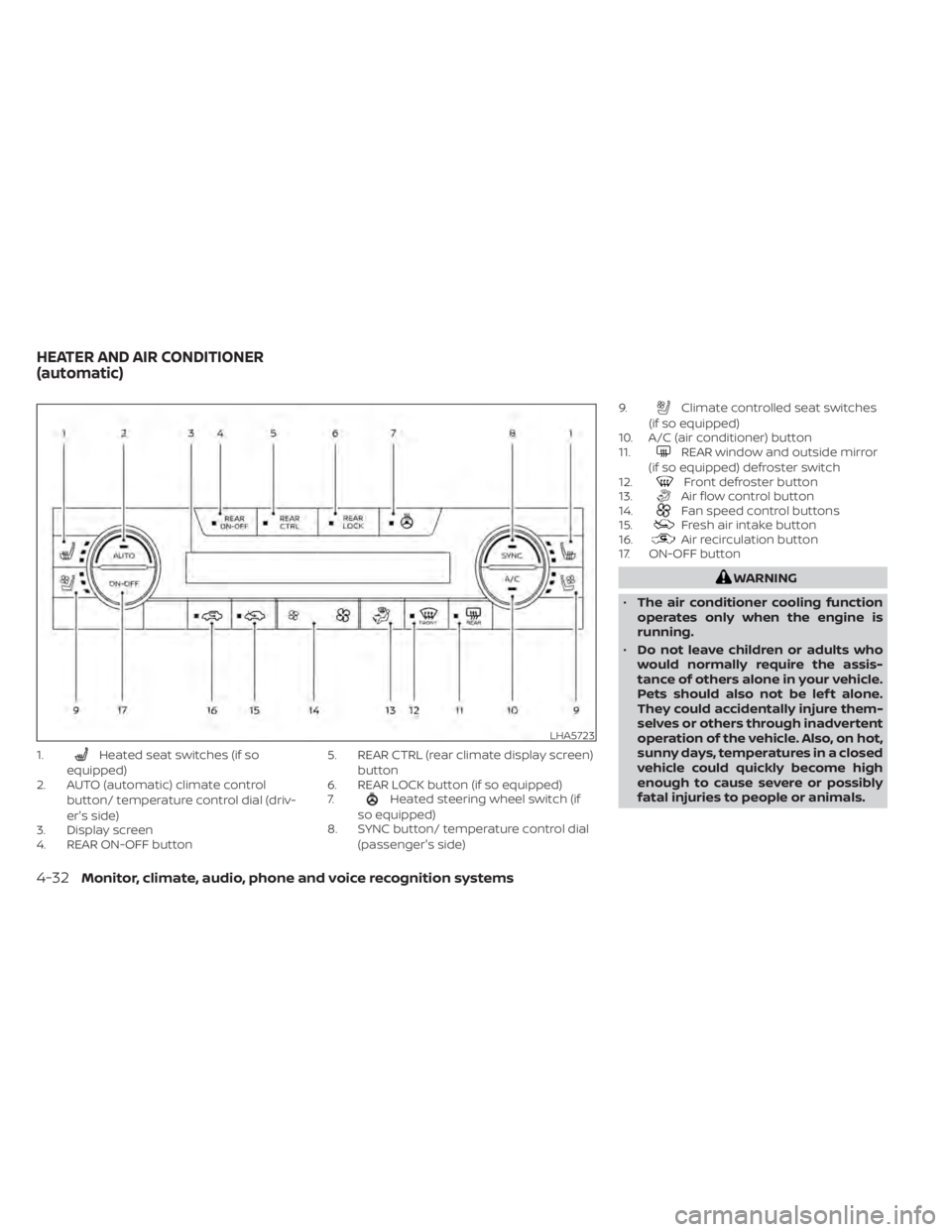
1.Heated seat switches (if so
equipped)
2. AUTO (automatic) climate control
button/ temperature control dial (driv-
er's side)
3. Display screen
4. REAR ON-OFF button 5. REAR CTRL (rear climate display screen)
button
6. REAR LOCK button (if so equipped)
7.
Heated steering wheel switch (if
so equipped)
8. SYNC button/ temperature control dial
(passenger's side) 9.
Climate controlled seat switches
(if so equipped)
10. A/C (air conditioner) button
11.
REAR window and outside mirror
(if so equipped) defroster switch
12.
Front defroster button
13.Air flow control button
14.Fan speed control buttons
15.Fresh air intake button
16.Air recirculation button
17. ON-OFF button
WARNING
• The air conditioner cooling function
operates only when the engine is
running.
• Do not leave children or adults who
would normally require the assis-
tance of others alone in your vehicle.
Pets should also not be lef t alone.
They could accidentally injure them-
selves or others through inadvertent
operation of the vehicle. Also, on hot,
sunny days, temperatures in a closed
vehicle could quickly become high
enough to cause severe or possibly
fatal injuries to people or animals.
LHA5723
HEATER AND AIR CONDITIONER
(automatic)
4-32Monitor, climate, audio, phone and voice recognition systems
Page 318 of 665
REAR AUTOMATIC AIR
CONDITIONING SYSTEM
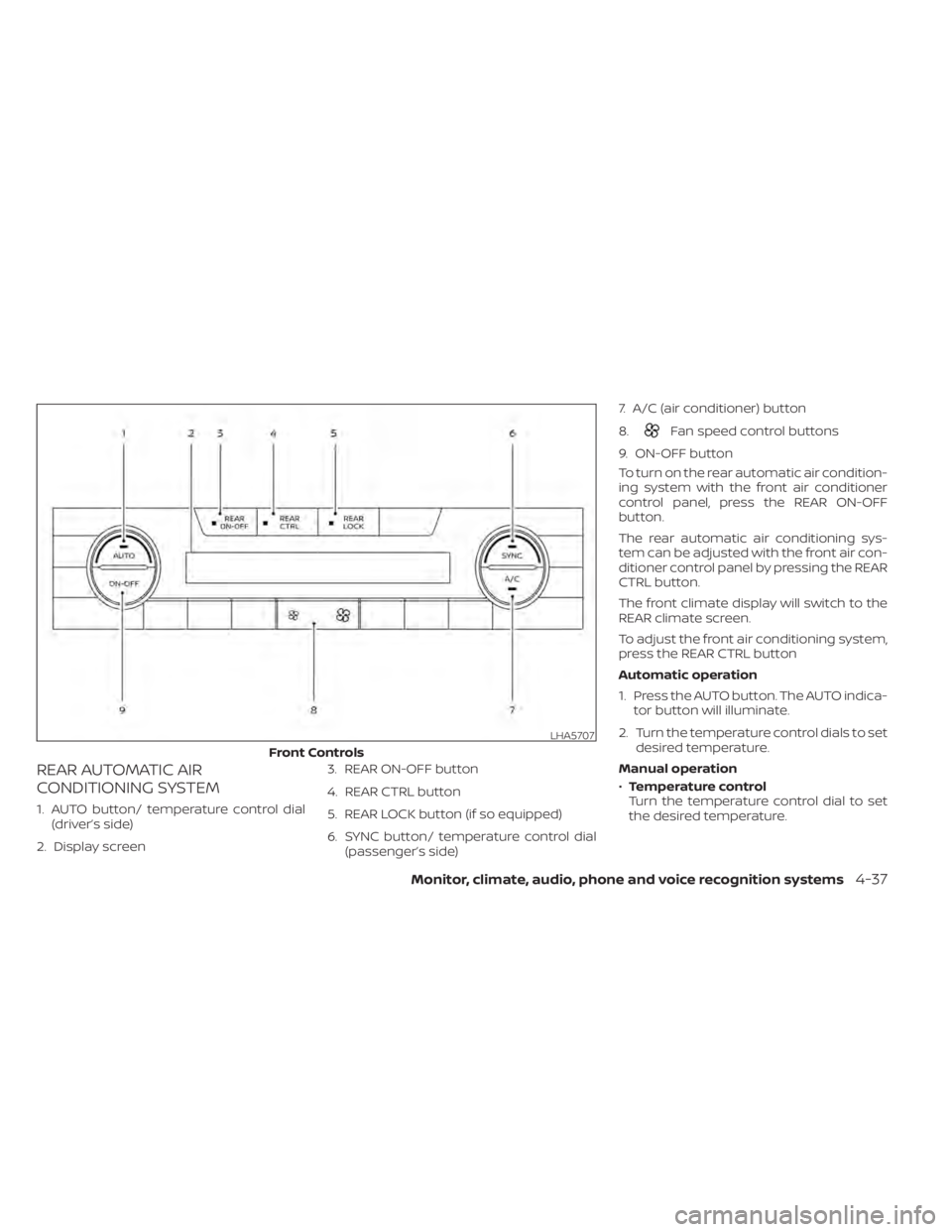
1. AUTO button/ temperature control dial(driver’s side)
2. Display screen 3. REAR ON-OFF button
4. REAR CTRL button
5. REAR LOCK button (if so equipped)
6. SYNC button/ temperature control dial
(passenger’s side) 7. A/C (air conditioner) button
8.
Fan speed control buttons
9. ON-OFF button
To turn on the rear automatic air condition-
ing system with the front air conditioner
control panel, press the REAR ON-OFF
button.
The rear automatic air conditioning sys-
tem can be adjusted with the front air con-
ditioner control panel by pressing the REAR
CTRL button.
The front climate display will switch to the
REAR climate screen.
To adjust the front air conditioning system,
press the REAR CTRL button
Automatic operation
1. Press the AUTO button. The AUTO indica- tor button will illuminate.
2. Turn the temperature control dials to set desired temperature.
Manual operation
• Temperature control
Turn the temperature control dial to set
the desired temperature.
LHA5707
Front Controls
Monitor, climate, audio, phone and voice recognition systems4-37
Page 319 of 665
•Fan speed control
Press theFan speed control buttons
to manually control the fan speed.
Rear Heating
1. Press the AUTO button. The AUTO indica- tor button will illuminate on the front
display.
2. Turn the temperature control dial to set the desired temperature.
Turning the system off
• Press the REAR ON-OFF button on the front display to turn the rear climate sys-
tem off. The indicator light will turn off.
• Press the ON-OFF button. The rear cli- mate will turn off and the control will
switch to front climate.
Locking the REAR controls
1. Press the REAR LOCK button on the front climate control panel. LOCK will be dis-
played on the rear climate display
screen.
2. The rear climate controls will be locked and can only be adjusted using the front
controls. Rear control buttons (if so equipped)
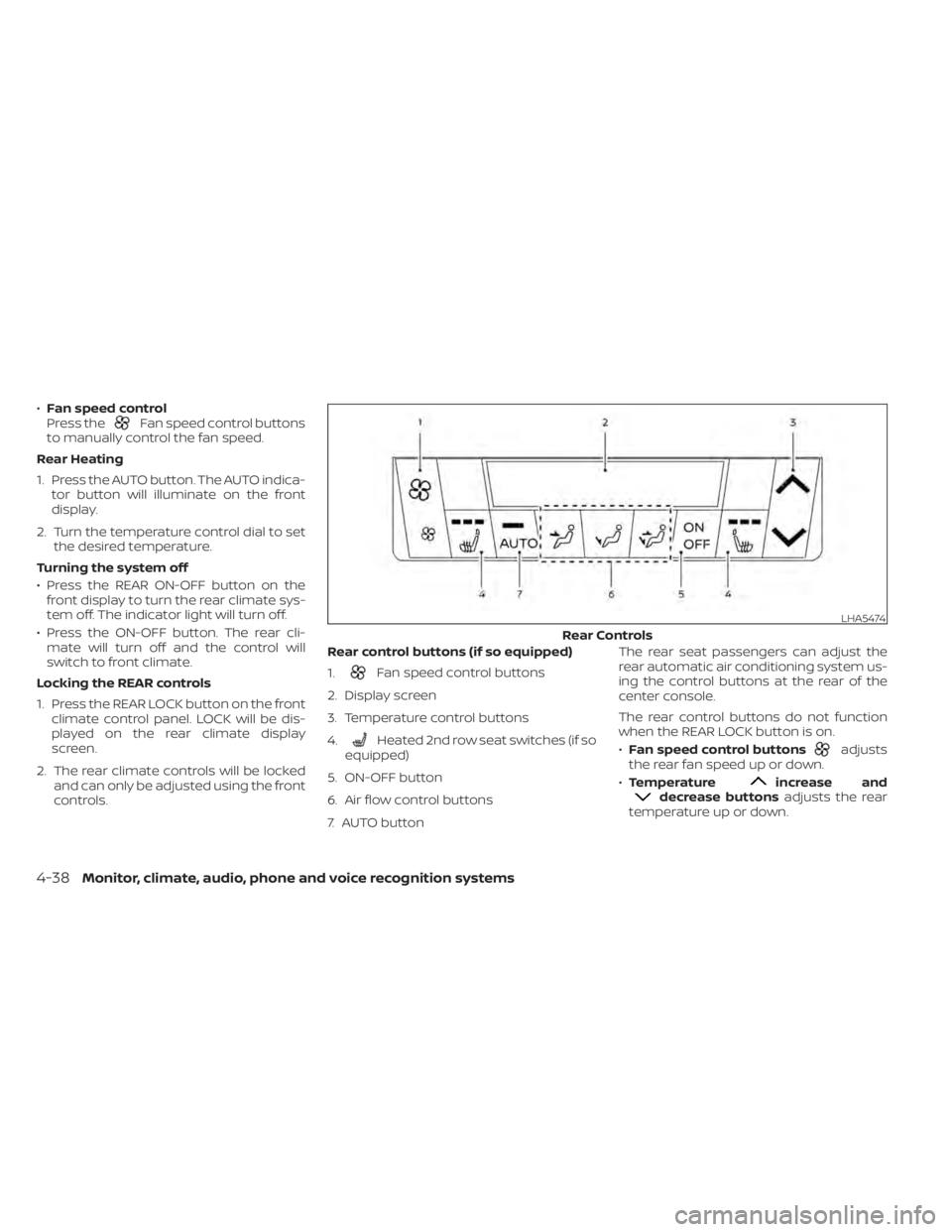
1.
Fan speed control buttons
2. Display screen
3. Temperature control buttons
4.
Heated 2nd row seat switches (if so
equipped)
5. ON-OFF button
6. Air flow control buttons
7. AUTO button The rear seat passengers can adjust the
rear automatic air conditioning system us-
ing the control buttons at the rear of the
center console.
The rear control buttons do not function
when the REAR LOCK button is on.
•
Fan speed control buttonsadjusts
the rear fan speed up or down.
• Temperature
increase anddecrease buttons adjusts the rear
temperature up or down.
LHA5474
Rear Controls
4-38Monitor, climate, audio, phone and voice recognition systems
Page 320 of 665
•Heated 2nd row seat switches (if so
equipped) For additional information,
see “Heated 2nd row seat switches”
(P. 2-92).
• ON-OFF button Turns rear automatic air
conditioning system on and off.
• Air flow control buttons controls air flow
and selects the air outlet.
• AUTO button Turns rear automatic air
conditioning system on, AUTO mode on. The air conditioner system in your NISSAN
vehicle is charged with a refrigerant de-
signed with the environment in mind.
This refrigerant does not harm the
earth's ozone layer.
Special charging equipment and lubricant
is required when servicing your NISSAN air
conditioner. Using improper refrigerants or
lubricants will cause severe damage to
your air conditioner system. For additional
information, see “Air conditioner system re-
frigerant and oil recommendations”
(P. 10-8).
It is recommended that you visit a NISSAN
dealer to service your “environmentally
friendly ” air conditioner system.
WARNING
The air conditioner system contains re-
frigerant under high pressure. To avoid
personal injury, any air conditioner ser-
vice should be done only by an experi-
enced technician with proper
equipment.
ROOF MOUNTED ANTENNA
The antenna is located on the rear part of
the vehicle roof.
CAUTION
• A build-up of ice on the antenna can
affect radio performance. Remove
the ice to restore radio reception.
• When removing snow from the roof,
do not apply strong force to the an-
tenna. That may cause broken an-
tenna and roof panel dent.
• When using a high pressure car wash,
keep the high pressure nozzle away
from the antenna. The seal may be
deformed or damaged.
• The radio performance may be af-
fected if cargo carried on the roof
blocks the radio signal. If possible, do
not put cargo near the antenna.
SERVICING AIR CONDITIONER ANTENNA
Monitor, climate, audio, phone and voice recognition systems4-39
Page 325 of 665
Steering Assist............................. 5-119
Conventional (fixed speed) cruise
control mode .............................. 5-127
Rear Automatic Braking (RAB) .................5-130
RAB system operation ......................5-131
Turning the RAB system on/off .............5-133
RAB system limitations .....................5-134
System malfunction ........................ 5-136
System maintenance ......................5-136
Automatic Emergency Braking (AEB) with
Pedestrian Detection .......................... 5-137
AEB with Pedestrian Detection system
operation .................................. 5-138
Turning the AEB with Pedestrian
Detection system ON/OFF .................5-140
AEB with Pedestrian Detection system
limitations ................................. 5-141
System temporarily unavailable ............5-145
System malfunction ........................ 5-147
System maintenance ......................5-148
Intelligent Forward Collision Warning (I-FCW) . . 5-149 I-FCW system operation ....................5-152
Turning the I-FCW system on/off ...........5-153
I-FCW system limitations ...................5-155
System temporarily unavailable ............5-161 System malfunction
........................ 5-163
System maintenance ......................5-164
Intelligent Driver Alertness (I-DA) ...............5-165
Intelligent Driver Alertness system
operation .................................. 5-166
How to enable/disable the Intelligent
Driver Alertness (I-DA) system ..............5-167
Intelligent Driver Alertness (I-DA)
system limitations ......................... 5-168
Break-in schedule ............................. 5-169
Fuel efficient driving tips .......................5-170
Increasing fuel economy .......................5-171
Intelligent 4X4 (I-4X4) (if so equipped) ...........5-171
Parking/parking on hills .......................5-173
Power steering ................................ 5-174
Brake system ................................. 5-175
Brake precautions .......................... 5-175
Anti-lock Braking System (ABS) .............5-175
Br
ake Assist ................................ 5-177
Vehicle Dynamic Control (VDC) system ........5-177
How to turn off the VDC system ............5-179
Rise-up and build-up ....................... 5-179
Brake force distribution ....................5-179
Active Brake Limited Slip (ABLS) system .......5-180
Page 326 of 665
Chassis control............................... 5-181
Intelligent Trace Control (I-TC) ..............5-181
Active Ride Control (ARC)
(if so equipped) ............................. 5-181
Hill descent control system (if so equipped) . . . 5-182
Hill start assist system ........................5-183
Front and Rear Sonar System
(if so equipped) ................................ 5-183
System operation .......................... 5-184
How to enable/disable the front and
rear sonar system .......................... 5-186
Sonar limitations ........................... 5-187
System temporarily unavailable ............5-188
System maintenance ......................5-188Idling Stop System
............................ 5-189
Retrograde movement control function ....5-191
Idling Stop System display ..................5-191
Idling Stop OFF switch ......................5-195
Cold weather driving .......................... 5-196
Freeing a frozen door lock ..................5-196
Antifreeze .................................. 5-196
Battery..................................... 5-196
Draining of coolant water ..................5-196
Tire equipment ............................. 5-196
Special winter equipment ..................5-196
Driving on snow or ice ......................5-196
Engine block heater (if so equipped) ........5-197
Page 336 of 665

WARNING
Do not operate the push-button igni-
tion switch while driving the vehicle ex-
cept in an emergency. (The engine will
stop when the ignition switch is pushed
three consecutive times in quick suc-
cession or the ignition switch is pushed
and held for more than 2 seconds.) If
the engine stops while the vehicle is
being driven, this could lead to a crash
and serious injury.
When the ignition switch is pushed without
depressing the brake pedal, the ignition
switch will illuminate.
Push the ignition switch center:
• Once to change to ON.
• Two times to change to OFF.
The ignition switch will automatically re-
turn to the LOCK position when any door is
either opened or closed with the switch in
the OFF position. When the ignition switch cannot be placed
in the OFF position, proceed as follows:
1. Push the park button to shif t to the P
(Park) position.
2. Push the ignition switch. The ignition switch position will change to the ON
position.
3. Push the ignition switch again to the OFF position.
The shif t position can be shif ted from
the P (Park) position if the ignition switch
is in the ON position and the brake pedal
is depressed.
If the battery of the vehicle is discharged,
the ignition switch cannot be moved
from the LOCK position.
Some indicators and warnings for opera-
tion are displayed on the vehicle informa-
tion display. For additional information, see
“Vehicle information display – 7 inch (18 cm)
Type A” (P. 2-23) or “Vehicle information dis-
play – 12.3 inch (31 cm) Type B” (P. 2-48).
LSD2645
PUSH-BUTTON IGNITION SWITCH
Starting and driving5-13