2023 NISSAN PATHFINDER lock
[x] Cancel search: lockPage 337 of 665
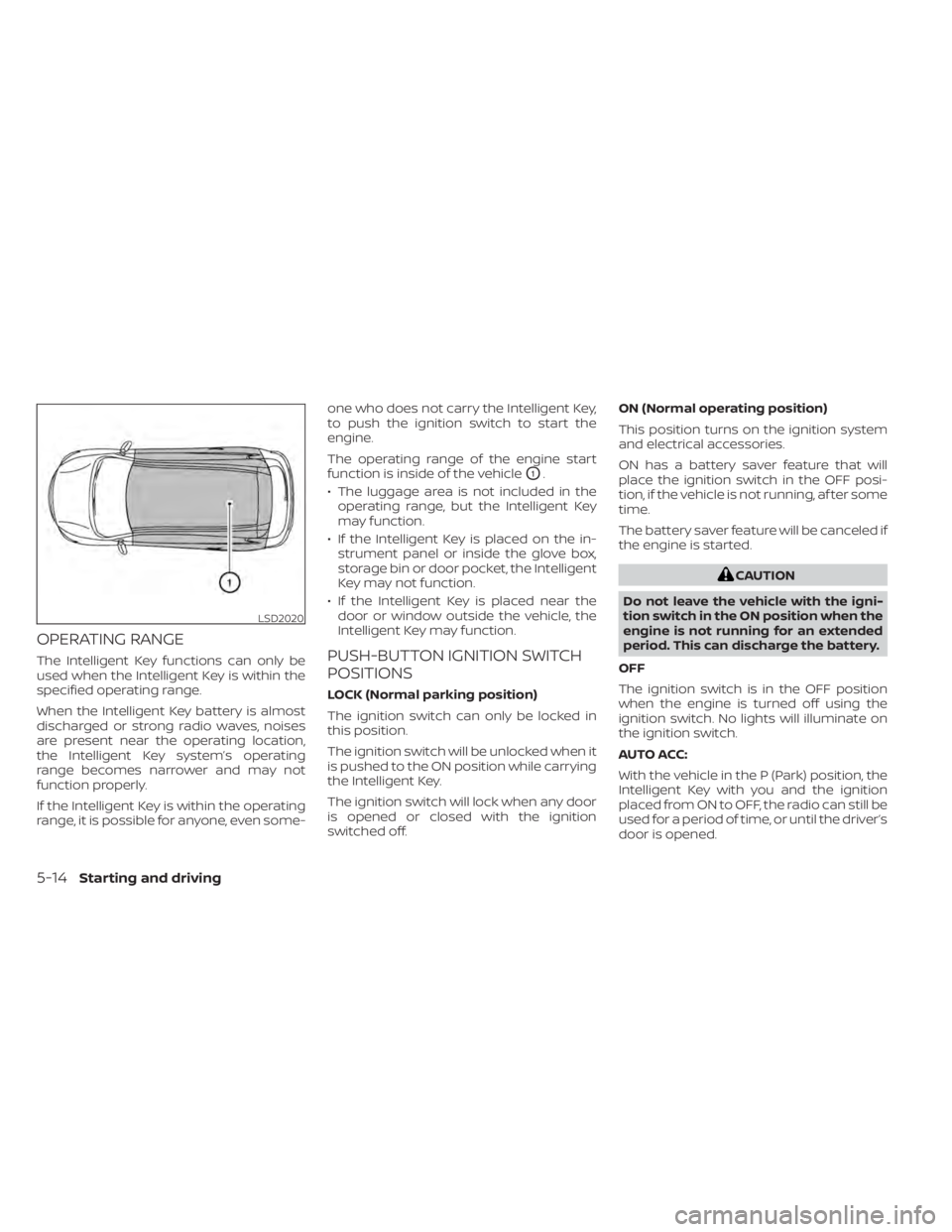
OPERATING RANGE
The Intelligent Key functions can only be
used when the Intelligent Key is within the
specified operating range.
When the Intelligent Key battery is almost
discharged or strong radio waves, noises
are present near the operating location,
the Intelligent Key system’s operating
range becomes narrower and may not
function properly.
If the Intelligent Key is within the operating
range, it is possible for anyone, even some-one who does not carry the Intelligent Key,
to push the ignition switch to start the
engine.
The operating range of the engine start
function is inside of the vehicle
O1.
• The luggage area is not included in the operating range, but the Intelligent Key
may function.
• If the Intelligent Key is placed on the in- strument panel or inside the glove box,
storage bin or door pocket, the Intelligent
Key may not function.
• If the Intelligent Key is placed near the door or window outside the vehicle, the
Intelligent Key may function.
PUSH-BUTTON IGNITION SWITCH
POSITIONS
LOCK (Normal parking position)
The ignition switch can only be locked in
this position.
The ignition switch will be unlocked when it
is pushed to the ON position while carrying
the Intelligent Key.
The ignition switch will lock when any door
is opened or closed with the ignition
switched off. ON (Normal operating position)
This position turns on the ignition system
and electrical accessories.
ON has a battery saver feature that will
place the ignition switch in the OFF posi-
tion, if the vehicle is not running, af ter some
time.
The battery saver feature will be canceled if
the engine is started.
CAUTION
Do not leave the vehicle with the igni-
tion switch in the ON position when the
engine is not running for an extended
period. This can discharge the battery.
OFF
The ignition switch is in the OFF position
when the engine is turned off using the
ignition switch. No lights will illuminate on
the ignition switch.
AUTO ACC:
With the vehicle in the P (Park) position, the
Intelligent Key with you and the ignition
placed from ON to OFF, the radio can still be
used for a period of time, or until the driver’s
door is opened.
LSD2020
5-14Starting and driving
Page 338 of 665

Af ter a period of time, functions such as
radio, navigation (if so equipped), and
Bluetooth® Hands-Free Phone System
may be restarted by turning on the audio
system (see separate NissanConnect®
Owner’s Manual), or by pushing the UN-
LOCK button on the Intelligent Key for up to
a total of 30 minutes.
EMERGENCY ENGINE SHUT OFF
To shut off the engine in an emergency
situation while driving, perform the follow-
ing procedure:
• Rapidly push the ignition switch threeconsecutive times in less than 1.5 sec-
onds, or
• Push and hold the ignition switch for more than 2 seconds.
NISSAN INTELLIGENT KEY®
BATTERY DISCHARGE
If the battery of the NISSAN Intelligent Key®
is discharged or environmental conditions
interfere with the Intelligent Key operation,
start the engine according to the following
procedure:
1. Push the park button to shif t to the P (Park) position.
2. Firmly apply the foot brake.
3. Touch the ignition switch with the Intel- ligent Key as illustrated. (A chime will
sound.) Af ter step 3 is performed, when the igni-
tion switch is pushed without depress-
ing the brake pedal, the ignition switch
position will change to the ON position.
4. Push the ignition switch while depress- ing the brake pedal within 10 seconds
af ter the chime sounds. The engine will
start.
NOTE:
• When the ignition switch is pushed tothe ON position or the engine is started
by the above procedure, the Intelligent
Key battery discharge indicator ap-
pears in the vehicle information dis-
play even when the Intelligent Key is
inside the vehicle. This is not a mal-
function. To turn off the Intelligent Key
battery discharge indicator, touch the
ignition switch with the Intelligent Key
again.
• If the Intelligent Key battery discharge indicator appears, replace the battery
as soon as possible. For additional in-
formation, see “Battery replacement”
(P. 8-24).
LSD4813
Starting and driving5-15
Page 339 of 665

NISSAN VEHICLE IMMOBILIZER
SYSTEM
The NISSAN Vehicle Immobilizer System
will not allow the engine to start without
the use of the registered key.
If the engine fails to start using a registered
key (for example, when interference is
caused by another registered key, an auto-
mated toll road device or automatic pay-
ment device on the key ring), restart the
engine using the following procedure:
1. Leave the ignition switch in the ON posi-tion for approximately 5 seconds.
2. Place the ignition switch in the OFF or LOCK position, and wait approximately
10 seconds.
3. Repeat steps 1 and 2.
4. Restart the engine while holding the de- vice (which may have caused the inter-
ference) separate from the registered
key.
If the no start condition re-occurs, NISSAN
recommends placing the registered key on
a separate key ring to avoid interference
from other devices. • Make sure the area around the vehicle is
clear.
• Check fluid levels such as engine oil, cool- ant, brake fluid, and windshield-washer
fluid as frequently as possible, or at least
whenever you refuel.
• Check that all windows and lights are clean.
• Visually inspect tires for their appearance and condition. Also check tires for proper
inflation.
• Lock all doors.
• Position seat and adjust headrests/head restraints.
• Adjust inside and outside mirrors.
• Fasten seat belts and ask all passengers to do likewise.
• Check the operation of warning lights when the ignition switch is pushed to the
ON position. For additional information,
see “Warning lights, indicator lights and
audible reminders” (P. 2-12). 1. Apply the parking brake.
2. Confirm that the vehicle is in the P (Park)
position.
The Intelligent Key must be carried
when operating the ignition switch.
3. Push the ignition switch to the ON posi- tion. Depress the brake pedal and push
the ignition switch to start the engine.
To start the engine immediately, push
and release the ignition switch while de-
pressing the brake pedal with the igni-
tion switch in any position.
• If the engine is very hard to start in extremely cold weather or when re-
starting, depress the accelerator
pedal a little (approximately 1/3 to the
floor) and while holding, crank the en-
gine. Release the accelerator pedal
when the engine starts.
• If the engine is very hard to start be- cause it is flooded, depress the accel-
erator pedal all the way to the floor
and hold it. Push the ignition switch to
the ON position to start cranking the
engine. Af ter 5 or 6 seconds, stop
cranking by pushing the ignition
switch to the LOCK position. Af ter
cranking the engine, release the accel-
erator pedal. Crank the engine with
BEFORE STARTING THE ENGINE STARTING THE ENGINE
5-16Starting and driving
Page 344 of 665
WARNING
Apply the electronic parking brake if
the shif t lever is in any position while
the engine is not running. Failure to do
so could cause the vehicle to move un-
expectedly or roll away and result in
serious personal injury or property
damage.
CAUTION
• Use the P (Park), R (Reverse) or D
(Drive) position only when the vehicle
is completely stopped.
• When switching to the desired shif t
position by operating the shif t lever,
check that the shif t lever returns to
the home position by releasing your
hand from the lever. Holding the shif t
lever in a mid-way position may also
damage the shif t control system.
• Do not operate the shif t lever while
the accelerator pedal is depressed.
This may cause a sudden start which
could result in an accident. •
The following operations are not al-
lowed because excessive force
would be applied to the transmission
and this may result in damage to the
vehicle:
– Moving the shif t lever to the R (Re-
verse) position when driving
forward
– Moving the shif t lever to the D
(Drive) position when reversing
If these operations are attempted, a
chime sounds and the vehicle shif ts to
the N (Neutral) position.
If the vehicle is moving over 5 mph (8
km/h) when shif ting to D (Drive) from R
(Reverse), the N (Neutral) position will
automatically be selected. A buzzer will
sound, noting that D (Drive) was not se-
lected. When selecting D (Drive) while
reversing below 5 mph (8 km/h) the
range will change normally.
P (Park)
CAUTION
• To prevent transmission damage,
use the P (Park) position only when
the vehicle is completely stopped.
• Do not slide the shif t lever while
pressing the park button. This may
damage the shif t control system.
Use the P (Park) position when the vehicle is
parked or when starting the engine. Make
sure the vehicle is completely stopped be-
fore pressing the park button to engage
the P (Park) position. For maximum safety,
the brake pedal must be depressed before
engaging the P (Park) position. Use this po-
sition together with the electronic parking
brake. When parking on a hill, first depress
the brake pedal, apply the electronic park-
ing brake and then engage the P (Park)
position. The parking lock should not be
used as a brake when parking. In order to
secure the vehicle, always apply the elec-
tronic parking brake in addition to the park-
ing lock.
Starting and driving5-21
Page 345 of 665

In the event of a malfunction of the vehi-
cle’s electronics, the transmission may lock
in the P (Park) position. Have the vehicle’s
electronics checked immediately. It is rec-
ommended that you visit a NISSAN dealer
for this service.
The P (Park) position is automatically en-
gaged if:
• You place the ignition switch in the OFFposition
• You unfasten the driver’s seat belt and open the driver side door when the ve-
hicle is stationary or driving at very low
speed and the transmission is in the D
(Drive) position, the N (Neutral) position,
the R (Reverse) position or M (Manual)
mode with your foot off the brake.
CAUTION
To avoid A/T malfunction, you must
manually place the shif t position in the
P (Park) position under the above
conditions.
R (Reverse)
CAUTION
• To prevent transmission damage,
use the R (Reverse) position only
when the vehicle is completely
stopped and the brake is pressed.
Use the R (Reverse) position to back up.
Make sure the vehicle is completely
stopped before selecting the R (Reverse)
position. The brake pedal must be de-
pressed and the shif t lever button
pressed to move the shif t lever from the
home position to R (Reverse). If the ve-
hicle is placed in R (Reverse) position
while the vehicle is moving forward, the
chime will sound and the vehicle will
switch into the N (Neutral) position.
NOTE:
If the vehicle is moving over 5 mph (8
km/h ), when shif ting to D (Drive) from R
(Reverse), the N (Neutral) position will au-
tomatically be selected. A buzzer will
sound, noting that D (Drive) was not se-
lected. When selecting D (Drive) while re-
versing below 5 mph (8 km/h), the range
will change normally.
N (Neutral)
Neither forward nor reverse gear is en-
gaged when the vehicle is completely
stopped, and the brake is pressed. The en-
gine can be started in this position. You
may shif t to the N (Neutral) position and
restart a stalled engine while the vehicle is
moving.
You can select this position by holding the
shif t lever at this position for 0.5 seconds.
D (Drive)
Use this position for all normal forward
driving when the vehicle is completely
stopped, and the brake is pressed. The A/T
changes gears automatically. All forward
gears are available. If the vehicle is placed
in the D (Drive) position while the vehicle
is reversing, the chime will sound and the
vehicle will switch into the N (Neutral)
position.
5-22Starting and driving
Page 348 of 665

4M (4th), 3M (3rd) and 2M (2nd)
Use these positions for hill climbing or en-
gine braking on downhill grades.
1M (1st)
Use this position when climbing steep hills
slowly or driving slowly through deep snow,
or for maximum engine braking on steep
downhill grades.
• Remember not to drive at high speeds forextended periods of time in lower than
the 8th range. This reduces fuel economy.
• Pulling the same paddle shif ter twice will shif t the ranges in succession. However, if
this motion is rapidly done, the second
shif ting may not be completed properly.
• In the manual shif t mode, the trans-
mission may not shif t to the selected
gear. This helps maintain driving per-
formance and reduces the chance of
vehicle damage or loss of control.
• In the manual shif t mode, the trans-
mission may shif t up automatically to a
higher range than selected if the en-
gine speed is too high. When the ve-
hicle speed decreases, the transmis-
sion automatically shif ts down and
shif ts to 1st gear before the vehicle
comes to a stop.
Accelerator downshif t
— in D (Drive) position —
For passing or hill climbing, depress the
accelerator pedal to the floor. This shif ts
the transmission down into a lower gear,
depending on the vehicle speed.
High fluid temperature protection
mode
This transmission has a high fluid tem-
perature protection mode. If the fluid tem-
perature becomes too high (for example,
when climbing steep grades in high tem-
peratures with heavy loads, such as when
towing a trailer), engine power and, under
some conditions, vehicle speed will be de-
creased automatically to reduce the
chance of transmission damage. Vehicle
speed can be controlled with the accelera-
tor pedal, but the engine and vehicle speed
may be limited.
Fail-safe
When the fail-safe operation occurs, please
note that the transmission will be locked in
any of the forward gears according to the
condition.
If the vehicle is driven under extreme
conditions, such as excessive wheel
spinning and subsequent hard braking,
the fail-safe system may be activated.
The Malfunction Indicator Light (MIL)
may come on to indicate the fail-safe
mode is activated. For additional infor-
mation, see “Malfunction Indicator Light
(MIL)” (P. 2-20). This will occur even if all
electrical circuits are functioning prop-
erly. In this case, place the ignition switch
in the OFF position and wait for 10 sec-
onds. Then push the switch back to the
ON position. The vehicle should return to
its normal operating condition. If it does
not return to its normal operating condi-
tion, have the transmission checked and
repaired, if necessary. It is recommended
that you visit a NISSAN dealer for this
service.
Starting and driving5-25
Page 350 of 665

WARNING
• Before leaving the vehicle, move the
shif t position to the P (Park) position
and check that the electronic parking
brake warning light is illuminated to
confirm that the electronic parking
brake is applied. The electronic park-
ing brake warning light will remain
on for a period of time af ter the driv-
er’s door is locked.
CAUTION
When parking in an area where the out-
side temperature is below 32°F (0°C),
the parking brake, if applied, may
freeze in place and may be difficult to
release.
For safe parking, it is recommended
that you place the shif t lever in the P
(Park) position and securely block the
wheels.
NOTE:
• To keep the electronic parking brake released af ter the engine is turned off,
place the ignition switch in the OFF po-
sition, depress the brake pedal and
push down the parking brake switch
before opening the driver’s door.
• If a malfunction occurs in the elec- tronic parking brake system (for ex-
ample, due to battery discharge), it is
recommended that you visit a NISSAN
dealer.
• Under the following conditions the electronic parking brake will automati-
cally be applied and the braking force
of the automatic brake hold will be
released:– The braking force is applied by the automatic brake hold function for 3
minutes or longer.
– The vehicle is in the P (Park) position.
– The electronic parking brake is ap- plied manually.
– The driver’s seat belt is unfastened.
– The driver’s door is opened.
– The ignition switch is placed in the OFF position.
– A malfunction occurs in the auto- matic brake hold function.
Manual operation
To apply: Pull the switch upO1. The indica-
tor light
OAwill illuminate.
To release: With the ignition switch in the
ON position, depress the brake pedal and
push the switch down
O2. The indicator
light
OAwill turn off.
Before driving, check that the electronic
parking brake indicator light (
or PARK)
goes out. For additional information, see
“Warning lights, indicator lights and audible
reminders” (P. 2-12).
NOTE:
• While the electronic parking brake is applied or released, an operating
sound is heard from the lower side of
the rear seat. This is normal and does
not indicate a malfunction.
• When the electronic parking brake is frequently applied and released in a
short period of time, the parking brake
may not operate in order to prevent the
parking brake system from overheat-
ing. If this occurs, operate the elec-
tronic parking brake switch again af ter
waiting approximately 1 minute.
Starting and driving5-27
Page 385 of 665

SYSTEM TEMPORARILY
UNAVAILABLE
When radar blockage is detected, the sys-
tem will be deactivated automatically. The
“Unavailable: Side Radar Obstruction”
warning message will appear in the vehicle
information display.
The system is not available until the condi-
tions no longer exist.
The radar sensors may be blocked by tem-
porary ambient conditions such as splash-
ing water, mist or fog. The blocked condi-
tion may also be caused by objects such as
ice, frost or dirt obstructing the radar
sensors.
NOTE:
If the BSW system stops working, the
RCTA and I-BSI systems (if so equipped)
will also stop working.
Action to take:
When the above conditions no longer exist,
the system will resume automatically.
LSD4264
For vehicles with the 7 inch (18 cm) display
5-62Starting and driving