2023 NISSAN MURANO air conditioning
[x] Cancel search: air conditioningPage 16 of 518
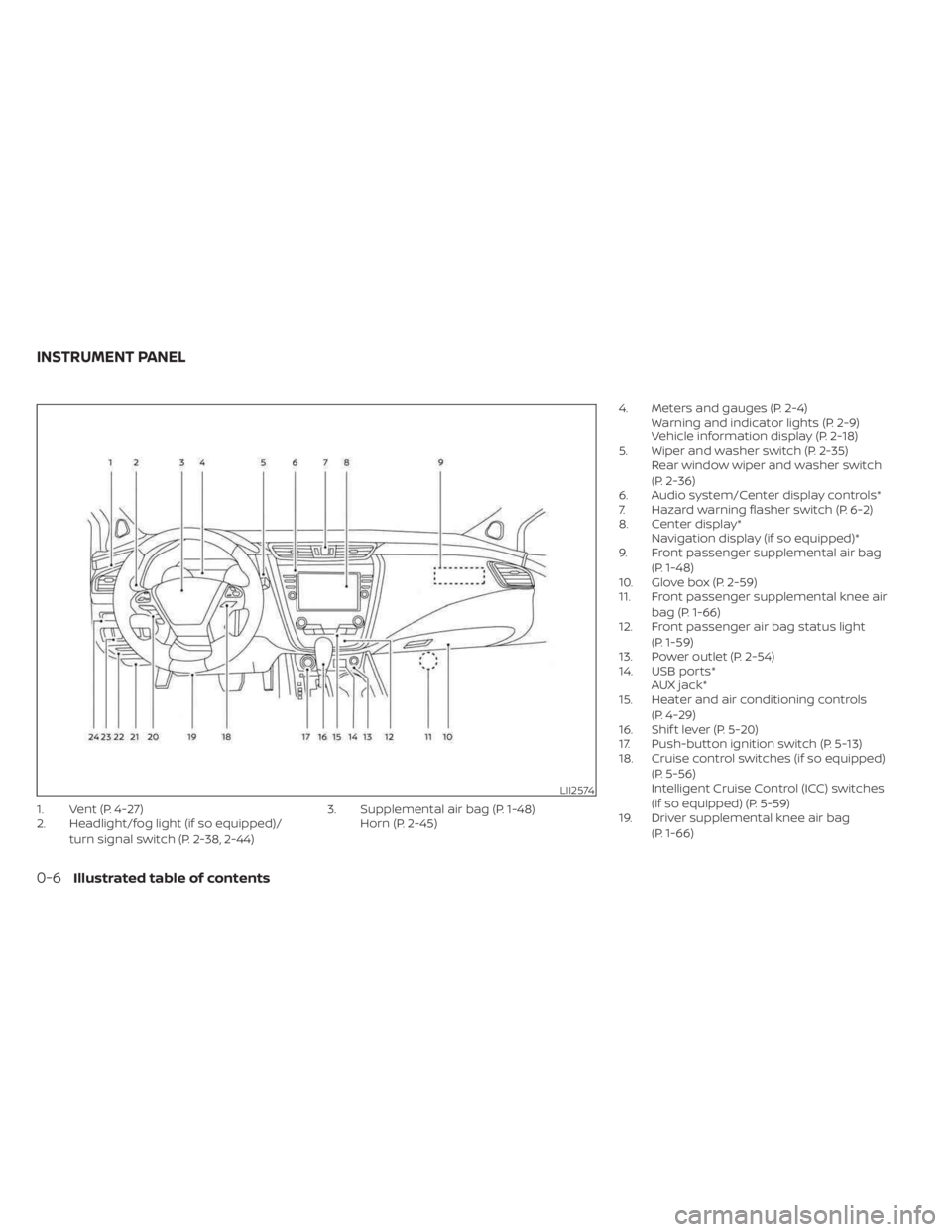
1. Vent (P. 4-27)
2. Headlight/fog light (if so equipped)/turn signal switch (P. 2-38, 2-44) 3. Supplemental air bag (P. 1-48)
Horn (P. 2-45) 4. Meters and gauges (P. 2-4)
Warning and indicator lights (P. 2-9)
Vehicle information display (P. 2-18)
5. Wiper and washer switch (P. 2-35) Rear window wiper and washer switch
(P. 2-36)
6. Audio system/Center display controls*
7. Hazard warning flasher switch (P. 6-2)
8. Center display* Navigation display (if so equipped)*
9. Front passenger supplemental air bag
(P. 1-48)
10. Glove box (P. 2-59)
11. Front passenger supplemental knee air
bag (P. 1-66)
12. Front passenger air bag status light
(P. 1-59)
13. Power outlet (P. 2-54)
14. USB ports* AUX jack*
15. Heater and air conditioning controls
(P. 4-29)
16. Shif t lever (P. 5-20)
17. Push-button ignition switch (P. 5-13)
18. Cruise control switches (if so equipped)
(P. 5-56)
Intelligent Cruise Control (ICC) switches
(if so equipped) (P. 5-59)
19. Driver supplemental knee air bag
(P. 1-66)
LII2574
INSTRUMENT PANEL
0-6Illustrated table of contents
Page 94 of 518
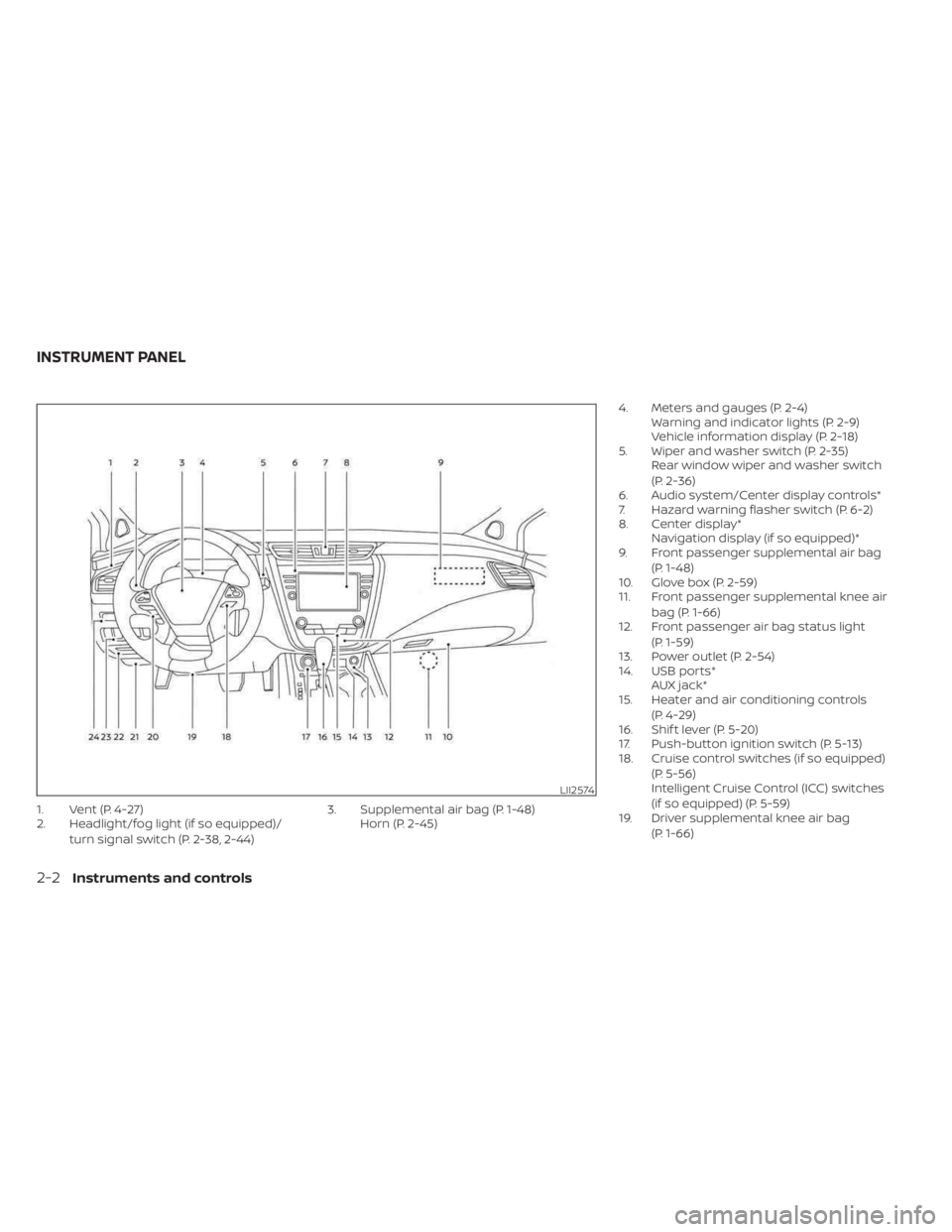
1. Vent (P. 4-27)
2. Headlight/fog light (if so equipped)/turn signal switch (P. 2-38, 2-44) 3. Supplemental air bag (P. 1-48)
Horn (P. 2-45) 4. Meters and gauges (P. 2-4)
Warning and indicator lights (P. 2-9)
Vehicle information display (P. 2-18)
5. Wiper and washer switch (P. 2-35) Rear window wiper and washer switch
(P. 2-36)
6. Audio system/Center display controls*
7. Hazard warning flasher switch (P. 6-2)
8. Center display* Navigation display (if so equipped)*
9. Front passenger supplemental air bag
(P. 1-48)
10. Glove box (P. 2-59)
11. Front passenger supplemental knee air
bag (P. 1-66)
12. Front passenger air bag status light
(P. 1-59)
13. Power outlet (P. 2-54)
14. USB ports* AUX jack*
15. Heater and air conditioning controls
(P. 4-29)
16. Shif t lever (P. 5-20)
17. Push-button ignition switch (P. 5-13)
18. Cruise control switches (if so equipped)
(P. 5-56)
Intelligent Cruise Control (ICC) switches
(if so equipped) (P. 5-59)
19. Driver supplemental knee air bag
(P. 1-66)
LII2574
INSTRUMENT PANEL
2-2Instruments and controls
Page 237 of 518

MANUAL OPERATION
Fan speed control
Press thefan speed control buttons
to manually control the fan speed.
Press the AUTO button to return to auto-
matic control of the fan speed.
Temperature control dial
The temperature control dial allows you to
adjust the temperature of the outlet air. To
lower the temperature, turn the dial to the
lef t. To increase the temperature, turn the
dial to the right. Temperature can be ad-
justed on the driver’s and passenger’s side.
Air recirculation
Press theair recirculation button to
recirculate interior air inside the vehicle.
The
indicator light on the button will
come on.
The air recirculation cannot be activated
when the air conditioner is in the
front
defrosting mode. When the outside temperature exceeds
70°F (21°C), the air conditioning system may
default to air recirculation mode automati-
cally to reduce overall power consumption.
To exit air recirculation mode, select the
fresh air intake button to enter fresh air
mode.
Fresh air intake
Press thefresh air intake button to
draw outside air into the passenger
compartment.
A/C (air conditioner) button
Start the engine, press thefan speed
control buttons to the desired position and
press the
button to turn on the air
conditioner. To turn off the air conditioner,
press the
button again.
The air conditioner cooling function op-
erates only when the engine is running.
Air flow control
Pressing the MODE button manually con-
trols air flow and selects the air outlet:
— Air flows mainly from center and side vents.
— Air flows mainly from center andside vents and foot outlets.
— Air flows mainly from foot outletsand partly from defroster.
— Air flows mainly from defrosterand foot outlets.
To turn system off
Press the ON-OFF button.
Rear window and outside mirror
(if so equipped) defroster switch
For additional information, see “Rear win-
dow and outside mirror (if so equipped)
defroster switch” (P. 2-37).
Monitor, climate, audio, phone and voice recognition systems4-31
Page 258 of 518
REMOTE ENGINE START (if so
equipped)
Vehicles started with the Remote Engine
Start require the ignition switch to be
placed in the ON position before the shif t
lever can be moved from the P (Park) posi-
tion. To place the ignition switch in the ON
position, follow these steps:
1. Make sure that the Intelligent Key is onyou.
2. Apply the brake.
3. Push the ignition switch once to the ON position.
For additional information, see “NISSAN In-
telligent Key®” (P. 3-2).
ENGINE PROTECTION MODE
The engine has an engine protection mode
to reduce the chance of damage if the
coolant temperature becomes too high
(for example, when climbing steep grades
in high temperatures with heavy loads,
such as when towing a trailer). When the
engine temperature reaches a certain
level:
• The engine coolant temperature gauge will move toward the H position.
• Engine power may be reduced.
• The air conditioning cooling function may be automatically turned off for a short
time (the blower will continue to operate).
Engine power and, under some conditions,
vehicle speed will decrease. Vehicle speed
can be controlled with the accelerator
pedal, but the vehicle may not accelerate at
the desired speed. The transmission will
downshif t or upshif t as it reaches pre-
scribed shif t points. You can also shif t
manually.
As driving conditions change and engine
coolant temperature is reduced, vehicle
speed can be increased using the accel-
erator pedal, and the air conditioning cool-
ing function will automatically be turned
back on. The Malfunction Indicator Light (MIL) may
also come on if the engine coolant tem-
perature is not reduced or the air condi-
tioning cooling function does not turn back
on. If
only it remains on, you do not need to
have your vehicle towed, but have it in-
spected soon. It is recommended that you
visit a NISSAN dealer for this service. For
additional information, see “Malfunction In-
dicator Light (MIL)” (P. 2-14).
WARNING
Overheating can result in reduced en-
gine power and vehicle speed. The re-
duced speed may be lower than other
traffic, which could increase the chance
of a collision. Be especially careful
when driving. If the vehicle cannot
maintain a safe driving speed, pull to
the side of the road in a safe area. Allow
the engine to cool and return to normal
operation. For additional information,
see “If your vehicle overheats” (P. 6-12).
DRIVING THE VEHICLE
5-18Starting and driving
Page 355 of 518
Action to take
Stop the vehicle in a safe location, place the
vehicle in P (Park) position, turn the engine
off and restart the engine. If the system
warning message continues to appear,
have the system checked. It is recom-
mended that you visit a NISSAN dealer for
this service.CAUTION
During the first 1,200 miles (2,000 km),
follow these recommendations to ob-
tain maximum engine performance
and ensure the future reliability and
economy of your new vehicle. Failure to
follow these recommendations may
result in shortened engine life and re-
duced engine performance.
• Avoid driving for long periods at constant speed, either fast or slow, and do not run
the engine over 4,000 rpm.
• Do not accelerate at full throttle in any gear.
• Avoid quick starts.
• Avoid hard braking as much as possible.
• Do not tow a trailer for the first 500 miles (805 kilometers). Your engine, axle or
other parts could be damaged. Follow these easy-to-use Fuel Efficient
Driving Tips to help you achieve the most
fuel economy from your vehicle.
1.
Use Smooth Accelerator and Brake
Pedal Application
• Avoid rapid starts and stops.
• Use smooth, gentle accelerator and brake application whenever possible.
• Maintain constant speed while com- muting and coast whenever possible.
2. Maintain Constant Speed
• Look ahead to try and anticipate and minimize stops.
• Synchronizing your speed with traffic lights allows you to reduce your num-
ber of stops.
• Maintaining a steady speed can mini- mize red light stops and improve fuel
efficiency.
3. Use Air Conditioning (A/C) at Higher
Vehicle Speeds
• Below 40 mph (64 km/h), it is more efficient to open windows to cool the
vehicle due to reduced engine load.
• Above 40 mph (64 km/h), it is more efficient to use A/C to cool the vehicle
due to increased aerodynamic drag.
BREAK-IN SCHEDULE FUEL EFFICIENT DRIVING TIPS
Starting and driving5-115
Page 471 of 518
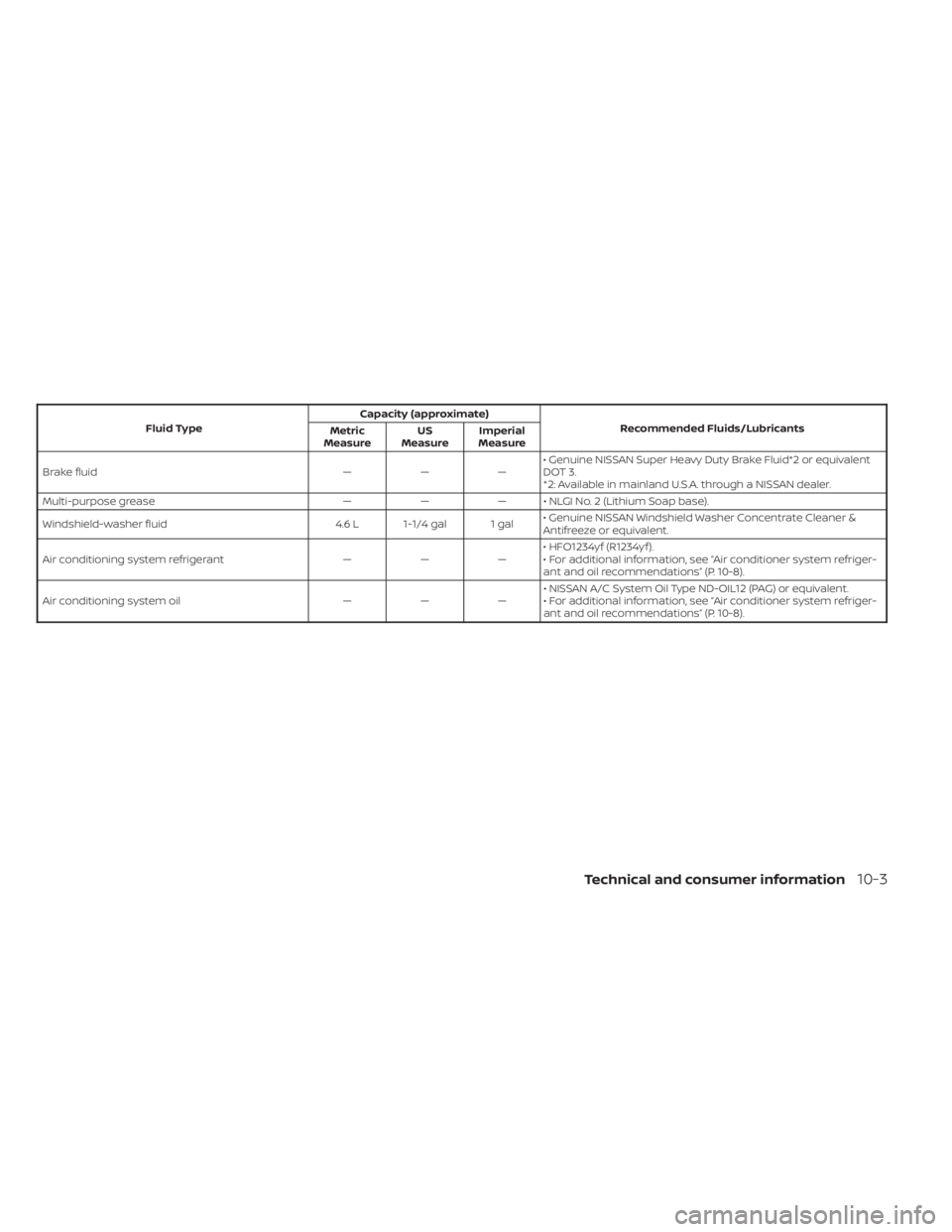
Fluid TypeCapacity (approximate)
Recommended Fluids/Lubricants
Metric
Measure US
Measure Imperial
Measure
Brake fluid ———• Genuine NISSAN Super Heavy Duty Brake Fluid*2 or equivalent
DOT 3.
*2: Available in mainland U.S.A. through a NISSAN dealer.
Multi-purpose grease ——— • NLGI No. 2 (Lithium Soap base).
Windshield-washer fluid 4.6 L 1-1/4 gal 1 gal• Genuine NISSAN Windshield Washer Concentrate Cleaner &
Antifreeze or equivalent.
Air conditioning system refrigerant ———• HFO1234yf (R1234yf ).
• For additional information, see “Air conditioner system refriger-
ant and oil recommendations” (P. 10-8).
Air conditioning system oil ———• NISSAN A/C System Oil Type ND-OIL12 (PAG) or equivalent.
• For additional information, see “Air conditioner system refriger-
ant and oil recommendations” (P. 10-8).
Technical and consumer information10-3
Page 476 of 518
Change intervals
The oil and oil filter change intervals for
your engine are based on the use of the
specified quality oils and filters. Using en-
gine oil and filters that are not of the speci-
fied quality, or exceeding recommended oil
and filter change intervals could reduce
engine life. Damage to the engine caused
by improper maintenance or use of incor-
rect oil and filter quality and/or viscosity is
not covered by the NISSAN New Vehicle
Limited Warranty.
Your engine was filled with a high-quality
engine oil when it was built. You do not have
to change the oil before the first recom-
mended change interval. Oil and filter
change intervals depend upon how you
use your vehicle.
Operation under the following conditions
may require more frequent oil and filter
changes:
• repeated short distance driving at coldoutside temperatures
• driving in dusty conditions
• extensive idling
• towing a trailer
• stop and go commuting For additional information, see “Mainte-
nance and schedules” (P. 9-2).
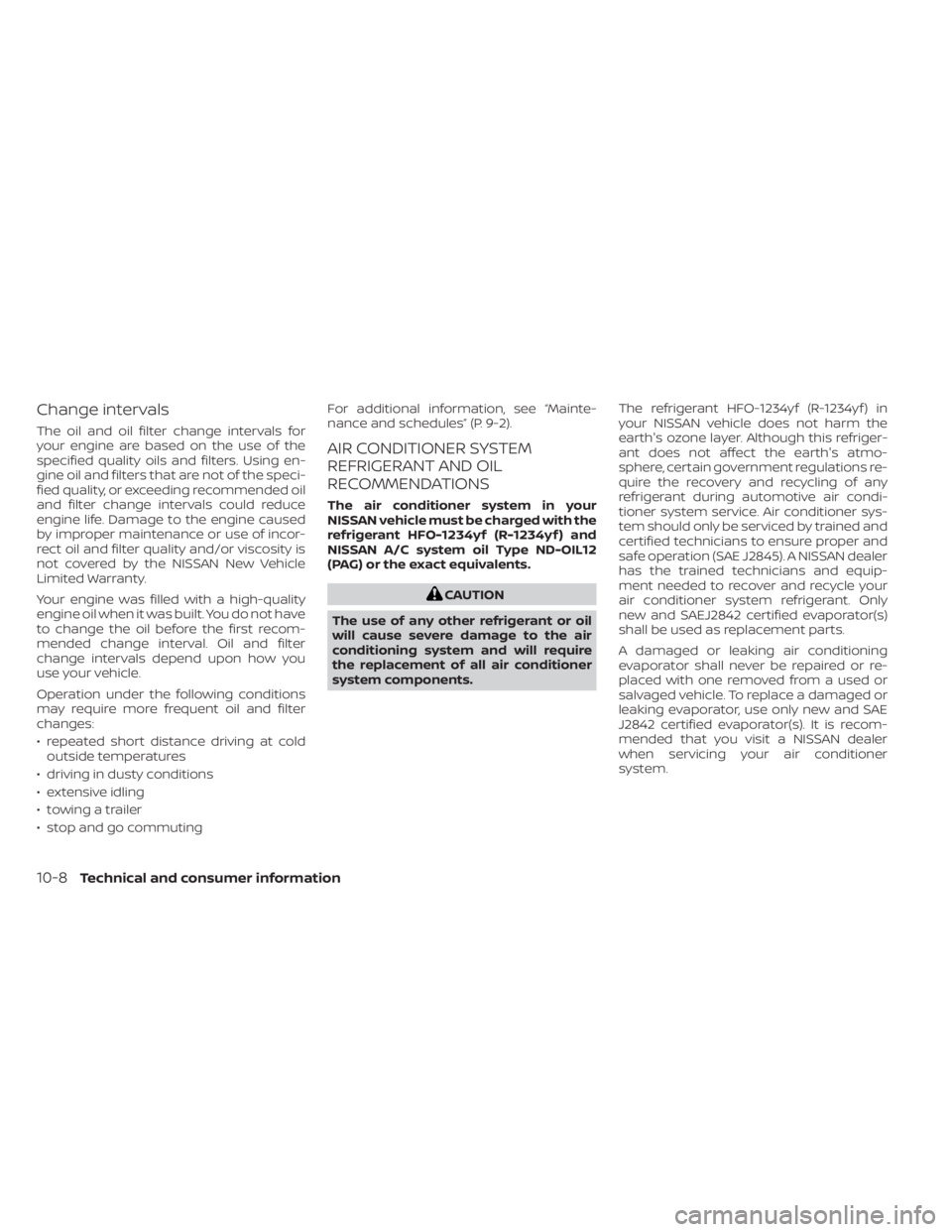
AIR CONDITIONER SYSTEM
REFRIGERANT AND OIL
RECOMMENDATIONS
The air conditioner system in your
NISSAN vehicle must be charged with the
refrigerant HFO-1234yf (R-1234yf ) and
NISSAN A/C system oil Type ND-OIL12
(PAG) or the exact equivalents.
CAUTION
The use of any other refrigerant or oil
will cause severe damage to the air
conditioning system and will require
the replacement of all air conditioner
system components. The refrigerant HFO-1234yf (R-1234yf ) in
your NISSAN vehicle does not harm the
earth's ozone layer. Although this refriger-
ant does not affect the earth's atmo-
sphere, certain government regulations re-
quire the recovery and recycling of any
refrigerant during automotive air condi-
tioner system service. Air conditioner sys-
tem should only be serviced by trained and
certified technicians to ensure proper and
safe operation (SAE J2845). A NISSAN dealer
has the trained technicians and equip-
ment needed to recover and recycle your
air conditioner system refrigerant. Only
new and SAEJ2842 certified evaporator(s)
shall be used as replacement parts.
A damaged or leaking air conditioning
evaporator shall never be repaired or re-
placed with one removed from a used or
salvaged vehicle. To replace a damaged or
leaking evaporator, use only new and SAE
J2842 certified evaporator(s). It is recom-
mended that you visit a NISSAN dealer
when servicing your air conditioner
system.
10-8Technical and consumer information
Page 482 of 518
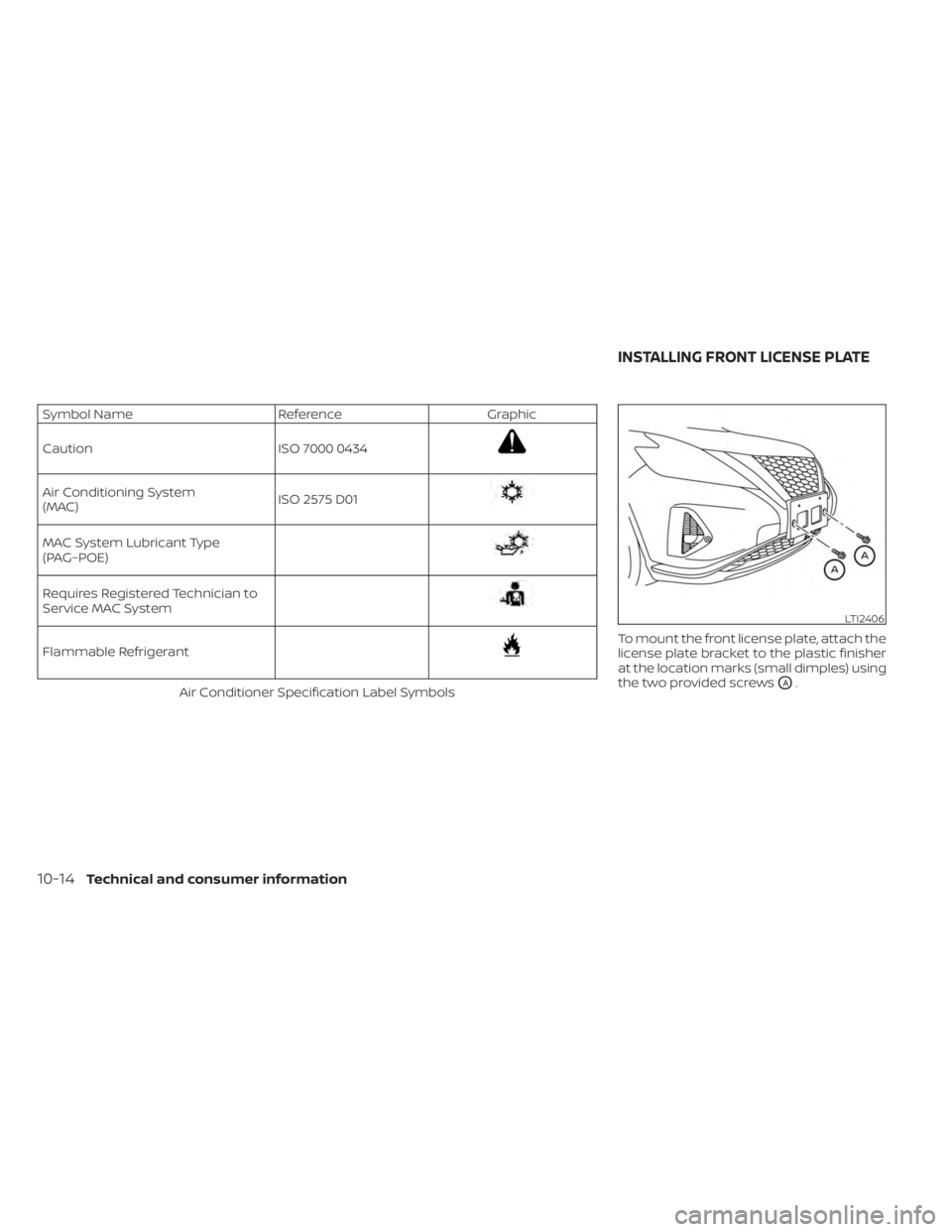
Symbol NameReferenceGraphic
Caution ISO 7000 0434
Air Conditioning System
(MAC)ISO 2575 D01
MAC System Lubricant Type
(PAG–POE)
Requires Registered Technician to
Service MAC System
Flammable Refrigerant
Air Conditioner Specification Label Symbols To mount the front license plate, attach the
license plate bracket to the plastic finisher
at the location marks (small dimples) using
the two provided screwsOA.
LTI2406
INSTALLING FRONT LICENSE PLATE
10-14Technical and consumer information