2023 NISSAN MURANO battery
[x] Cancel search: batteryPage 193 of 518
Auto Power Lif tgate System Battery
Power Saving Mode:
The vehicle goes into power saving mode
when the lif tgate is open for a long time
(approximately 12 hours). This is to prevent
deterioration of the battery. The power
saving mode automatically cuts the power
supply of the power lif tgate door.
When the power to the lif tgate is cut off, the
manual mode must be performed. Af ter
the manual mode is performed, the power
lif tgate function is restored.
NOTE:
When a battery voltage is lower than ap-
proximately 11V, the power lif tgate may
not operate af ter automatic return.
MOTION-ACTIVATED LIFTGATE
(if so equipped)
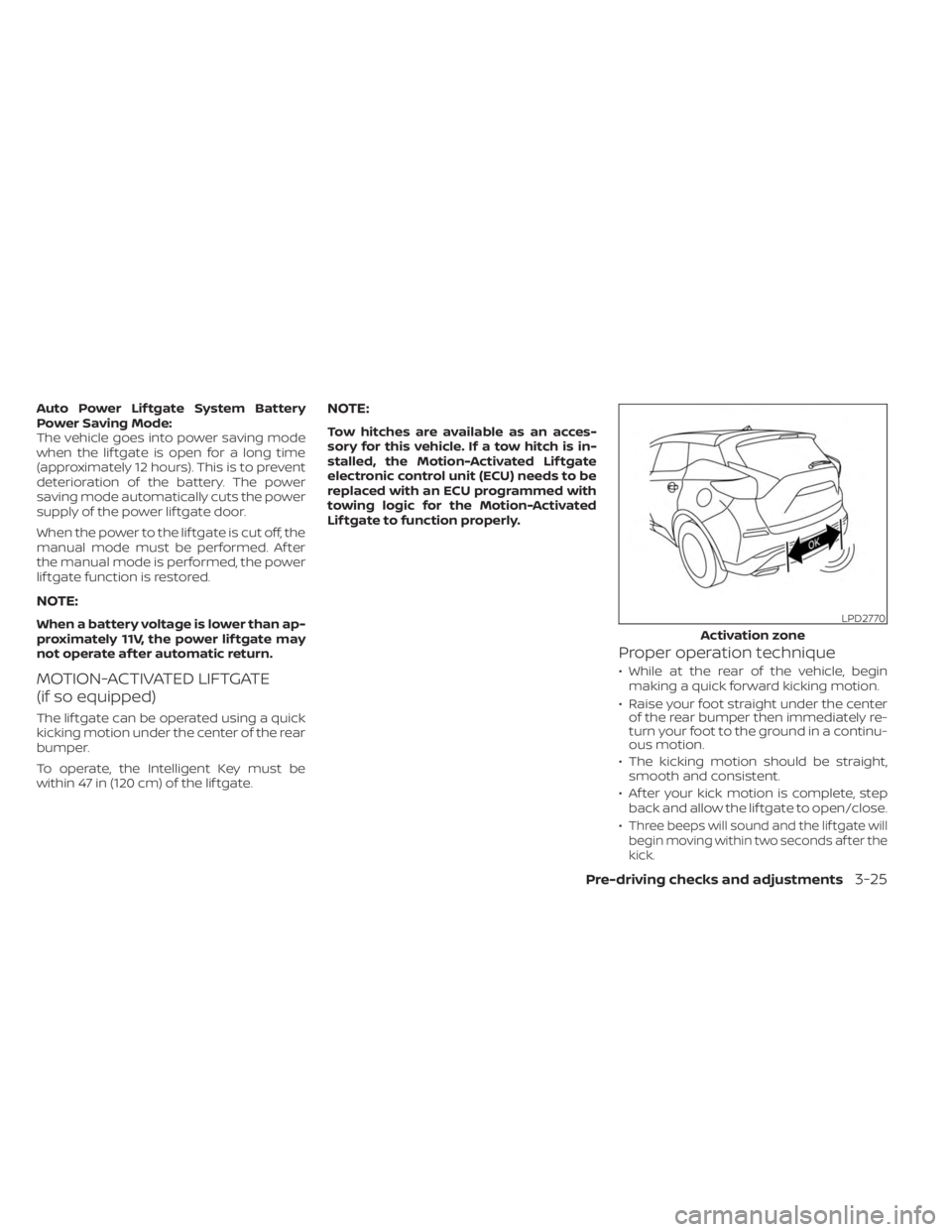
The lif tgate can be operated using a quick
kicking motion under the center of the rear
bumper.
To operate, the Intelligent Key must be
within 47 in (120 cm) of the lif tgate.
NOTE:
Tow hitches are available as an acces-
sory for this vehicle. If a tow hitch is in-
stalled, the Motion-Activated Lif tgate
electronic control unit (ECU) needs to be
replaced with an ECU programmed with
towing logic for the Motion-Activated
Lif tgate to function properly.
Proper operation technique
• While at the rear of the vehicle, beginmaking a quick forward kicking motion.
• Raise your foot straight under the center of the rear bumper then immediately re-
turn your foot to the ground in a continu-
ous motion.
• The kicking motion should be straight, smooth and consistent.
• Af ter your kick motion is complete, step back and allow the lif tgate to open/close.
•
Three beeps will sound and the lif tgate will
begin moving within two seconds af ter the
kick.
LPD2770
Activation zone
Pre-driving checks and adjustments3-25
Page 195 of 518
CAUTION
• If the power lif tgate does not stay
open or if the lif tgate unexpectedly
closes at any time while a continuous
warning chime sounds, do not oper-
ate the lif tgate. There may be a pres-
sure loss in one or both of the lif tgate
struts. It is recommended that you
have the lif tgate inspected. It is rec-
ommended that you visit a NISSAN
dealer for this service.
•
Do not activate the power lif tgate if
one or both of the lif tgate struts are
removed. Damage to the lif tgate or
power lif tgate mechanisms may
occur.
Lif tgate release (manual and
power)
The lif tgate release mechanism allows the
lif tgate to be opened in the event of a dis-
charged battery.
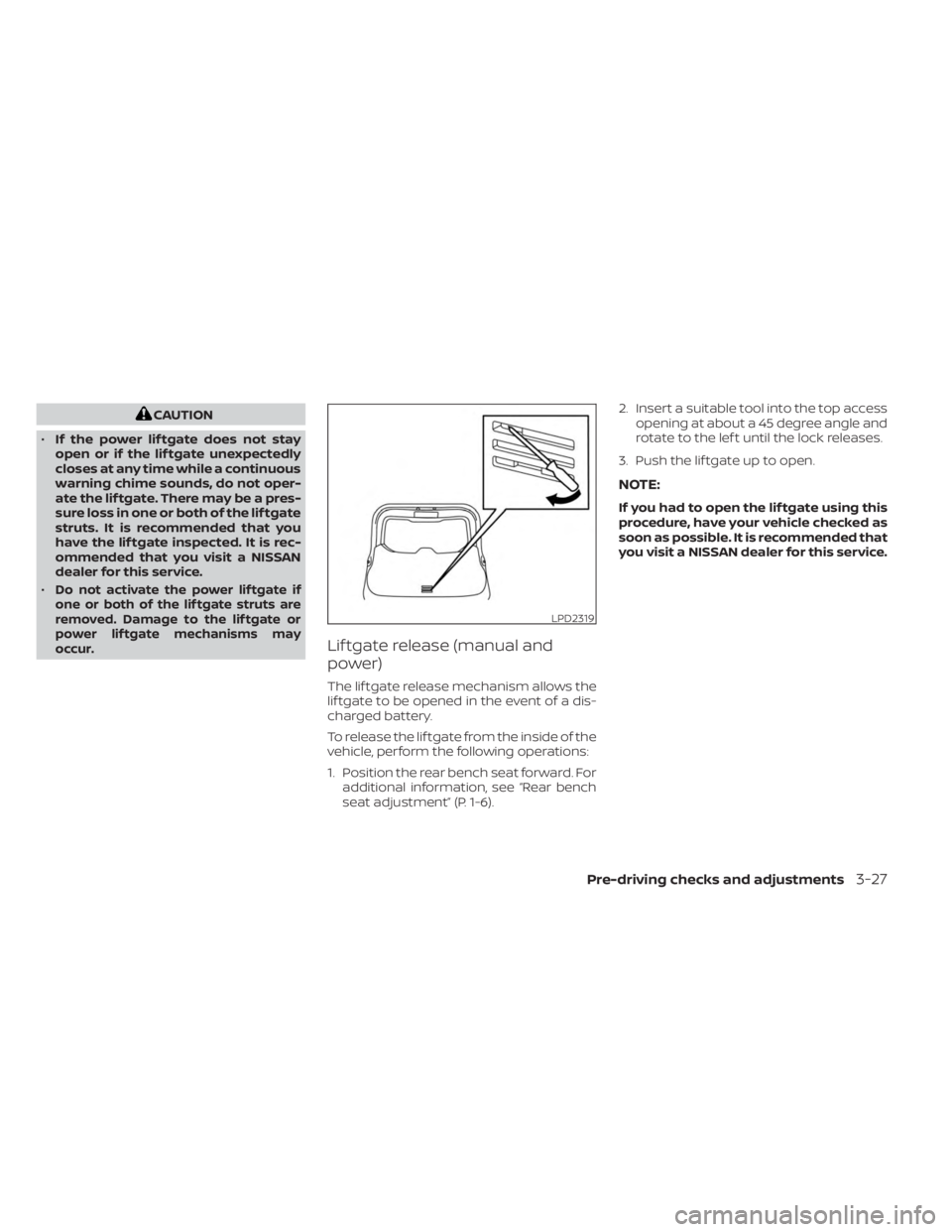
To release the lif tgate from the inside of the
vehicle, perform the following operations:
1. Position the rear bench seat forward. For additional information, see “Rear bench
seat adjustment” (P. 1-6). 2. Insert a suitable tool into the top access
opening at about a 45 degree angle and
rotate to the lef t until the lock releases.
3. Push the lif tgate up to open.
NOTE:
If you had to open the lif tgate using this
procedure, have your vehicle checked as
soon as possible. It is recommended that
you visit a NISSAN dealer for this service.
LPD2319
Pre-driving checks and adjustments3-27
Page 200 of 518
CAUTION
For vehicles with memory seat: Failure
to reset the tilt and telescoping func-
tions of the steering wheel, af ter the
vehicle’s battery has been discharged,
may prevent the steering wheel posi-
tion from being adjusted.
For vehicles with memory seat: Both the tilt
and telescopic steering operation must be
reset af ter the vehicle’s battery has been
discharged in order to prevent the tilt and
telescopic operation from locking in one
position. When the battery has been re-
charged or replaced, perform the following:
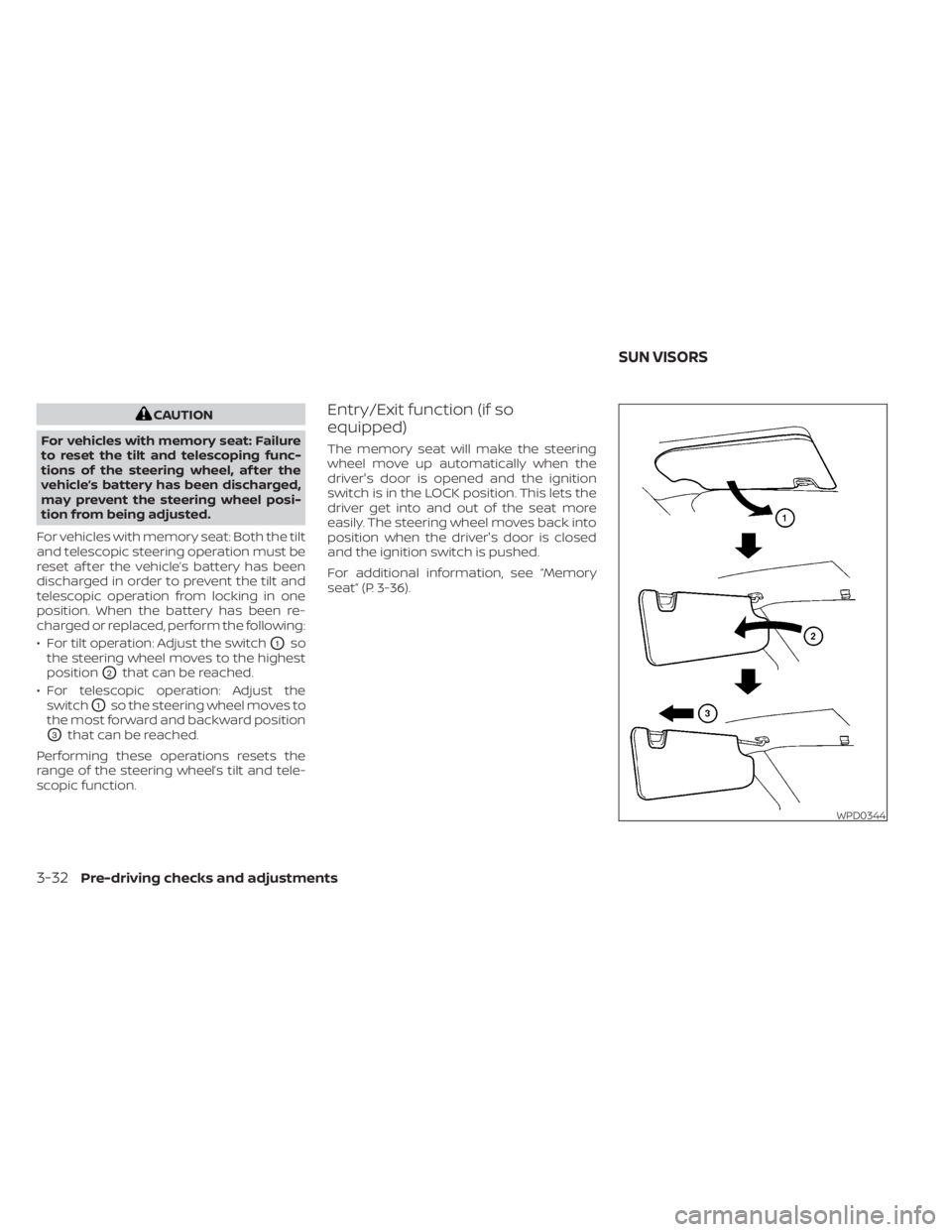
• For tilt operation: Adjust the switch
O1so
the steering wheel moves to the highest
position
O2that can be reached.
• For telescopic operation: Adjust the switch
O1so the steering wheel moves to
the most forward and backward position
O3that can be reached.
Performing these operations resets the
range of the steering wheel’s tilt and tele-
scopic function.
Entry/Exit function (if so
equipped)
The memory seat will make the steering
wheel move up automatically when the
driver's door is opened and the ignition
switch is in the LOCK position. This lets the
driver get into and out of the seat more
easily. The steering wheel moves back into
position when the driver's door is closed
and the ignition switch is pushed.
For additional information, see “Memory
seat” (P. 3-36).
WPD0344
SUN VISORS
3-32Pre-driving checks and adjustments
Page 206 of 518
2. Push the SET switch and, within 5 sec-onds, push the memory switch (1 or 2).
The indicator light for the pushed memory
switch will come on and stay on for ap-
proximately 5 seconds. The chime will
sound when the memory is stored.
NOTE:
If a new memory position is stored in the
same memory switch, the previous
memory position will be overwritten by
the new stored position.
Recalling switch memory
positions
To recall the manually stored positions,
push the memory switch (1 or 2). The driv-
er’s seat and automatic steering wheel
(if so equipped) will move to the positions
stored to those buttons.
ENTRY/EXIT FUNCTION (if so
equipped)
This system is designed so that the driver's
seat and steering column will automati-
cally move when the shif t lever is in the P
(Park) position. This allows the driver to
easily get in and out of the driver’s seat. The driver’s seat will slide backward and
the steering wheel will move up when the
ignition is switched to OFF and the driver’s
door is open.
The driver’s seat and steering wheel will
return to the previous position when the
ignition switch is switched to ON.
The entry/exit function can be enabled or
disabled through the “Vehicle Settings” in
the vehicle information display by perform-
ing the following:
• Switch the Exit Seat Slide from ON to OFF.
• Switch the Exit Steering Up from ON to
OFF.
Restarting the entry/exit function
If the battery cable is disconnected or if the
fuse opens, the stored memory positions
may be lost and some of the functions will
be restricted.
1. Drive the vehicle over 25 mph (40 km/h).
OR
2. Open and close the driver's door more than two times with the ignition switch
in the OFF position.
The entry/exit function should now work
properly.
SYSTEM OPERATION
The memory seat system will not work or
will stop operating under the following
conditions:
• When the vehicle speed is above 4 mph (7 km/h).
• When any of the memory switches are pushed while the memory seat is
operating.
• When the switch for the driver’s seat and steering wheel is pushed while the
memory seat is operating.
• When the seat has already been moved to the memorized position.
• When no seat position is stored in the memory switch.
• When the shif t position is moved from P (Park) to any other position.
3-38Pre-driving checks and adjustments
Page 213 of 518
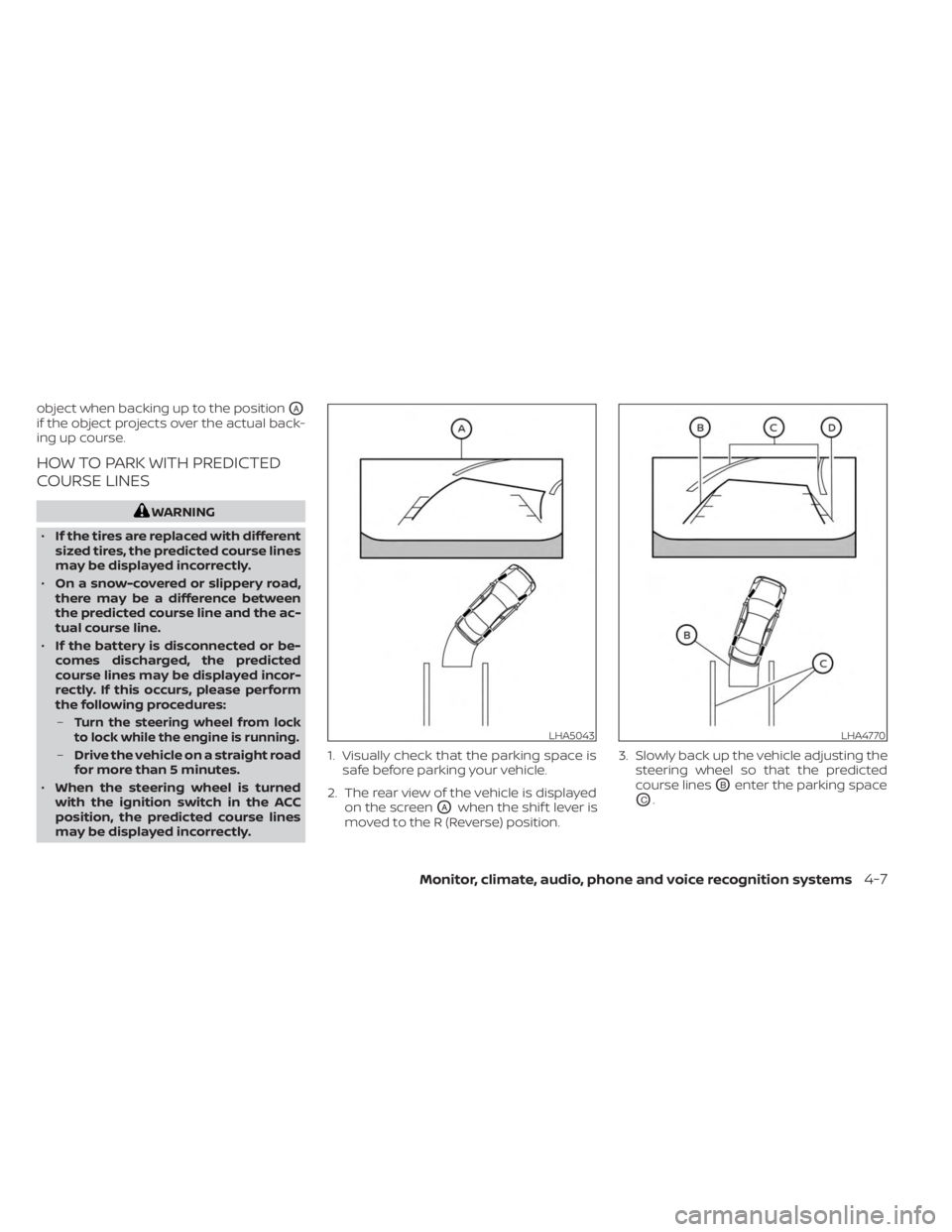
object when backing up to the positionOA
if the object projects over the actual back-
ing up course.
HOW TO PARK WITH PREDICTED
COURSE LINES
WARNING
• If the tires are replaced with different
sized tires, the predicted course lines
may be displayed incorrectly.
• On a snow-covered or slippery road,
there may be a difference between
the predicted course line and the ac-
tual course line.
• If the battery is disconnected or be-
comes discharged, the predicted
course lines may be displayed incor-
rectly. If this occurs, please perform
the following procedures:
–
Turn the steering wheel from lock
to lock while the engine is running.
– Drive the vehicle on a straight road
for more than 5 minutes.
• When the steering wheel is turned
with the ignition switch in the ACC
position, the predicted course lines
may be displayed incorrectly. 1. Visually check that the parking space is
safe before parking your vehicle.
2. The rear view of the vehicle is displayed on the screen
OAwhen the shif t lever is
moved to the R (Reverse) position. 3. Slowly back up the vehicle adjusting the
steering wheel so that the predicted
course lines
OBenter the parking space
OC.
LHA5043LHA4770
Monitor, climate, audio, phone and voice recognition systems4-7
Page 223 of 518
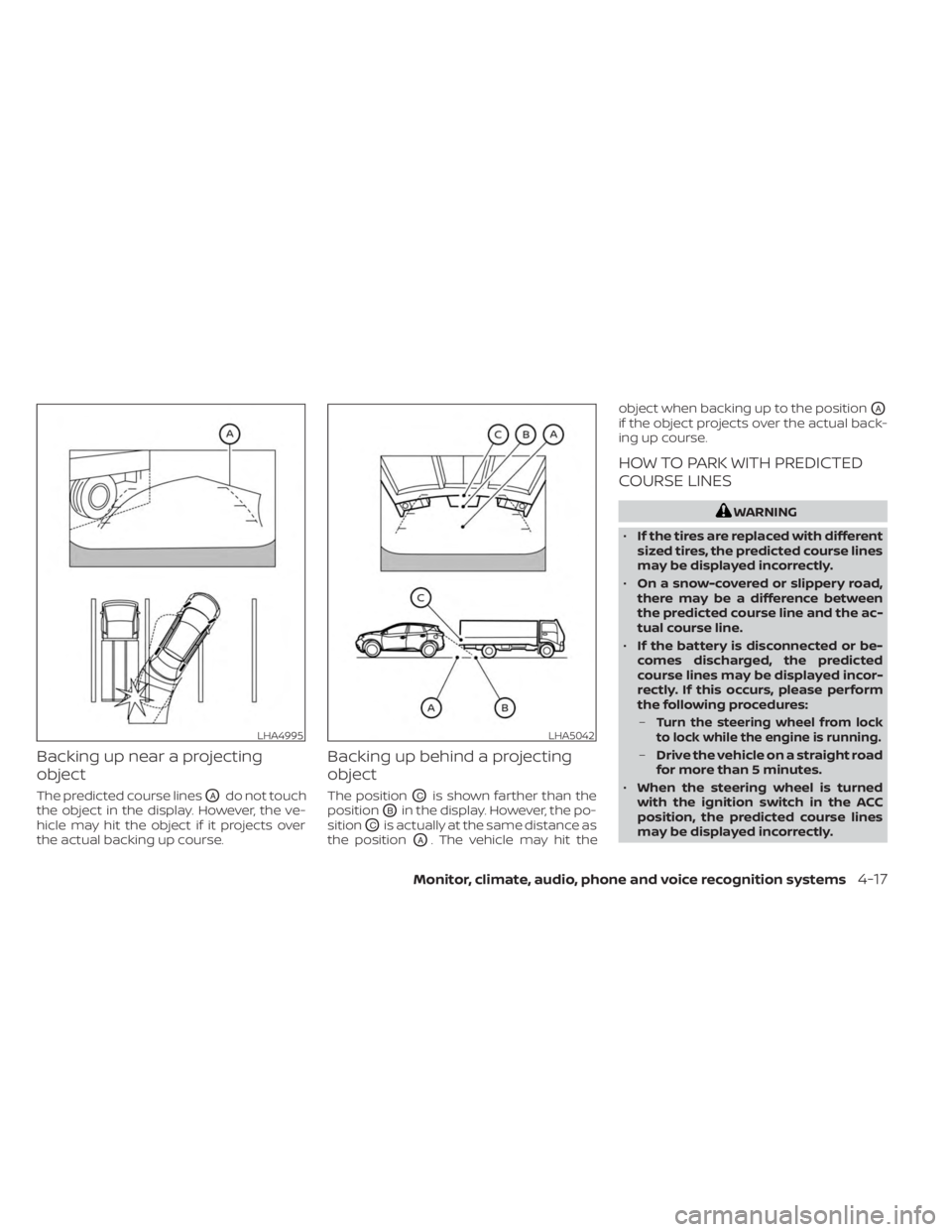
Backing up near a projecting
object
The predicted course linesOAdo not touch
the object in the display. However, the ve-
hicle may hit the object if it projects over
the actual backing up course.
Backing up behind a projecting
object
The positionOCis shown farther than the
position
OBin the display. However, the po-
sition
OCis actually at the same distance as
the position
OA. The vehicle may hit the object when backing up to the position
OA
if the object projects over the actual back-
ing up course.
HOW TO PARK WITH PREDICTED
COURSE LINES
WARNING
• If the tires are replaced with different
sized tires, the predicted course lines
may be displayed incorrectly.
• On a snow-covered or slippery road,
there may be a difference between
the predicted course line and the ac-
tual course line.
• If the battery is disconnected or be-
comes discharged, the predicted
course lines may be displayed incor-
rectly. If this occurs, please perform
the following procedures:
–
Turn the steering wheel from lock
to lock while the engine is running.
– Drive the vehicle on a straight road
for more than 5 minutes.
• When the steering wheel is turned
with the ignition switch in the ACC
position, the predicted course lines
may be displayed incorrectly.
LHA4995LHA5042
Monitor, climate, audio, phone and voice recognition systems4-17
Page 241 of 518
5 Starting and driving
Precautions when starting and driving..........5-4
Exhaust gas (carbon monoxide) ..............5-4
Three-way catalyst ...........................5-4
Tire Pressure Monitoring System
(TPMS) .......................................5-5
On-pavement and off-road driving
precautions ..................................5-9
Avoiding collision and rollover ................5-9
Off-roadrecovery ............................5-9
Rapid air pressure loss ......................5-10
Drinking alcohol/drugs and driving ..........5-10
Driving safety precautions ....................5-11
Push-button ignition switch ....................5-13
Operating range ............................ 5-14
Push-button ignition switch positions .......5-14
Emergency engine shut off ..................5-15
NISSAN Intelligent Key® battery
discharge ................................... 5-15
NISSAN Vehicle Immobilizer System .........5-16
Before starting the engine .....................5-16
Starting the engine ............................. 5-17
Remote Engine Start (if so equipped) ........5-18
Driving the vehicle .............................. 5-18
Engine protection mode ....................5-18
Continuously Variable Transmission
(CVT) ........................................ 5-19Parking brake
.................................. 5-24
Traffic Sign Recognition (TSR) (if so equipped) . . . 5-25 System operation ........................... 5-26
Turning the Traffic Sign Recognition
(TSR) system on and off .....................5-27
System temporarily unavailable .............5-27
System malfunction ......................... 5-27
System maintenance .......................5-27
Lane Departure Warning (LDW) .................5-28
LDW system operation ......................5-29
How to enable/disable the LDW system .....5-30
LDW system limitations .....................5-31
System temporarily unavailable .............5-32
System malfunction ......................... 5-32
System maintenance .......................5-32
Intelligent Lane Intervention (I-LI) ...............5-33
I-LI system operation ........................ 5-34
How to enable/disable the I-LI system ......5-35
I-LI
system limitations ....................... 5-36
System temporarily unavailable .............5-37
System malfunction ......................... 5-38
System maintenance .......................5-38
Blind Spot Warning (BSW) .......................5-39
BSW system operation ......................5-40
How to enable/disable the BSW system .....5-41
BSW system limitations .....................5-42
Page 243 of 518
System maintenance......................5-110
Intelligent Driver Alertness (I-DA) ...............5-112
Intelligent Driver Alertness system
operation .................................. 5-112
How to enable/disable the Intelligent
Driver Alertness (I-DA) system ..............5-113
Intelligent Driver Alertness (I-DA)
system limitations ......................... 5-114
Break-in schedule ............................. 5-115
Fuel efficient driving tips .......................5-115
Increasing fuel economy ......................5-116
All-Wheel Drive (AWD) (if so equipped) ...........5-117
Parking/parking on hills .......................5-119
Power steering ................................ 5-120
Brake system ................................. 5-121
Brake precautions .......................... 5-121
Anti-lock Braking System (ABS) .............5-121
Brake Assist ................................ 5-123Vehicle Dynamic Control (VDC) system
........5-123
Rise-up and build-up ....................... 5-124
Brake force distribution ....................5-125
Hill start assist system ........................5-126
Front and rear sonar system (if so equipped) . . 5-126 System operation .......................... 5-127
How to enable/disable the front and
rear sonar system .......................... 5-129
Sonar limitations ........................... 5-130
System temporarily unavailable ............5-130
System maintenance ......................5-130
Cold weather driving .......................... 5-131
Freeing a frozen door lock ..................5-131
Antifreeze .................................. 5-131
Battery..................................... 5-131
Draining of coolant water ..................5-131
Tire equipment ............................. 5-131
Special winter equipment ..................5-132
Driving on snow or ice ......................5-132