2023 NISSAN MURANO Front sensor
[x] Cancel search: Front sensorPage 81 of 518
that the person is a small adult, or is not
sitting on the seat properly or not using the
seat belt properly.
If a child restraint must be used in the front
seat, the front passenger air bag status
light may or may not be illuminated, de-
pending on the size of the child and the
type of child restraint being used. If the air
bag status light is not illuminated (indicat-
ing that the front passenger air bag and
front passenger supplemental knee air
bag might inflate in a crash), it could be that
the child restraint or seat belt is not being
used properly. Make sure that the child re-
straint is installed properly, the seat belt is
used properly and the occupant is posi-
tioned properly. If the air bag status light is
still not illuminated, reposition the occu-
pant or child restraint in a rear seat.
If the front passenger air bag status light
will not illuminate even though you believe
that the child restraint, the seat belts and
the occupant are properly positioned, it is
recommended that you take your vehicle
to a NISSAN dealer. A NISSAN dealer can
check system status by using a special
tool. However, until you have confirmed
with a dealer that your air bag is working
properly, reposition the occupant or child
restraint in a rear seat.The NISSAN Advanced Air Bag System and
front passenger air bag status light will
take a few seconds to register a change in
the front passenger seat status. This is nor-
mal system operation and does not indi-
cate a malfunction.
If a malfunction occurs in the front passen-
ger air bag system, the supplemental air
bag warning light
, located in the me-
ter and gauges area of the instrument
panel, will be illuminated (blinking or
steadily lit). Have the system checked. It is
recommended that you visit a NISSAN
dealer for this service.
Normal operation
In order for the occupant classification
sensor system to classif y the front passen-
ger based on weight, please follow the pre-
cautions and steps outlined below:
Precautions
• Make sure that there are no objects weighing over 9.1 lbs. (4 kg) hanging on
the seat or placed in the seatback pocket.
• Make sure that a child restraint or other object is not pressing against the rear of
the seatback.
• Make sure that a rear passenger is not pushing or pulling on the back of the front
passenger seat. • Make sure that the front passenger seat
or seatback is not forced back against an
object on the seat or floor behind it.
• Make sure that there is no object placed under the front passenger seat.
Steps
1. Adjust the seat as outlined in the “Seats” (P. 1-2) section of this manual. Sit upright,
leaning against the seatback, and cen-
tered on the seat cushion with your feet
comfortably extended to the floor.
2. Make sure there are no objects on your lap.
3.Fasten the seat belt as outlined in the
“Seat belts” (P. 1-13) section of this manual.
Front passenger seat belt buckle status is
monitored by the occupant classification
system, and is used as an input to deter-
mine occupancy status. So, it is highly
recommended that the front passenger
fasten their seat belt.
4. Remain in this position for 30 seconds allowing the system to classif y the front
passenger before the vehicle is put into
motion.
5. Ensure proper classification by checking the front passenger air bag status light.
Safety-Seats, seat belts and supplemental restraint system1-61
Page 82 of 518
NOTE:
This vehicle’s occupant classification
sensor system generally keeps the clas-
sification locked during driving, so it is
important that you confirm that the
front passenger is properly classified
prior to driving. However, the occupant
classification sensor may recalculate the
weight of the occupant under some con-
ditions (both while driving and when
stopped), so front passenger seat occu-
pants should continue to remain seated
as outlined above.
Troubleshooting
If you think the front passenger air bag
status light is incorrect:
1. If the light is ON with an adult occupyingthe front passenger seat:
•
Occupant is a small adult — the air bag light
is functioning as intended. The front pas-
senger air bag and front passenger supple-
mental knee air bag are suppressed.
However, if the occupant is not a small
adult, then this may be due to the following
conditions that may be interfering with the
weight sensors:
• Occupant is not sitting upright, leaning against the seatback, and centered on
the seat cushion with his/her feet com-
fortably extended to the floor.
• A child restraint or other object pressing against the rear of the seatback.
• A rear passenger pushing or pulling on the back of the front passenger seat.
•
Forcing the front seat or seatback against
an object on the seat or floor behind it.
• An object placed under the front passen- ger seat.
• An object placed between the seat cush- ion and center console or between the
seat cushion and the door.
If the vehicle is moving, please come to a
stop when it is safe to do so. Check and
correct any of the above conditions. Re-
start the vehicle and wait 1 minute.
NOTE:
A system check will be performed during
which the front passenger air bag status
light will remain lit for about 7 seconds
initially. If the light is still ON af ter this, the person
should be advised not to ride in the front
passenger seat and the vehicle should be
checked as soon as possible. It is recom-
mended that you visit a NISSAN dealer for
this service.
2. If the light is OFF with a small adult, child
or child restraint occupying the front
passenger seat.
This may be due to the following condi-
tions that may be interfering with the
weight sensors:
• Small adult or child is not sitting upright, leaning against the seatback, and cen-
tered on the seat cushion with his/her
feet comfortably extended to the floor.
• The child restraint is not properly in- stalled, as outlined in the “Child restraints”
section of this manual.
• An object weighing over 9.1 lbs. (4 kg) hanging on the seat or placed in the seat-
back pocket.
• A child restraint or other object pressing against the rear of the seatback.
• A rear passenger pushing or pulling on the back of the front passenger seat.
•
Forcing the front seat or seatback against
an object on the seat or floor behind it.
1-62Safety-Seats, seat belts and supplemental restraint system
Page 83 of 518
• An object placed under the front passen-ger seat.
• An object placed between the seat cush- ion and center console.
If the vehicle is moving, please come to a
stop when it is safe to do so. Check and
correct any of the above conditions. Re-
start the vehicle and wait 1 minute.
NOTE:
A system check will be performed during
which the front passenger air bag status
light will remain lit for about 7 seconds
initially.
If the light is still OFF af ter this, the small
adult, child or child restraint should be re-
positioned in the rear seat and the vehicle
should be checked as soon as possible. It is
recommended that you visit a NISSAN
dealer for this service.
3. If the light is OFF with no front passenger and no objects on the front passenger
seat, the vehicle should be checked. It is
recommended that you visit a NISSAN
dealer as soon as possible.
Other supplemental front-impact air
bag precautions
WARNING
• Do not place any objects on the
steering wheel pad or on the instru-
ment panel. Also, do not place any
objects between any occupant and
the steering wheel or instrument
panel. Such objects may become
dangerous projectiles and cause in-
jury if the front air bags inflate.
• Immediately af ter inflation, several
front air bag system components will
be hot. Do not touch them; you may
severely burn yourself.
• No unauthorized changes should be
made to any components or wiring
of the supplemental air bag system.
This is to prevent accidental inflation
of the supplemental air bag or dam-
age to the supplemental air bag
system.
• Do not make unauthorized changes
to your vehicle's electrical system,
suspension system or front end
structure. This could affect proper
operation of the front air bag system. •
Tampering with the front air bag sys-
tem may result in serious personal
injury. Tampering includes changes
to the steering wheel and the instru-
ment panel assembly by placing ma-
terial over the steering wheel pad
and above the instrument panel or
by installing additional trim material
around the air bag system.
• Removing or modif ying the front
passenger seat may affect the func-
tion of the air bag system and result
in serious personal injury.
• Modif ying or tampering with the
front passenger seat may result in
serious personal injury. For example,
do not change the front seats by
placing material on the seat cushion
or by installing additional trim mate-
rial, such as seat covers, on the seat
that are not specifically designed to
assure proper air bag operation. Ad-
ditionally, do not stow any objects
under the front passenger seat or the
seat cushion and seatback. Such ob-
jects may interfere with the proper
operation of the occupant classifica-
tion sensor (weight sensor).
Safety-Seats, seat belts and supplemental restraint system1-63
Page 91 of 518
WARNING
• Once a front air bag, side air bag, cur-
tain air bag, or knee air bag has in-
flated, the air bag module will not
function again and must be replaced.
Additionally, the activated preten-
sioner(s) must also be replaced. The
air bag module and pretensioner(s)
should be replaced. It is recom-
mended that you visit a NISSAN
dealer for this service. However, the
air bag module and pretensioner(s)
cannot be repaired.
• The front air bag, side air bag, curtain
air bag, knee air bag systems and the
pretensioner system should be in-
spected if there is any damage to the
front end or side portion of the ve-
hicle. It is recommended that you
visit a NISSAN dealer for this service.
• If you need to dispose of a supple-
mental air bag or pretensioner sys-
tems or scrap the vehicle, it is recom-
mended that you visit a NISSAN
dealer. Incorrect disposal procedures
could cause personal injury. •
If there is an impact to your vehicle
from any direction, your Occupant
Classification Sensor (OCS) should be
checked to verif y it is still functioning
correctly. It is recommended that you
visit a NISSAN dealer for this service.
The OCS should be checked even if no
air bags deploy as a result of the im-
pact. Failure to verif y proper OCS
function may result in an improper
air bag deployment resulting in in-
jury or death.
Safety-Seats, seat belts and supplemental restraint system1-71
Page 112 of 518
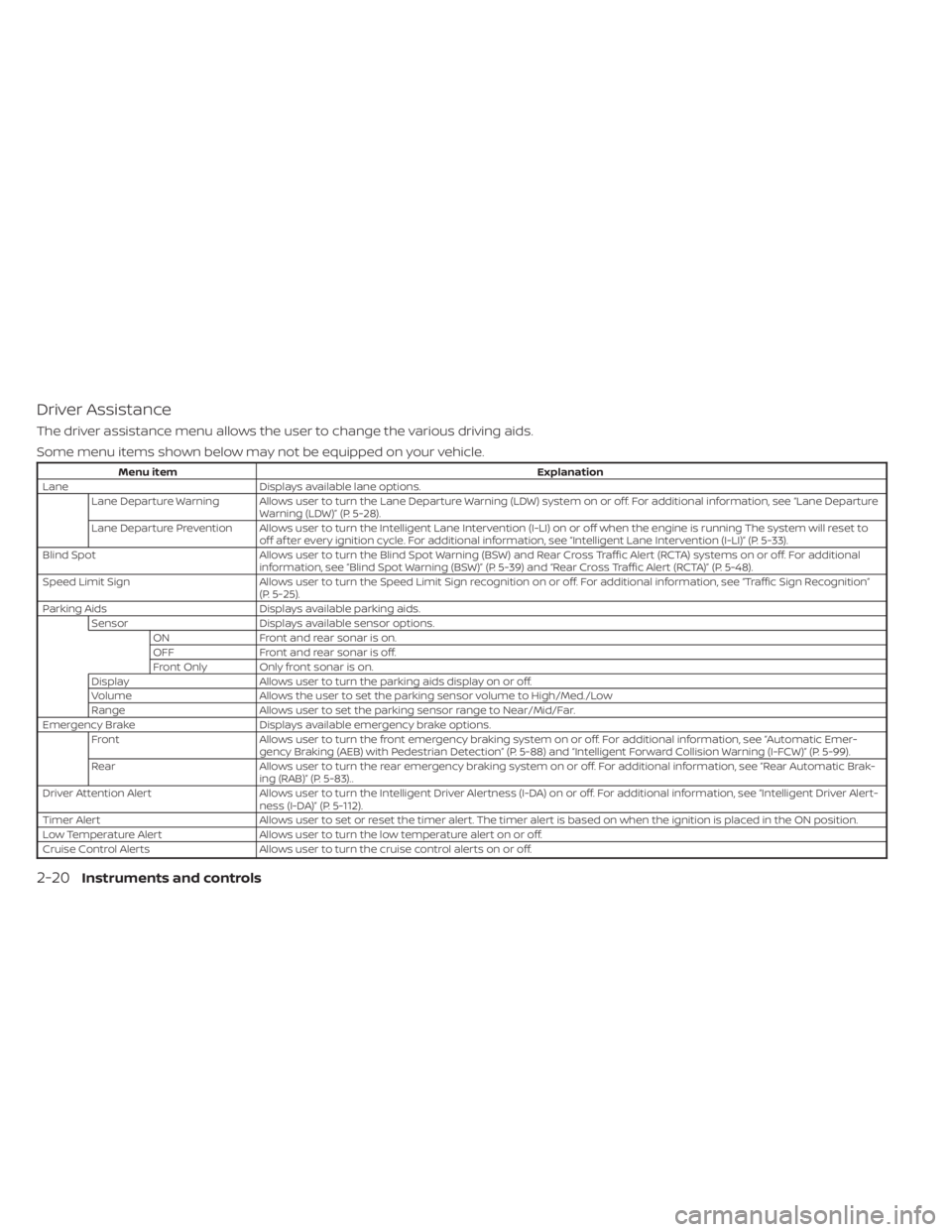
Driver Assistance
The driver assistance menu allows the user to change the various driving aids.
Some menu items shown below may not be equipped on your vehicle.
Menu itemExplanation
Lane Displays available lane options.
Lane Departure Warning Allows user to turn the Lane Departure Warning (LDW) system on or off. For additional information, see “Lane Departure Warning (LDW)” (P. 5-28).
Lane Departure Prevention Allows user to turn the Intelligent Lane Intervention (I-LI) on or off when the engine is running The system will reset to off af ter every ignition cycle. For additional information, see “Intelligent Lane Intervention (I-LI)” (P. 5-33).
Blind Spot Allows user to turn the Blind Spot Warning (BSW) and Rear Cross Traffic Alert (RCTA) systems on or off. For additional
information, see “Blind Spot Warning (BSW)” (P. 5-39) and “Rear Cross Traffic Alert (RCTA)” (P. 5-48).
Speed Limit Sign Allows user to turn the Speed Limit Sign recognition on or off. For additional information, see “Traffic Sign Recognition”
(P. 5-25).
Parking Aids Displays available parking aids.
Sensor Displays available sensor options.
ON Front and rear sonar is on.
OFF Front and rear sonar is off.
Front Only Only front sonar is on.
Display Allows user to turn the parking aids display on or off.
Volume Allows the user to set the parking sensor volume to High/Med./Low
Range Allows user to set the parking sensor range to Near/Mid/Far.
Emergency Brake Displays available emergency brake options.
Front Allows user to turn the front emergency braking system on or off. For additional information, see “Automatic Emer-
gency Braking (AEB) with Pedestrian Detection” (P. 5-88) and “Intelligent Forward Collision Warning (I-FCW)” (P. 5-99).
Rear Allows user to turn the rear emergency braking system on or off. For additional information, see “Rear Automatic Brak-
ing (RAB)” (P. 5-83)..
Driver Attention Alert Allows user to turn the Intelligent Driver Alertness (I-DA) on or off. For additional information, see “Intelligent Driver Al ert-
ness (I-DA)” (P. 5-112).
Timer Alert Allows user to set or reset the timer alert. The timer alert is based on when the ignition is placed in the ON position.
Low Temperature Alert Allows user to turn the low temperature alert on or off.
Cruise Control Alerts Allows user to turn the cruise control alerts on or off.
2-20Instruments and controls
Page 122 of 518
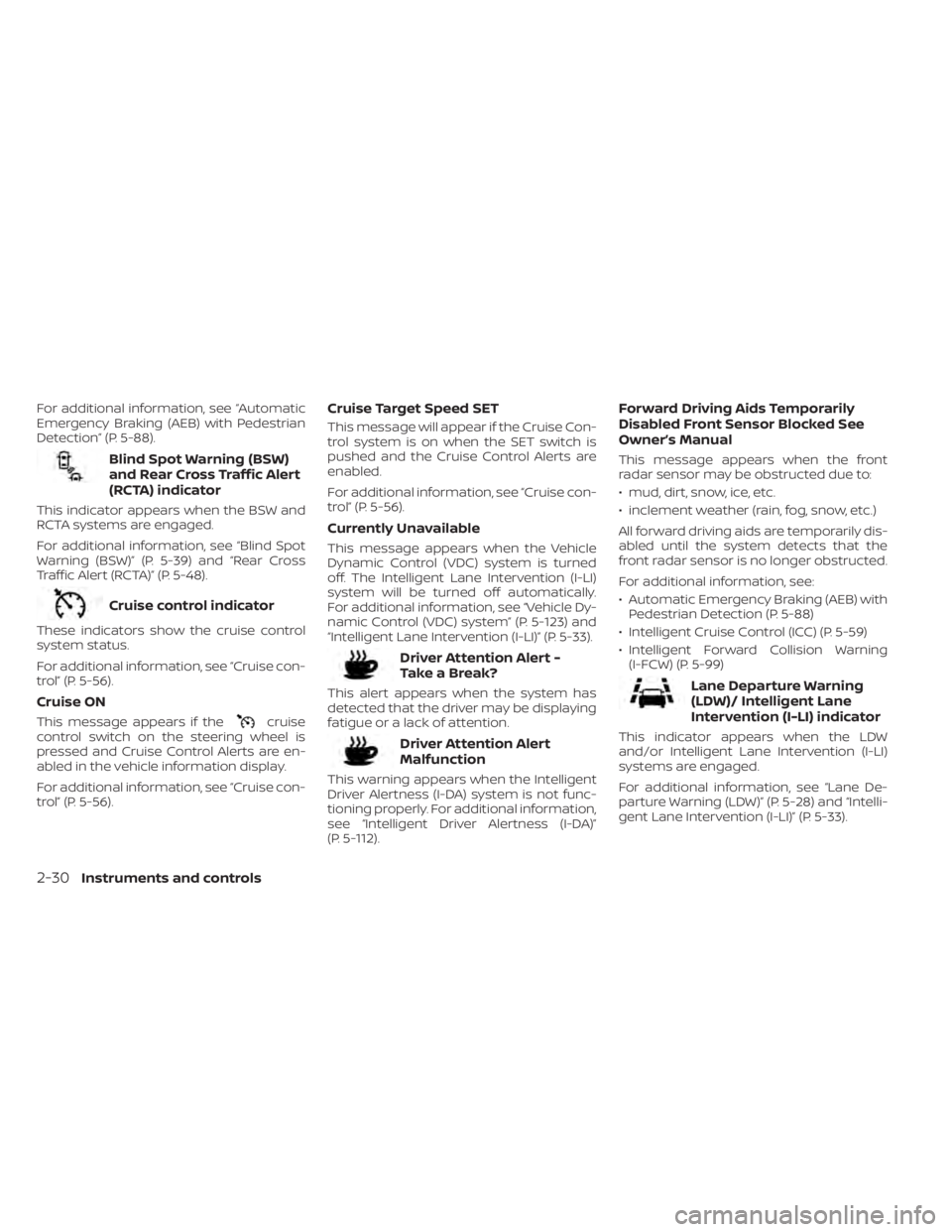
For additional information, see “Automatic
Emergency Braking (AEB) with Pedestrian
Detection” (P. 5-88).
Blind Spot Warning (BSW)
and Rear Cross Traffic Alert
(RCTA) indicator
This indicator appears when the BSW and
RCTA systems are engaged.
For additional information, see “Blind Spot
Warning (BSW)” (P. 5-39) and “Rear Cross
Traffic Alert (RCTA)” (P. 5-48).
Cruise control indicator
These indicators show the cruise control
system status.
For additional information, see “Cruise con-
trol” (P. 5-56).
Cruise ON
This message appears if thecruise
control switch on the steering wheel is
pressed and Cruise Control Alerts are en-
abled in the vehicle information display.
For additional information, see “Cruise con-
trol” (P. 5-56).
Cruise Target Speed SET
This message will appear if the Cruise Con-
trol system is on when the SET switch is
pushed and the Cruise Control Alerts are
enabled.
For additional information, see “Cruise con-
trol” (P. 5-56).
Currently Unavailable
This message appears when the Vehicle
Dynamic Control (VDC) system is turned
off. The Intelligent Lane Intervention (I-LI)
system will be turned off automatically.
For additional information, see “Vehicle Dy-
namic Control (VDC) system” (P. 5-123) and
“Intelligent Lane Intervention (I-LI)” (P. 5-33).
Driver Attention Alert -
TakeaBreak?
This alert appears when the system has
detected that the driver may be displaying
fatigue or a lack of attention.
Driver Attention Alert
Malfunction
This warning appears when the Intelligent
Driver Alertness (I-DA) system is not func-
tioning properly. For additional information,
see “Intelligent Driver Alertness (I-DA)”
(P. 5-112).
Forward Driving Aids Temporarily
Disabled Front Sensor Blocked See
Owner’s Manual
This message appears when the front
radar sensor may be obstructed due to:
• mud, dirt, snow, ice, etc.
• inclement weather (rain, fog, snow, etc.)
All forward driving aids are temporarily dis-
abled until the system detects that the
front radar sensor is no longer obstructed.
For additional information, see:
• Automatic Emergency Braking (AEB) with Pedestrian Detection (P. 5-88)
• Intelligent Cruise Control (ICC) (P. 5-59)
• Intelligent Forward Collision Warning (I-FCW) (P. 5-99)
Lane Departure Warning
(LDW)/ Intelligent Lane
Intervention (I-LI) indicator
This indicator appears when the LDW
and/or Intelligent Lane Intervention (I-LI)
systems are engaged.
For additional information, see “Lane De-
parture Warning (LDW)” (P. 5-28) and “Intelli-
gent Lane Intervention (I-LI)” (P. 5-33).
2-30Instruments and controls
Page 123 of 518
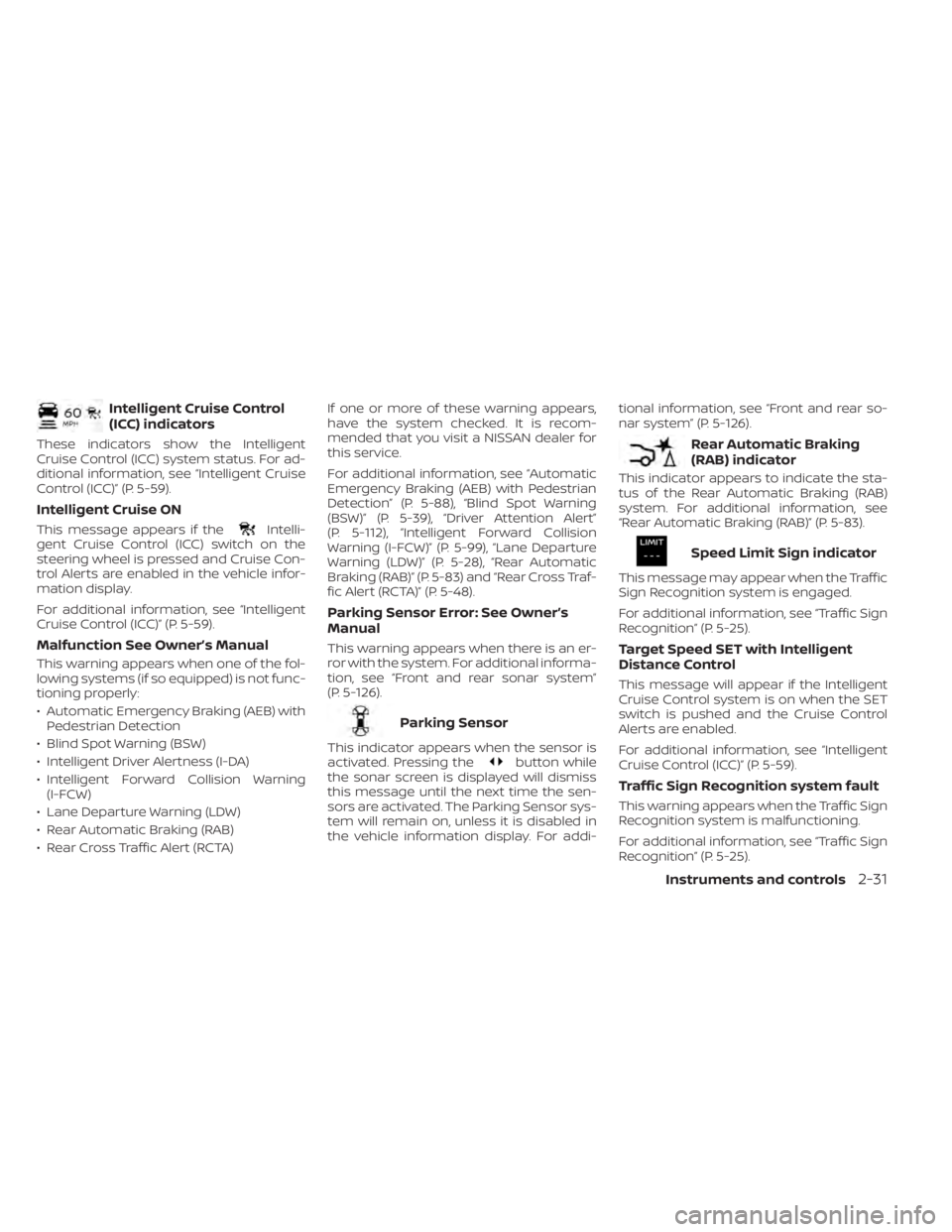
Intelligent Cruise Control
(ICC) indicators
These indicators show the Intelligent
Cruise Control (ICC) system status. For ad-
ditional information, see “Intelligent Cruise
Control (ICC)” (P. 5-59).
Intelligent Cruise ON
This message appears if theIntelli-
gent Cruise Control (ICC) switch on the
steering wheel is pressed and Cruise Con-
trol Alerts are enabled in the vehicle infor-
mation display.
For additional information, see “Intelligent
Cruise Control (ICC)” (P. 5-59).
Malfunction See Owner’s Manual
This warning appears when one of the fol-
lowing systems (if so equipped) is not func-
tioning properly:
• Automatic Emergency Braking (AEB) with Pedestrian Detection
• Blind Spot Warning (BSW)
• Intelligent Driver Alertness (I-DA)
• Intelligent Forward Collision Warning (I-FCW)
• Lane Departure Warning (LDW)
• Rear Automatic Braking (RAB)
• Rear Cross Traffic Alert (RCTA) If one or more of these warning appears,
have the system checked. It is recom-
mended that you visit a NISSAN dealer for
this service.
For additional information, see “Automatic
Emergency Braking (AEB) with Pedestrian
Detection” (P. 5-88), “Blind Spot Warning
(BSW)” (P. 5-39), “Driver Attention Alert”
(P. 5-112), “Intelligent Forward Collision
Warning (I-FCW)” (P. 5-99), “Lane Departure
Warning (LDW)” (P. 5-28), “Rear Automatic
Braking (RAB)” (P. 5-83) and “Rear Cross Traf-
fic Alert (RCTA)” (P. 5-48).
Parking Sensor Error: See Owner’s
Manual
This warning appears when there is an er-
ror with the system. For additional informa-
tion, see “Front and rear sonar system”
(P. 5-126).
Parking Sensor
This indicator appears when the sensor is
activated. Pressing thebutton while
the sonar screen is displayed will dismiss
this message until the next time the sen-
sors are activated. The Parking Sensor sys-
tem will remain on, unless it is disabled in
the vehicle information display. For addi- tional information, see “Front and rear so-
nar system” (P. 5-126).
Rear Automatic Braking
(RAB) indicator
This indicator appears to indicate the sta-
tus of the Rear Automatic Braking (RAB)
system. For additional information, see
“Rear Automatic Braking (RAB)” (P. 5-83).
Speed Limit Sign indicator
This message may appear when the Traffic
Sign Recognition system is engaged.
For additional information, see “Traffic Sign
Recognition” (P. 5-25).
Target Speed SET with Intelligent
Distance Control
This message will appear if the Intelligent
Cruise Control system is on when the SET
switch is pushed and the Cruise Control
Alerts are enabled.
For additional information, see “Intelligent
Cruise Control (ICC)” (P. 5-59).
Traffic Sign Recognition system fault
This warning appears when the Traffic Sign
Recognition system is malfunctioning.
For additional information, see “Traffic Sign
Recognition” (P. 5-25).
Instruments and controls2-31
Page 134 of 518
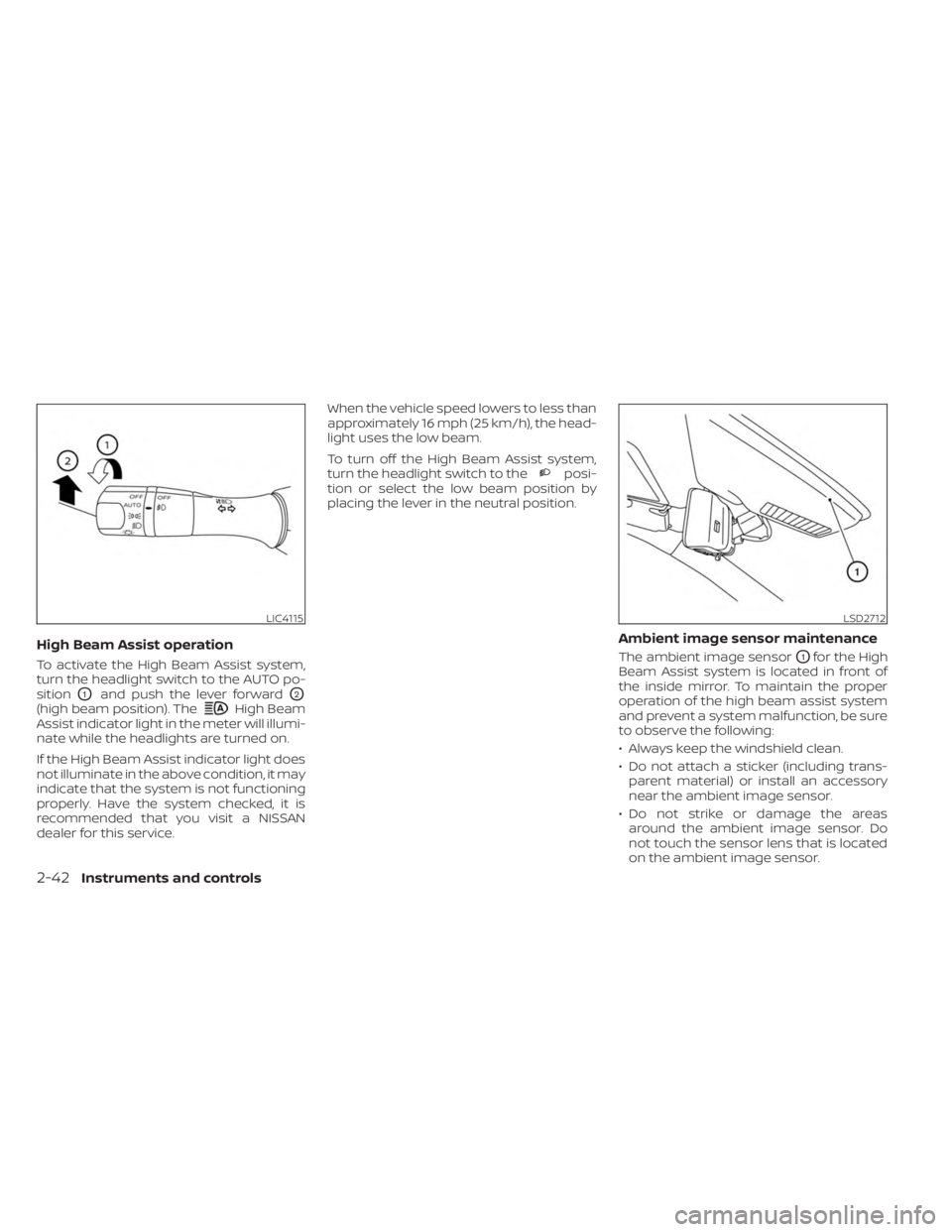
High Beam Assist operation
To activate the High Beam Assist system,
turn the headlight switch to the AUTO po-
sition
O1and push the lever forwardO2
(high beam position). TheHigh Beam
Assist indicator light in the meter will illumi-
nate while the headlights are turned on.
If the High Beam Assist indicator light does
not illuminate in the above condition, it may
indicate that the system is not functioning
properly. Have the system checked, it is
recommended that you visit a NISSAN
dealer for this service. When the vehicle speed lowers to less than
approximately 16 mph (25 km/h), the head-
light uses the low beam.
To turn off the High Beam Assist system,
turn the headlight switch to the
posi-
tion or select the low beam position by
placing the lever in the neutral position.
Ambient image sensor maintenance
The ambient image sensorO1for the High
Beam Assist system is located in front of
the inside mirror. To maintain the proper
operation of the high beam assist system
and prevent a system malfunction, be sure
to observe the following:
• Always keep the windshield clean.
• Do not attach a sticker (including trans- parent material) or install an accessory
near the ambient image sensor.
• Do not strike or damage the areas around the ambient image sensor. Do
not touch the sensor lens that is located
on the ambient image sensor.
LIC4115LSD2712
2-42Instruments and controls