2023 NISSAN LEAF brake
[x] Cancel search: brakePage 285 of 612
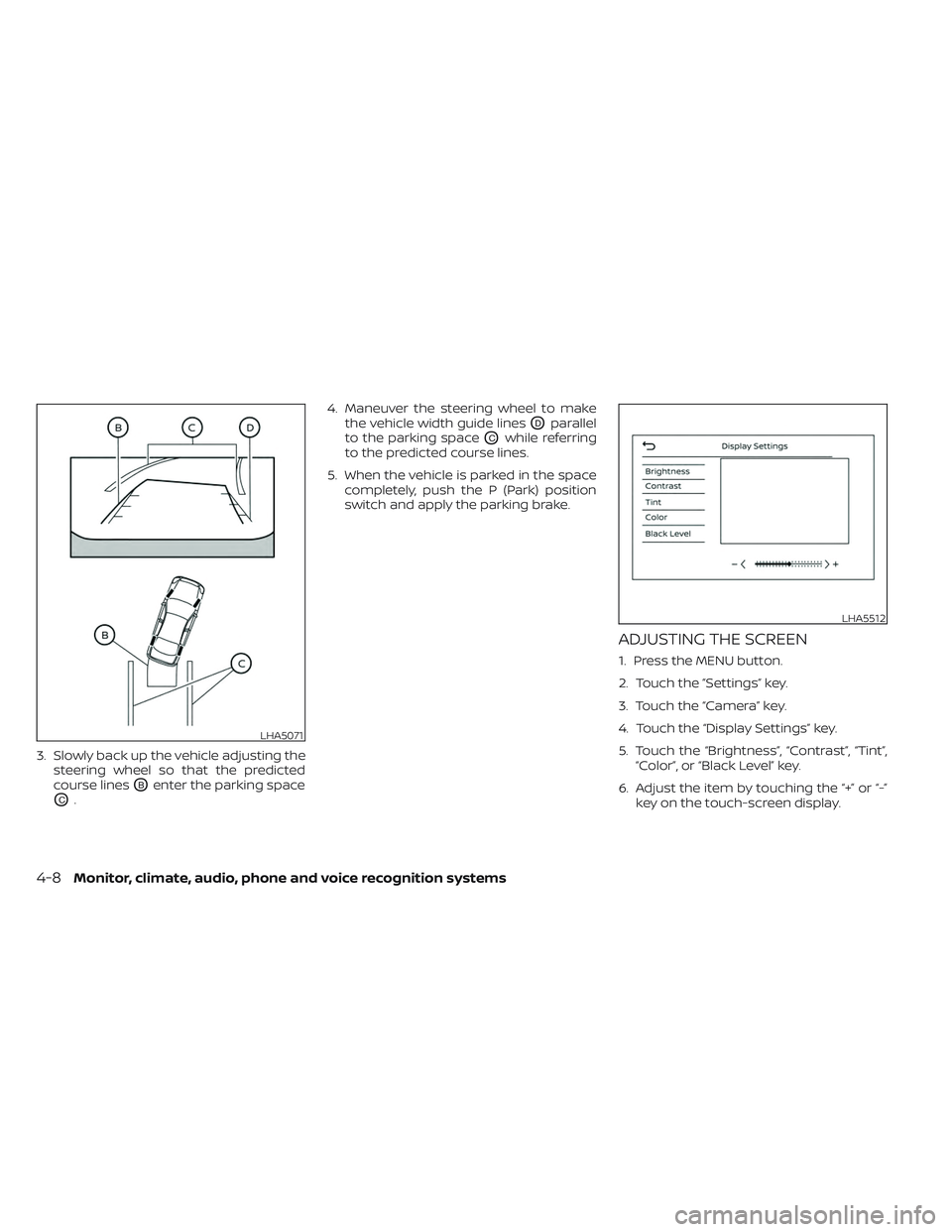
3. Slowly back up the vehicle adjusting thesteering wheel so that the predicted
course lines
OBenter the parking space
OC. 4. Maneuver the steering wheel to make
the vehicle width guide lines
ODparallel
to the parking space
OCwhile referring
to the predicted course lines.
5. When the vehicle is parked in the space completely, push the P (Park) position
switch and apply the parking brake.
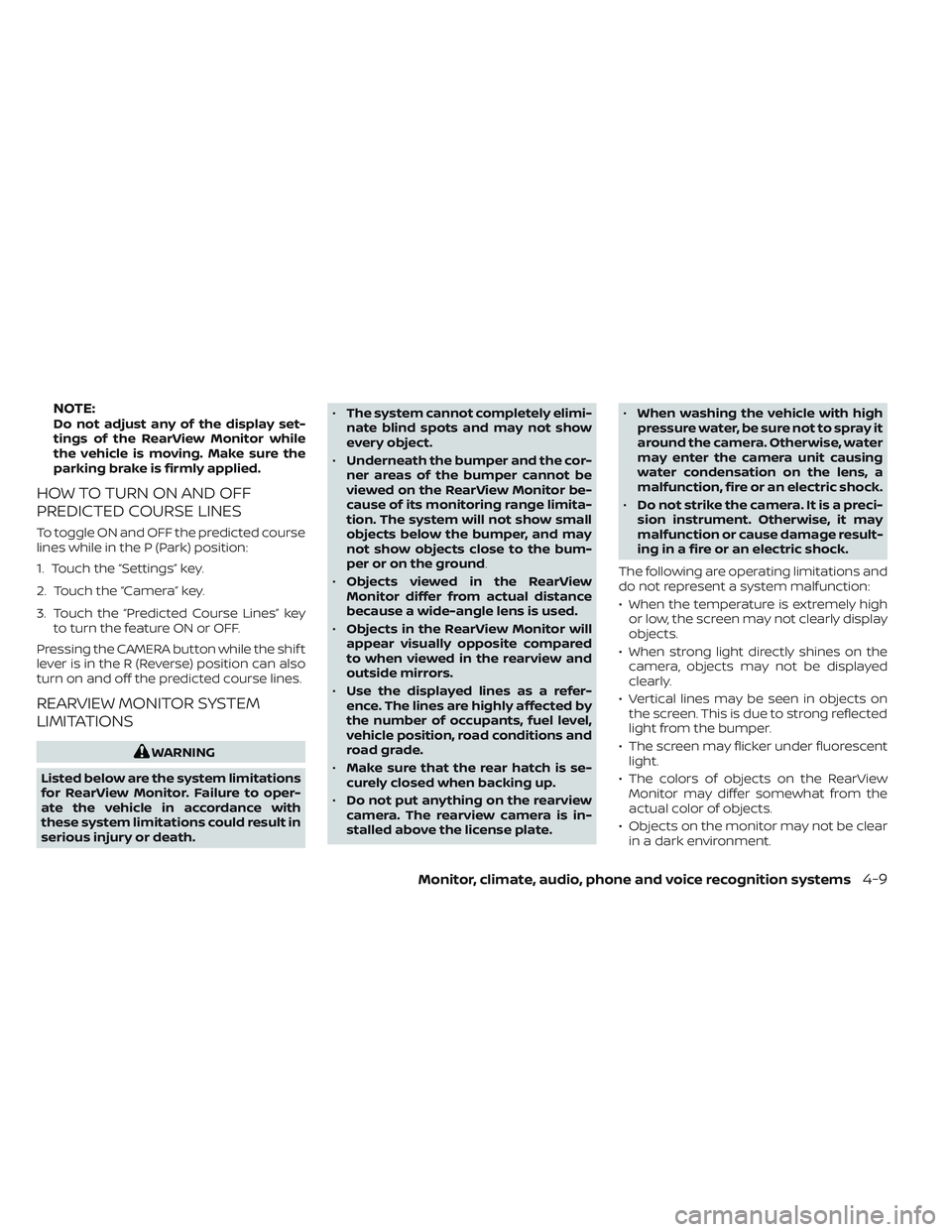
ADJUSTING THE SCREEN
1. Press the MENU button.
2. Touch the ”Settings” key.
3. Touch the “Camera” key.
4. Touch the “Display Settings” key.
5. Touch the “Brightness”, “Contrast”, “Tint”,“Color”, or “Black Level” key.
6. Adjust the item by touching the “+” or “-” key on the touch-screen display.
LHA5071
LHA5512
4-8Monitor, climate, audio, phone and voice recognition systems
Page 286 of 612
NOTE:Do not adjust any of the display set-
tings of the RearView Monitor while
the vehicle is moving. Make sure the
parking brake is firmly applied.
HOW TO TURN ON AND OFF
PREDICTED COURSE LINES
To toggle ON and OFF the predicted course
lines while in the P (Park) position:
1. Touch the “Settings” key.
2. Touch the “Camera” key.
3. Touch the “Predicted Course Lines” keyto turn the feature ON or OFF.
Pressing the CAMERA button while the shif t
lever is in the R (Reverse) position can also
turn on and off the predicted course lines.
REARVIEW MONITOR SYSTEM
LIMITATIONS
WARNING
Listed below are the system limitations
for RearView Monitor. Failure to oper-
ate the vehicle in accordance with
these system limitations could result in
serious injury or death. •
The system cannot completely elimi-
nate blind spots and may not show
every object.
• Underneath the bumper and the cor-
ner areas of the bumper cannot be
viewed on the RearView Monitor be-
cause of its monitoring range limita-
tion. The system will not show small
objects below the bumper, and may
not show objects close to the bum-
per or on the ground.
• Objects viewed in the RearView
Monitor differ from actual distance
because a wide-angle lens is used.
• Objects in the RearView Monitor will
appear visually opposite compared
to when viewed in the rearview and
outside mirrors.
• Use the displayed lines as a refer-
ence. The lines are highly affected by
the number of occupants, fuel level,
vehicle position, road conditions and
road grade.
• Make sure that the rear hatch is se-
curely closed when backing up.
• Do not put anything on the rearview
camera. The rearview camera is in-
stalled above the license plate. •
When washing the vehicle with high
pressure water, be sure not to spray it
around the camera. Otherwise, water
may enter the camera unit causing
water condensation on the lens, a
malfunction, fire or an electric shock.
• Do not strike the camera. It is a preci-
sion instrument. Otherwise, it may
malfunction or cause damage result-
ing in a fire or an electric shock.
The following are operating limitations and
do not represent a system malfunction:
• When the temperature is extremely high or low, the screen may not clearly display
objects.
• When strong light directly shines on the camera, objects may not be displayed
clearly.
• Vertical lines may be seen in objects on the screen. This is due to strong reflected
light from the bumper.
• The screen may flicker under fluorescent light.
• The colors of objects on the RearView Monitor may differ somewhat from the
actual color of objects.
• Objects on the monitor may not be clear in a dark environment.
Monitor, climate, audio, phone and voice recognition systems4-9
Page 295 of 612
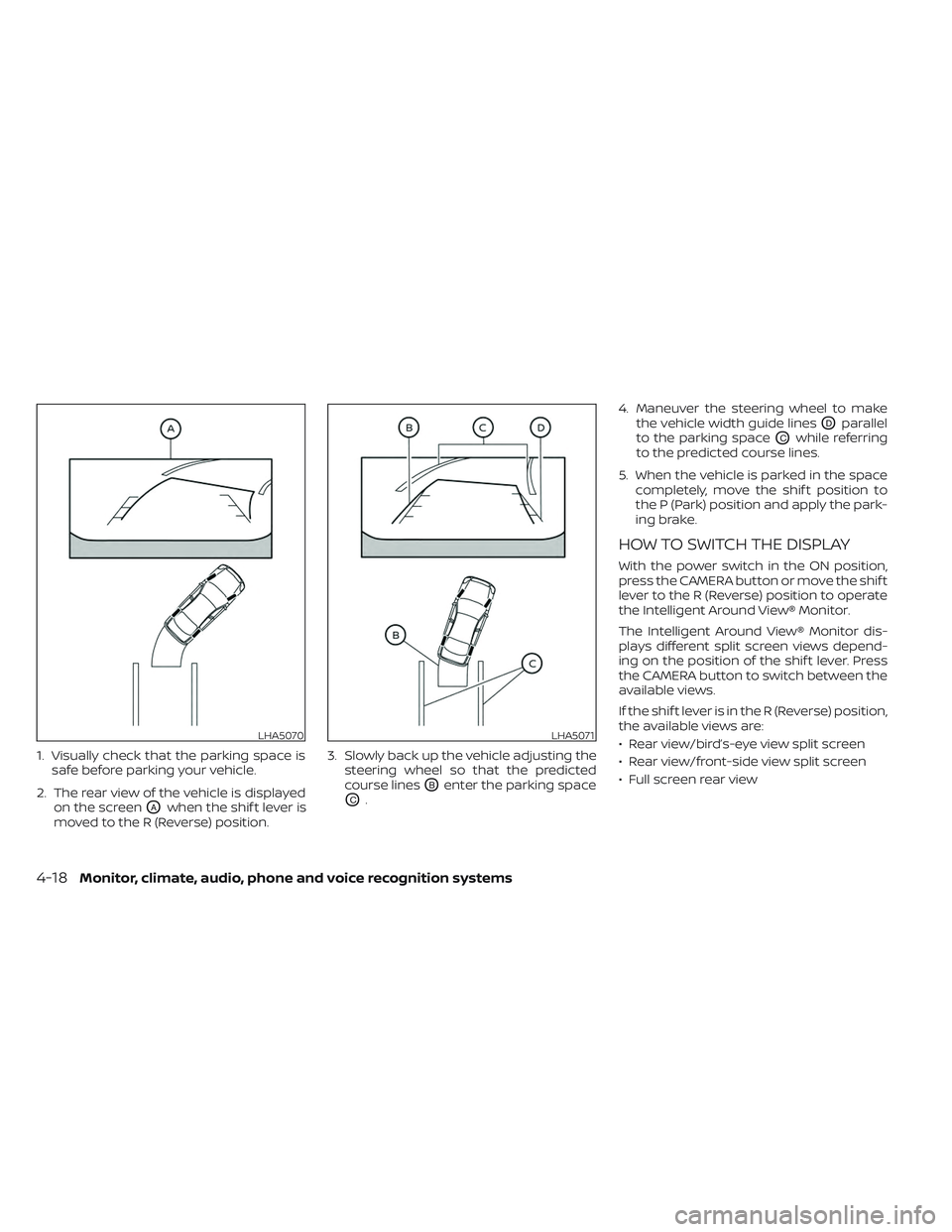
1. Visually check that the parking space issafe before parking your vehicle.
2. The rear view of the vehicle is displayed on the screen
OAwhen the shif t lever is
moved to the R (Reverse) position. 3. Slowly back up the vehicle adjusting the
steering wheel so that the predicted
course lines
OBenter the parking space
OC. 4. Maneuver the steering wheel to make
the vehicle width guide lines
ODparallel
to the parking space
OCwhile referring
to the predicted course lines.
5. When the vehicle is parked in the space completely, move the shif t position to
the P (Park) position and apply the park-
ing brake.
HOW TO SWITCH THE DISPLAY
With the power switch in the ON position,
press the CAMERA button or move the shif t
lever to the R (Reverse) position to operate
the Intelligent Around View® Monitor.
The Intelligent Around View® Monitor dis-
plays different split screen views depend-
ing on the position of the shif t lever. Press
the CAMERA button to switch between the
available views.
If the shif t lever is in the R (Reverse) position,
the available views are:
• Rear view/bird’s-eye view split screen
• Rear view/front-side view split screen
• Full screen rear view
LHA5070LHA5071
4-18Monitor, climate, audio, phone and voice recognition systems
Page 296 of 612
If the shif t position is in the P (Park) and D
(Drive) position, the available views are:
• Front view/bird’s-eye view split screen
• Front view/front-side view split screen
The display will switch from the Intelligent
Around View® Monitor screen when:
• The shif t lever is in the D (Drive) positionand the vehicle speed increases above
approximately 6 mph (10 km/h).
• A different screen is selected.
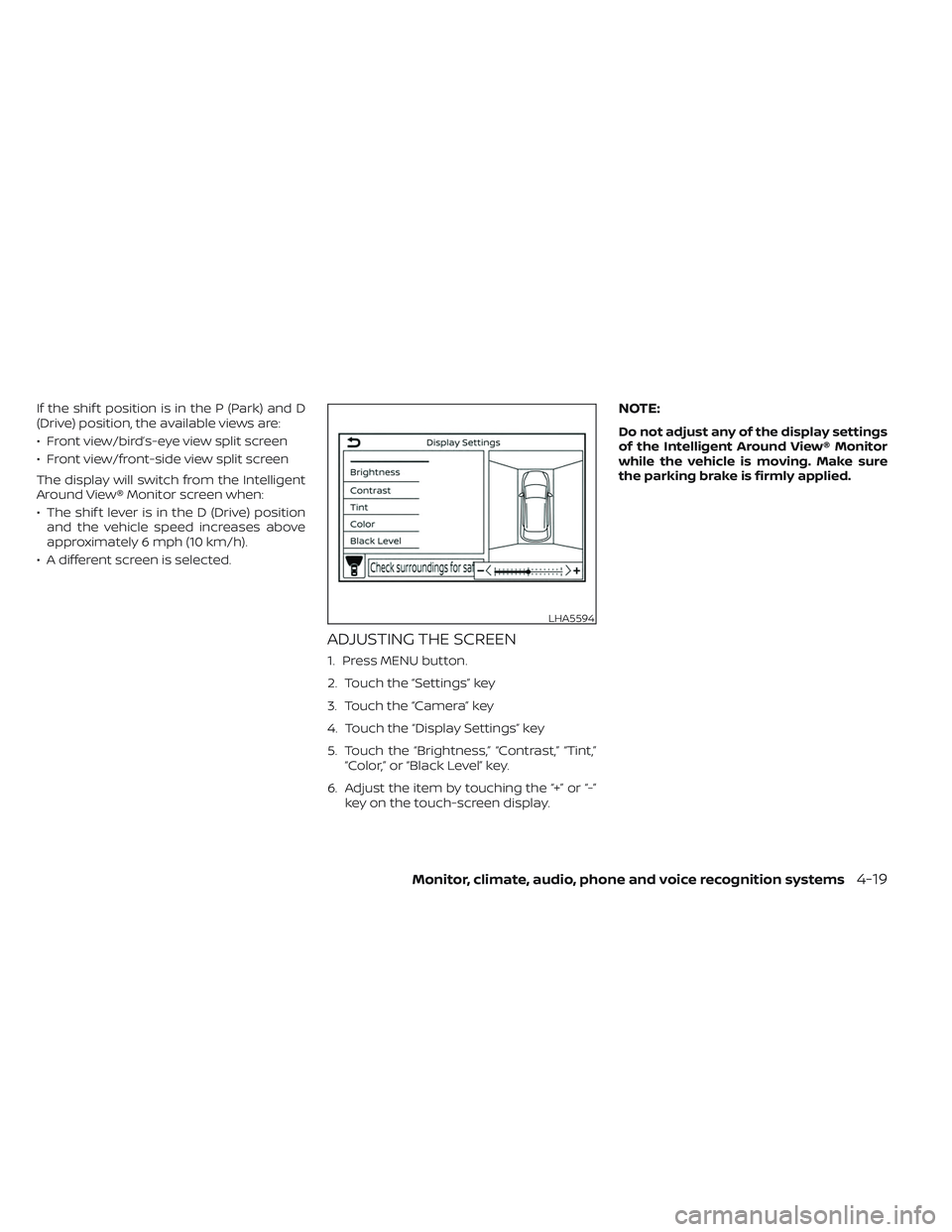
ADJUSTING THE SCREEN
1. Press MENU button.
2. Touch the “Settings” key
3. Touch the “Camera” key
4. Touch the “Display Settings” key
5. Touch the “Brightness,” “Contrast,” “Tint,” “Color,” or “Black Level” key.
6. Adjust the item by touching the “+” or “-” key on the touch-screen display.
NOTE:
Do not adjust any of the display settings
of the Intelligent Around View® Monitor
while the vehicle is moving. Make sure
the parking brake is firmly applied.
LHA5594
Monitor, climate, audio, phone and voice recognition systems4-19
Page 323 of 612
5 Starting and driving
Precautions when starting and driving..........5-4
Tire Pressure Monitoring System
(TPMS) .......................................5-4
Avoiding collision and rollover ................5-7
Off-roadrecovery ............................5-8
Rapid air pressure loss .......................5-8
Drinking alcohol/drugs and driving ...........5-9
Push-button power switch ......................5-9
NISSAN Intelligent Key® system ..............5-10
Operating range for EV start function .......5-10
Power switch operation ......................5-11
Power switch positions ......................5-12
Emergency EV shut off ......................5-12
NISSAN Intelligent Key® battery
discharge ................................... 5-12
NISSAN Vehicle Immobilizer System .........5-13
Before starting the EV system ..................5-13
Starting the EV system ......................... 5-14
Driving the vehicle .............................. 5-14
Electric shif t control system .................5-14
Parking brake .................................. 5-18
Pedal type ................................... 5-19
Switch type (models with electronic
parking brake system) ......................5-19
e-Pedal system ................................ 5-21
e-Pedal system operation ...................5-21e-Pedal system limitations
..................5-24
System malfunction ......................... 5-24
Lane Departure Warning (LDW) .................5-25
LDW system operation ......................5-26
How to enable/disable the LDW system .....5-27
LDW system limitations .....................5-27
System temporarily unavailable .............5-28
System malfunction ......................... 5-29
System maintenance .......................5-29
Intelligent Lane Intervention (I-LI) ...............5-30
I-LI system operation ........................ 5-31
How to enable/disable the I-LI system ......5-32
I-LI system limitations .......................5-33
System temporarily unavailable .............5-34
System malfunction ......................... 5-35
S
ystem maintenance ....................... 5-35
Blind Spot Warning (BSW) .......................5-36
BSW system operation ......................5-37
How to enable/disable the BSW system .....5-38
BSW system limitations .....................5-39
BSW driving situations .......................5-40
System temporarily unavailable .............5-43
System maintenance .......................5-44
Intelligent Blind Spot Intervention (I-BSI) ........5-45
I-BSI system operation ......................5-47
How to enable/disable the I-BSI system .....5-48
Page 325 of 612
Automatic Emergency Braking (AEB) with
Pedestrian Detection.......................... 5-130
AEB with Pedestrian Detection system
operation .................................. 5-131
Turning the AEB with Pedestrian
Detection system on/off ...................5-133
AEB with Pedestrian Detection system
limitations ................................. 5-134
System temporarily unavailable ............5-137
System malfunction ........................ 5-139
System maintenance ......................5-139
Intelligent Forward Collision Warning (I-FCW) . . 5-141 I-FCW System operation ....................5-142
Turning the I-FCW system on/off ...........5-144
I-FCW system limitations ...................5-145
System temporarily unavailable ............5-150
System malfunction ........................ 5-151
System maintenance ......................5-152
Intelligent Driver Alertness (I-DA)
(if so equipped) ................................ 5-154
I-DA system operation .....................5-154
How to enable/disable the I-DA system ....5-155
I-DA system limitations .....................5-155
ECO Mode ..................................... 5-157
ECO drive report ........................... 5-157Increasing power economy
...................5-158
Parking/parking on hills .......................5-159
Power steering system ........................ 5-161
Brake system ................................. 5-161
Brake precautions .......................... 5-161
Anti-lock Braking System (ABS) .............5-163
Brake Assist ................................ 5-164
Vehicle Dynamic Control (VDC) system ........5-164
Brake force distribution ....................5-166
Chassis control ............................... 5-167
Intelligent Trace Control (I-TC) ..............5-167
Active Ride Control (ARC) ...................5-168
Hill start assist system ........................5-168
Rear sonar system (RSS) ......................
5-169
S
ystem operation .......................... 5-170
How to enable/disable the rear sonar
system ...................................... 5-171
Sonar limitations ........................... 5-172
System temporarily unavailable ............5-172
System maintenance ......................5-173
Cold weather driving .......................... 5-173
Freeing a frozen door lock ..................5-174
Antifreeze .................................. 5-174
12-volt battery .............................. 5-174
Page 326 of 612
Draining of coolant water..................5-174
Tire equipment ............................. 5-174
Special winter equipment ..................5-175Driving on snow or ice
......................5-175
Freeing a frozen charge port lid ............5-175
Parking brake .............................. 5-175
Page 330 of 612
TPMS with Easy-Fill Tire Alert
When tire pressure is low, the low tire pres-
sure warning light illuminates.
This vehicle provides visual and audible
signals to help you inflate the tires to the
recommended COLD tire pressure.
Vehicle set-up:
1. Park the vehicle in a safe and level place.
2. Apply the parking brake and push the P(Park) position switch on the shif t lever.
3. Place the power switch in the ON posi- tion. Do not place in the READY to drive
mode.
Operation:
1. Add air to the tire.
2. Af ter a few seconds, the hazard indica- tors will start flashing.
3. When the designated pressure is reached, the horn beeps once and the
hazard indicators stop flashing.
4. Perform the above steps for each tire. • If the tire is over-inflated more thanapproximately 4 psi (30 kPa), the horn
beeps and the hazard indicators flash
three times. To correct the pressure,
push the core of the valve stem on the tire briefly to release pressure. When
the pressure reaches the designated
pressure, the horn beeps once.
• If the hazard indicator does not flash within approximately 15 seconds af ter
starting to inflate the tire, it indicates
that the Easy-Fill Tire Alert is not
operating.
• The TPMS will not activate the Easy-Fill Tire Alert under the following
conditions:– If there is interference from an exter- nal device or transmitter.
– The air pressure from the inflation device is not sufficient to inflate the
tire, such as those using a power
socket.
– If electrical equipment is being used in or near the vehicle.
– There is a malfunction in the TPMS.
– There is a malfunction in the horn or hazard indicators.
– If the Easy-Fill Tire Alert does not op- erate due to TPMS interference,
move the vehicle about 3 f t (1 m)
backward or forward and try again.
If the Easy-Fill Tire Alert is not working, use a
tire pressure gauge.
AVOIDING COLLISION AND
ROLLOVER
WARNING
Failure to operate this vehicle in a safe
and prudent manner may result in loss
of control or an accident.
Be alert and drive defensively at all times.
Obey all traffic regulations. Avoid excessive
speed, high speed cornering, or sudden
steering maneuvers because these driving
practices could cause you to lose control of
your vehicle.
As with any vehicle, loss of control could
result in a collision with other vehicles or
objects or cause the vehicle to roll over,
particularly if the loss of control causes
the vehicle to slide sideways.
Be attentive at all times, and avoid driving
when tired. Never drive when under the in-
fluence of alcohol or drugs (including pre-
scription or over-the-counter drugs which
may cause drowsiness). Always wear your
seat belt as outlined in “Seat belts” (P. 7-6),
and also instruct your passengers to do so.
Seat belts help reduce the risk of injury in
collisions and rollovers.
Starting and driving5-7