2023 NISSAN LEAF display
[x] Cancel search: displayPage 493 of 612

•The system may not detect the fol-
lowing objects: fluff y objects such as
snow, cloth, cotton, glass, wool, etc.,
and thin objects such as rope, wire
and chain, etc., or wedge-shaped
objects.
If your vehicle sustains damage to the rear
bumper fascia, leaving it misaligned or
bent, the sensing zone may be altered
causing inaccurate measurement of ob-
stacles or false alarms.
CAUTION
• Excessive noise (such as audio sys-
tem volume or an open vehicle win-
dow) will interfere with the tone and
it may not be heard.
• Keep the sonar sensors (located on
the bumper fascia) free from snow,
ice and large accumulations of dirt.
Do not clean the sensors with sharp
objects. If the sensors are covered,
the accuracy of the sonar function
will be diminished.
SYSTEM OPERATION
The system informs with a visual and au-
dible alert of rear obstacles when the shif t
lever is in the R (Reverse) position. Sonar Operation Table
RR Sensor
Range Sound Display Px †
Roo
Nx † Dx †
o – Display/Beep when detect
† – Display on camera view
x – No Display and Beep
The system is deactivated at speeds above
6 mph (10 km/h). It is reactivated at lower
speeds.
The intermittent tone will stop af ter 3 sec-
onds when an obstacle is detected by only
the corner sensor and the distance does
not change. The tone will stop if the ob-
stacle moves away from the vehicle or if
the vehicle moves away from the obstacle.
When the object is detected, the indicator
(green) appears and blinks and the tone
sounds intermittently. When the vehicle
moves closer to the object, the color of the
indicator turns yellow and the rate of the
blinking increases. When the vehicle is very
close to the object, the indicator stops
blinking and turns red, and the tone
sounds continuously. When the corner of the vehicle moves
closer to an object, the corner sonar indi-
cator
OAappears. When the center of the
vehicle moves close to an object, the cen-
ter sonar indicator
OBappears
LSD3773
5-170Starting and driving
Page 495 of 612

Perform the following steps to enable or
disable the sonar system:
1. Press the
button until “Settings” ap-
pears in the vehicle information display
and then press OK. Use the
button
to select “Driver Assistance.” Then press
the OK button.
2. Select “Parking Aids” and press the OK button.
3. Select “Sonar” and press the OK button to turn the system on or off.
• Select “Parking sonar” and press the OK button to turn the system on or off.
• Select “Display” and press the OK but- ton to turn the display on or off.
• Select “Volume” to change the sonar system volume to “High,” Med.” or
“Low.”
• Select “Range” to change the sonar system distance to “Far,” “Med.” or
“Near.”
NOTE:
The system will automatically be turned
on when the EV system is restarted.
SONAR LIMITATIONS
WARNING
Listed below are the system limitations
for the sonar system. Failure to operate
the vehicle in accordance with these
system limitations could result in seri-
ous injury or death.
• The system is deactivated at speeds
above 6 mph (10 km/h). It is reacti-
vated at lower speeds.
• Inclement weather or ultrasonic
sources such as an automatic car
wash, a truck’s compressed-air
brakes or a pneumatic drill may af-
fect the function of the system; this
may include reduced performance or
a false activation.
• The system is not designed to pre-
vent contact with small or moving
objects. Always move slowly. The
system will not detect small objects
below the bumper or on the ground.
• The system may not detect the fol-
lowing objects: fluff y objects such as
snow, cloth, cotton, glass-wool, etc.;
thin objects such as rope, wire and
chain, etc.; or wedge-shaped objects. •
The system may not detect objects
at speeds above 3 mph (5 km/h) and
may not detect certain angular or
moving objects.
• Do not attach stickers (including
transparent material), install acces-
sories, or apply anything blocking
the sensors. These conditions may
reduce the ability of the system.
SYSTEM TEMPORARILY
UNAVAILABLE
When sonar blockage is detected, the sys-
tem will be deactivated automatically.
The system is not available until the condi-
tions no longer exist.
The sonar sensors may be blocked by tem-
porary ambient conditions such as splash-
ing water, mist or fog. The blocked condi-
tion may also be caused by objects such as
ice, frost or dirt obstructing the sonar
sensors.
Action to take:
When the above conditions no longer exist,
the system will resume automatically.
5-172Starting and driving
Page 497 of 612
• The predicted charging time displayedon the meter and navigation system (if
so equipped) increases when the Li-ion
battery warmer (if so equipped)
operates.
• Vehicle range may be substantially re- duced in extremely cold conditions (for
example under -4°F (-20°C)).
• Using the climate control system to heat the cabin when outside tempera-
ture is below 32°F (0°C) uses more elec-
tricity and affects vehicle range more
than when using the heater when the
temperature is above 32°F (0°C).
• Climate control performance is re- duced when using the Climate Ctrl.
Timer or Remote Climate Control while
the Li-ion battery warmer (if so
equipped) operates (for models with
40 kWh battery model). Set only the
charging timer [End Time] when charg-
ing in cold weather. The vehicle auto-
matically determines when to start
charging to fully charge the Li-ion bat-
tery, even if the Li-ion battery warmer
operates. Charging ends before the set
end time if the Li-ion battery is fully
charged.FREEING A FROZEN DOOR LOCK
To prevent a door lock from freezing, apply
deicer through the key hole. If the lock be-
comes frozen, heat the key before inserting
it into the key hole or use the remote key-
less entry key fob.
ANTIFREEZE
In the winter when it is possible that the
outside temperature will drop below 32°F
(0°C), check the antifreeze to ensure proper
winter protection. For additional informa-
tion, see “Cooling system” (P. 8-5).
12-VOLT BATTERY
If the 12-volt battery is not fully charged
during extremely cold weather conditions,
the 12-volt battery fluid may freeze and
damage the 12-volt battery. To maintain
maximum efficiency, the 12-volt battery
should be checked regularly. For additional
information, see “12-volt battery” (P. 8-9).
DRAINING OF COOLANT WATER
If the vehicle is to be lef t outside without
antifreeze, drain the cooling system. Refill
before operating the vehicle. For additional
information, see “Cooling system” (P. 8-5).
TIRE EQUIPMENT
SUMMER tires have a tread designed to
provide superior performance on dry
pavement. However, the performance of
these tires will be substantially reduced in
snowy and icy conditions. If you operate
your vehicle on snowy or icy roads, NISSAN
recommends the use of MUD & SNOW or
ALL SEASON tires on all four wheels. It is
recommended that you visit a NISSAN cer-
tified LEAF dealer for the tire type, size,
speed rating and availability information.
For additional traction on icy roads, stud-
ded tires may be used. However, some U.S.
states and Canadian provinces prohibit
their use. Check local, state and provincial
laws before installing studded tires.
Skid and traction capabilities of studded
snow tires, on wet or dry surfaces, may
be poorer than that of non-studded
snow tires.
Tire chains may be used. For additional in-
formation, see “Tire chains” (P. 8-34).
5-174Starting and driving
Page 502 of 612
To shut off the EV system in an emergency
situation while driving, perform the follow-
ing procedure.
• Rapidly push the power switch three con-secutive times in less than 1.5 seconds, or
• Push and hold the power switch for more than 2 seconds.TIRE PRESSURE MONITORING
SYSTEM (TPMS)
This vehicle is equipped with TPMS. It moni-
tors tire pressure of all tires. When the low
tire pressure warning light is lit, and the “Tire
Pressure Low — Add Air” warning appears
on the vehicle information display, one or
more of your tires is significantly under-
inflated. If the vehicle is being driven with
low tire pressure, the TPMS will activate and
warn you of it by the low tire pressure
warning light. This system will activate only
when the vehicle is driven at speeds above
16 mph (25 km/h). For additional informa-
tion, see “Warning lights, indicator lights
and audible reminders” (P. 2-14) and “Tire
Pressure Monitoring System (TPMS)” (P. 5-4).
WARNING
• Radio waves could adversely affect
electric medical equipment. Those
who use a pacemaker should contact
the electric medical equipment
manufacturer for the possible influ-
ences before use. •
If the low tire pressure warning light
illuminates while driving, avoid sud-
den steering maneuvers or abrupt
braking, reduce vehicle speed, pull
off the road to a safe location and
stop the vehicle as soon as possible.
Driving with underinflated tires may
permanently damage the tires and
increase the likelihood of tire failure.
Serious vehicle damage could occur
and may lead to an accident and
could result in serious personal in-
jury. Check the tire pressure for all
four tires. Adjust the tire pressure to
the recommended COLD tire pres-
sure shown on the Tire and Loading
Information label to turn the low tire
pressure warning light OFF. If the
light still illuminates while driving af-
ter adjusting the tire pressure, a tire
may be flat or the TPMS may be mal-
functioning. If you have a flat tire, re-
pair it as soon as possible. If no tire is
flat and all tires are properly inflated,
have the vehicle checked. It is recom-
mended that you visit a certified
LEAF dealer for this service.
EMERGENCY EV (Electric Vehicle)
SHUT OFF FLAT TIRE
In case of emergency6-3
Page 531 of 612
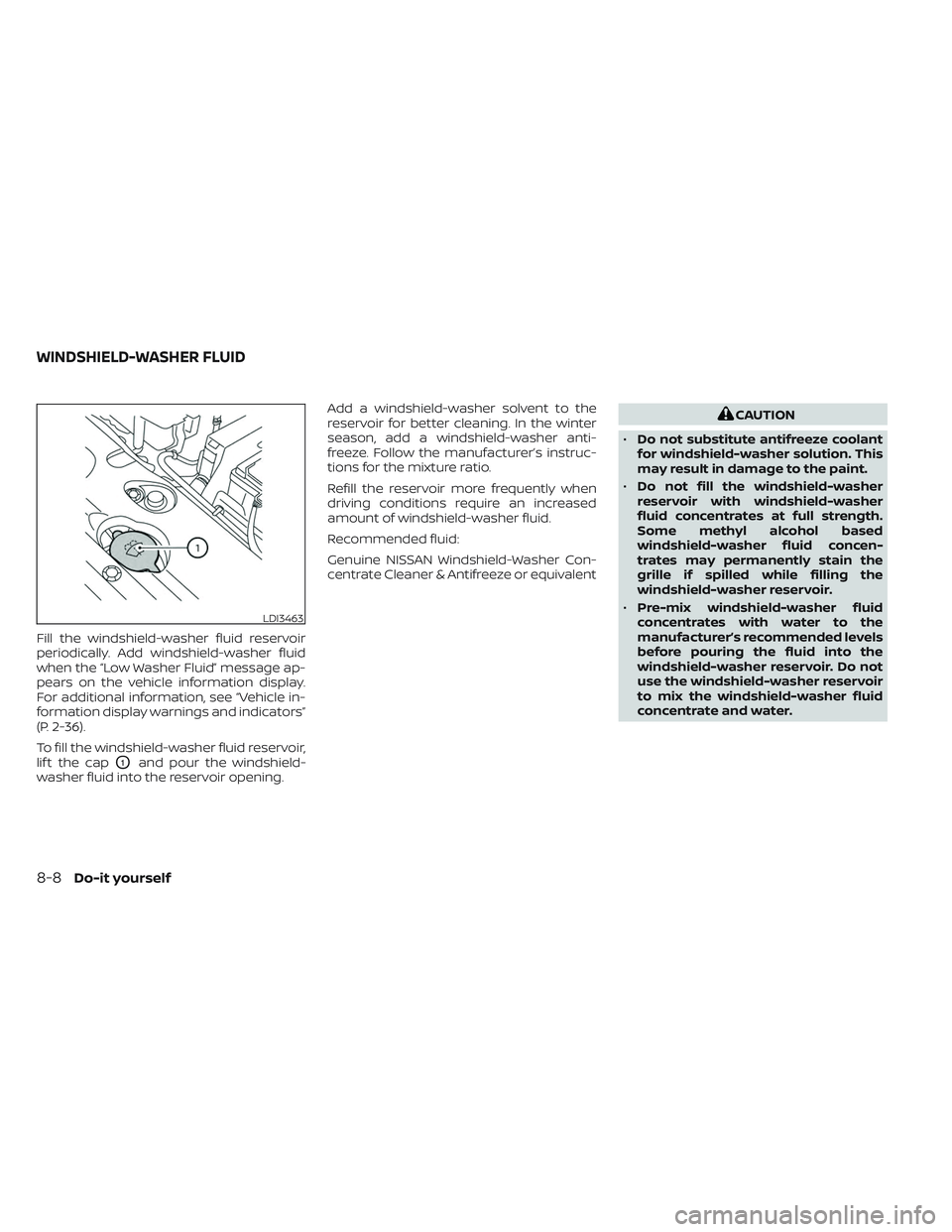
Fill the windshield-washer fluid reservoir
periodically. Add windshield-washer fluid
when the “Low Washer Fluid” message ap-
pears on the vehicle information display.
For additional information, see “Vehicle in-
formation display warnings and indicators”
(P. 2-36).
To fill the windshield-washer fluid reservoir,
lif t the cap
O1and pour the windshield-
washer fluid into the reservoir opening. Add a windshield-washer solvent to the
reservoir for better cleaning. In the winter
season, add a windshield-washer anti-
freeze. Follow the manufacturer’s instruc-
tions for the mixture ratio.
Refill the reservoir more frequently when
driving conditions require an increased
amount of windshield-washer fluid.
Recommended fluid:
Genuine NISSAN Windshield-Washer Con-
centrate Cleaner & Antifreeze or equivalent
CAUTION
• Do not substitute antifreeze coolant
for windshield-washer solution. This
may result in damage to the paint.
• Do not fill the windshield-washer
reservoir with windshield-washer
fluid concentrates at full strength.
Some methyl alcohol based
windshield-washer fluid concen-
trates may permanently stain the
grille if spilled while filling the
windshield-washer reservoir.
• Pre-mix windshield-washer fluid
concentrates with water to the
manufacturer’s recommended levels
before pouring the fluid into the
windshield-washer reservoir. Do not
use the windshield-washer reservoir
to mix the windshield-washer fluid
concentrate and water.
LDI3463
WINDSHIELD-WASHER FLUID
8-8Do-it yourself
Page 548 of 612
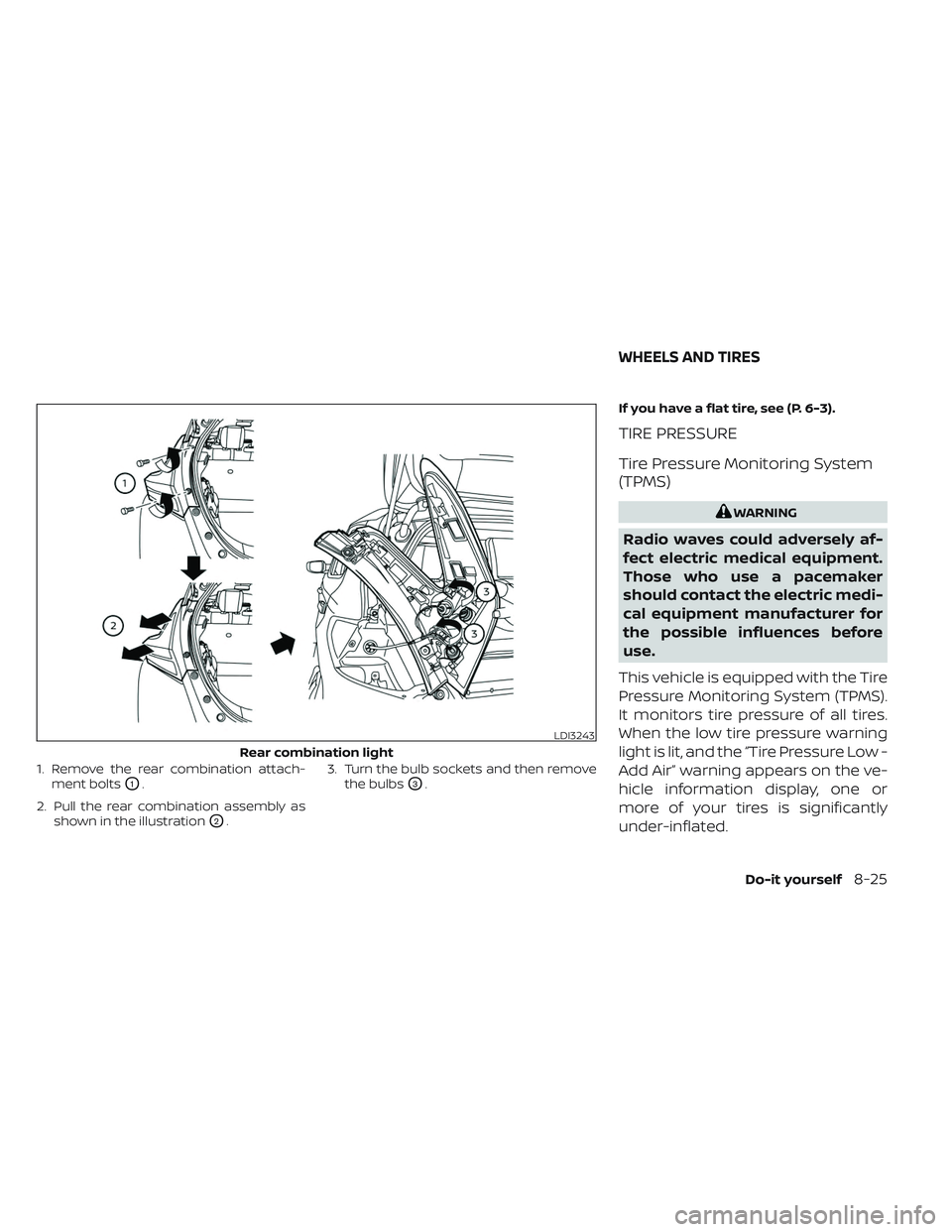
1. Remove the rear combination attach-ment bolts
O1.
2. Pull the rear combination assembly as shown in the illustration
O2. 3. Turn the bulb sockets and then remove
the bulbs
O3. If you have a flat tire, see (P. 6-3).
TIRE PRESSURE
Tire Pressure Monitoring System
(TPMS)
WARNING
Radio waves could adversely af-
fect electric medical equipment.
Those who use a pacemaker
should contact the electric medi-
cal equipment manufacturer for
the possible influences before
use.
This vehicle is equipped with the Tire
Pressure Monitoring System (TPMS).
It monitors tire pressure of all tires.
When the low tire pressure warning
light is lit, and the “Tire Pressure Low -
Add Air” warning appears on the ve-
hicle information display, one or
more of your tires is significantly
under-inflated.
LDI3243
Rear combination light
WHEELS AND TIRES
Do-it yourself8-25
Page 605 of 612
Ceiling light...................2-73Center console................2-66Charge port lid.................3-20Charge port lid switch............2-61ChargingCharge port lid...............3-20Charging related indicator light. . .CH-49Normal charge..............CH-9Precautions on charging........CH-2Quick charge..........CH-35, CH-38Specifications................10-4Trickle charge...............CH-11Charging information............10-23Charging methods.............CH-43Charging related indicator light.....CH-49Charging related remote function. . .CH-48Charging status indicator light.....CH-49Charging the Li-ion battery........EV-12Charging troubleshooting guide. . . .CH-56CheckingChecking bulbs...............2-16Checking coolant level...........8-6Child restraint with top tether strap. . . .1-27Child restraints..............1-22,1-24Booster seats................1-40LATCH (Lower Anchors and Tethers for
CHildren) System..............1-24Precautions on child restraints.....1-22Top tether strap...............1-27Child safety...................1-19Child safety rear door lock..........3-6Chimes, audible reminders.........2-25Circuit breaker, fusible link..........8-17Cleaning exterior and interior......7-2,7-4
ClimateClimate control system refrigerant and
lubricant recommendations
......4-43Climate controlClimate control service..........4-43Climate control systemAir conditioner...............4-29Climate control operation........4-29Heater....................4-29Climate Ctrl. Timer..............4-38Clock.......................2-12Cold tire pressures..............10-25Cold weather driving............5-173ConsoleCenter console...............2-66CoolantCapacities and recommended
fuel/lubricants
...............10-2Changing coolant..............8-6Checking coolant level...........8-6Cooling system................ .8-5Corrosion protection..............7-7Cruise control.................5-65Cup holders................. .2-67
D
Defroster switch
Rear window and outside mirror defroster
switch
................... .2-49Dimensions and weights..........10-6Dimmer switch for instrument panel. . .2-56
Display
Information display............2-26Door locks................... .3-4Driving
Cold weather driving...........5-173Driving vehicle...............5-14Precautions when starting and
driving.................... .5-4Driving range..................2-8Driving the vehicle..............EV-18Driving vehicle.................5-14Dynamic driver assistance switch.....2-61e-Pedal......................2-13e-Pedal system................5-21
E
ECO
ECO switch................ .2-58Eco Drive Report...............5-157ECO mode...............2-13,5-157ECO switch.................. .2-58Efficient use of your vehicle........EV-23Electric shif t control system........5-14Electronic parking brake...........5-19Emblem light..................2-57Emergency call (SOS) button........2-60Emergency charge.............CH-11Emergency EV (Electric Vehicle)
shut off...................5-12,6-3Emergency shutoff system........EV-10Emission control information label. . . .10-8EV Characteristics..............EV-11
11-2
Page 610 of 612
T
Telematic Control Unit Gen2K.......10-19Telematics overview.............10-17TemperatureLi-ion battery temperature gauge. . . .2-7Thef t (NISSAN Vehicle Immobilizer System),
traction motor start..........2-46, 5-13TireFlat tire................... .6-3Low tire pressure warning system. . .5-4Tire and Loading Information
label..................8-28, 10-9Tire chains.................8-34Tire dressing.................7-4Tire pressure................8-29Tire Pressure Monitoring System
(TPMS)................. .5-4, 6-3Tire rotation.................8-35Types of tires................8-33Uniform tire quality grading.......10-15Wheel/tire size...............10-5Wheels and tires..............8-25Tire pressure
Low tire pressure warning light.....2-21Tonneau cover................ .2-68To p
Tether strap child restraints.......1-27Top tether strap child restraint.......1-27TowingFlat towing................ .10-15Tow truck towing..............6-13Trailer towing...............10-14Towing a trailer................10-14
TPMS, Tire Pressure Monitoring System. .5-4Traction motor
Traction motor serial number......10-8Trickle charge................CH-11Turn signal switch...............2-56Type of charge and how to charge the
Li-ion battery................ .CH-5
U
Underbody cleaning..............7-3Uniform tire quality grading........10-15Unplugged status.............CH-48USB/iPod® Charging Ports.........2-64
V
Vanity mirror..................3-24Vehicle
Dimensions and weights.........10-6Loading information...........10-11Security system..............2-44Vehicle Dynamic Control (VDC)
system.....................5-164Vehicle identification number (VIN)
plate...................... .10-7Vehicle immobilizer system.........5-13Vehicle information display......2-26,2-27Vehicle security system (NISSAN Vehicle
Immobilizer System), traction motor
start
.......................5-13Vents......................4-28Visors......................3-23
W
Warning
Air bag warning light........1-66, 2-18Hazard warning flasher switch......6-2Indicators for operation.........2-36Low tire pressure warning light.....2-21Seat belt warning light...........1-14Supplemental air bag warning
light.................. .1-66, 2-18Tire Pressure Monitoring System
(TPMS)..................5-4, 6-3Warning lights............2-16,2-19Warning/indicator lights and audible
reminders..................2-14Warning light
Anti-lock braking system (ABS) warning
light
......................2-19BRAKE warning light (red).........2-17BRAKE warning light (yellow).......2-20Seat belt warning light..........2-18Warning lights.................2-14Warning/indicator lights and audible
reminders....................2-14Audible reminders.............2-14Indicator lights...............2-14Warning lights................2-14Washer switchRear window wiper and washer
switches
.................. .2-48Wiper and washer switch........2-47Washing......................7-2Waxing......................7-3Weights (See dimensions and weights). .10-6
11-7