Page 413 of 604

— When your vehicle or the ve-hicle or pedestrian ahead
moves quickly or significantly
such that the system cannot
detect and react in time (for
example, pedestrian moving
quickly toward the vehicle at
close range, vehicle cutting in,
changing lanes, making a
turn, steering abruptly, sud-
den acceleration or decelera-
tion).
— When the vehicle or pedes- trian is offset from the vehi-
cle’s forward path.
— If the speed difference be- tween the two vehicles is
small.
— The pedestrian’s profile is par- tially obscured or unidentifi-
able; for example, due to
transporting luggage, push-
ing a stroller, wearing bulky
or very loose-fitting clothing
or accessories, or being in a
unique posture (such as rais-
ing hands).
— There is poor contrast of a person to the background,
such as having clothing color
or pattern which is similar to the background.
— For approximately 15 seconds after starting the engine
— If the vehicle ahead has a unique or unusual shape, ex-
tremely low or high clearance
heights, or unusual cargo
loading or is narrow (for ex-
ample, a motorcycle).
— When the vehicle or pedes- trian is located near a traffic
sign, a reflective area (for ex-
ample, water on road), or is in
a shadow.
— When multiple pedestrians are grouped together.
— When the view of the pedes- trian is obscured by a vehicle
or other object.
— While towing a trailer or other vehicle.
. The system performance may be
degraded in the following condi-
tions:
— The vehicle is driven on a
slippery road.
— The vehicle is driven on a slope. — Excessively heavy baggage is
loaded in the rear seat or the
cargo area of your vehicle.
. The system is designed to auto-
matically check the sensor (radar
and camera)’s functionality, with-
in certain limitations. The system
may not detect some forms of
obstruction of the sensor area
such as ice, snow or stickers, for
example. In these cases, the sys-
tem may not be able to warn the
driver properly. Be sure that you
check, clean and clear sensor
areas regularly.
. In some road and traffic condi-
tions, the AEB with pedestrian
detection system may unexpect-
edly apply partial braking. When
acceleration is necessary, de-
press the accelerator pedal to
override the system.
. The AEB with pedestrian detec-
tion system may operate when a
pattern, object, shadow or lights
are detected that are similar to
the outline of vehicles or pedes-
trians, or if they are the same size
and position as a vehicle or mo-
torcycle’s tail lights.
Starting and driving5-101
Page 415 of 604

— pedestrians approaching thetraveling lane
— vehicles, pedestrians or ob- jects in adjacent lanes or close
to the vehicle
— oncoming pedestrians
— objects on the road (such as trees)
. Braking distances increase on
slippery surfaces.
. Excessive noise will interfere with
the warning chime sound, and
the chime may not be heard.
SSD0253
When driving on some roads, such as
winding, hilly, curved, narrow roads, or
roads which are under construction or on
a slope, the sensor may detect vehicles in
a different lane, or may temporarily not
detect a vehicle traveling ahead. This may
cause the system to work inappropriately.
The detection of vehicles may also be
affected by vehicle operation (steering
maneuver or traveling position in the
lane, etc.) or vehicle condition. If this
occurs, the system may warn you by
blinking the system indicator and
sounding the chime unexpectedly. You
will have to manually control the proper
distance away from the vehicle travel-
ing ahead.SYSTEM TEMPORARILY UNAVAIL-
ABLE
Condition A
In the following conditions, the AEB
system warning light (orange) will blink
and the system will be turned off auto-
matically.
. The camera area of windshield is
misted or frozen.
. Strong light is shining from the front.
. The cabin temperature is over ap-
proximately 104°F (40°C) in direct sun-
light.
Starting and driving5-103
Page 421 of 604
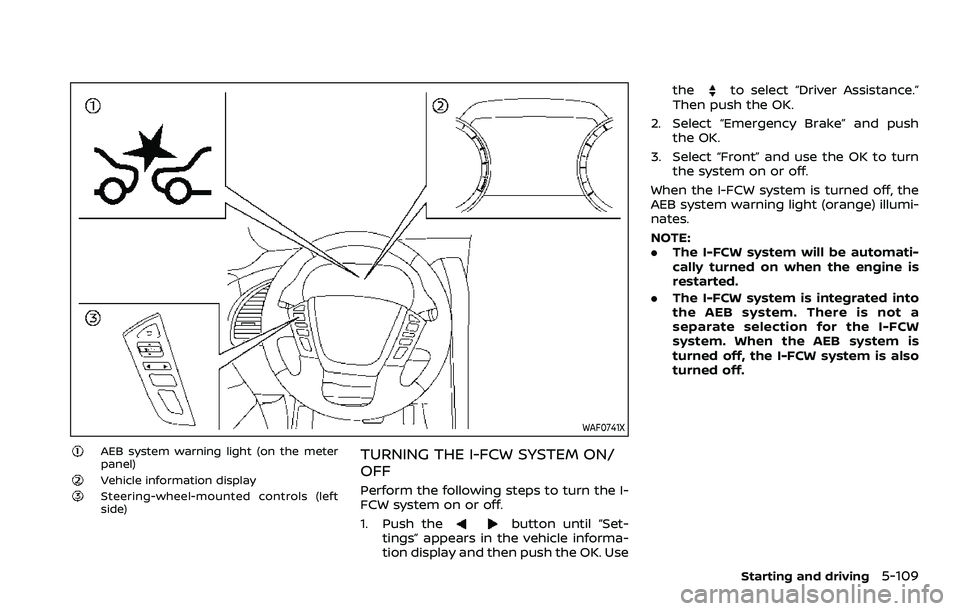
WAF0741X
AEB system warning light (on the meter
panel)
Vehicle information displaySteering-wheel-mounted controls (left
side)
TURNING THE I-FCW SYSTEM ON/
OFF
Perform the following steps to turn the I-
FCW system on or off.
1. Push the
button until “Set-
tings” appears in the vehicle informa-
tion display and then push the OK. Use the
to select “Driver Assistance.”
Then push the OK.
2. Select “Emergency Brake” and push the OK.
3. Select “Front” and use the OK to turn the system on or off.
When the I-FCW system is turned off, the
AEB system warning light (orange) illumi-
nates.
NOTE:
. The I-FCW system will be automati-
cally turned on when the engine is
restarted.
. The I-FCW system is integrated into
the AEB system. There is not a
separate selection for the I-FCW
system. When the AEB system is
turned off, the I-FCW system is also
turned off.
Starting and driving5-109
Page 424 of 604

5-112Starting and driving
.Excessive noise will interfere with
the warning chime sound, and
the chime may not be heard.
SSD0253
When driving on some roads, such as
winding, hilly, curved, narrow roads, or
roads which are under construction, the
radar sensor may detect vehicles in a
different lane, or may temporarily not
detect a vehicle traveling ahead. This
may cause the I-FCW system to work
inappropriately.
The detection of vehicles may also be
affected by vehicle operation (steering
maneuver or traveling position in the
lane, etc.) or vehicle condition. If this
occurs, the system may warn you by
blinking the vehicle ahead detection
indicator and sounding the chime un-
expectedly. You will have to manually
control the proper distance away from the vehicle traveling ahead.
SYSTEM TEMPORARILY UNAVAIL-
ABLE
Condition A
When the radar sensor picks up interfer-
ence from another radar source, making
it impossible to detect a vehicle ahead,
the I-FCW system is automatically turned
off. The AEB system warning light (or-
ange) will illuminate.
Action to take:
When the above conditions no longer
exist, the I-FCW system will resume auto-
matically.
Page 426 of 604

5-114Starting and driving
tion.
. Do not alter, remove or paint the front
bumper. It is recommended you con-
tact a NISSAN dealer before customiz-
ing or restoring the front bumper.
Radio frequency statement
Model: ARS4–A
IC: 4135A-ARS4A
FCC ID: OAYARS4A
This device complies with Part 15 of the
FCC Rules and with Industry Canada
licence exempt RSS standard(s). Opera-
tion is subject to the following two con-
ditions:
(1) This device may not cause harmful inter-
ference, and
(2) This device must accept any interference received, including interference that may
cause undesired operation.
WARNING
Failure to follow the warnings and
instructions for proper use of the I-
DA system could result in serious
injury or death.
.The I–DA system is only a warning
to inform the driver of a potential
lack of driver attention or drowsi-
ness. It will not steer the vehicle
or prevent loss of control.
. The I–DA system does not detect
and provide an alert of the dri-
ver’s lack of attention or fatigue
in every situation.
. It is the driver’s responsibility to:
— Stay alert.
— Drive safely.
— Keep the vehicle in the travel-
ing lane.
— Be in control of the vehicle at all times.
— Avoid driving when tired.
— Avoid distractions (texting, etc). The I–DA system helps alert the driver if
the system detects a lack of attention or
driving fatigue.
The system monitors driving style and
steering behavior over a period of time,
and it detects changes from the normal
pattern. If the system detects that driver
attention is decreasing over a period of
time, the system uses audible and visual
warnings to suggest that the driver take a
break.
INTELLIGENT DRIVER ALERTNESS (I-DA)
Page 427 of 604
WAF0641X
Example
I-DA SYSTEM OPERATION
If the system detects driver fatigue or that
driver attention is decreasing, the mes-
sage “Take a Break?” appears in the
vehicle information display and a chime
sounds when the vehicle is driven at
speeds above 37 MPH (60 km/h).
The system continuously monitors driver
attention and can provide multiple warn-
ings per trip.
The system resets and starts reassessing
driving style and steering behavior when
the ignition switch is cycled from the ON
to the OFF position and back to the ON
position.
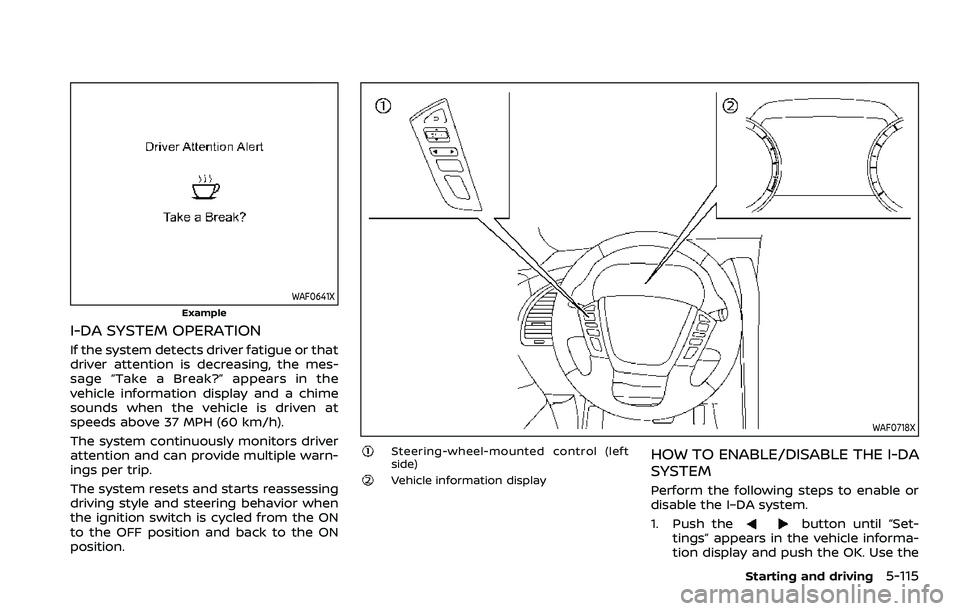
WAF0718X
Steering-wheel-mounted control (left
side)
Vehicle information display
HOW TO ENABLE/DISABLE THE I-DA
SYSTEM
Perform the following steps to enable or
disable the I–DA system.
1. Push the
button until “Set-
tings” appears in the vehicle informa-
tion display and push the OK. Use the
Starting and driving5-115
Page 429 of 604
WAF0760X
The RAB system detects obstacles behind
the vehicle using the sonar sensors
located on the rear bumper.
NOTE:
You can temporarily cancel the sonar
function in the vehicle, but the RAB
system will continue to operate. (See
“Front and rear sonar system” (P.5-136).)
WAF0744X
RAB system warning light (on the meter
panel)
Steering-wheel-mounted controls (left
side)
Vehicle information displayTouch screen display (if so equipped)“P” key (on the touch screen display)
(example)
Starting and driving5-117
Page 431 of 604
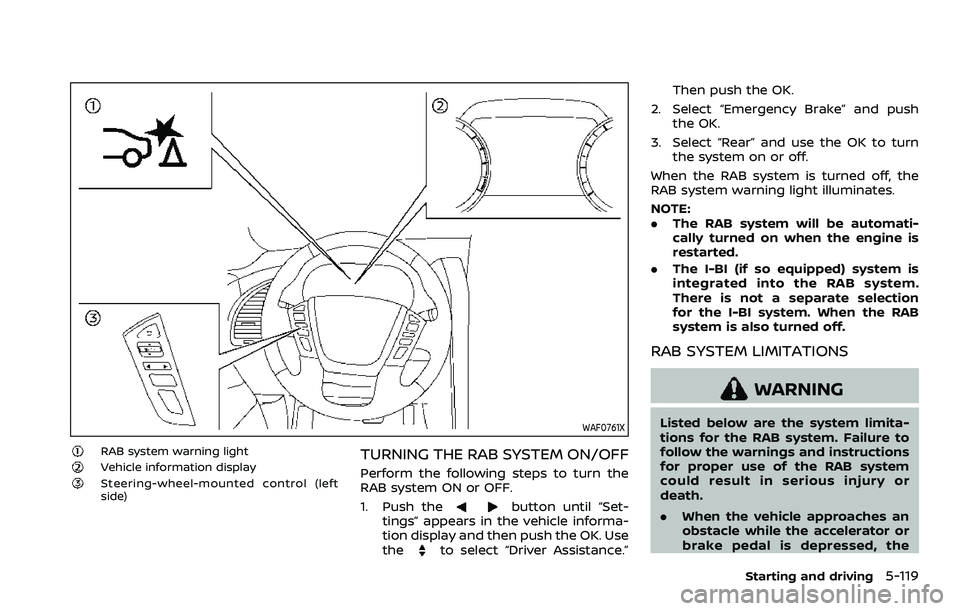
WAF0761X
RAB system warning lightVehicle information displaySteering-wheel-mounted control (left
side)
TURNING THE RAB SYSTEM ON/OFF
Perform the following steps to turn the
RAB system ON or OFF.
1. Push the
button until “Set-
tings” appears in the vehicle informa-
tion display and then push the OK. Use
the
to select “Driver Assistance.” Then push the OK.
2. Select “Emergency Brake” and push the OK.
3. Select “Rear” and use the OK to turn the system on or off.
When the RAB system is turned off, the
RAB system warning light illuminates.
NOTE:
. The RAB system will be automati-
cally turned on when the engine is
restarted.
. The I-BI (if so equipped) system is
integrated into the RAB system.
There is not a separate selection
for the I-BI system. When the RAB
system is also turned off.
RAB SYSTEM LIMITATIONS
WARNING
Listed below are the system limita-
tions for the RAB system. Failure to
follow the warnings and instructions
for proper use of the RAB system
could result in serious injury or
death.
.When the vehicle approaches an
obstacle while the accelerator or
brake pedal is depressed, the
Starting and driving5-119