2023 NISSAN ARMADA check engine
[x] Cancel search: check enginePage 342 of 604
5-30Starting and driving
— When the vehicle’s travelingdirection does not align with
the lane marker.
— When traveling close to the vehicle in front of you, which
obstructs the lane camera
unit detection range.
— When rain, snow, dirt or object adheres to the windshield in
front of the lane camera unit.
— When the headlights are not bright due to dirt on the lens
or if the aiming is not adjusted
properly.
— When strong light enters the lane camera unit. (For exam-
ple, the light directly shines on
the front of the vehicle at
sunrise or sunset.)
— When a sudden change in brightness occurs. (For exam-
ple, when the vehicle enters or
exits a tunnel or under a
bridge.)SYSTEM TEMPORARILY UNAVAIL-
ABLE
Condition A:
If the vehicle is parked in direct sunlight
under high temperature conditions (over
approximately 104°F (40°C)) and then
started, the LDW system may be deacti-
vated automatically, the LDW indicator
will flash and the following message will
appear in the vehicle information display.
. “Not Available: High Camera Temp”
When the interior temperature is reduced,
the LDW system will resume operating
automatically and the LDW indicator will
stop flashing.
Condition B:
The warning function of the LDW system
is not designed to work under the follow-
ing conditions:
. When you operate the lane change
signal and change traveling lanes in
the direction of the signal. (The LDW
system will become operable again
approximately 2 seconds after the
lane change signal is turned off.)
. When the vehicle speed lowers to less
than approximately 37 MPH (60 km/h).
Action to take:
After the above conditions have finished
and the necessary operating conditions are satisfied, the LDW system will resume.
SYSTEM MALFUNCTION
If the LDW system malfunctions, it will
cancel automatically and “Malfunction”
warning message will appear in the
vehicle information display. If the warning
message appears, pull off the road to a
safe location and stop the vehicle. Place
the ignition switch in the OFF position
and restart the engine. If the warning
message continues to appear, have the
system checked. It is recommended that
you visit a NISSAN dealer for this service.
Page 349 of 604
SYSTEM MALFUNCTION
If the I-LI system malfunctions, it will
cancel automatically. The I-LI indicator
(orange) will illuminates and the “Malfunc-
tion” warning message will appear in the
vehicle information display.
If the I-LI indicator (orange) illuminates,
pull off the road to a safe location. Turn
the engine off and restart the engine. If
the I-LI indicator (orange) continues to
illuminate, have the I-LI system checked. It
is recommended that you visit a NISSAN
dealer for this service.
SSD0453
SYSTEM MAINTENANCE
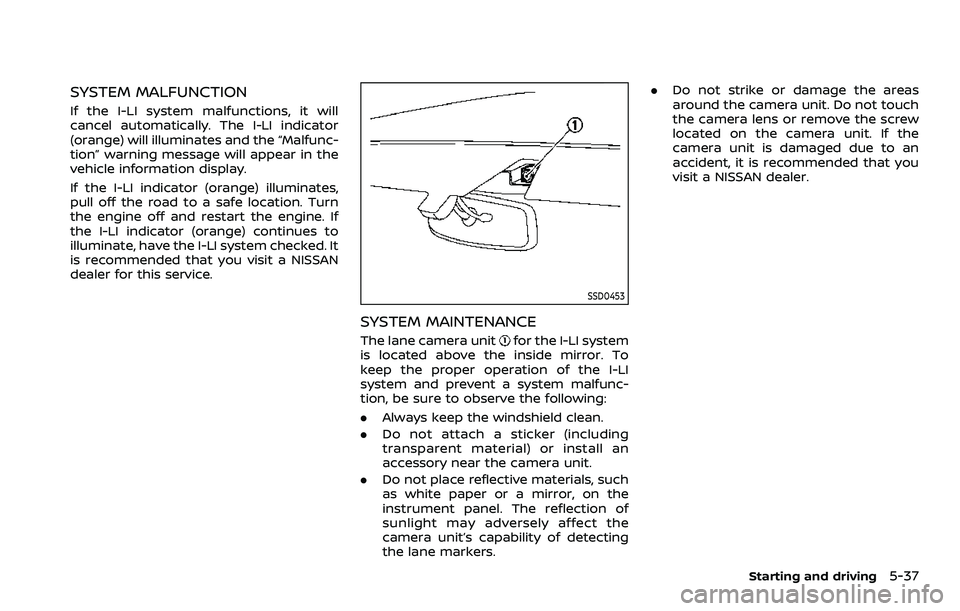
The lane camera unitfor the I-LI system
is located above the inside mirror. To
keep the proper operation of the I-LI
system and prevent a system malfunc-
tion, be sure to observe the following:
. Always keep the windshield clean.
. Do not attach a sticker (including
transparent material) or install an
accessory near the camera unit.
. Do not place reflective materials, such
as white paper or a mirror, on the
instrument panel. The reflection of
sunlight may adversely affect the
camera unit’s capability of detecting
the lane markers. .
Do not strike or damage the areas
around the camera unit. Do not touch
the camera lens or remove the screw
located on the camera unit. If the
camera unit is damaged due to an
accident, it is recommended that you
visit a NISSAN dealer.
Starting and driving5-37
Page 356 of 604

5-44Starting and driving
WAF0555X
Illustration 6 – Entering from the side
Illustration 6: If the driver activates the
turn signal while another vehicle is in the
detection zone, then the system chimes
(twice) and the side indicator light flashes.
NOTE:
.The radar sensors may not detect a
vehicle which is traveling at about
the same speed as your vehicle
when it enters the detection zone.
SYSTEM TEMPORARILY UNAVAIL-
ABLE
When radar blockage is detected, the BSW
system will be turned off automatically, a
chime will sound and the “Unavailable
Side Radar Obstruction” warning mes-
sage will appear in the vehicle informa-
tion display.
The system is not available until the
conditions no longer exist.
The radar sensors may be blocked by
temporary ambient conditions such as
splashing water, mist or fog. The blocked
condition may also be caused by objects
such as ice, frost or dirt obstructing the
radar sensors.
NOTE:
If the BSW system stops working, the
Intelligent Blind Spot Intervention (I-
BSI) and the Rear Cross Traffic Alert
(RCTA) systems will also stop working.
Action to take:
When the above conditions no longer
exist, the system will resume automati-
cally.
SYSTEM MALFUNCTION
When the BSW system malfunctions, it will
be turned off automatically, the BSW
indicator illuminates and the “Malfunc-
tion” warning message will appear in the
vehicle information display.
NOTE:
If the BSW system stops working, the
Intelligent Blind Spot Intervention (I-
BSI) (if so equipped) and Rear Cross
Traffic Alert (RCTA) systems will also
stop working.
Action to take:
Stop the vehicle in a safe location, turn
the engine off and restart the engine. If
the message continues to appear, have
the BSW system checked. It is recom-
mended that you visit a NISSAN dealer for
this service.
Page 367 of 604

.“Not Available: High Camera Temp”:
If the vehicle is parked in direct sun-
light under high temperature condi-
tions (over approximately 104°F
(40°C)).
. “Unavailable Side Radar Obstruction”:
When side radar blockage is detected.
Turn off the I-BSI system and turn it on
again when the above conditions no
longer exist.
SYSTEM MALFUNCTION
When the I-BSI system malfunctions, it will
be turned off automatically, the I-BSI
indicator illuminates and a chime will
sound, and the “Malfunction” warning
message will appear in the vehicle infor-
mation display.
Action to take:
Stop the vehicle in a safe location and
push the park button to engage the P
(Park) position. Turn the engine off and
restart the engine. If the warning mes-
sage continues to appear, It is recom-
mended you visit a NISSAN dealer for this
service.
WAF0769X
SYSTEM MAINTENANCE
The two radar sensorsfor the I-BSI
system are located near the rear bumper.
Always keep the area near the radar
sensors clean.
The radar sensors may be blocked by
temporary ambient conditions such as
splashing water, mist or fog.
The blocked condition may also be
caused by objects such as ice, frost or
dirt obstructing the radar sensors.
Check for and remove objects obstruct-
ing the area around the radar sensors.
Do not attach stickers (including trans-
parent material), install accessories or apply additional paint near the radar
sensors.
Do not strike or damage the area around
the radar sensors.
It is recommended you visit a NISSAN
dealer if the area around the radar
sensors is damaged due to a collision.
The lane camera unit
for I-BSI system is
located above the inside mirror. To keep
the proper operation of I-BSI and prevent
a system malfunction, be sure to observe
the following:
. Always keep the windshield clean.
. Do not attach a sticker (including
transparent material) or install an
accessory near the camera unit.
. Do not place reflective materials, such
as white paper or a mirror, on the
instrument panel. The reflection of
sunlight may adversely affect the
camera unit’s capability of detecting
the lane markers.
. Do not strike or damage the areas
around the camera unit. Do not touch
the camera lens or remove the screw
located on the camera unit. It is
recommended you contact a NISSAN
dealer if the camera unit is damaged
due to an accident.
Starting and driving5-55
Page 374 of 604

5-62Starting and driving
NOTE:
In the case of several vehicles ap-
proaching in a row (Illustration 1) or in
the opposite direction (Illustration 2), a
chime may not be sounded by the RCTA
system after the first vehicle passes the
sensors.
SYSTEM TEMPORARILY UNAVAIL-
ABLE
When radar blockage is detected, the
system will be deactivated automatically.
The “Unavailable Side Radar Obstruction”
warning message will appear in the
vehicle information display.
The systems are not available until the
conditions no longer exist.
The radar sensors may be blocked by
temporary ambient conditions such as
splashing water, mist or fog.
The blocked condition may also be
caused by objects such as ice, frost or
dirt obstructing the radar sensors.
NOTE:
If the BSW system stops working, the
RCTA and Intelligent Blind Spot Inter-
vention (I-BSI) systems will also stop
working.
Action to take:
When the above conditions no longer
exist, the system will resume automati-cally.
SYSTEM MALFUNCTION
When the RCTA system malfunctions, it
will turn off automatically. The “Malfunc-
tion” warning message will appear in the
vehicle information display.
NOTE:
If the BSW system stops working, the
RCTA and I-BSI systems will also stop
working.
Action to take:
Stop the vehicle in a safe location, turn
the engine off and restart the engine. If
the message continues to appear, have
the system checked. It is recommended
that you visit a NISSAN dealer for this
service.
WAF0721X
SYSTEM MAINTENANCE
The two radar sensorsfor the RCTA
system are located near the rear bumper.
Always keep the area near the radar
sensors clean.
The radar sensors may be blocked by
temporary ambient conditions such as
splashing water, mist or fog.
The blocked condition may also be
caused by objects such as ice, frost or
dirt obstructing the radar sensors.
Check for and remove objects obstruct-
ing the area around the radar sensors.
Do not attach stickers (including trans-
parent material), install accessories or
Page 382 of 604
5-70Starting and driving
2. Select “Emergency Brake” and pushthe OK.
3. Select “Rear” and use the OK to turn the system on or off.
NOTE:
. The I-BI system will be automatically
turned on when the engine is re-
started.
. The I-BI system is integrated into the
RAB system. There is not a separate
selection for the I-BI system. When
the RAB system is also turned off.
JVS0479X
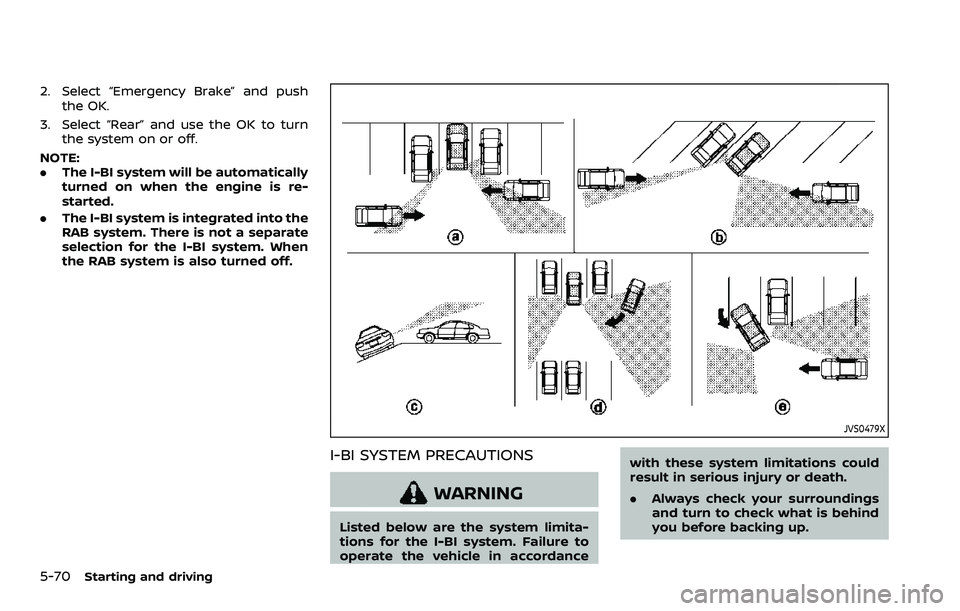
I-BI SYSTEM PRECAUTIONS
WARNING
Listed below are the system limita-
tions for the I-BI system. Failure to
operate the vehicle in accordance with these system limitations could
result in serious injury or death.
.
Always check your surroundings
and turn to check what is behind
you before backing up.
Page 384 of 604

5-72Starting and driving
WAF0772X
Vehicle information display
SYSTEM TEMPORARILY UNAVAIL-
ABLE
When any of the following messages
appear on the vehicle information display
, a chime will sound and the I-BI system
will be turned off automatically.
. “Unavailable: High Accelerator Tem-
perature”:
If the vehicle is parked in direct sun-
light under high temperature condi-
tions (over approximately 104°F
(40°C)).
. “Unavailable Side Radar Obstruction”:
When side radar blockage is detected. Turn off the I-BI system and turn it on
again when the above conditions no
longer exist.
SYSTEM MALFUNCTION
If the I-BI system malfunctions, it will turn
off automatically, a chime will sound and
“Malfunction” warning message will ap-
pear in the vehicle information display
.
Action to take
Stop the vehicle in a safe location and
place the shift lever in the P (Park)
position. Turn the engine off and restart
the engine. If the warning message con-
tinues to appear, have the system
checked. It is recommended you visit a
NISSAN dealer for this service.
WAF0721X
SYSTEM MAINTENANCE
The two radar sensorsfor the I-BI
system are located near the rear bumper.
Always keep the area near the radar
sensors clean.
The radar sensors may be blocked by
temporary ambient conditions such as
splashing water, mist or fog.
The blocked condition may also be
caused by objects such as ice, frost or
dirt obstructing the radar sensors.
Check for and remove objects obstruct-
ing the area around the radar sensors.
Do not attach stickers (including trans-
parent material), install accessories or
Page 403 of 604

in the P (Park) position and turn the
engine off. When the radar signal is
temporarily interrupted, clean the sensor
area of the front bumper and restart the
engine. If the warning message continues
to be displayed, have the ICC system
checked. It is recommended you visit a
NISSAN dealer for this service.
.When driving on roads with limited
road structures or buildings (for ex-
ample, long bridges, deserts, snow
fields, driving next to long walls)
Action to take:
When the above conditions no longer
exist, the ICC system will resume auto-
matically.
JVS0968X
Condition C:
When the ICC system is not operating
properly, the chime sounds and the ICC
system warning (yellow) will come on.
Action to take:
If the warning light comes on, park the
vehicle in a safe place. Turn the engine off,
restart the engine, resume driving and set
the ICC system again.
If it is not possible to set the system or
the indicator stays on, it may indicate
that the ICC system is malfunctioning.
Although the vehicle is still driveable
under normal conditions, have the ve-
hicle checked. It is recommended you visit a NISSAN dealer for this service.
Starting and driving5-91