2023 NISSAN ARMADA USB
[x] Cancel search: USBPage 299 of 604

4. After selecting a content source, navi-gate through the folders, and select
the desired file to stream to the
monitor. Once the file is selected, it
will begin streaming to the monitor
that was selected in step 2 above.
5. Playback controls are available from the Now Playing screen in the UPnP
application and from the monitor.
Press
to display the playback
controls on the monitor.
NOTE:
. Content protected with DRM (Digital
Rights Management) cannot be
streamed using the SmartStream
feature.
. A wired connection (HDMI or MHL) is
required to stream protected con-
tent from a mobile device to the RSI
system. For additional information,
see “HDMI/MHL connection” (P.4-57).
WAE0740X
SETTINGS
The following settings can be accessed
from the main menu:
Wi-Fi
Change the SSID (network name), change
the password of the network, and toggle
between Client Mode or Access Point.
Read Back
A text-to-speech aid that enables the
system to read text items displayed on
the screen. This feature guides the user
through operating the RSI system.
Display
Adjust Brightness, Contrast, and Sharp-
ness settings. Audio
Select the monitor to use for Bluetooth®
audio streaming and set the maximum
volume level when using wired head-
phones.
Advanced
Change the language of the GUI (Graphic
User Interface), reset the RSI system, and
update the software.
Customize
Change the background image of the
home screen using content from an SD
card or USB storage device.
Bluetooth
Control Bluetooth® audio streaming (On/
Off) and select from the available list of
paired devices.
Monitor, heater, air conditioner, audio, phone and voice recognition systems4-69
Page 304 of 604
4-74Monitor, heater, air conditioner, audio, phone and voice recognition systems
WAE0747X
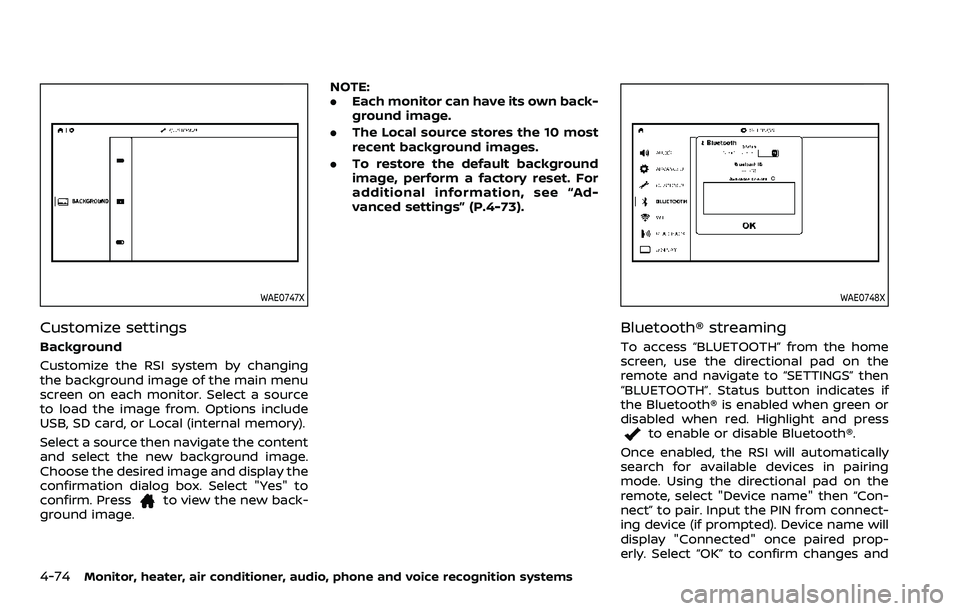
Customize settings
Background
Customize the RSI system by changing
the background image of the main menu
screen on each monitor. Select a source
to load the image from. Options include
USB, SD card, or Local (internal memory).
Select a source then navigate the content
and select the new background image.
Choose the desired image and display the
confirmation dialog box. Select "Yes" to
confirm. Press
to view the new back-
ground image. NOTE:
.
Each monitor can have its own back-
ground image.
. The Local source stores the 10 most
recent background images.
. To restore the default background
image, perform a factory reset. For
additional information, see “Ad-
vanced settings” (P.4-73).
WAE0748X
Bluetooth® streaming
To access “BLUETOOTH” from the home
screen, use the directional pad on the
remote and navigate to “SETTINGS” then
“BLUETOOTH”. Status button indicates if
the Bluetooth® is enabled when green or
disabled when red. Highlight and press
to enable or disable Bluetooth®.
Once enabled, the RSI will automatically
search for available devices in pairing
mode. Using the directional pad on the
remote, select "Device name" then “Con-
nect” to pair. Input the PIN from connect-
ing device (if prompted). Device name will
display "Connected" once paired prop-
erly. Select “OK” to confirm changes and
Page 307 of 604
SymptomRemedy
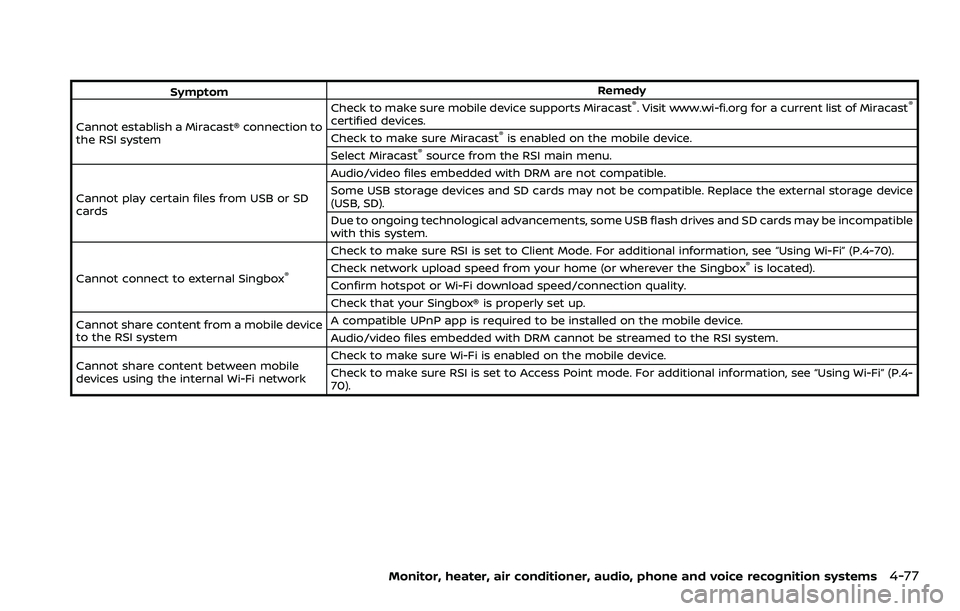
Cannot establish a Miracast® connection to
the RSI system Check to make sure mobile device supports Miracast®. Visit www.wi-fi.org for a current list of Miracast®
certified devices.
Check to make sure Miracast®is enabled on the mobile device.
Select Miracast®source from the RSI main menu.
Cannot play certain files from USB or SD
cards Audio/video files embedded with DRM are not compatible.
Some USB storage devices and SD cards may not be compatible. Replace the external storage device
(USB, SD).
Due to ongoing technological advancements, some USB flash drives and SD cards may be incompatible
with this system.
Cannot connect to external Singbox
®
Check to make sure RSI is set to Client Mode. For additional information, see “Using Wi-Fi” (P.4-70).
Check network upload speed from your home (or wherever the Singbox®is located).
Confirm hotspot or Wi-Fi download speed/connection quality.
Check that your Singbox® is properly set up.
Cannot share content from a mobile device
to the RSI system A compatible UPnP app is required to be installed on the mobile device.
Audio/video files embedded with DRM cannot be streamed to the RSI system.
Cannot share content between mobile
devices using the internal Wi-Fi network Check to make sure Wi-Fi is enabled on the mobile device.
Check to make sure RSI is set to Access Point mode. For additional information, see “Using Wi-Fi” (P.4-
70).
Monitor, heater, air conditioner, audio, phone and voice recognition systems4-77
Page 308 of 604
4-78Monitor, heater, air conditioner, audio, phone and voice recognition systems
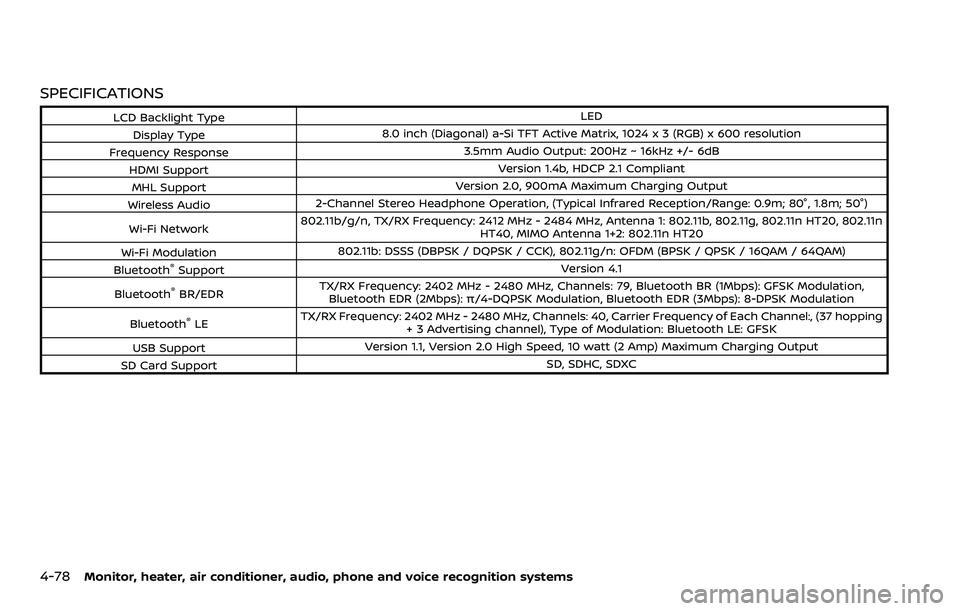
SPECIFICATIONS
LCD Backlight TypeLED
Display Type 8.0 inch (Diagonal) a-Si TFT Active Matrix, 1024 x 3 (RGB) x 600 resolution
Frequency Response 3.5mm Audio Output: 200Hz ~ 16kHz +/- 6dB
HDMI Support Version 1.4b, HDCP 2.1 Compliant
MHL Support Version 2.0, 900mA Maximum Charging Output
Wireless Audio 2-Channel Stereo Headphone Operation, (Typical Infrared Reception/Range: 0.9m; 80°, 1.8m; 50°)
Wi-Fi Network 802.11b/g/n, TX/RX Frequency: 2412 MHz - 2484 MHz, Antenna 1: 802.11b, 802.11g, 802.11n HT20, 802.11n
HT40, MIMO Antenna 1+2: 802.11n HT20
Wi-Fi Modulation 802.11b: DSSS (DBPSK / DQPSK / CCK), 802.11g/n: OFDM (BPSK / QPSK / 16QAM / 64QAM)
Bluetooth
®Support Version 4.1
Bluetooth
®BR/EDR TX/RX Frequency: 2402 MHz - 2480 MHz, Channels: 79, Bluetooth BR (1Mbps): GFSK Modulation,
Bluetooth EDR (2Mbps): π/4-DQPSK Modulation, Bluetooth EDR (3Mbps): 8-DPSK Modulation
Bluetooth
®LE TX/RX Frequency: 2402 MHz - 2480 MHz, Channels: 40, Carrier Frequency of Each Channel:, (37 hopping
+ 3 Advertising channel), Type of Modulation: Bluetooth LE: GFSK
USB Support Version 1.1, Version 2.0 High Speed, 10 watt (2 Amp) Maximum Charging Output
SD Card Support SD, SDHC, SDXC
Page 600 of 604
11-6
Precautions when starting
and driving.................................................................... 5-4
Push starting............................................................ 6-14
Starting the engine............................................. 5-16
Status light, Front passenger air bag ......... 1-63
Steering Heated steering wheel ..................................... 2-54
Power steering ................................................... 5-141
Power steering fluid .............................................. 8-8
Tilt/telescopic steering .................................... 3-29
Storage ........................................................................\
........ 2-69
Sun visors ........................................................................\
.. 3-29
Sunglasses holder....................................................... 2-71
Supplemental air bag warning labels ......... 1-73
Supplemental air bag
warning light .................................................... 1-74, 2-14
Supplemental restraint system........................ 1-54 Precautions on supplemental
restraint system .................................................... 1-54
Switch Autolight switch .................................................... 2-48
Emergency Call (SOS) button ..................... 2-67
Fog light switch ..................................................... 2-54
Hazard warning flasher switch .................... 6-2
Headlight switch ................................................... 2-47
Ignition switch ........................................................ 5-18
Intelligent Auto Headlight switch ............ 2-47
Power door lock switch ..................................... 3-5
SNOW mode switch ............................................ 2-59
Turn signal switch ............................................... 2-53
Vehicle Dynamic Control (VDC)
OFF switch ................................................................. 2-60
T
Tachometer........................................................................\
.. 2-8 Temperature gauge, Engine coolant
temperature gauge ....................................................... 2-8
Theft (NISSAN Vehicle Immobilizer
System), Engine start ............................................... 2-41
Three-way catalyst......................................................... 5-4
Tilt/telescopic steering ........................................... 3-29
Tire
Pressure, Low tire pressure
warning light ............................................................ 2-16
Tires Flat tire........................................................................\
..... 6-3
Tire and Loading
information label................................ 8-30, 10-13
Tire chains.................................................................. 8-35
Tire dressing................................................................ 7-4
Tire pressure ............................................................ 8-28
Tire Pressure Monitoring
System (TPMS) ................................................ 5-5, 6-3
Tire rotation.............................................................. 8-36
Types of tires ........................................................... 8-34
Uniform tire quality grading .................... 10-36
Wheel/tire size ........................................................ 10-9
Wheels and tires .................................................... 8-28
Top Tether strap child restraints........................ 1-37
TOW mode ..................................................................... 5-134
TOW mode switch....................................................... 2-59
Towing Flat towing............................................................. 10-35
Tow truck towing................................................. 6-16
Towing a trailer.................................................. 10-19
Towing safety...................................................... 10-24
TPMS, Tire Pressure
Monitoring System ............................................. 5-5, 6-3 TPMS with Easy Fill Tire Alert......................... 5-8
Traffic Sign Recognition (TSR)........................... 5-23
Trailer Brake Controller Unit (TBCU) ............ 2-60 Trailer towing .............................................................. 10-19
Transceiver
HomeLink®
Universal Transceiver ......................... 2-83, 2-87
Transmission Automatic Transmission Fluid (ATF) ........ 8-8
Driving with
automatic transmission .................................. 5-18
Transmission shift lever lock release ..... 5-22
Transmitter (See remote keyless
entry system) .................................................................. 3-15
Traveling or registering your vehicle in
another country ........................................................ 10-11
Trip computer ................................................................ 2-37
Trip odometer ................................................................ 2-37
Turn signal switch ...................................................... 2-53
U
Underbody cleaning ...................................................... 7-3
Uniform tire quality grading ............................ 10-36
USB (Universal Serial Bus)
charging connector................................................... 2-64
V
Vanity mirror ................................................................... 3-40
Vanity mirror lights .................................................... 2-83
Variable voltage control system ..................... 8-13
Vehicle Dimensions ............................................................ 10-10
Identification number (VIN)....................... 10-11
Loading information ...................................... 10-15
Recovery (freeing a stuck vehicle) .......... 6-19
Security system...................................................... 2-39
Vehicle Dynamic Control (VDC)
OFF switch ................................................................. 2-60