2023 NISSAN ALTIMA lane assist
[x] Cancel search: lane assistPage 112 of 644
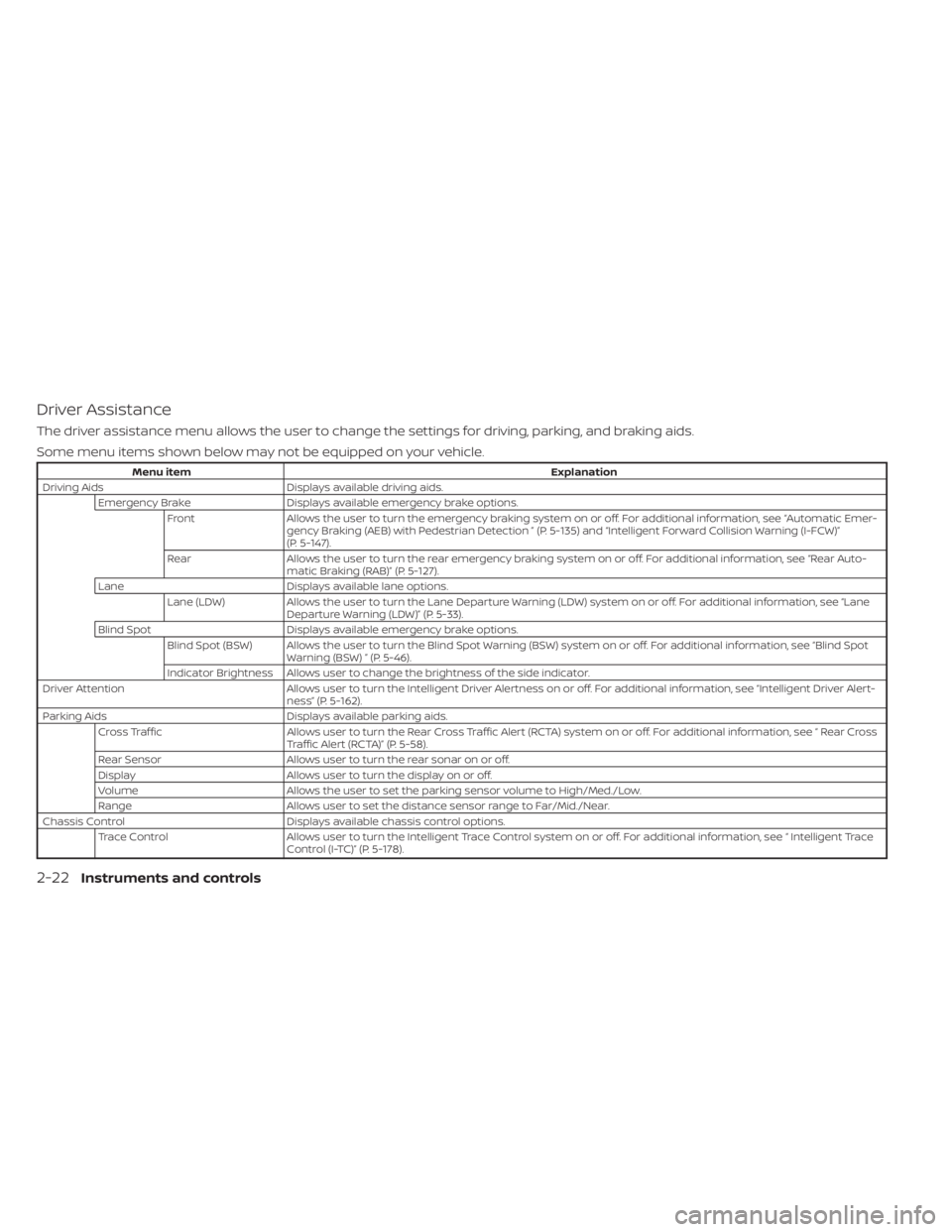
Driver Assistance
The driver assistance menu allows the user to change the settings for driving, parking, and braking aids.
Some menu items shown below may not be equipped on your vehicle.
Menu itemExplanation
Driving Aids Displays available driving aids. Emergency Brake Displays available emergency brake options. Front Allows the user to turn the emergency braking system on or off. For additional information, see “Automatic Emer- gency Braking (AEB) with Pedestrian Detection ” (P. 5-135) and “Intelligent Forward Collision Warning (I-FCW)”
(P. 5-147).
Rear Allows the user to turn the rear emergency braking system on or off. For additional information, see “Rear Auto- matic Braking (RAB)” (P. 5-127).
Lane Displays available lane options. Lane (LDW) Allows the user to turn the Lane Departure Warning (LDW) system on or off. For additional information, see “Lane Departure Warning (LDW)” (P. 5-33).
Blind Spot Displays available emergency brake options. Blind Spot (BSW) Allows the user to turn the Blind Spot Warning (BSW) system on or off. For additional information, see “Blind Spot Warning (BSW) ” (P. 5-46).
Indicator Brightness Allows user to change the brightness of the side indicator.
Driver Attention Allows user to turn the Intelligent Driver Alertness on or off. For additional information, see “Intelligent Driver Alert- ness” (P. 5-162).
Parking Aids Displays available parking aids. Cross Traffic Allows user to turn the Rear Cross Traffic Alert (RC TA) system on or off. For additional information, see “ Rear Cross
Traffic Alert (RCTA)” (P. 5-58).
Rear Sensor Allows user to turn the rear sonar on or off.
Display Allows user to turn the display on or off.
Volume Allows the user to set the parking sensor volume to High/Med./Low.
Range Allows user to set the distance sensor range to Far/Mid./Near.
Chassis Control Displays available chassis control options. Trace Control Allows user to turn the Intelligent Trace Control system on or off. For additional information, see “ Intelligent Trace Control (I-TC)” (P. 5-178).
2-22Instruments and controls
Page 128 of 644
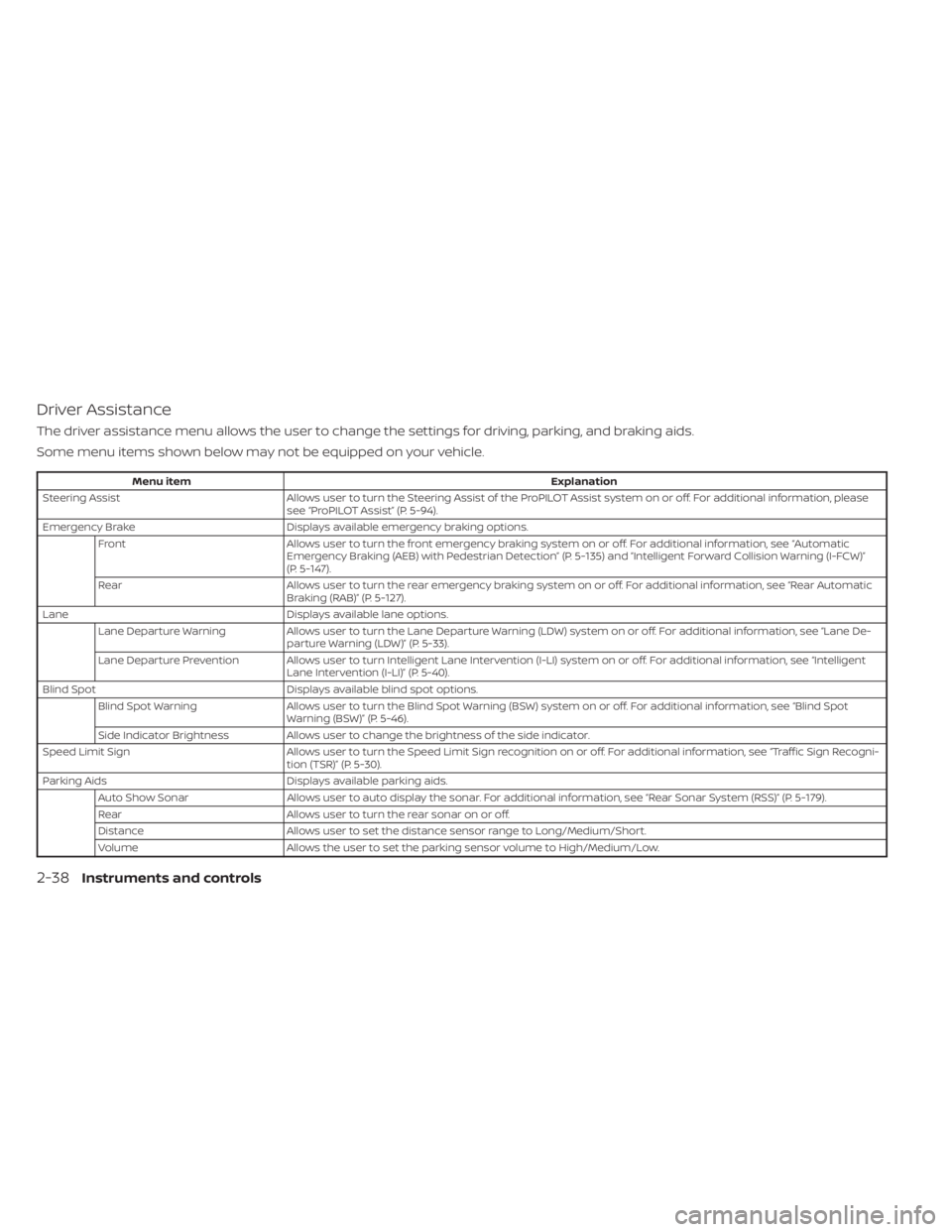
Driver Assistance
The driver assistance menu allows the user to change the settings for driving, parking, and braking aids.
Some menu items shown below may not be equipped on your vehicle.
Menu itemExplanation
Steering Assist Allows user to turn the Steering Assist of the ProPILOT Assist system on or off. For additional information, please
see “ProPILOT Assist” (P. 5-94).
Emergency Brake Displays available emergency braking options.
Front Allows user to turn the front emergency braking system on or off. For additional information, see “Automatic
Emergency Braking (AEB) with Pedestrian Detection” (P. 5-135) and “Intelligent Forward Collision Warning (I-FCW)”
(P. 5-147).
Rear Allows user to turn the rear emergency braking system on or off. For additional information, see “Rear Automatic
Braking (RAB)” (P. 5-127).
Lane Displays available lane options.
Lane Departure Warning Allows user to turn the Lane Departure Warning (LDW) system on or off. For additional information, see “Lane De-
parture Warning (LDW)” (P. 5-33).
Lane Departure Prevention Allows user to turn Intelligent Lane Intervention (I-LI) system on or off. For additional information, see “Intelligent Lane Intervention (I-LI)” (P. 5-40).
Blind Spot Displays available blind spot options.
Blind Spot Warning Allows user to turn the Blind Spot Warning (BSW) system on or off. For additional information, see “Blind Spot
Warning (BSW)” (P. 5-46).
Side Indicator Brightness Allows user to change the brightness of the side indicator.
Speed Limit Sign Allows user to turn the Speed Limit Sign recognition on or off. For additional information, see “Traffic Sign Recogni-
tion (TSR)” (P. 5-30).
Parking Aids Displays available parking aids.
Auto Show Sonar Allows user to auto display the sonar. For additional information, see “Rear Sonar System (RSS)” (P. 5-179).
Rear Allows user to turn the rear sonar on or off.
Distance Allows user to set the distance sensor range to Long/Medium/Short.
Volume Allows the user to set the parking sensor volume to High/Medium/Low.
2-38Instruments and controls
Page 139 of 644
WARNING
When the high fluid temperature pro-
tection mode operation occurs, vehicle
speed may be gradually reduced. The
reduced speed may be lower than
other traffic, which could increase the
chance of a collision. Be especially
careful when driving. If necessary, pull
to the side of the road at a safe place
and allow the transmission to return to
normal operation; or have it repaired if
necessary.
CVT (AT) Stop the vehicle
This message appears 30 seconds before
the vehicle is shut down due to an above
normal operating transmission tempera-
ture. The Malfunction Indicator Light (MIL)
and malfunction warning (red) will illumi-
nate. Have the system checked. It is recom-
mended that you visit a NISSAN dealer im-
mediately for this service.
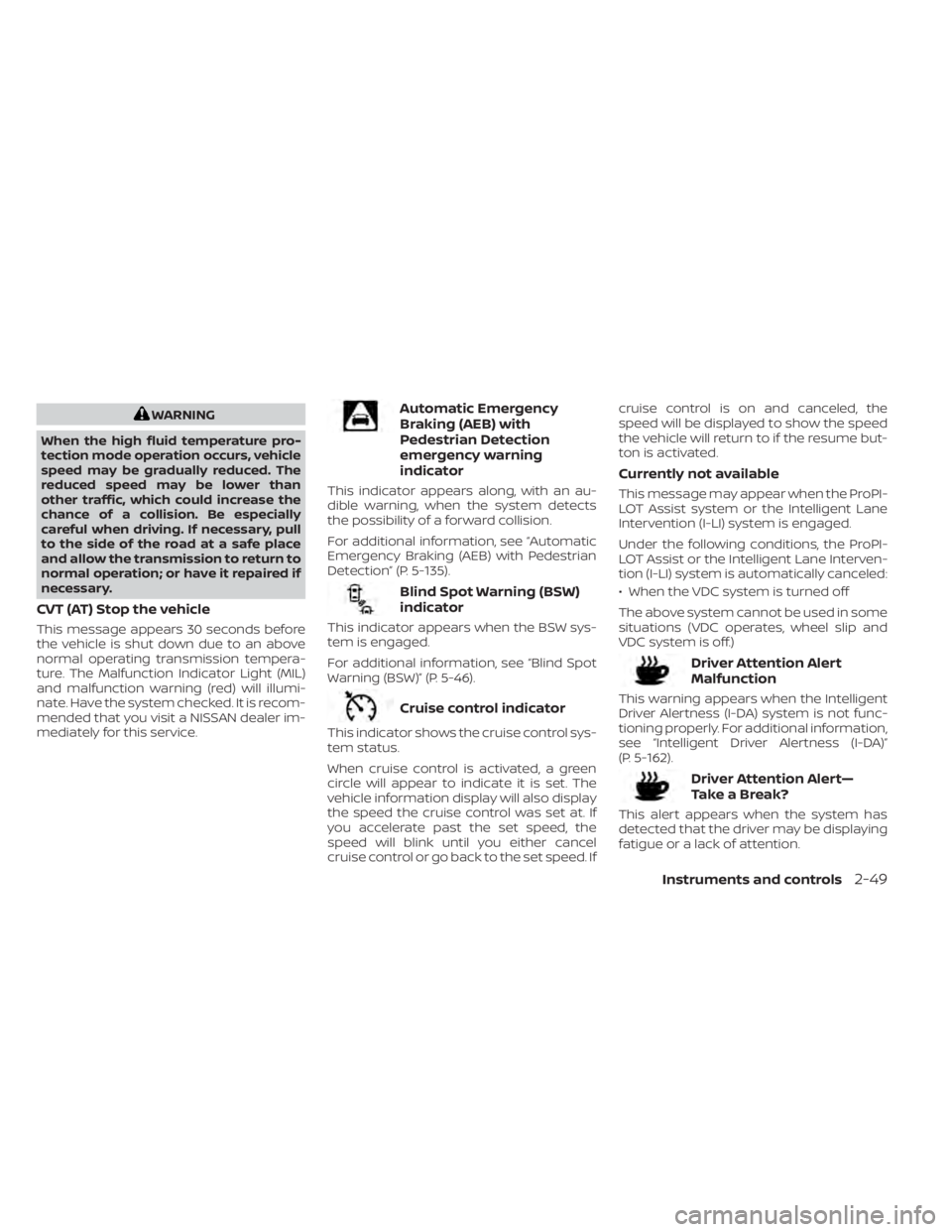
Automatic Emergency
Braking (AEB) with
Pedestrian Detection
emergency warning
indicator
This indicator appears along, with an au-
dible warning, when the system detects
the possibility of a forward collision.
For additional information, see “Automatic
Emergency Braking (AEB) with Pedestrian
Detection” (P. 5-135).
Blind Spot Warning (BSW)
indicator
This indicator appears when the BSW sys-
tem is engaged.
For additional information, see “Blind Spot
Warning (BSW)” (P. 5-46).
Cruise control indicator
This indicator shows the cruise control sys-
tem status.
When cruise control is activated, a green
circle will appear to indicate it is set. The
vehicle information display will also display
the speed the cruise control was set at. If
you accelerate past the set speed, the
speed will blink until you either cancel
cruise control or go back to the set speed. If cruise control is on and canceled, the
speed will be displayed to show the speed
the vehicle will return to if the resume but-
ton is activated.
Currently not available
This message may appear when the ProPI-
LOT Assist system or the Intelligent Lane
Intervention (I-LI) system is engaged.
Under the following conditions, the ProPI-
LOT Assist or the Intelligent Lane Interven-
tion (I-LI) system is automatically canceled:
• When the VDC system is turned off
The above system cannot be used in some
situations (VDC operates, wheel slip and
VDC system is off.)
Driver Attention Alert
Malfunction
This warning appears when the Intelligent
Driver Alertness (I-DA) system is not func-
tioning properly. For additional information,
see “Intelligent Driver Alertness (I-DA)”
(P. 5-162).
Driver Attention Alert—
TakeaBreak?
This alert appears when the system has
detected that the driver may be displaying
fatigue or a lack of attention.
Instruments and controls2-49
Page 140 of 644
Forward Driving Aids temporarily
disabled Front Sensor blocked See
Owner’s Manual
This message appears when the front ra-
dar sensor may be obstructed due to:
• mud, dirt, snow, ice, etc.
• inclement weather (rain, fog, snow, etc.).
All forward driving aids are temporarily dis-
abled until the system detects that the
front radar sensor is no longer obstructed.
For additional information, see:
• Automatic Emergency Braking (AEB) withPedestrian Detection (P. 5-135)
• ProPILOT Assist (P. 5-94)
• Intelligent Forward Collision Warning (I- FCW) (P. 5-147)
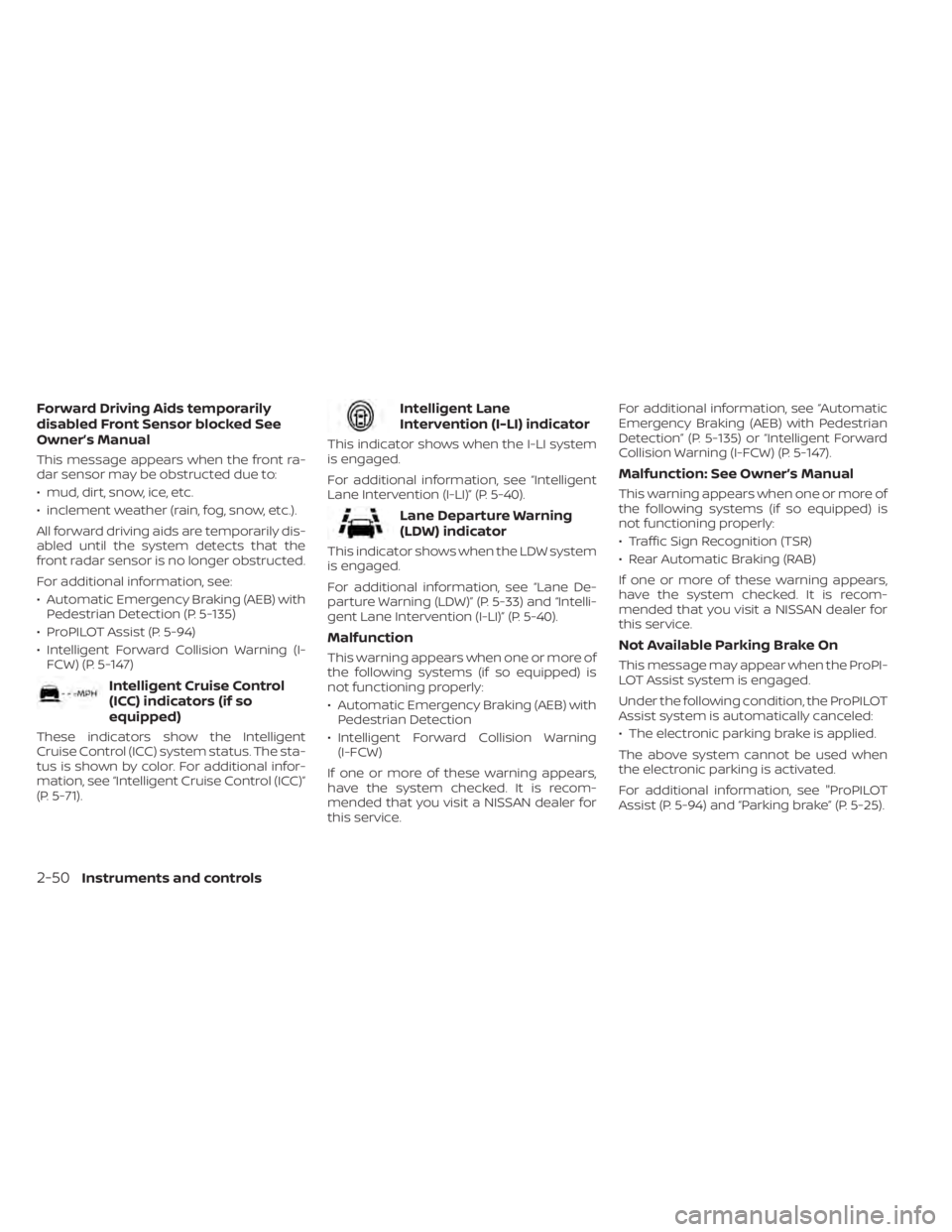
Intelligent Cruise Control
(ICC) indicators (if so
equipped)
These indicators show the Intelligent
Cruise Control (ICC) system status. The sta-
tus is shown by color. For additional infor-
mation, see “Intelligent Cruise Control (ICC)”
(P. 5-71).
Intelligent Lane
Intervention (I-LI) indicator
This indicator shows when the I-LI system
is engaged.
For additional information, see “Intelligent
Lane Intervention (I-LI)” (P. 5-40).
Lane Departure Warning
(LDW) indicator
This indicator shows when the LDW system
is engaged.
For additional information, see “Lane De-
parture Warning (LDW)” (P. 5-33) and “Intelli-
gent Lane Intervention (I-LI)” (P. 5-40).
Malfunction
This warning appears when one or more of
the following systems (if so equipped) is
not functioning properly:
• Automatic Emergency Braking (AEB) withPedestrian Detection
• Intelligent Forward Collision Warning (I-FCW)
If one or more of these warning appears,
have the system checked. It is recom-
mended that you visit a NISSAN dealer for
this service. For additional information, see “Automatic
Emergency Braking (AEB) with Pedestrian
Detection” (P. 5-135) or “Intelligent Forward
Collision Warning (I-FCW) (P. 5-147).
Malfunction: See Owner’s Manual
This warning appears when one or more of
the following systems (if so equipped) is
not functioning properly:
• Traffic Sign Recognition (TSR)
• Rear Automatic Braking (RAB)
If one or more of these warning appears,
have the system checked. It is recom-
mended that you visit a NISSAN dealer for
this service.
Not Available Parking Brake On
This message may appear when the ProPI-
LOT Assist system is engaged.
Under the following condition, the ProPILOT
Assist system is automatically canceled:
• The electronic parking brake is applied.
The above system cannot be used when
the electronic parking is activated.
For additional information, see "ProPILOT
Assist (P. 5-94) and “Parking brake” (P. 5-25).
2-50Instruments and controls
Page 141 of 644
Not Available Poor Road Conditions
This message may appear when the ProPI-
LOT Assist system or the Intelligent Lane
Intervention (I-LI) system is engaged.
Under the following conditions, the ProPI-
LOT Assist system or the Intelligent Lane
Intervention (I-LI) system is automatically
canceled:
• When the VDC system is turned off
The above system cannot be used in some
situations (VDC operates, wheel slip and
VDC system is off.)
Not Available Seat Belt Not Fastened
This message may appear when the ProPI-
LOT Assist system is engaged.
Under the following condition, the ProPILOT
Assist system is automatically canceled:
• When the driver’s seat belt is not fastened
The above system cannot be used when
the driver’s seat belt is not fastened.
Not Available System Malfunction
This warning appears when one or more of
the following systems (if so equipped) is
not functioning properly.
• ProPILOT
• Blind Spot Warning (BSW)• Lane Departure Warning (LDW)
• Intelligent Lane Intervention (I-LI)
If one or more of these warnings appear,
have the system checked. It is recom-
mended that you visit a NISSAN dealer for
this service.
For additional information, see ProPILOT
Assist” (P. 5-94), “Blind Spot Warning (BSW)”
(P. 5-46), “Lane Departure Warning (LDW)”
(P. 5-33) or “Intelligent Lane Intervention (I-
LI)” (P. 5-40).
Parking Sensor Error: See Owner’s
Manual
This warning appears when there is an er-
ror with the system. For additional informa-
tion, see “Rear Sonar System (RSS)”
(P. 5-180).
ProPILOT Assist indicators
These indicators show the ProPILOT Assist
system status. The status is shown by
color. For additional information, see “Pro-
PILOT Assist” (P. 5-94).
Rear Automatic Braking
(RAB) indicator
This indicator appears to indicate the sta-
tus of the Rear Automatic Braking (RAB)
system. For additional information, see
“Rear Automatic Braking (RAB)” (P. 5-127).
Speed Limit Sign indicator
This message may appear when the Traffic
Sign Recognition system is engaged.
For additional information, see “Traffic Sign
Recognition (TSR)” (P. 5-30).
Steering Assist Alert
This message may appear when the Steer-
ing Assist system is engaged.
It will be displayed under the following
condition:
• When not holding the steering wheel or
when there is no steering wheel
operation
Please hold on the steering wheel immedi-
ately. When the steering operation is de-
tected, the warning turns off and the steer-
ing assist function is automatically
restored.
Instruments and controls2-51
Page 142 of 644
Steering Assist indicator
This indicator appears when the Steering
Assist system is engaged.
For additional information, see “ProPILOT
Assist” (P. 5-94).
Unavailable: High Cabin Temperature
This message appears when the camera
detects an interior temperature of more
than 104°F (40°C). For additional informa-
tion, see “Automatic Emergency Braking
(AEB) with Pedestrian Detection” (P. 5-135),
“ProPILOT Assist” (P. 5-94), “Intelligent Lane
Intervention (I-LI)” (P. 5-40), “Lane Departure
Warning (LDW)” (P. 5-33) or “Traffic Sign Rec-
ognition (TSR) . (P. 5-30).
Unavailable: Side Radar Obstruction
This message appears when the Blind
Spot Warning (BSW)/Rear Cross Traffic Alert
(RCTA) systems become unavailable be-
cause a radar blockage is detected. For
additional information, see “Blind Spot
Warning (BSW)” (P. 5-46) or “Rear Cross Traf-
fic Alert (RCTA)” (P. 5-58).
Vehicle ahead detection
indicator
This indicator shows when the following
systems are engaged and have detected a
vehicle:
• Automatic Emergency Braking (AEB) withPedestrian Detection
• Intelligent Forward Collision Warning (I-FCW)
For additional information, see “Automatic
Emergency Braking (AEB) with Pedestrian
Detection” (P. 5-135) or “Intelligent Forward
Collision Warning (I-FCW)” (P. 5-147).
Your vehicle may have two types of security
systems:
• Vehicle security system
• NISSAN Vehicle Immobilizer System
VEHICLE SECURITY SYSTEM
The vehicle security system provides visual
and audible alarm signals if someone
opens the doors or trunk when the system
is armed. It is not, however, a motion detec-
tion type system that activates when a ve-
hicle is moved or when a vibration occurs.
LIC0301
SECURITY SYSTEMS
2-52Instruments and controls
Page 156 of 644
NOTE:
• Once activated, your heated steeringwheel will automatically turn on and
off to maintain a temperature above
68°F (20°C).
• When the temperature of the steering wheel is above 122°F (50°C) and the
heated steering wheel switch is turned
on, the system will not heat the steer-
ing wheel. This does not indicate a
malfunction.
The Steering Assist switch is used to en-
able and disable the Steering Assist sys-
tem that is activated using the settings
menu of the vehicle information display.
The Steering Assist system controls the
steering system, when ProPILOT Assist is
engaged, to help keep your vehicle near
the center of the lane when driving. For
additional information, see ”ProPILOT As-
sist” (P. 5-94) and “Intelligent Lane Interven-
tion (I-LI)” (P. 5-40).
LIC4101
STEERING ASSIST SWITCH (for
vehicles with ProPILOT Assist) (if so
equipped)
2-66Instruments and controls
Page 336 of 644
• Do not place reflective materials, such aswhite paper or a mirror, on the instru-
ment panel. The reflection of sunlight
may adversely affect the camera unit’s
capability of detecting the lane markers.
• Do not strike or damage the areas around the camera unit. Do not touch the
camera lens or remove the screw located
on the camera unit. If the camera unit is
damaged due to an accident, it is recom-
mended that you visit a NISSAN dealer.
WARNING
Failure to follow the warnings and in-
structions for proper use of the I-LI sys-
tem could result in serious injury or
death.
• The I-LI system will not steer the ve-
hicle or prevent loss of control. It is
the driver’s responsibility to stay
alert, drive safely, keep the vehicle in
the traveling lane, and be in control of
the vehicle at all times. •
The I-LI system is primarily intended
for use on well-developed freeways
or highways. It may not detect the
lane markers in certain road,
weather, or driving conditions.
The I-LI system must be turned on with the
ProPILOT Assist switch (for vehicles with
ProPILOT Assist) on the steering wheel, ev-
ery time the ignition is placed in the ON
position.
The I-LI system will operate when the ve-
hicle is driven at speeds of approximately
37 mph (60 km/h) and above, and only
when the lane markings are clearly visible
on the road.
The I-LI system warns the driver when the
vehicle has lef t the center of the traveling
lane with an indicator and a steering wheel
vibration. The system helps assist the
driver to return the vehicle to the center of
the traveling lane by applying the brakes to
the lef t or right wheels individually (for a
short period of time).
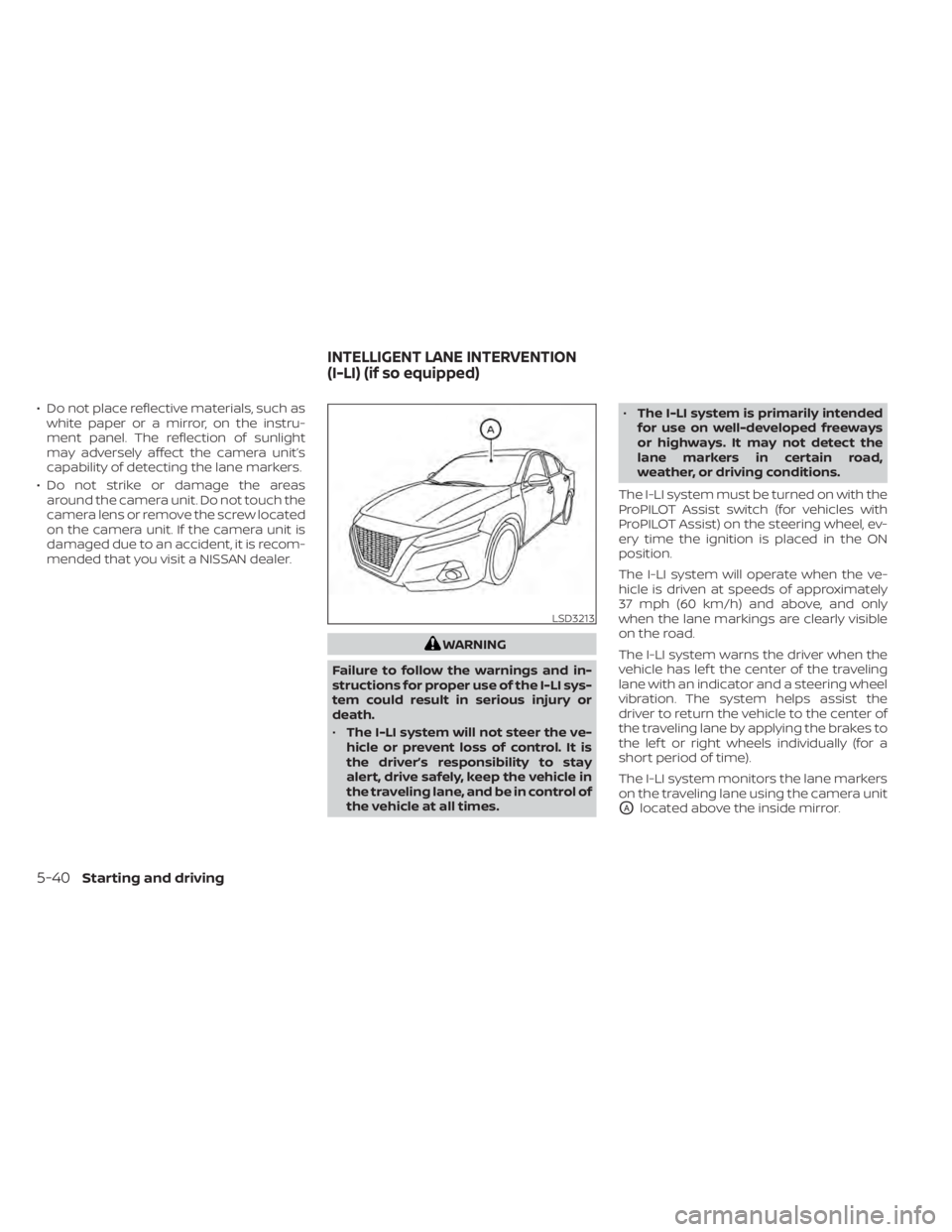
The I-LI system monitors the lane markers
on the traveling lane using the camera unit
OAlocated above the inside mirror.
LSD3213
INTELLIGENT LANE INTERVENTION
(I-LI) (if so equipped)
5-40Starting and driving